remote control PEUGEOT 508 2021 Owner's Manual
[x] Cancel search | Manufacturer: PEUGEOT, Model Year: 2021, Model line: 508, Model: PEUGEOT 508 2021Pages: 292, PDF Size: 8.61 MB
Page 166 of 292
164
Practical information
2.Incorrect use of this charging cable may
result in fire, property damage and serious
injury or death by electrocution!
3. Always use a correctly earthed power
socket, protected by a 30
mA residual
current device.
4. Always use an electrical socket protected
by a circuit-breaker appropriate for the
electrical circuit’s current rating.
5. The weight of the control unit must not be
borne by the electrical socket, plug and
cables.
6. Never use this charging cable if it is
defective or in any way damaged.
7. Never attempt to repair or open this
charging cable. It contains no repairable
parts - replace the charging cable if it is
damaged. 8.
Never immerse this charging cable in water.
9. Never use this charging cable with an
extension cable, a multi-plug socket, a
conversion adaptor or on a damaged
electrical socket.
10. Do not unplug the plug from the wall as a
means of stopping charging.
11 . Do not force the connector if it is locked into
the vehicle.
12. Immediately stop charging, by locking and
then unlocking the vehicle using the remote
control key, if the charging cable or wall
socket feel burning hot to the touch.
13. This charging cable includes components
liable to cause electrical arcing or sparks.
Do not expose to flammable vapours.
14. Only use this charging cable with PEUGEOT
vehicles. 15.
Never plug the cable into the wall socket (or
unplug it) with wet hands.
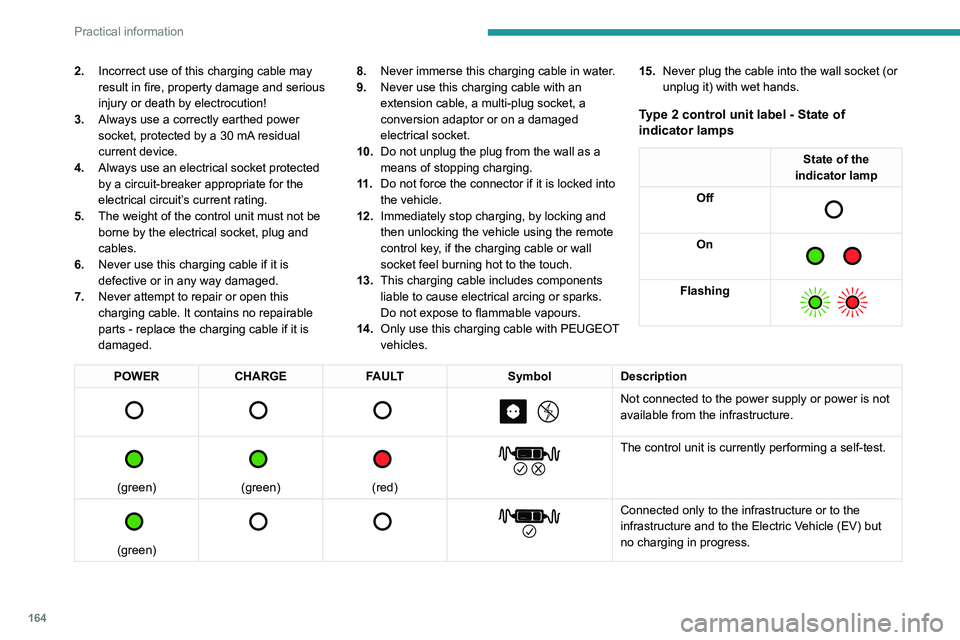
Type 2 control unit label - State of
indicator lamps
State of the
indicator lamp
Off
On
Flashing
POWER CHARGE FAULT SymbolDescription
Not connected to the power supply or power is not
available from the infrastructure.
(green)
(green)
(red)
The control unit is currently performing a self-test.
(green)
Connected only to the infrastructure or to the
infrastructure and to the Electric Vehicle (EV) but
no charging in progress.
Type 2 control unit label
- Recommendations
Refer to the handbook before use.
Page 168 of 292
166
Practical information
4.The weight of the control unit must not be
borne by the electrical socket, plug and
cables.
5. Never use this charging cable if it is
defective or in any way damaged.
6. Never attempt to repair or open this
charging cable. It contains no repairable
parts - replace the charging cable if it is
damaged.
7. Never immerse this charging cable in water.
8. Never use this charging cable with an
extension cable, a multi-plug socket, a
conversion adaptor or on a damaged
electrical socket.
9. Do not unplug the plug from the wall as a
means of stopping charging.
10. Immediately stop charging, by locking and
then unlocking the vehicle using the remote
control key, if the charging cable or wall
socket feel burning hot to the touch.
11 . This charging cable includes components
liable to cause electrical arcing or sparks.
Do not expose to flammable vapours.
12. Only use this charging cable with PEUGEOT
vehicles.
13. Never plug the cable into the wall socket (or
unplug it) with wet hands.
14. Do not force the connector if it is locked into
the vehicle.Charging the traction
battery (Rechargeable
hybrid)
For a full charge, follow the charging procedure
without interrupting it, until it stops automatically.
Charging may be performed either immediately
(by default) or deferred.
Deferred charging is set via the touch
screen or the
MYPEUGEOT APP
application.
When the vehicle is connected, the following
information is displayed on the instrument panel:
–
Status of the battery (%).
–
Remaining range (miles or km).
–
Estimated charging time (calculation may take
a few seconds).
–
Charging speed (kW/h).
After the instrument panel has been put into
standby mode, this information can be displayed
again by unlocking the vehicle or opening a door
.
It is also possible to monitor the charging
progress using the MYPEUGEOT APP
application.
For more information on Remote functions,
refer to the corresponding section.
Lounge mode
When the vehicle is connected, it is
possible to switch on the ignition and use
certain functions such as the audio and
telematics system and the air conditioning
system for several hours.
Vehicle immobilised for 1 to 12
months
Discharge the traction battery down to 2 or
3 bars on the charge level indicator on the
instrument panel.
Do not connect the charging cable.
Always park the vehicle in a place with
temperatures between -10°C and 30°C
(parking in a place with extreme temperatures
can damage the traction battery).
Refer to the Accessory battery
(Rechargeable hybrid) section for the
battery disconnection procedure.
Precautions
Rechargeable hybrid vehicles have
been developed in accordance with the
recommendations for maximum electromagnetic
field limits established by the ICNIRP
(International Commission on Non-Ionizing
Radiation Protection - 1998 Guidelines).
Wearers of pacemakers or equivalent
devices should consult a doctor to
enquire about any applicable precautionary
measures, or contact the manufacturer of their
implanted electronic medical device to check that
it is guaranteed to operate in an environment
compliant with the ICNIRP guidelines.
If in doubt , during charging, do not remain
inside or near the vehicle, near the charging
cable or the charging unit, even for a short time.
Before charging
Depending on the context:
► Have a professional check that the
electrical system to be used complies with
applicable standards and is compatible with
the vehicle.
► Have a professional electrician install
a dedicated domestic power socket or
accelerated charging unit (Wallbox)
compatible with the vehicle.
Use the charging cable supplied with the
vehicle.
For more information, contact a PEUGEOT
dealer or a qualified workshop.
(During charging)
As a safety measure, the engine will
not start if the charging cable is plugged into
the connector on the vehicle. A warning is
displayed on the instrument panel.
While charging is in progress, unlocking the
vehicle will cause the charging to stop.
If no action is taken on one of the openings
(door or boot) or on the charging nozzle, the
vehicle will lock again after 30 seconds and
charging will resume automatically.
Never work under the bonnet:
– Some areas remain very hot, even an hour
after charging ends - risk of burns!
Page 170 of 292
168
Practical information
► Follow the accelerated charging unit
(W allbox) user instructions.
►
Remove the protective cover from the
charging nozzle.
►
Insert the nozzle into the vehicle's charging
connector
.
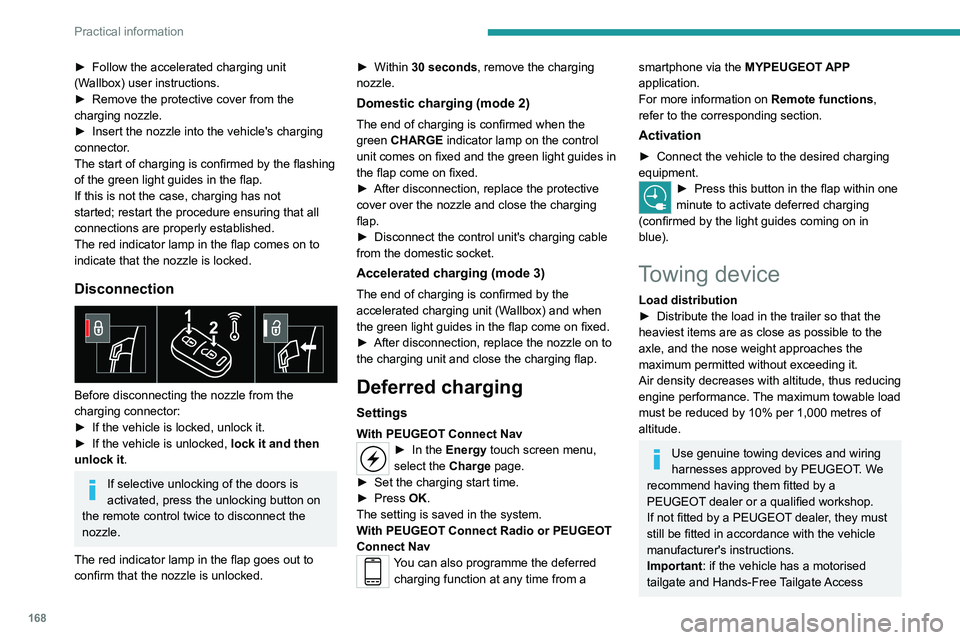
The start of charging is confirmed by the flashing
of the green light guides in the flap.
If this is not the case, charging has not
started; restart the procedure ensuring that all
connections are properly established.
The red indicator lamp in the flap comes on to
indicate that the nozzle is locked.
Disconnection
Before disconnecting the nozzle from the
charging connector:
►
If the vehicle is locked, unlock it.
►
If the vehicle is unlocked, lock it and then
unlock it .
If selective unlocking of the doors is
activated, press the unlocking button on
the remote control twice to disconnect the
nozzle.
The red indicator lamp in the flap goes out to
confirm that the nozzle is unlocked. ►
Within
30 seconds, remove the charging
nozzle.
Domestic charging (mode 2)
The end of charging is confirmed when the
green CHARGE indicator lamp on the control
unit comes on fixed and the green light guides in
the flap come on fixed.
►
After disconnection, replace the protective
cover over the nozzle and close the charging
flap.
►
Disconnect the control unit's charging cable
from the domestic socket.
Accelerated charging (mode 3)
The end of charging is confirmed by the
accelerated charging unit (Wallbox) and when
the green light guides in the flap come on fixed.
►
After disconnection, replace the nozzle on to
the charging unit and close the charging flap.
Deferred charging
Settings
With PEUGEOT Connect Nav► In the Energy touch screen menu,
select the Charge page.
►
Set the charging start time.
►
Press
OK.
The setting is saved in the system.
With PEUGEOT Connect Radio or PEUGEOT
Connect Nav
You can also programme the deferred charging function at any time from a
smartphone via the MYPEUGEOT APP
application.
For more information on Remote functions,
refer to the corresponding section.
Activation
► Connect the vehicle to the desired charging
equipment.
► Press this button in the flap within one
minute to activate deferred charging
(confirmed by the light guides coming on in
blue).
Towing device
Load distribution
► Distribute the load in the trailer so that the
heaviest items are as close as possible to the
axle, and the nose weight approaches the
maximum permitted without exceeding it.
Air density decreases with altitude, thus reducing
engine performance.
The maximum towable load
must be reduced by 10% per 1,000
metres of
altitude.
Use genuine towing devices and wiring
harnesses approved by PEUGEOT. We
recommend having them fitted by a
PEUGEOT dealer or a qualified workshop.
If not fitted by a PEUGEOT dealer, they must
still be fitted in accordance with the vehicle
manufacturer's instructions.
Important: if the vehicle has a motorised
tailgate and Hands-Free Tailgate Access
Page 176 of 292
174
Practical information
Cooling of the engine when stopped
The engine cooling fan may start after
the engine has been switched off.
Take care with objects or clothing that
could be caught in the blades of the fan!
Opening
► From the inside: pull the control lever ,
located on the left below the dashboard, towards
you.
► From the outside: lift the safety catch and
raise the bonnet.
* Depending on engine.
Two bonnet struts open the bonnet and hold it
open.
Closing
► Lower the bonnet and release it near the end
of its travel.
►
Check the locking.
Because of the presence of electrical
equipment under the bonnet, it is strongly
recommended that exposure to water (rain,
washing, etc.) be limited.
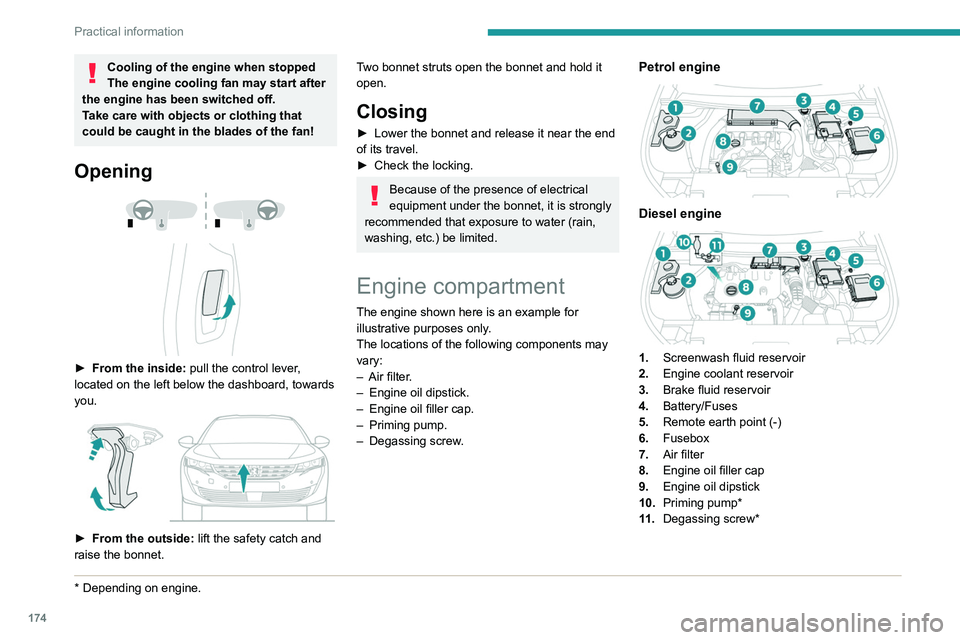
Engine compartment
The engine shown here is an example for
illustrative purposes only.
The locations of the following components may
vary:
–
Air filter
.
–
Engine oil dipstick.
–
Engine oil filler cap.
–
Priming pump.
–
Degassing screw
.
Petrol engine
Diesel engine
1.Screenwash fluid reservoir
2. Engine coolant reservoir
3. Brake fluid reservoir
4. Battery/Fuses
5. Remote earth point (-)
6. Fusebox
7. Air filter
8. Engine oil filler cap
9. Engine oil dipstick
10. Priming pump*
11 . Degassing screw*
Diesel fuel system
This system is under very high pressure.
All work must be carried out only by a
PEUGEOT dealer or a qualified workshop
Checking levels
Check all of the following levels regularly in
accordance with the manufacturer's service
schedule. Top them up if required, unless
otherwise indicated.
If a level drops significantly, have the
corresponding system checked by a PEUGEOT
dealer or a qualified workshop.
The fluids must comply with the manufacturer's requirements and with
the vehicle's engine.
Take care when working under the bonnet, as certain areas of the engine
may be extremely hot (risk of burns) and the
cooling fan could start at any time (even with
the ignition off).
Used products
Avoid prolonged contact of used oil or fluids with the skin.
Most of these fluids are harmful to health and
very corrosive.
Page 196 of 292
194
In the event of a breakdown
Take used remote control batteries and
vehicle batteries to a special collection point.
Protect your eyes and face before
handling the battery.
All operations on the battery must be carried
out in a well ventilated area and away from
naked flames and sources of sparks, to avoid
any risk of explosion or fire.
Wash your hands afterwards.
Accessing the battery
The battery is located under the bonnet.
For access to the (+) terminal:
► Release the bonnet by pulling the internal
release lever, then the external safety catch.
► Raise the bonnet.
(+) Positive terminal.
This terminal has a quick-release clamp.
(-) Negative terminal.
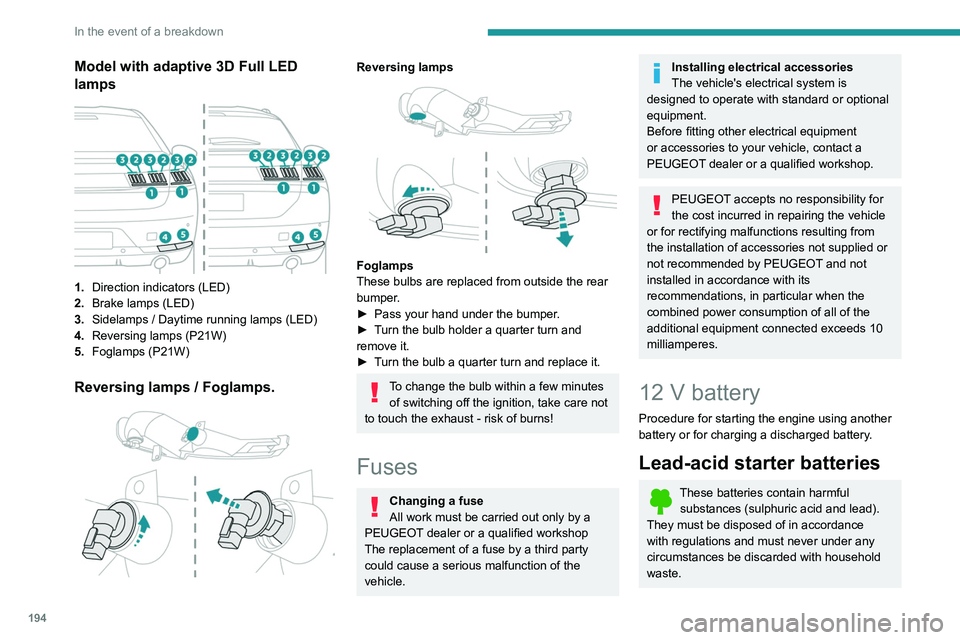
Model with adaptive 3D Full LED
lamps
1. Direction indicators (LED)
2. Brake lamps (LED)
3. Sidelamps / Daytime running lamps (LED)
4. Reversing lamps (P21W)
5. Foglamps (P21W)
Reversing lamps / Foglamps.
Reversing lamps
Foglamps
These bulbs are replaced from outside the rear
bumper.
►
Pass your hand under the bumper
.
►
T
urn the bulb holder a quarter turn and
remove it.
►
T
urn the bulb a quarter turn and replace it.
To change the bulb within a few minutes of switching off the ignition, take care not
to touch the exhaust - risk of burns!
Fuses
Changing a fuse
All work must be carried out only by a
PEUGEOT dealer or a qualified workshop
The replacement of a fuse by a third party
could cause a serious malfunction of the
vehicle.
Installing electrical accessories
The vehicle's electrical system is
designed to operate with standard or optional
equipment.
Before fitting other electrical equipment
or accessories to your vehicle, contact a
PEUGEOT dealer or a qualified workshop.
PEUGEOT accepts no responsibility for
the cost incurred in repairing the vehicle
or for rectifying malfunctions resulting from
the installation of accessories not supplied or
not recommended by PEUGEOT and not
installed in accordance with its
recommendations, in particular when the
combined power consumption of all of the
additional equipment connected exceeds 10
milliamperes.
12 V battery
Procedure for starting the engine using another
battery or for charging a discharged battery.
Lead-acid starter batteries
These batteries contain harmful substances (sulphuric acid and lead).
They must be disposed of in accordance
with regulations and must never under any
circumstances be discarded with household
waste.
Page 197 of 292
195
In the event of a breakdown
8Take used remote control batteries and
vehicle batteries to a special collection point.
Protect your eyes and face before
handling the battery.
All operations on the battery must be carried
out in a well ventilated area and away from
naked flames and sources of sparks, to avoid
any risk of explosion or fire.
Wash your hands afterwards.
Accessing the battery
The battery is located under the bonnet.
For access to the (+) terminal:
► Release the bonnet by pulling the internal
release lever
, then the external safety catch.
►
Raise the bonnet.
(+)
Positive terminal.
This terminal has a quick-release clamp.
(-) Negative terminal.
As the battery's negative terminal is not
accessible, a remote earth point is located near
the battery.
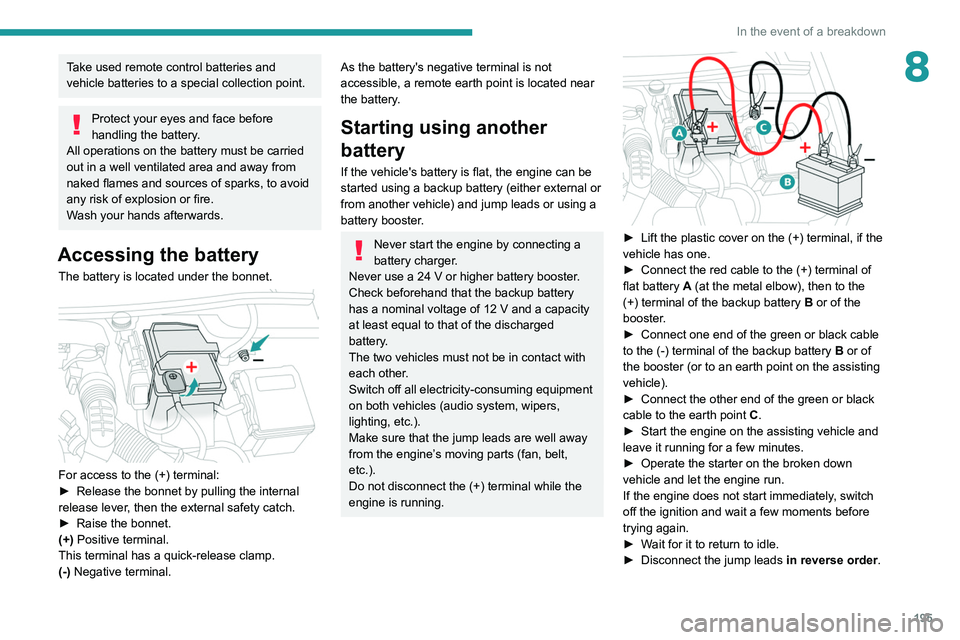
Starting using another
battery
If the vehicle's battery is flat, the engine can be
started using a backup battery (either external or
from another vehicle) and jump leads or using a
battery booster.
Never start the engine by connecting a
battery charger.
Never use a 24
V or higher battery booster.
Check beforehand that the backup battery
has a nominal voltage of 12
V and a capacity
at least equal to that of the discharged
battery.
The two vehicles must not be in contact with
each other.
Switch off all electricity-consuming equipment
on both vehicles (audio system, wipers,
lighting, etc.).
Make sure that the jump leads are well away
from the engine’s moving parts (fan, belt,
etc.).
Do not disconnect the (+) terminal while the
engine is running.
► Lift the plastic cover on the (+) terminal, if the
vehicle has one.
►
Connect the red cable to the (+) terminal of
flat battery
A (at the metal elbow), then to the
(+) terminal of the backup battery
B or of the
booster.
►
Connect one end of the green or black cable
to the (-) terminal of the backup battery
B or of
the booster (or to an earth point on the assisting
vehicle).
►
Connect the other end of the green or black
cable to the earth point
C
.
►
Start the engine on the assisting vehicle and
leave it running for a few minutes.
►
Operate the starter on the broken down
vehicle and let the engine run.
If the engine does not start immediately
, switch
off the ignition and wait a few moments before
trying again.
►
W
ait for it to return to idle.
►
Disconnect the jump leads in reverse order.
Page 200 of 292
198
In the event of a breakdown
The batteries contain harmful substances (sulphuric acid and lead).
They must be disposed of in accordance
with regulations and must never under any
circumstances be discarded with household
waste.
Take used remote control batteries and
vehicle batteries to a special collection point.
Protect your eyes and face before
handling batteries.
All operations on the batteries must be carried
out in a well ventilated area and away from
naked flames and sources of sparks, so as to
avoid the risk of explosion or fire.
Wash your hands afterwards.
Replacing the batteries
Contact a PEUGEOT dealer or a
qualified workshop.
Jump-starting another vehicle
Do not start or jump start another vehicle
from the vehicle’s batteries.
Accessing the batteries
Front
The front battery is located under the bonnet.
For access to the (+) terminal:
► Release the bonnet by pulling the internal
release lever
, then the external safety catch.
►
Raise the bonnet.
(+)
Positive terminal with a quick-release
terminal.
(-) Negative terminal.
As the battery's negative terminal is not
accessible, a remote earth point is located near
the battery.
Rear
The rear battery is located in the boot.
To reach the battery:
► Lift the boot floor .
(+) Positive terminal, protected by a red plastic
cover (not accessible).
(-) Negative terminal with a black quick-release
connector.
Charging the front battery
using a battery charger
For optimum service life of the front battery, it
is essential to maintain an adequate state of
charge.
In some circumstances, it may be necessary to
charge the front battery:
–
When using the vehicle mainly for short
journeys.
–
If the vehicle is to be taken off the road for
several weeks.
Consult a PEUGEOT
dealer or a qualified
workshop.
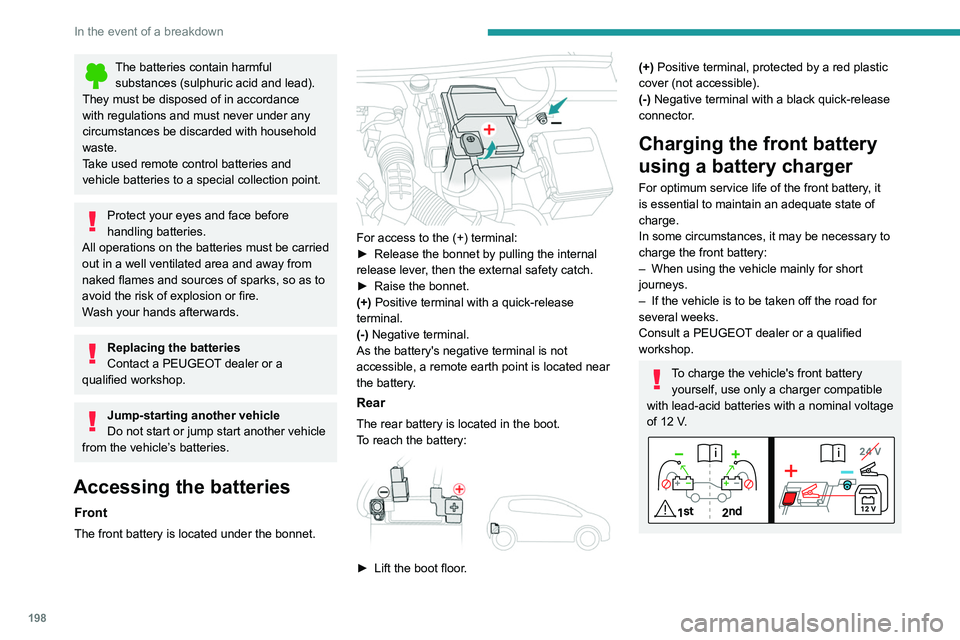
To charge the vehicle's front battery yourself, use only a charger compatible
with lead-acid batteries with a nominal voltage
of 12
V.
Page 253 of 292
251
Alphabetical index
180° rear vision 147
A
ABS 82
Accelerated charging unit (Wallbox)
161–162
Accessories
79, 172
Active Safety Brake
133–135
Active suspension
111
Active Suspension Control
111
Adaptive LED Technology
30, 69
Adaptive rear lighting
69
AdBlue®
20, 178
AdBlue® tank
179
Additive, Diesel
176–177
Adjusting headlamps
71
Adjusting head restraints
45
Adjusting seat
45–46
Adjusting the air distribution
53–54
Adjusting the air flow
53–54
Adjusting the date
222, 244
Adjusting the height and reach of
the steering wheel
48
Adjusting the lumbar support
45–46
Adjusting the seat angle
45
Adjusting the temperature
53
Adjusting the time
221, 245
Advice on care and maintenance
160, 181
Advice on driving
8, 100
Airbags
86–88, 90
Airbags, curtain
87–88
Airbags, front 86–87, 91
Airbags, lateral
87–88
Air conditioning
52, 55
Air conditioning, automatic
55
Air conditioning, digital
53
Air conditioning, dual-zone automatic
53
Air intake
54–55
Air vents
51
Alarm
33–34
Amplifier, audio
61
Android Auto connection
236
Anti-lock braking system (ABS)
82
Antitheft / Immobiliser
28
Apple CarPlay connection
218, 235
Applications
236
Armrest, front
61–62
Armrest, rear
63
Assistance call
80–81
Assistance, emergency braking
82, 135
Audible warning
80
Audio streaming (Bluetooth)
217, 240
B
Battery, 12 V 173, 177, 194–199
Battery, ancillaries
197
Battery, charging
196, 198–199
Battery, remote control
32, 57
Bicycle carrier
172
Blanking screen (snow shield)
172
Blind
42–43
Blind spot monitoring system, active 142
Blind spot sensors
140, 142
BlueHDi
20, 176, 183
Bluetooth (hands-free)
219, 241
Bluetooth (telephone)
219–220, 241–242
Bodywork
181
Bonnet
173–174
Bonnet, active
88
Boot
36–38, 68
Brake discs
178
Brake lamps
193–194
Brakes
177–178
Braking
109
Braking assistance system
82
Braking, automatic emergency
133–135
Braking, dynamic emergency
104–105
Brightness
221
Bulbs
192
Bulbs (changing)
191–194
C
Cable, audio 239
Cable, Jack
239
Capacity, fuel tank
157
Care of the bodywork
181
Central locking
30, 33
Changing a bulb
191–194
Changing a fuse
194
Changing a wheel
184, 188
Changing a wiper blade
77
Page 254 of 292
252
Alphabetical index
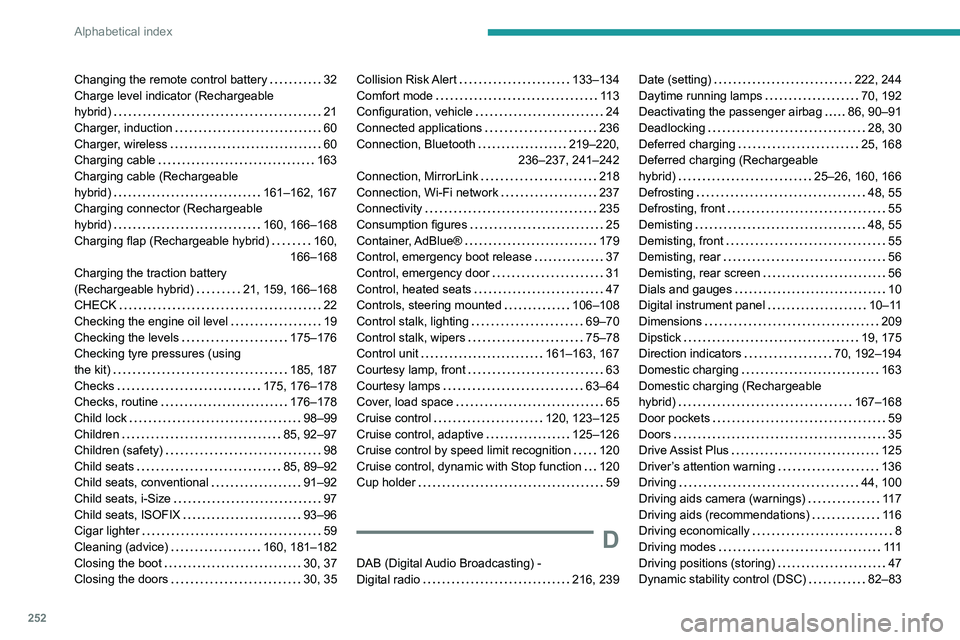
Changing the remote control battery 32
Charge level indicator (Rechargeable
hybrid)
21
Charger, induction
60
Charger, wireless
60
Charging cable
163
Charging cable (Rechargeable
hybrid)
161–162, 167
Charging connector (Rechargeable
hybrid)
160, 166–168
Charging flap (Rechargeable hybrid)
160,
166–168
Charging the traction battery
(Rechargeable hybrid)
21, 159, 166–168
CHECK
22
Checking the engine oil level
19
Checking the levels
175–176
Checking tyre pressures (using
the kit)
185, 187
Checks
175, 176–178
Checks, routine
176–178
Child lock
98–99
Children
85, 92–97
Children (safety)
98
Child seats
85, 89–92
Child seats, conventional
91–92
Child seats, i-Size
97
Child seats, ISOFIX
93–96
Cigar lighter
59
Cleaning (advice)
160, 181–182
Closing the boot
30, 37
Closing the doors
30, 35Collision Risk Alert 133–134
Comfort mode
11 3
Configuration, vehicle
24
Connected applications
236
Connection, Bluetooth
219–220,
236–237, 241–242
Connection, MirrorLink
218
Connection, Wi-Fi network
237
Connectivity
235
Consumption figures
25
Container, AdBlue®
179
Control, emergency boot release
37
Control, emergency door
31
Control, heated seats
47
Controls, steering mounted
106–108
Control stalk, lighting
69–70
Control stalk, wipers
75–78
Control unit
161–163, 167
Courtesy lamp, front
63
Courtesy lamps
63–64
Cover, load space
65
Cruise control
120, 123–125
Cruise control, adaptive
125–126
Cruise control by speed limit recognition
120
Cruise control, dynamic with Stop function
120
Cup holder
59
D
DAB (Digital Audio Broadcasting) -
Digital radio
216, 239
Date (setting) 222, 244
Daytime running lamps
70, 192
Deactivating the passenger airbag
86, 90–91
Deadlocking
28, 30
Deferred charging
25, 168
Deferred charging (Rechargeable
hybrid)
25–26, 160, 166
Defrosting
48, 55
Defrosting, front
55
Demisting
48, 55
Demisting, front
55
Demisting, rear
56
Demisting, rear screen
56
Dials and gauges
10
Digital instrument panel
10–11
Dimensions
209
Dipstick
19, 175
Direction indicators
70, 192–194
Domestic charging
163
Domestic charging (Rechargeable
hybrid)
167–168
Door pockets
59
Doors
35
Drive Assist Plus
125
Driver’s attention warning
136
Driving
44, 100
Driving aids camera (warnings)
11 7
Driving aids (recommendations)
11 6
Driving economically
8
Driving modes
111
Driving positions (storing)
47
Dynamic stability control (DSC)
82–83
Page 256 of 292
254
Alphabetical index
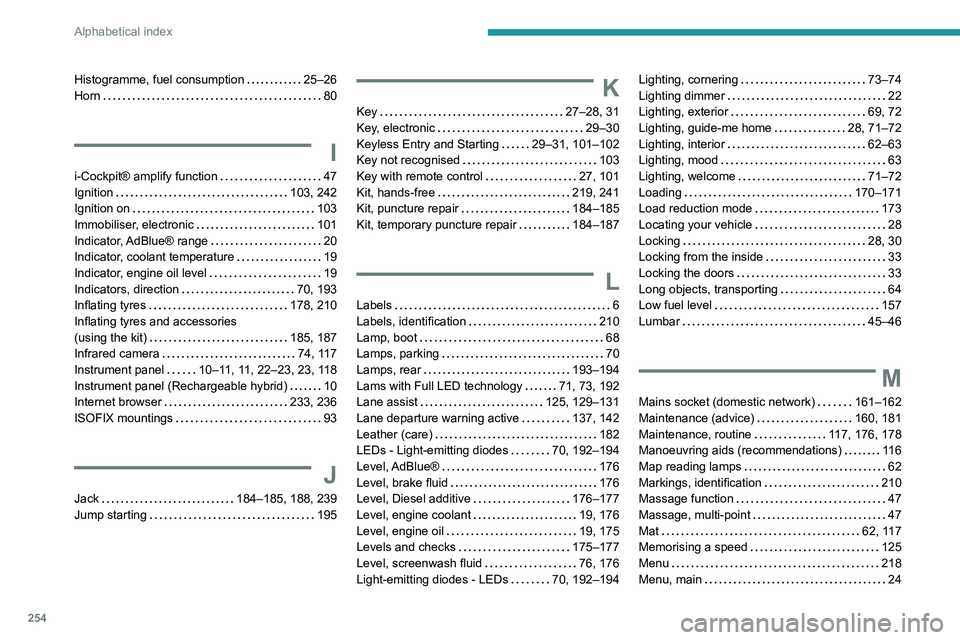
Histogramme, fuel consumption 25–26
Horn
80
I
i-Cockpit® amplify function 47
Ignition
103, 242
Ignition on
103
Immobiliser, electronic
101
Indicator, AdBlue® range
20
Indicator, coolant temperature
19
Indicator, engine oil level
19
Indicators, direction
70, 193
Inflating tyres
178, 210
Inflating tyres and accessories
(using the kit)
185, 187
Infrared camera
74, 117
Instrument panel
10–11, 11, 22–23, 23, 118
Instrument panel (Rechargeable hybrid)
10
Internet browser
233, 236
ISOFIX mountings
93
J
Jack 184–185, 188, 239
Jump starting
195
K
Key 27–28, 31
Key, electronic
29–30
Keyless Entry and Starting
29–31, 101–102
Key not recognised
103
Key with remote control
27, 101
Kit, hands-free
219, 241
Kit, puncture repair
184–185
Kit, temporary puncture repair
184–187
L
Labels 6
Labels, identification
210
Lamp, boot
68
Lamps, parking
70
Lamps, rear
193–194
Lams with Full LED technology
71, 73, 192
Lane assist
125, 129–131
Lane departure warning active
137, 142
Leather (care)
182
LEDs - Light-emitting diodes
70, 192–194
Level, AdBlue®
176
Level, brake fluid
176
Level, Diesel additive
176–177
Level, engine coolant
19, 176
Level, engine oil
19, 175
Levels and checks
175–177
Level, screenwash fluid
76, 176
Light-emitting diodes - LEDs
70, 192–194
Lighting, cornering 73–74
Lighting dimmer
22
Lighting, exterior
69, 72
Lighting, guide-me home
28, 71–72
Lighting, interior
62–63
Lighting, mood
63
Lighting, welcome
71–72
Loading
170–171
Load reduction mode
173
Locating your vehicle
28
Locking
28, 30
Locking from the inside
33
Locking the doors
33
Long objects, transporting
64
Low fuel level
157
Lumbar
45–46
M
Mains socket (domestic network) 161–162
Maintenance (advice)
160, 181
Maintenance, routine
117, 176, 178
Manoeuvring aids (recommendations)
11 6
Map reading lamps
62
Markings, identification
210
Massage function
47
Massage, multi-point
47
Mat
62, 117
Memorising a speed
125
Menu
218
Menu, main
24