park assist PEUGEOT 508 2021 Owners Manual
[x] Cancel search | Manufacturer: PEUGEOT, Model Year: 2021, Model line: 508, Model: PEUGEOT 508 2021Pages: 292, PDF Size: 8.61 MB
Page 4 of 292
2
Contents
■
Overview
■
Eco-driving
1InstrumentsDigital instrument panels 10
Warning and indicator lamps 12
Indicators 18
Manual test 22
Total distance recorder 22
Lighting dimmer 22
Trip computer 22
Touch screen 23
Remote functions (Rechargeable hybrid) 26
2AccessElectronic key with remote control function
and built-in key, 27
Keyless Entry and Start 29
Back-up procedures 31
Central locking 33
Alarm 33
Doors 35
Boot 36
Motorised tailgate 37
Electric windows 41
Panoramic sunroof 42
3Ease of use and comfortDriving position 44
Front seats 45
Steering wheel adjustment 48
Mirrors 48
Rear seats 50
Heating and Ventilation 51
Dual-zone automatic air conditioning 53
Front demisting - defrosting 55
Heated windscreen 56
Rear screen demisting/defrosting 56
Additional heating/ventilation system 56
Temperature pre-conditioning
(Rechargeable hybrid)
58
Front fittings 59
Courtesy lamps 62
Interior ambient lighting 63
Rear fittings 63
Boot fittings 64
4Lighting and visibilityExterior lighting control stalk 69
Direction indicators 70
Headlamp beam height adjustment 71
Automatic illumination of headlamps 71
Guide-me-home and welcome lighting 71
Automatic lighting systems - General
recommendations
72
Automatic headlamp dipping 72
Static cornering lighting 73
Night Vision 74
Wiper control stalk 75
Changing a wiper blade 77
Automatic wipers 77
5SafetyGeneral safety recommendations 79
Hazard warning lamps 79
Horn 80
Pedestrian horn (Rechargeable hybrid) 80
Emergency or assistance 80
Electronic stability control (ESC) 82
Seat belts 84
Airbags 86
Active bonnet 88
Child seats 89
Deactivating the front passenger airbag 91
ISOFIX child seats 93
i-Size child seats 97
Child lock 98
6DrivingDriving recommendations 100
Starting/switching off the engine 101
Starting rechargeable hybrid vehicles 102
Electric parking brake 103
Automatic gearbox 106
Electric automatic gearbox (Rechargeable
hybrid)
109
Hill start assist 11 0
Active Suspension Control 111
Driving modes 111
Gear efficiency indicator 11 3
Stop & Start 11 3
Under-inflation detection 11 5
Driving and manoeuvring aids - General
recommendations
11 6
Road signs recognition 11 8
Speed limiter 121
Cruise control - Specific recommendations 123
Programmable cruise control 123
Memorising speeds 125
Drive Assist Plus 125
Adaptive cruise control 126
Lane positioning assist 129
Page 5 of 292
3
Contents
Active Safety Brake with Collision Risk
Alert and Intelligent emergency braking
assistance
133
Distraction detection 136
Active lane departure warning system 137
Blind spot monitoring 140
Active Blind Spot Detection 142
Parking sensors 142
Visiopark 1 - Visiopark 2 144
Park Assist 148
Full Park Assist 151
7Practical informationCompatibility of fuels 157
Refuelling 157
Misfuel prevention (Diesel) 158
Rechargeable hybrid system 159
Charging the traction battery (Rechargeable
hybrid engine)
166
Towing device 168
Towing device with retractable ball joint 169
Roof bars 170
Very cold climate screen 172
Snow chains 172
Energy economy mode 173
Bonnet 173
Engine compartment 174
Checking levels 175
Checks 176
AdBlue® (BlueHDi) 178
Free-wheeling 180
Advice on care and maintenance 181
8In the event of a breakdownWarning triangle 183
Running out of fuel (Diesel) 183
Tool kit 184
Temporary puncture repair kit 185
Spare wheel 188
Changing a bulb 191
Fuses 194
12
V battery 194
Accessory battery (Rechargeable hybrid) 197
Towing the vehicle 200
9Technical dataEngine technical data and towed loads 203
Petrol engines 204
Diesel engines 206
Rechargeable hybrid engines 208
Dimensions 209
Identification markings 210
10PEUGEOT Connect RadioFirst steps 2 11
Steering mounted controls 212
Menus 213
Applications 214
Radio 214
DAB (Digital Audio Broadcasting) radio 216
Media 216
Telephone 218
Settings 221
Frequently asked questions 222
11PEUGEOT Connect NavFirst steps 224
Steering mounted controls 225
Menus 225
Voice commands 227
Navigation 230
Connected navigation 233
Applications 235
Radio 238
DAB (Digital Audio Broadcasting) radio 239
Media 239
Telephone 241
Settings 243
Frequently asked questions 245
12Event data recorders
■
Alphabetical index
bit.ly/helpPSA
Access to additional videos
Page 6 of 292
4
Overview
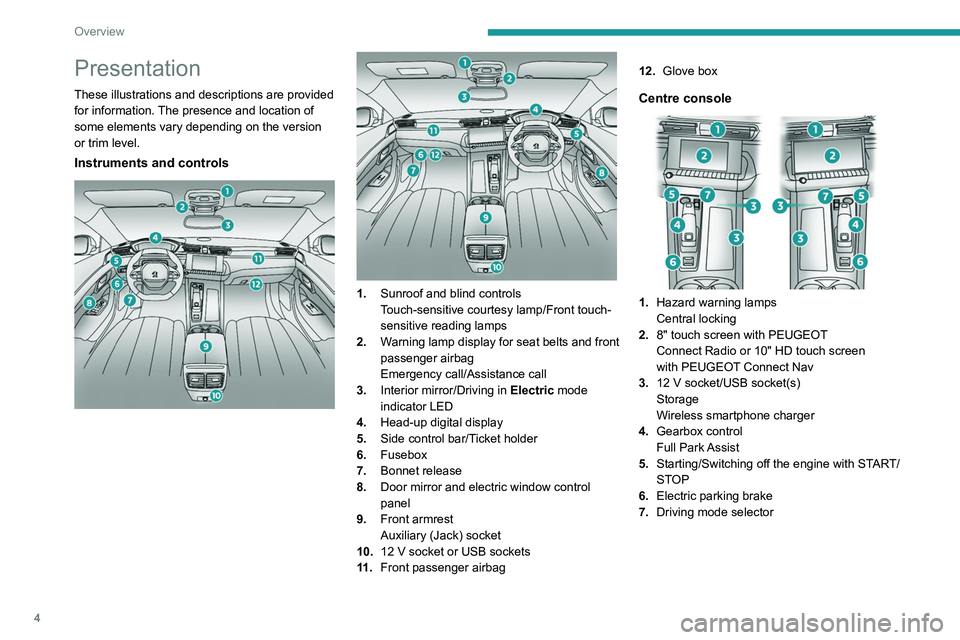
Presentation
These illustrations and descriptions are provided
for information. The presence and location of
some elements vary depending on the version
or trim level.
Instruments and controls
1. Sunroof and blind controls
Touch-sensitive courtesy lamp/Front touch-
sensitive reading lamps
2. Warning lamp display for seat belts and front
passenger airbag
Emergency call/Assistance call
3. Interior mirror/Driving in Electric mode
indicator LED
4. Head-up digital display
5. Side control bar/Ticket holder
6. Fusebox
7. Bonnet release
8. Door mirror and electric window control
panel
9. Front armrest
Auxiliary (Jack) socket
10. 12
V socket or USB sockets
11 . Front passenger airbag 12.
Glove box
Centre console
1.Hazard warning lamps
Central locking
2. 8" touch screen with
PEUGEOT
Connect Radio
or 10" HD touch screen
with
PEUGEOT Connect Nav
3.12
V socket/USB socket(s)
Storage
Wireless smartphone charger
4. Gearbox control
Full Park Assist
5. Starting/Switching off the engine with START/
STOP
6. Electric parking brake
7. Driving mode selector
Steering-mounted controls
1.Exterior lighting controls/Direction indicators/
Service indicator
2. Wiper controls/Screenwash/Trip computer
3. Automatic gearbox control paddles
4. Horn/Driver front airbag
5. Controls for Cruise control/Speed limiter/
Adaptive cruise control
6. Audio system setting controls
A. Choice of instrument panel display mode
B. Voice commands
C. Decrease/Increase volume
D. Select previous/next media
Confirm a selection
E. Access the Telephone menu
Manage calls
F. Select an audio source
Page 8 of 292
6
Overview
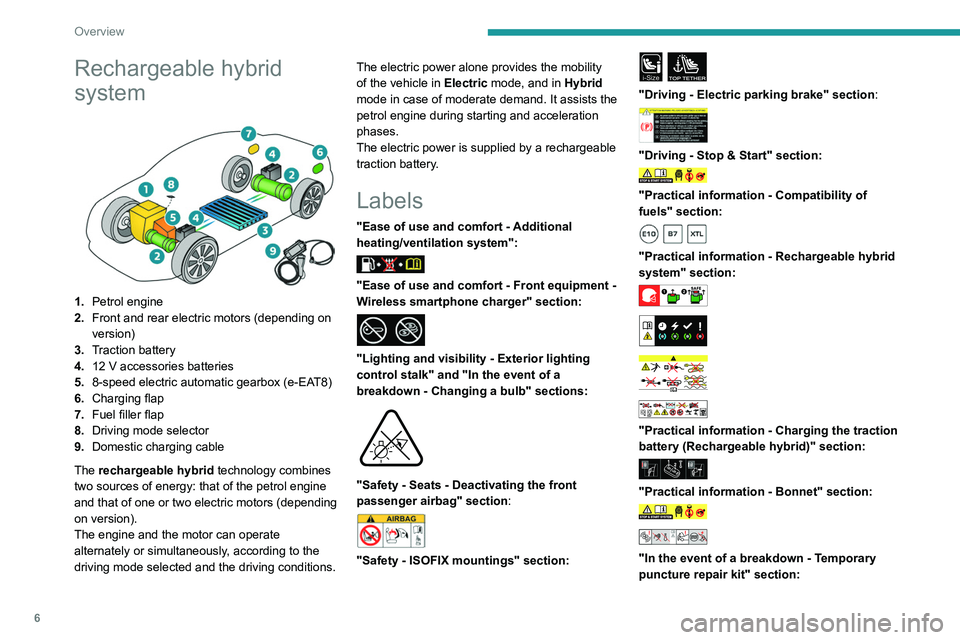
Rechargeable hybrid
system
1.Petrol engine
2. Front and rear electric motors (depending on
version)
3. Traction battery
4. 12 V accessories batteries
5. 8-speed electric automatic gearbox (e-EAT8)
6. Charging flap
7. Fuel filler flap
8. Driving mode selector
9. Domestic charging cable
The rechargeable hybrid technology combines
two sources of energy: that of the petrol engine
and that of one or two electric motors (depending
on version).
The engine and the motor can operate
alternately or simultaneously, according to the
driving mode selected and the driving conditions. The electric power alone provides the mobility
of the vehicle in
Electric mode, and in Hybrid
mode in case of moderate demand. It assists the
petrol engine during starting and acceleration
phases.
The electric power is supplied by a rechargeable
traction battery.
Labels
"Ease of use and comfort - Additional
heating/ventilation system":
"Ease of use and comfort - Front equipment -
Wireless smartphone charger" section:
"Lighting and visibility - Exterior lighting
control stalk" and "In the event of a
breakdown - Changing a bulb" sections:
"Safety - Seats - Deactivating the front
passenger airbag" section:
"Safety - ISOFIX mountings" section:
i-SizeTOP TETHER
"Driving - Electric parking brake" section:
"Driving - Stop & Start" section:
"Practical information - Compatibility of
fuels" section:
"Practical information - Rechargeable hybrid
system" section:
"Practical information - Charging the traction
battery (Rechargeable hybrid)" section:
"Practical information - Bonnet" section:
"In the event of a breakdown - Temporary
puncture repair kit" section:
Page 18 of 292
16
Instruments
passenger (depending on version) has been
detected as present but the corresponding seat
belt has not been fastened.
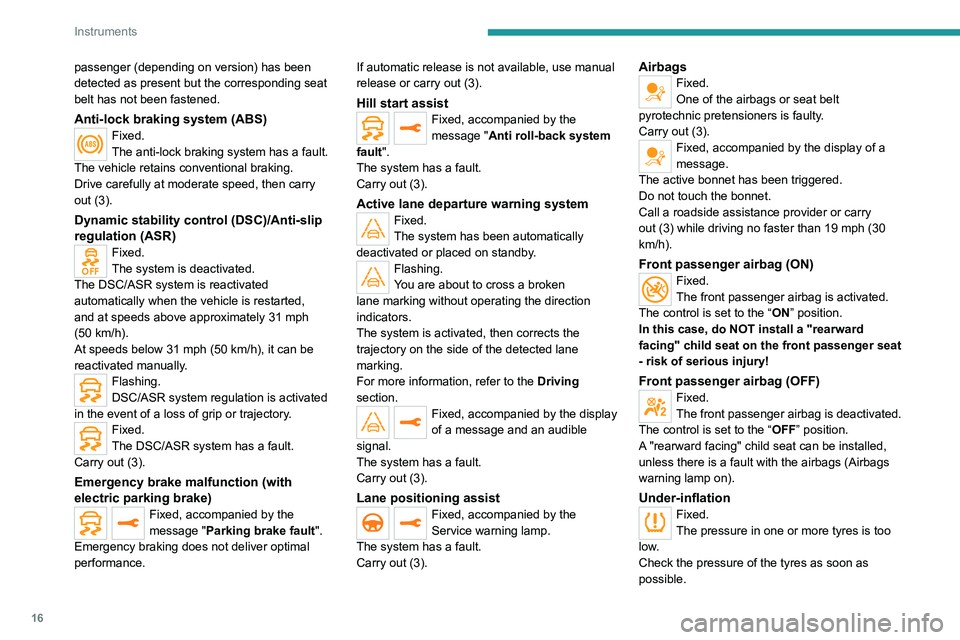
Anti-lock braking system (ABS)Fixed.
The anti-lock braking system has a fault.
The vehicle retains conventional braking.
Drive carefully at moderate speed, then carry
out (3).
Dynamic stability control (DSC)/Anti-slip
regulation (ASR)
Fixed.
The system is deactivated.
The DSC/ASR system is reactivated
automatically when the vehicle is restarted,
and at speeds above approximately 31 mph
(50
km/h).
At speeds below 31
mph (50 km/h), it can be
reactivated manually.
Flashing.
DSC/ASR system regulation is activated
in the event of a loss of grip or trajectory.
Fixed.
The DSC/ASR system has a fault.
Carry out (3).
Emergency brake malfunction (with
electric parking brake)
Fixed, accompanied by the
message "Parking brake fault".
Emergency braking does not deliver optimal
performance. If automatic release is not available, use manual
release or carry out (3).
Hill start assistFixed, accompanied by the
message "Anti roll-back system
fault".
The system has a fault.
Carry out (3).
Active lane departure warning systemFixed.
The system has been automatically
deactivated or placed on standby.
Flashing.
You are about to cross a broken
lane marking without operating the direction
indicators.
The system is activated, then corrects the
trajectory on the side of the detected lane
marking.
For more information, refer to the Driving
section.
Fixed, accompanied by the display
of a message and an audible
signal.
The system has a fault.
Carry out (3).
Lane positioning assistFixed, accompanied by the
Service warning lamp.
The system has a fault.
Carry out (3).
AirbagsFixed.
One of the airbags or seat belt
pyrotechnic pretensioners is faulty.
Carry out (3).
Fixed, accompanied by the display of a
message.
The active bonnet has been triggered.
Do not touch the bonnet.
Call a roadside assistance provider or carry
out (3) while driving no faster than 19 mph (30
km/h).
Front passenger airbag (ON)Fixed.
The front passenger airbag is activated.
The control is set to the “ON” position.
In this case, do NOT install a "rearward
facing" child seat on the front passenger seat
- risk of serious injury!
Front passenger airbag (OFF)Fixed.
The front passenger airbag is deactivated.
The control is set to the “OFF ” position.
A "rearward facing" child seat can be installed,
unless there is a fault with the airbags (Airbags
warning lamp on).
Under-inflationFixed.
The pressure in one or more tyres is too
low.
Check the pressure of the tyres as soon as
possible.
Page 19 of 292

17
Instruments
1Reinitialise the detection system after adjusting
the pressure.
Under-inflation warning lamp
flashing then fixed and Service
warning lamp fixed.
The tyre pressure monitoring system is faulty.
Under-inflation detection is no longer monitored.
Check the tyre pressures as soon as possible
and carry out (3).
Parking sensorsFixed, accompanied by an onscreen
message and an audible signal.
The system is deactivated.
Fixed, associated with the Service
warning lamp, accompanied by the
display of a message and an audible signal.
The system has a fault.
Carry out (3).
Stop & StartFixed, accompanied by the display of a
message.
The Stop & Start system has been deactivated
manually.
The engine will not switch off at the next traffic
stop.
Press the button to reactivate Stop & Start.
Fixed.
The Stop & Start system has been
deactivated automatically.
The engine will not switch off at the next traffic
stop, if the exterior temperature is:
–
below 0°C. –
above +35°C.
For more information, refer to the
Driving
section.
Flashing then fixed, accompanied by a
message.
The system has a fault.
Carry out (3).
Night VisionFixed.
The function has been activated, but
the vehicle is travelling too fast or the exterior
temperature conditions are outside the operating
range.
The display is available with " Night vision"
mode but the system does not emit an alert.
For more information, refer to the Lighting and
visibility section.
Automatic headlamp dippingFixed, accompanied by an audible signal
and a message.
A function or camera malfunction is detected.
Carry out (2).
Rear foglampsFixed.
The lamps are on.
Green warning/indicator lamps
Stop & Start
Fixed.
When the vehicle stops, the Stop & Start
puts the engine into STOP mode.
Flashing temporarily.
STOP mode is momentarily unavailable
or START mode is automatically triggered.
For more information, refer to the Driving
section.
Vehicle ready to drive (Rechargeable
hybrid)
Fixed, accompanied by an audible signal
when it comes on.
The vehicle is ready to drive.
The indicator lamp goes out upon reaching a
speed of approximately 3 mph (5
km/h) and
lights up again when the vehicle stops moving.
The lamp will go out when you turn off the
engine and exit the vehicle.
Park Assist or Full Park AssistFixed.
The function is active.
For more information, refer to the Driving
section.
Lane positioning assistFixed.
The function has been activated.
All conditions have been met: the system is
operating.
For more information, refer to the Driving
section.
Automatic wipingFixed.
Automatic windscreen wiping is activated.
Page 26 of 292
24
Instruments
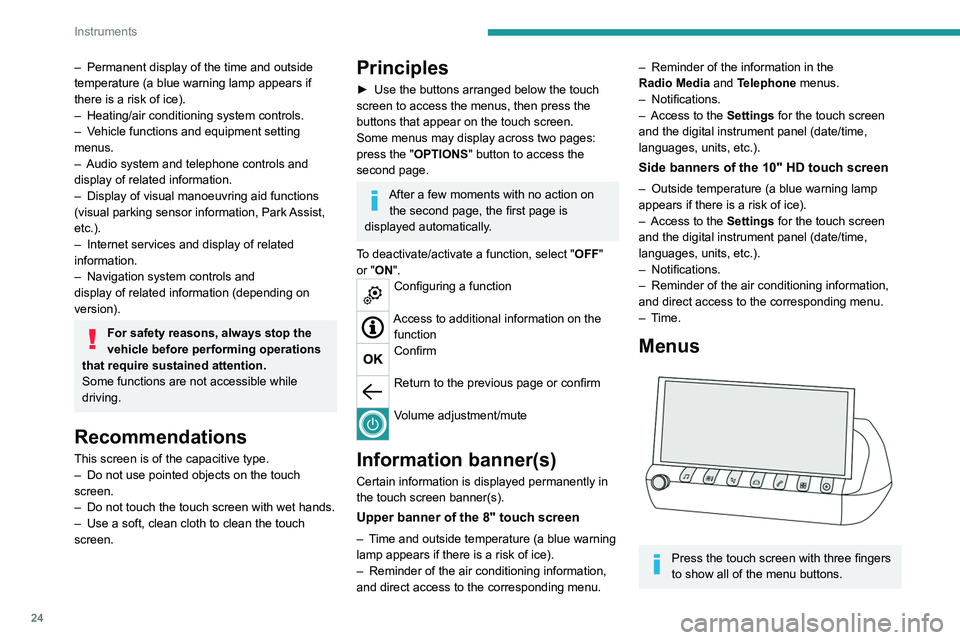
For more information about the menus,
refer to the sections describing the audio
and telematics systems.
Radio/Media
Climate
Settings for temperature, air flow, etc.
For more information on Dual-zone automatic
air conditioning , refer to the corresponding
section.
Navigation (Depending on equipment)
Driving or Vehicle (Depending on
equipment)
Activation, deactivation and settings for certain
functions.
The functions are organised in 2 tabs: " Driving
functions" and "Vehicle settings".
Telephone
Applications
Access to certain configurable equipment.
Settings
Main settings for the audio system, touch
screen and digital instrument panel.
or
Energy
Access to the rechargeable hybrid system
features (energy flow, consumption statistics,
deferred charging, eSave function).
– Permanent display of the time and outside
temperature (a blue warning lamp appears if
there is a risk of ice).
–
Heating/air conditioning system controls.
–
V
ehicle functions and equipment setting
menus.
–
Audio system and telephone controls and
display of related information.
–
Display of visual manoeuvring aid functions
(visual parking sensor information, Park
Assist,
etc.).
–
Internet services and display of
related
information.
–
Navigation system controls and
display
of related information (depending on
version).
For safety reasons, always stop the
vehicle before performing operations
that require sustained attention.
Some functions are not accessible while
driving.
Recommendations
This screen is of the capacitive type.
– Do not use pointed objects on the touch
screen.
–
Do not touch the touch screen with wet hands.
–
Use a soft, clean cloth to clean the touch
screen.
Principles
► Use the buttons arranged below the touch
screen to access the menus, then press the
buttons that appear on the touch screen.
Some menus may display across two pages:
press the "
OPTIONS" button to access the
second page.
After a few moments with no action on the second page, the first page is
displayed automatically.
To deactivate/activate a function, select " OFF"
or "ON".
Configuring a function
Access to additional information on the function
Confirm
Return to the previous page or confirm
Volume adjustment/mute
Information banner(s)
Certain information is displayed permanently in
the touch screen banner(s).
Upper banner of the 8" touch screen
– Time and outside temperature (a blue warning
lamp appears if there is a risk of ice).
–
Reminder of the air conditioning information,
and direct access to the corresponding menu.
– Reminder of the information in the
Radio Media and Telephone menus.
–
Notifications.
–
Access to the
Settings for the touch screen
and the digital instrument panel (date/time,
languages, units, etc.).
Side banners of the 10" HD touch screen
– Outside temperature (a blue warning lamp
appears if there is a risk of ice).
–
Access to the
Settings for the touch screen
and the digital instrument panel (date/time,
languages, units, etc.).
–
Notifications.
–
Reminder of the air conditioning information,
and direct access to the corresponding menu.
–
Time.
Menus
Press the touch screen with three fingers
to show all of the menu buttons.
Page 51 of 292

49
Ease of use and comfort
3Adjustment
► Move control A to the right or to the left to
select the corresponding mirror.
►
Move control
B in any of the four directions
to adjust.
►
Return control A
to its central position.
Electric folding
Depending on equipment, the door mirrors can
be folded electrically.
► From the inside, with the
ignition on, place control A
in the
central position.
►
Pull control A
backwards.
►
Lock the vehicle from the outside.
If the mirrors are folded using control A,
they will not unfold when the vehicle is
unlocked.
Electric unfolding
► From outside: unlock the vehicle.
► From inside: with the ignition on, place
control
A in the central position and then pull it
rearwards.
The automatic door mirror folding/ unfolding function is configured via the
Driving
/ Vehicle touch screen menu.
Manual folding
The mirrors can be folded manually (parking
obstruction, narrow garage, etc.).
►
T
urn the mirror towards the vehicle.
Automatic tilting in reverse gear
Depending on version, this function allows to
automatically tilt the mirrors downwards to assist
with parking manoeuvres in reverse gear.
With the engine running, on engaging reverse
gear, the mirror glasses tilt downwards.
They return to their initial position:
–
A
few seconds after coming out of reverse
gear.
–
Once the vehicle speed exceeds 6 mph
(10
km/h).
–
When the engine is switched off.
This function is set via the Driving/Vehicle touch screen menu.
Electrochrome interior rear
view mirror
Equipped with an anti-dazzle system, which
darkens the mirror glass and reduces the
nuisance to the driver caused by the sun,
headlamps of other vehicles, etc.
The electrochrome system uses a sensor that
detects the level of exterior brightness and that
coming from the rear of the vehicle, in order to
automatically and gradually switch between day
and night usage.
To ensure optimum visibility while manoeuvring, the mirror automatically
brightens when reverse gear is engaged.
The system is deactivated if the load in the
boot exceeds the height of the load space
Page 104 of 292
102
Driving
Starting
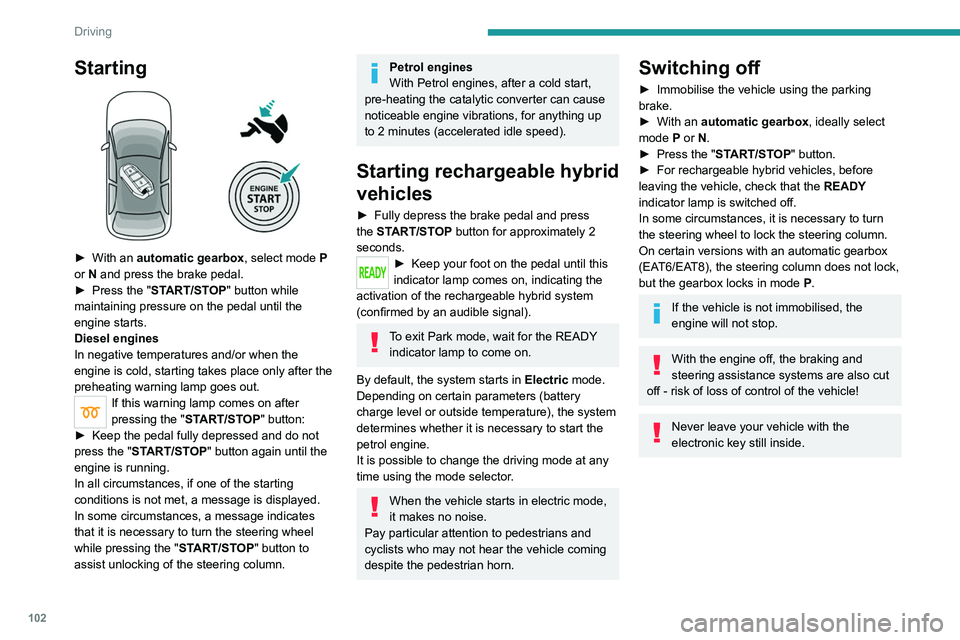
► With an automatic gearbox, select mode P
or N and press the brake pedal.
►
Press the "
START/STOP" button while
maintaining pressure on the pedal until the
engine starts.
Diesel engines
In negative temperatures and/or when the
engine is cold, starting takes place only after the
preheating warning lamp goes out.
If this warning lamp comes on after
pressing the " START/STOP" button:
►
Keep the pedal fully depressed and do not
press the "
START/STOP" button again until the
engine is running.
In all circumstances, if one of the starting
conditions is not met, a message is displayed.
In some circumstances, a message indicates
that it is necessary to turn the steering wheel
while pressing the " START/STOP" button to
assist unlocking of the steering column.
Petrol engines
With Petrol engines, after a cold start,
pre-heating the catalytic converter can cause
noticeable engine vibrations, for anything up
to 2 minutes (accelerated idle speed).
Starting rechargeable hybrid
vehicles
► Fully depress the brake pedal and press
the START/STOP button for approximately 2
seconds.
► Keep your foot on the pedal until this
indicator lamp comes on, indicating the
activation of the rechargeable hybrid system
(confirmed by an audible signal).
To exit Park mode, wait for the READY indicator lamp to come on.
By default, the system starts in Electric mode.
Depending on certain parameters (battery
charge level or outside temperature), the system
determines whether it is necessary to start the
petrol engine.
It is possible to change the driving mode at any
time using the mode selector.
When the vehicle starts in electric mode,
it makes no noise.
Pay particular attention to pedestrians and
cyclists who may not hear the vehicle coming
despite the pedestrian horn.
Switching off
► Immobilise the vehicle using the parking
brake.
►
With an
automatic gearbox, ideally select
mode
P or N.
►
Press the "
START/STOP" button.
►
For rechargeable hybrid vehicles, before
leaving the vehicle, check that the READY
indicator lamp is switched off.
In some circumstances, it is necessary to turn
the steering wheel to lock the steering column.
On certain versions with an automatic gearbox
(EAT6/EAT8), the steering column does not lock,
but the gearbox locks in mode P.
If the vehicle is not immobilised, the
engine will not stop.
With the engine off, the braking and
steering assistance systems are also cut
off - risk of loss of control of the vehicle!
Never leave your vehicle with the
electronic key still inside.
Switching on the ignition
without starting the engine
With the electronic key in the passenger
compartment, pressing the " START/STOP"
button, without depressing any of the pedals ,
allows the ignition to be switched on without
starting the engine.
► Press this button again to switch off the
ignition and allow the vehicle to be locked.
Key not detected
Back-up starting
A back-up reader is fitted to the steering column,
to enable the engine to be started if the system
fails to detect the key in the recognition zone, or
if the battery in the electronic key is flat.
Page 107 of 292
105
Driving
6When stationary with the engine running,
do not depress the accelerator pedal
unnecessarily. Risk of parking brake release.
Automatic application
With the vehicle stationary, the parking brake
is applied automatically when the engine is
switched off.
It is not applied automatically if the
engine stalls or enters STOP mode with
Stop & Start.
In automatic mode, the parking brake
can be manually applied or released at
any time using the control.
Special cases
Immobilising the vehicle with the
engine running
To immobilise the vehicle with the engine
running, briefly pull the control.
Parking the vehicle with the brake
released
In very cold conditions (ice), applying the
parking brake is not recommended.
To immobilise the vehicle, engage a gear or
place the chocks against one of the wheels.
With an automatic gearbox, mode P is
automatically selected when the ignition
is switched off. The wheels are blocked.
For more information on Free-wheeling, refer
to the corresponding section.
With an automatic gearbox, if you open
the driver's door while mode N is
engaged, an audible signal will sound and
mode P will be engaged. The audible signal
stops when the driver's door is closed.
Deactivating automatic
operation
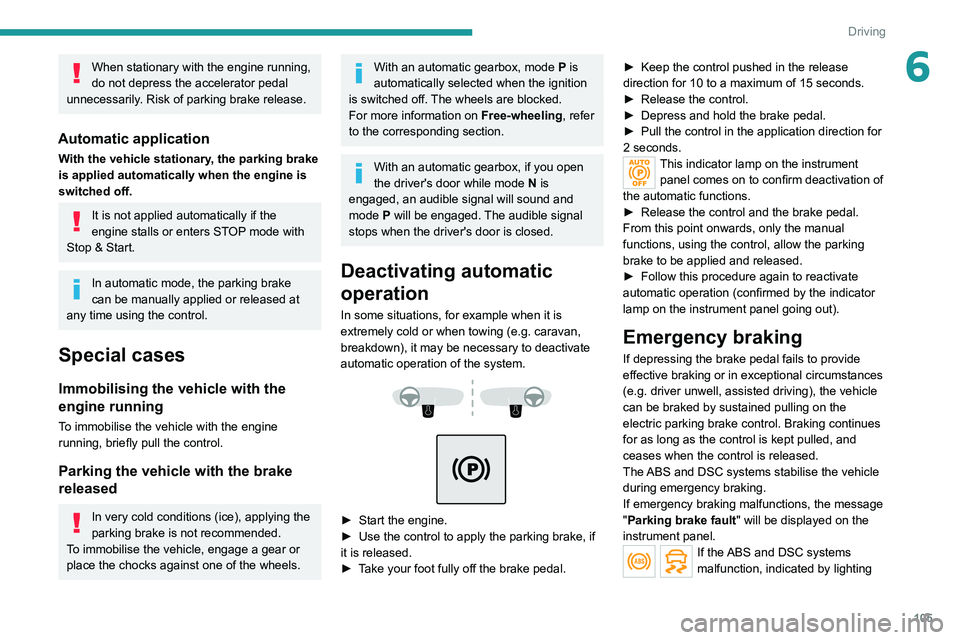
In some situations, for example when it is
extremely cold or when towing (e.g. caravan,
breakdown), it may be necessary to deactivate
automatic operation of the system.
► Start the engine.
► Use the control to apply the parking brake, if
it is released.
►
T
ake your foot fully off the brake pedal. ►
Keep the control pushed in the release
direction for 10 to a maximum of
15 seconds.
►
Release the control.
►
Depress and hold the brake pedal.
►
Pull the control in the application direction for
2
seconds.
This indicator lamp on the instrument
panel comes on to confirm deactivation of
the automatic functions.
►
Release the control and the brake pedal.
From this point onwards, only the manual
functions, using the control, allow the parking
brake to be applied and released.
►
Follow this procedure again to reactivate
automatic operation (confirmed by the indicator
lamp on the instrument panel going out).
Emergency braking
If depressing the brake pedal fails to provide
effective braking or in exceptional circumstances
(e.g.
driver unwell, assisted driving), the vehicle
can be braked by sustained pulling on the
electric parking brake control. Braking continues
for as long as the control is kept pulled, and
ceases when the control is released.
The ABS and DSC systems stabilise the vehicle
during emergency braking.
If emergency braking malfunctions, the message
"Parking brake fault" will be displayed on the
instrument panel.
If the ABS and DSC systems
malfunction, indicated by lighting