check engine light PEUGEOT 508 2023 User Guide
[x] Cancel search | Manufacturer: PEUGEOT, Model Year: 2023, Model line: 508, Model: PEUGEOT 508 2023Pages: 244, PDF Size: 7.38 MB
Page 134 of 244
132
Driving
The brake pedal may feel hard and vibrate slightly while the function is
operating.
If the vehicle comes to a complete stop,
automatic braking is maintained for 1 to
2
seconds.
Deactivation/Activation
By default, the system is automatically activated
at every engine start.
It is configured in the ADAS touch screen
application.
Deactivation of the system is signalled by
the illumination of this warning lamp,
accompanied by the display of a message.
The system cannot be deactivated above 10 km/h.
Malfunction
This warning lamp lights up on the instrument panel with the message
"Driving Assistance Sensor blind: Clean
sensor, see User Manual" if the sensor is
masked.
This is a normal behavior, which does not
request the support of a qualified workshop.
In this case, stop the vehicle and verify if the
front camera or the front radar is covered by dirt,
mud, sand, snow, ice or anything preventing the
sensing.
The system is operational again after the
detection field has been cleaned.
In the event of a malfunction, this warning
lamp lights up on the instrument panel,
accompanied by the display of a message and
an audible signal.
Have it checked by a PEUGEOT dealer or a
qualified workshop.
If these warning lamps come on
after the engine has been switched
off and then restarted, contact a PEUGEOT
dealer or a qualified workshop to have the
system checked.
These warning lamps light up on the instrument panel and/or in the
warning lamp display for seat belts and front
passenger airbag to indicate that the driver's
and/or front passenger's seat belt is not fastened
(depending on version). The automatic braking
system is deactivated until the seat belts are
fastened.
Distraction detection
For more information, refer to the
General recommendations on the use
of driving and manoeuvring aids .
The function comprises the "Driver Attention
Warning" system combined with the "Driver
Attention Warning by Camera" system.
These systems are in no way designed to keep the driver awake or to prevent
the driver from falling asleep at the wheel.
It is the driver’s responsibility to stop if feeling
tired.
Take a break if you are feeling tired or at least
every 2 hours.
Driver Attention Warning
The system triggers an alert when it detects that the driver has not taken a
break after two hours of driving at a speed above
43 mph (70
km/h).
This alert is issued via the display of a message
encouraging the driver to take a break,
accompanied by an audible signal.
If the driver does not follow this advice, the alert
is repeated hourly until the vehicle is stopped.
The system resets itself if one of the following
conditions is met:
–
With the engine running, the vehicle has been
stationary for more than 15 minutes.
–
The ignition has been switched off for a few
minutes.
–
The driver's seat belt is unfastened and their
door is opened.
As soon as the speed of the vehicle drops below 43 mph (70 km/h), the
system goes into standby.
Driving time starts being counted again once
the speed reaches above 43
mph (70 km/h).
Page 135 of 244
133
Driving
6Driver Attention Warning by
Camera
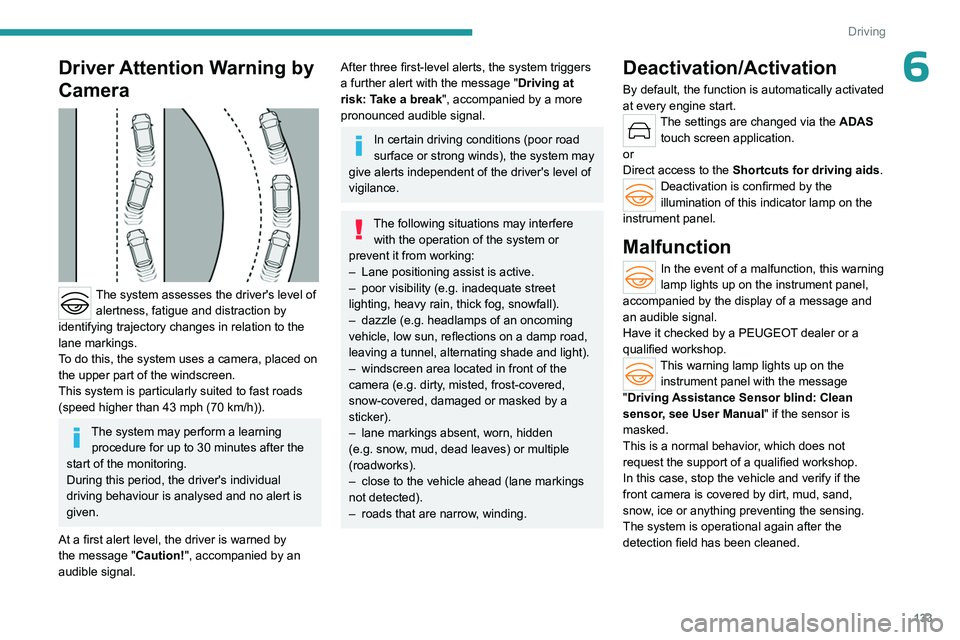
The system assesses the driver's level of alertness, fatigue and distraction by
identifying trajectory changes in relation to the
lane markings.
To do this, the system uses a camera, placed on
the upper part of the windscreen.
This system is particularly suited to fast roads
(speed higher than 43 mph (70
km/h)).
The system may perform a learning procedure for up to 30 minutes after the
start of the monitoring.
During this period, the driver's individual
driving behaviour is analysed and no alert is
given.
At a first alert level, the driver is warned by
the message "Caution!", accompanied by an
audible signal.
After three first-level alerts, the system triggers
a further alert with the message " Driving at
risk: Take a break", accompanied by a more
pronounced audible signal.
In certain driving conditions (poor road
surface or strong winds), the system may
give alerts independent of the driver's level of
vigilance.
The following situations may interfere with the operation of the system or
prevent it from working:
–
Lane positioning assist is active.
–
poor visibility (e.g.
inadequate street
lighting, heavy rain, thick fog, snowfall).
–
dazzle (e.g.
headlamps of an oncoming
vehicle, low sun, reflections on a damp road,
leaving a tunnel, alternating shade and light).
–
windscreen area located in front of the
camera (e.g.
dirty, misted, frost-covered,
snow-covered, damaged or masked by a
sticker).
–
lane markings absent, worn, hidden
(e.g.
snow, mud, dead leaves) or multiple
(roadworks).
–
close to the vehicle ahead (lane markings
not detected).
–
roads that are narrow
, winding.
Deactivation/Activation
By default, the function is automatically activated
at every engine start.
The settings are changed via the ADAS
touch screen application.
or
Direct access to the Shortcuts for driving aids .
Deactivation is confirmed by the
illumination of this indicator lamp on the
instrument panel.
Malfunction
In the event of a malfunction, this warning
lamp lights up on the instrument panel,
accompanied by the display of a message and
an audible signal.
Have it checked by a PEUGEOT dealer or a
qualified workshop.
This warning lamp lights up on the instrument panel with the message
"Driving Assistance Sensor blind: Clean
sensor, see User Manual" if the sensor is
masked.
This is a normal behavior, which does not
request the support of a qualified workshop.
In this case, stop the vehicle and verify if the
front camera is covered by dirt, mud, sand,
snow, ice or anything preventing the sensing.
The system is operational again after the
detection field has been cleaned.
Page 138 of 244
136
Driving
The following situations may interfere with the operation of the system or
prevent it from working:
–
Insufficient contrast between the road
surface and the verge or hard shoulder
(e.g.
shade).
–
Lane markings worn, hidden (e.g.
snow,
mud) or multiple (e.g.
roadworks).
–
Close proximity to the vehicle in front (lane
markings may not be detected).
–
Roads that are narrow
, winding.
Risk of undesirable operation
The system should be deactivated in the
following situations:
–
When changing a wheel or working near a
wheel.
–
T
owing or with a bicycle carrier on a towing
device, especially with trailer not plugged in or
not approved.
–
Road in poor condition, unstable or with very
poor grip (risk of aquaplaning, snow
, ice).
–
Adverse weather conditions.
–
Driving on racing circuits.
–
Driving on a rolling road.
Deactivation/Activation
By default, the system is automatically activated
at every engine start.
It is configured in the ADAS touch screen
application.
or
Direct access to the Shortcuts for driving aids .Deactivation is confirmed by the
illumination of this indicator lamp on the
instrument panel.
Malfunction
In the event of a malfunction,
these warning lamps light up on
the instrument panel, accompanied by the
display of a message and an audible signal.
Have it checked by a PEUGEOT dealer or a
qualified workshop.
This warning lamp lights up on the instrument panel with the message
"Driving Assistance Sensor blind: Clean
sensor, see User Manual" if the sensor is
masked.
This is a normal behavior, which does not
request the support of a qualified workshop.
In this case, stop the vehicle and verify if the
front camera is covered by dirt, mud, sand,
snow, ice or anything preventing the sensing.
The system is operational again after the
detection field has been cleaned.
Blind spot monitoring
For more information, refer to the
General recommendations on the use
of driving and manoeuvring aids .
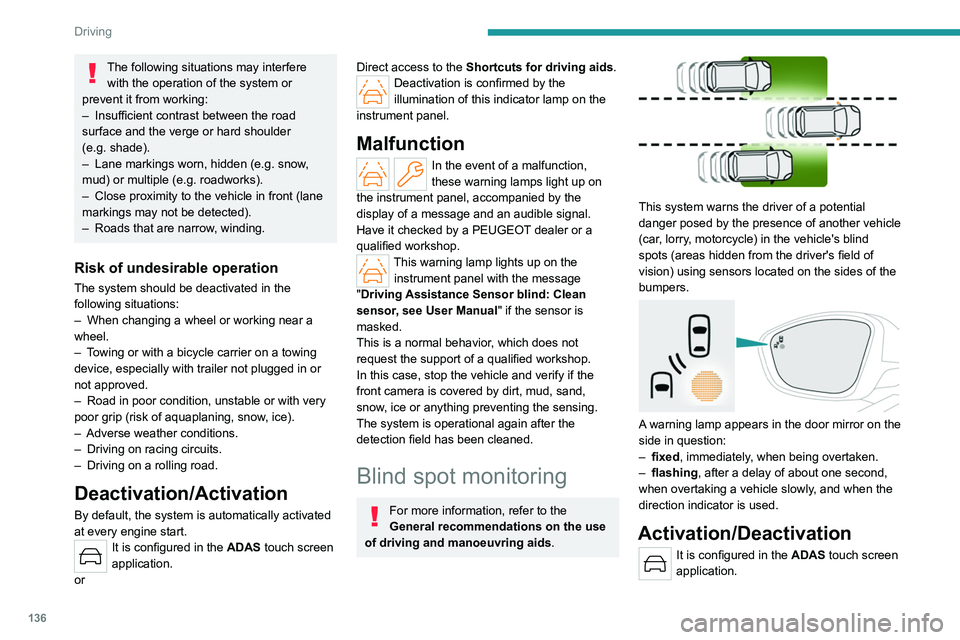
This system warns the driver of a potential
danger posed by the presence of another vehicle
(car, lorry, motorcycle) in the vehicle's blind
spots (areas hidden from the driver's field of
vision) using sensors located on the sides of the
bumpers.
A warning lamp appears in the door mirror on the
side in question:
–
fixed
, immediately, when being overtaken.
–
flashing , after a delay of about one second,
when overtaking a vehicle slowly
, and when the
direction indicator is used.
Activation/Deactivation
It is configured in the ADAS touch screen
application.
Page 142 of 244
140
Driving
Malfunction
In the event of a malfunction, this warning
lamp lights up on the instrument panel,
accompanied by the display of a message and
an audible signal (short beep).
Have it checked by a PEUGEOT dealer or a
qualified workshop.
This warning lamp lights up on the instrument panel with the message
"Parking Assistance Sensor blind: Clean
sensor, see User Manual" if the sensor is
masked.
This is a normal behavior, which does not
request the support of a qualified workshop.
In this case, stop the vehicle and verify if the
front and/or rear sensors are covered by dirt,
mud, sand, snow, ice or anything preventing the
sensing.
The system is operational again after the
detection field has been cleaned.
Visiopark 1
For more information, refer to the
General recommendations on the use
of driving and manoeuvring aids .
When reverse gear is engaged, with the engine
running, this system displays views of the
vehicle's close surroundings on the touch screen
using a camera located at the rear of the vehicle.
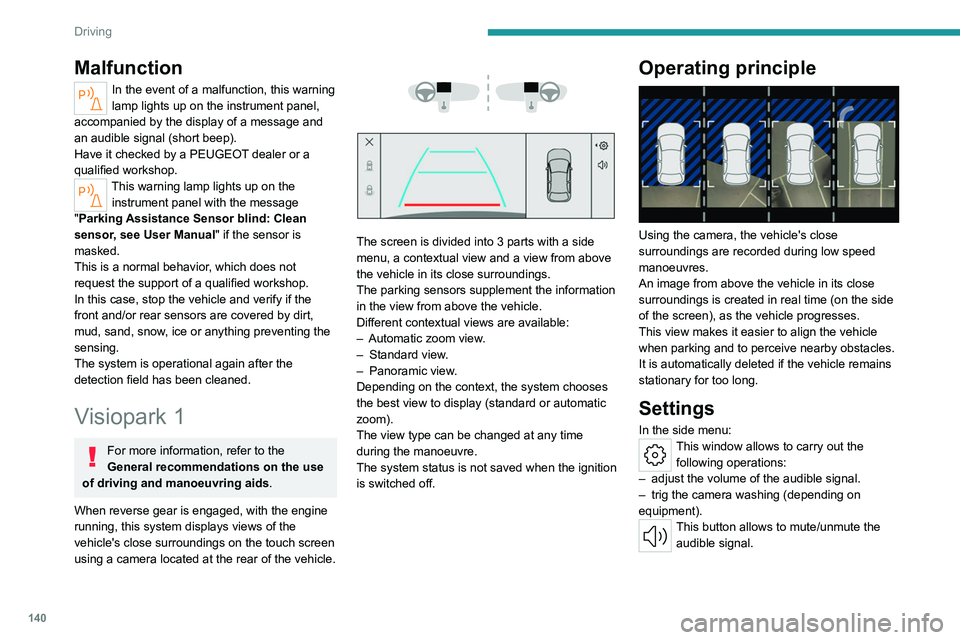
The screen is divided into 3 parts with a side
menu, a contextual view and a view from above
the vehicle in its close surroundings.
The parking sensors supplement the information
in the view from above the vehicle.
Different contextual views are available:
–
Automatic zoom view
.
–
Standard view
.
–
Panoramic view
.
Depending on the context, the system chooses
the best view to display (standard or automatic
zoom).
The view type can be changed at any time
during the manoeuvre.
The system status is not saved when the ignition
is switched off.
Operating principle
Using the camera, the vehicle's close
surroundings are recorded during low speed
manoeuvres.
An image from above the vehicle in its close
surroundings is created in real time (on the side
of the screen), as the vehicle progresses.
This view makes it easier to align the vehicle
when parking and to perceive nearby obstacles.
It is automatically deleted if the vehicle remains
stationary for too long.
Settings
In the side menu:This window allows to carry out the following operations:
–
adjust the volume of the audible signal.
–
trig the camera washing (depending on
equipment).
This button allows to mute/unmute the audible signal.
Page 158 of 244
156
Practical information
Use the charging cable supplied with the
vehicle.
For more information, contact a PEUGEOT
dealer or a qualified workshop.
During charging
As a safety measure, the engine will
not start if the charging cable is plugged into
the connector on the vehicle. A warning is
displayed on the instrument panel.
While charging is in progress, unlocking the
vehicle will cause the charging to stop.
If no action is taken on one of the openings
(door or boot) or on the charging nozzle, the
vehicle will lock again after 30 seconds and
charging will resume automatically.
Never work under the bonnet:
–
Some areas remain very hot, even an hour
after charging ends - risk of burns!
–
The fan may start at any time - risk of cuts
or strangulation!
After charging
Check that the charging flap is closed.
Do not leave the cable connected to the
domestic power socket - risk of short-circuit
or electrocution in the event of contact with or
immersion in water!
Charging procedure
Connection
► Before charging, check that the gear selector
is in mode P and the ignition is off, otherwise
charging is impossible.
►
Press on the rear of the charging flap to open
it and check that there are no foreign bodies on
the vehicle's charging connector
.
The light guides in the flap come on white.
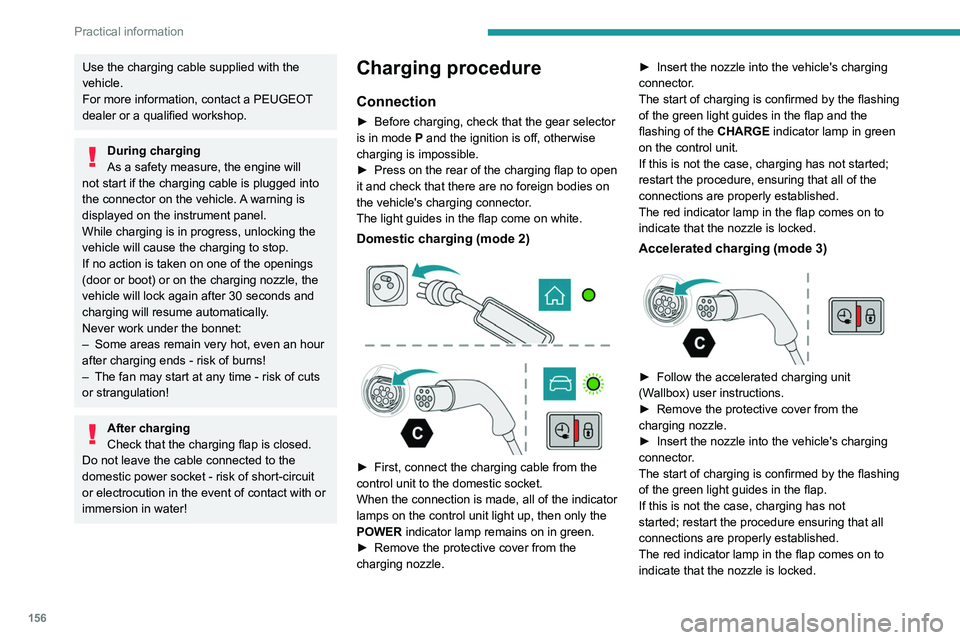
Domestic charging (mode 2)
► First, connect the charging cable from the
control unit to the domestic socket.
When the connection is made, all of the indicator
lamps on the control unit light up, then only the
POWER
indicator lamp remains on in green.
►
Remove the protective cover from the
charging nozzle. ►
Insert the nozzle into the vehicle's charging
connector
.
The start of charging is confirmed by the flashing
of the green light guides in the flap and the
flashing of the CHARGE indicator lamp in green
on the control unit.
If this is not the case, charging has not started;
restart the procedure, ensuring that all of the
connections are properly established.
The red indicator lamp in the flap comes on to
indicate that the nozzle is locked.
Accelerated charging (mode 3)
► Follow the accelerated charging unit
(W allbox) user instructions.
►
Remove the protective cover from the
charging nozzle.
►
Insert the nozzle into the vehicle's charging
connector
.
The start of charging is confirmed by the flashing
of the green light guides in the flap.
If this is not the case, charging has not
started; restart the procedure ensuring that all
connections are properly established.
The red indicator lamp in the flap comes on to
indicate that the nozzle is locked.
Page 168 of 244
166
Practical information
Versions equipped with Stop & Start are
fitted with a 12 V lead-acid battery with
special technology and specifications.
Its replacement should be carried out only by
a PEUGEOT dealer or a qualified workshop.
Passenger compartment
filter
Depending on the environment and the
use of the vehicle (e.g. dusty atmosphere,
city driving), change it twice as often, if
necessary .
A clogged passenger compartment filter
can adversely affect air conditioning
system performance and generate
undesirable odours.
Air filter
Depending on the environment and the
use of the vehicle (e.g. dusty atmosphere,
city driving), change it twice as often, if
necessary .
Oil filter
Change the oil filter each time the engine
oil is changed.
Particle filter (Diesel)
The start of clogging of the particle filter is
indicated by the temporary lighting of this
warning lamp, accompanied by an alert
message.
As soon as traffic conditions allow, regenerate
the filter by driving at a speed of at least
37
mph (60 km/h), with an engine speed above
2,500
rpm, for about 15 minutes (until the
warning lamp goes out).
If it is not possible to reach 37
mph (60 km/h),
leave the engine running at idle for about 15
minutes, then drive with an engine speed above
2,500
rpm for 15 minutes.
Do not switch off the engine until the filter
is fully regenerated; repeated intervals
can degrade the engine oil prematurely.
Regenerating the filter while the vehicle is
stationary is not recommended.
Following prolonged operation of the
vehicle at very low speed or at idle, you
may, in exceptional circumstances, notice
water vapour coming from the exhaust while
accelerating. These emissions have no
impact on the vehicle’s behaviour and the
environment.
New vehicle
During the first few particle filter
regeneration operations, you may notice a
"burning" smell. This is perfectly normal.
Automatic gearbox
The gearbox does not require any maintenance (no oil change).
Electric parking brake
This system does not require any routine servicing. However, in the event of a
problem, do not hesitate to have the system
checked by a PEUGEOT dealer or a qualified
workshop.
For more information on the Electric
parking brake, refer to the
corresponding section.
Brake pads
Brake wear depends on the style of
driving, particularly in the case of vehicles
used in town, over short distances. It may be
necessary to have the condition of the brakes
checked, even between vehicle services.
Unless there is a leak in the circuit, a drop in the
brake fluid level indicates that the brake pads
are worn.
After washing the vehicle, moisture, or in wintry conditions, ice can form on the
brake discs and pads: braking efficiency may
be reduced. Gently dab the brakes to dry and
defrost them.
Page 171 of 244
169
Practical information
7Important: in the event of a top-up after
an AdBlue breakdown, you must wait
about 5
minutes before switching on the
ignition, without opening the driver's door,
unlocking the vehicle or bringing the
electronic key into the passenger
compartment.
Switch on the ignition, then wait for 10
seconds before starting the engine.
►
Press the "
START/STOP" button to switch off
the engine.
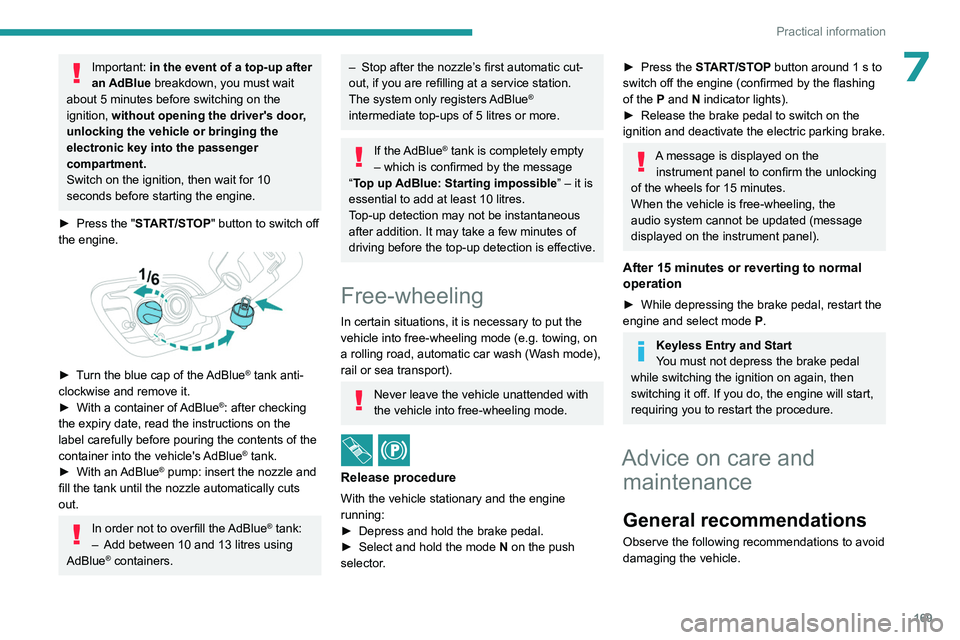
► Turn the blue cap of the AdBlue® tank anti-
clockwise and remove it.
►
With a container of
AdBlue
®: after checking
the expiry date, read the instructions on the
label carefully before pouring the contents of the
container into the vehicle's AdBlue
® tank.
►
With an
AdBlue® pump: insert the nozzle and
fill the tank until the nozzle automatically cuts
out.
In order not to overfill the AdBlue® tank:
–
Add between 10 and 13 litres using
AdBlue® containers.
– Stop after the nozzle’ s first automatic cut-
out, if you are refilling at a service station.
The system only registers AdBlue
®
intermediate top-ups of 5
litres or more.
If the AdBlue® tank is completely empty
– which is confirmed by the message
“Top up AdBlue: Starting impossible ” – it is
essential to add at least 10
litres.
Top-up detection may not be instantaneous
after addition. It may take a few minutes of
driving before the top-up detection is effective.
Free-wheeling
In certain situations, it is necessary to put the
vehicle into free-wheeling mode (e.g. towing, on
a rolling road, automatic car wash (Wash mode),
rail or sea transport).
Never leave the vehicle unattended with
the vehicle into free-wheeling mode.
/
Release procedure
With the vehicle stationary and the engine
running:
►
Depress and hold the brake pedal.
►
Select and hold the mode
N
on the push
selector.
► Press the START/STOP button around 1 s to
switch off the engine (confirmed by the flashing
of the P and N indicator lights).
►
Release the brake pedal to switch on the
ignition and deactivate the electric parking brake.
A message is displayed on the instrument panel to confirm the unlocking
of the wheels for 15
minutes.
When the vehicle is free-wheeling, the
audio system cannot be updated (message
displayed on the instrument panel).
After 15 minutes or reverting to normal
operation
► While depressing the brake pedal, restart the
engine and select mode P .
Keyless Entry and Start
You must not depress the brake pedal
while switching the ignition on again, then
switching it off. If you do, the engine will start,
requiring you to restart the procedure.
Advice on care and maintenance
General recommendations
Observe the following recommendations to avoid
damaging the vehicle.
Page 185 of 244
183
In the event of a breakdown
8Accessing the battery
The battery is located under the bonnet.
For access to the (+) terminal:
► Release the bonnet by pulling the internal
release lever
, then the external safety catch.
►
Raise the bonnet.
(+)
Positive terminal with a quick-release
terminal.
(-) Negative terminal.
As the battery's negative terminal is not
accessible, a remote earth point is located near
the battery.
Starting using another battery
If the vehicle's battery is flat, the engine can be
started using a backup battery (either external or
from another vehicle) and jump leads or using a
battery booster.
Never start the engine by connecting a
battery charger.
Never use a 24
V or higher battery booster.
Check beforehand that the backup battery
has a nominal voltage of 12
V and a capacity
at least equal to that of the discharged
battery.
The two vehicles must not be in contact with
each other.
Switch off all electricity-consuming equipment
on both vehicles (audio system, wipers,
lighting, etc.).
Make sure that the jump leads are well away
from the engine’s moving parts (fan, belt,
etc.).
Do not disconnect the (+) terminal while the
engine is running.
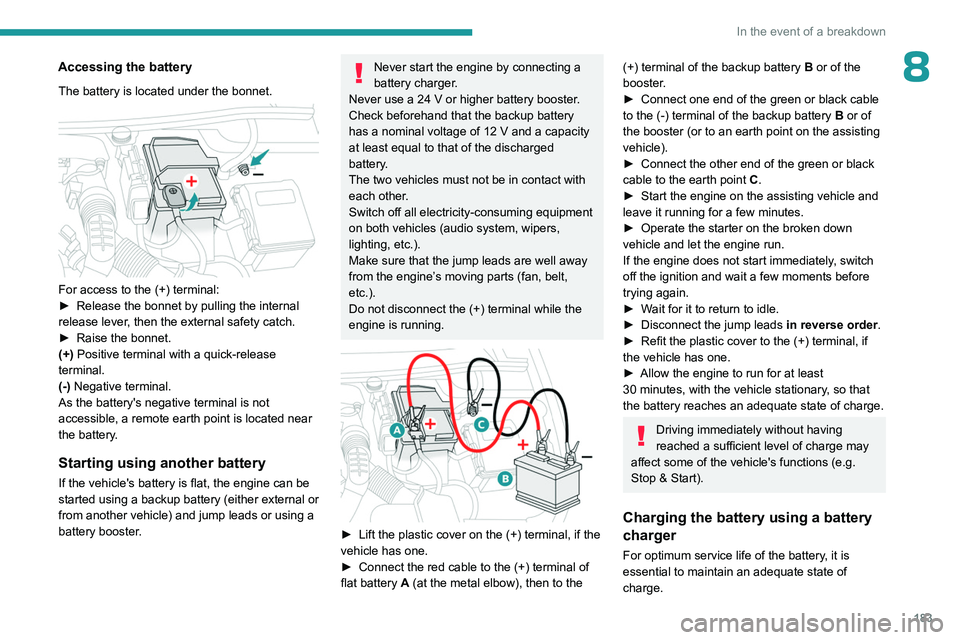
► Lift the plastic cover on the (+) terminal, if the
vehicle has one.
►
Connect the red cable to the (+) terminal of
flat battery
A (at the metal elbow), then to the
(+) terminal of the backup battery B or of the
booster .
►
Connect one end of the green or black cable
to the (-) terminal of the backup battery
B or of
the booster (or to an earth point on the assisting
vehicle).
►
Connect the other end of the green or black
cable to the earth point
C
.
►
Start the engine on the assisting vehicle and
leave it running for a few minutes.
►
Operate the starter on the broken down
vehicle and let the engine run.
If the engine does not start immediately
, switch
off the ignition and wait a few moments before
trying again.
►
W
ait for it to return to idle.
►
Disconnect the jump leads in reverse order.
►
Refit the plastic cover to the (+) terminal, if
the vehicle has one.
►
Allow the engine to run for at least
30
minutes, with the vehicle stationary, so that
the battery reaches an adequate state of charge.
Driving immediately without having
reached a sufficient level of charge may
affect some of the vehicle's functions (e.g.
Stop & Start).
Charging the battery using a battery
charger
For optimum service life of the battery, it is
essential to maintain an adequate state of
charge.
Page 218 of 244
216
Alphabetical index
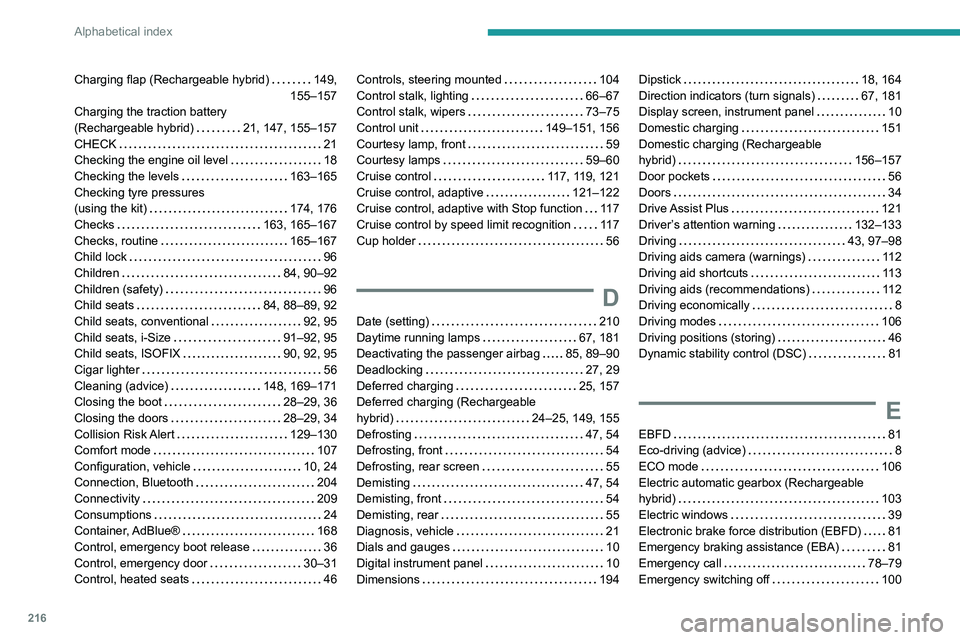
Charging flap (Rechargeable hybrid) 149,
155–157
Charging the traction battery
(Rechargeable hybrid)
21, 147, 155–157
CHECK
21
Checking the engine oil level
18
Checking the levels
163–165
Checking tyre pressures
(using the kit)
174, 176
Checks
163, 165–167
Checks, routine
165–167
Child lock
96
Children
84, 90–92
Children (safety)
96
Child seats
84, 88–89, 92
Child seats, conventional
92, 95
Child seats, i-Size
91–92, 95
Child seats, ISOFIX
90, 92, 95
Cigar lighter
56
Cleaning (advice)
148, 169–171
Closing the boot
28–29, 36
Closing the doors
28–29, 34
Collision Risk Alert
129–130
Comfort mode
107
Configuration, vehicle
10, 24
Connection, Bluetooth
204
Connectivity
209
Consumptions
24
Container, AdBlue®
168
Control, emergency boot release
36
Control, emergency door
30–31
Control, heated seats
46Controls, steering mounted 104
Control stalk, lighting
66–67
Control stalk, wipers
73–75
Control unit
149–151, 156
Courtesy lamp, front
59
Courtesy lamps
59–60
Cruise control
117, 119, 121
Cruise control, adaptive
121–122
Cruise control, adaptive with Stop function
11 7
Cruise control by speed limit recognition
11 7
Cup holder
56
D
Date (setting) 210
Daytime running lamps
67, 181
Deactivating the passenger airbag
85, 89–90
Deadlocking
27, 29
Deferred charging
25, 157
Deferred charging (Rechargeable
hybrid)
24–25, 149, 155
Defrosting
47, 54
Defrosting, front
54
Defrosting, rear screen
55
Demisting
47, 54
Demisting, front
54
Demisting, rear
55
Diagnosis, vehicle
21
Dials and gauges
10
Digital instrument panel
10
Dimensions
194
Dipstick 18, 164
Direction indicators (turn signals)
67, 181
Display screen, instrument panel
10
Domestic charging
151
Domestic charging (Rechargeable
hybrid)
156–157
Door pockets
56
Doors
34
Drive Assist Plus
121
Driver’s attention warning
132–133
Driving
43, 97–98
Driving aids camera (warnings)
11 2
Driving aid shortcuts
11 3
Driving aids (recommendations)
11 2
Driving economically
8
Driving modes
106
Driving positions (storing)
46
Dynamic stability control (DSC)
81
E
EBFD 81
Eco-driving (advice)
8
ECO mode
106
Electric automatic gearbox (Rechargeable
hybrid)
103
Electric windows
39
Electronic brake force distribution (EBFD)
81
Emergency braking assistance (EBA)
81
Emergency call
78–79
Emergency switching off
100
Page 220 of 244
218
Alphabetical index
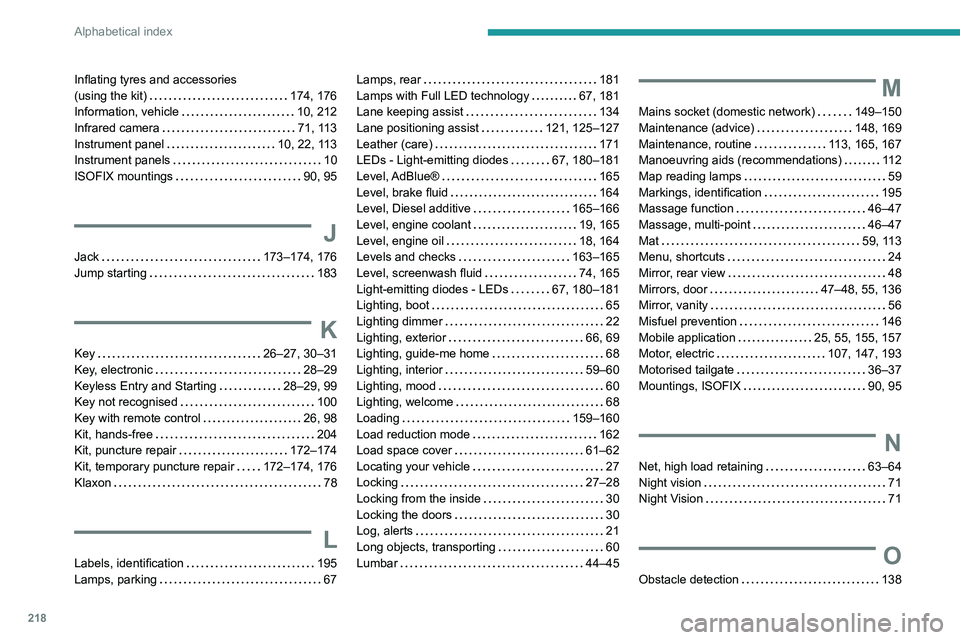
Inflating tyres and accessories
(using the kit)
174, 176
Information, vehicle
10, 212
Infrared camera
71, 113
Instrument panel
10, 22, 113
Instrument panels
10
ISOFIX mountings
90, 95
J
Jack 173–174, 176
Jump starting
183
K
Key 26–27, 30–31
Key, electronic
28–29
Keyless Entry and Starting
28–29, 99
Key not recognised
100
Key with remote control
26, 98
Kit, hands-free
204
Kit, puncture repair
172–174
Kit, temporary puncture repair
172–174, 176
Klaxon
78
L
Labels, identification 195
Lamps, parking
67
Lamps, rear 181
Lamps with Full LED technology
67, 181
Lane keeping assist
134
Lane positioning assist
121, 125–127
Leather (care)
171
LEDs - Light-emitting diodes
67, 180–181
Level, AdBlue®
165
Level, brake fluid
164
Level, Diesel additive
165–166
Level, engine coolant
19, 165
Level, engine oil
18, 164
Levels and checks
163–165
Level, screenwash fluid
74, 165
Light-emitting diodes - LEDs
67, 180–181
Lighting, boot
65
Lighting dimmer
22
Lighting, exterior
66, 69
Lighting, guide-me home
68
Lighting, interior
59–60
Lighting, mood
60
Lighting, welcome
68
Loading
159–160
Load reduction mode
162
Load space cover
61–62
Locating your vehicle
27
Locking
27–28
Locking from the inside
30
Locking the doors
30
Log, alerts
21
Long objects, transporting
60
Lumbar
44–45M
Mains socket (domestic network) 149–150
Maintenance (advice)
148, 169
Maintenance, routine
113, 165, 167
Manoeuvring aids (recommendations)
11 2
Map reading lamps
59
Markings, identification
195
Massage function
46–47
Massage, multi-point
46–47
Mat
59, 113
Menu, shortcuts
24
Mirror, rear view
48
Mirrors, door
47–48, 55, 136
Mirror, vanity
56
Misfuel prevention
146
Mobile application
25, 55, 155, 157
Motor, electric
107, 147, 193
Motorised tailgate
36–37
Mountings, ISOFIX
90, 95
N
Net, high load retaining 63–64
Night vision
71
Night Vision
71
O
Obstacle detection 138