window Peugeot 508 Hybrid 2013 Owner's Guide
[x] Cancel search | Manufacturer: PEUGEOT, Model Year: 2013, Model line: 508 Hybrid, Model: Peugeot 508 Hybrid 2013Pages: 340, PDF Size: 10.91 MB
Page 300 of 340
298
01 FIRST STEPS
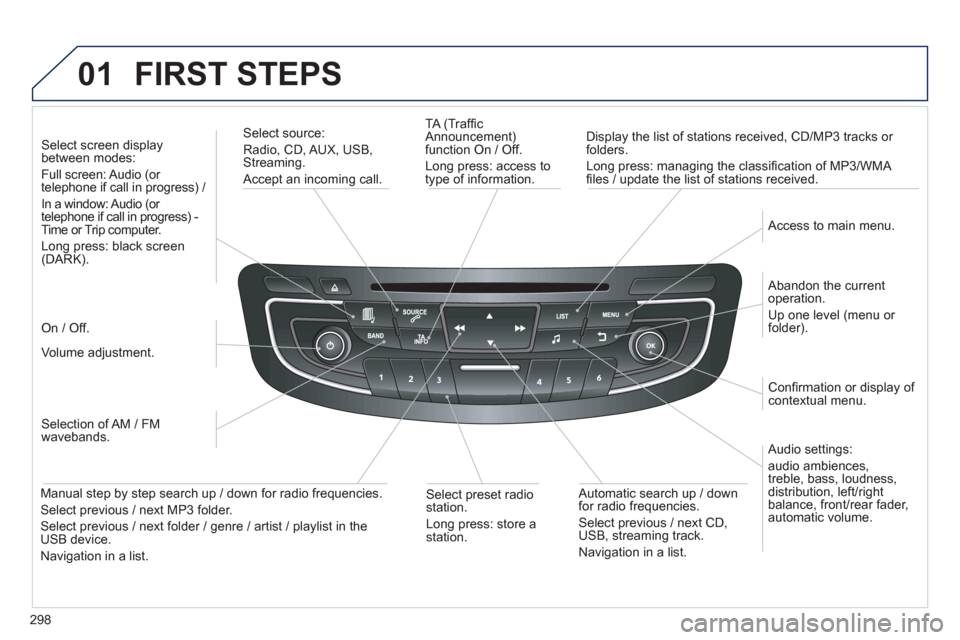
TA (Traffi c
Announcement)
function On / Off.
Long press: access to
type of information.
Displa
y the list of stations received, CD/MP3 tracks or
folders.
Lon
g press: managing the classifi cation of MP3/WMA fi les / update the list of stations received.
Select source:
Radio, CD, AUX, USB, Streaming.
Accept an incoming call.
Audio settings:
audio ambiences,
treble, bass, loudness,
distribution, left/ri
ght
balance, front/rear fader, automatic volume.
Abandon the current
operation.
Up one level (menu or folder).
Access to main menu.
Selection of AM / FM
wavebands.
Select screen displa
y between modes:
Full screen: Audio (or
telephone if call in progress) /
In a window: Audio
(or
telephone if call in progress) -
Time or Trip computer.
Long press: black screen (DARK).
Volume adjustment.
Select preset radio
station.
Long press: store astation.
Automatic search up / down
for radio frequencies.
Select previous / next CD, USB, streaming track.
Navigation in a list.
Manual step b
y step search up / down for radio frequencies.
Select previous / next MP3 folder.
Select previous / next folder / genre / artist / playlist in the USB device.
Navigation in a list.
On / Off.
Confi rmation or displa
y of contextual menu.
Page 301 of 340
02
299
STEERING MOUNTED CONTROLS
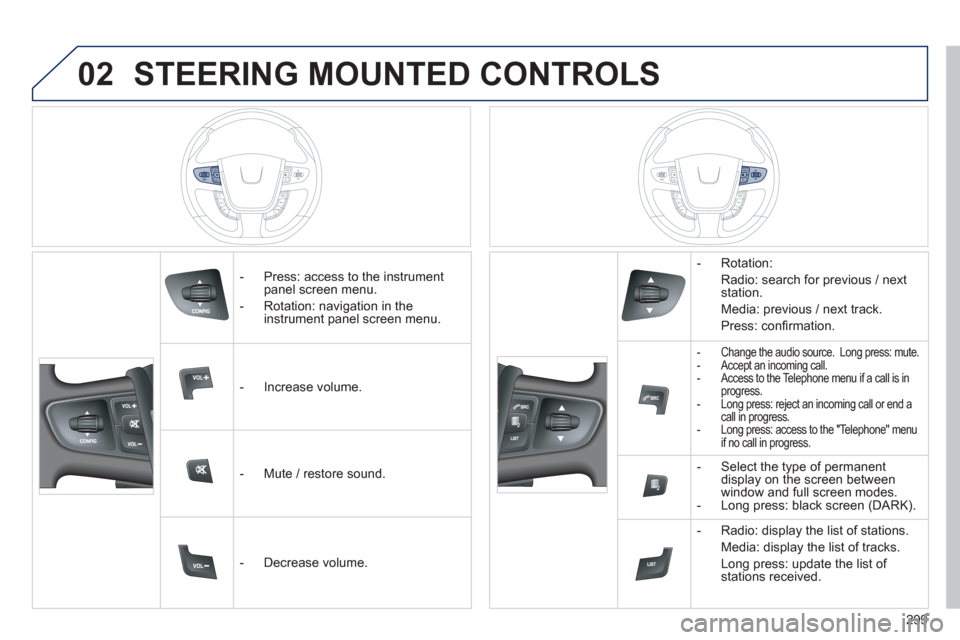
- Press: access to the instrumentpanel screen menu.
- Rotation: navi
gation in the
instrument panel screen menu.
- In
crease volume.
- Mute
/ restore sound.
- D
ecrease volume. - R
otation:
Radio: search for previous / next
station.
Media: previous
/ next track.
Pr
ess: confi rmation.
- Change the audio source. Long press: mute.
- Accept an incoming call.
- Access to the Telephone menu if a call is in progress.
- Long press: reject an incoming call or end acall in progress.
- Long press: access to the "Telephone" menu
if no call in progress.
- Select the type of permanentdisplay on the screen between
window and full screen modes.
- Long press: black screen (DARK).
- Radio: displa
y the list of stations.
Media: displa
y the list of tracks.
Lon
g press: update the list of stations received.
Page 313 of 340
311
05USING THE TELEPHONE
PAIRING A TELEPHONE
FIRST CONNECTION
The services offered depend on the network, the SIM card and the compatibility of the Bluetooth telephone used.
Consult
your telephone's manual and your operator to fi nd out which services are available to you.
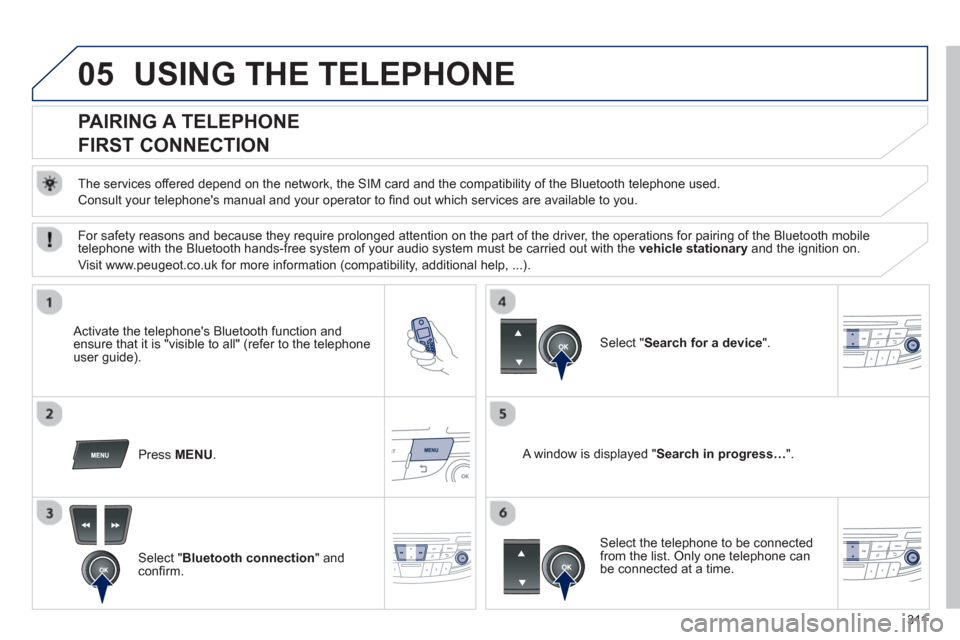
Activate the telephone's Bluetooth function andensure that it is "visible to all" (refer to the telephone
user guide).
Press MENU. A window is displayed "Search in progress…".
Select the telephone to be connected from the list. Only one telephone can be connected at a time.
Select " Search for a device".
For safety reasons and because they require prolonged attention on the part of the driver, the operations for pairing of the Bluetooth mobile
telephone with the Bluetooth hands-free system of your audio system must be carried out with the vehicle stationaryand the ignition on.
Visit www.peu
geot.co.uk for more information (compatibility, additional help, ...).
Select " Bluetooth connection" andconfi rm.
Page 333 of 340
.
331
Visual search
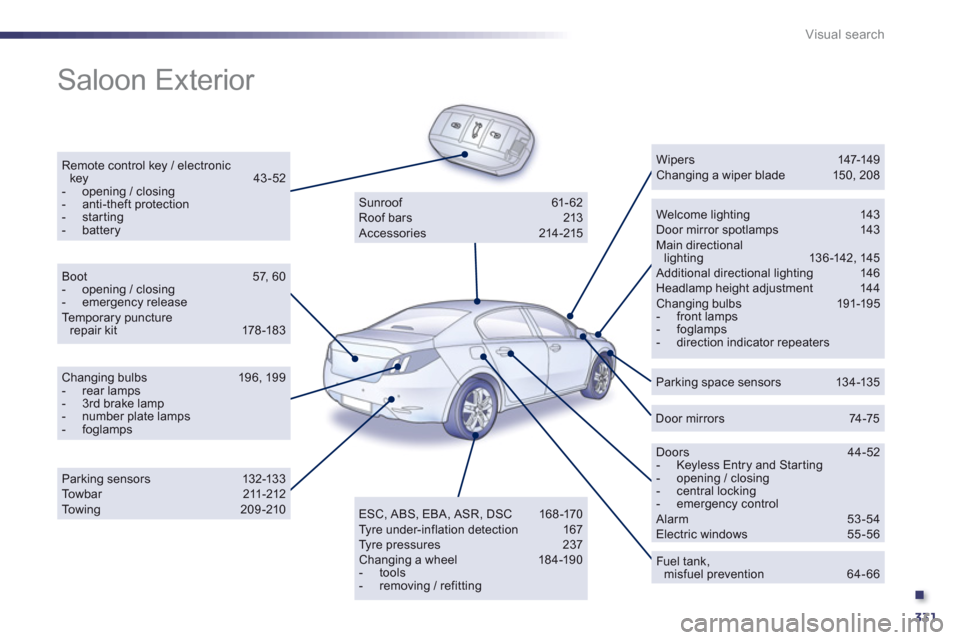
Saloon Exterior
Remote control key / electronic key 43-52- opening / closing - anti-theft protection - starting - batteryWelcome lighting 143 Door mirror spotlamps 143 Main directional lighting 13 6-142, 145 Additional directional lighting 146 Headlamp height adjustment 144 Changing bulbs 191-195 - front lamps - foglamps- direction indicator repeaters
Wipers 147-149 Changing a wiper blade 150, 208
Parking space sensors 134-135
Doors 44-52 - Keyless Entry and Starting - opening / closing - central locking - emergency control Alarm 53-54 Electric windows 55 -56
Fuel tank,misfuel prevention 64-66
Sunroof 61- 62
Roof bars 213
Accessories 214 -215
ESC, ABS, EBA, ASR, DSC 168 -170
Tyre under-inflation detection 167
Tyre pressures 237
Changing a wheel 184-190
- tools
- removing / refitting
Boot 57, 60- opening / closing - emergency releaseTe m p o r a ry puncture repair kit 178 -183
Changing bulbs 196, 199 - rear lamps - 3rd brake lamp- number plate lamps - foglamps
Parking sensors 132-13 3 Towbar 211-212To w i ng 209-210
Door mirrors 74-75
Page 336 of 340
334
Visual search
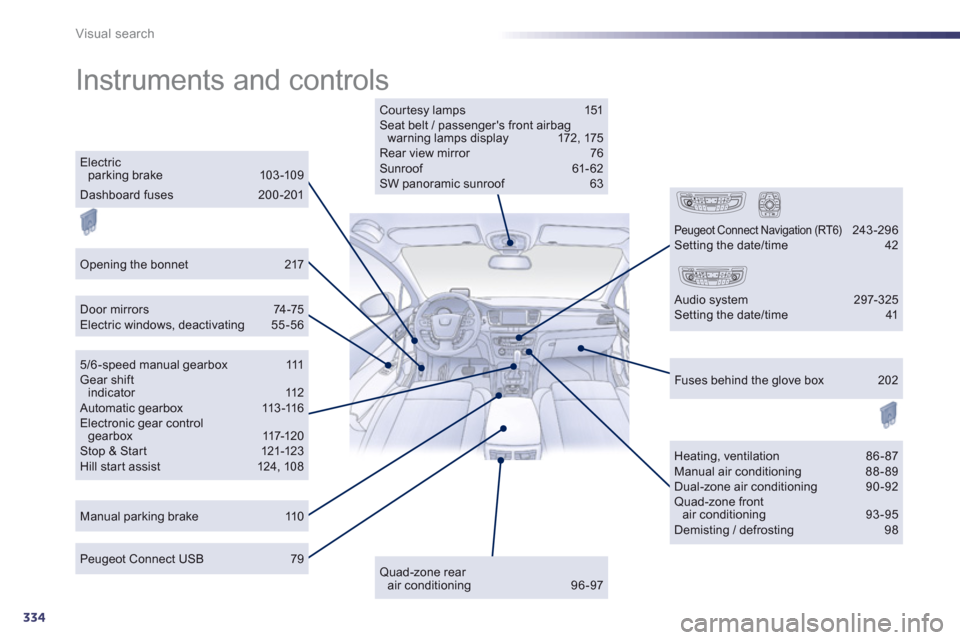
Instruments and controls
Courtesy lamps 151 Seat belt / passenger's front airbag warning lamps display 172 , 175 Rear view mirror 76 Sunroof 61-62 SW panoramic sunroof 63
Door mirrors 74-75 Electric windows, deactivating 55-56
Manual parking brake 110
Heating, ventilation 86 - 87 Manual air conditioning 88-89 Dual-zone air conditioning 90-92 Quad-zone frontair conditioning 93-95 Demisting / defrosting 98
Peugeot Connect USB 79
Electric parking brake 103 -109
5/6 -speed manual ge a r b o x 111 Gear shift indicator 112 Automatic gearbox 113 -116 Electronic gear controlgearbox 117-120 Stop & St ar t 121-123 Hill start assist 124, 108
Fuses behind the glove box 202
Quad-zone rear air conditioning 96-97
Peugeot Connect Navigation (RT6) 243-296 Setting the date/time 42
Audio system 297-325 Setting the date/time 41
Opening the bonnet 217
Dashboard fuses 200-201