audio PEUGEOT 807 2008.5 User Guide
[x] Cancel search | Manufacturer: PEUGEOT, Model Year: 2008.5, Model line: 807, Model: PEUGEOT 807 2008.5Pages: 252, PDF Size: 10.67 MB
Page 100 of 252
104
11
22
33
44
11
22
33
44
05
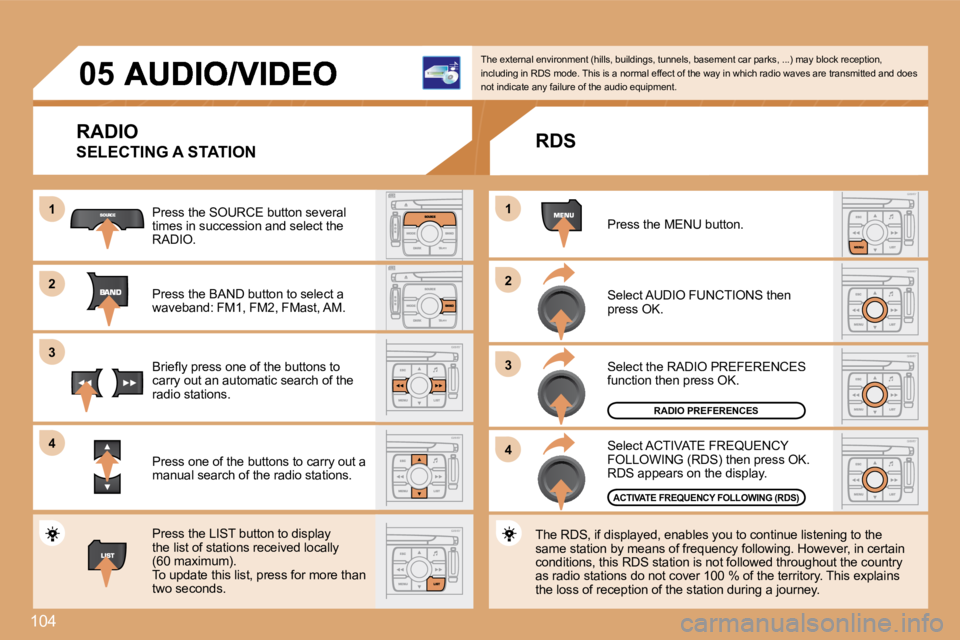
RADIO
SELECTING A STATION
Press the SOURCE button several times in succession and select the RADIO.
Press the BAND button to select a waveband: FM1, FM2, FMast, AM.
Briefl y press one of the buttons to carry out an automatic search of the radio stations.
Press one of the buttons to carry out a manual search of the radio stations.
Press the LIST button to display the list of stations received locally (60 maximum). To update this list, press for more than two seconds.
The external environment (hills, buildings, tunnels, basement car parks, ...) may block reception, including in RDS mode. This is a normal effect of t he way in which radio waves are transmitted and doe s not indicate any failure of the audio equipment.
RDS
Select ACTIVATE FREQUENCY FOLLOWING (RDS) then press OK. RDS appears on the display.
Select the RADIO PREFERENCES function then press OK.
Select AUDIO FUNCTIONS then press OK.
Press the MENU button.
The RDS, if displayed, enables you to continue lis tening to the same station by means of frequency following. Howev er, in certain conditions, this RDS station is not followed throughout the country as radio stations do not cover 100 % of the territory. This explains the loss of reception of the station during a journey.
RADIO PREFERENCES
ACTIVATE FREQUENCY FOLLOWING (RDS)
Page 101 of 252
11
22
05105 AUDIO/VIDEO
INFORMATION AND ADVICE
The MP3 format, an abbreviation of MPEG 1.2 & 2.5 Audio Layer 3, is an audio compression standard which permits the recording of several tens of music fi les on a single disc. In order to be able to play a recorded CDR/DVDR or CDRW/DVDRW, when recording it is preferable to select standardsISO 9660 level 1.2 or Joliet.
If the disc is recorded in another format, it may not be played correctly. It is recommended that the same recording standard is always used for an individual disc, with as low a speed as possible (4x maximum) for optimum sound quality. In the particular case of a multi-session CD, the Joliet standard is recommended.
The audio equipment will only play audio fi les wit h the extension ".mp3" with a sampling rate of 22.05 KHz, 44.1 KHz or 48 KHz. No other type of fi le (.wma, .mp4, m3u...) can be played.
It is advisable to restrict fi le names to 20 characters without using special characters (e.g.: " " ? ; ù) to avoid any p laying or displaying problems.
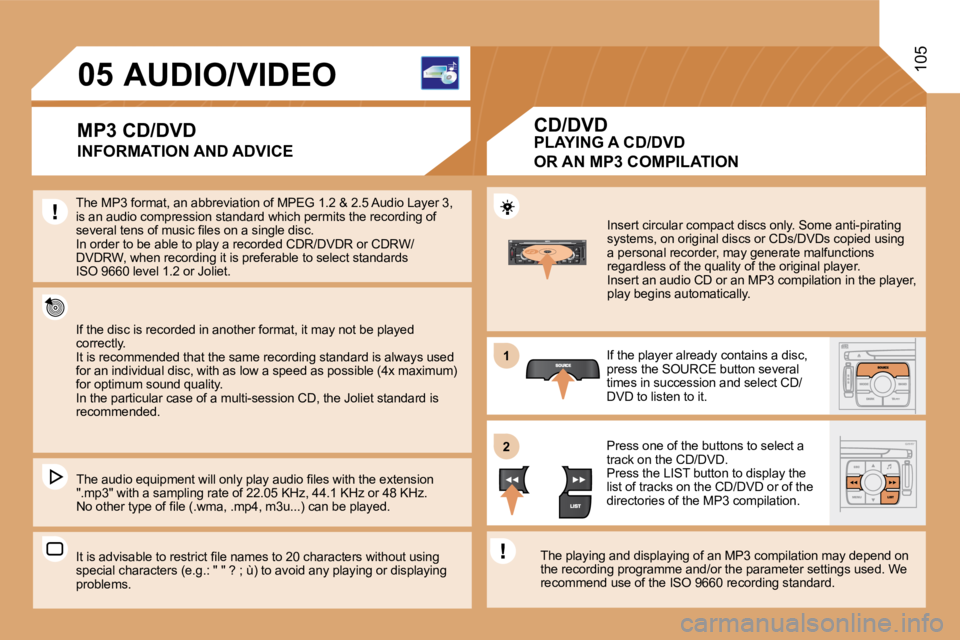
Insert circular compact discs only. Some anti-pirating systems, on original discs or CDs/DVDs copied using a personal recorder, may generate malfunctions regardless of the quality of the original player. Insert an audio CD or an MP3 compilation in the player, play begins automatically.
If the player already contains a disc, press the SOURCE button several times in succession and select CD/DVD to listen to it.
Press one of the buttons to select a track on the CD/DVD. Press the LIST button to display the list of tracks on the CD/DVD or of the directories of the MP3 compilation.
The playing and displaying of an MP3 compilation m ay depend on the recording programme and/or the parameter settin gs used. We recommend use of the ISO 9660 recording standard.
MP3 CD/DVD PLAYING A CD/DVD
OR AN MP3 COMPILATION
CD/DVD
Page 102 of 252
106
22
33
11
55
66
44
OK
STOP COPY
COMPLETE CD/DVD
COPY CD/DVD TO JUKEBOX
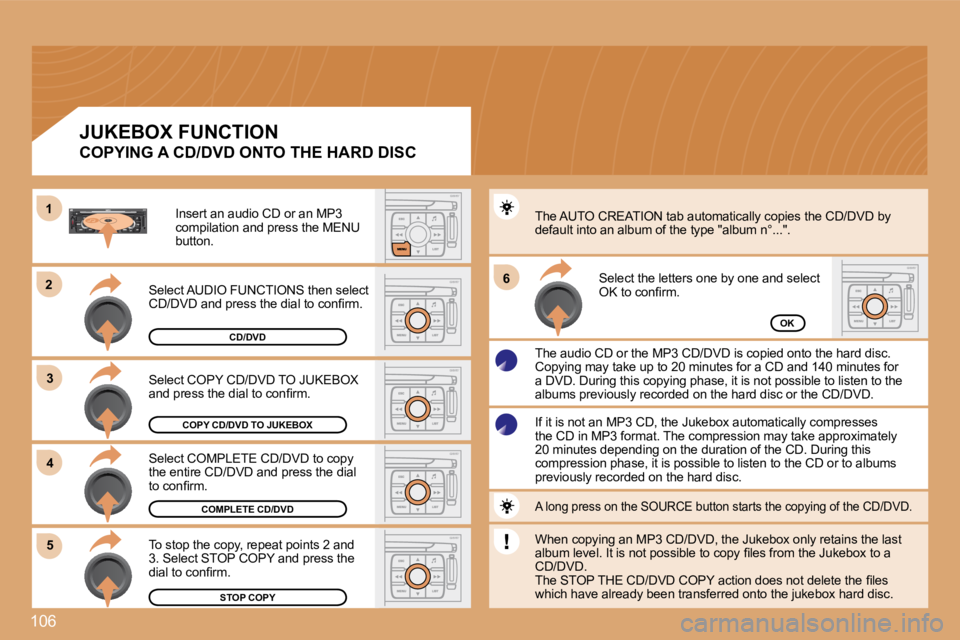
Select COPY CD/DVD TO JUKEBOX and press the dial to confi rm.
Select COMPLETE CD/DVD to copy the entire CD/DVD and press the dial to confi rm.
To stop the copy, repeat points 2 and 3. Select STOP COPY and press the dial to confi rm.
The AUTO CREATION tab automatically copies the CD/DVD by default into an album of the type "album n°...".
The audio CD or the MP3 CD/DVD is copied onto the hard disc. Copying may take up to 20 minutes for a CD and 140 minutes for a DVD. During this copying phase, it is not possible to listen to the albums previously recorded on the hard disc or the CD/DVD.
Select the letters one by one and select OK to confi rm.
If it is not an MP3 CD, the Jukebox automatically compresses the CD in MP3 format. The compression may take appr oximately 20 minutes depending on the duration of the CD. During this compression phase, it is possible to listen to the CD or to albums previously recorded on the hard disc.
A long press on the SOURCE button starts the copyi ng of the CD/DVD.
When copying an MP3 CD/DVD, the Jukebox only retai ns the last album level. It is not possible to copy fi les from the Jukebox to a CD/DVD. The STOP THE CD/DVD COPY action does not delete th e fi les which have already been transferred onto the jukebox hard disc.
Select AUDIO FUNCTIONS then select CD/DVD and press the dial to confi rm.
Insert an audio CD or an MP3 compilation and press the MENU button.
JUKEBOX FUNCTION
COPYING A CD/DVD ONTO THE HARD DISC
CD/DVD
Page 103 of 252
66
77
55
22
33
44
11
107
JUKEBOX
JUKEBOX MANAGEMENT
RENAME
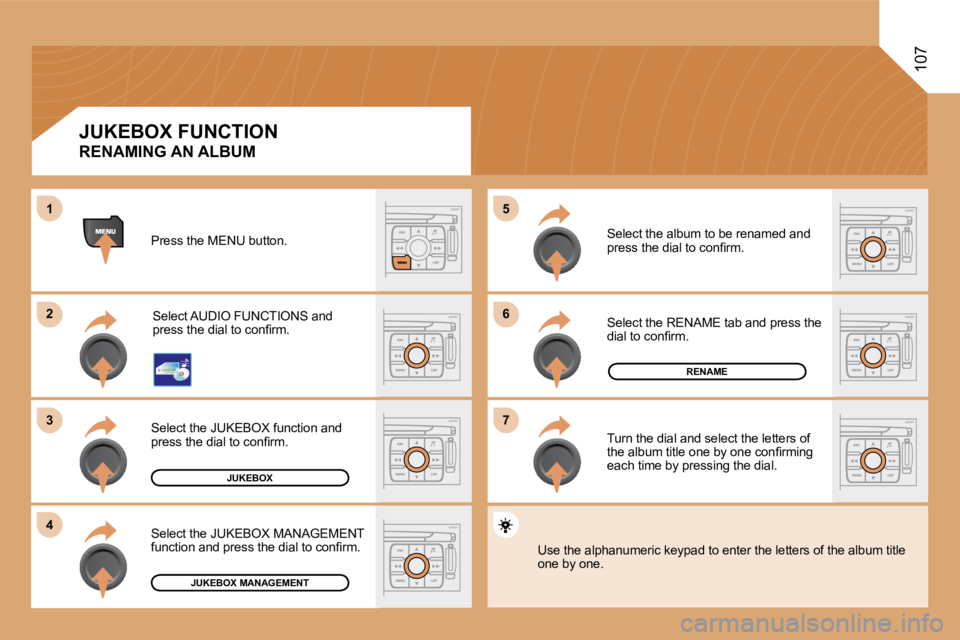
Press the MENU button.
Select AUDIO FUNCTIONS and press the dial to confi rm.
Select the JUKEBOX function and press the dial to confi rm.
Select the JUKEBOX MANAGEMENT function and press the dial to confi rm.
Select the album to be renamed and press the dial to confi rm.
Select the RENAME tab and press the dial to confi rm.
Turn the dial and select the letters of the album title one by one confi rming each time by pressing the dial.
Use the alphanumeric keypad to enter the letters of the album title one by one.
JUKEBOX FUNCTION
RENAMING AN ALBUM
Page 105 of 252
11
22
11
33
22
109
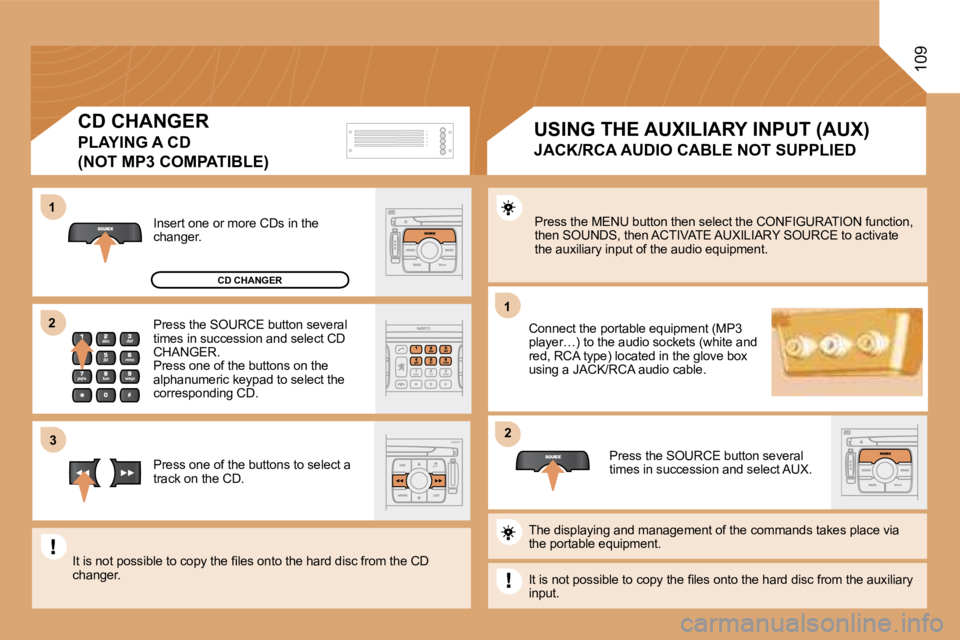
Press the MENU button then select the CONFIGURATION function, then SOUNDS, then ACTIVATE AUXILIARY SOURCE to acti vate the auxiliary input of the audio equipment.
Connect the portable equipment (MP3 player…) to the audio sockets (white and red, RCA type) located in the glove box using a JACK/RCA audio cable.
Press the SOURCE button several times in succession and select AUX.
Insert one or more CDs in the changer.
Press the SOURCE button several times in succession and select CD CHANGER. Press one of the buttons on the alphanumeric keypad to select the corresponding CD.
Press one of the buttons to select a track on the CD.
The displaying and management of the commands takes place via the portable equipment.
It is not possible to copy the fi les onto the hard disc from the auxiliary input.
It is not possible to copy the fi les onto the hard disc from the CD changer.
USING THE AUXILIARY INPUT (AUX)
JACK/RCA AUDIO CABLE NOT SUPPLIED
CD CHANGER
PLAYING A CD
(NOT MP3 COMPATIBLE)
CD CHANGER
Page 106 of 252
110
11
22
33
44
55
66
77
ACTIVATE VIDEO MODE
VIDEO PARAMETERS
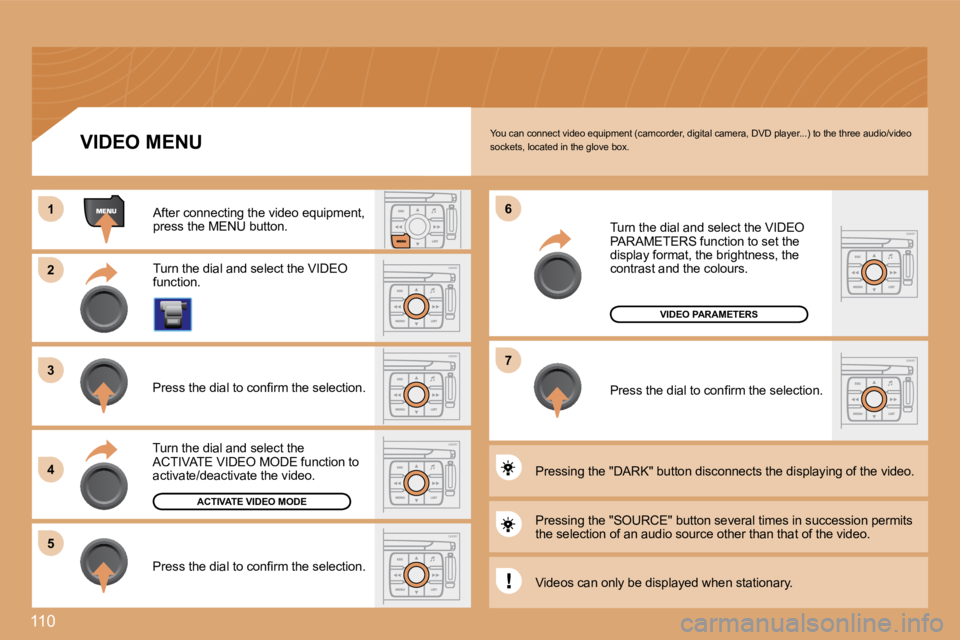
You can connect video equipment (camcorder, digital camera, DVD player...) to the three audio/video sockets, located in the glove box.
Turn the dial and select the VIDEO function.
After connecting the video equipment, press the MENU button.
Turn the dial and select the ACTIVATE VIDEO MODE function to activate/deactivate the video.
Press the dial to confi rm the selection.
Press the dial to confi rm the selection.
Pressing the "SOURCE" button several times in succ ession permits the selection of an audio source other than that of the video.
Pressing the "DARK" button disconnects the display ing of the video.
Turn the dial and select the VIDEO PARAMETERS function to set the display format, the brightness, the contrast and the colours.
Press the dial to confi rm the selection.
VIDEO MENU
Videos can only be displayed when stationary.
Page 107 of 252
11
22
33
11
22
111 TELEPHONE
ENTERING THE PIN CODE
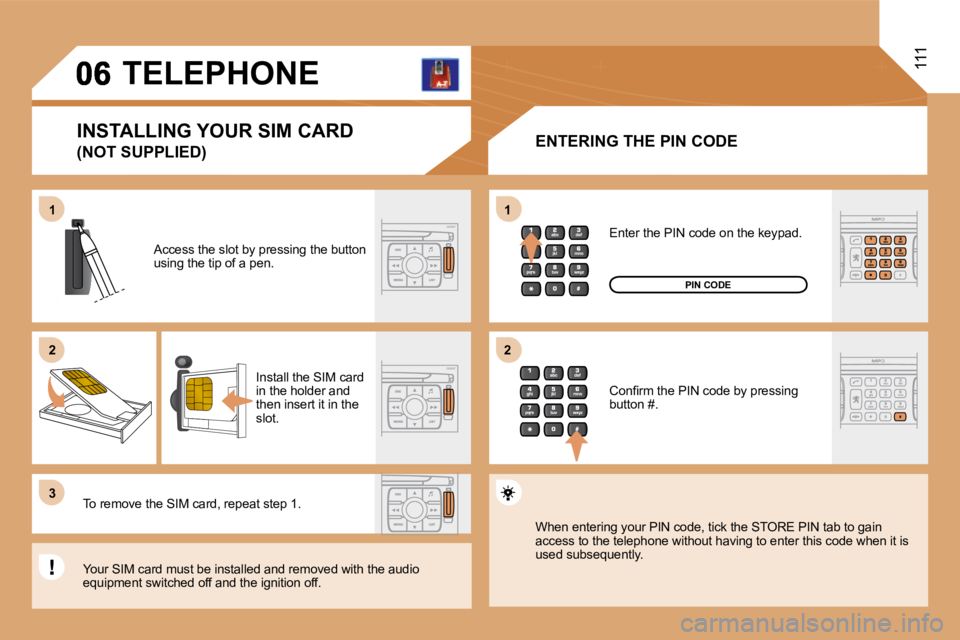
Access the slot by pressing the button using the tip of a pen.
Install the SIM card in the holder and then insert it in the slot.
To remove the SIM card, repeat step 1.
Your SIM card must be installed and removed with the audio equipment switched off and the ignition off.
Enter the PIN code on the keypad.
Confi rm the PIN code by pressing button #.
PIN CODE
When entering your PIN code, tick the STORE PIN ta b to gain access to the telephone without having to enter this code when it is used subsequently.
INSTALLING YOUR SIM CARD
(NOT SUPPLIED)
Page 113 of 252
08117 CONTROL SHORT-CUTS
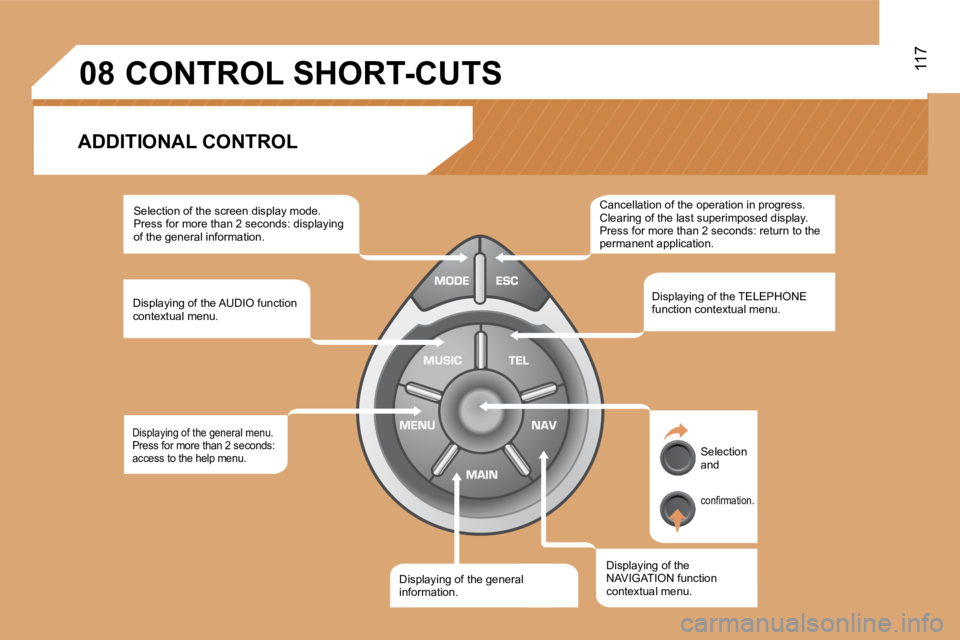
ADDITIONAL CONTROL
Selection of the screen display mode. Press for more than 2 seconds: displaying of the general information.
Displaying of the AUDIO function contextual menu.
Displaying of the general menu. Press for more than 2 seconds: access to the help menu.
Displaying of the general Displaying of the general information.
Displaying of the NAVIGATION function contextual menu.
Displaying of the TELEPHONE function contextual menu.
Cancellation of the operation in progress. Clearing of the last superimposed display. Press for more than 2 seconds: return to the permanent application.
Selection and
confi rmation.
Page 114 of 252
118
22
11
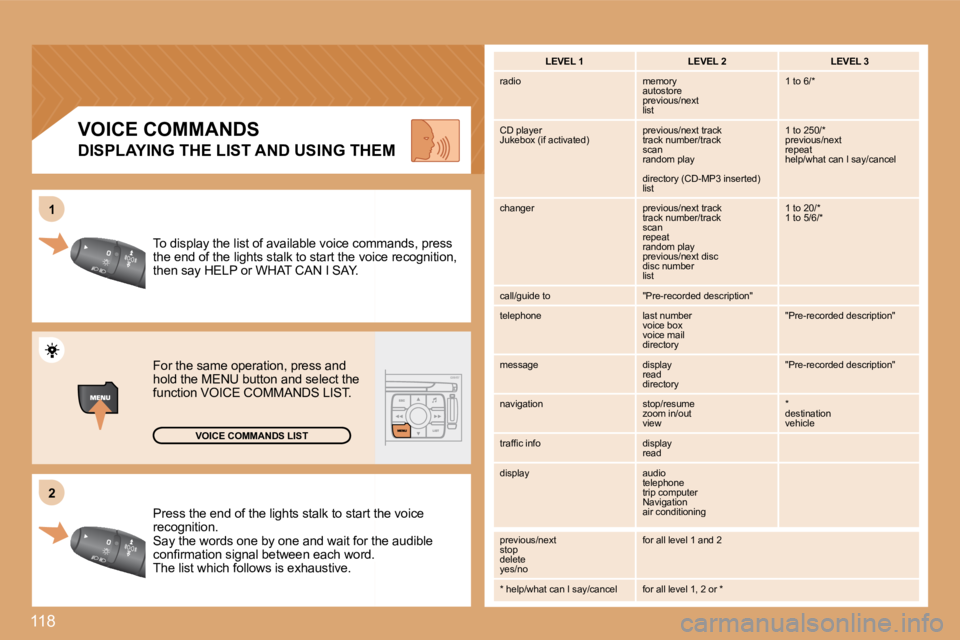
Press the end of the lights stalk to start thtart the voice recognition. Say the words one by one and wait for the for the audible confi rmation signal between each word. confi rmation signal between each word. The list which follows is exhaustive.
To display the list of available voice commcommands, press the end of the lights stalk to start the voice voice recognition, then say HELP or WHAT CAN I SAY.
For the same operation, press and hold the MENU button and select the function VOICE COMMANDS LIST.
VOICE COMMANDS LIST
VOICE COMMANDS
DISPLAYING THE LIST AND USING THEM
LEVEL 1 LEVEL 2 LEVEL 3
radio memory autostore previous/next list
1 to 6/*
CD player Jukebox (if activated) previous/next track track number/track scan random play
directory (CD-MP3 inserted) list
1 to 250/* previous/next repeat help/what can I say/cancel
changer previous/next track track number/track scan repeat random play previous/next disc disc number list
1 to 20/* 1 to 5/6/*
call/guide to "Pre-recorded description"
telephone last number voice box voice mail directory
"Pre-recorded description"
message display read directory
"Pre-recorded description"
navigation stop/resume zoom in/out view
* destination vehicle
traffi c info display read
display audio telephone trip computer Navigation air conditioning
previous/next stop delete yes/no
for all level 1 and 2
* help/what can I say/cancel for all level 1, 2 or *
Page 117 of 252
4
4
3
1
2
3
4
4
3
4
4
4
4
4
1
2
3
3
3
3
3
3
3
3
2
3
2
3
3
2
4
4
2
4
4
4
3
3
4
4
4
4
4
4
4
3
3
4
4
4
4
3
3
2
2
2
3
3
3
4
4
4
4
2
3
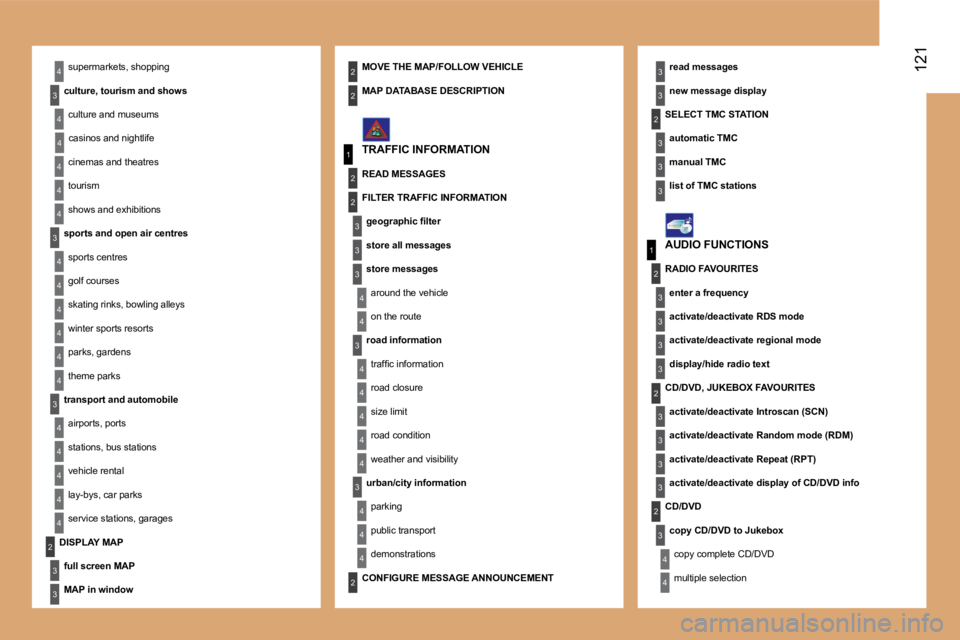
121 supermarkets, shopping
culture, tourism and shows
culture and museums
casinos and nightlife
cinemas and theatres
tourism
shows and exhibitions
sports and open air centres
sports centres
golf courses
skating rinks, bowling alleys
winter sports resorts
parks, gardens
theme parks
transport and automobile
airports, ports
stations, bus stations
vehicle rental
lay-bys, car parks
service stations, garages
read messages
new message display
TRAFFIC INFORMATION
SELECT TMC STATION
automatic TMC
manual TMC
list of TMC stations
MOVE THE MAP/FOLLOW VEHICLE
DISPLAY MAP
full screen MAP
MAP in window
MAP DATABASE DESCRIPTION
READ MESSAGES
FILTER TRAFFIC INFORMATION
geographic fi lter
store all messages
store messages
around the vehicle
on the route
road information
traffi c information
road closure
size limit
road condition
weather and visibility
urban/city information
parking
public transport
demonstrations
AUDIO FUNCTIONS
RADIO FAVOURITES
enter a frequency
activate/deactivate RDS mode
activate/deactivate regional mode
display/hide radio text
CD/DVD, JUKEBOX FAVOURITES
activate/deactivate Introscan (SCN)
activate/deactivate Random mode (RDM)
activate/deactivate Repeat (RPT)
activate/deactivate display of CD/DVD info
CD/DVD
copy CD/DVD to Jukebox
copy complete CD/DVD
multiple selection CONFIGURE MESSAGE ANNOUNCEMENT