buttons PEUGEOT 807 2008.5 User Guide
[x] Cancel search | Manufacturer: PEUGEOT, Model Year: 2008.5, Model line: 807, Model: PEUGEOT 807 2008.5Pages: 252, PDF Size: 10.67 MB
Page 140 of 252
140
1
2
3
4
1
4
06
2
3
5
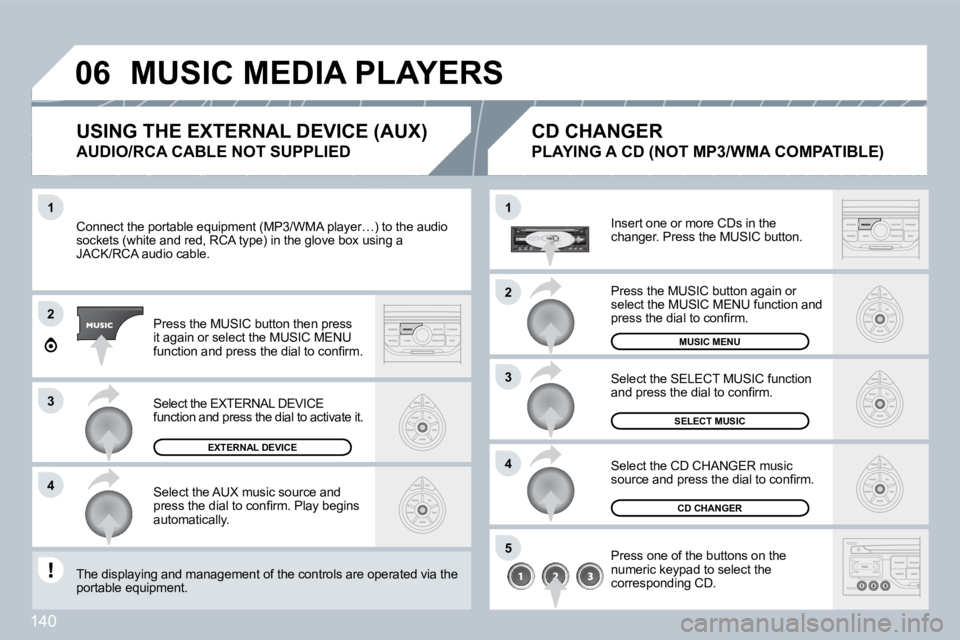
Connect the portable equipment (MP3/WMA player…) to the audio Connect the portable equipment (MP3/WMA player…) to the audio sockets (white and red, RCA type) in the glove box using a sockets (white and red, RCA type) in the glove box using a JACK/RCA audio cable.
Press the MUSIC button then press it again or select the MUSIC MENU function and press the dial to confi rm.
Select the AUX music source and press the dial to confi rm. Play begins automatically.
Select the EXTERNAL DEVICE function and press the dial to activate it.
EXTERNAL DEVICE
Insert one or more CDs in the changer. Press the MUSIC button.
Press one of the buttons on the numeric keypad to select the corresponding CD.
Select the CD CHANGER music source and press the dial to confi rm.
The displaying and management of the controls are opere operated via the portable equipment.
CD CHANGER
Select the SELECT MUSIC function and press the dial to confi rm.
SELECT MUSIC
MUSIC MENU
USING THE EXTERNAL DEVICE (AUX)
AUDIO/RCA CABLE NOT SUPPLIED
CD CHANGER
PLAYING A CD (NOT MP3/WMA COMPATIBLE)
Press the MUSIC button again or select the MUSIC MENU function and press the dial to confi rm.
MUSIC MEDIA PLAYERS
Page 145 of 252
10
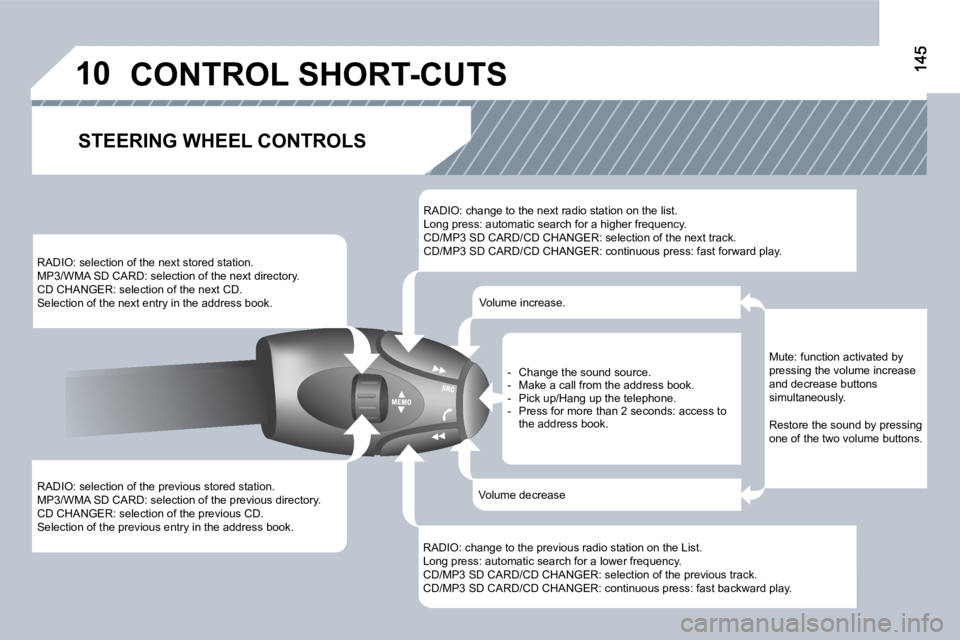
RADIO: selection of the previous stored station. MP3/WMA SD CARD: selection of the previous directory. CD CHANGER: selection of the previous CD. Selection of the previous entry in the address book.
RADIO: selection of the next stored station. MP3/WMA SD CARD: selection of the next directory. CD CHANGER: selection of the next CD. Selection of the next entry in the address book.
RADIO: change to the next radio station on the list. Long press: automatic search for a higher frequency. CD/MP3 SD CARD/CD CHANGER: selection of the next track. CD/MP3 SD CARD/CD CHANGER: continuous press: fast forward play.
RADIO: change to the previous radio station on the List. Long press: automatic search for a lower frequency. CD/MP3 SD CARD/CD CHANGER: selection of the previous track. CD/MP3 SD CARD/CD CHANGER: continuous press: fast backward play.
- Change the sound source. - Make a call from the address book. - Pick up/Hang up the telephone. - Press for more than 2 seconds: access to the address book.
Volume increase.
Volume decrease
STEERING WHEEL CONTROLS
Mute: function activated by pressing the volume increase and decrease buttons simultaneously.
Restore the sound by pressing one of the two volume buttons.
CONTROL SHORT-CUTS
Page 153 of 252
152
11
22
33
44
22
44
33
11
AUDIO
RADIO
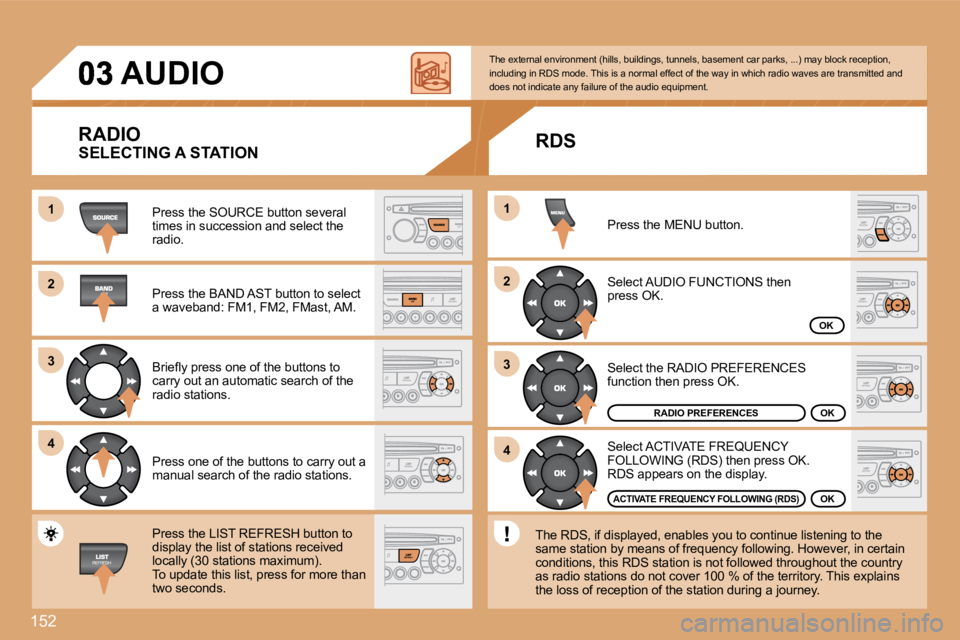
Press the SOURCE button several times in succession and select the radio.
Press the BAND AST button to select a waveband: FM1, FM2, FMast, AM.
Briefl y press one of the buttons to carry out an automatic search of the radio stations.
Press one of the buttons to carry out a manual search of the radio stations.
Press the LIST REFRESH button to display the list of stations received locally (30 stations maximum). To update this list, press for more than two seconds.
Select ACTIVATE FREQUENCY FOLLOWING (RDS) then press OK. RDS appears on the display.
Select the RADIO PREFERENCES function then press OK.
Select AUDIO FUNCTIONS then press OK.
Press the MENU button.
RADIO PREFERENCES
ACTIVATE FREQUENCY FOLLOWING (RDS)
The external environment (hills, buildings, tunnels, basement car parks, ...) may block reception, including in RDS mode. This is a normal effect of t he way in which radio waves are transmitted and does not indicate any failure of the audio equipmen t.
OK
OK
RDS
OK
The RDS, if displayed, enables you to continue lis tening to the same station by means of frequency following. Howev er, in certain conditions, this RDS station is not followed throughout the country as radio stations do not cover 100 % of the territory. This explains the loss of reception of the station during a journey.
SELECTING A STATION
Page 154 of 252
11
22
153
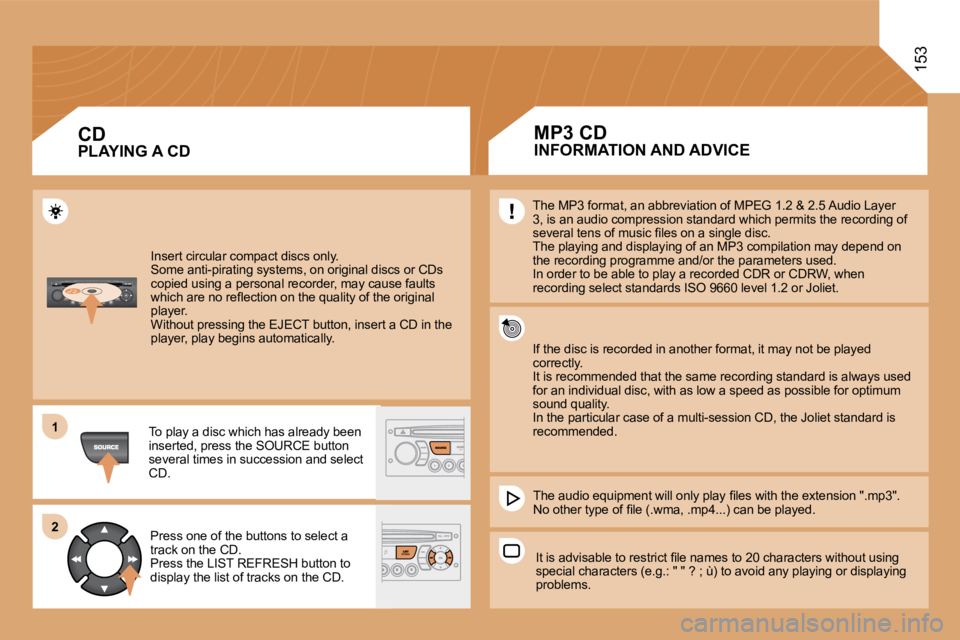
Insert circular compact discs only. Some anti-pirating systems, on original discs or CDs copied using a personal recorder, may cause faults which are no refl ection on the quality of the original player. Without pressing the EJECT button, insert a CD in the player, play begins automatically.
To play a disc which has already been inserted, press the SOURCE button several times in succession and select CD.
Press one of the buttons to select a track on the CD. Press the LIST REFRESH button to display the list of tracks on the CD.
PLAYING A CD CD INFORMATION AND ADVICE
The MP3 format, an abbreviation of MPEG 1.2 & 2.5 Audio Layer 3, is an audio compression standard which permits the recording of several tens of music fi les on a single disc. The playing and displaying of an MP3 compilation m ay depend on the recording programme and/or the parameters used. In order to be able to play a recorded CDR or CDRW, when recording select standards ISO 9660 level 1.2 or Joliet.
If the disc is recorded in another format, it may not be played correctly. It is recommended that the same recording standard is always used for an individual disc, with as low a speed as possible for optimum sound quality. In the particular case of a multi-session CD, the Joliet standard is recommended.
The audio equipment will only play fi les with the extension ".mp3". No other type of fi le (.wma, .mp4...) can be played .
It is advisable to restrict fi le names to 20 characters without using special characters (e.g.: " " ? ; ù) to avoid any p laying or displaying problems.
MP3 CD
Page 155 of 252
154
11
22
11
22
33
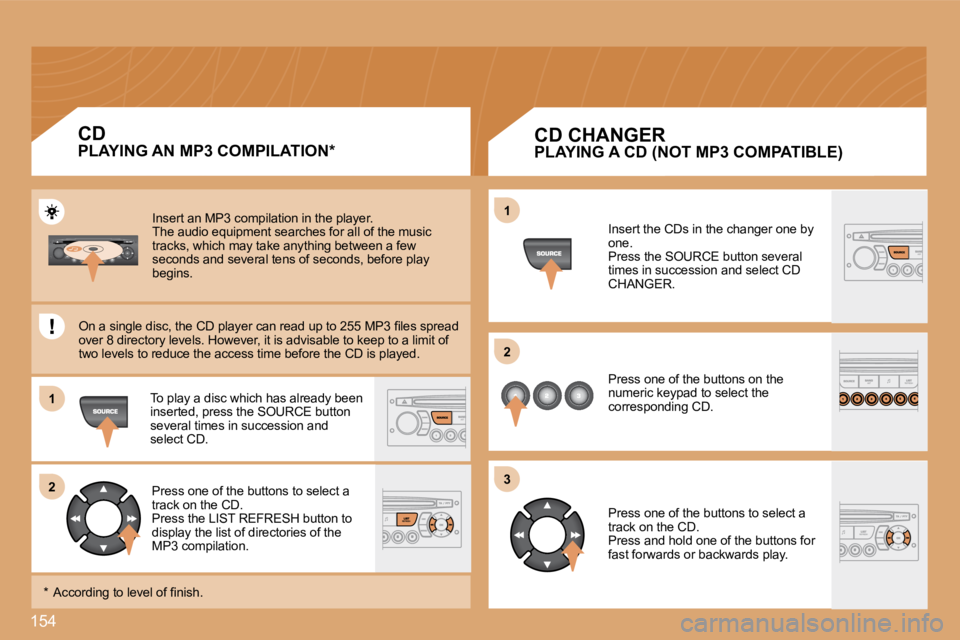
Insert an MP3 compilation in the player. The audio equipment searches for all of the music tracks, which may take anything between a few seconds and several tens of seconds, before play begins.
On a single disc, the CD player can read up to 255 MP3 fi les spread over 8 directory levels. However, it is advisable to keep to a limit of two levels to reduce the access time before the CD is played.
To play a disc which has already been inserted, press the SOURCE button several times in succession and select CD.
Press one of the buttons to select a track on the CD. Press the LIST REFRESH button to display the list of directories of the MP3 compilation.
* According to level of fi nish.
PLAYING AN MP3 COMPILATION *
CD
PLAYING A CD (NOT MP3 COMPATIBLE)
Insert the CDs in the changer one by one. Press the SOURCE button several times in succession and select CD CHANGER.
Press one of the buttons on the numeric keypad to select the corresponding CD.
Press one of the buttons to select a track on the CD. Press and hold one of the buttons for fast forwards or backwards play.
CD CHANGER
Page 158 of 252
06157
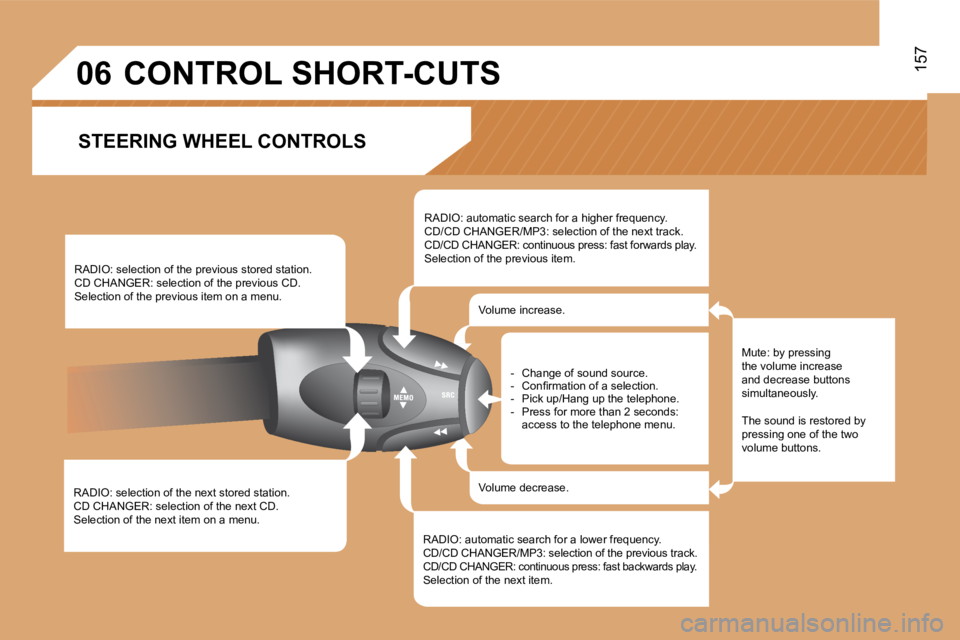
RADIO: selection of the next stored station. CD CHANGER: selection of the next CD. Selection of the next item on a menu.
RADIO: selection of the previous stored station. CD CHANGER: selection of the previous CD. Selection of the previous item on a menu.
RADIO: automatic search for a higher frequency. CD/CD CHANGER/MP3: selection of the next track. CD/CD CHANGER: continuous press: fast forwards play. Selection of the previous item.
RADIO: automatic search for a lower frequency. CD/CD CHANGER/MP3: selection of the previous track . CD/CD CHANGER: continuous press: fast backwards play. Selection of the next item.
Volume increase.
Volume decrease.
CONTROL SHORT-CUTS
Mute: by pressing the volume increase and decrease buttons simultaneously.
The sound is restored by pressing one of the two volume buttons.
- Change of sound source. - Confi rmation of a selection. - Pick up/Hang up the telephone. - Press for more than 2 seconds: access to the telephone menu.
STEERING WHEEL CONTROLS
Page 208 of 252
208
Changing a fuse
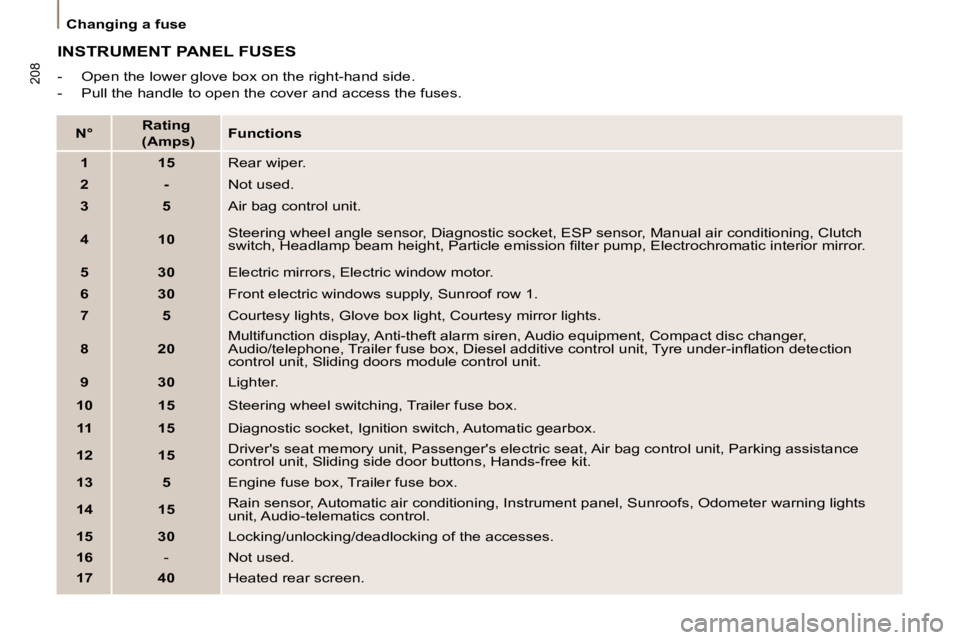
INSTRUMENT PANEL FUSES
- Open the lower glove box on the right-hand side.
- Pull the handle to open the cover and access the fuses.
N°
Rating
(Amps)
Functions
1 15 Rear wiper.
2 - Not used.
3 5 Air bag control unit.
4 10 Steering wheel angle sensor, Diagnostic socket, ESP sensor, Manu
al air conditioning, Clutch
switch, Headlamp beam height, Particle emission fi lter pump, Ele ctrochromatic interior mirror.
5 30 Electric mirrors, Electric window motor.
6 30 Front electric windows supply, Sunroof row 1.
7 5 Courtesy lights, Glove box light, Courtesy mirror lights.
8 20 Multifunction display, Anti-theft alarm siren, Audio equipmen
t, Compact disc changer,
Audio/telephone, Trailer fuse box, Diesel additive control u nit, Tyre under-infl ation detection
control unit, Sliding doors module control unit.
9 30 Lighter.
10 15 Steering wheel switching, Trailer fuse box.
11 15 Diagnostic socket, Ignition switch, Automatic gearbox.
12 15 Driver's seat memory unit, Passenger's electric seat, Air bag control un
it, Parking assistance
control unit, Sliding side door buttons, Hands-free kit.
13 5 Engine fuse box, Trailer fuse box.
14 15 Rain sensor, Automatic air conditioning, Instrument panel, Su
nroofs, Odometer warning lights
unit, Audio-telematics control.
15 30 Locking/unlocking/deadlocking of the accesses.
16 - Not used.
17 40 Heated rear screen.
Page 238 of 252
10
1
2
1
2
3
4
STOP
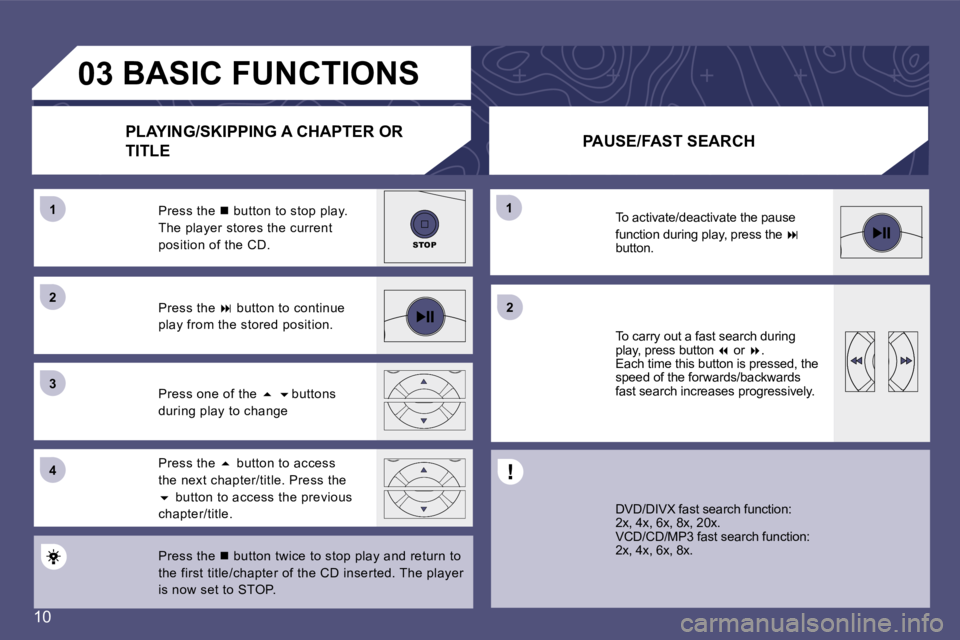
03BASIC FUNCTIONSPLAYING/SKIPPING A CHAPTER OR
TITLE PAUSE/FAST SEARCH
Press the n button twice to stop play and return to
the first title/chapter of the CD inserted. The pla yer
is now set to STOP.
Press the
5 button to access
the next chapter/title. Press the 6 button to access the previous
chapter/title.
Press one of the
5 6 buttons
during play to change
Press the
button to continue
play from the stored position.
Press the
n button to stop play.
The player stores the current
position of the CD.
DVD/DIVX fast search function:
2x, 4x, 6x, 8x, 20x.
VCD/CD/MP3 fast search function:
2x, 4x, 6x, 8x.
To carry out a fast search during
play, press button
7 or 8.
Each time this button is pressed, the
speed of the forwards/backwards
fast search increases progressively.
To activate/deactivate the pause
function during play, press the
button.
Page 244 of 252
16
04
1
2
3
4
1
2
5
3
POWERSTOPMODE
SMART
ROOT ACID-JAZZ
CHILL OUT
INDEPENDANT
LATINROOT ACID-JAZZ
CHILL OUT
INDEPENDANT
LATIN
POPPOP
. .002PAC-Cali
ANASTACIA -
BABYLON ZOO
BRANDY MONICULTURE BA 1 23 4
52PAC-Cali
ANASTACIA -
BABYLON ZOO
BRANDY MONI
CULTURE BA 1 2 34
5MP3MP3MP3MP3MP3MP3MP3MP3MP3MP3
SMART NAVI 00 : 02 : 58
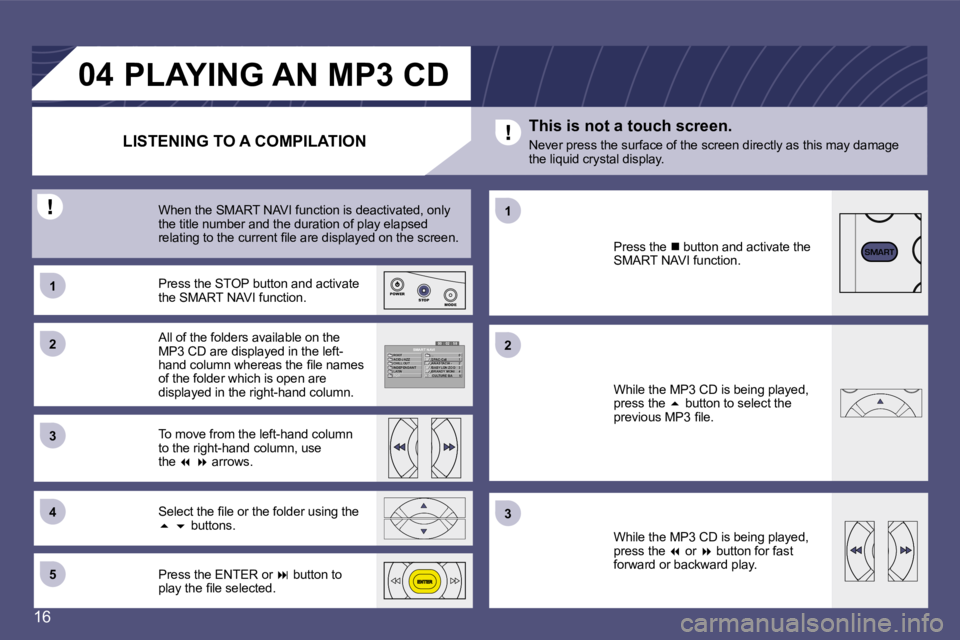
LISTENING TO A COMPILATIONPLAYING AN MP3 CD
All of the folders available on the
MP3 CD are displayed in the left-
hand column whereas the ile names
of the folder which is open are
displayed in the right-hand column.
Press the STOP button and activate
the SMART NAVI function.
To move from the left-hand column
to the right-hand column, use
the 7 8 arrows.
When the SMART NAVI function is deactivated, only
the title number and the duration of play elapsed
relating to the current ile are displayed on the sc
reen.
Select the ile or the folder using the 5 6 buttons.
Press the ENTER or button to
play the ile selected. Press the
n button and activate the
SMART NAVI function.
While the MP3 CD is being played,
press the 5 button to select the
previous MP3 ile.
While the MP3 CD is being played,
press the 7 or 8 button for fast
forward or backward play.
This is not a touch screen.
Never press the surface of the screen directly as t
his may damage
the liquid crystal display.
Page 245 of 252
17
05
1
1
2
123
456
789
MENU
INFORMATION AND ADVICEPLAYING A JPEG IMAGES CD
PLAYING A JPEG IMAGES CD
Check that the JPEG images have the extension
".jpeg".
The folder can only be selected in STOP mode ( n).
The volume, colours, contrast and brightness of the
images cannot be adjusted while the CD is being
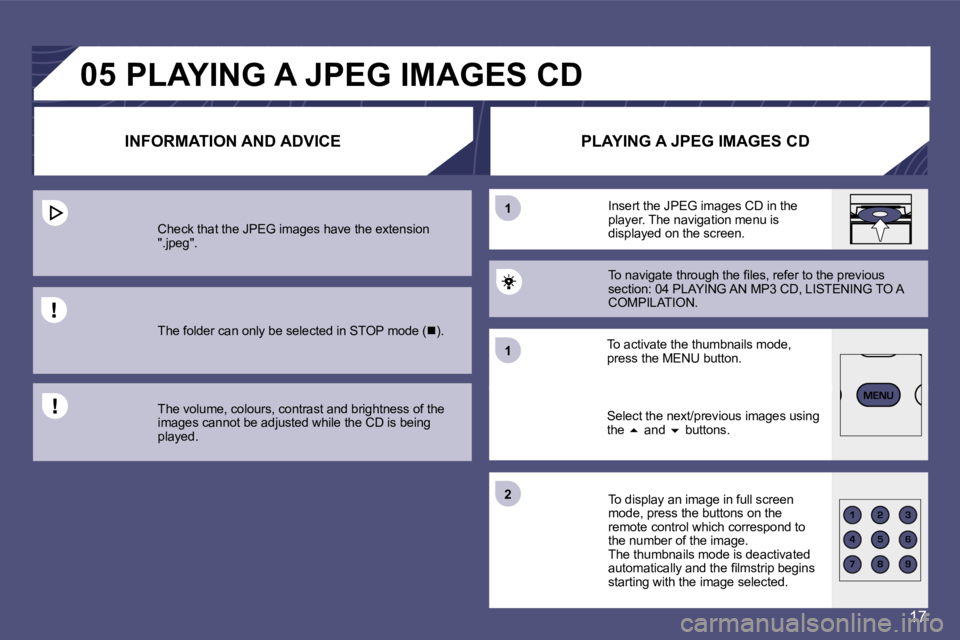
played. Select the next/previous images using
the
5 and 6 buttons.
To activate the thumbnails mode,
press the MENU button. Insert the JPEG images CD in the
player. The navigation menu is
displayed on the screen.
To navigate through the iles, refer to the previous
section: 04 PLAYING AN MP3 CD, LISTENING TO A
COMPILATION.
To display an image in full screen
mode, press the buttons on the
remote control which correspond to
the number of the image.
The thumbnails mode is deactivated
automatically and the ilmstrip begins
starting with the image selected.