key PEUGEOT 807 2008.5 User Guide
[x] Cancel search | Manufacturer: PEUGEOT, Model Year: 2008.5, Model line: 807, Model: PEUGEOT 807 2008.5Pages: 252, PDF Size: 10.67 MB
Page 39 of 252
2
43
READY TO SET OFF
Starting and stopping
READY TO SET OFF
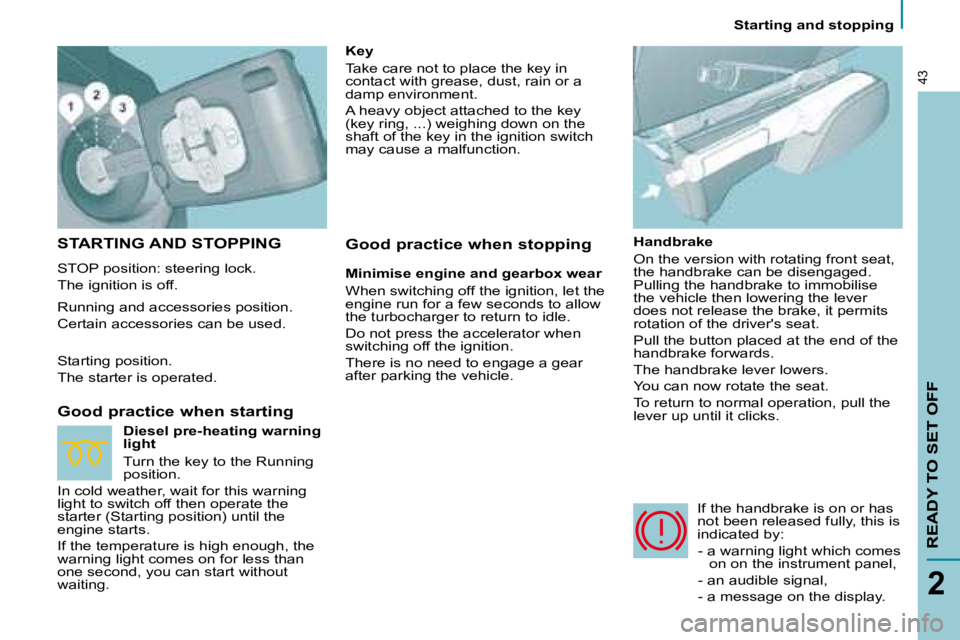
STARTING AND STOPPING
STOP position: steering lock.
The ignition is off.
Good practice when starting Handbrake
On the version with rotating front seat,
the handbrake can be disengaged.
Pulling the handbrake to immobilise
the vehicle then lowering the lever
does not release the brake, it permits
rotation of the driver's seat.
Pull the button placed at the end of the
handbrake forwards.
The handbrake lever lowers.
You can now rotate the seat.
To return to normal operation, pull the
lever up until it clicks.
If the handbrake is on or has
not been released fully, this is
indicated by: - a warning light which comes on on the instrument panel,
- an audible signal,
- a message on the display.
Key
Take care not to place the key in
contact with grease, dust, rain or a
damp environment.
A heavy object attached to the key
(key ring, ...) weighing down on the
shaft of the key in the ignition switch
may cause a malfunction.
Running and accessories position.
Certain accessories can be used.
Starting position.
The starter is operated. Diesel pre-heating warning
light
Turn the key to the Running
position.
In cold weather, wait for this warning
light to switch off then operate the
starter (Starting position) until the
engine starts.
If the temperature is high enough, the
warning light comes on for less than
one second, you can start without
waiting. Good practice when stopping
Minimise engine and gearbox wear
When switching off the ignition, let the
engine run for a few seconds to allow
the turbocharger to return to idle.
Do not press the accelerator when
switching off the ignition.
There is no need to engage a gear
after parking the vehicle.
Page 62 of 252
ERGONOMICS and COMFORT
3
67
Seats
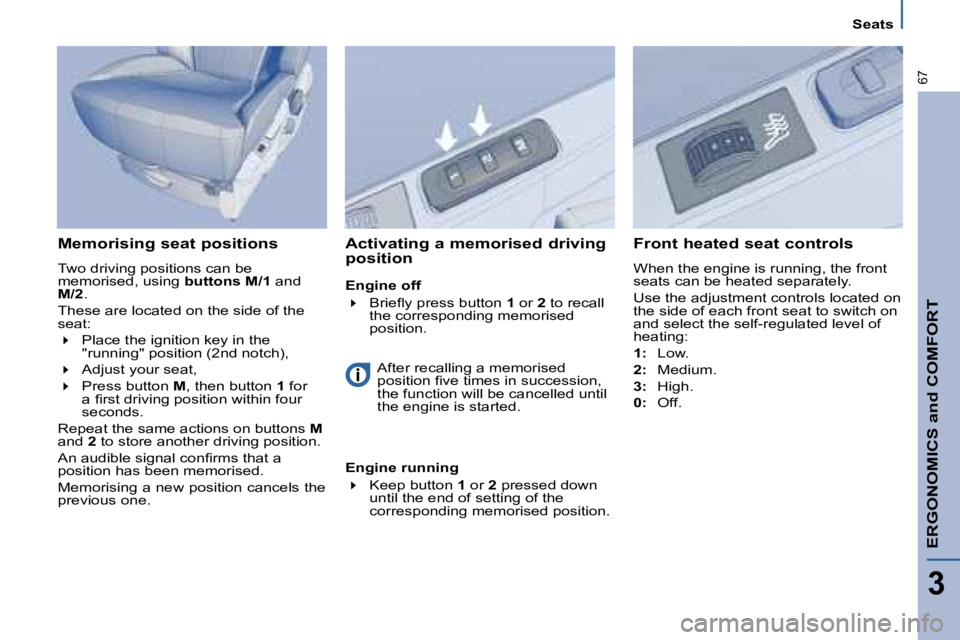
Memorising seat positions
Two driving positions can be memorised, using buttons M/1 and M/2 .
These are located on the side of the seat:
Place the ignition key in the "running" position (2nd notch),
Adjust your seat,
Press button M , then button 1 for a fi rst driving position within four seconds.
Repeat the same actions on buttons Mand 2 to store another driving position.
An audible signal confi rms that a position has been memorised.
Memorising a new position cancels the
previous one.
Activating a memorised driving
position
Front heated seat controls
When the engine is running, the front seats can be heated separately.
Use the adjustment controls located on the side of each front seat to switch on and select the self-regulated level of heating:
1: Low.
2: Medium.
3: High.
0: Off. After recalling a memorised position fi ve times in succession, the function will be cancelled until the engine is started.
Engine running
Keep button 1 or 2 pressed down until the end of setting of the corresponding memorised position.
Engine off
Briefl y press button 1 or 2 to recall the corresponding memorised position.
Page 81 of 252
86
Mirrors and windows Manual interior mirror
The interior mirror has two positions:
- day (normal),
- night (anti-dazzle).
To change from one to the other, push
or pull the lever on the lower edge of
the mirror.
Automatic day/night interior
mirror
This automatically and gradually
changes between the day and night
positions. To prevent dazzling,
the glass of the mirror darkens
automatically depending on the
intensity of the light from behind.
It clears as the light (headlamps of
following vehicles, sunlight) decreases,
ensuring maximum visibility.
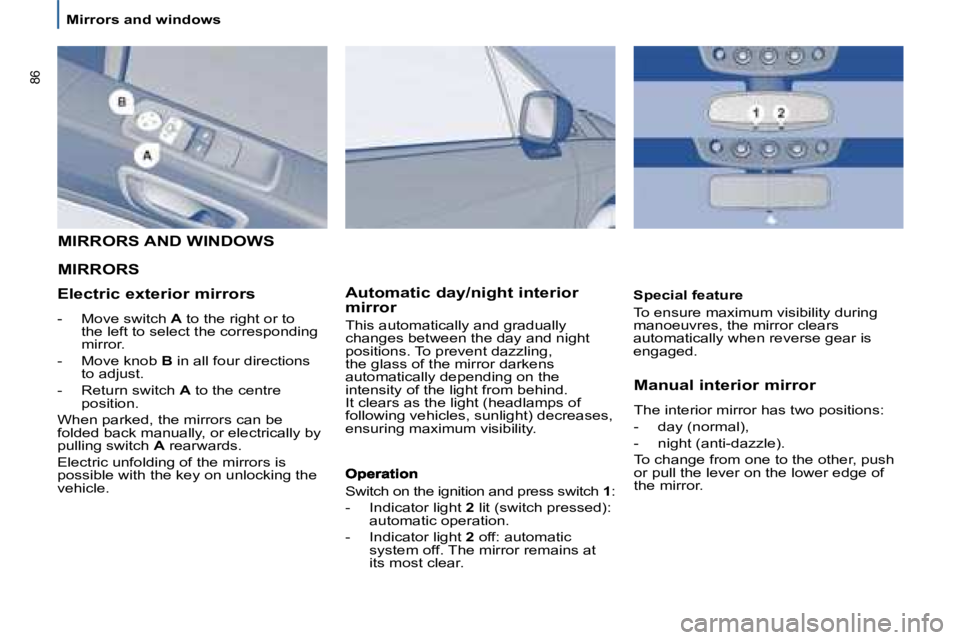
Switch on the ignition and press switch 1 :
- Indicator light 2 lit (switch pressed): automatic operation.
- Indicator light 2 off: automatic system off. The mirror remains at its most clear.
MIRRORS
MIRRORS AND WINDOWS
Special feature
To ensure maximum visibility during manoeuvres, the mirror clears automatically when reverse gear is engaged.
Electric exterior mirrors
- Move switch A to the right or to the left to select the corresponding mirror.
- Move knob B in all four directions to adjust.
- Return switch A to the centre position.
When parked, the mirrors can be
folded back manually, or electrically by
pulling switch
A rearwards.
Electric unfolding of the mirrors is
possible with the key on unlocking the
vehicle.
Page 83 of 252
88
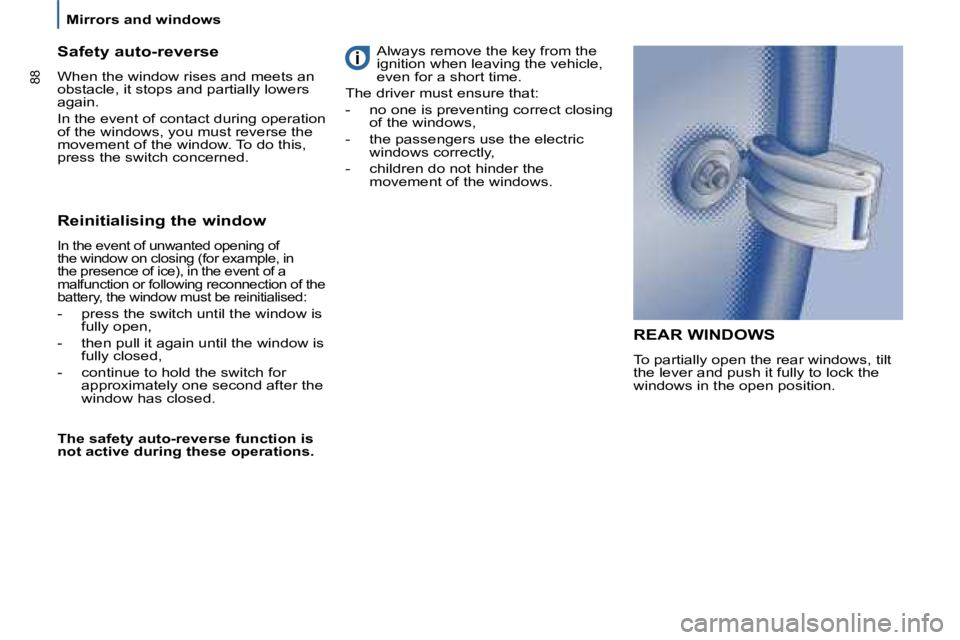
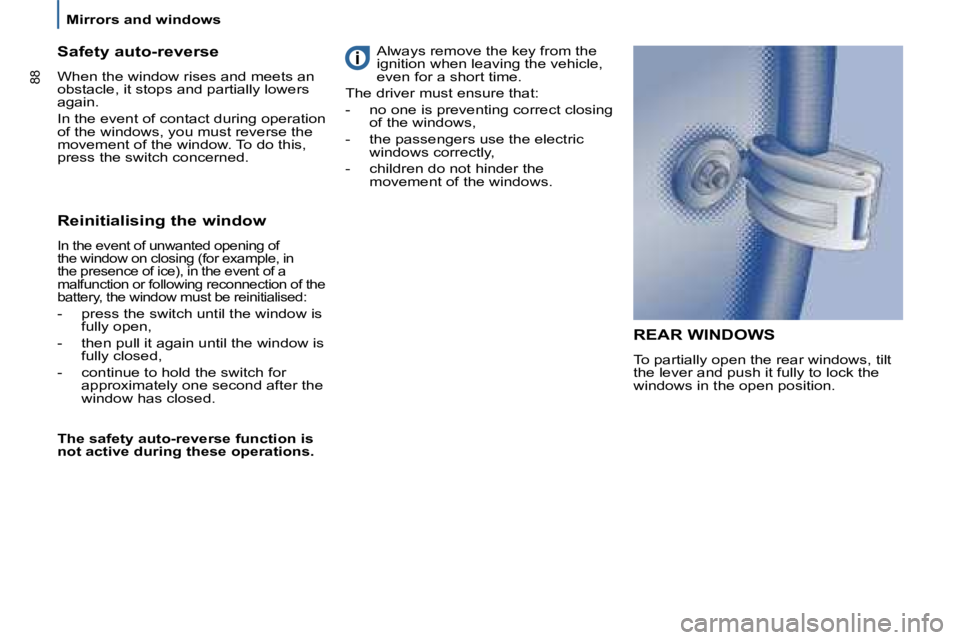
Mirrors and windows REAR WINDOWS
To partially open the rear windows, tilt
the lever and push it fully to lock the
windows in the open position.
Safety auto-reverse
When the window rises and meets an
obstacle, it stops and partially lowers
again.
In the event of contact during operation
of the windows, you must reverse the
movement of the window. To do this,
press the switch concerned.
Reinitialising the window
In the event of unwanted opening of the window on closing (for example, in the presence of ice), in the event of a malfunction or following reconnection of the battery, the window must be reinitialised:
- press the switch until the window is
fully open,
- then pull it again until the window is
fully closed,
- continue to hold the switch for
approximately one second after the
window has closed.
The safety auto-reverse function is not active during these operations.
Always remove the key from the ignition when leaving the vehicle, even for a short time.
The driver must ensure that:
- no one is preventing correct closing of the windows,
- the passengers use the electric windows correctly,
- children do not hinder the movement of the windows.
Page 84 of 252
88
Mirrors and windows REAR WINDOWS
To partially open the rear windows, tilt
the lever and push it fully to lock the
windows in the open position.
Safety auto-reverse
When the window rises and meets an
obstacle, it stops and partially lowers
again.
In the event of contact during operation
of the windows, you must reverse the
movement of the window. To do this,
press the switch concerned.
Reinitialising the window
In the event of unwanted opening of the window on closing (for example, in the presence of ice), in the event of a malfunction or following reconnection of the battery, the window must be reinitialised:
- press the switch until the window is
fully open,
- then pull it again until the window is
fully closed,
- continue to hold the switch for
approximately one second after the
window has closed.
The safety auto-reverse function is not active during these operations.
Always remove the key from the ignition when leaving the vehicle, even for a short time.
The driver must ensure that:
- no one is preventing correct closing of the windows,
- the passengers use the electric windows correctly,
- children do not hinder the movement of the windows.
Page 86 of 252

90
01 FIRST STEPS
CD/DVD eject
On - Off Volume dial
Source: selection of the radio, Jukebox, CD/DVD, CD changer and auxiliary (AUX if activated on the Confi guration menu). Copy CD to hard disc
Mode: selection with displaying of the TRIP, TEL, NAV or AUDIO mode chosen Dark: hide the screen display, until completely black, by successive presses. Pressing again reactivates the display.
Reinitialisation of the system
Band: selection of the FM1, FM2, FMast, AM wavebands. TA: TA Traffi c Announcements function on/off PTY: Types of Programme function on/off by means of a lo ng press
Alpha-numeric telephone keypad for the same uses, dial, call, hang up, enter.
Lion: Direct access to the " PEUGEOT " services.
ESC: clears the current selection return to the previous selection
Menu: displays the general screen: sound settings
List: displays the list of radio stations received the list of CD/DVD tracks or MP3/Jukebox directories updating of the stations received.
Navigator which selects the choices above or the step by step or rapid advances.
Pressing the navigation dial confi rms the choice, but does not store it.
A long press is required.
For a detailed global view of the menus available, refer to the "Display fl ow chart" section of this chapter.
Page 90 of 252
94
99
1111
1212
1313
1515
1010
1414
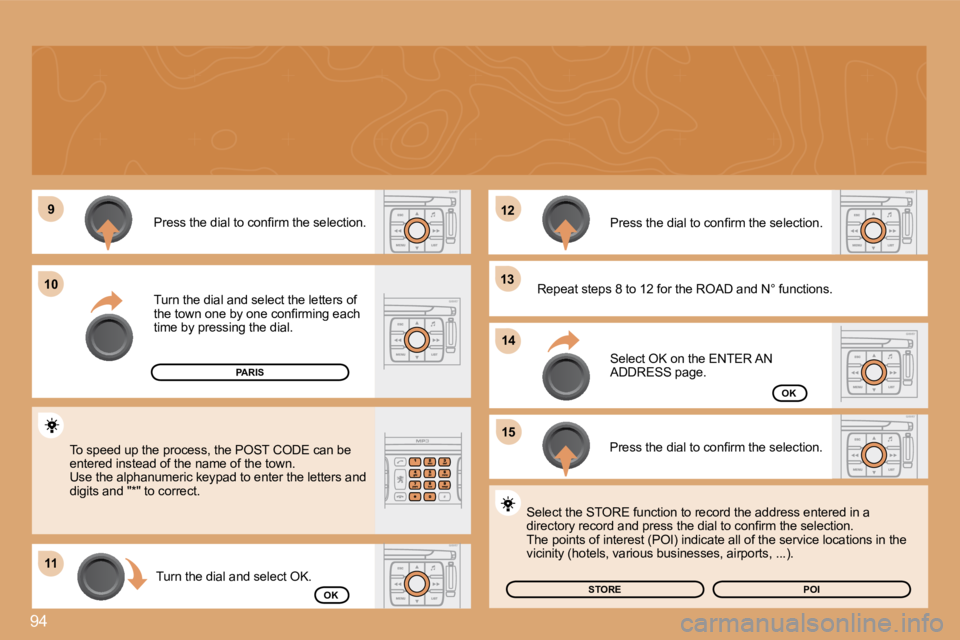
Press the dial to confi rm the selection.
Turn the dial and select the letters of the town one by one confi rming each time by pressing the dial.
Turn the dial and select OK.
Press the dial to confi rm the selection.
To speed up the process, the POST CODE can be entered instead of the name of the town. Use the alphanumeric keypad to enter the letters and digits and "*" to correct.
Press the dial to confi rm the selection.
Select OK on the ENTER AN ADDRESS page.
Repeat steps 8 to 12 for the ROAD and N° functions .
OK
OKSTOREPOI
Select the STORE function to record the address entered in a directory record and press the dial to confi rm the selection. The points of interest (POI) indicate all of the service locations in the vicinity (hotels, various businesses, airports, ... ).
PARIS
Page 103 of 252
66
77
55
22
33
44
11
107
JUKEBOX
JUKEBOX MANAGEMENT
RENAME
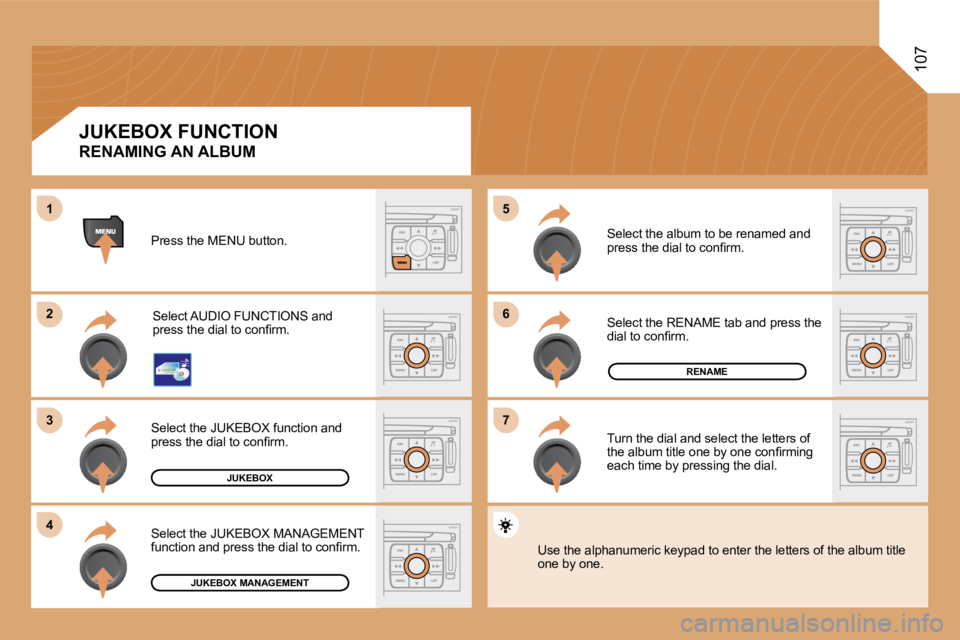
Press the MENU button.
Select AUDIO FUNCTIONS and press the dial to confi rm.
Select the JUKEBOX function and press the dial to confi rm.
Select the JUKEBOX MANAGEMENT function and press the dial to confi rm.
Select the album to be renamed and press the dial to confi rm.
Select the RENAME tab and press the dial to confi rm.
Turn the dial and select the letters of the album title one by one confi rming each time by pressing the dial.
Use the alphanumeric keypad to enter the letters of the album title one by one.
JUKEBOX FUNCTION
RENAMING AN ALBUM
Page 105 of 252
11
22
11
33
22
109
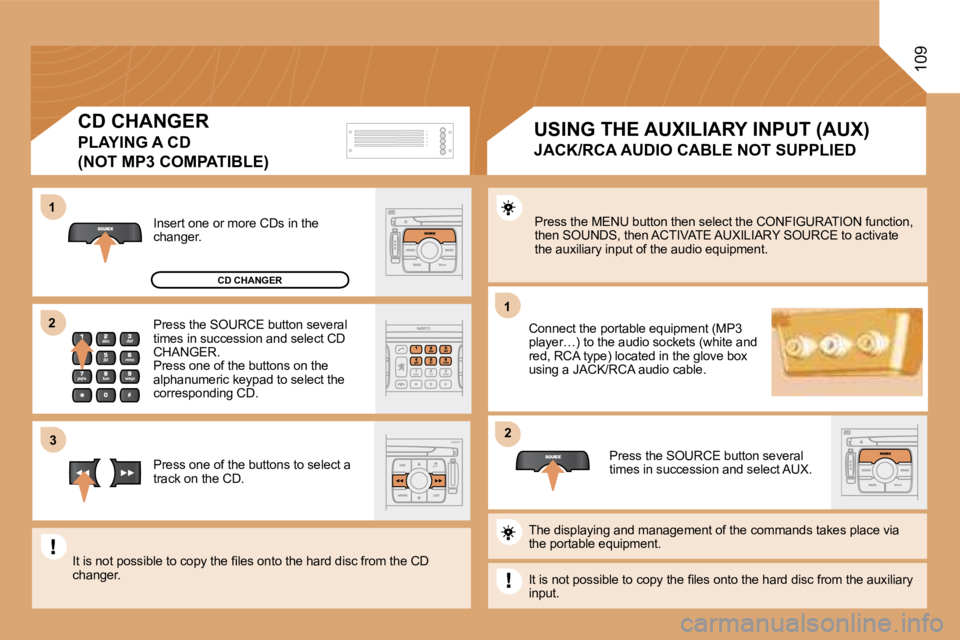
Press the MENU button then select the CONFIGURATION function, then SOUNDS, then ACTIVATE AUXILIARY SOURCE to acti vate the auxiliary input of the audio equipment.
Connect the portable equipment (MP3 player…) to the audio sockets (white and red, RCA type) located in the glove box using a JACK/RCA audio cable.
Press the SOURCE button several times in succession and select AUX.
Insert one or more CDs in the changer.
Press the SOURCE button several times in succession and select CD CHANGER. Press one of the buttons on the alphanumeric keypad to select the corresponding CD.
Press one of the buttons to select a track on the CD.
The displaying and management of the commands takes place via the portable equipment.
It is not possible to copy the fi les onto the hard disc from the auxiliary input.
It is not possible to copy the fi les onto the hard disc from the CD changer.
USING THE AUXILIARY INPUT (AUX)
JACK/RCA AUDIO CABLE NOT SUPPLIED
CD CHANGER
PLAYING A CD
(NOT MP3 COMPATIBLE)
CD CHANGER
Page 107 of 252
11
22
33
11
22
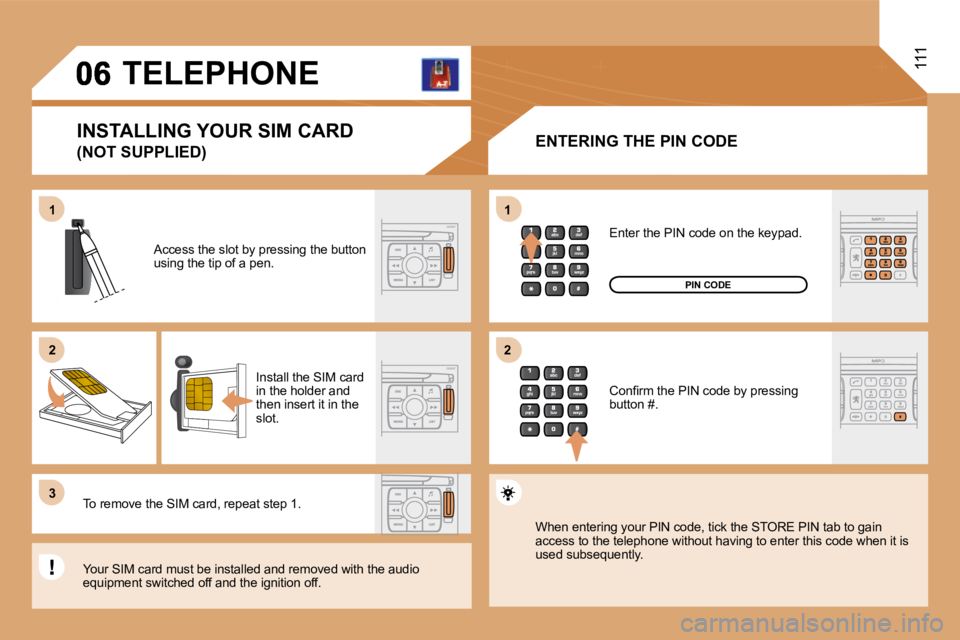
111 TELEPHONE
ENTERING THE PIN CODE
Access the slot by pressing the button using the tip of a pen.
Install the SIM card in the holder and then insert it in the slot.
To remove the SIM card, repeat step 1.
Your SIM card must be installed and removed with the audio equipment switched off and the ignition off.
Enter the PIN code on the keypad.
Confi rm the PIN code by pressing button #.
PIN CODE
When entering your PIN code, tick the STORE PIN ta b to gain access to the telephone without having to enter this code when it is used subsequently.
INSTALLING YOUR SIM CARD
(NOT SUPPLIED)