navigation PEUGEOT 807 2008.5 User Guide
[x] Cancel search | Manufacturer: PEUGEOT, Model Year: 2008.5, Model line: 807, Model: PEUGEOT 807 2008.5Pages: 252, PDF Size: 10.67 MB
Page 126 of 252
126
01
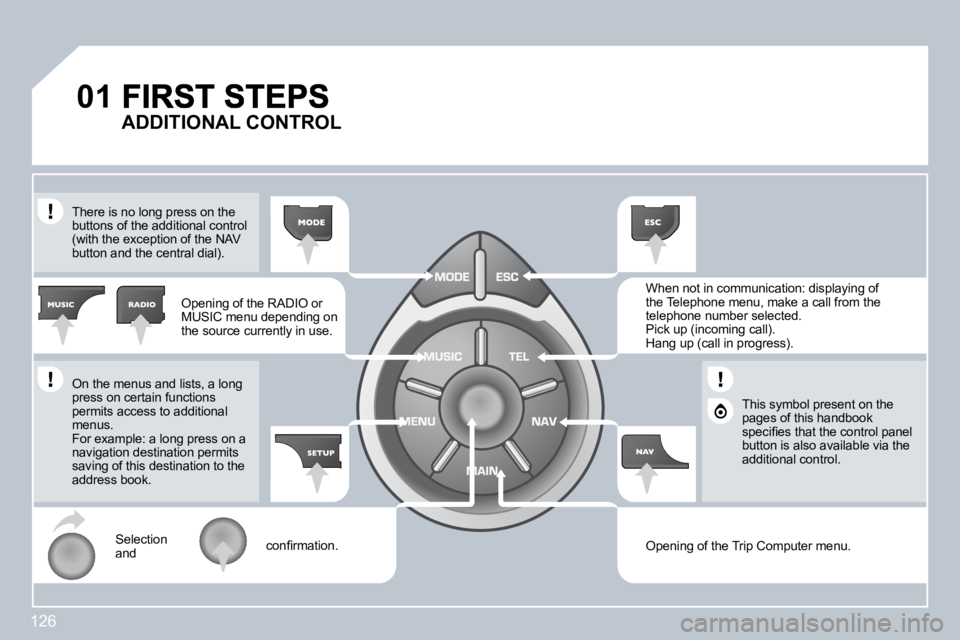
Opening of the RADIO or MUSIC menu depending on the source currently in use.
Opening of the Trip Computer menu.
When not in communication: displaying of the Telephone menu, make a call from the telephone number selected. Pick up (incoming call). Hang up (call in progress).
Selection and confi rmation.
On the menus and lists, a long press on certain functions permits access to additional menus. For example: a long press on a navigation destination permits saving of this destination to the address book.
There is no long press on the buttons of the additional control (with the exception of the NAV button and the central dial).
This symbol present on the pages of this handbook specifi es that the control panel button is also available via the additional control.
ADDITIONAL CONTROL
Page 127 of 252

02
127
GENERAL OPERATION
For a detailed global view of the menus available, refer to the "Display fl ow charts" section of this handbook.
Press the MODE button several times in succession to gain access to the following menus:
For maintenance of the display, the use of a soft, non-abrasive cloth (spectacles cloth) is recommended, without any addi tional product.
RADIO / MUSIC MEDIA PLAYERS
PHONE (If a conversation is in progress)
TRIP COMPUTER
FULL SCREEN MAP
NAVIGATION (If navigation is in progress)
SETUP: system language, date and time, display, vehicle parameters, units and system parameters
TRAFFIC: TMC information and messages
Page 129 of 252
03
1
2
3
6
5
4
129 NAVIGATION - GUIDANCE
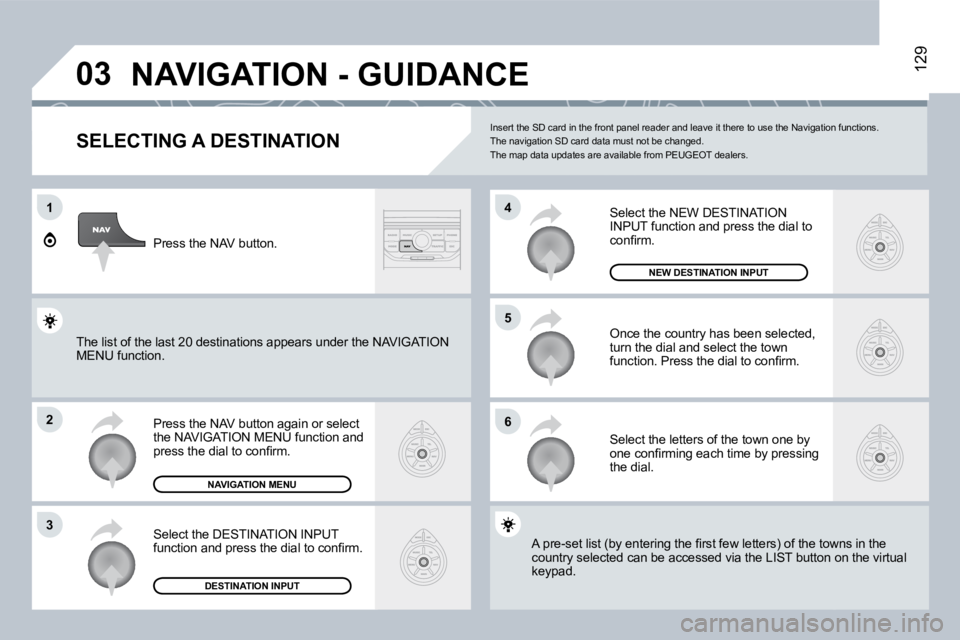
SELECTING A DESTINATION
Press the NAV button again or select the NAVIGATION MENU function and press the dial to confi rm.
Select the DESTINATION INPUT function and press the dial to confi rm.
Press the NAV button.
Select the letters of the town one by one confi rming each time by pressing the dial.
Once the country has been selected, turn the dial and select the town function. Press the dial to confi rm.
DESTINATION INPUT
NAVIGATION MENU
Insert the SD card in the front panel reader and leave it there to use the Navigation functions. The navigation SD card data must not be changed. The map data updates are available from PEUGEOT dealers.
A pre-set list (by entering the fi rst few letters) of the towns in the A pre-set list (by entering the fi rst few letters) of the towns in the country selected can be accessed via the LIST butto n ontton on the virtual keypad.
Select the NEW DESTINATION INPUT function and press the dial to confi rm.
NEW DESTINATION INPUT
The list of the last 20 destinations appears under the NAthe NAVIGATION MENU function.
Page 131 of 252
03
5
6
7
1
2
3
4
131 NAVIGATION - GUIDANCE
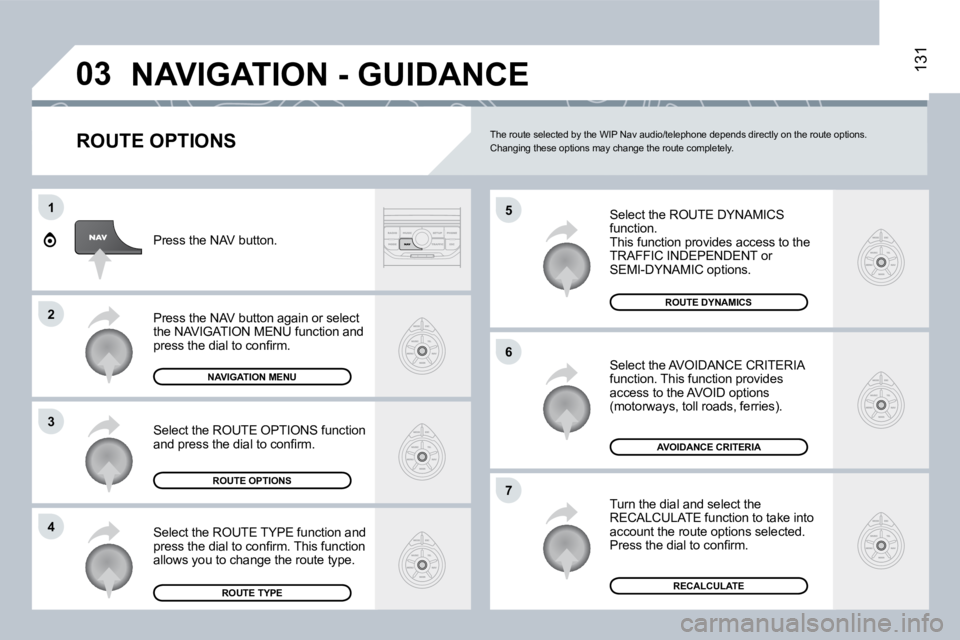
ROUTE OPTIONS
Select the ROUTE DYNAMICS function. This function provides access to the TRAFFIC INDEPENDENT orSEMI-DYNAMIC options.
Select the AVOIDANCE CRITERIA function. This function provides access to the AVOID options (motorways, toll roads, ferries).
Turn the dial and select the RECALCULATE function to take into account the route options selected. Press the dial to confi rm.
Press the NAV button.
Press the NAV button again or select the NAVIGATION MENU function and press the dial to confi rm.
Select the ROUTE TYPE function and press the dial to confi rm. This function allows you to change the route type.
Select the ROUTE OPTIONS function and press the dial to confi rm.
NAVIGATION MENU
ROUTE OPTIONS
ROUTE TYPERECALCULATE
AVOIDANCE CRITERIA
ROUTE DYNAMICS
The route selected by the WIP Nav audio/telephone depends directly on the route options. Changing these options may change the route comple tely.
Page 132 of 252
132
5
6
7
1
2
3
4
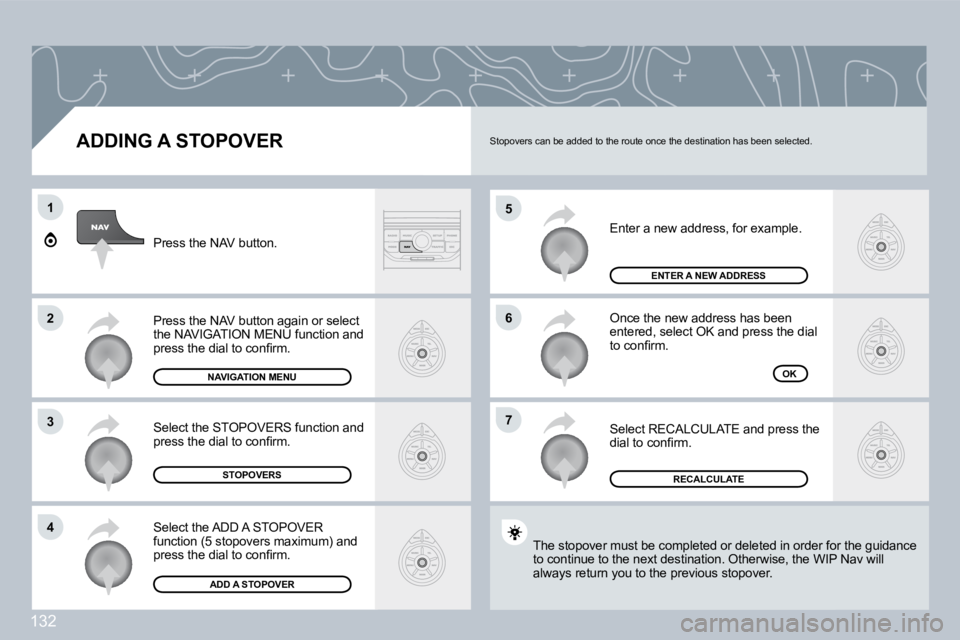
ADDING A STOPOVER
Enter a new address, for example.
Once the new address has been entered, select OK and press the dial to confi rm.
Select RECALCULATE and press the dial to confi rm.
Press the NAV button.
Press the NAV button again or select the NAVIGATION MENU function and press the dial to confi rm.
Select the ADD A STOPOVER function (5 stopovers maximum) and press the dial to confi rm.
Select the STOPOVERS function and press the dial to confi rm.
NAVIGATION MENU
STOPOVERS
ADD A STOPOVER
OK
ENTER A NEW ADDRESS
RECALCULATE
The stopover must be completed or deleted in order for er for the guidance to continue to the next destination. Otherwise, the WIP N WIP Nav will always return you to the previous stopover.
Stopovers can be added to the route once the destination has been selected.
Page 133 of 252
03
1
2
3
4
7
85
6
NAVIGATION - GUIDANCE
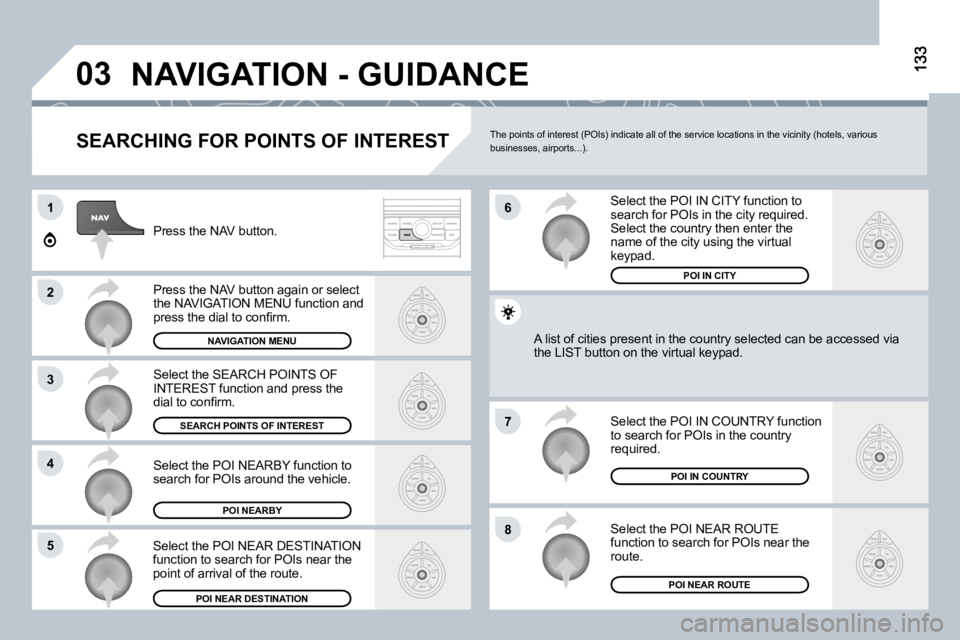
SEARCHING FOR POINTS OF INTEREST
Press the NAV button.
Press the NAV button again or select the NAVIGATION MENU function and press the dial to confi rm.
Select the POI NEARBY function to search for POIs around the vehicle.
Select the SEARCH POINTS OF INTEREST function and press the dial to confi rm.
NAVIGATION MENU
SEARCH POINTS OF INTEREST
POI NEARBY
Select the POI IN CITY function to search for POIs in the city required. Select the country then enter the name of the city using the virtual keypad.
Select the POI NEAR ROUTE function to search for POIs near the route.
Select the POI IN COUNTRY function to search for POIs in the country required.
Select the POI NEAR DESTINATION function to search for POIs near the point of arrival of the route.
POI NEAR DESTINATIONPOI NEAR ROUTE
POI IN COUNTRY
A list of cities present in the country selected can be accbe accessed via the LIST button on the virtual keypad.
POI IN CITY
The points of interest (POIs) indicate all of the service locations in the vicinity (hotels, various businesses, airports...).
Page 135 of 252
03
6
4
5
1
2
3
135
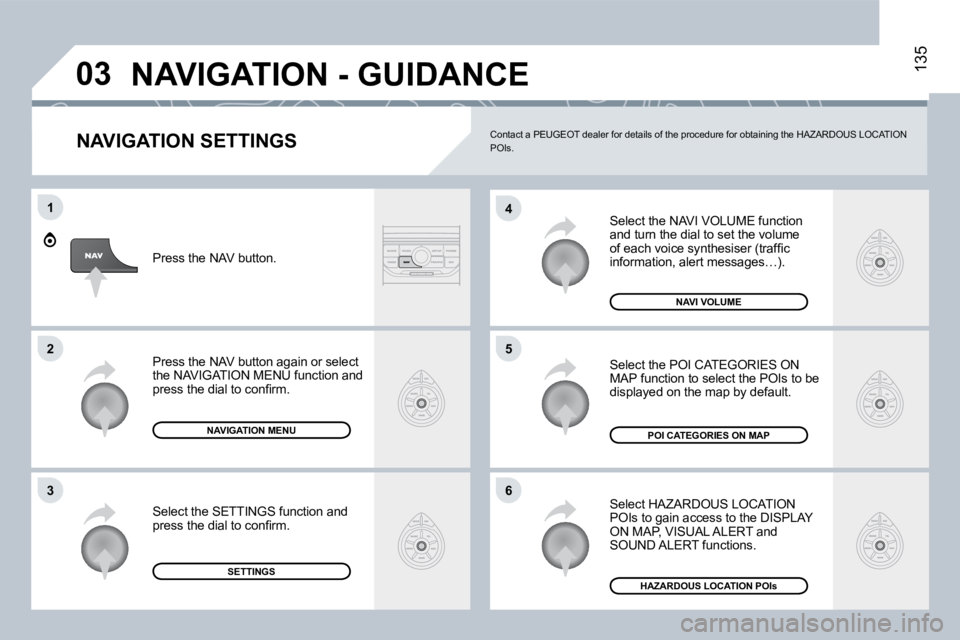
NAVIGATION SETTINGS
Select the NAVI VOLUME function and turn the dial to set the volume of each voice synthesiser (traffi c information, alert messages…).
Select HAZARDOUS LOCATION POIs to gain access to the DISPLAY ON MAP, VISUAL ALERT and SOUND ALERT functions.
Select the POI CATEGORIES ON MAP function to select the POIs to be displayed on the map by default.
NAVI VOLUME
Press the NAV button.
NAVIGATION MENU
Press the NAV button again or select the NAVIGATION MENU function and press the dial to confi rm.
SETTINGS
Select the SETTINGS function and press the dial to confi rm.
HAZARDOUS LOCATION POIs
POI CATEGORIES ON MAP
NAVIGATION - GUIDANCE
Contact a PEUGEOT dealer for details of the procedure for obtaining the HAZARDOUS LOCATION POIs.
Page 138 of 252
138
06 MUSIC MEDIA PLAYERS
CD, MP3/WMA SD CARD
INFORMATION AND ADVICE
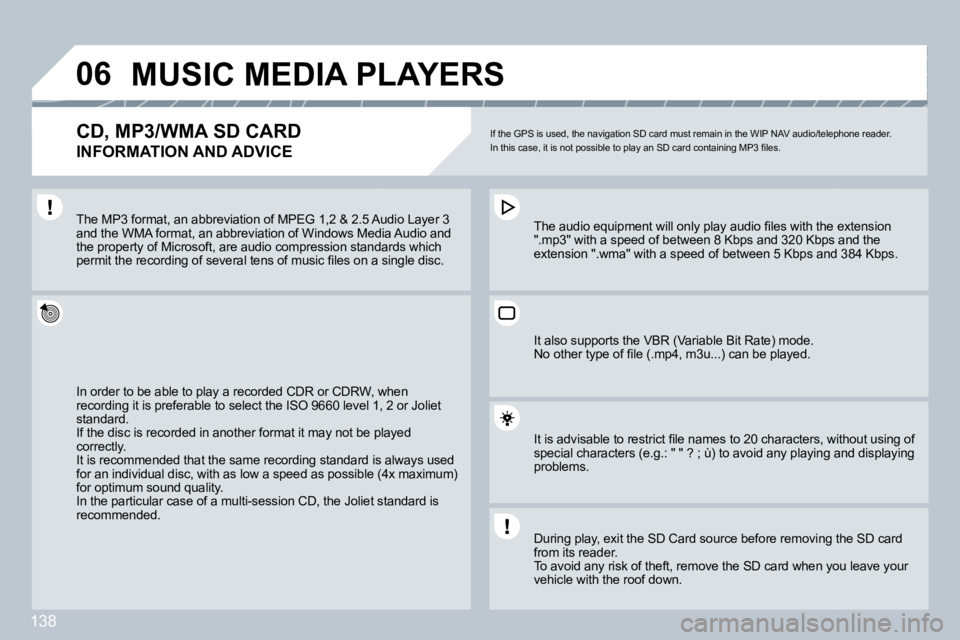
If the GPS is used, the navigation SD card must remain in the WIP NAV audio/telephone reader. In this case, it is not possible to play an SD card containing MP3 fi les.
In order to be able to play a recorded CDR or CDRW , wRW, when recording it is preferable to select the ISO 9660 level 1, vel 1, 2 or Joliet standard. If the disc is recorded in another format it may not be plat be played correctly. It is recommended that the same recording standard is ard is always used for an individual disc, with as low a speed as possible (4x maximum) for an individual disc, with as low a speed as possible (4x maximum) for optimum sound quality. In the particular case of a multi-session CD, the Joliet stoliet standard is recommended.
The audio equipment will only play audio fi les wit h the extension The audio equipment will only play audio fi les with the extension ".mp3" with a speed of between 8 Kbps and 320 Kbps abps and the extension ".wma" with a speed of between 5 Kbps and 3s and 384 Kbps.
The MP3 format, an abbreviation of MPEG 1,2 & 2.5 Au2.5 Audio Layer 3 and the WMA format, an abbreviation of Windows Medi Media Audio and the property of Microsoft, are audio compression standastandards which permit the recording of several tens of music fi les on a single disc. permit the recording of several tens of music fi les on a single disc.
It also supports the VBR (Variable Bit Rate) mode. No other type of fi le (.mp4, m3u...) can be played.
It is advisable to restrict fi le names to 20 characters, without using of It is advisable to restrict fi le names to 20 characters, without using of special characters (e.g.: " " ? ; ù) to avoid any p laying and displaying special characters (e.g.: " " ? ; ù) to avoid any playing and displaying problems.
During play, exit the SD Card source before removi ng thving the SD card from its reader. To avoid any risk of theft, remove the SD card when youen you leave your vehicle with the roof down.
Page 144 of 252

144
09
1
TRIP COMPUTER
VEHICLE DIAGNOSTICS
Press the MAIN button or press the MODE button several times in succession until the trip computer is displayed. - The "vehicle" tab: The range, the current consumption and the distance remaining. - The "1" (route 1) tab with : The average speed, the average consumption and the distance travelled calculated over route "1". - The "2" (route 2) tab with the same functions for a second route.
Range: Displays the distance which can travelled with t with the remaining fuel detected in the tank, in relation to the average cons consumption over the last few miles (kilometres). This displayed value may vary signifi cantly follow ing a change in the This displayed value may vary signifi cantly following a change in the vehicle speed or the relief of the route. When the range falls below 20 miles (30 km), dashe s are displayed. When the range falls below 20 miles (30 km), dashes are displayed. After fi lling with at least 5 litres of fuel, the range is recalculated and After fi lling with at least 5 litres of fuel, the range is recalculated and is displayed when it exceeds 60 miles (100 km). If, whilst driving, dashes are displayed continuou sly in ply in place of the digits, contact a PEUGEOT dealer.
Current consumption: only calculated and displayed aayed above 20 mph (30 km/h).
Average consumption: this is the average quantity of tity of fuel consumed since the last trip computer zero reset.
Distance travelled: calculated since the last trip compucomputer zero reset.
Distance remaining to the destination: calculated wited with reference to the fi nal destination, entered by the user. If guidance is activated, to the fi nal destination, entered by the user. If guidance is activated, the navigation system calculates it as a current va lue.
Average speed: this is the average speed calculated sated since the last trip computer zero reset (ignition on).
Each press of the button at the end of the wipers stalk dstalk displays the various trip computer data in succession, according to tg to the display.
A FEW DEFINITIONS
Page 151 of 252
150
01 FIRST STEPS
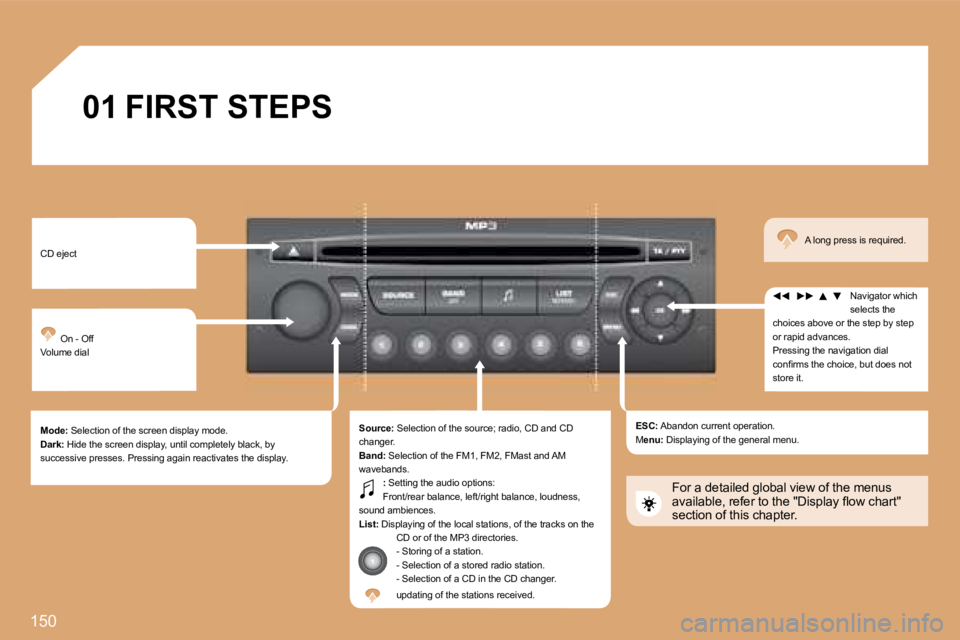
CD eject
On - Off Volume dial
Mode: Selection of the screen display mode. Dark: Hide the screen display, until completely black, by successive presses. Pressing again reactivates the display.
Source: Selection of the source; radio, CD and CD changer. Band: Selection of the FM1, FM2, FMast and AM wavebands. : Setting the audio options: Front/rear balance, left/right balance, loudness, sound ambiences. List: Displaying of the local stations, of the tracks on the CD or of the MP3 directories. - Storing of a station. - Selection of a stored radio station. - Selection of a CD in the CD changer. updating of the stations received.
ESC: Abandon current operation. Menu: Displaying of the general menu.
Navigator which selects the choices above or the step by step or rapid advances. Pressing the navigation dial confi rms the choice, but does not store it.
A long press is required.
For a detailed global view of the menus available, refer to the "Display fl ow chart" section of this chapter.