audio PEUGEOT 807 2008 User Guide
[x] Cancel search | Manufacturer: PEUGEOT, Model Year: 2008, Model line: 807, Model: PEUGEOT 807 2008Pages: 194, PDF Size: 5.17 MB
Page 100 of 194
23
S
O SSOURCE
MODE BAND ESC
2
abc
5
jkl
8
tuv 3
def
6
mno
9
wxyz
1 4
ghi
7
pqrs0 # MENU LIST
TA
PTY
DARKESC
LIST
MENU
ESC
MENU LIST
6
ESC
MENU LIST
ESC
MENU LIST
ESC
MENU LIST
4
ESC
MENU LIST
5
1
103
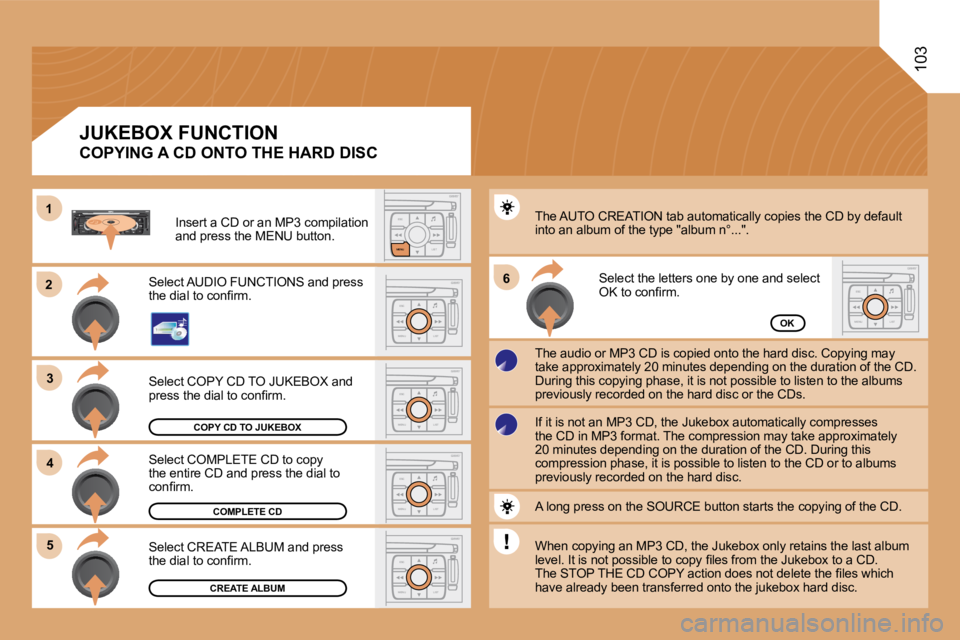
COPY CD TO JUKEBOX
COMPLETE CD
CREATE ALBUM
OK
Select COPY CD TO JUKEBOX and
press the dial to conirm.
Select COMPLETE CD to copy
the entire CD and press the dial to
conirm.
Select CREATE ALBUM and press
the dial to conirm. The AUTO CREATION tab automatically copies the CD b
y default
into an album of the type "album n°...".
The audio or MP3 CD is copied onto the hard disc. C opying may
take approximately 20 minutes depending on the dura tion of the CD.
During this copying phase, it is not possible to li sten to the albums
previously recorded on the hard disc or the CDs. Select the letters one by one and select
OK to conirm.
If it is not an MP3 CD, the Jukebox automatically c ompresses
the CD in MP3 format. The compression may take appr oximately
20 minutes depending on the duration of the CD. Dur ing this
compression phase, it is possible to listen to the CD or to albums
previously recorded on the hard disc.
A long press on the SOURCE button starts the copyin g of the CD.
When copying an MP3 CD, the Jukebox only retains th e last album
level. It is not possible to copy iles from the Juk ebox to a CD.
The STOP THE CD COPY action does not delete the ile s which
have already been transferred onto the jukebox hard disc.
Select AUDIO FUNCTIONS and press
the dial to conirm.
Insert a CD or an MP3 compilation
and press the MENU button.
COPYING A CD ONTO THE HARD DISC
JUKEBOX FUNCTION
Page 101 of 194
104
ESC
MENU LIST
ESC
MENU LIST
6
7
5
ESC
LIST
MENU
MENU
ESC
MENU LIST
2
3
4
1
ESC
MENU LIST
ESC
MENU LIST
ESC
MENU LIST
ESC
MENU LIST
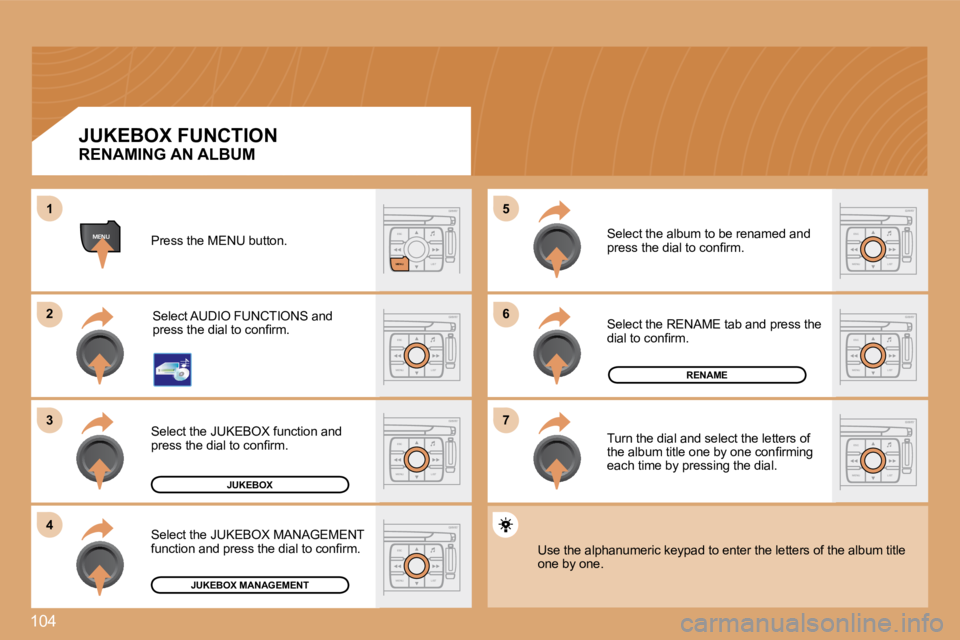
JUKEBOX
RENAME
JUKEBOX MANAGEMENT
RENAMING AN ALBUM
Press the MENU button.Select AUDIO FUNCTIONS and
press the dial to conirm.
Select the JUKEBOX function and
press the dial to conirm.
Select the JUKEBOX MANAGEMENT
function and press the dial to conirm. Select the album to be renamed and
press the dial to conirm.
Select the RENAME tab and press the
dial to conirm.
Turn the dial and select the letters of
the album title one by one conirming
each time by pressing the dial.
Use the alphanumeric keypad to enter the letters of the album title
one by one.
JUKEBOX FUNCTION
Page 103 of 194
106
1
SOURCE
2
S
O S SOURCE
MODE BAND TPT
A Y
DARKSOURCE
2
abc
5
jkl
8
tuv 3
def
6
mno
9
wxyz
1 4
ghi
7
pqrs
0 #
2
abc
5
jkl
8
tuv
3
def
6
mno
9
wxyz
1 4
ghi
r
7
pq s0 #
S
O S SOURCE
MODE BAND TPT
A Y
DARKSOURCESOURCE
ESC
MENU LIST
1
3
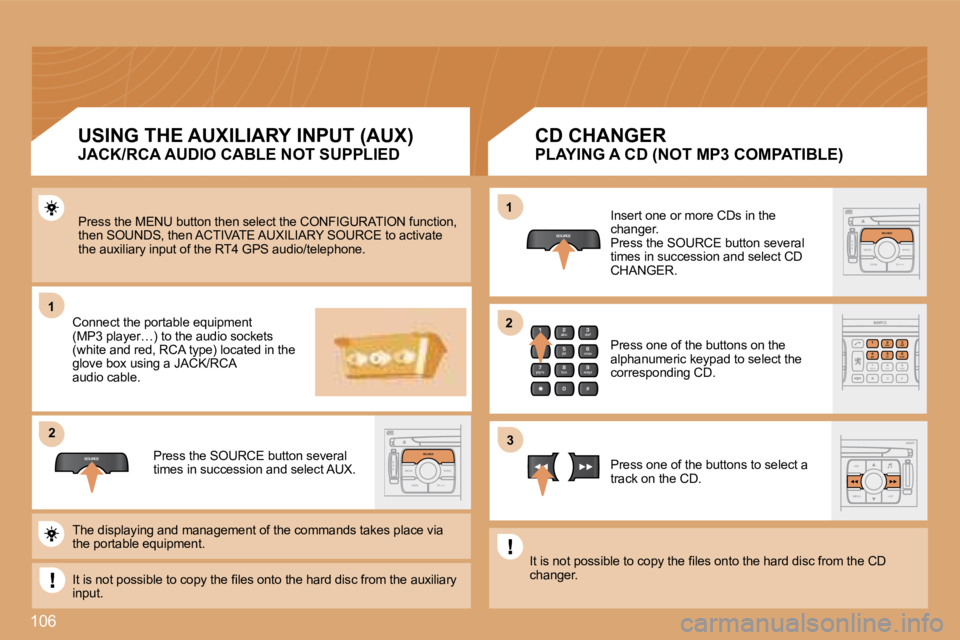
2Press the MENU button then select the CONFIGURATION
function,
then SOUNDS, then ACTIVATE AUXILIARY SOURCE to acti vate
the auxiliary input of the RT4 GPS audio/telephone.
Connect the portable equipment
(MP3 player…) to the audio sockets
(white and red, RCA type) located in the
glove box using a JACK/RCA
audio cable.
Press the SOURCE button several
times in succession and select AUX. Insert one or more CDs in the
changer.
Press the SOURCE button several
times in succession and select CD
CHANGER.
Press one of the buttons on the
alphanumeric keypad to select the
corresponding CD.
Press one of the buttons to select a
track on the CD.
The displaying and management of the commands takes place via
the portable equipment.
It is not possible to copy the iles onto the hard d isc from the auxiliary
input. It is not possible to copy the iles onto the hard d
isc from the CD
changer.
JACK/RCA AUDIO CABLE NOT SUPPLIED
USING THE AUXILIARY INPUT (AUX)
PLAYING A CD (NOT MP3 COMPATIBLE)
CD CHANGER
Page 104 of 194
ESC
MENU LIST
MENUESC
LIST
MENU
1
2
ESC
MENU LIST
ESC
MENU LIST
3
4
ESC
MENU LIST5
ESC
MENU LIST
ESC
MENU LIST
107
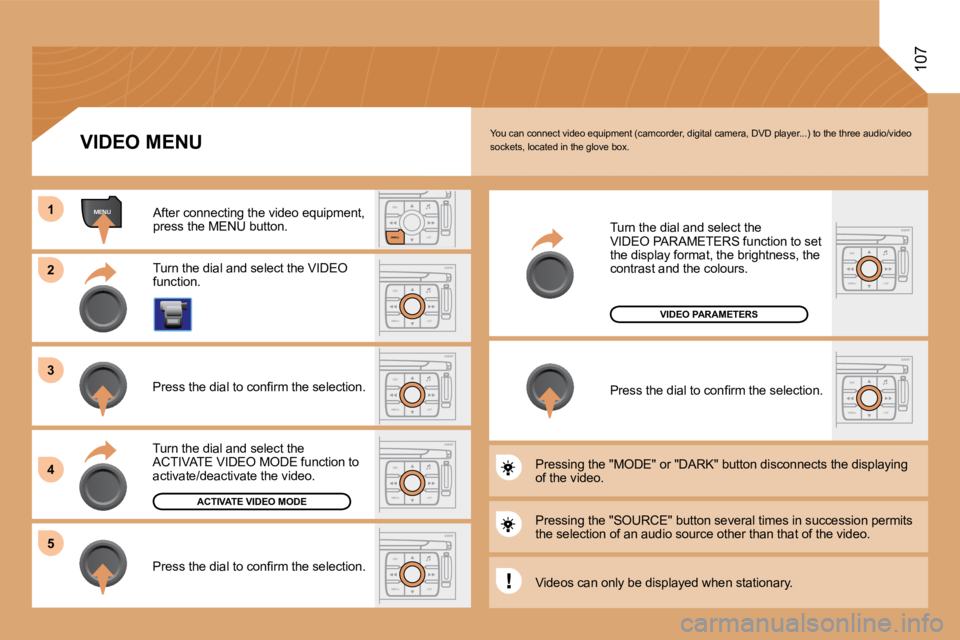
You can connect video equipment (camcorder, digital camera, DVD player...) to the three audio/video
sockets, located in the glove box.
Turn the dial and select the VIDEO
function.
After connecting the video equipment,
press the MENU button.
Turn the dial and select the
ACTIVATE VIDEO MODE function to
activate/deactivate the video.
Press the dial to conirm the selection.
ACTIVATE VIDEO MODE
Press the dial to conirm the selection. Pressing the "SOURCE" button several times in succe
ssion permits
the selection of an audio source other than that of the video.
Pressing the "MODE" or "DARK" button disconnects th
e displaying
of the video. Turn the dial and select the
VIDEO PARAMETERS function to set
the display format, the brightness, the
contrast and the colours.
Press the dial to conirm the selection.
VIDEO MENU
VIDEO PARAMETERS
Videos can only be displayed when stationary.
Page 105 of 194
108
2
abc
5
jkl
8
tuv 3
def
6
mno
9
wxyz
1 4
ghi
7
pqrs
0 #
ESC
MENU LIST
ESC
MENU LIST
ESC
MENU LIST
2
abc
5
jkl
8
tuv 3
def
6
mno
9
wxyz
1 4
ghi
7
pqrs
0 #
2
abc
5
jkl
8
tuv 3
def
6
mno
9
wxyz
1 4
ghi
r
7
pq s
0
#
2
abc
5
jkl
8
tuv 3
def
6
mno
9
wxyz
1 4
ghi
r
7
pq s
0
#
1
2
3 1
2
06
TELEPHONE
ENTERING THE PIN CODE
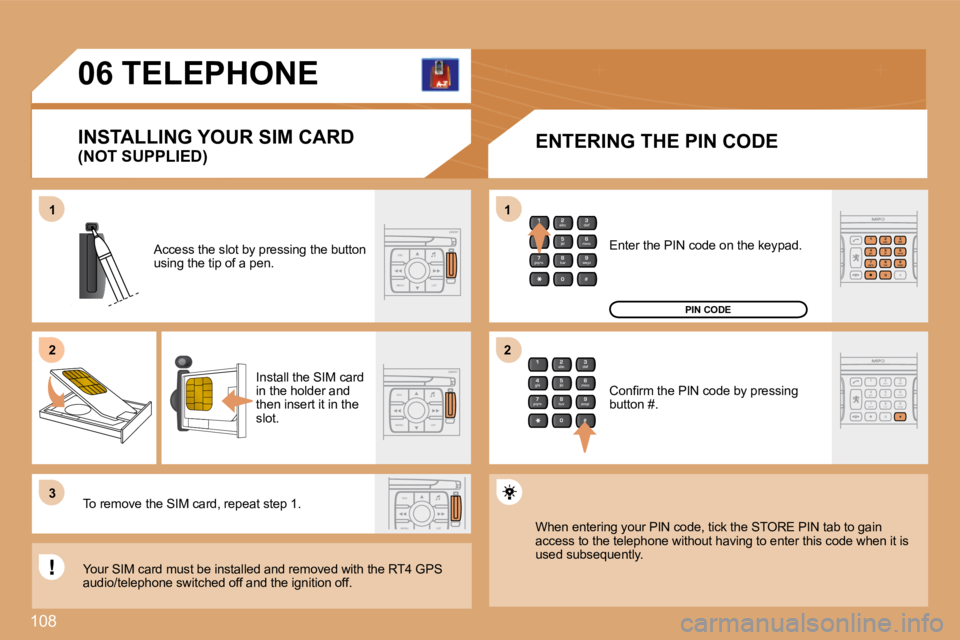
Access the slot by pressing the button
using the tip of a pen.
Install the SIM card
in the holder and
then insert it in the
slot.
To remove the SIM card, repeat step 1.
Your SIM card must be installed and removed with th e RT4 GPS
audio/telephone switched off and the ignition off. Enter the PIN code on the keypad.
Conirm the PIN code by pressing
button #.
PIN CODE
When entering your PIN code, tick the STORE PIN tab to gain
access to the telephone without having to enter thi s code when it is
used subsequently.
(NOT SUPPLIED)
INSTALLING YOUR SIM CARD
Page 111 of 194
114
08 CONTROL SHORT-CUTS
ADDITIONAL CONTROL
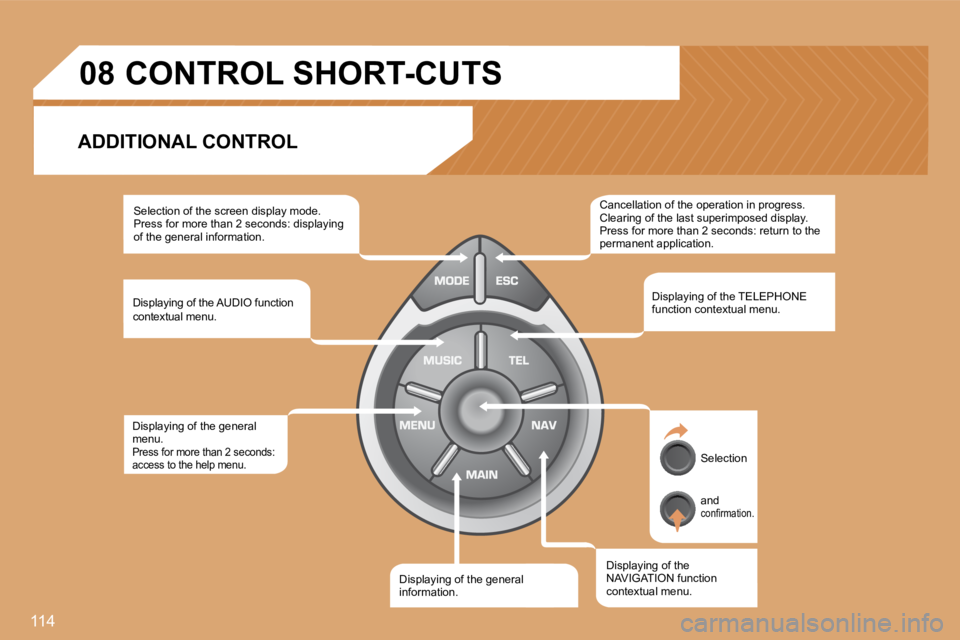
Selection of the screen display mode.
Press for more than 2 seconds: displaying
of the general information.
Displaying of the AUDIO function
contextual menu.
Displaying of the general
menu.
Press for more than 2 seconds:
access to the help menu.
Displaying of the general
information. Displaying of the
NAVIGATION function
contextual menu.Displaying of the TELEPHONE
function contextual menu.
Cancellation of the operation in progress.
Clearing of the last superimposed display.
Press for more than 2 seconds: return to the
permanent application.
Selection
and
conirmation.
Page 112 of 194
MENUESCLIST
MENU
2
1
115
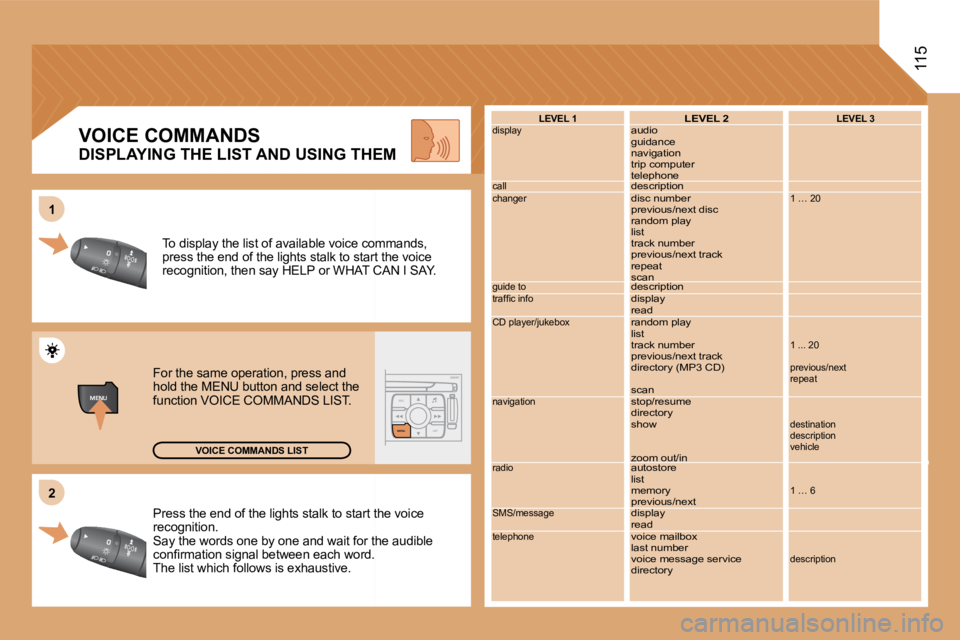
Press the end of the lights stalk to start the voic
e
recognition.
Say the words one by one and wait for the audible
conirmation signal between each word.
The list which follows is exhaustive. To display the list of available voice commands,
press the end of the lights stalk to start the voic
e
recognition, then say HELP or WHAT CAN I SAY.
For the same operation, press and
hold the MENU button and select the
function VOICE COMMANDS LIST.
VOICE COMMANDS LIST LEVEL 1
display
call
changer
guide to
trafic info
CD player/jukebox
navigation
radio
SMS/message
telephone
LEVEL 2
audio
guidance
navigation
trip computer
telephone
description
disc number
previous/next disc
random play
list
track number
previous/next track
repeat
scan
description
display
read
random play
list
track number
previous/next track
directory (MP3 CD)
scan
stop/resume
directory
show
zoom out/in
autostore
list
memory
previous/next
display
read
voice mailbox
last number
voice message service
directoryLEVEL 3
1 … 20
1 ... 20
previous/next
repeat
destination
description
vehicle
1 … 6
description
VOICE COMMANDS
DISPLAYING THE LIST AND USING THEM
Page 115 of 194
118
4
4
4
4
4
4
4
4
3
4
4
4
4
3
3
4
4
1
2
3
4
4
4
3
4
4
4
4
4
1
2
3
3
3
3
3
3
3
3
2
3
2
2
3
3
3
3
22
4
4
2
4
4
3
3
4
4
4
3
3
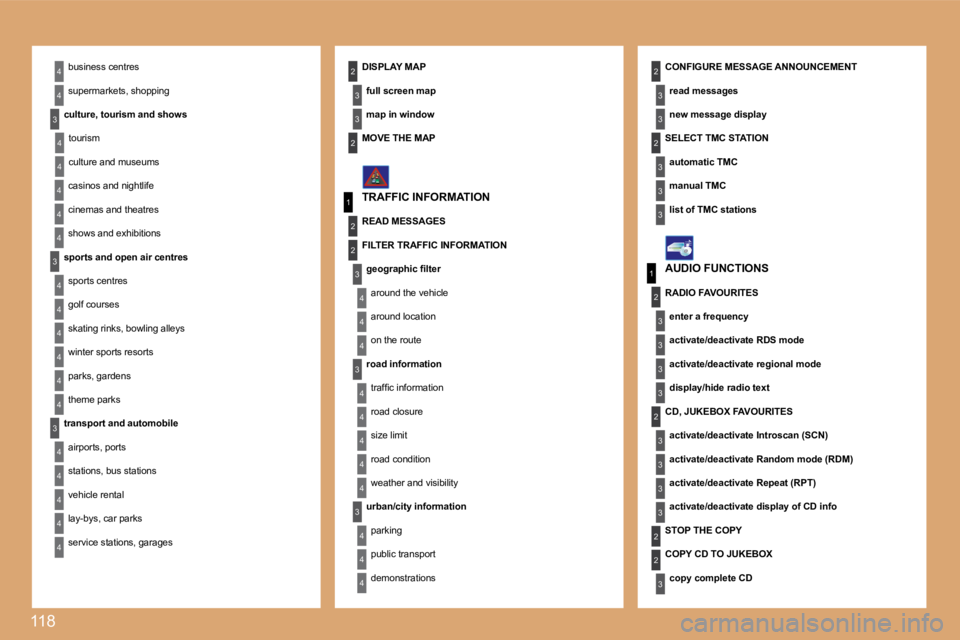
22business centres
supermarkets, shopping
culture, tourism and shows tourism
culture and museums
casinos and nightlife
cinemas and theatres
shows and exhibitions
sports and open air centres sports centres
golf courses
skating rinks, bowling alleys
winter sports resorts
parks, gardens
theme parks
transport and automobile airports, ports
stations, bus stations
vehicle rental
lay-bys, car parks
service stations, garages DISPLAY MAP
full screen map
map in window CONFIGURE MESSAGE ANNOUNCEMENT
read messages
new message display
TRAFFIC INFORMATION AUDIO FUNCTIONS
MOVE THE MAP
READ MESSAGES
FILTER TRAFFIC INFORMATION
geographic ilter
around the vehicle
around location
on the route
road information
trafic information
road closure
size limit
road condition
weather and visibility
urban/city information parking
public transport
demonstrations SELECT TMC STATION
automatic TMC
manual TMC
list of TMC stations
STOP THE COPY
RADIO FAVOURITES
enter a frequency
activate/deactivate RDS mode
activate/deactivate regional mode
display/hide radio text
CD, JUKEBOX FAVOURITES activate/deactivate Introscan (SCN)
activate/deactivate Random mode (RDM)
activate/deactivate Repeat (RPT)
activate/deactivate display of CD info
COPY CD TO JUKEBOX copy complete CD
Page 117 of 194
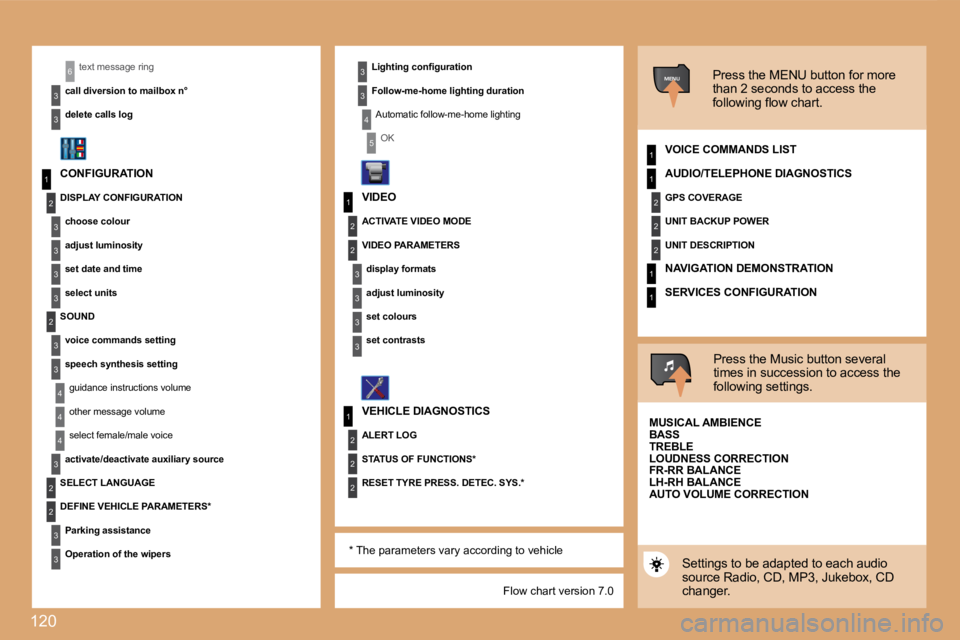
120
1
2
3
3
3
3
2
3
3
4
41
3
2
3
1
2
3
3
2
2
2
1
2
2
2
1
1
MENU
4
3
2
2
3
3
6
1
3
3
3
3
4
5
Flow chart version 7.0
text message ring
call diversion to mailbox n°
delete calls log
CONFIGURATION ACTIVATE VIDEO MODE
VEHICLE DIAGNOSTICS Press the MENU button for more
than 2 seconds to access the
following low chart.
VOICE COMMANDS LIST
Press the Music button several
times in succession to access the
following settings.
MUSICAL AMBIENCE
Settings to be adapted to each audio
source Radio, CD, MP3, Jukebox, CD
changer.
Lighting coniguration
Follow-me-home lighting duration
Automatic follow-me-home lighting
OK
DISPLAY CONFIGURATION choose colour
adjust luminosity
set date and time
select units
SOUND voice commands setting
speech synthesis settingguidance instructions volume
other message volume
select female/male voice
activate/deactivate auxiliary source
SELECT LANGUAGE
DEFINE VEHICLE PARAMETERS*
Parking assistance
Operation of the wipers VIDEO
VIDEO PARAMETERS
display formats
adjust luminosity
set colours
set contrasts
ALERT LOG
STATUS OF FUNCTIONS*
RESET TYRE PRESS. DETEC. SYS.* AUDIO/TELEPHONE DIAGNOSTICS
GPS COVERAGE
UNIT BACKUP POWER
UNIT DESCRIPTION
NAVIGATION DEMONSTRATION
SERVICES CONFIGURATION
BASS
TREBLE
LOUDNESS CORRECTION
FR-RR BALANCE
LH-RH BALANCE
AUTO VOLUME CORRECTION
* The parameters vary according to vehicle
Page 119 of 194
122
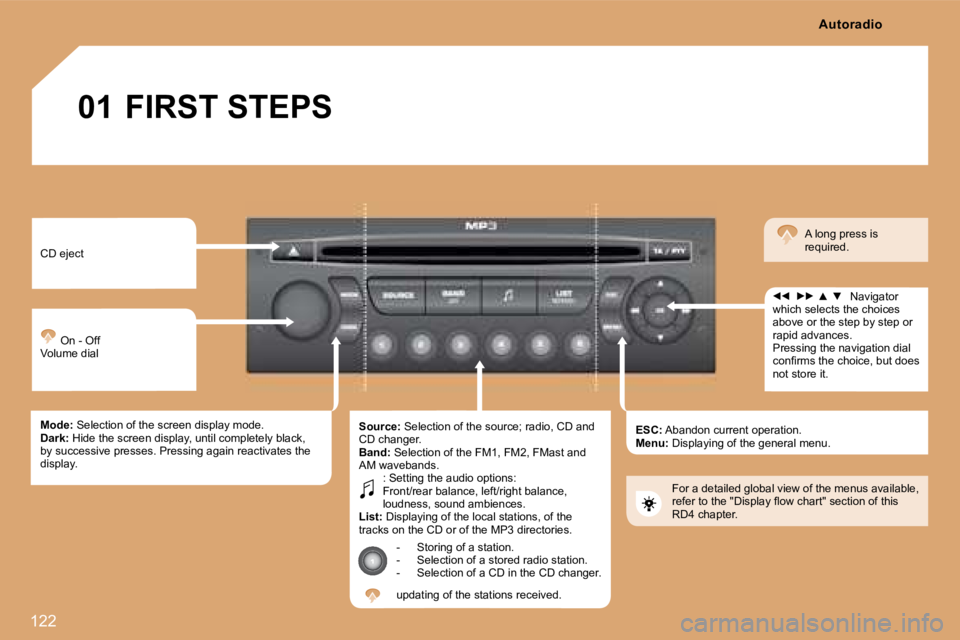
01 FIRST STEPS
CD eject On - Off
Volume dial
Mode: Selection of the screen display mode.
Dark: Hide the screen display, until completely black,
by successive presses. Pressing again reactivates the
display. Source:
Selection of the source; radio, CD and
CD changer.
Band: Selection of the FM1, FM2, FMast and
AM wavebands. : Setting the audio options:
Front/rear balance, left/right balance,
loudness, sound ambiences.
List: Displaying of the local stations, of the
tracks on the CD or of the MP3 directories.
- Storing of a station.
- Selection of a stored radio station.
- Selection of a CD in the CD changer.
updating of the stations received. ESC:
Abandon current operation.
Menu: Displaying of the general menu. Navigator
which selects the choices
above or the step by step or
rapid advances.
Pressing the navigation dial
conirms the choice, but does
not store it. A long press is
required.
For a detailed global view of the menus available,
refer to the "Display low chart" section of this
RD4 chapter. Autoradio