radio PEUGEOT 807 2008 Owners Manual
[x] Cancel search | Manufacturer: PEUGEOT, Model Year: 2008, Model line: 807, Model: PEUGEOT 807 2008Pages: 194, PDF Size: 5.17 MB
Page 85 of 194
88
01 FIRST STEPS
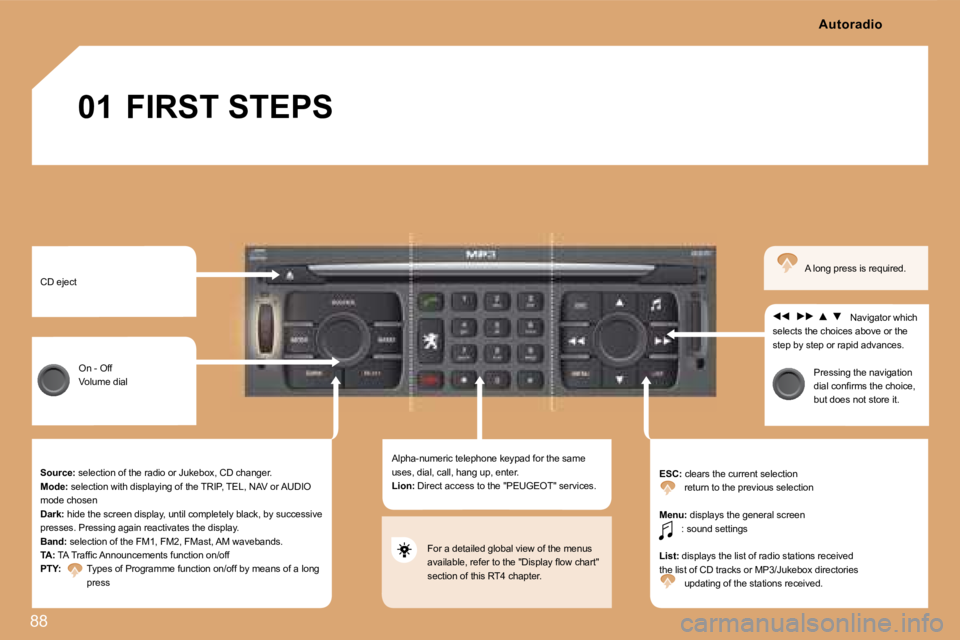
CD eject On - Off
Volume dial
Source: selection of the radio or Jukebox, CD changer.
Mode: selection with displaying of the TRIP, TEL, NAV or AUDIO
mode chosen
Dark: hide the screen display, until completely black, b y successive
presses. Pressing again reactivates the display.
Band: selection of the FM1, FM2, FMast, AM wavebands.
TA: TA Trafic Announcements function on/off
PTY: Types of Programme function on/off by means of a l ong
press Alpha-numeric telephone keypad for the same
uses, dial, call, hang up, enter.
Lion:
Direct access to the "PEUGEOT" services. ESC:
clears the current selection
return to the previous selection
Menu: displays the general screen
: sound settings
List: displays the list of radio stations received
the list of CD tracks or MP3/Jukebox directories updating of the stations received. Navigator which
selects the choices above or the
step by step or rapid advances.
Pressing the navigation
dial conirms the choice,
but does not store it.
A long press is required.
For a detailed global view of the menus
available, refer to the "Display low chart"
section of this RT4 chapter. Autoradio
Page 86 of 194
02
89
DISPLAY AND GENERAL MENU
> COLOUR DISPLAY
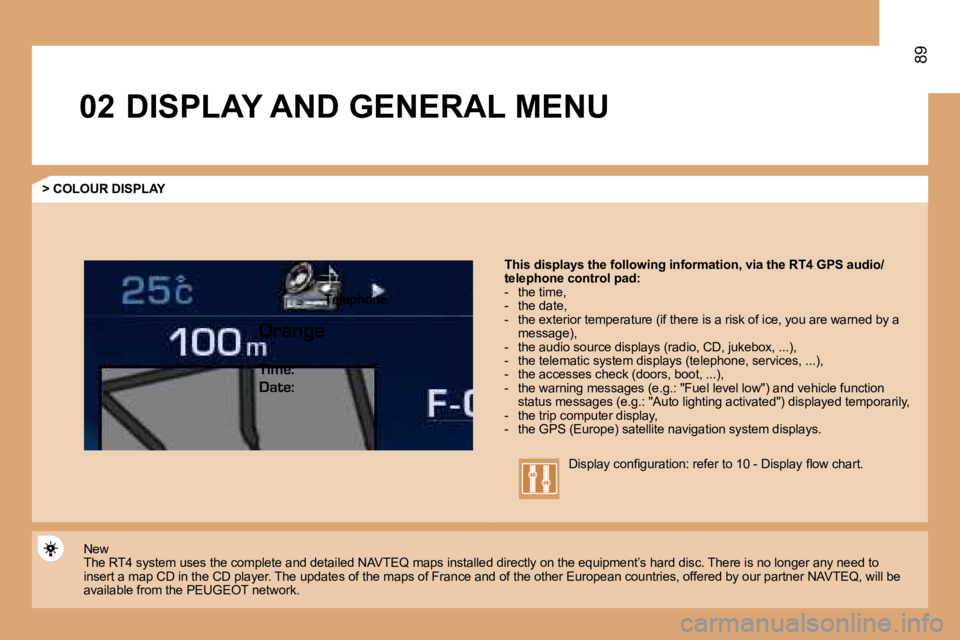
This displays the following information, via the RT4 GPS audio/
telephone control pad:
- the time,
- the date,
- the exterior temperature (if there is a risk of i ce, you are warned by a
message),
- the audio source displays (radio, CD, jukebox, .. .),
- the telematic system displays (telephone, service s, ...),
- the accesses check (doors, boot, ...),
- the warning messages (e.g.: "Fuel level low") and vehicle function
status messages (e.g.: "Auto lighting activated") d isplayed temporarily,
- the trip computer display,
- the GPS (Europe) satellite navigation system disp lays.
New
The RT4 system uses the complete and detailed NAVTE Q maps installed directly on the equipment’s hard disc. There is no longer any need to
insert a map CD in the CD player. The updates of th e maps of France and of the other European countrie s, offered by our partner NAVTEQ, will be
available from the PEUGEOT network. Display coniguration: refer to 10 - Display low cha
rt.
Telephone
Orange Time:
Date:
Page 87 of 194
90
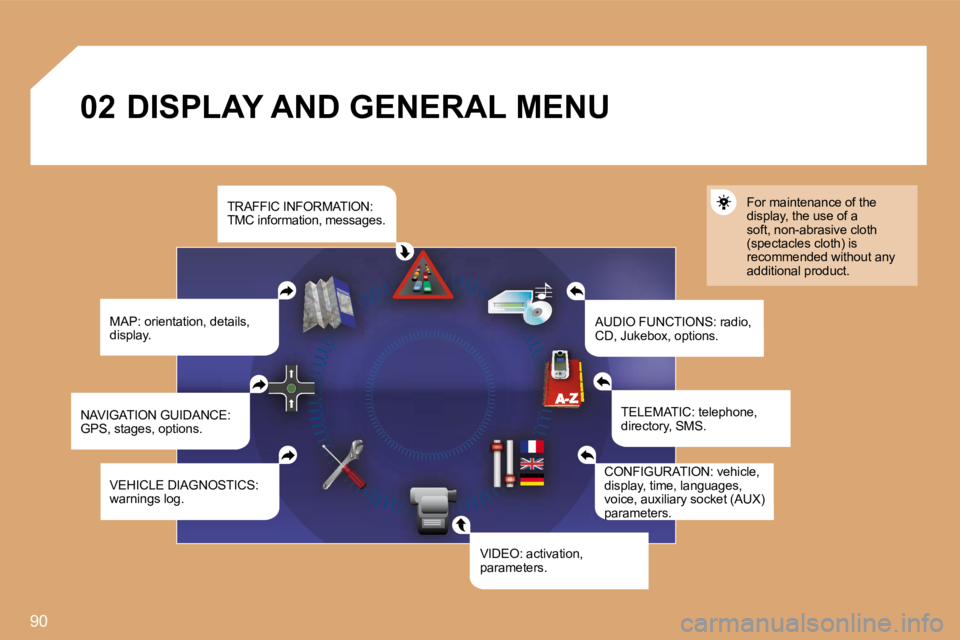
02 DISPLAY AND GENERAL MENUMAP: orientation, details,
display. AUDIO FUNCTIONS: radio,
CD, Jukebox, options.For maintenance of the
display, the use of a
soft, non-abrasive cloth
(spectacles cloth) is
recommended without any
additional product.
TELEMATIC: telephone,
directory, SMS.
CONFIGURATION: vehicle,
display, time, languages,
voice, auxiliary socket (AUX)
parameters.
VIDEO: activation,
parameters.
VEHICLE DIAGNOSTICS:
warnings log.
NAVIGATION GUIDANCE:
GPS, stages, options. TRAFFIC INFORMATION:
TMC information, messages.
Page 98 of 194
1
2
3
4S
O S SOURCE
MODE BAND TPT
A Y
DARKSOURCE
S
O S SOURCE
MODE BAND TPT
A Y
DARKBAND
SOURCE
BAND
ESC
MENU LIST
LIST
ESC LIST
MENU
MENU
ESC
MENU LIST
ESC
MENU LIST
ESC
MENU LIST
1
2
3
4
LIST
ESC
MENU LIST
ESC
MENU LIST
05101AUDIO/VIDEO
RADIO
SELECTING A STATION
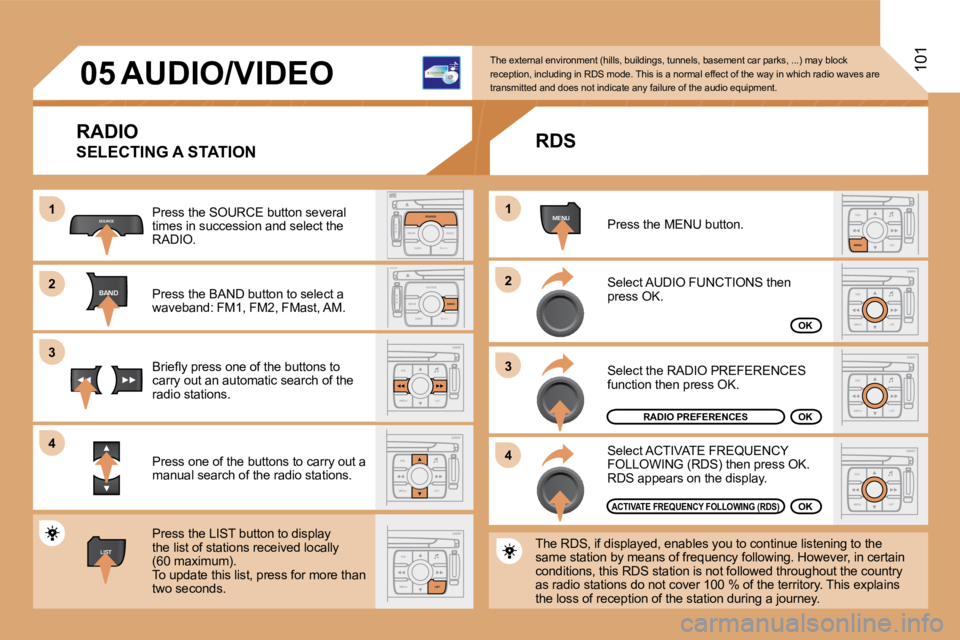
Press the SOURCE button several
times in succession and select the
RADIO.
Press the BAND button to select a
waveband: FM1, FM2, FMast, AM.
Briely press one of the buttons to
carry out an automatic search of the
radio stations.
Press one of the buttons to carry out a
manual search of the radio stations.
Press the LIST button to display
the list of stations received locally
(60 maximum).
To update this list, press for more than
two seconds. The external environment (hills, buildings, tunnels
, basement car parks, ...) may block
reception, including in RDS mode. This is a normal effect of the way in which radio waves are
transmitted and does not indicate any failure of th e audio equipment.
RDS
Select ACTIVATE FREQUENCY
FOLLOWING (RDS) then press OK.
RDS appears on the display.
Select the RADIO PREFERENCES
function then press OK.
Select AUDIO FUNCTIONS then
press OK.
Press the MENU button.
The RDS, if displayed, enables you to continue list ening to the
same station by means of frequency following. Howev er, in certain
conditions, this RDS station is not followed throug hout the country
as radio stations do not cover 100 % of the territo ry. This explains
the loss of reception of the station during a journ ey.
RADIO PREFERENCESOK
ACTIVATE FREQUENCY FOLLOWING (RDS)OK
OK
Page 110 of 194
08113
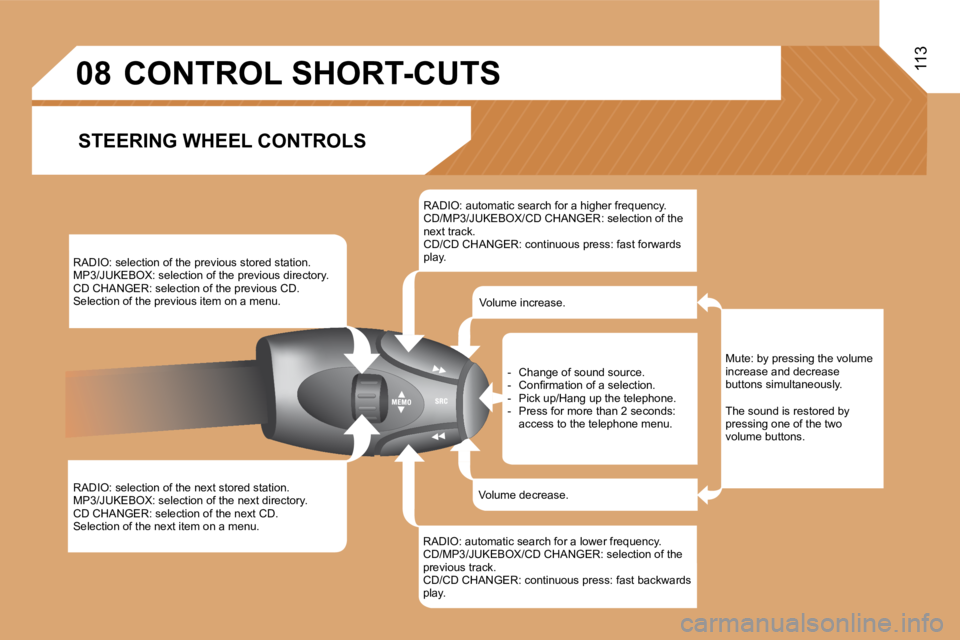
RADIO: selection of the previous stored station.
MP3/JUKEBOX: selection of the previous directory.
CD CHANGER: selection of the previous CD.
Selection of the previous item on a menu.
RADIO: selection of the next stored station.
MP3/JUKEBOX: selection of the next directory.
CD CHANGER: selection of the next CD.
Selection of the next item on a menu.RADIO: automatic search for a higher frequency.
CD/MP3/JUKEBOX/CD CHANGER: selection of the
next track.
CD/CD CHANGER: continuous press: fast forwards
play.
RADIO: automatic search for a lower frequency.
CD/MP3/JUKEBOX/CD CHANGER: selection of the
previous track.
CD/CD CHANGER: continuous press: fast backwards
play. - Change of sound source.
- Conirmation of a selection.
- Pick up/Hang up the telephone.
- Press for more than 2 seconds:
access to the telephone menu.
Volume increase.
Volume decrease.
CONTROL SHORT-CUTS
STEERING WHEEL CONTROLS
Mute: by pressing the volume
increase and decrease
buttons simultaneously.
The sound is restored by
pressing one of the two
volume buttons.
Page 112 of 194
MENUESCLIST
MENU
2
1
115
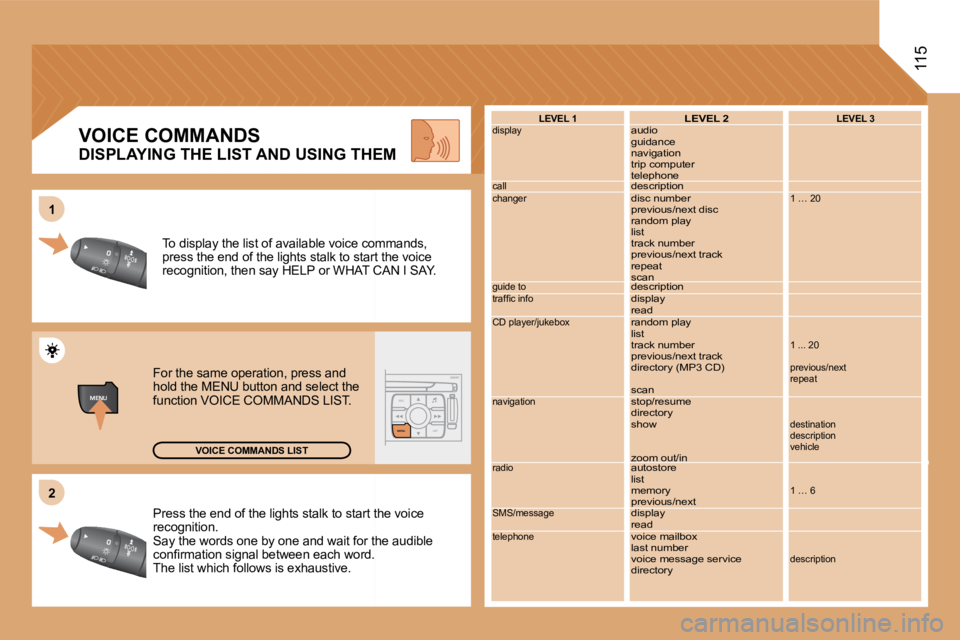
Press the end of the lights stalk to start the voic
e
recognition.
Say the words one by one and wait for the audible
conirmation signal between each word.
The list which follows is exhaustive. To display the list of available voice commands,
press the end of the lights stalk to start the voic
e
recognition, then say HELP or WHAT CAN I SAY.
For the same operation, press and
hold the MENU button and select the
function VOICE COMMANDS LIST.
VOICE COMMANDS LIST LEVEL 1
display
call
changer
guide to
trafic info
CD player/jukebox
navigation
radio
SMS/message
telephone
LEVEL 2
audio
guidance
navigation
trip computer
telephone
description
disc number
previous/next disc
random play
list
track number
previous/next track
repeat
scan
description
display
read
random play
list
track number
previous/next track
directory (MP3 CD)
scan
stop/resume
directory
show
zoom out/in
autostore
list
memory
previous/next
display
read
voice mailbox
last number
voice message service
directoryLEVEL 3
1 … 20
1 ... 20
previous/next
repeat
destination
description
vehicle
1 … 6
description
VOICE COMMANDS
DISPLAYING THE LIST AND USING THEM
Page 117 of 194
120
1
2
3
3
3
3
2
3
3
4
41
3
2
3
1
2
3
3
2
2
2
1
2
2
2
1
1
MENU
4
3
2
2
3
3
6
1
3
3
3
3
4
5
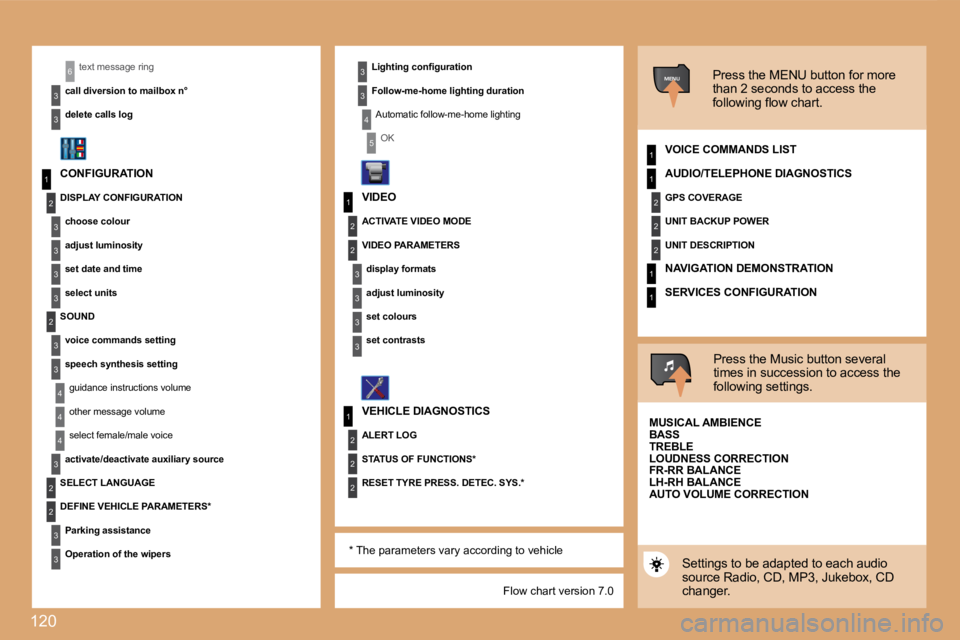
Flow chart version 7.0
text message ring
call diversion to mailbox n°
delete calls log
CONFIGURATION ACTIVATE VIDEO MODE
VEHICLE DIAGNOSTICS Press the MENU button for more
than 2 seconds to access the
following low chart.
VOICE COMMANDS LIST
Press the Music button several
times in succession to access the
following settings.
MUSICAL AMBIENCE
Settings to be adapted to each audio
source Radio, CD, MP3, Jukebox, CD
changer.
Lighting coniguration
Follow-me-home lighting duration
Automatic follow-me-home lighting
OK
DISPLAY CONFIGURATION choose colour
adjust luminosity
set date and time
select units
SOUND voice commands setting
speech synthesis settingguidance instructions volume
other message volume
select female/male voice
activate/deactivate auxiliary source
SELECT LANGUAGE
DEFINE VEHICLE PARAMETERS*
Parking assistance
Operation of the wipers VIDEO
VIDEO PARAMETERS
display formats
adjust luminosity
set colours
set contrasts
ALERT LOG
STATUS OF FUNCTIONS*
RESET TYRE PRESS. DETEC. SYS.* AUDIO/TELEPHONE DIAGNOSTICS
GPS COVERAGE
UNIT BACKUP POWER
UNIT DESCRIPTION
NAVIGATION DEMONSTRATION
SERVICES CONFIGURATION
BASS
TREBLE
LOUDNESS CORRECTION
FR-RR BALANCE
LH-RH BALANCE
AUTO VOLUME CORRECTION
* The parameters vary according to vehicle
Page 119 of 194
122
01 FIRST STEPS
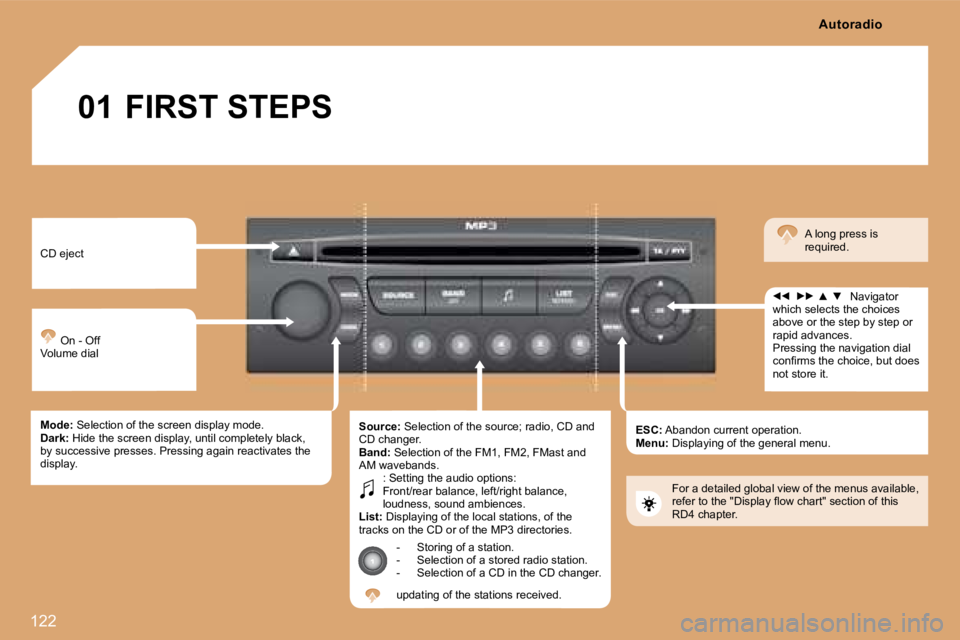
CD eject On - Off
Volume dial
Mode: Selection of the screen display mode.
Dark: Hide the screen display, until completely black,
by successive presses. Pressing again reactivates the
display. Source:
Selection of the source; radio, CD and
CD changer.
Band: Selection of the FM1, FM2, FMast and
AM wavebands. : Setting the audio options:
Front/rear balance, left/right balance,
loudness, sound ambiences.
List: Displaying of the local stations, of the
tracks on the CD or of the MP3 directories.
- Storing of a station.
- Selection of a stored radio station.
- Selection of a CD in the CD changer.
updating of the stations received. ESC:
Abandon current operation.
Menu: Displaying of the general menu. Navigator
which selects the choices
above or the step by step or
rapid advances.
Pressing the navigation dial
conirms the choice, but does
not store it. A long press is
required.
For a detailed global view of the menus available,
refer to the "Display low chart" section of this
RD4 chapter. Autoradio
Page 120 of 194
7
EUROPE
02
123
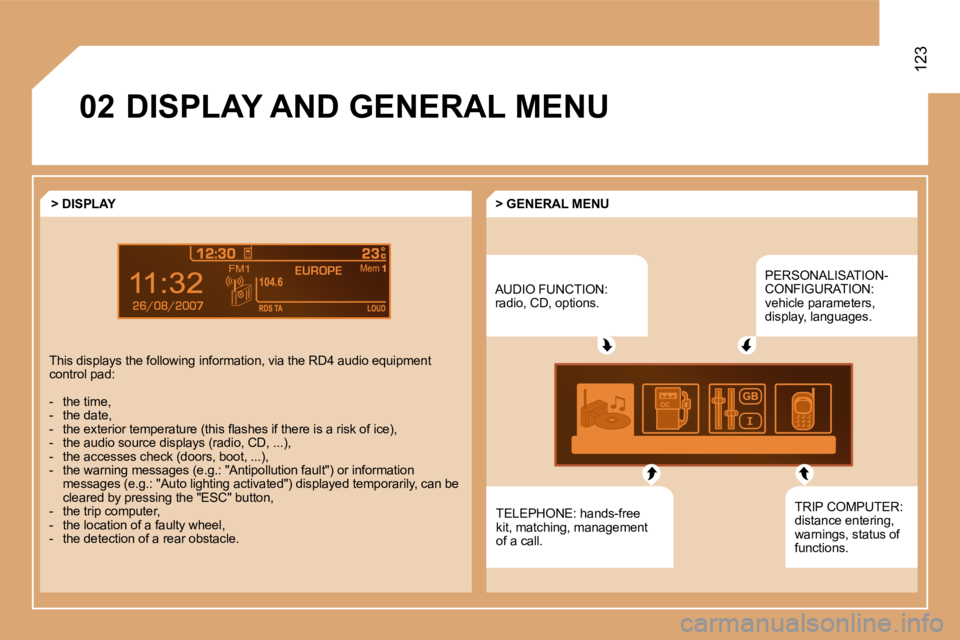
DISPLAY AND GENERAL MENUAUDIO FUNCTION:
radio, CD, options.PERSONALISATION-
CONFIGURATION:
vehicle parameters,
display, languages.
TELEPHONE: hands-free
kit, matching, management
of a call.
> GENERAL MENU
> DISPLAY
This displays the following information, via the RD 4 audio equipment
control pad:
- the time,
- the date,
- the exterior temperature (this lashes if there is a risk of ice),
- the audio source displays (radio, CD, ...),
- the accesses check (doors, boot, ...),
- the warning messages (e.g.: "Antipollution fault" ) or information
messages (e.g.: "Auto lighting activated") displaye d temporarily, can be
cleared by pressing the "ESC" button,
- the trip computer,
- the location of a faulty wheel,
- the detection of a rear obstacle. TRIP COMPUTER:
distance entering,
warnings, status of
functions.
Page 121 of 194
124
1
2
3
4MENU
2
4
3
1
03
AUDIO
RADIO
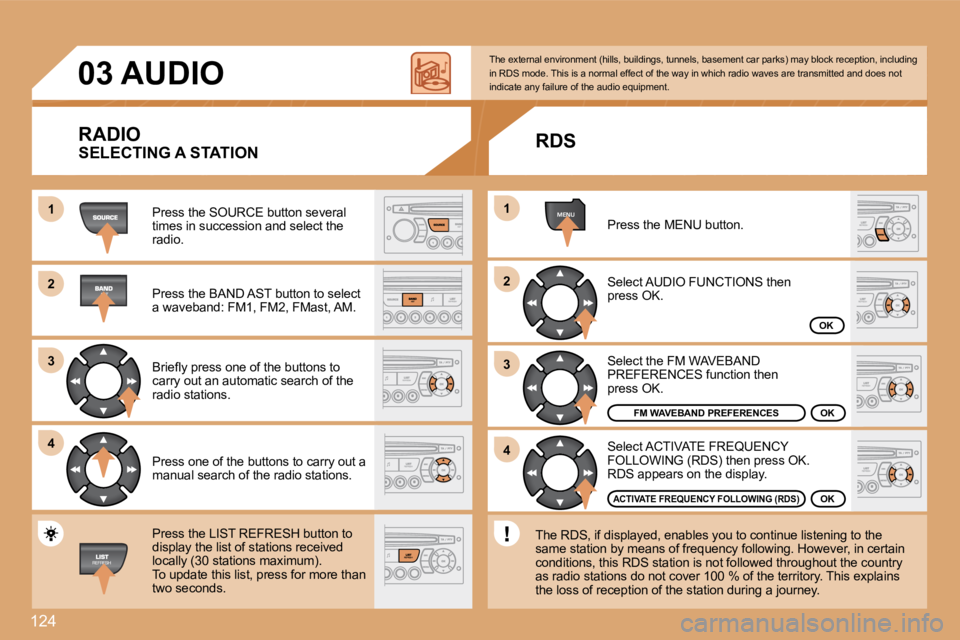
Press the SOURCE button several
times in succession and select the
radio.
Press the BAND AST button to select
a waveband: FM1, FM2, FMast, AM.
Briely press one of the buttons to
carry out an automatic search of the
radio stations.
Press one of the buttons to carry out a
manual search of the radio stations.
Press the LIST REFRESH button to
display the list of stations received
locally (30 stations maximum).
To update this list, press for more than
two seconds. Select ACTIVATE FREQUENCY
FOLLOWING (RDS) then press OK.
RDS appears on the display.
Select the FM WAVEBAND
PREFERENCES function then
press OK.
Select AUDIO FUNCTIONS then
press OK.
Press the MENU button.
FM WAVEBAND PREFERENCES
ACTIVATE FREQUENCY FOLLOWING (RDS)
The external environment (hills, buildings, tunnels
, basement car parks) may block reception, includin g
in RDS mode. This is a normal effect of the way in which radio waves are transmitted and does not
indicate any failure of the audio equipment.
RDS
The RDS, if displayed, enables you to continue list ening to the
same station by means of frequency following. Howev er, in certain
conditions, this RDS station is not followed throug hout the country
as radio stations do not cover 100 % of the territo ry. This explains
the loss of reception of the station during a journ ey.
OK
OK
OK
SELECTING A STATION