ignition PEUGEOT BOXER 2011 Owner's Manual
[x] Cancel search | Manufacturer: PEUGEOT, Model Year: 2011, Model line: BOXER, Model: PEUGEOT BOXER 2011Pages: 184, PDF Size: 4.86 MB
Page 76 of 184
74
Trip computer
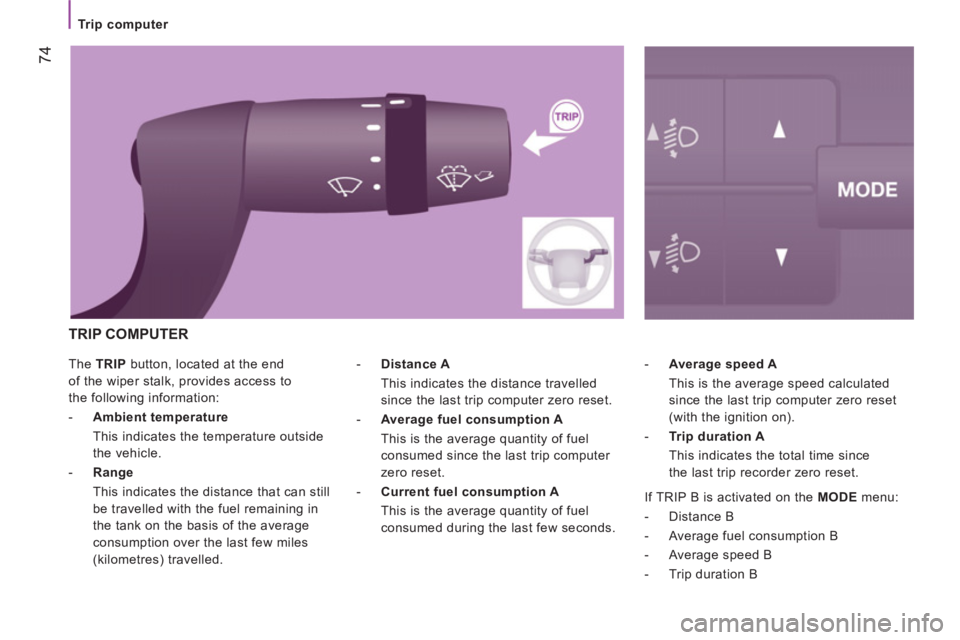
The TRIP
button, located at the end
of the wiper stalk, provides access to
the following information:
- Ambient
temperature
This indicates the temperature outside
the vehicle.
- Range
This indicates the distance that can still
be travelled with the fuel remaining in
the tank on the basis of the average
consumption over the last few miles
(kilometres) travelled.
- Average speed A
This is the average speed calculated
since the last trip computer zero reset
(with the ignition on).
- Trip duration A
This indicates the total time since
the last trip recorder zero reset.
- Distance A
This indicates the distance travelled
since the last trip computer zero reset.
- Average
fuel
consumption A
This is the average quantity of fuel
consumed since the last trip computer
zero reset.
- Current
fuel
consumption A
This is the average quantity of fuel
consumed during the last few seconds.
TRIP COMPUTER
If TRIP B is activated on the MODE
menu:
- Distance B
- Average fuel consumption B
- Average speed B
- Trip duration B
Page 77 of 184
miles
75
4
TECHNOLOGY ON BOARD
Mode
MODE
Confi
guration - Personalisation
If your vehicle is fitted with the control
panel located to the right of the steering
wheel, this provides access to menus which
permit the personalisation of some of your
equipment.
Seven languages are offered: Italian,
English, German, French, Spanish,
Portuguese, Dutch.
As a safety precaution, some menus can
only be accessed when the ignition is off.
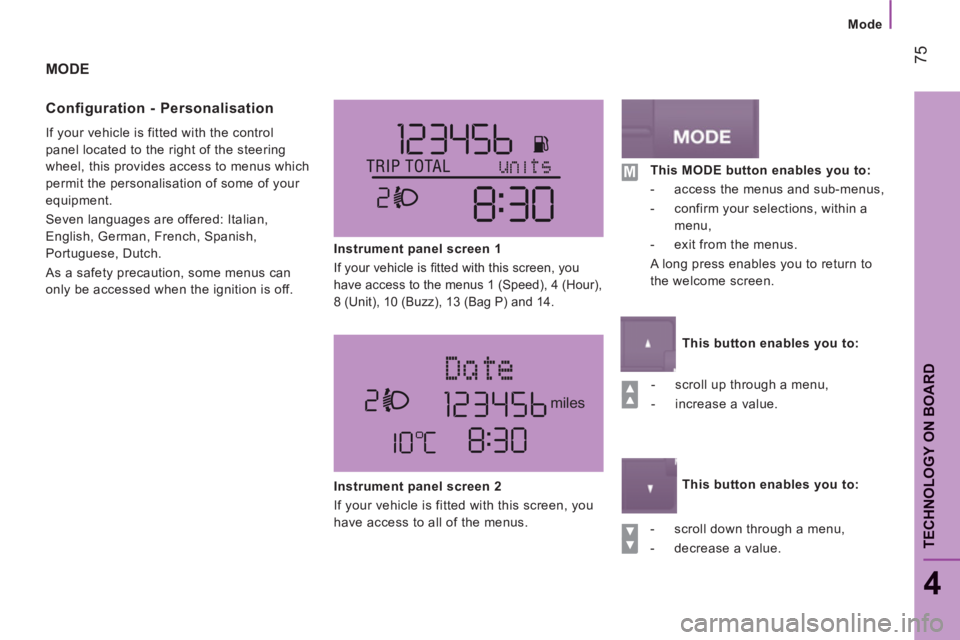
Instrument panel screen 1
If your vehicle is fi tted with this screen, you
have access to the menus 1 (Speed), 4 (Hour),
8 (Unit), 10 (Buzz), 13 (Bag P) and 14.
- scroll up through a menu,
- increase a value.
- scroll down through a menu,
- decrease a value.
Instrument panel screen 2
If your vehicle is fitted with this screen, you
have access to all of the menus.
This MODE button enables you to:
- access the menus and sub-menus,
- confirm your selections, within a
menu,
- exit from the menus.
A long press enables you to return to
the welcome screen.
This button enables you to:
This button enables you to:
Page 90 of 184
Audio equipment
88
Scroll
the display
Select
Display
Select
Display
Select
Display
Select
Display
Enables you
to…
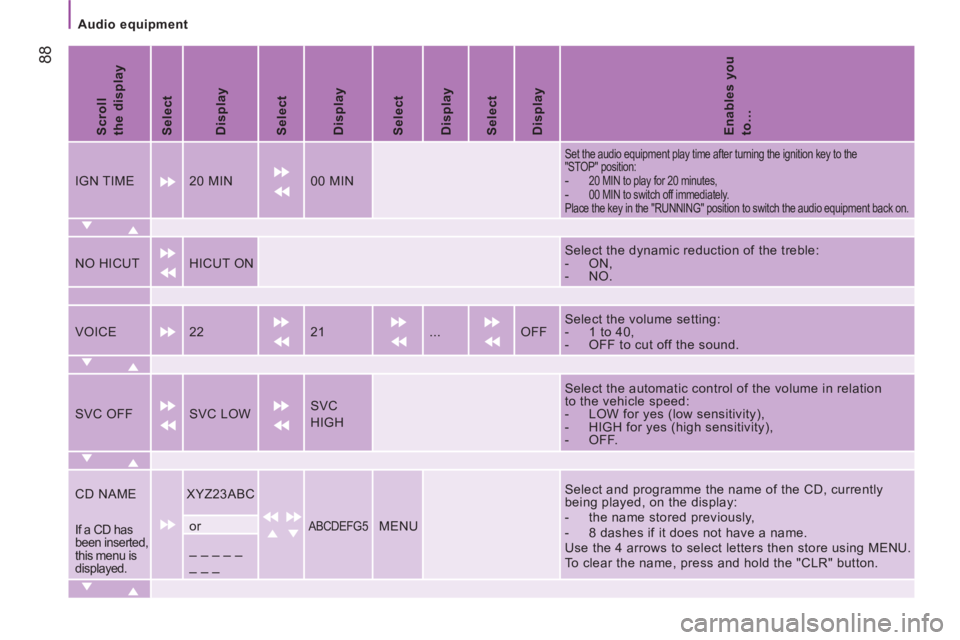
IGN TIME 20 MIN 00 MIN
Set the audio equipment play time after turning the ignition key to the
"STOP" position:
-
20 MIN to play for 20 minutes,
-
00 MIN to switch off immediately.
Place the key in the "RUNNING" position to switch the audio equipment back on.
NO HICUT HICUT ON
Select the dynamic reduction of the treble:
- ON,
- NO.
VOICE 22 21 ... OFF Select the volume setting:
- 1 to 40,
- OFF to cut off the sound.
SVC OFF SVC LOW SVC
HIGH
Select the automatic control of the volume in relation
to the vehicle speed:
- LOW for yes (low sensitivity),
- HIGH for yes (high sensitivity),
- OFF.
CD NAME
XYZ23ABC
ABCDEFG5
MENU
Select and programme the name of the CD, currently
being played, on the display:
- the name stored previously,
- 8 dashes if it does not have a name.
Use the 4 arrows to select letters then store using MENU.
To clear the name, press and hold the "CLR" button.
If a CD has
been inserted,
this menu is
displayed. or
_ _ _ _ _
_ _ _
Page 99 of 184
TECHNOLOGY ON BOARD
Bluetooth hands-free system
4
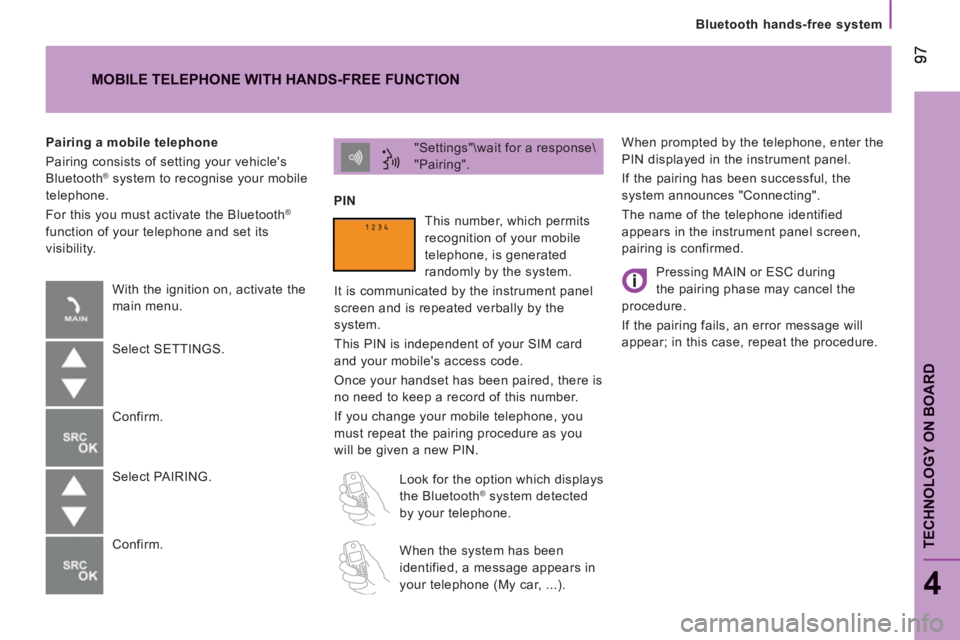
When prompted by the telephone, enter the
PIN displayed in the instrument panel.
If the pairing has been successful, the
system announces "Connecting".
The name of the telephone identified
appears in the instrument panel screen,
pairing is confirmed. "Settings"\wait for a response\
"Pairing".
PIN
Pairing a mobile telephone
Pairing consists of setting your vehicle's
Bluetooth
® system to recognise your mobile
telephone.
For this you must activate the Bluetooth
®
function of your telephone and set its
visibility.
MOBILE TELEPHONE WITH HANDS-FREE FUNCTION
With the ignition on, activate the
main menu.
Select SETTINGS.
Confirm.
Select PAIRING.
Confirm. This number, which permits
recognition of your mobile
telephone, is generated
randomly by the system.
It is communicated by the instrument panel
screen and is repeated verbally by the
system.
This PIN is independent of your SIM card
and your mobile's access code.
Once your handset has been paired, there is
no need to keep a record of this number.
If you change your mobile telephone, you
must repeat the pairing procedure as you
will be given a new PIN.
Look for the option which displays
the Bluetooth
® system detected
by your telephone.
When the system has been
identified, a message appears in
your telephone (My car, ...). Pressing MAIN or ESC during
the pairing phase may cancel the
procedure.
If the pairing fails, an error message will
appear; in this case, repeat the procedure.
Page 102 of 184
100
Bluetooth hands-free system
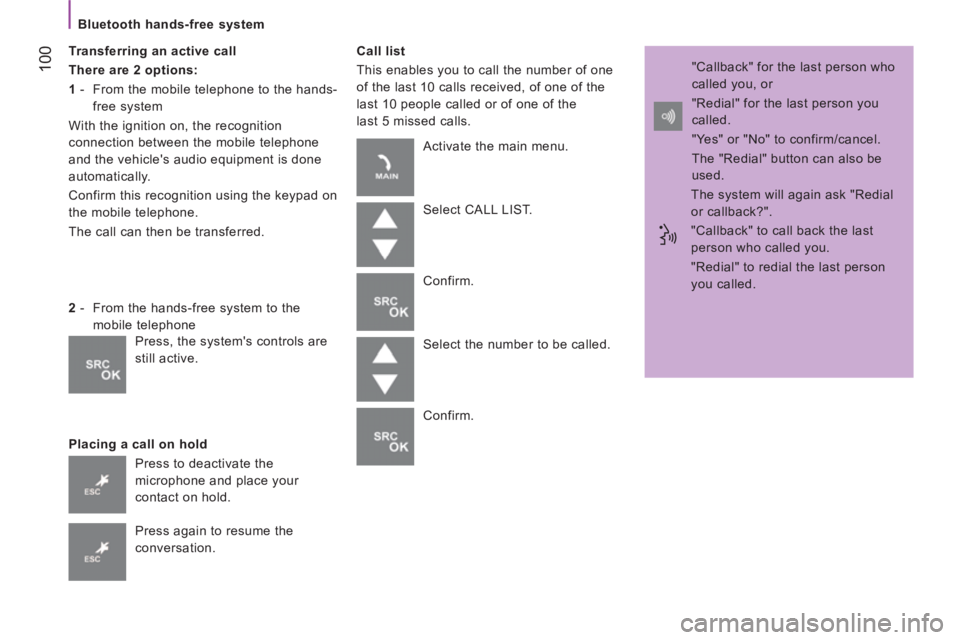
Transferring an active call
There are 2 options:
1
- From the mobile telephone to the hands-
free system
With the ignition on, the recognition
connection between the mobile telephone
and the vehicle's audio equipment is done
automatically.
Confirm this recognition using the keypad on
the mobile telephone.
The call can then be transferred.
Placing a call on hold
Call list
This enables you to call the number of one
of the last 10 calls received, of one of the
last 10 people called or of one of the
last 5 missed calls.
2
- From the hands-free system to the
mobile telephone
Press to deactivate the
microphone and place your
contact on hold.
Press again to resume the
conversation. Activate the main menu.
Select CALL LIST.
Confirm.
Select the number to be called.
Confirm. "Callback" for the last person who
called you, or
"Redial" for the last person you
called.
"Yes" or "No" to confirm/cancel.
The "Redial" button can also be
used.
The system will again ask "Redial
or callback?".
"Callback" to call back the last
person who called you.
"Redial" to redial the last person
you called.
Press, the system's controls are
still active.
Page 109 of 184
107
TECHNOLOGY ON BOARD
Bluetooth hands-free system
4
Audio tracks in .mp3, .wma, .wav format
and playlists with the extension .wpl are
recognised by the system.
Selecting tracks
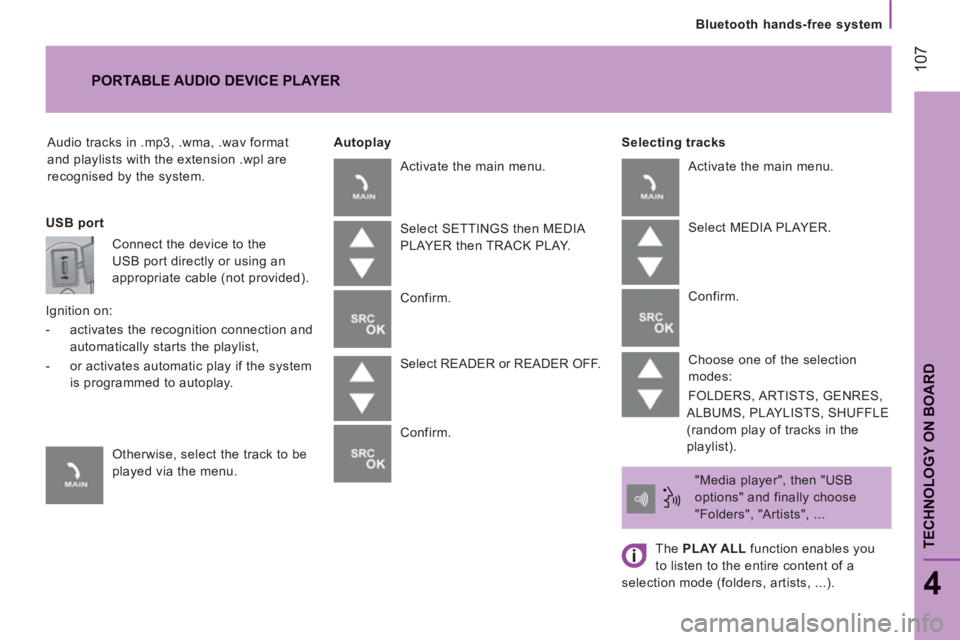
PORTABLE AUDIO DEVICE PLAYER
Autoplay
USB port
Connect the device to the
USB port directly or using an
appropriate cable (not provided).
Ignition on:
- activates the recognition connection and
automatically starts the playlist,
- or activates automatic play if the system
is programmed to autoplay.
Otherwise, select the track to be
played via the menu. Activate the main menu.
Select SETTINGS then MEDIA
PLAYER then TRACK PLAY.
Confirm.
Select READER or READER OFF.
Confirm. Activate the main menu.
Select MEDIA PLAYER.
Confirm.
Choose one of the selection
modes:
FOLDERS, ARTISTS, GENRES,
ALBUMS, PLAYLISTS, SHUFFLE
(random play of tracks in the
playlist).
"Media player", then "USB
options" and finally choose
"Folders", "Artists", ...
The PLAY ALL
function enables you
to listen to the entire content of a
selection mode (folders, artists, ...).
Page 113 of 184
111
5
Driving safely
SAFETY
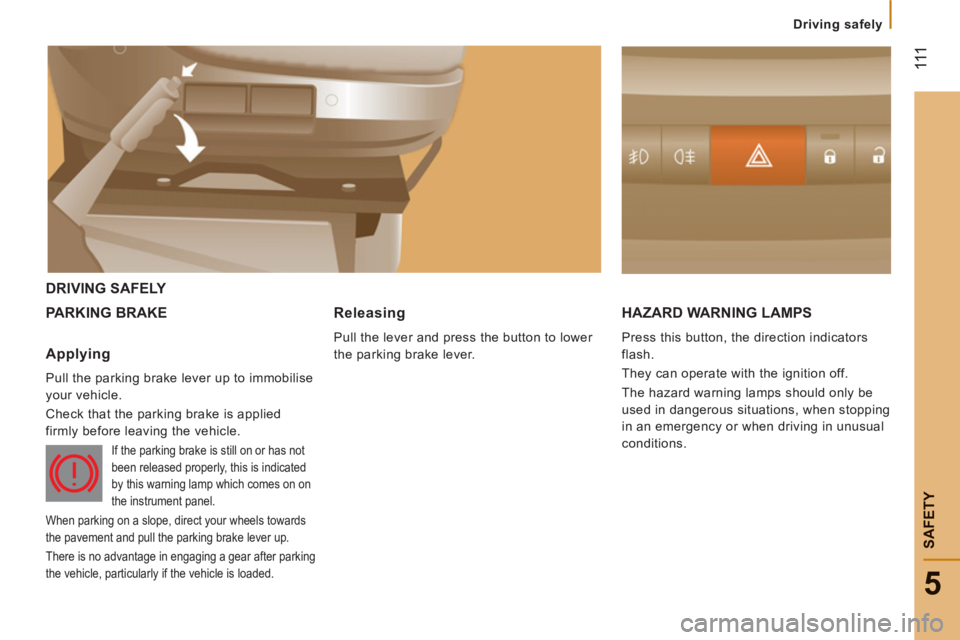
DRIVING SAFELY
PARKING BRAKE HAZARD WARNING LAMP
S
Press this button, the direction indicators
flash.
They can operate with the ignition off.
The hazard warning lamps should only be
used in dangerous situations, when stopping
in an emergency or when driving in unusual
conditions.
Applying
Pull the parking brake lever up to immobilise
your vehicle.
Check that the parking brake is applied
firmly before leaving the vehicle.
If the parking brake is still on or has not
been released properly, this is indicated
by this warning lamp which comes on on
the instrument panel.
When parking on a slope, direct your wheels towards
the pavement and pull the parking brake lever up.
There is no advantage in engaging a gear after parking
the vehicle, particularly if the vehicle is loaded.
Releasing
Pull the lever and press the button to lower
the parking brake lever.
Page 119 of 184
Seat belts
11
7
5
SAFETY
The force limiter reduces the pressure of the
seat belt against the body of the occupants.
The pretensioning seat belts are active when
the ignition is switched on.
The inertia reels are fitted with a device
which automatically locks the strap in the
event of a collision or emergency braking or
if the vehicle rolls over.
You can unfasten the seat belt by pressing
the red button on the buckle. Guide the seat
belt after unfastening. Good practice
The driver must ensure that passengers use
the seat belts correctly and that they are all
strapped in securely before moving off.
Wherever you are seated in the vehicle,
always fasten your seat belt, even for short
journeys.
The seat belts are fitted with an inertia reel
which automatically adjusts the length of
the strap to your size.
Do not use accessories (clothes pegs, clips,
safety pins, etc.) which permit a clearance
with the seat belt straps.
Ensure that the seat belt has reeled in
correctly after use.
After folding or moving a seat or a rear
bench seat, ensure that the seat belt has
reeled in correctly and that the buckle is
ready to accommodate the tongue.
Depending on the nature and seriousness
of any impact, the pretensioning device may
be triggered before and independently of
inflation of the airbags. It instantly tightens
the seat belts against the body of the
occupants.
Triggering of the pretensioners is
accompanied by a slight discharge of
harmless smoke and a noise, due to the
activation of the pyrotechnic cartridge
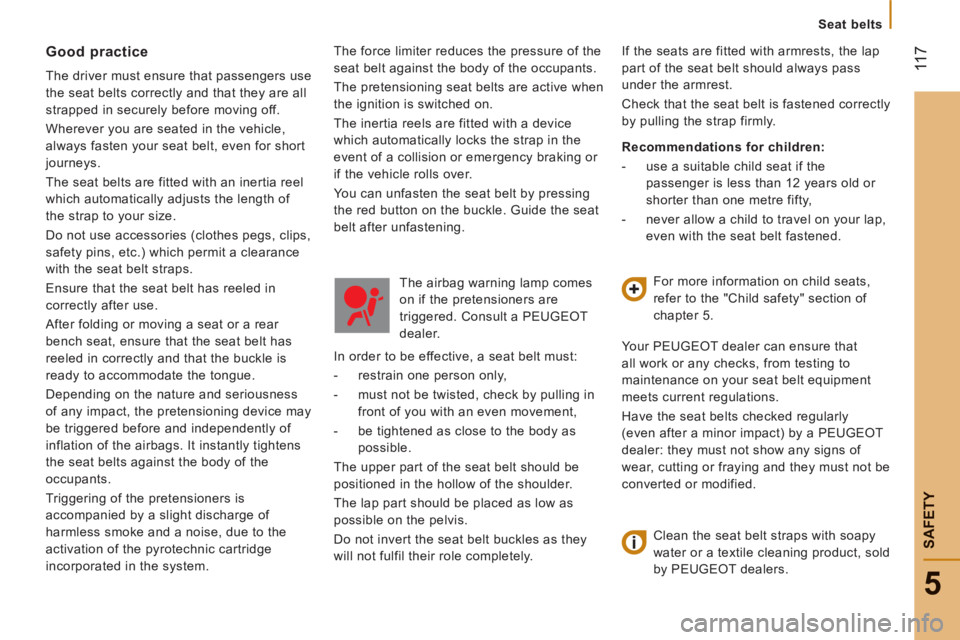
incorporated in the system. The airbag warning lamp comes
on if the pretensioners are
triggered. Consult a PEUGEOT
dealer.
In order to be effective, a seat belt must:
- restrain one person only,
- must not be twisted, check by pulling in
front of you with an even movement,
- be tightened as close to the body as
possible.
The upper part of the seat belt should be
positioned in the hollow of the shoulder.
The lap part should be placed as low as
possible on the pelvis.
Do not invert the seat belt buckles as they
will not fulfil their role completely.If the seats are fitted with armrests, the lap
part of the seat belt should always pass
under the armrest.
Check that the seat belt is fastened correctly
by pulling the strap firmly.
Recommendations for children:
- use a suitable child seat if the
passenger is less than 12 years old or
shorter than one metre fifty,
- never allow a child to travel on your lap,
even with the seat belt fastened.
For more information on child seats,
refer to the "Child safety" section of
chapter 5.
Your PEUGEOT dealer can ensure that
all work or any checks, from testing to
maintenance on your seat belt equipment
meets current regulations.
Have the seat belts checked regularly
(even after a minor impact) by a PEUGEOT
dealer: they must not show any signs of
wear, cutting or fraying and they must not be
converted or modified.
Clean the seat belt straps with soapy
water or a textile cleaning product, sold
by PEUGEOT dealers.
Page 121 of 184
Airbags
11
9
5
SAFETY
AIRBAGS
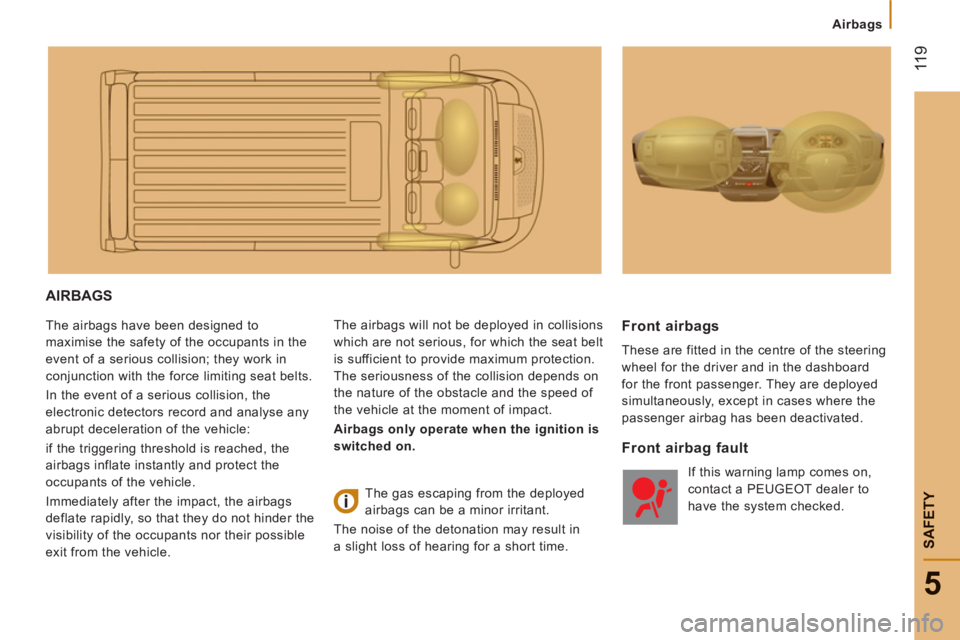
The airbags have been designed to
maximise the safety of the occupants in the
event of a serious collision; they work in
conjunction with the force limiting seat belts.
In the event of a serious collision, the
electronic detectors record and analyse any
abrupt deceleration of the vehicle:
if the triggering threshold is reached, the
airbags inflate instantly and protect the
occupants of the vehicle.
Immediately after the impact, the airbags
deflate rapidly, so that they do not hinder the
visibility of the occupants nor their possible
exit from the vehicle. The airbags will not be deployed in collisions
which are not serious, for which the seat belt
is sufficient to provide maximum protection.
The seriousness of the collision depends on
the nature of the obstacle and the speed of
the vehicle at the moment of impact.
Airbags
only operate when the ignition is
switched on. Front airbags
These are fitted in the centre of the steering
wheel for the driver and in the dashboard
for the front passenger. They are deployed
simultaneously, except in cases where the
passenger airbag has been deactivated.
The gas escaping from the deployed
airbags can be a minor irritant.
The noise of the detonation may result in
a slight loss of hearing for a short time.
Front airbag fault
If this warning lamp comes on,
contact a PEUGEOT dealer to
have the system checked.
Page 139 of 184
Levels
137
7
CHECK
S
Cooling system
Only use the fluid recommended by the
manufacturer. Otherwise, you risk seriously
damaging your engine. When the engine
is warm, the temperature of the coolant is
controlled by the engine fan. As this fan can
operate with the ignition key removed and
because the cooling system is pressurised,
wait for at least one hour after the engine
has stopped before carrying out any work.
Slacken the cap by 1/4 of a turn to release
the pressure to prevent any risk of scalding.
When the pressure has dropped, remove the
cap and top up the level with coolant.
If fluid has to be added frequently, this
indicates a failure which must be checked by
a PEUGEOT dealer as soon as possible.
Power steering fluid level
The vehicle must be parked on level ground with
the engine cold. Unscrew the cap integrated with
the gauge and check the level which must be
between the MIN
and MAX
marks.
Used oil
Avoid prolonged contact of used oil with the
skin.
Brake fluid is harmful to health and very
corrosive.
Do not dispose of used oil, brake fluid or
coolant into drains or into the ground but
into the containers dedicated to this use at
PEUGEOT dealerships (France) or to an
authorised waste disposal site.
Topping up
The level must be between the MIN
and
MAX
marks on the expansion bottle. If
more than 1 litre of fluid is required to top
up the level, have the system checked by
a PEUGEOT dealer.
Windscreen wash and headlamp
wash level
For best quality cleaning and to prevent
freezing, this fluid must not be topped up or
replaced with plain water.
Capacity of the reservoir: approximately
5.5 litres.