ESP PEUGEOT BOXER 2015 User Guide
[x] Cancel search | Manufacturer: PEUGEOT, Model Year: 2015, Model line: BOXER, Model: PEUGEOT BOXER 2015Pages: 276, PDF Size: 8.99 MB
Page 171 of 276
169
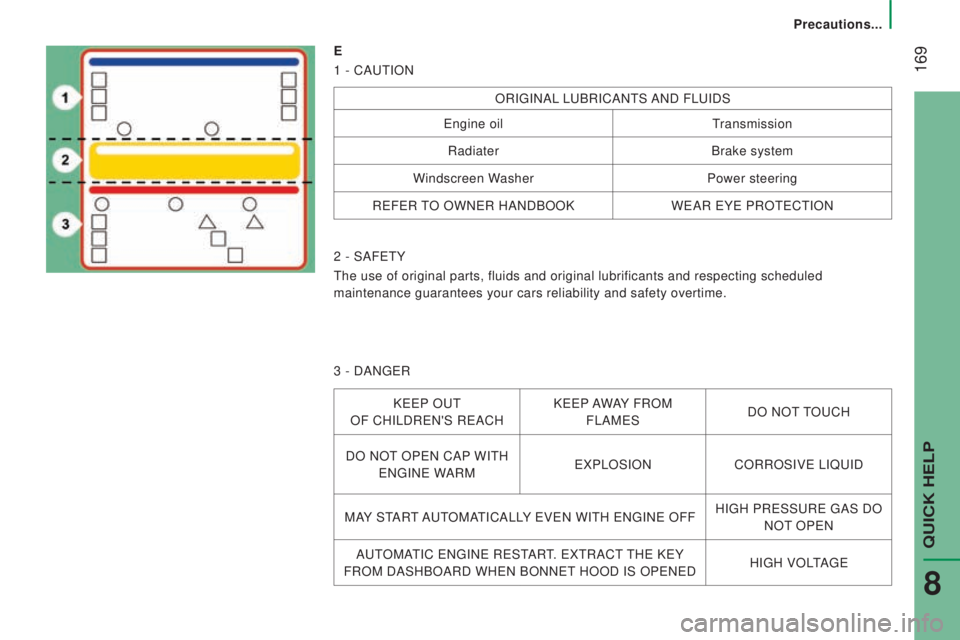
E
1 - CA
utION
ORIgINAL LuBRICANtS AND FLuIDS
engine oiltransmission
Radiater Brake system
Windscreen Washer Power steering
R
eFeR tO OWNeR HANDBOOK WeAR eYe PROteCtION
2 - SAF
etY
the use of original parts, fluids and original lubrificants and respectin\
g scheduled
maintenance guarantees your cars reliability and safety overtime.
3 - DAN
geR
KeeP Out
OF CHILDR
eN'S ReACH K
eeP
AWAY FROM
FLAM
eS DO
NOt tOuCH
DO NO
t OPeN CAP
WI
tH
eNgINe W
ARM
eXPLOSION CORROSIVe LIQuID
MA
Y S
tARt AutOMAtICALL
Y
eVeN WItH eNgINe OFFHIgH PReSSuRe gAS DO
NO
t OPeN
A
utOMAtIC eNgINe ReStARt. eXtRACt tHe KeY
FROM DASHBOARD WH
eN BONNet HOOD IS OPeNeD HIgH VOLtAge
QuICK HeLP
8
Precautions...
Page 175 of 276
 and 3 heights (H1...); r\
efer to the corresponding tables:VA
n
L1L2L3L4
H1 H2 H1 H2 H2 H3 H2 H3")
173
dIMEnSIonS
the dimensions are given in millimetres.
this model is available in 4 lengths (L1...) and 3 heights (H1...); r\
efer to the corresponding tables:VA
n
L1L2L3L4
H1 H2 H1 H2 H2 H3 H2 H3
L Overall length 4
9635 4135 9986 363
H Overall height 2
254
2 524 2
254
2 524 2
524
2
764
2
524
2
764
A Wheelbase 3
0003 450 4 035
B Front overhang 948
cRear overhang1 0151 380
dOverall width (incl./excl. mirrors) 2 508 / 2 050
E Width of front track 1
810
F Width of rear track 1
790
G Height of load floor 535 to 565
I Length of interior floor 2
6703 1203 7054 070
jMaximum interior load height 1 662
1
932
1
662
1
932
1
932
2
172
1
932
2
172
K Maximum interior width 1
870
M Interior width between wheel arches 1
422
V
olume (m
3) 89.5 10 11.5 13 15 15 17
9
teCHNICAL DAtA
Dimensions
Page 187 of 276
185
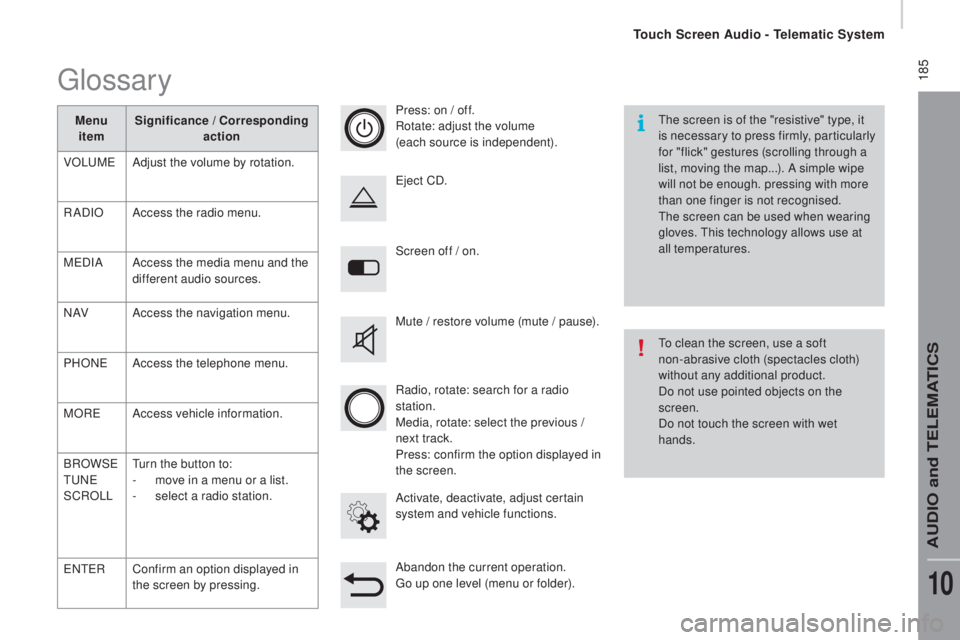
Screen off / on.
Activate, deactivate, adjust certain
system and vehicle functions.
eje
ct CD.
Mute / restore volume (mute / pause).
Abandon the current operation.
go up o
ne level (menu or folder).
Press: on / off.
Rotate: adjust the volume
(each source is independent).
Radio, rotate: search for a radio
station.
Media, rotate: select the previous /
next track.
Press: confirm the option displayed in
the screen.
the s
creen is of the "resistive" type, it
is necessary to press firmly, particularly
for "flick" gestures (scrolling through a
list, moving the map...). A simple wipe
will not be enough. pressing with more
than one finger is not recognised.
the s
creen can be used when wearing
gloves.
thi
s technology allows use at
all temperatures.
to cl
ean the screen, use a soft
non-abrasive cloth (spectacles cloth)
without any additional product.
Do not use pointed objects on the
screen.
Do not touch the screen with wet
hands.
glossary
Menu item Significance / cor
responding
action
VOL
uMeAd
just the volume by rotation.
RADIO Access the radio menu.
M
eD
IA Access the media menu and the
different audio sources.
N AV Access the navigation menu.
PHON
eAc
cess the telephone menu.
MOR
eAc
cess vehicle information.
BROWS
e
tuNeSC
ROLL
tur
n the button to:
-
mov
e in a menu or a list.
-
se
lect a radio station.
eNteRC
onfirm an option displayed in
the screen by pressing.
touch Screen Audio - telematic System
AuDIO and teLeMAtICS
10
Page 191 of 276
189Level 1Level 2 Level 3com ment
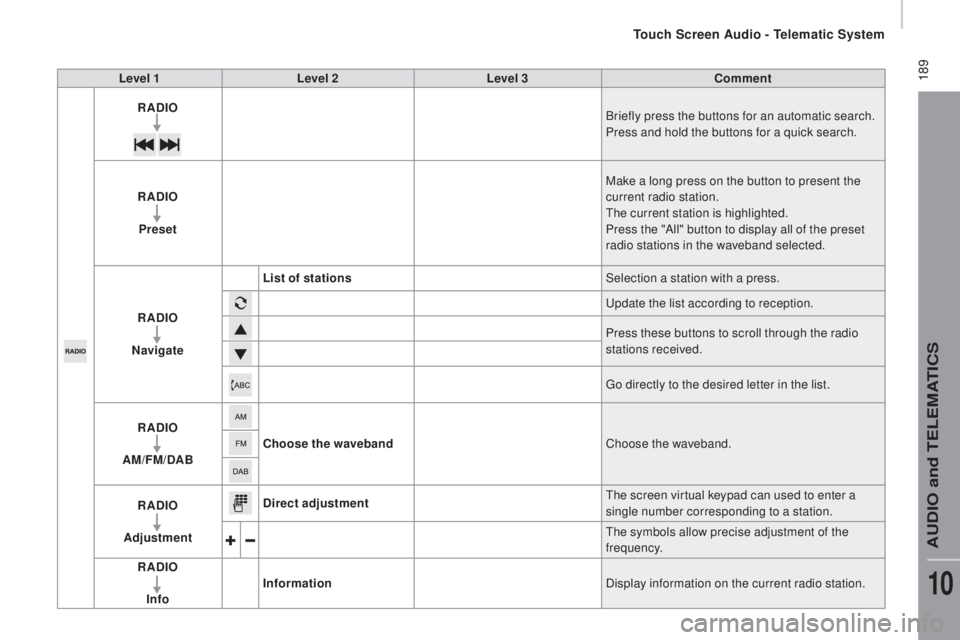
rAdIoBr
iefly press the buttons for an automatic search.
Press and hold the buttons for a quick search.
rAdIo
Pre
set Make a long press on the button to present the
current radio station.
the c
urrent station is highlighted.
Press the "All" button to display all of the preset
radio stations in the waveband selected.
rAdIo
n
a
vigate List of stations
Selection a station with a press.
upd
ate the list according to reception.
Press these buttons to scroll through the radio
stations received.
go di
rectly to the desired letter in the list.
rAdIo
AM/F
M/
dA
B
choo
se the waveband Choose the waveband.
rAdIo
Ad
justment
dire
ct adjustment
the s
creen virtual keypad can used to enter a
single number corresponding to a station.
the s
ymbols allow precise adjustment of the
frequency.
rAdIo
In
fo Information
Display information on the current radio station.
touch Screen Audio - telematic System
AuDIO and teLeMAtICS
10
Page 195 of 276
193
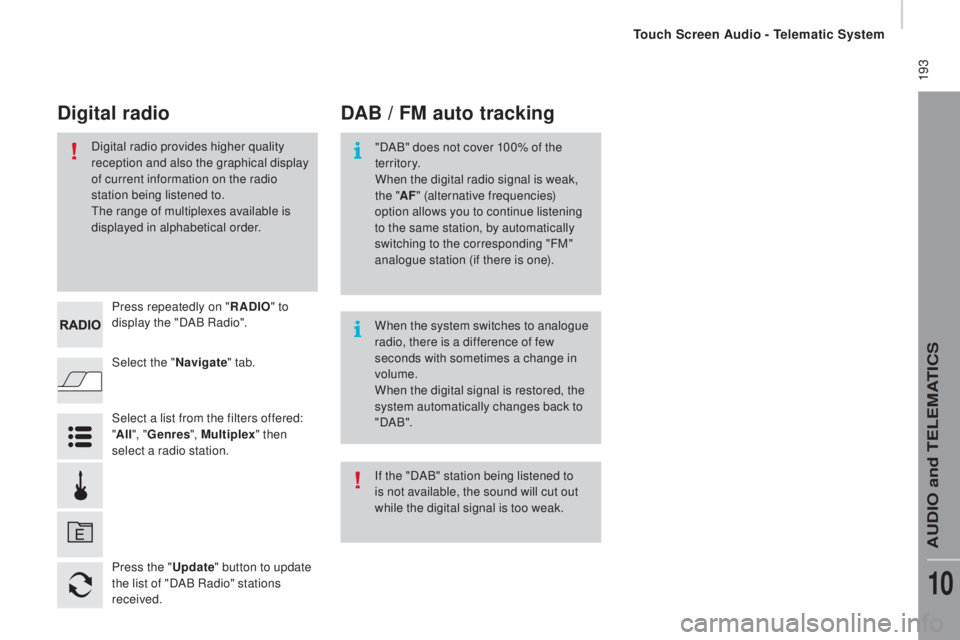
Select the "navigate" tab.
Press repeatedly on "
rAdIo" to
d
isplay the "DAB Radio".
Select a list from the filters offered:
" All ", "Genres ", Multiplex " then
select a radio station.
Press the "
upda
te" button to update
the list of "DAB Radio" stations
received.
dAB / FM auto trackingdig
ital radio
"DAB" does not cover 100% of the
te r r i to r y.
When the digital radio signal is weak,
the " AF" (alternative frequencies)
option allows you to continue listening
to the same station, by automatically
switching to the corresponding "FM"
analogue station (if there is one).
When the system switches to analogue
radio, there is a difference of few
seconds with sometimes a change in
volume.
When the digital signal is restored, the
system automatically changes back to
" DA B ".
Digital radio provides higher quality
reception and also the graphical display
of current information on the radio
station being listened to.
the r
ange of multiplexes available is
displayed in alphabetical order.
If the "DAB" station being listened to
is not available, the sound will cut out
while the digital signal is too weak.
touch Screen Audio - telematic System
AuDIO and teLeMAtICS
10
Page 215 of 276
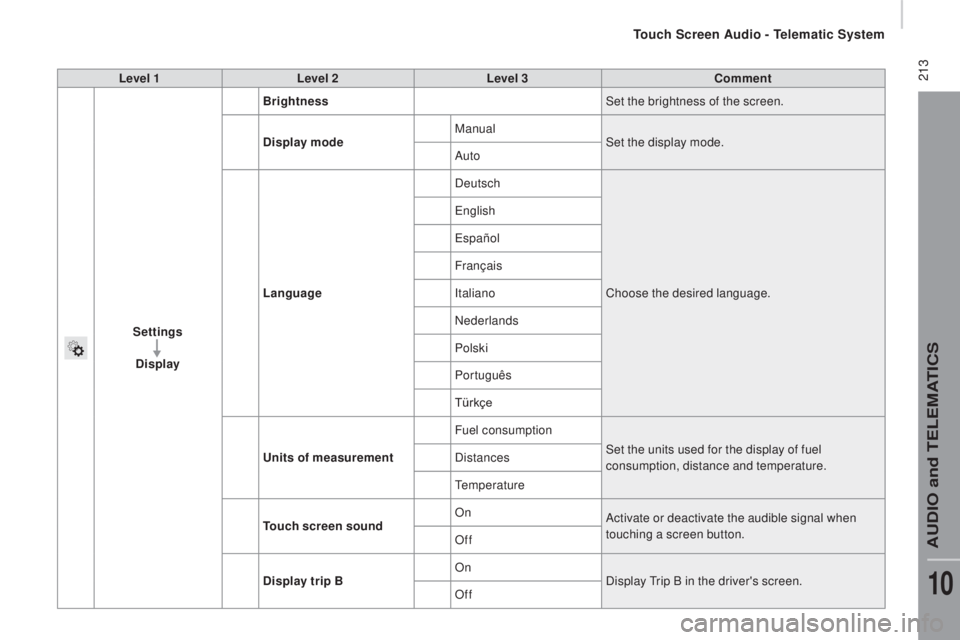
213Level 1Level 2 Level 3com ment
Settings
di
splay Brightness
Set the brightness of the screen.
di
splay mode Manual
Set the display mode.
Auto
Language Deutsch
Choose the desired language.
engl
ish
españo
l
Français
Italiano
Nederlands
Polski
Português
Türkçe
uni
ts of measurement Fuel consumption
Set the units used for the display of fuel
consumption, distance and temperature.
Distances
temp
erature
touch
screen soundOn
Activate or deactivate the audible signal when
touching a screen button.
Off
dis
play trip B On
Display
tri
p B in the driver's screen.
Off
touch Screen Audio - telematic System
AuDIO and teLeMAtICS
10
Page 217 of 276
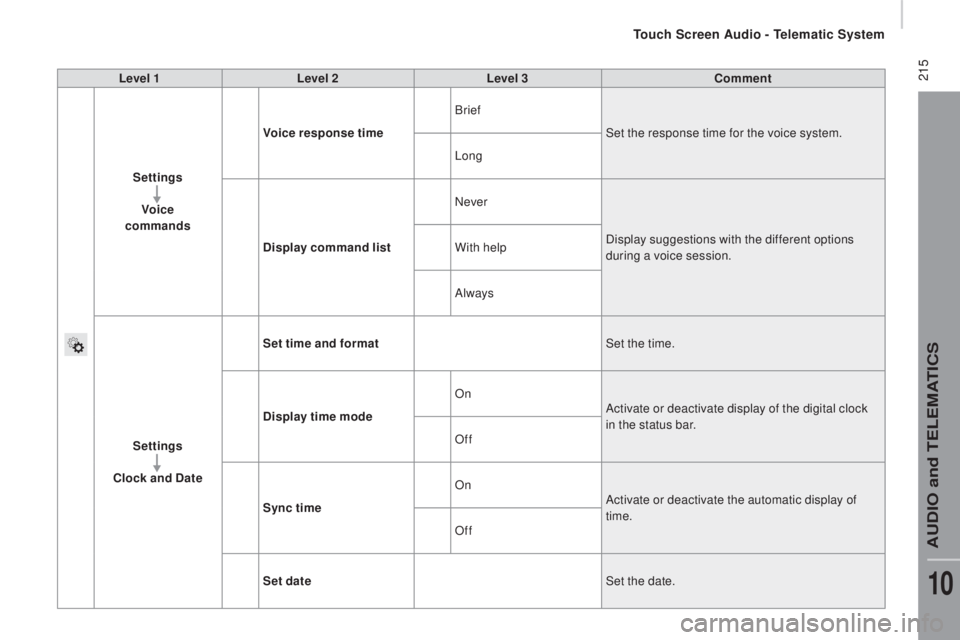
215Level 1Level 2 Level 3com ment
Settings Voice
commands Voice response time
Brief
Set the response time for the voice system.
Long
di
splay command list Never
Display suggestions with the different options
during a voice session.
With help
Always
Settings
cloc
k and
date S
et time and format Set the time.
di
splay time mode On
Activate or deactivate display of the digital clock
in the status bar.
Off
Sync time On
Activate or deactivate the automatic display of
time.
Off
Set date Set the date.
touch Screen Audio - telematic System
AuDIO and teLeMAtICS
10
Page 253 of 276

251
PrESEntAtIon
Chassis cab and floor cab versions have a cab, a fixed floor and two spe\
cific rear lamp
clusters.
these versions are also available with:
-
a crew cab,
-
a tipper body.
changing a bulb
For more information on bulbs, refer to
the table "
types of bulb and lamp" in
the "Quick help" section.
rear lamps
Carry out the operations in reverse order to
refit each bulb.
1.
direction indicators
type B, PY21W - 21W
2.
Brake lamps
type B, P21W - 21W
3.
Sidelamps
type A, W5W - 5W
4.
reversing lamps
type A, W16W - 16W
5.
Foglamps
type A, W16W - 16W -
Identify the failed bulb.
-
Remove the four lamp unit fixing screws.
-
Pull the lamp unit out towards you.
-
Replace the bulb.
For more information on these versions, refer to the corresponding secti\
on.
SPeCIAL FeAtuReS
Chassis cab / Floor cab
Page 260 of 276
258PrESEntAtIon
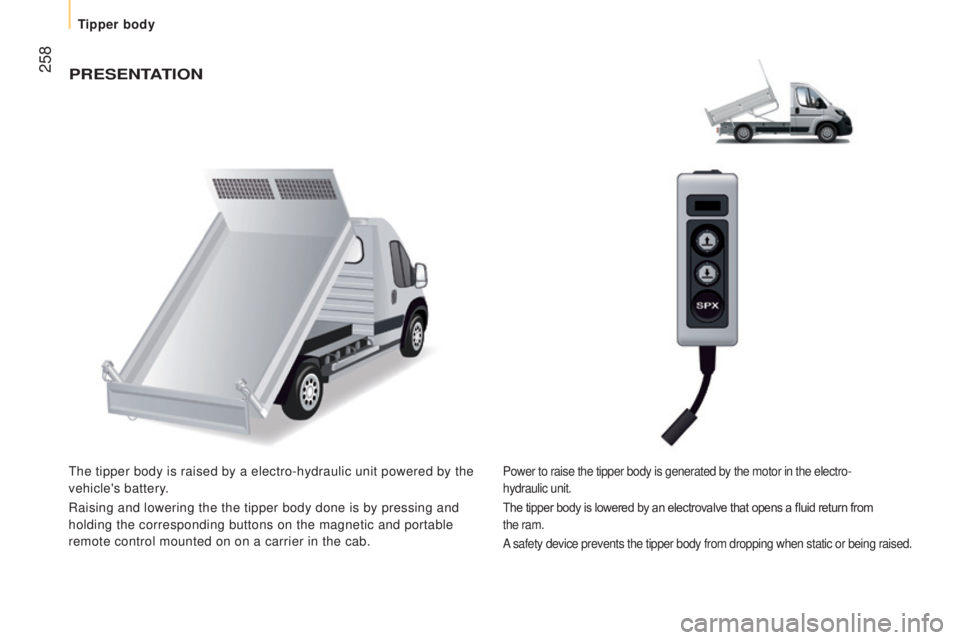
the tipper body is raised by a electro-hydraulic unit powered by the
vehicle's battery.
Raising and lowering the the tipper body done is by pressing and
holding the corresponding buttons on the magnetic and portable
remote control mounted on on a carrier in the cab.Power to raise the tipper body is generated by the motor in the electro-\
hydraulic
unit.
The tipper body is lowered by an electrovalve that opens a fluid
return from
the
ram.
A
safety device prevents the tipper body from dropping when static or bei\
ng raised.
tipper body
Page 275 of 276
06.15
this handbook describes all of the
equipment available in the whole range. Automobiles P
eugeOt declares, by
application of the provisions of the
european
regulation (Directive 2000/53) relating
to
end of Life V
ehicles, that it achieves
the objectives set by this regulation and
that recycled materials are used in the
manufacture of the products that it sells.
Printed in the
eu
Anglais
Your vehicle will be fitted with some of this
equipment described in this document,
depending on its trim level, version and the
specification for the country in which it is
sold.
the descriptions and illustrations are
given without any obligation. Automobiles
P
eugeOt reserves the right to modify the
technical specifications, equipment and
accessories without having to update this
edition of the handbook.
this document is an integral part of your
vehicle. It should be passed on to the new
user in the event of sale or transfer.
In addition, there are labels present in your
vehicle to warn you of the need for certain
precautions to take for your safety; don't
remove them, they will be useful again for a
new owner. Reproduction or translation of all or part of
this document is prohibited without written
authorisation from Automobiles P
eugeOt.
We draw your attention to the following
points:
-
t
he fitting of electrical equipment
or accessories not listed by
P
eugeOt
may cause faults and
failures with the electrical system of
your vehicle. Contact a P
eugeOt
dealer for information on the range of
recommended accessories.
-
As a safety measure, access to the
diagnostic socket, used for the vehicle's
electronic systems, is reserved strictly
for P
eugeOt dealers or qualified
workshops, equipped with the special
diagnostic tool required (risk of
malfunctions of the vehicle's electronic
systems that could cause breakdowns
or serious accidents).
the manufacturer
cannot be held responsible if this advice
is not followed.
-
Any modification or adaptation not
intended or authorised by
Automobiles
P
eugeOt or carried out without
meeting the technical requirements
defined by the manufacturer would
lead to the suspension of the legal and
contractual warranties.