USB PEUGEOT BOXER 2015 User Guide
[x] Cancel search | Manufacturer: PEUGEOT, Model Year: 2015, Model line: BOXER, Model: PEUGEOT BOXER 2015Pages: 276, PDF Size: 8.99 MB
Page 224 of 276
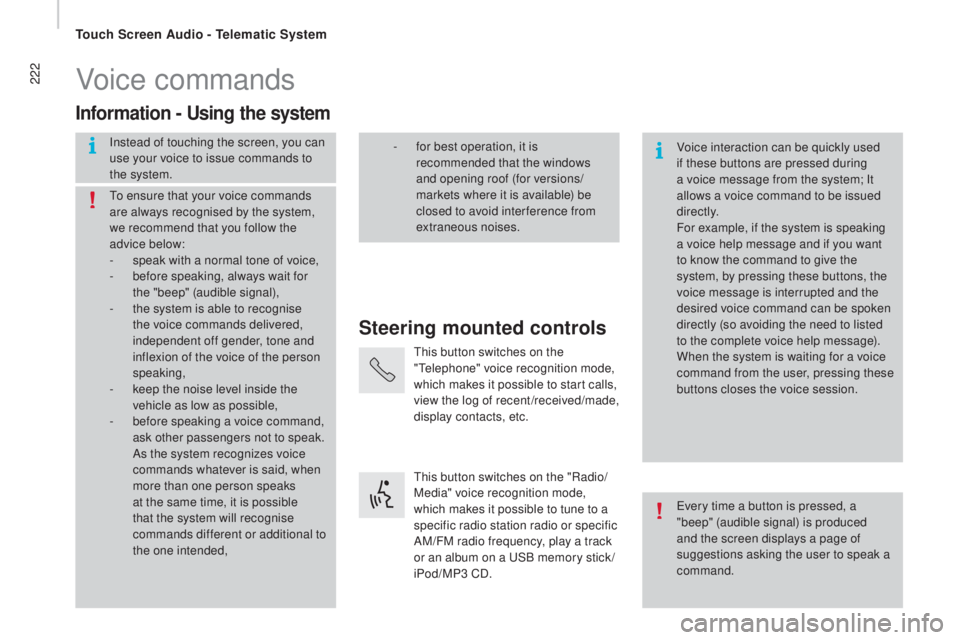
222Voice commands
Steering mounted controls
Information - using the system
Instead of touching the screen, you can
use your voice to issue commands to
the system. Voice interaction can be quickly used
if these buttons are pressed during
a voice message from the system; It
allows a voice command to be issued
di r e c t l y.
For example, if the system is speaking
a voice help message and if you want
to know the command to give the
system, by pressing these buttons, the
voice message is interrupted and the
desired voice command can be spoken
directly (so avoiding the need to listed
to the complete voice help message).
When the system is waiting for a voice
command from the user, pressing these
buttons closes the voice session.
to en
sure that your voice commands
are always recognised by the system,
we recommend that you follow the
advice below:
-
sp
eak with a normal tone of voice,
-
be
fore speaking, always wait for
the "beep" (audible signal),
-
th
e system is able to recognise
the voice commands delivered,
independent off gender, tone and
inflexion of the voice of the person
speaking,
-
ke
ep the noise level inside the
vehicle as low as possible,
-
be
fore speaking a voice command,
ask other passengers not to speak.
As the system recognizes voice
commands whatever is said, when
more than one person speaks
at the same time, it is possible
that the system will recognise
commands different or additional to
the one intended,
eve
ry time a button is pressed, a
"beep" (audible signal) is produced
and the screen displays a page of
suggestions asking the user to speak a
command.
- fo
r best operation, it is
recommended that the windows
and opening roof (for versions/
markets where it is available) be
closed to avoid inter ference from
extraneous noises.
thi
s button switches on the
"
tele
phone" voice recognition mode,
which makes it possible to start calls,
view the log of recent /received/made,
display contacts, etc.
thi
s button switches on the "Radio/
Media" voice recognition mode,
which makes it possible to tune to a
specific radio station radio or specific
AM/FM radio frequency, play a track
or an album on a
uSB m
emory stick /
iPod/MP3 CD.
touch Screen Audio - telematic System
Page 229 of 276
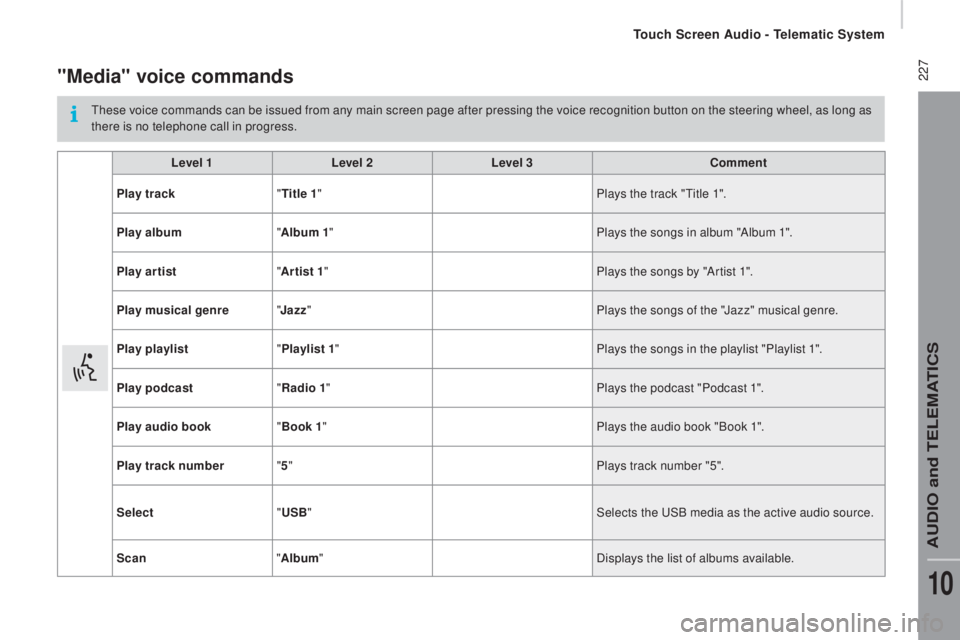
227"Media" voice commands
these voice commands can be issued from any main screen page after pressing the voice recognition button on the steering wheel, as long as
t here is no telephone call in progress.
Level 1 Level 2Level 3
com
ment
Play track "
tit
le 1" Plays the track "
tit
le 1".
Play album "Album 1 " Plays the songs in album "Album 1".
Play ar tist "Ar tist 1 " Plays the songs by "Artist 1".
Play musical genre "
ja
zz" Plays the songs of the "Jazz" musical genre.
Play playlist "Playlist 1 " Plays the songs in the playlist "Playlist 1".
Play podcast "
rad
io 1" Plays the podcast "Podcast 1".
Play audio book "Book 1 " Plays the audio book "Book 1".
Play track number "5 " Plays track number "5".
Select "
uS
B" Selects the
uSB m
edia as the active audio source.
Scan "Album " Displays the list of albums available.
touch Screen Audio - telematic System
AuDIO and teLeMAtICS
10
Page 234 of 276
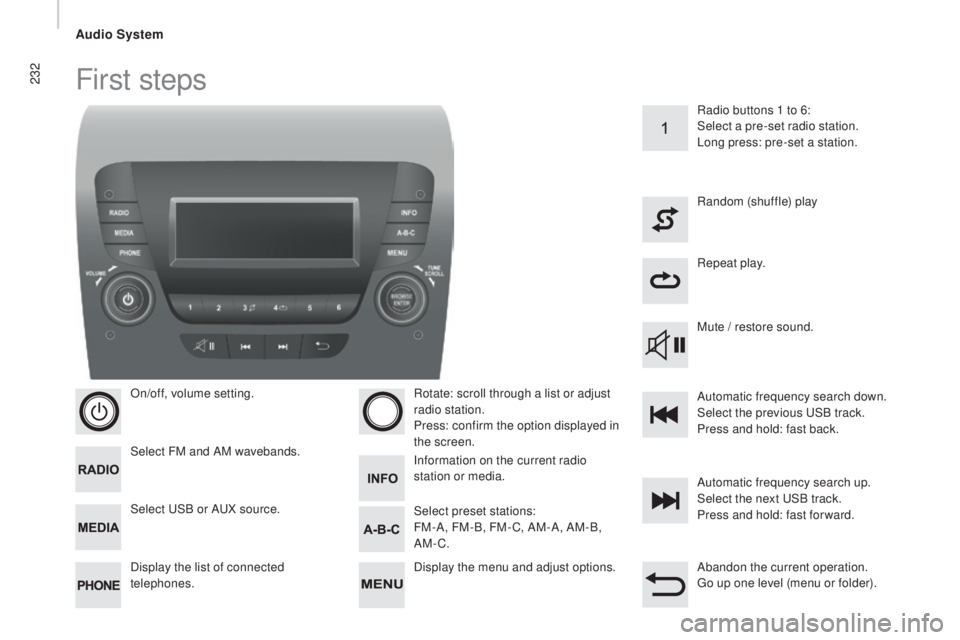
232First steps
On/off, volume setting.
Select FM and AM wavebands.
Display the list of connected
telephones.Rotate: scroll through a list or adjust
radio station.
Press: confirm the option displayed in
the screen.
Select
uSB o
r A
uX so
urce. Information on the current radio
station or media. Repeat play.
Select preset stations:
FM-A, FM-B, FM- C, AM-A, AM-B,
AM-C. Mute / restore sound. Radio buttons 1 to 6:
Select a pre-set radio station.
Long press: pre-set a station.
Random (shuffle) play
Automatic frequency search up.
Select the next
uSB t
rack.
Press and hold: fast for ward.
Display the menu and adjust options. Automatic frequency search down.
Select the previous
uSB t
rack.
Press and hold: fast back.
Abandon the current operation.
go up o
ne level (menu or folder).
Audio System
Page 235 of 276
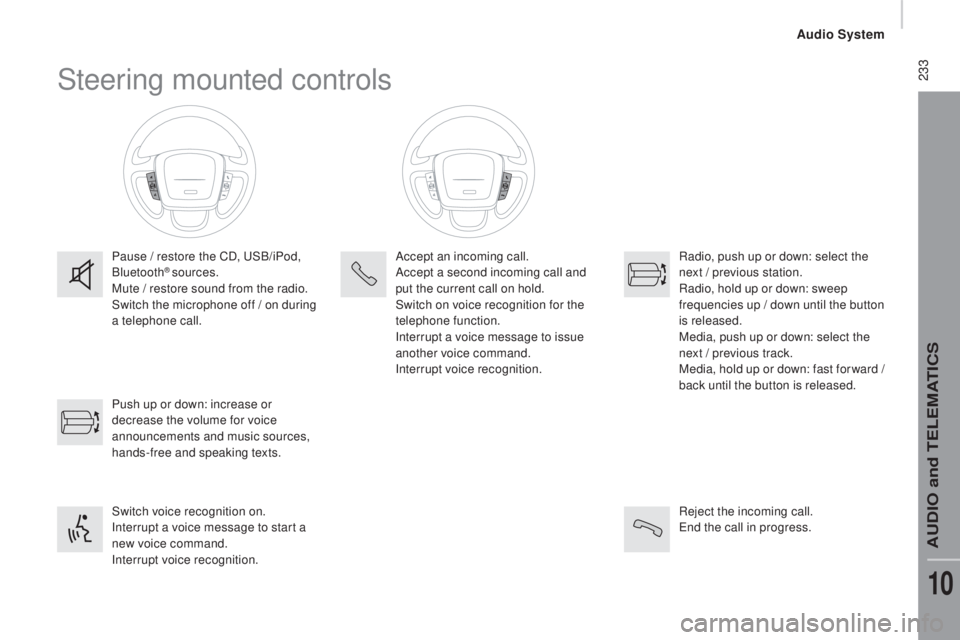
233Steering mounted controls
Pause / restore the CD, uSB/iPod,
Bluetooth® sources.
Mute / restore sound from the radio.
Switch the microphone off / on during
a telephone call.
Switch voice recognition on.
Interrupt a voice message to start a
new voice command.
Interrupt voice recognition. Push up or down: increase or
decrease the volume for voice
announcements and music sources,
hands-free and speaking texts. Accept an incoming call.
Accept a second incoming call and
put the current call on hold.
Switch on voice recognition for the
telephone function.
Interrupt a voice message to issue
another voice command.
Interrupt voice recognition.
Radio, push up or down: select the
next / previous station.
Radio, hold up or down: sweep
frequencies up / down until the button
is released.
Media, push up or down: select the
next / previous track.
Media, hold up or down: fast for ward
/
b
ack until the button is released.
Reject the incoming call.
end t
he call in progress.
Audio System
AuDIO and teLeMAtICS
10
Page 238 of 276
236
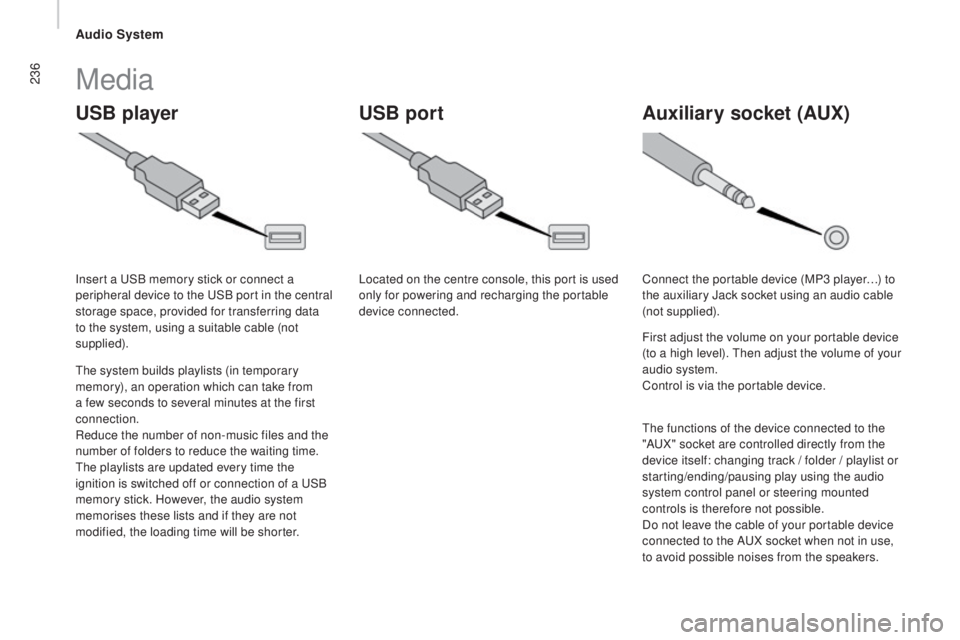
uSB playerA uxiliary socket (Aux)uSB port
Media
the system builds playlists (in temporary
m emory), an operation which can take from
a few seconds to several minutes at the first
connection.
Reduce the number of non-music files and the
number of folders to reduce the waiting time.
the p
laylists are updated every time the
ignition is switched off or connection of a
uSB
m
emory stick. However, the audio system
memorises these lists and if they are not
modified, the loading time will be shorter. Insert a
uSB m
emory stick or connect a
peripheral device to the
uSB p
ort in the central
storage space, provided for transferring data
to the system, using a suitable cable (not
supplied). Located on the centre console, this port is used
only for powering and recharging the portable
device connected.
Connect the portable device (MP3 player…) to
the auxiliary Jack socket using an audio cable
(not supplied).
First adjust the volume on your portable device
(to a high level).
the
n adjust the volume of your
audio system.
Control is via the portable device.
the f
unctions of the device connected to the
"A
uX" s
ocket are controlled directly from the
device itself: changing track / folder / playlist or
starting/ending/pausing play using the audio
system control panel or steering mounted
controls is therefore not possible.
Do not leave the cable of your portable device
connected to the A
uX so
cket when not in use,
to avoid possible noises from the speakers.
Audio System
Page 239 of 276
237
It is recommended that official Apple® uSB c
ables are used to ensure correct
operation.
the s
ystem does not support
two
i
dentical devices connected at
the same time (two memory sticks,
two Apple
® players) but it is possible
to c
onnect one memory stick and one
Apple
® player at the same time.
the s
ystem supports
uSB m
ass storage
devices, BlackBerry
® devices or Apple®
players via uSB p
orts. the a
daptor cable is not
supplied.
Other peripherals, not recognised on
connection, must be connected to the auxiliary
socket using a Jack cable (not supplied).
use o
nly
uSB m
emory sticks formatted FA
t 3
2
(File Allocation
table
).
It is advisable to restrict file names to
20
c
haracters, without using of special
characters (e.g.: "
" ? ; ù
) to avoid any playing
and displaying problems.
Information and advice
the version of software in the audio
s ystem may not be compatible with the
generation of your Apple
® p l aye r.
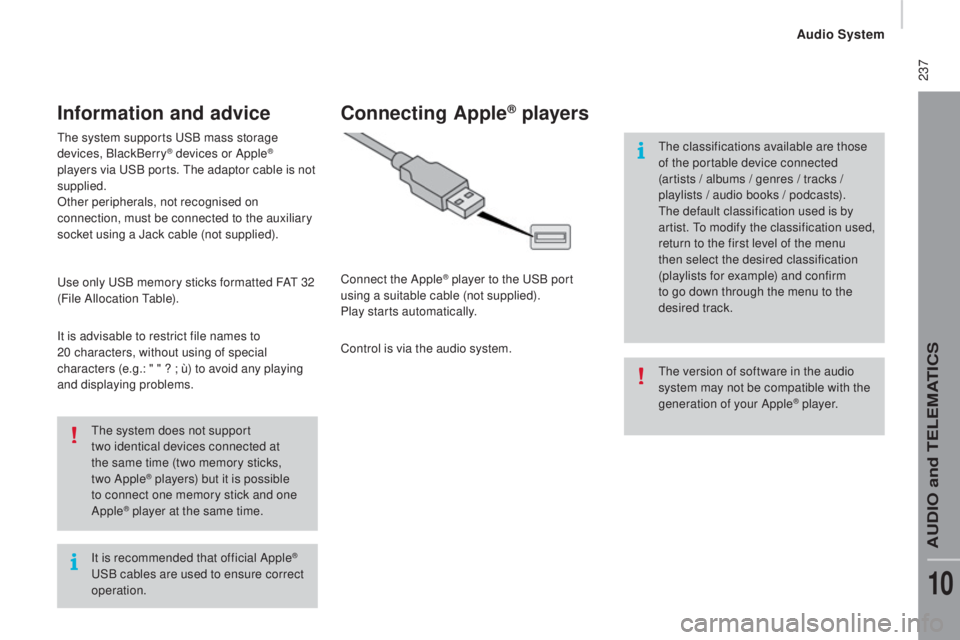
connecting Apple® players
Connect the Apple® player to the uSB p ort
using a suitable cable (not supplied).
Play starts automatically.
Control is via the audio system.
the c
lassifications available are those
of the portable device connected
(artists / albums / genres / tracks /
playlists / audio books / podcasts).
the d
efault classification used is by
artist.
to mo
dify the classification used,
return to the first level of the menu
then select the desired classification
(playlists for example) and confirm
to go down through the menu to the
desired track.
Audio System
AuDIO and teLeMAtICS
10
Page 242 of 276
240Voice commands
Steering mounted controls
Information - using the system
Instead of touching the screen, you can
use your voice to issue commands to
the system. Voice interaction can be quickly used
if these buttons are pressed during
a voice message from the system; It
allows a voice command to be issued
di r e c t l y.
For example, if the system is speaking
a voice help message and if you want
to know the command to give the
system, by pressing these buttons, the
voice message is interrupted and the
desired voice command can be spoken
directly (so avoiding the need to listed
to the complete voice help message).
When the system is waiting for a voice
command from the user, pressing these
buttons closes the voice session.
to en
sure that your voice commands
are always recognised by the system,
we recommend that you follow the
advice below:
-
sp
eak with a normal tone of voice,
-
be
fore speaking, always wait for
the "beep" (audible signal),
-
th
e system is able to recognise
the voice commands delivered,
independent off gender, tone and
inflexion of the voice of the person
speaking,
-
ke
ep the noise level inside the
vehicle as low as possible,
-
be
fore speaking a voice command,
ask other passengers not to speak.
As the system recognizes voice
commands whatever is said, when
more than one person speaks
at the same time, it is possible
that the system will recognise
commands different or additional to
the one intended,
eve
ry time a button is pressed, a
"beep" (audible signal) is produced
and the screen displays a page of
suggestions asking the user to speak a
command.
- fo
r best operation, it is
recommended that the windows
and opening roof (for versions/
markets where it is available) be
closed to avoid inter ference from
extraneous noises.
thi
s button switches on the
"
tele
phone" voice recognition mode,
which makes it possible to start calls,
view the log of recent /received/made,
display contacts, etc.
thi
s button switches on the "Radio/
Media" voice recognition mode,
which makes it possible to tune to a
specific radio station radio or specific
AM/FM radio frequency, play a track
or an album on a
uSB m
emory stick /
iPod/MP3 CD.
Audio System
Page 247 of 276
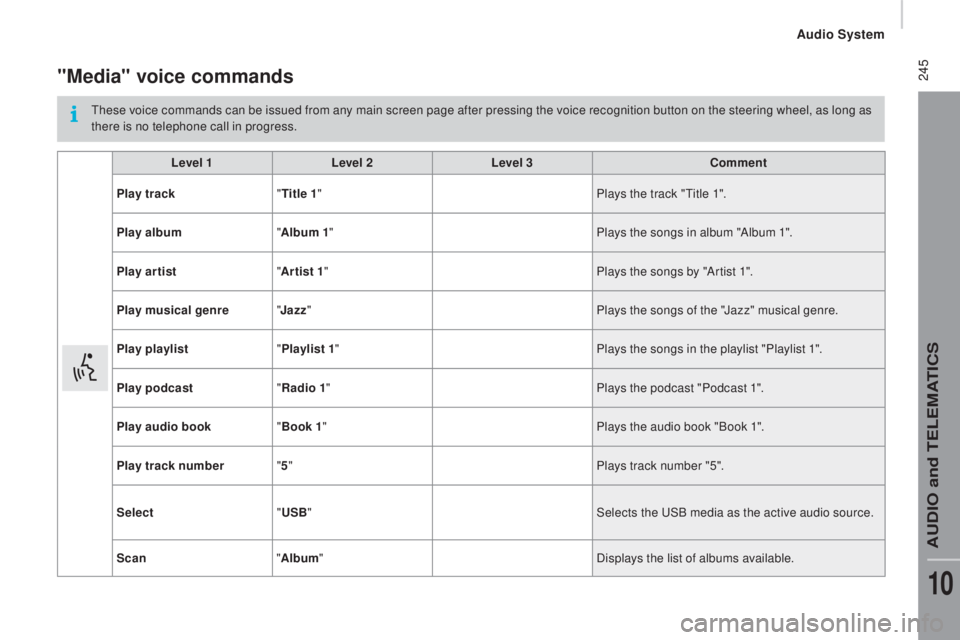
245"Media" voice commands
these voice commands can be issued from any main screen page after pressing the voice recognition button on the steering wheel, as long as
t here is no telephone call in progress.
Level 1 Level 2Level 3
com
ment
Play track "
tit
le 1" Plays the track "
tit
le 1".
Play album "Album 1 " Plays the songs in album "Album 1".
Play ar tist "Ar tist 1 " Plays the songs by "Artist 1".
Play musical genre "
ja
zz" Plays the songs of the "Jazz" musical genre.
Play playlist "Playlist 1 " Plays the songs in the playlist "Playlist 1".
Play podcast "
rad
io 1" Plays the podcast "Podcast 1".
Play audio book "Book 1 " Plays the audio book "Book 1".
Play track number "5 " Plays track number "5".
Select "
uS
B" Selects the
uSB m
edia as the active audio source.
Scan "Album " Displays the list of albums available.
Audio System
AuDIO and teLeMAtICS
10