Number PEUGEOT BOXER 2015 Owner's Manual
[x] Cancel search | Manufacturer: PEUGEOT, Model Year: 2015, Model line: BOXER, Model: PEUGEOT BOXER 2015Pages: 276, PDF Size: 8.99 MB
Page 232 of 276
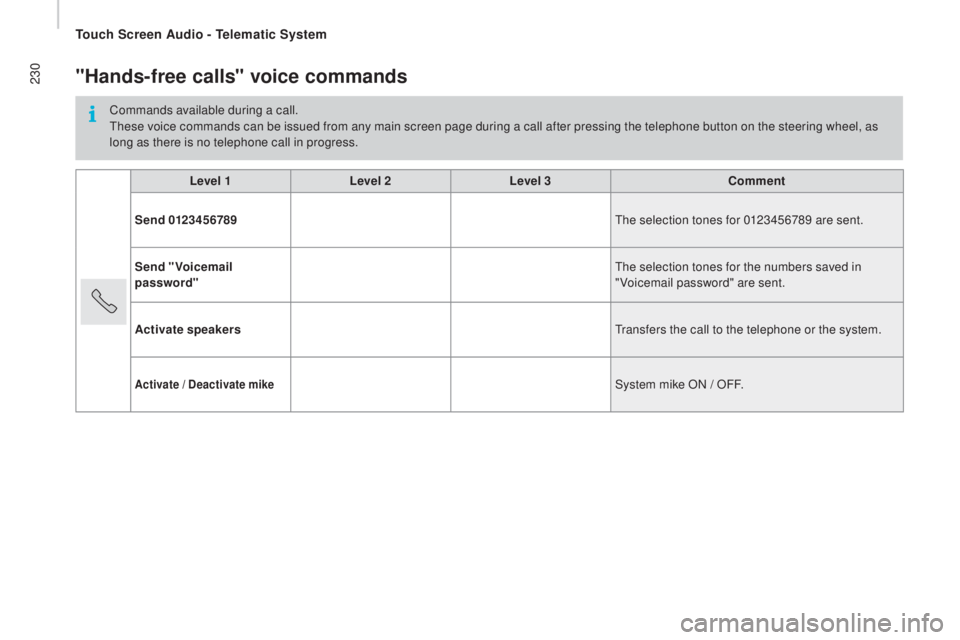
230"Hands-free calls" voice commands
Commands available during a call.these voice commands can be issued from any main screen page during a call after pressing the telephone button on the steering wheel, as
long as there is no telephone call in progress.
Level 1 Level 2Level 3
com
ment
Send 0123456789
the s
election tones for 0123456789 are sent.
Send "Voicemail
password"
the s
election tones for the numbers saved in
"Voicemail password" are sent.
Activate speakers
tra
nsfers the call to the telephone or the system.
Activate / deactivate mikeSystem mike ON / OFF.
touch Screen Audio - telematic System
Page 238 of 276
236
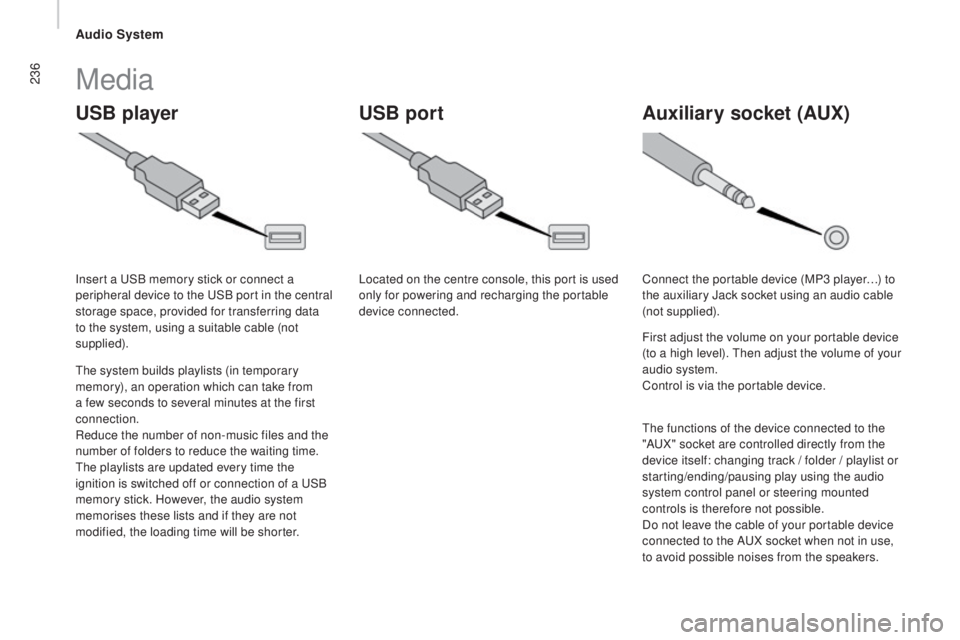
uSB playerA uxiliary socket (Aux)uSB port
Media
the system builds playlists (in temporary
m emory), an operation which can take from
a few seconds to several minutes at the first
connection.
Reduce the number of non-music files and the
number of folders to reduce the waiting time.
the p
laylists are updated every time the
ignition is switched off or connection of a
uSB
m
emory stick. However, the audio system
memorises these lists and if they are not
modified, the loading time will be shorter. Insert a
uSB m
emory stick or connect a
peripheral device to the
uSB p
ort in the central
storage space, provided for transferring data
to the system, using a suitable cable (not
supplied). Located on the centre console, this port is used
only for powering and recharging the portable
device connected.
Connect the portable device (MP3 player…) to
the auxiliary Jack socket using an audio cable
(not supplied).
First adjust the volume on your portable device
(to a high level).
the
n adjust the volume of your
audio system.
Control is via the portable device.
the f
unctions of the device connected to the
"A
uX" s
ocket are controlled directly from the
device itself: changing track / folder / playlist or
starting/ending/pausing play using the audio
system control panel or steering mounted
controls is therefore not possible.
Do not leave the cable of your portable device
connected to the A
uX so
cket when not in use,
to avoid possible noises from the speakers.
Audio System
Page 240 of 276
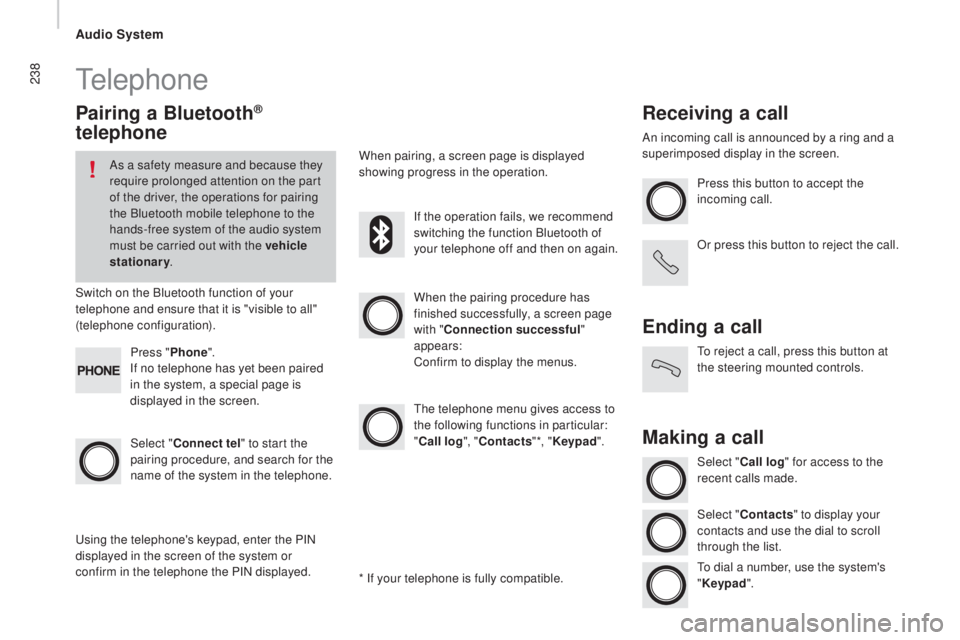
238telephone
Pairing a Bluetooth®
telephone
As a safety measure and because they
require prolonged attention on the part
of the driver, the operations for pairing
the Bluetooth mobile telephone to the
hands-free system of the audio system
must be carried out with the vehicle
stationary.
Switch on the Bluetooth function of your
telephone and ensure that it is "visible to all"
(telephone configuration).
Select "
con
nect tel" to start the
pairing procedure, and search for the
name of the system in the telephone. When the pairing procedure has
finished successfully, a screen page
with "
con
nection successful"
appears:
Confirm to display the menus.
the t
elephone menu gives access to
the following functions in particular:
"
call
log", "
co
ntacts" *, "Keypad ".
When pairing, a screen page is displayed
showing progress in the operation.
usi
ng the telephone's keypad, enter the PIN
displayed in the screen of the system or
confirm in the telephone the PIN displayed. Press "
Phone".
If no telephone has yet been paired
in the system, a special page is
displayed in the screen. If the operation fails, we recommend
switching the function Bluetooth of
your telephone off and then on again.
* If your telephone is fully compatible.
receiving a call
An incoming call is announced by a ring and a
superimposed display in the screen. Press this button to accept the
incoming call.
Or press this button to reject the call.
Ending a call
to reject a call, press this button at
t he steering mounted controls.
Making a call
Select "call log" for access to the
recent calls made.
Select "
co
ntacts" to display your
contacts and use the dial to scroll
through the list.
to di
al a number, use the system's
" Keypad ".
Audio System
Page 244 of 276
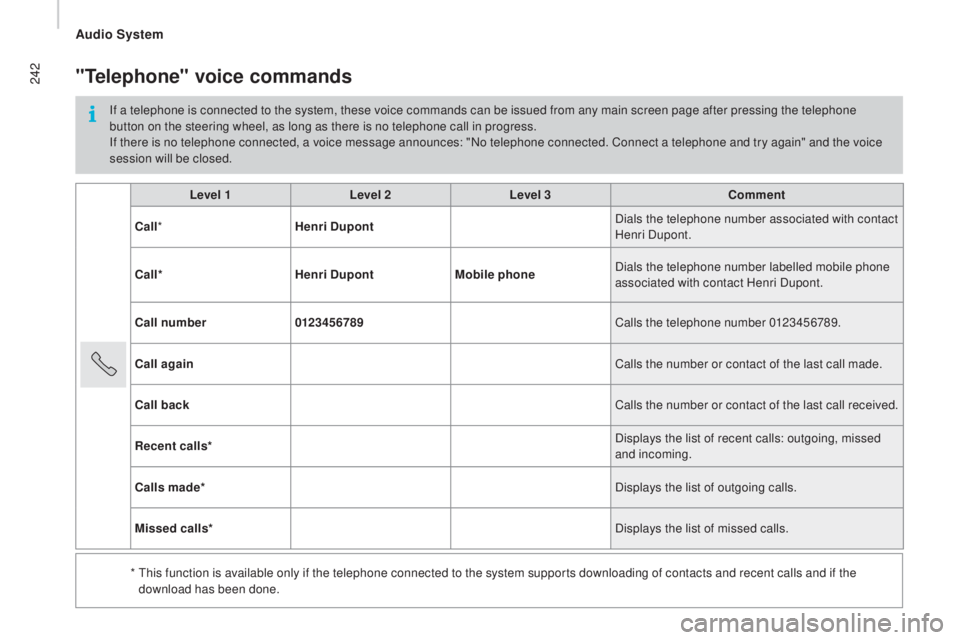
242
Level 1Level 2Level 3com ment
ca
ll * Henri
dup
ont Dials the telephone number associated with contact
Henri Dupont.
ca
ll* Henri
dup
ontMobile phone Dials the telephone number labelled mobile phone
associated with contact Henri Dupont.
cal
l number 0123456789 Calls the telephone number 0123456789.
call
again Calls the number or contact of the last call made.
cal
l back Calls the number or contact of the last call received.
rec
ent calls* Displays the list of recent calls: outgoing, missed
and incoming.
cal
ls made* Displays the list of outgoing calls.
Missed calls* Displays the list of missed calls.
*
t
hi
s function is available only if the telephone connected to the system supports downloading of contacts and recent calls and if the
download has been done.
"telephone" voice commands
If a telephone is connected to the system, these voice commands can be issued from any main screen page after pressing the telephone
button on the steering wheel, as long as there is no telephone call in progress.
If there is no telephone connected, a voice message announces: "No telephone connected. Connect a telephone and try again" and the voice
session will be closed.
Audio System
Page 245 of 276
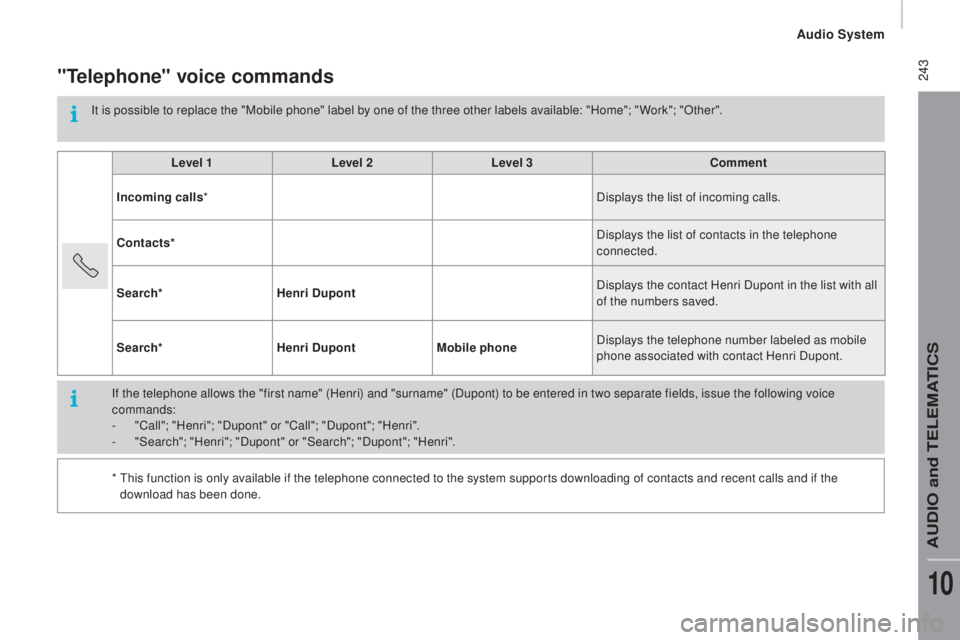
243"telephone" voice commands
It is possible to replace the "Mobile phone" label by one of the three other labels available: "Home"; " Work"; "Other".Level 1 Level 2Level 3
com
ment
Incoming calls * Displays the list of incoming calls.
con
tacts* Displays the list of contacts in the telephone
connected.
Search* Henri
dup
ont Displays the contact Henri Dupont in the list with all
of the numbers saved.
Search* Henri
dup
ontMobile phone Displays the telephone number labeled as mobile
phone associated with contact Henri Dupont.
If the telephone allows the "first name" (Henri) and "surname" (Dupont) to be entered in two separate fields, issue the following voice
commands:
-
"C
all"; "Henri"; "Dupont" or "Call"; "Dupont"; "Henri".
-
"S
earch"; "Henri"; "Dupont" or "Search"; "Dupont"; "Henri".
*
t
hi
s function is only available if the telephone connected to the system supports downloading of contacts and recent calls and if the
download has been done.
Audio System
AuDIO and teLeMAtICS
10
Page 247 of 276
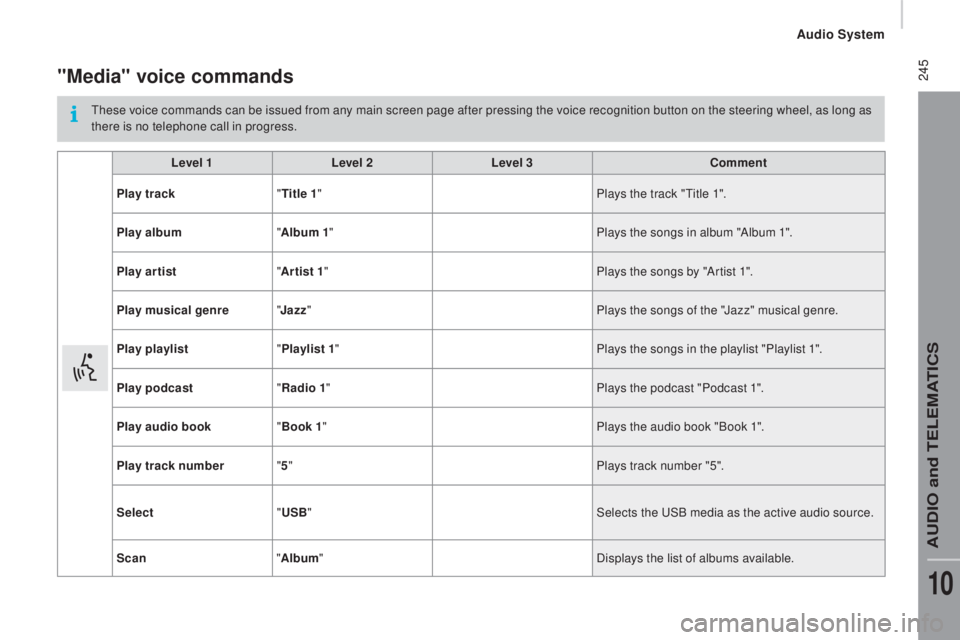
245"Media" voice commands
these voice commands can be issued from any main screen page after pressing the voice recognition button on the steering wheel, as long as
t here is no telephone call in progress.
Level 1 Level 2Level 3
com
ment
Play track "
tit
le 1" Plays the track "
tit
le 1".
Play album "Album 1 " Plays the songs in album "Album 1".
Play ar tist "Ar tist 1 " Plays the songs by "Artist 1".
Play musical genre "
ja
zz" Plays the songs of the "Jazz" musical genre.
Play playlist "Playlist 1 " Plays the songs in the playlist "Playlist 1".
Play podcast "
rad
io 1" Plays the podcast "Podcast 1".
Play audio book "Book 1 " Plays the audio book "Book 1".
Play track number "5 " Plays track number "5".
Select "
uS
B" Selects the
uSB m
edia as the active audio source.
Scan "Album " Displays the list of albums available.
Audio System
AuDIO and teLeMAtICS
10
Page 249 of 276
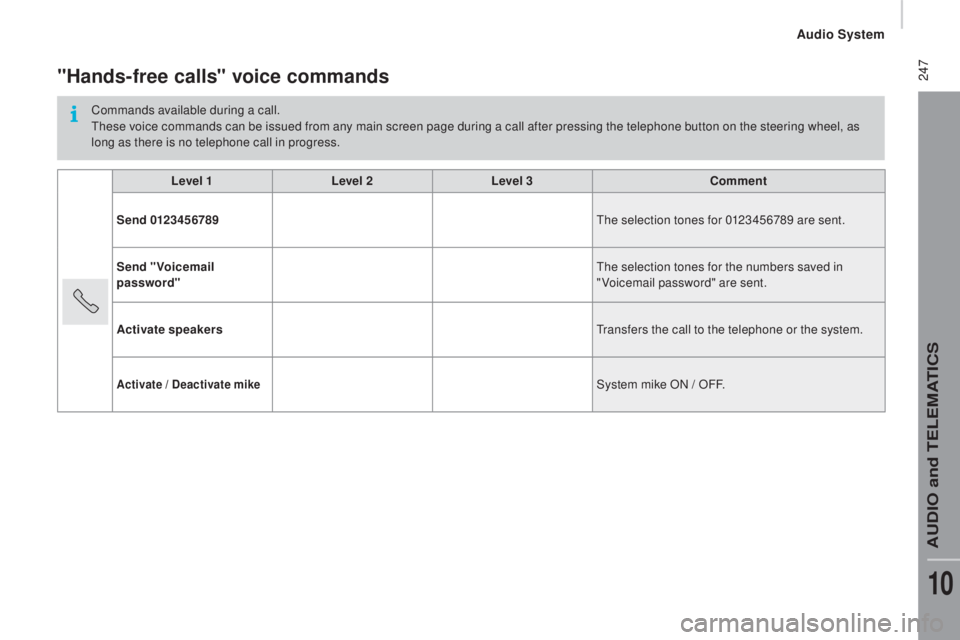
247"Hands-free calls" voice commands
Commands available during a call.these voice commands can be issued from any main screen page during a call after pressing the telephone button on the steering wheel, as
long as there is no telephone call in progress.
Level 1 Level 2Level 3
com
ment
Send 0123456789
the s
election tones for 0123456789 are sent.
Send "Voicemail
password"
the s
election tones for the numbers saved in
"Voicemail password" are sent.
Activate speakers
tra
nsfers the call to the telephone or the system.
Activate / deactivate mikeSystem mike ON / OFF.
Audio System
AuDIO and teLeMAtICS
10
Page 251 of 276

249
PrESEntAtIon
the crew cab is available on van versions and comprises a bench seat, sea\
t belts, a storage
space and side windows.
It is separated from the load space and a high-strength partition offering comfort and safety
.
rear bench seat
this ergonomic bench seats four people.
Storage space
A storage space is provided under the bench
seat.
From the cab, tilt the seat cushion forward
for access to it.
Good practice
Do not tilt the bench seat cushion during
transportation.
No not attach anything to the cab fixing
structure.
Do not exceed the number of passengers
indicated on the registration certificate.
In the rear, the load space is intended for
carrying goods only.
You are advised to place the goods or heavy
objects as far forwards as possible in the
load space (towards the cab) and secure
them by means of straps using the stowing
rings on the floor.
SPeCIAL FeAtuReS
Crew cab
Page 256 of 276

254
PrESEntAtIon
the double cab is available in chassis and floor versions and comprises a\
bench seat, seat
belts, a storage space and side windows.
rear bench seat
this ergonomic bench seats four people.
Storage space
A storage space is provided under the bench
seat.
tilt the seat cushion forward for access to it.
Good practice
Do not tilt the bench seat cushion during
transportation.
No not attach anything to the cab fixing
structure.
Do not exceed the number of passengers
indicated on the registration certificate.
Double cab