headlamp Peugeot Boxer 2016 Owner's Guide
[x] Cancel search | Manufacturer: PEUGEOT, Model Year: 2016, Model line: Boxer, Model: Peugeot Boxer 2016Pages: 292, PDF Size: 10.07 MB
Page 152 of 292
150
boxer_en_Chap08_Aide-Rapide_ed01-2015
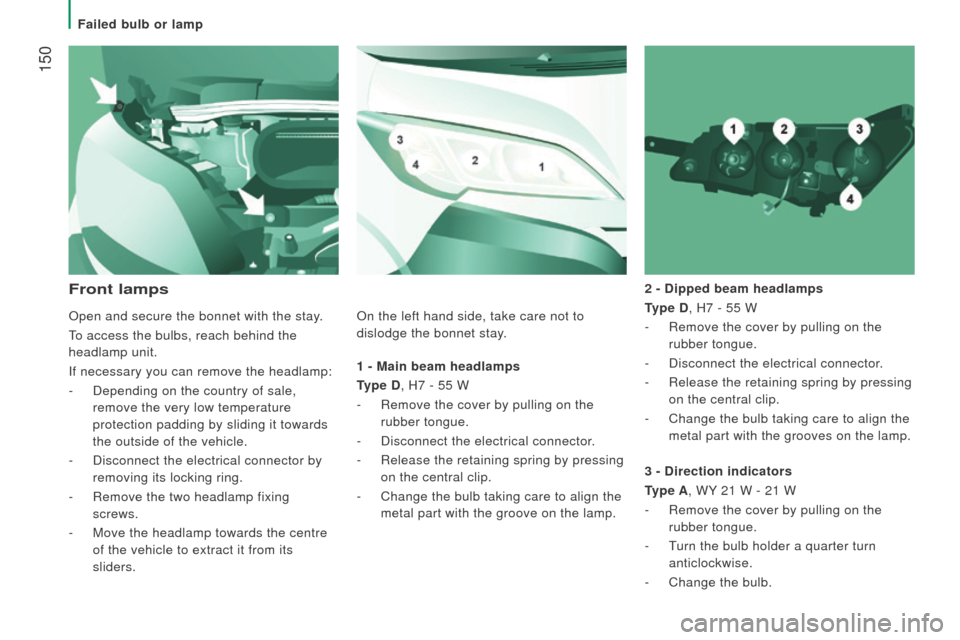
1 - Main beam headlamps
type
d , H7 - 55 W
-
Remove the cover by pulling on the
rubber tongue.
-
Disconnect the electrical connector
.
-
Release the retaining spring by pressing
on the central clip.
-
Change the bulb taking care to align the
metal part with the groove on the lamp. 2 -
d ipped beam headlamps
type
d , H7 - 55 W
-
Remove the cover by pulling on the
rubber tongue.
- Disconnect the electrical connector .
- Release the retaining spring by pressing
on the central clip.
-
Change the bulb taking care to align the
metal part with the grooves on the lamp.
Front lamps
3 - direction indicators
type A
, WY 21 W - 21 W
-
Remove the cover by pulling on the
rubber tongue.
-
t
urn the bulb holder a quarter turn
anticlockwise.
-
Change the bulb.
Open and secure the bonnet with the stay
.
to access the bulbs, reach behind the
headlamp unit.
If necessary you can remove the headlamp:
-
Depending on the country of sale,
remove the very low temperature
protection padding by sliding it towards
the outside of the vehicle.
-
Disconnect the electrical connector by
removing its locking ring.
-
Remove the two headlamp fixing
screws.
-
Move the headlamp towards the centre
of the vehicle to extract it from its
sliders. On the left hand side, take care not to
dislodge the bonnet stay.
Failed bulb or lamp
Page 153 of 292
151
boxer_en_Chap08_Aide-Rapide_ed01-2015
Halogen bulbs must be changed after
the headlamp has been off for several
minutes (risk of serious burns). Do not touch
the bulb directly with your fingers, use a
lint-free cloth.
When each operation has been completed,
check the operation of the lamps.
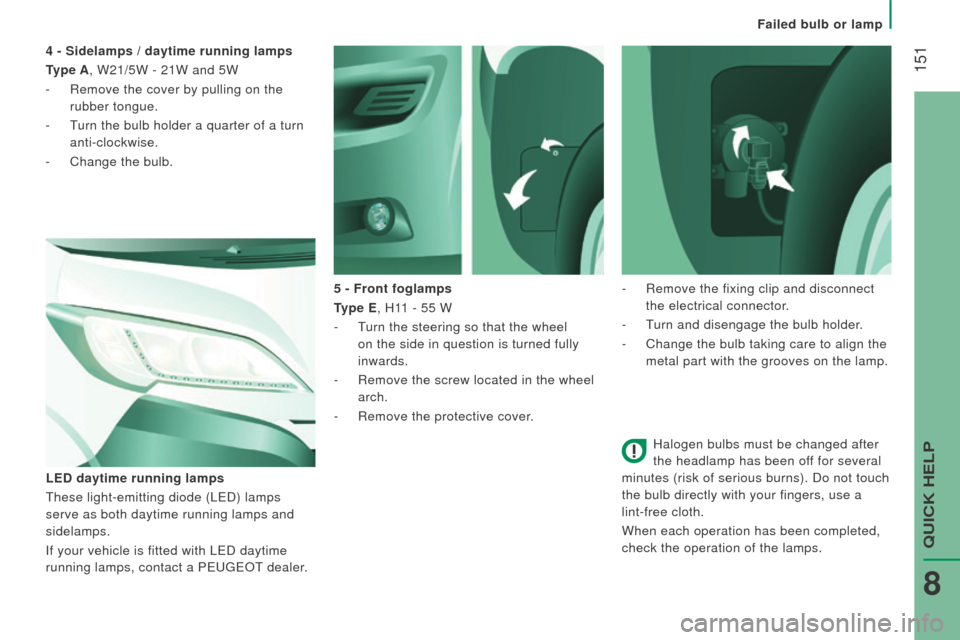
5 - Front foglamps
type E
, H11 - 55 W
-
t
urn the steering so that the wheel
on the side in question is turned fully
inwards.
-
Remove the screw located in the wheel
arch.
-
Remove the protective cover
.
LE
d
daytime running lamps
t
hese light-emitting diode (L
e
D) lamps
serve as both daytime running lamps and
sidelamps.
If your vehicle is fitted with L
e
D daytime
running lamps, contact a P
euge
O
t
dealer
.
4 - Sidelamps / daytime running lamps
type A
, W21/5W - 21W and 5W
-
Remove the cover by pulling on the
rubber tongue.
-
t
urn the bulb holder a quarter of a turn
anti-clockwise.
-
Change the bulb.
-
Remove the fixing clip and disconnect
the electrical connector.
-
t
urn and disengage the bulb holder
.
-
Change the bulb taking care to align the
metal part with the grooves on the lamp.
Failed bulb or lamp
QuICK HeLP
8
Page 157 of 292
155
boxer_en_Chap08_Aide-Rapide_ed01-2015
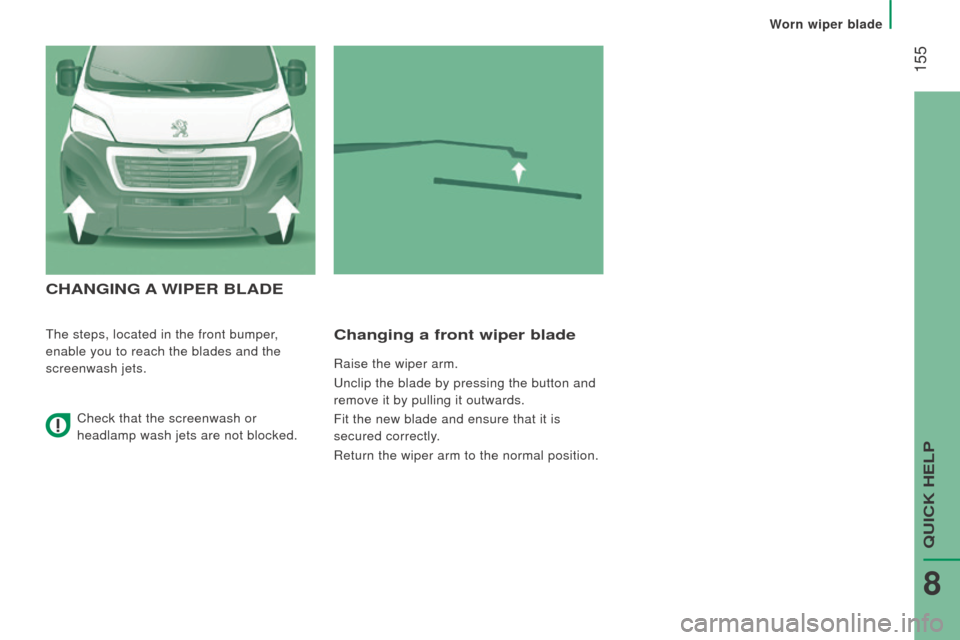
cHAnGInG A WIPE r BLA d E
the steps, located in the front bumper,
enable you to reach the blades and the
screenwash jets.changing a front wiper blade
Raise the wiper arm.
u
nclip the blade by pressing the button and
remove it by pulling it outwards.
Fit the new blade and ensure that it is
secured correctly.
Return the wiper arm to the normal position.
Check that the screenwash or
headlamp wash jets are not blocked.
Worn wiper blade
QuICK HeLP
8
Page 219 of 292
217
boxer_en_Chap10a_Autoradio_Fiat-tactile-1_ed01-2015
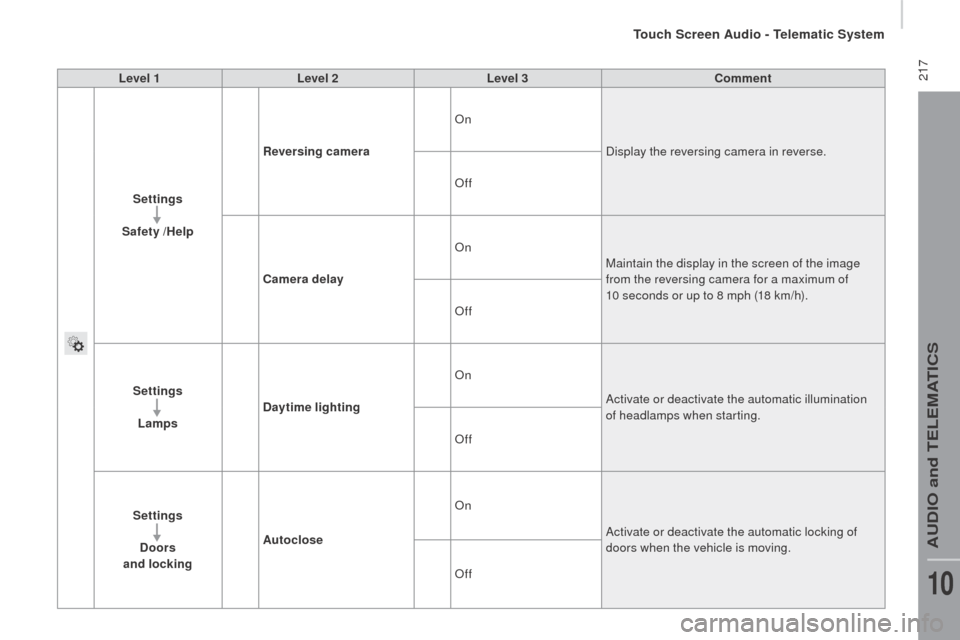
Level 1Level 2 Level 3co mment
Settings
Safety /Help
re
versing camera On
Display the reversing camera in reverse.
Off
ca
mera delay On
Maintain the display in the screen of the image
from the reversing camera for a maximum of
10 seconds or up to 8 mph (18 km/h).
Off
Settings Lamps
da
ytime lighting On
Activate or deactivate the automatic illumination
of headlamps when starting.
Off
Settings
d
oors
and locking Autoclose On
Activate or deactivate the automatic locking of
doors when the vehicle is moving.
Off
touch Screen Audio - telematic System
AuDIO and teLeMAtICS
10
Page 279 of 292
1
2
READY TO GO
boxer-post-it_en_Chap02_Pret-a-Partir_ed01-2015
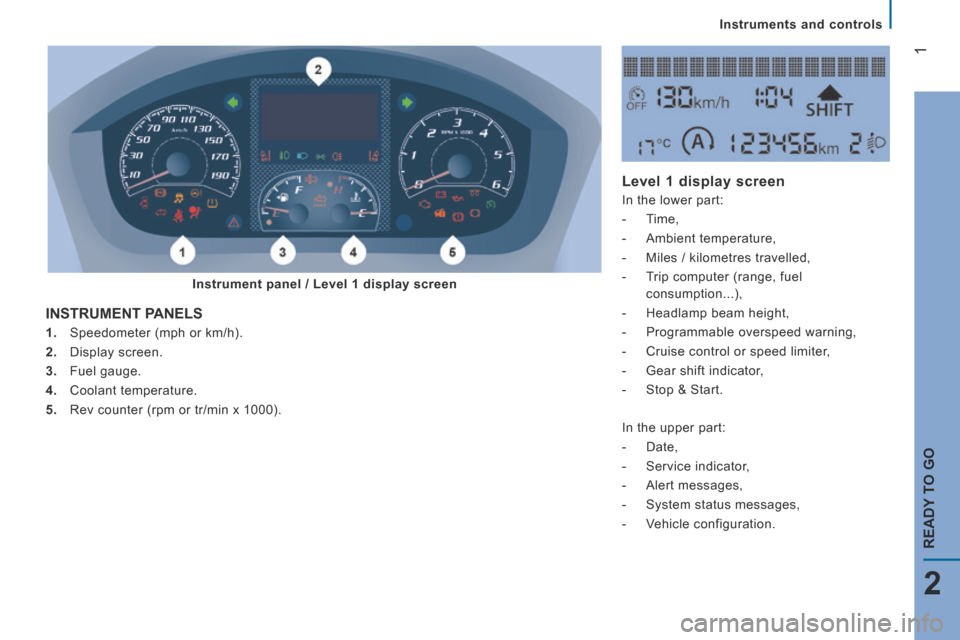
Instruments and controls
1. Speedometer (mph or km/h).
2. Display screen.
3. Fuel gauge.
4. Coolant temperature.
5. Rev counter (rpm or tr/min x 1000).
INSTRUMENT PANELS
Level 1 display screen
In the lower part:
- Time,
- Ambient temperature,
- Miles / kilometres travelled,
- Trip computer (range, fuel
consumption...),
- Headlamp beam height,
- Programmable overspeed warning,
- Cruise control or speed limiter,
- Gear shift indicator,
- Stop & Start.
In the upper part:
- Date,
- Service indicator,
- Alert messages,
- System status messages,
- Vehicle configuration.
Instrument panel / Level 1 display screen
Page 280 of 292
2
boxer-post-it_en_Chap02_Pret-a-Partir_ed01-2015
Instruments and controls
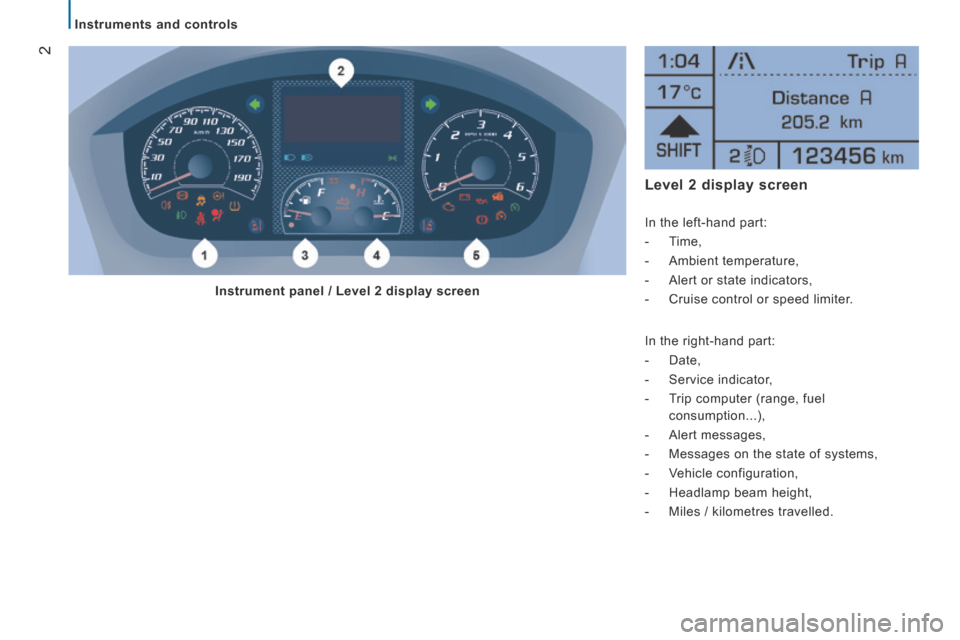
Level 2 display screen
In the left-hand part:
- Time,
- Ambient temperature,
- Alert or state indicators,
- Cruise control or speed limiter.
In the right-hand part:
- Date,
- Service indicator,
- Trip computer (range, fuel
consumption...),
- Alert messages,
- Messages on the state of systems,
- Vehicle configuration,
- Headlamp beam height,
- Miles / kilometres travelled.
Instrument panel / Level 2 display screen
Page 283 of 292
5
3
EASE OF USE
and
COMFORT
Steering mounted controls
boxer-post-it_en_Chap03_Ergo-et-confort_ed01-2015
Activation
Operation
Once the function is activated, the system
operates as follows:
If the ambient light level is sufficient and/or if
the traffic conditions do not allow illumination
of the main beam headlamps:
Refer to the "Technology on board -
Vehicle configuration" section.
Flash the headlamps (going beyond the
point of resistance) to activate the function.
If the situation requires a change of
headlamp beam, the driver can take over at
any time.
Flashing the headlamps again pauses
the function and the system changes to
"automatic illumination of headlamps"
mode.
The function is deactivated automatically
below 9 mph (15 km/h).
If main beam is still needed, flash the
headlamps again; main beam will then
remain on until the vehicle reaches a speed
of 25 mph (40 km/h).
Above 25 mph (40 km/h), the function is
reactivated automatically (provided that the
headlamps have not been flashed again in
the meantime, to change to dipped beam).
Deactivation
Turn the lighting control stalk ring to the
" Dipped beam " position.
The system may suffer interference or
not work correctly:
- Under conditions of poor visibility
(falling snow, heavy rain or dense
fog, ...),
- If the windscreen is dirty, misted or
obscured (by a sticker, ...) in front
of the camera,
- If the vehicle is facing highly
reflective signs.
The system is not able to detect:
- Road users that do not have their
own lighting, such as pedestrians,
- Vehicles whose lighting is
obscured, such as when running
behind a safety barrier on a
motorway, for example,
- Vehicles at the top or bottom of a
steep slope, on winding roads, on
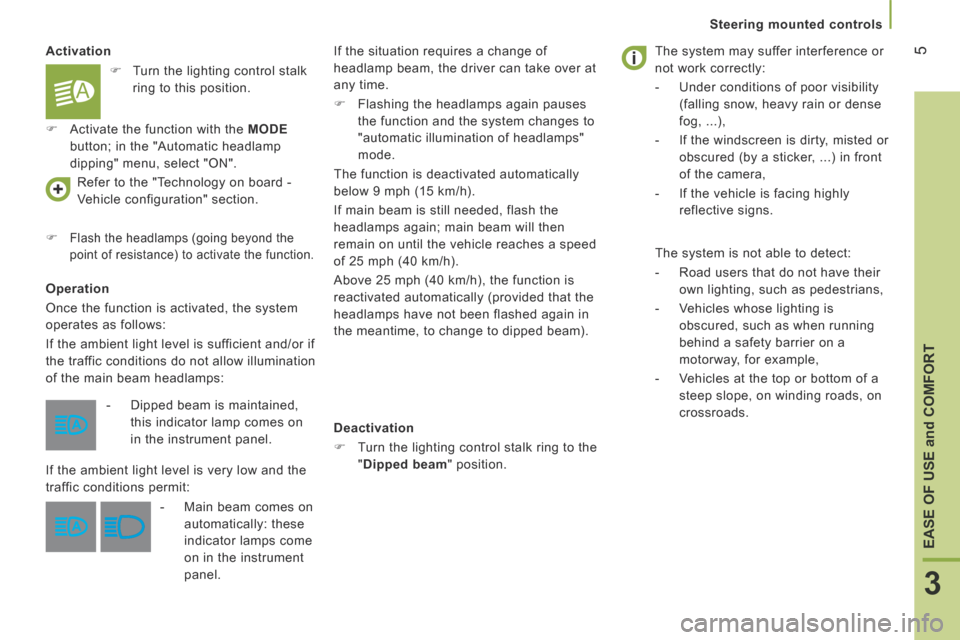
crossroads. - Dipped beam is maintained,
this indicator lamp comes on
in the instrument panel.
If the ambient light level is very low and the
traffic conditions permit:
- Main beam comes on
automatically: these
indicator lamps come
on in the instrument
panel.
Turn the lighting control stalk
ring to this position.
Activate the function with the MODE
button; in the "Automatic headlamp
dipping" menu, select "ON".
Page 285 of 292
7
4
TECHNOLOGY
on
BOARD
boxer-post-it_en_Chap04_Technologie-a-bord_ed01-2015
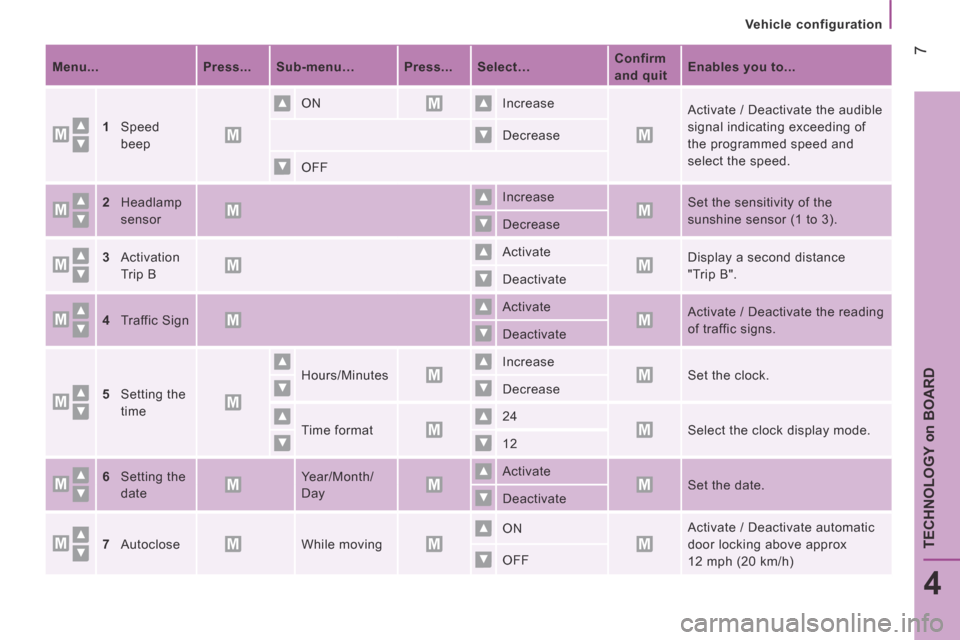
Vehicle configuration
Menu... Press... Sub-menu… Press... Select… Confirm
and quit Enables you to...
1Speed
beep
ON Increase Activate / Deactivate the audible
signal indicating exceeding of
the programmed speed and
select the speed.
Decrease
OFF
2Headlamp
sensor
Increase Set the sensitivity of the
sunshine sensor (1 to 3). Decrease
3Activation
Trip B
Activate Display a second distance
"Trip B". Deactivate
4Traffic Sign Activate Activate / Deactivate the reading
of traffic signs. Deactivate
5Setting the
time
Hours/Minutes Increase Set the clock. Decrease
Time format 24 Select the clock display mode. 12
6Setting the
date
Year/Month/
Day
Activate Set the date. Deactivate
7Autoclose While moving ON Activate / Deactivate automatic
door locking above approx
12 mph (20 km/h) OFF
Page 287 of 292
9
4
TECHNOLOGY
on
BOARD
boxer-post-it_en_Chap04_Technologie-a-bord_ed01-2015
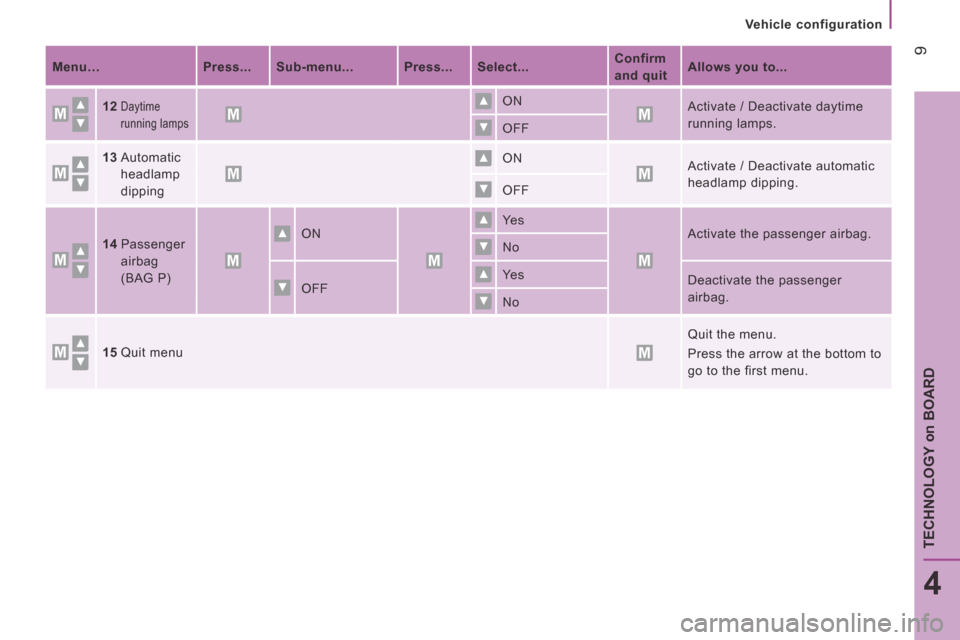
Vehicle configuration
Menu… Press... Sub-menu... Press... Select... Confirm
and quit Allows you to...
12Daytime
running lamps
ON Activate / Deactivate daytime
running lamps. OFF
13Automatic
headlamp
dipping
ON Activate / Deactivate automatic
headlamp dipping. OFF
14Passenger
airbag
(BAG P)
ON Ye s Activate the passenger airbag. No
OFF Ye s Deactivate the passenger
airbag. No
15Quit menu
Quit the menu.
Press the arrow at the bottom to
go to the first menu.
Page 289 of 292
11
4
TECHNOLOGY
on
BOARD
boxer-post-it_en_Chap04_Technologie-a-bord_ed01-2015
Vehicle configuration
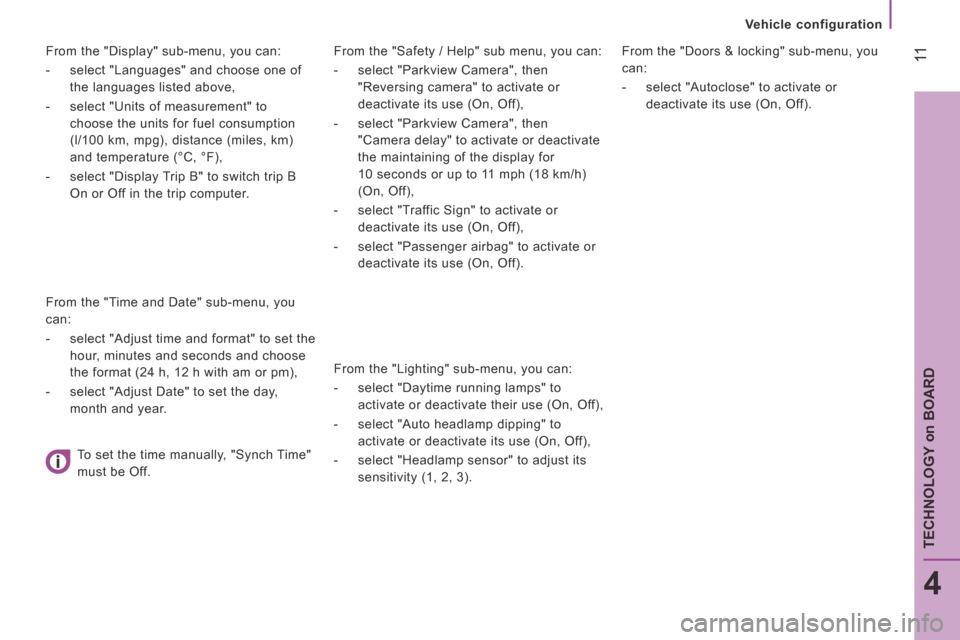
From the "Safety / Help" sub menu, you can:
- select "Parkview Camera", then
"Reversing camera" to activate or
deactivate its use (On, Off),
- select "Parkview Camera", then
"Camera delay" to activate or deactivate
the maintaining of the display for
10 seconds or up to 11 mph (18 km/h)
(On, Off),
- select "Traffic Sign" to activate or
deactivate its use (On, Off),
- select "Passenger airbag" to activate or
deactivate its use (On, Off).
From the "Lighting" sub-menu, you can:
- select "Daytime running lamps" to
activate or deactivate their use (On, Off),
- select "Auto headlamp dipping" to
activate or deactivate its use (On, Off),
- select "Headlamp sensor" to adjust its
sensitivity (1, 2, 3).
From the "Doors & locking" sub-menu, you
can:
- select "Autoclose" to activate or
deactivate its use (On, Off).
From the "Display" sub-menu, you can:
- select "Languages" and choose one of
the languages listed above,
- select "Units of measurement" to
choose the units for fuel consumption
(l/100 km, mpg), distance (miles, km)
and temperature (°C, °F),
- select "Display Trip B" to switch trip B
On or Off in the trip computer.
From the "Time and Date" sub-menu, you
can:
- select "Adjust time and format" to set the
hour, minutes and seconds and choose
the format (24 h, 12 h with am or pm),
- select "Adjust Date" to set the day,
month and year.
To set the time manually, "Synch Time"
must be Off.