locking Peugeot Boxer 2016 Owner's Guide
[x] Cancel search | Manufacturer: PEUGEOT, Model Year: 2016, Model line: Boxer, Model: Peugeot Boxer 2016Pages: 292, PDF Size: 10.07 MB
Page 152 of 292
150
boxer_en_Chap08_Aide-Rapide_ed01-2015
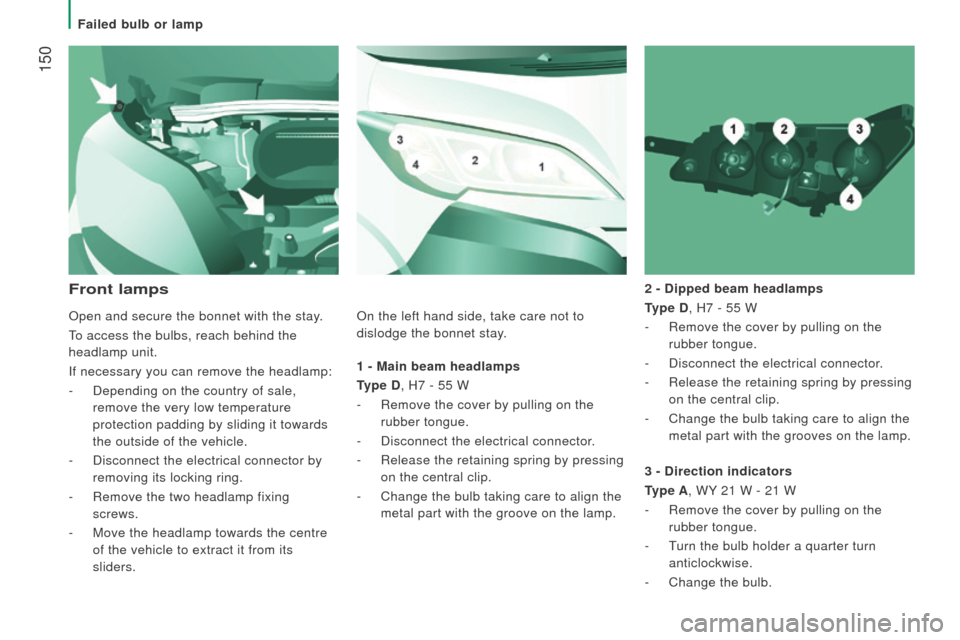
1 - Main beam headlamps
type
d , H7 - 55 W
-
Remove the cover by pulling on the
rubber tongue.
-
Disconnect the electrical connector
.
-
Release the retaining spring by pressing
on the central clip.
-
Change the bulb taking care to align the
metal part with the groove on the lamp. 2 -
d ipped beam headlamps
type
d , H7 - 55 W
-
Remove the cover by pulling on the
rubber tongue.
- Disconnect the electrical connector .
- Release the retaining spring by pressing
on the central clip.
-
Change the bulb taking care to align the
metal part with the grooves on the lamp.
Front lamps
3 - direction indicators
type A
, WY 21 W - 21 W
-
Remove the cover by pulling on the
rubber tongue.
-
t
urn the bulb holder a quarter turn
anticlockwise.
-
Change the bulb.
Open and secure the bonnet with the stay
.
to access the bulbs, reach behind the
headlamp unit.
If necessary you can remove the headlamp:
-
Depending on the country of sale,
remove the very low temperature
protection padding by sliding it towards
the outside of the vehicle.
-
Disconnect the electrical connector by
removing its locking ring.
-
Remove the two headlamp fixing
screws.
-
Move the headlamp towards the centre
of the vehicle to extract it from its
sliders. On the left hand side, take care not to
dislodge the bonnet stay.
Failed bulb or lamp
Page 166 of 292
164
boxer_en_Chap08_Aide-Rapide_ed01-2015
toWBA r WI t H Q u I c KLY
d E t
A
c HABLE to WBALL
Presentation
this towball can be fitted and removed
quickly and easily without the use of tools. For information on the maximum
trailer weight and the recommended
nose weight, refer to the " t
echnical data -
Weights" section.
For information on safely towing a trailer,
refer to the "Accessories -
towing a trailer"
section.
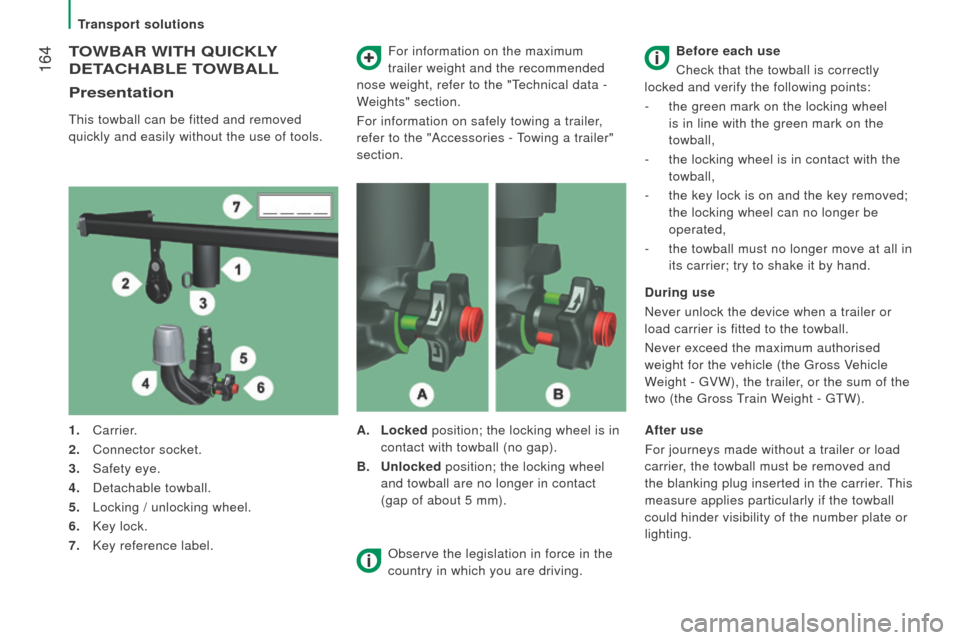
1.
Carrier.
2.
Connector socket.
3.
Safety eye.
4.
Detachable towball.
5.
Locking / unlocking wheel.
6.
Key lock.
7.
Key reference label. A.
Locked
position; the locking wheel is in
contact with towball (no gap).
B.
u
nlocked position; the locking wheel
and towball are no longer in contact
(gap of about 5 mm). Before each use
Check that the towball is correctly
locked and verify the following points:
- the green mark on the locking wheel
is in line with the green mark on the
towball,
-
the locking wheel is in contact with the
towball,
-
the key lock is on and the key removed;
the locking wheel can no longer be
operated,
-
the towball must no longer move at all in
its carrier; try to shake it by hand.
d
uring use
Never unlock the device when a trailer or
load carrier is fitted to the towball.
Never exceed the maximum authorised
weight for the vehicle (the
g ross Vehicle
Weight -
g VW), the trailer, or the sum of the
two (the
g ross
train W
eight - gt W).
Observe the legislation in force in the
country in which you are driving. After use
For journeys made without a trailer or load
carrier, the towball must be removed and
the blanking plug inserted in the carrier.
t
his
measure applies particularly if the towball
could hinder visibility of the number plate or
lighting.
transport solutions
Page 167 of 292
165
boxer_en_Chap08_Aide-Rapide_ed01-2015
Fitting the towball
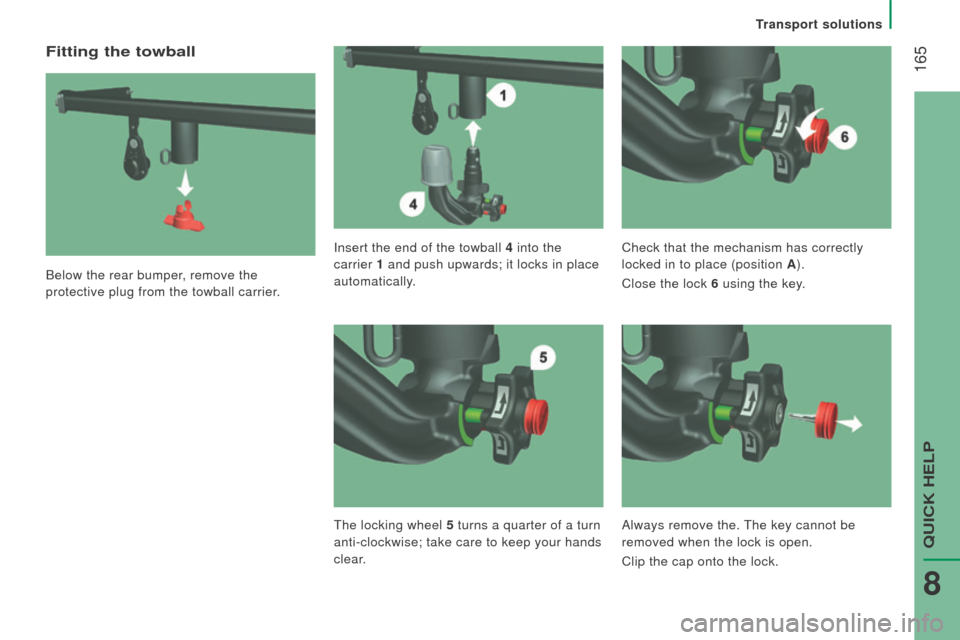
Below the rear bumper, remove the
protective plug from the towball carrier.Insert the end of the towball 4
into the
carrier 1 and push upwards; it locks in place
automatically. Check that the mechanism has correctly
locked in to place (position A
).
Close the lock 6 using the key.
t
he locking wheel 5 turns a quarter of a turn
anti-clockwise; take care to keep your hands
clear. Always remove the.
t
he key cannot be
removed when the lock is open.
Clip the cap onto the lock.
transport solutions
QuICK HeLP
8
Page 169 of 292
167
boxer_en_Chap08_Aide-Rapide_ed01-2015
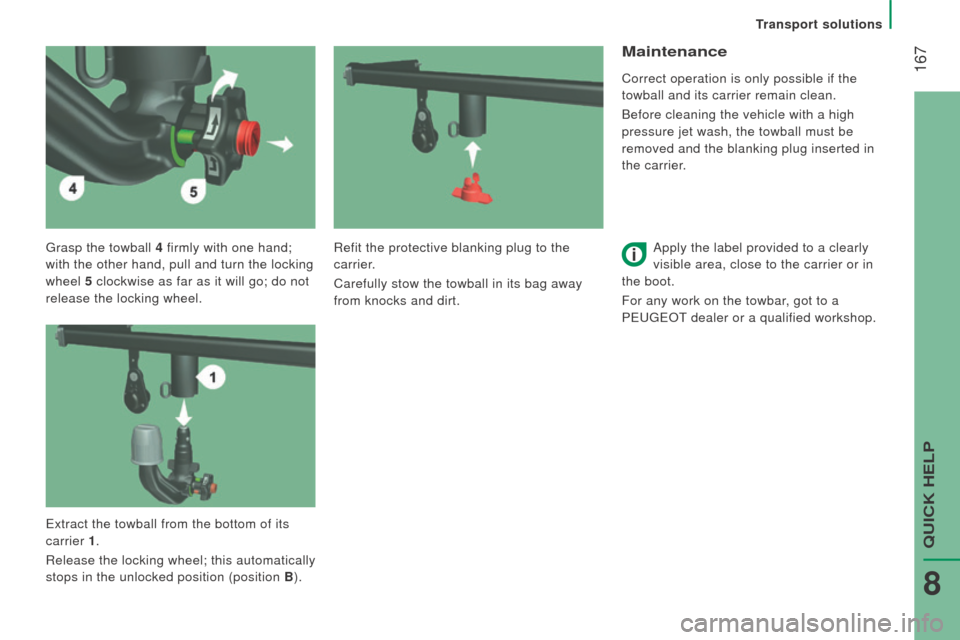
grasp the towball 4 firmly with one hand;
with the other hand, pull and turn the locking
wheel 5 clockwise as far as it will go; do not
release the locking wheel.
Maintenance
Correct operation is only possible if the
towball and its carrier remain clean.
Before cleaning the vehicle with a high
pressure jet wash, the towball must be
removed and the blanking plug inserted in
the carrier.
Apply the label provided to a clearly
visible area, close to the carrier or in
the boot.
For any work on the towbar, got to a
P
euge O t
dealer or a qualified workshop.
Refit the protective blanking plug to the
carrier.
Carefully stow the towball in its bag away
from knocks and dirt.
e
xtract the towball from the bottom of its
carrier 1.
Release the locking wheel; this automatically
stops in the unlocked position (position B ).
transport solutions
QuICK HeLP
8
Page 219 of 292
217
boxer_en_Chap10a_Autoradio_Fiat-tactile-1_ed01-2015
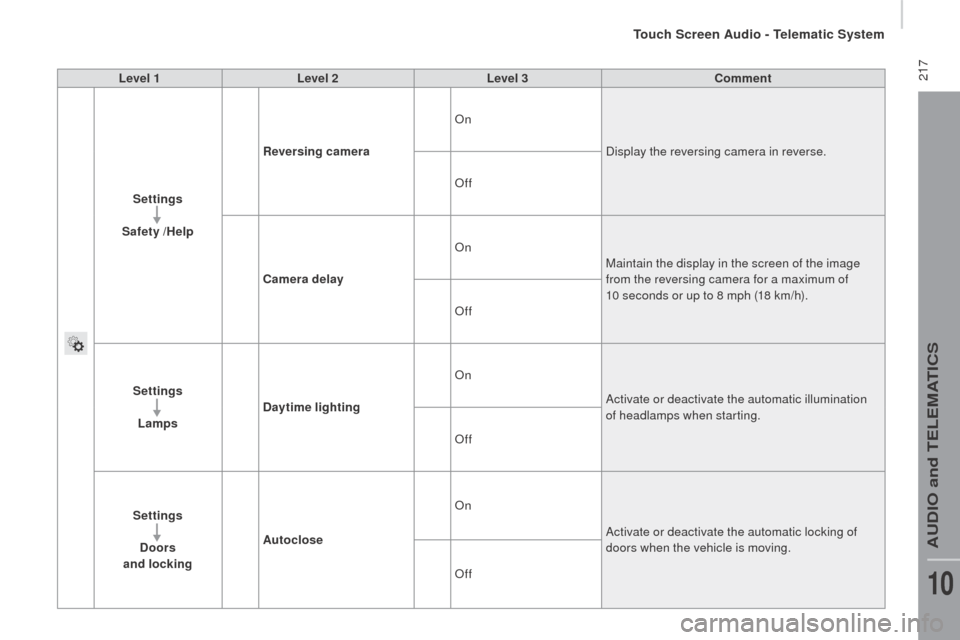
Level 1Level 2 Level 3co mment
Settings
Safety /Help
re
versing camera On
Display the reversing camera in reverse.
Off
ca
mera delay On
Maintain the display in the screen of the image
from the reversing camera for a maximum of
10 seconds or up to 8 mph (18 km/h).
Off
Settings Lamps
da
ytime lighting On
Activate or deactivate the automatic illumination
of headlamps when starting.
Off
Settings
d
oors
and locking Autoclose On
Activate or deactivate the automatic locking of
doors when the vehicle is moving.
Off
touch Screen Audio - telematic System
AuDIO and teLeMAtICS
10
Page 252 of 292
250
boxer_en_Chap11_Particularites_ed01-2015
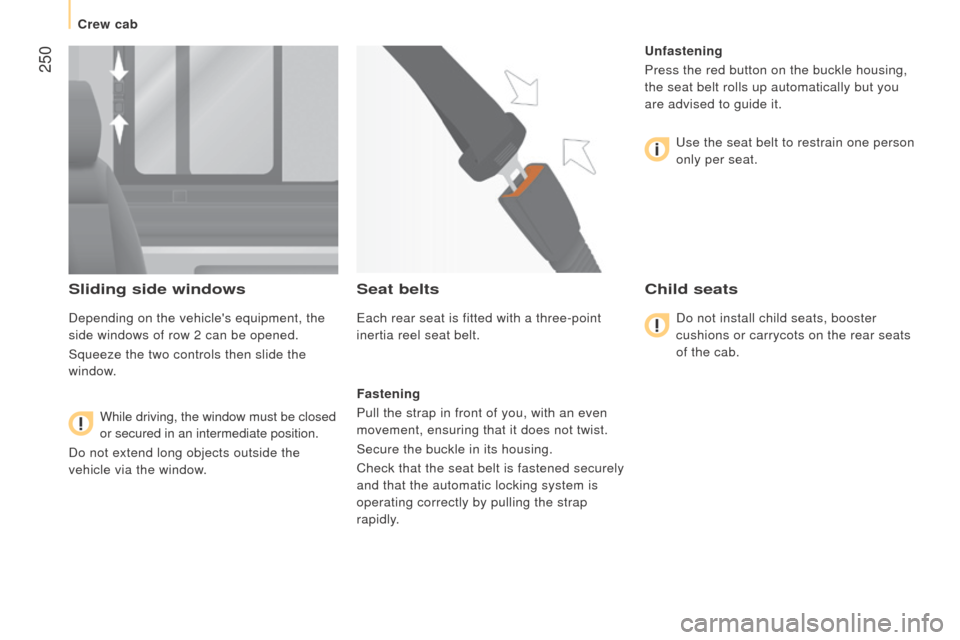
Sliding side windows
Depending on the vehicle's equipment, the
side windows of row 2 can be opened.
Squeeze the two controls then slide the
window.While driving, the window must be closed
or secured in an intermediate position.
Do not extend long objects outside the
vehicle via the window.
Seat belts
each rear seat is fitted with a three-point
inertia reel seat belt.
Fastening
Pull the strap in front of you, with an even
movement, ensuring that it does not twist.
Secure the buckle in its housing.
Check that the seat belt is fastened securely
and that the automatic locking system is
operating correctly by pulling the strap
rapidly.
u
nfastening
Press the red button on the buckle housing,
the seat belt rolls up automatically but you
are advised to guide it.
u
se the seat belt to restrain one person
only per seat.
child seats
Do not install child seats, booster
cushions or carrycots on the rear seats
of the cab.
Crew cab
Page 257 of 292
255
boxer_en_Chap11_Particularites_ed01-2015
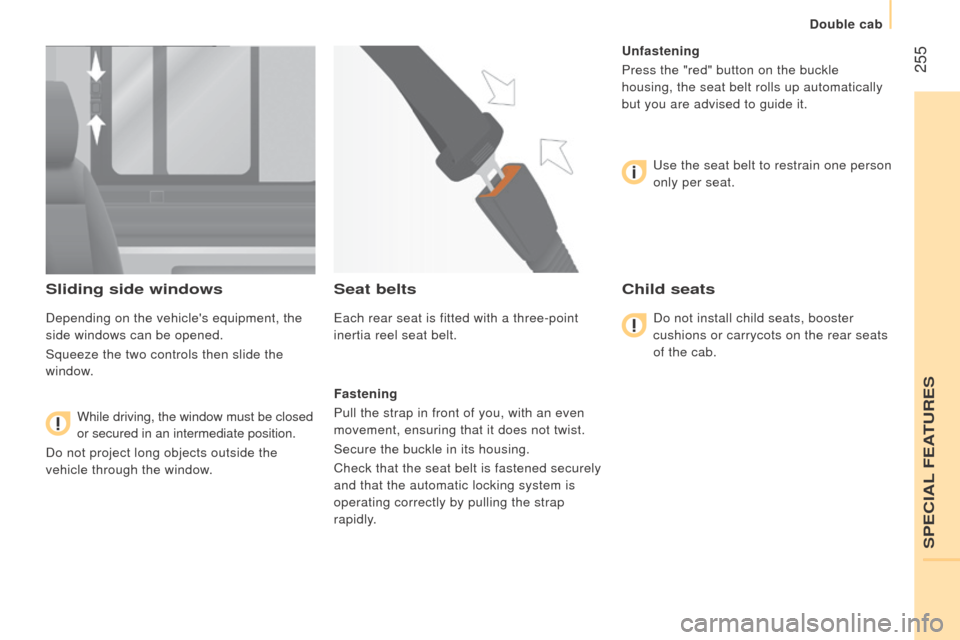
Sliding side windows
Depending on the vehicle's equipment, the
side windows can be opened.
Squeeze the two controls then slide the
window.While driving, the window must be closed
or secured in an intermediate position.
Do not project long objects outside the
vehicle through the window.
Seat belts
each rear seat is fitted with a three-point
inertia reel seat belt.
Fastening
Pull the strap in front of you, with an even
movement, ensuring that it does not twist.
Secure the buckle in its housing.
Check that the seat belt is fastened securely
and that the automatic locking system is
operating correctly by pulling the strap
rapidly.
u
nfastening
Press the "red" button on the buckle
housing, the seat belt rolls up automatically
but you are advised to guide it.
u
se the seat belt to restrain one person
only per seat.
child seats
Do not install child seats, booster
cushions or carrycots on the rear seats
of the cab.
SPeCIAL FeAtuReS
Double cab
Page 281 of 292
3
2
READY TO GO
boxer-post-it_en_Chap02_Pret-a-Partir_ed01-2015
Starting and switching off
boxer-post-it_en_Chap02_Pret-a-Partir_ed01-2015
BATTERY STANDBY SYSTEM
If the vehicle is not to be used for a
prolonged period, such as for winter storage,
for example, it is strongly recommended that
the battery be placed on standby in order to
protect it and optimise its service life.
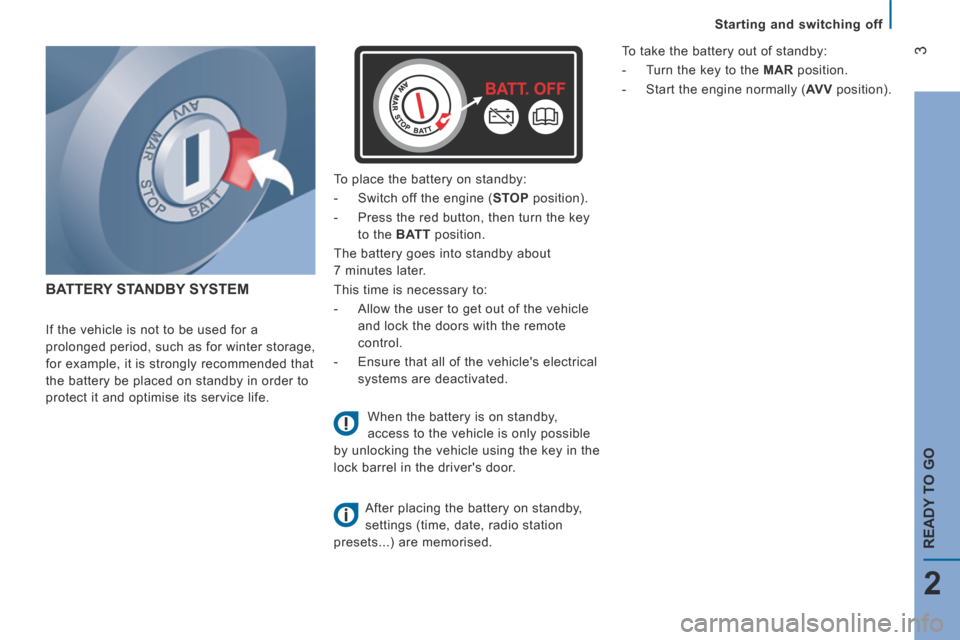
To place the battery on standby:
- Switch off the engine ( STOP position).
- Press the red button, then turn the key
to the BATT position.
The battery goes into standby about
7 minutes later.
This time is necessary to:
- Allow the user to get out of the vehicle
and lock the doors with the remote
control.
- Ensure that all of the vehicle's electrical
systems are deactivated.
When the battery is on standby,
access to the vehicle is only possible
by unlocking the vehicle using the key in the
lock barrel in the driver's door.
After placing the battery on standby,
settings (time, date, radio station
presets...) are memorised.
To take the battery out of standby:
- Turn the key to the MAR position.
- Start the engine normally ( AV V position).
Page 285 of 292
7
4
TECHNOLOGY
on
BOARD
boxer-post-it_en_Chap04_Technologie-a-bord_ed01-2015
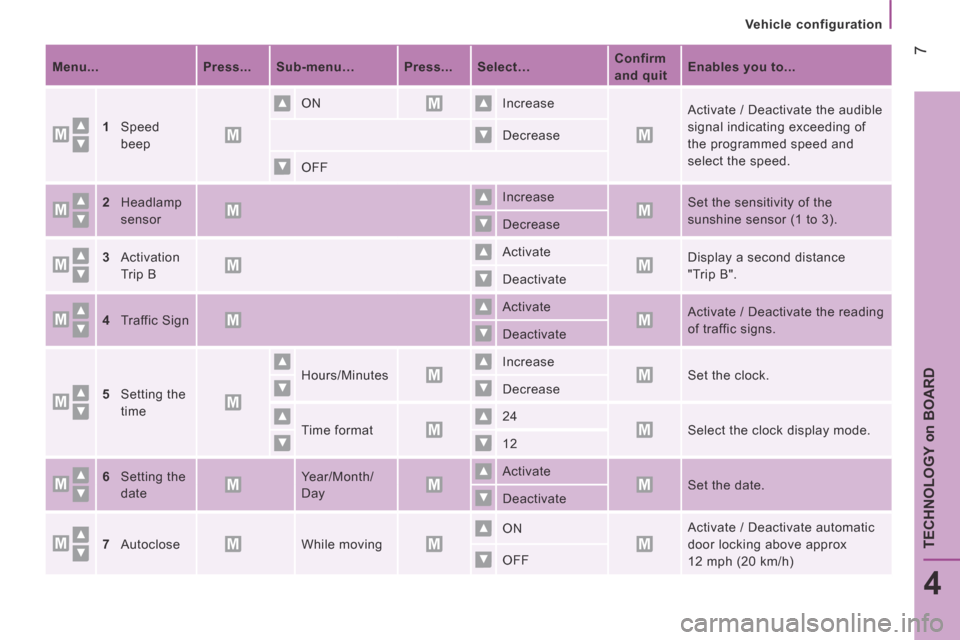
Vehicle configuration
Menu... Press... Sub-menu… Press... Select… Confirm
and quit Enables you to...
1Speed
beep
ON Increase Activate / Deactivate the audible
signal indicating exceeding of
the programmed speed and
select the speed.
Decrease
OFF
2Headlamp
sensor
Increase Set the sensitivity of the
sunshine sensor (1 to 3). Decrease
3Activation
Trip B
Activate Display a second distance
"Trip B". Deactivate
4Traffic Sign Activate Activate / Deactivate the reading
of traffic signs. Deactivate
5Setting the
time
Hours/Minutes Increase Set the clock. Decrease
Time format 24 Select the clock display mode. 12
6Setting the
date
Year/Month/
Day
Activate Set the date. Deactivate
7Autoclose While moving ON Activate / Deactivate automatic
door locking above approx
12 mph (20 km/h) OFF
Page 288 of 292
10
boxer-post-it_en_Chap04_Technologie-a-bord_ed01-2015
Vehicle configuration
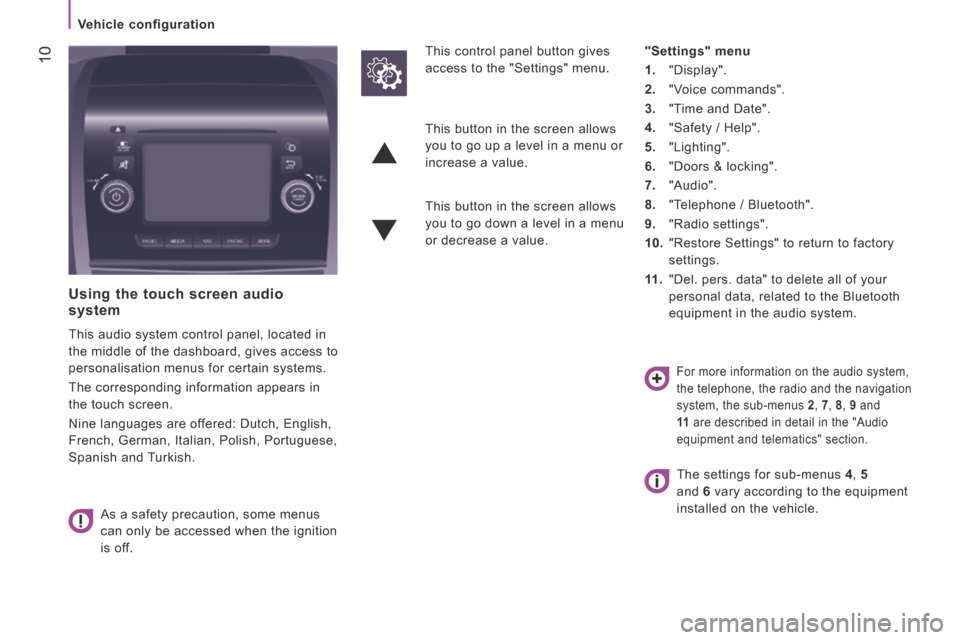
Using the touch screen audio system
This audio system control panel, located in
the middle of the dashboard, gives access to
personalisation menus for certain systems.
The corresponding information appears in
the touch screen.
Nine languages are offered: Dutch, English,
French, German, Italian, Polish, Portuguese,
Spanish and Turkish.
As a safety precaution, some menus
can only be accessed when the ignition
is off.
This control panel button gives
access to the "Settings" menu.
"Settings" menu
1. "Display".
2. "Voice commands".
3. "Time and Date".
4. "Safety / Help".
5. "Lighting".
6. "Doors & locking".
7. "Audio".
8. "Telephone / Bluetooth".
9. "Radio settings".
10. "Restore Settings" to return to factory
settings.
11 . "Del. pers. data" to delete all of your
personal data, related to the Bluetooth
equipment in the audio system.
This button in the screen allows
you to go up a level in a menu or
increase a value.
This button in the screen allows
you to go down a level in a menu
or decrease a value.
For more information on the audio system,
the telephone, the radio and the navigation
system, the sub-menus 2 , 7 , 8 , 9 and
11 are described in detail in the "Audio
equipment and telematics" section.
The settings for sub-menus 4 , 5
and 6 vary according to the equipment
installed on the vehicle.