buttons PEUGEOT EXPERT 2018 User Guide
[x] Cancel search | Manufacturer: PEUGEOT, Model Year: 2018, Model line: EXPERT, Model: PEUGEOT EXPERT 2018Pages: 416, PDF Size: 14.12 MB
Page 68 of 416
66
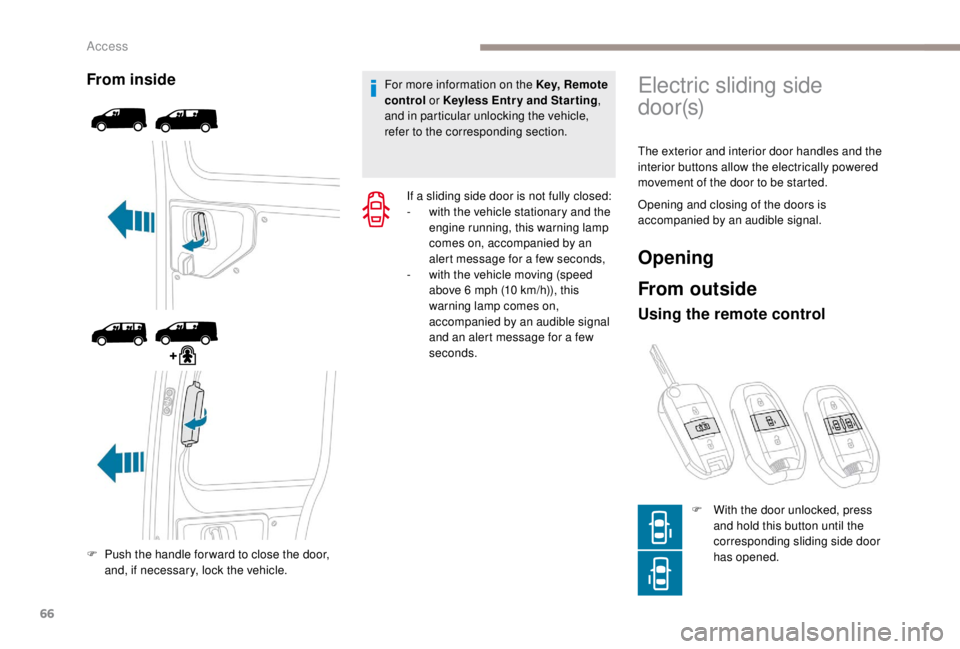
From inside
F Push the handle for ward to close the door, and, if necessary, lock the vehicle. For more information on the Key, Remote
control or
K
eyless Entr y and Star ting
,
and in particular unlocking the vehicle,
refer to the corresponding section.
If a sliding side door is not fully closed:
-
w
ith the vehicle stationary and the
engine running, this warning lamp
comes on, accompanied by an
alert message for a few seconds,
-
w
ith the vehicle moving (speed
above 6 mph (10 km/h)), this
warning lamp comes on,
accompanied by an audible signal
and an alert message for a few
seconds.
Electric sliding side
d o o r (s)
The exterior and interior door handles and the
interior buttons allow the electrically powered
movement of the door to be started.
Opening and closing of the doors is
accompanied by an audible signal.
Opening
From outside
Using the remote control
F With the door unlocked, press and hold this button until the
corresponding sliding side door
has opened.
Access
Page 69 of 416
67
F Press this button again to reverse the movement of the
d o o r.
The remote controls buttons are not active
with the ignition switched on.
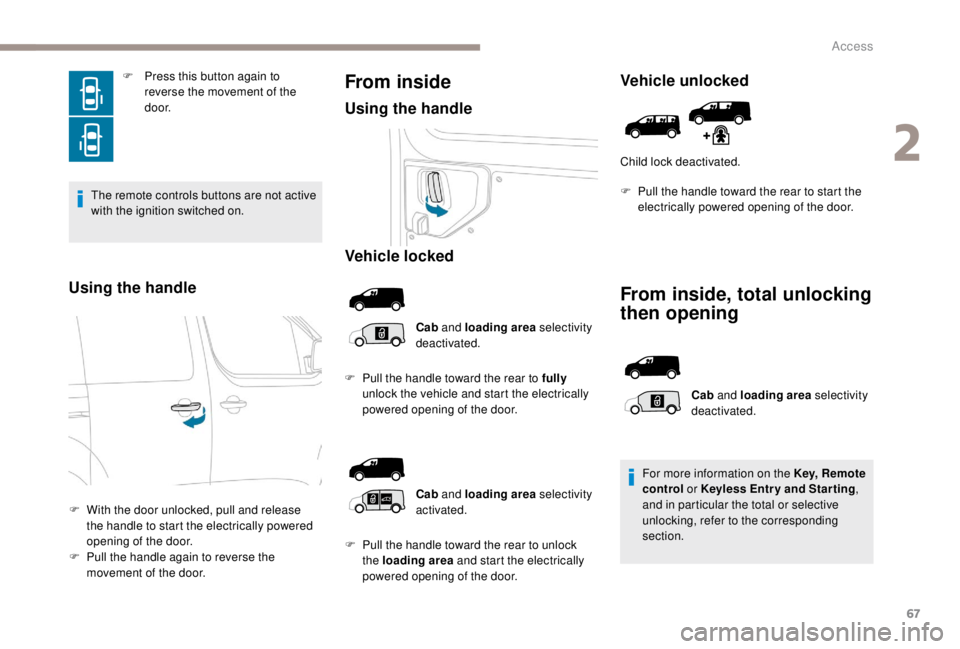
Using the handle
F With the door unlocked, pull and release the handle to start the electrically powered
opening of the door.
F
P
ull the handle again to reverse the
movement of the door.
From inside
Using the handle
Vehicle locked
Cab and loading area selectivity
deactivated.
F
P
ull the handle toward the rear to fully
unlock the vehicle and start the electrically
powered opening of the door.
Vehicle unlocked
Child lock deactivated.
From inside, total unlocking
then opening
Cab and loading area selectivity
activated.
F
P
ull the handle toward the rear to unlock
the loading area and start the electrically
powered opening of the door. Cab
and loading area selectivity
deactivated.
For more information on the Key, Remote
control or K eyless Entr y and Star ting
,
and in particular the total or selective
unlocking, refer to the corresponding
section.
F
P
ull the handle toward the rear to start the
electrically powered opening of the door.
2
Access
Page 71 of 416
69
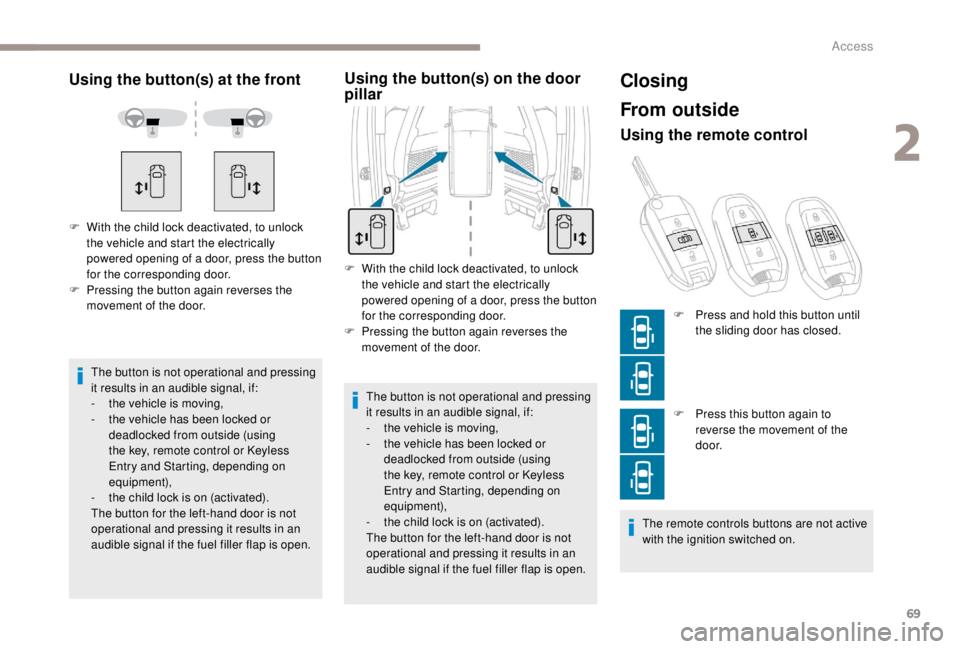
Using the button(s) at the front
The button is not operational and pressing
it results in an audible signal, if:
-
t
he vehicle is moving,
-
t
he vehicle has been locked or
deadlocked from outside (using
the key, remote control or Keyless
Entry and Starting, depending on
equipment),
-
t
he child lock is on (activated).
The button for the left-hand door is not
operational and pressing it results in an
audible signal if the fuel filler flap is open.
F
W
ith the child lock deactivated, to unlock
the vehicle and start the electrically
powered opening of a door, press the button
for the corresponding door.
F
P
ressing the button again reverses the
movement of the door.
Using the button(s) on the door
pillar
F With the child lock deactivated, to unlock the vehicle and start the electrically
powered opening of a door, press the button
for the corresponding door.
F
P
ressing the button again reverses the
movement of the door.
The button is not operational and pressing
it results in an audible signal, if:
-
t
he vehicle is moving,
-
t
he vehicle has been locked or
deadlocked from outside (using
the key, remote control or Keyless
Entry and Starting, depending on
equipment),
-
t
he child lock is on (activated).
The button for the left-hand door is not
operational and pressing it results in an
audible signal if the fuel filler flap is open.
Closing
From outside
Using the remote control
F Press this button again to reverse the movement of the
d o o r.
The remote controls buttons are not active
with the ignition switched on. F
P
ress and hold this button until
the sliding door has closed.
2
Access
Page 118 of 416
116
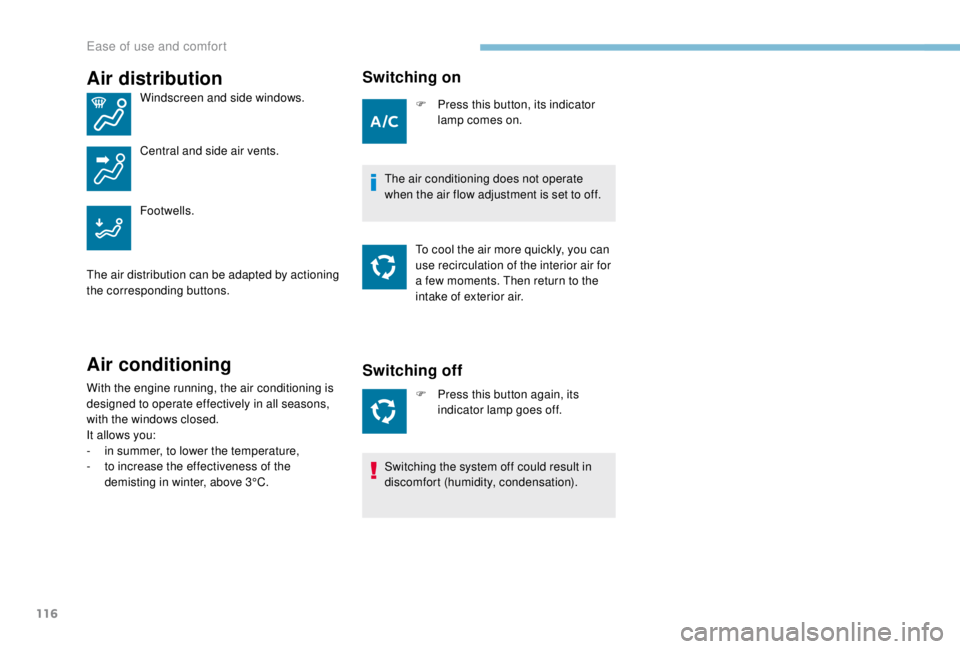
Air distribution
Windscreen and side windows.
Central and side air vents.
Footwells.
The air distribution can be adapted by actioning
the corresponding buttons.
Air conditioning
With the engine running, the air conditioning is
designed to operate effectively in all seasons,
with the windows closed.
It allows you:
-
i
n summer, to lower the temperature,
-
t
o increase the effectiveness of the
demisting in winter, above 3°C.
Switching on
F Press this button, its indicator lamp comes on.
The air conditioning does not operate
when the air flow adjustment is set to off. To cool the air more quickly, you can
use recirculation of the interior air for
a few moments. Then return to the
intake of exterior air.
Switching off
F Press this button again, its indicator lamp goes off.
Switching the system off could result in
discomfort (humidity, condensation).
Ease of use and comfort
Page 146 of 416
144
Geolocation
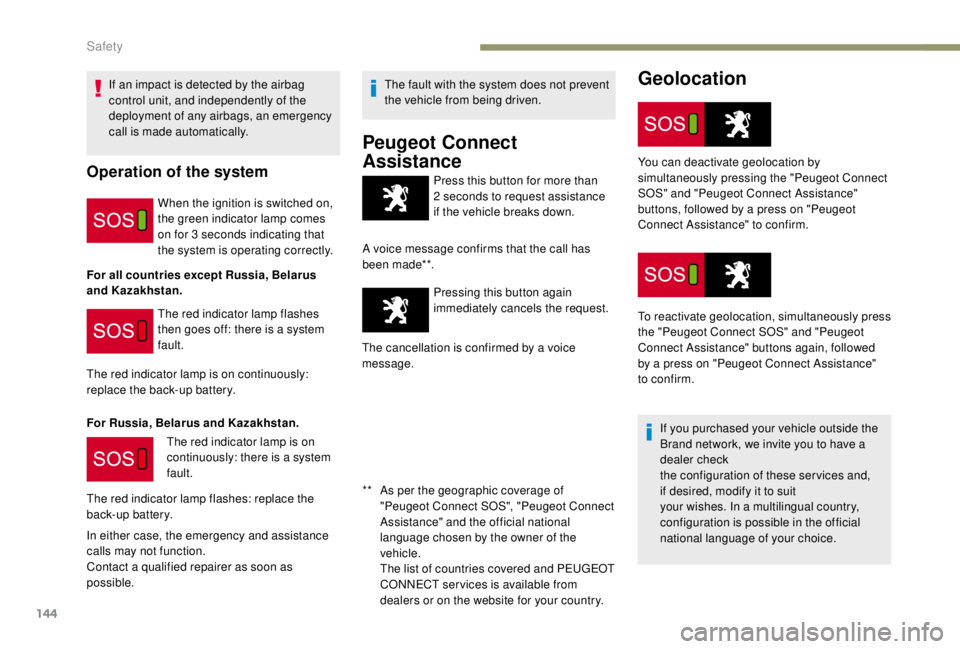
Press this button for more than
2 seconds to request assistance
if the vehicle breaks down.
A voice message confirms that the call has
been made**. Pressing this button again
immediately cancels the request.
The cancellation is confirmed by a voice
message.
If an impact is detected by the airbag
control unit, and independently of the
deployment of any airbags, an emergency
call is made automatically.Operation of the system
When the ignition is switched on,
the green indicator lamp comes
on for 3
seconds indicating that
the system is operating correctly.
For all countries except Russia, Belarus
and Kazakhstan. The red indicator lamp flashes
then goes off: there is a system
fault.
The red indicator lamp is on continuously:
replace the back-up battery.
For Russia, Belarus and Kazakhstan. The red indicator lamp is on
continuously: there is a system
fault.
The red indicator lamp flashes: replace the
back-up battery.
In either case, the emergency and assistance
calls may not function.
Contact a qualified repairer as soon as
possible. The fault with the system does not prevent
the vehicle from being driven.
Peugeot Connect
Assistance
** As per the geographic coverage of
"Peugeot Connect SOS", "Peugeot Connect
Assistance" and the official national
language chosen by the owner of the
vehicle.
T
he list of countries covered and PEUGEOT
CONNECT services is available from
dealers or on the website for your country. You can deactivate geolocation by
simultaneously pressing the "Peugeot Connect
SOS" and "Peugeot Connect Assistance"
buttons, followed by a press on "Peugeot
Connect Assistance" to confirm.
To reactivate geolocation, simultaneously press
the "Peugeot Connect SOS" and "Peugeot
Connect Assistance" buttons again, followed
by a press on "Peugeot Connect Assistance"
to confirm.
If you purchased your vehicle outside the
Brand network, we invite you to have a
dealer check
the configuration of these services and,
if desired, modify it to suit
your wishes. In a multilingual country,
configuration is possible in the official
national language of your choice.
Safety
Page 203 of 416
201
For more information on Navigation, refer
to the Audio equipment and telematics
section.
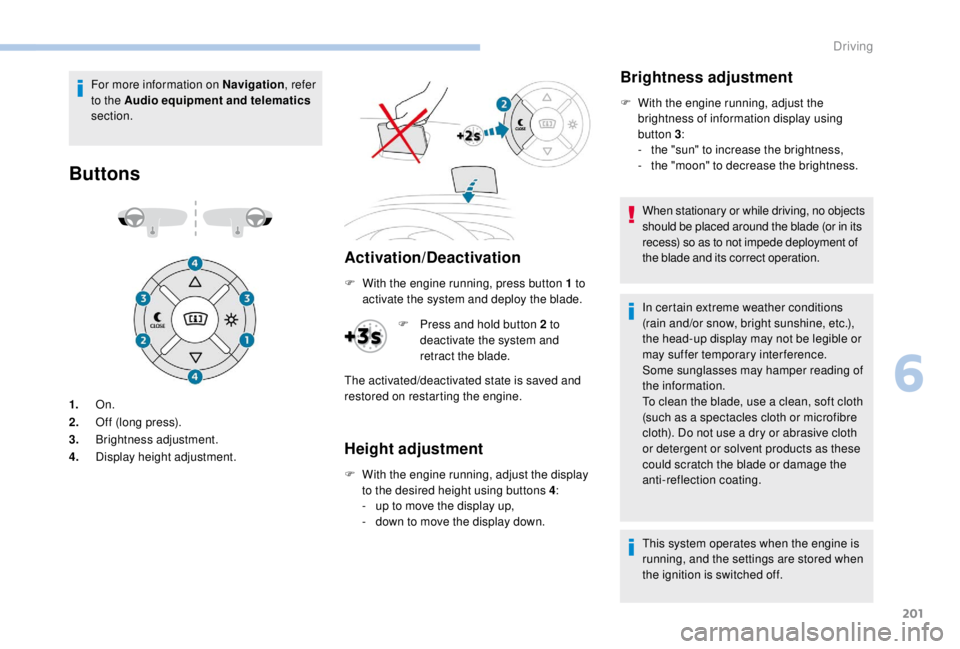
Buttons
Activation/Deactivation
1. On.
2. Off (long press).
3. Brightness adjustment.
4. Display height adjustment. F
W
ith the engine running, press button 1 to
activate the system and deploy the blade.
Height adjustment
F With the engine running, adjust the display to the desired height using buttons 4 :
-
u
p to move the display up,
-
d
own to move the display down.
Brightness adjustment
F With the engine running, adjust the brightness of information display using
button 3 :
-
t
he "sun" to increase the brightness,
-
t
he "moon" to decrease the brightness.
When stationary or while driving, no objects
should be placed around the blade (or in its
recess) so as to not impede deployment of
the blade and its correct operation.
In certain extreme weather conditions
(rain and/or snow, bright sunshine, etc.),
the head-up display may not be legible or
may suffer temporary interference.
Some sunglasses may hamper reading of
the information.
To clean the blade, use a clean, soft cloth
(such as a spectacles cloth or microfibre
cloth). Do not use a dry or abrasive cloth
or detergent or solvent products as these
could scratch the blade or damage the
anti-reflection coating.
This system operates when the engine is
running, and the settings are stored when
the ignition is switched off.
F
P
ress and hold button 2
to
deactivate the system and
retract the blade.
The activated/deactivated state is saved and
restored on restarting the engine.
6
Driving
Page 209 of 416
207
Switching on/Pause
Operation of the speed limiter requires
a programmed speed of at least 20 mph
(30
km/h).
The speed limiter is paused using the control.
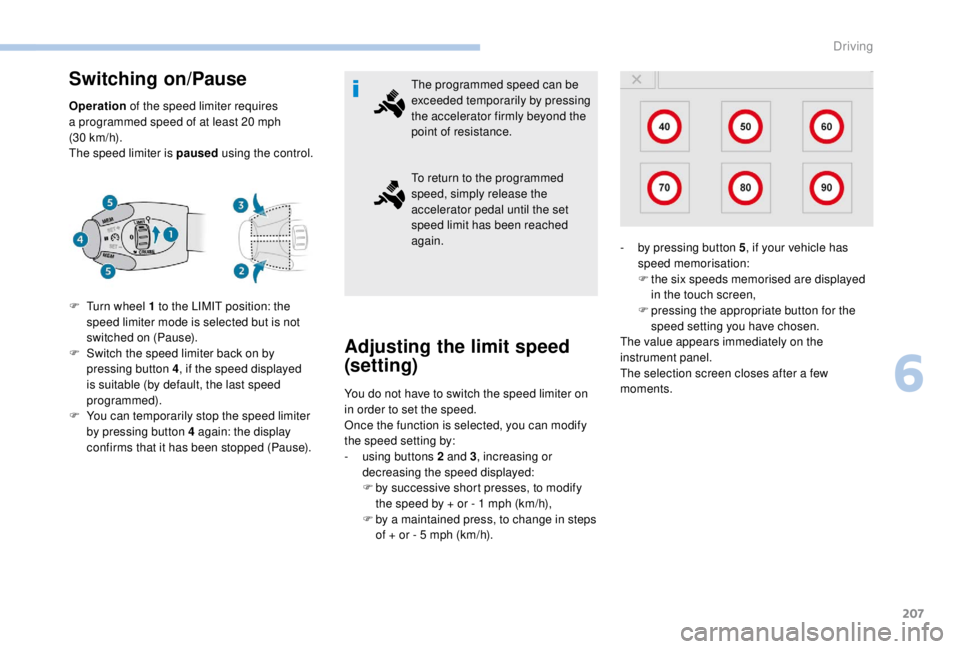
F
T
urn wheel 1 to the LIMIT position: the
speed limiter mode is selected but is not
switched on (Pause).
F
S
witch the speed limiter back on by
pressing button 4, if the speed displayed
is suitable (by default, the last speed
programmed).
F
Y
ou can temporarily stop the speed limiter
by pressing button 4
again: the display
confirms that it has been stopped (Pause). The programmed speed can be
exceeded temporarily by pressing
the accelerator firmly beyond the
point of resistance.
To return to the programmed
speed, simply release the
accelerator pedal until the set
speed limit has been reached
again.
Adjusting the limit speed
(set ting)
You do not have to switch the speed limiter on
in order to set the speed.
Once the function is selected, you can modify
the speed setting by:
-
u
sing buttons 2 and 3, increasing or
decreasing the speed displayed:
F
b
y successive short presses, to modify
the speed by + or - 1
mph (km/h),
F
b
y a maintained press, to change in steps
of + or - 5
mph (km/h). -
b
y pressing button 5
, if your vehicle has
speed memorisation:
F
t
he six speeds memorised are displayed
in the touch screen,
F
p
ressing the appropriate button for the
speed setting you have chosen.
The value appears immediately on the
instrument panel.
The selection screen closes after a few
moments.
6
Driving
Page 212 of 416
210
Switching on
The cruise control is switched on manually: it
requires a minimum vehicle speed of 25 mph
(40
km/h).
With a manual gearbox, third or fourth gear or
higher must be engaged.
With an automatic gearbox, second gear or
higher must be engaged. It is possible to exceed the programmed
speed temporarily by depressing the
accelerator pedal.
To return to the programmed speed,
simply release the accelerator pedal until
the programmed cruise speed is reached
again.
Modification of the initial
speed (setting)
If the cruise control is on, you can then modify
the initial speed:
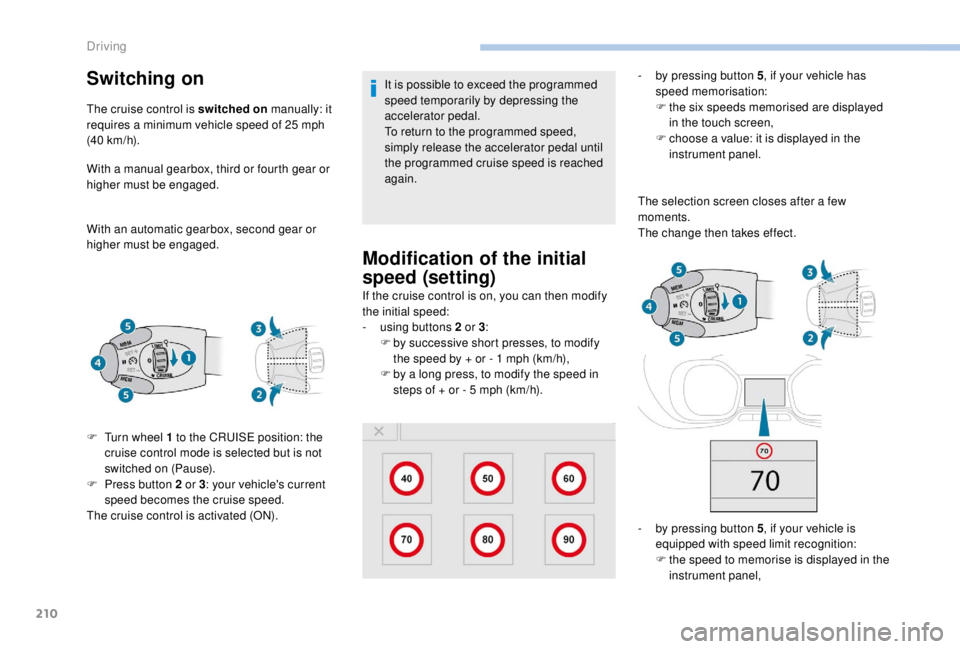
-
u
sing buttons 2 or 3:
F
b
y successive short presses, to modify
the speed by + or - 1
mph (km/h),
F
b
y a long press, to modify the speed in
steps of + or - 5
mph (km/h). -
b
y pressing button 5
, if your vehicle has
speed memorisation:
F
t
he six speeds memorised are displayed
in the touch screen,
F
c
hoose a value: it is displayed in the
instrument panel.
The selection screen closes after a few
moments.
The change then takes effect.
-
b
y pressing button 5, if your vehicle is
equipped with speed limit recognition:
F
t
he speed to memorise is displayed in the
instrument panel,
F
T
urn wheel 1
to the CRUISE position: the
cruise control mode is selected but is not
switched on (Pause).
F
P
ress button 2
or 3 : your vehicle's current
speed becomes the cruise speed.
The cruise control is activated (ON).
Driving
Page 215 of 416
213
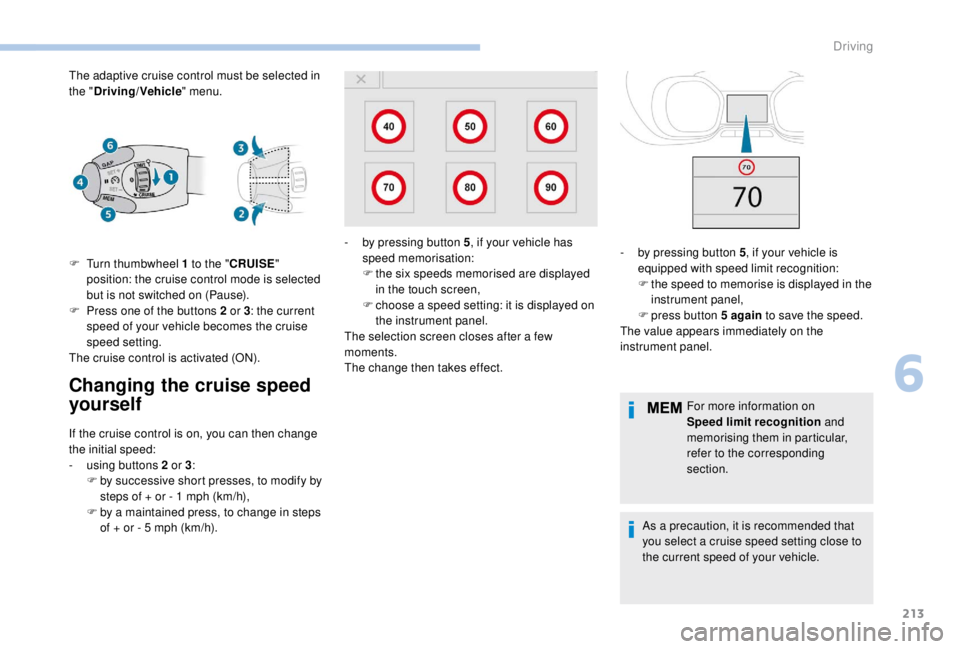
The adaptive cruise control must be selected in
the "Driving/Vehicle " menu.
Changing the cruise speed
yourself
F Turn thumbwheel 1 to the "CRUISE "
position: the cruise control mode is selected
but is not switched on (Pause).
F
P
ress one of the buttons 2 or 3: the current
speed of your vehicle becomes the cruise
speed setting.
The cruise control is activated (ON).
If the cruise control is on, you can then change
the initial speed:
-
u
sing buttons 2 or 3:
F
b
y successive short presses, to modify by
steps of + or - 1
mph (km/h),
F
b
y a maintained press, to change in steps
of + or - 5
mph (km/h). For more information on
Speed limit recognition
and
memorising them in particular,
refer to the corresponding
section.
As a precaution, it is recommended that
you select a cruise speed setting close to
the current speed of your vehicle.
-
b
y pressing button 5
, if your vehicle has
speed memorisation:
F t he six speeds memorised are displayed
in the touch screen,
F
c
hoose a speed setting: it is displayed on
the instrument panel.
The selection screen closes after a few
moments.
The change then takes effect. -
b y pressing button 5
, if your vehicle is
equipped with speed limit recognition:
F
t
he speed to memorise is displayed in the
instrument panel,
F
press button 5
again to save the speed.
The value appears immediately on the
instrument panel.
6
Driving
Page 310 of 416
2
12:13
18,5 21,5
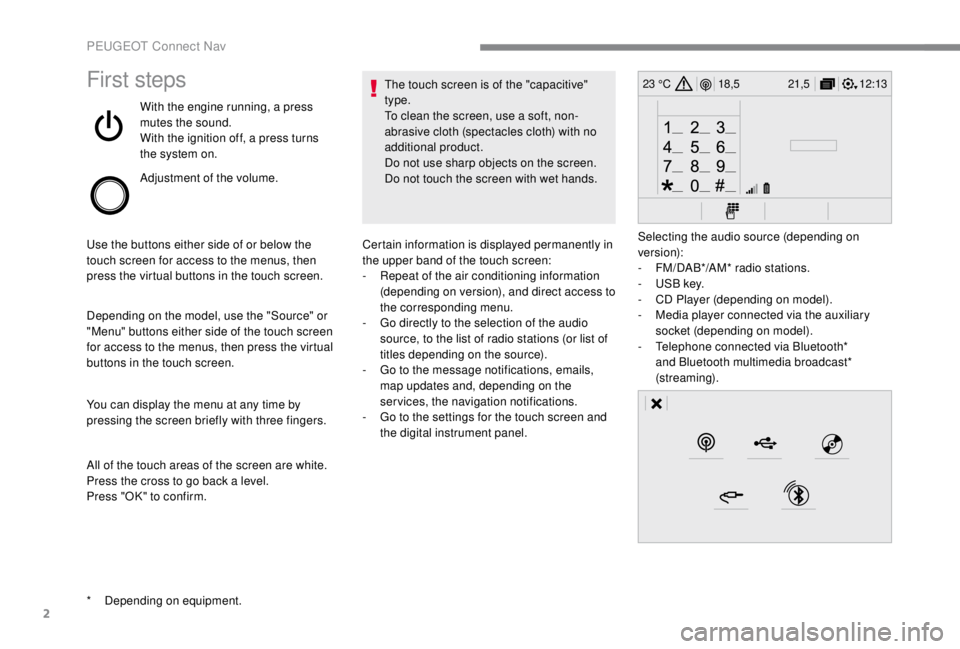
23 °CFirst steps
With the engine running, a press
mutes the sound.
With the ignition off, a press turns
the system on.
Adjustment of the volume.
Use the buttons either side of or below the
touch screen for access to the menus, then
press the virtual buttons in the touch screen.
Depending on the model, use the "Source" or
"Menu" buttons either side of the touch screen
for access to the menus, then press the virtual
buttons in the touch screen.
You can display the menu at any time by
pressing the screen briefly with three fingers.
All of the touch areas of the screen are white.
Press the cross to go back a level.
Press "OK" to confirm. The touch screen is of the "capacitive"
type.
To clean the screen, use a soft, non-
abrasive cloth (spectacles cloth) with no
additional product.
Do not use sharp objects on the screen.
Do not touch the screen with wet hands.
*
D
epending on equipment. Certain information is displayed permanently in
the upper band of the touch screen:
-
R
epeat of the air conditioning information
(depending on version), and direct access to
the corresponding menu.
-
G
o directly to the selection of the audio
source, to the list of radio stations (or list of
titles depending on the source).
-
G
o to the message notifications, emails,
map updates and, depending on the
services, the navigation notifications.
-
G
o to the settings for the touch screen and
the digital instrument panel. Selecting the audio source (depending on
version):
-
F
M/DAB*/AM* radio stations.
-
U
SB key.
-
C
D Player (depending on model).
-
M
edia player connected via the auxiliary
socket (depending on model).
-
T
elephone connected via Bluetooth*
and Bluetooth multimedia broadcast*
(streaming).
PEUGEOT Connect Nav