sensor PEUGEOT EXPERT 2018 User Guide
[x] Cancel search | Manufacturer: PEUGEOT, Model Year: 2018, Model line: EXPERT, Model: PEUGEOT EXPERT 2018Pages: 416, PDF Size: 14.12 MB
Page 158 of 416
156
Advice
For the airbags to be fully effective,
observe the safety recommendations
below.
Adopt a normal and upright sitting position.
Wear a correctly adjusted seat belt.
Do not leave anything between the occupants
and the airbags (a child, pet, object, etc.),
nor fix or attach anything close or in the way
of airbag trajectory; this could cause injuries
during their deployment.
Never modify the original definition of your
vehicle, particularly in the area directly
around the airbags.
After an accident or if the vehicle has been
stolen, have the airbag systems checked.
All work on the airbag system must be carried
out by a PEUGEOT dealer or a qualified
workshop.
Even when following all the precautions
listed, a risk of injuries or slight burns to
the head, the chest or the arms, when an
airbag deploys cannot be excluded. The
bag inflates almost instantly (within a few
milliseconds) then deflates within the same
time discharging the hot gas via openings
provided for this purpose.Front airbags
Do not drive holding the steering wheel by its
spokes or resting your hands on the centre
part of the wheel.
Passengers must not place their feet on the
dashboard.
Do not smoke as deployment of the airbags
can cause burns or the risk of injury from a
cigarette or pipe.
Never remove or pierce the steering wheel or
hit it violently.
Do not fit or attach anything to the steering
wheel or dashboard, this could cause injuries
in case of airbag deployment.
Curtain airbags
Do not attach anything or hang anything to the
roof, as this could cause head injuries when the
curtain airbag is deployed.
If fitted to your vehicle, do not remove the grab
handles installed on the roof, they play a part in
securing the curtain airbags. Side airbags
Use only approved covers on the seats,
compatible with the deployment of the lateral
airbags. For information on the range of seat
covers suitable for your vehicle, you can
contact a PEUGEOT dealer.
Do not attach or hang anything to the seat
backrests (clothes, etc.) as this could cause
injuries to the thorax or arm when the side
airbag is deployed.
Do not sit with the upper part of the body any
nearer to the door than necessary.
The vehicle's front door panels include side
impact sensors.
A damaged door or any unauthorised or
incorrectly executed work (modification or
repair) on the front doors or their interior trim
could compromise the operation of these
sensors – Risk of malfunction of the lateral
airbags!
Such work must only be done by a PEUGEOT
dealer or a qualified workshop.
Safety
Page 180 of 416
178
Cooling
Towing a trailer on a slope increases the
temperature of the coolant.
As the fan is electrically controlled, its cooling
capacity is not dependent on the engine speed.
F
T
o lower the engine speed, reduce your
speed.
The maximum towable load on an incline
depends on the gradient and the exterior
temperature.
In all cases, keep a check on the coolant
temperature.
F
I
f this warning lamp and the
STOP warning lamp come on,
stop the vehicle and switch off
the engine as soon as possible.
New vehicle
Do not pull a trailer before having driven at
least around 600
miles (1,000 kilometres).
When the exterior temperature is high,
leaving the engine running for 1
to
2
minutes after stopping the vehicle to
allow it to cool is recommended.
Braking
Towing a trailer increases the braking distance.
To avoid overheating of the brakes, the use of
engine braking is recommended.
Ty r e s
F Check the tyre pressures of the towing vehicle and of the trailer, observing the
recommended pressures.
Lighting
F Check the electrical lighting and signalling on the trailer and the headlamp beam height
of your vehicle.
For more information on Headlamp
beam height adjustment , refer to the
corresponding section.
The rear parking sensors will be
deactivated automatically to avoid the
audible signal if a genuine PEUGEOT
towbar is used.
Starting/switching off
the engine, manual key,
remote control
Ignition switch
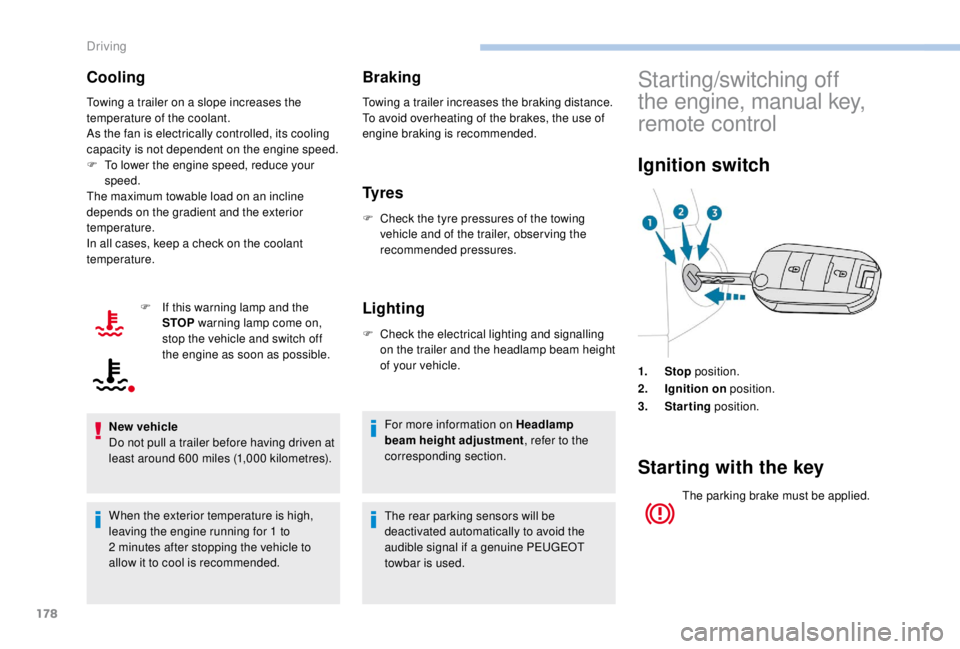
1. Stop position.
2. Ignition on position.
3. Starting position.
Starting with the key
The parking brake must be applied.
Driving
Page 223 of 416
221
Operation of the system may be felt by
slight vibration in the brake pedal.
If the vehicle comes to a complete stop,
the automatic braking is maintained for
1 to 2 seconds.
With a manual gearbox, in the event of
automatic emergency braking until the
vehicle comes to a complete stop, the
vehicle may stall.
With an automatic gearbox, in the event
of automatic emergency braking until the
vehicle comes to a complete stop, keep
the brake pedal pressed down to prevent
the vehicle from starting off again.
If automatic emergency braking is not
activated, you are alerted by the fixed
display of the warning lamp accompanied
by a message.
Intelligent emergency braking
assistance
If the driver does not brake sufficiently
to avoid an accident, this system will
complete the braking.
This emergency braking system will not
act if you press the brake pedal.
Deactivation/Activation of the
alert and the braking
By default, the function is automatically
activated at every engine start.
The deactivation or activation of the function is
done in the vehicle configuration menu.
With audio system
Operating fault
In the event of a fault with the
system, you are alerted by the
illumination of this warning lamp,
accompanied by the display of a
message and an audible signal.
If the fault persists, contact a PEUGEOT dealer
or a qualified workshop to have the system
checked. If one of the two sensors (camera or radar)
is masked or its visibility is reduced, while
the other sensor is able to work normally,
the system still operates, but at a lower
level of per formance. No message or
warning lamp indicates this.
To ensure correct operation of the radar,
do not paint over the paintwork on the
vehicle's bumper.
Poor weather conditions (very heavy
rain, accumulation of snow in front of the
radar and the camera) may hinder the
operation of the system, with the display of
an operating fault message. The function
remains unavailable until the message
disappears.
In the "
Personalisation-
configuration " menu, activate/
deactivate " Auto. emergency
braking ".
With touch screen
In the "Driving/Vehicle " menu,
activate/deactivate " Collision risk
alert and automatic braking ".
6
Driving
Page 229 of 416
227
The system may suffer temporary
interference in certain weather conditions
(rain, hail, etc.).
In particular, driving on a wet sur face
or moving from a dry area to a wet area
can cause false alerts (for example, the
presence of a fog of water droplets in
the blind spot angle is interpreted as a
vehicle).
In bad or wintry weather, ensure that the
sensors are not covered with mud, ice or
snow.
Take care not to cover the warning zone in
the door mirrors or the detection zones on
the front and rear bumpers with adhesive
labels or other objects; they may hamper
the correct operation of the system.
High pressure jet wash
When washing your vehicle, do not place
the tip of the lance within 30 cm of the
sensors as other wise there is a risk of
damaging them.Parking sensors
This system cannot in any circumstances
replace the need for vigilance on the part
of the driver.
Rear parking sensors
The system is switched on by engaging reverse
g e a r.
This is confirmed by an audible signal.
The system is switched off when you come out
of reverse gear.
Audible assistance
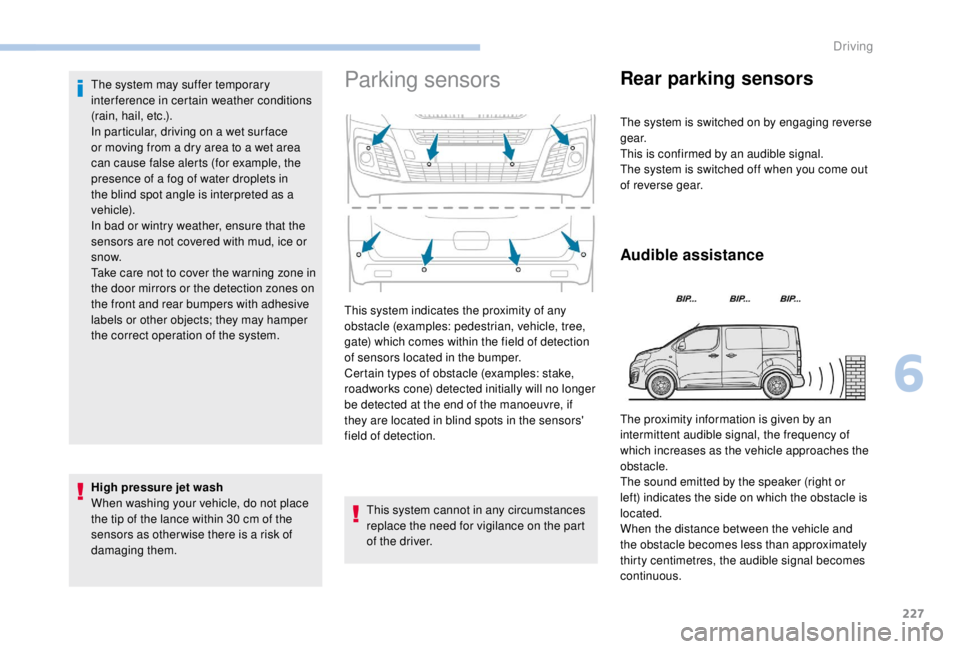
This system indicates the proximity of any
obstacle (examples: pedestrian, vehicle, tree,
gate) which comes within the field of detection
of sensors located in the bumper.
Certain types of obstacle (examples: stake,
roadworks cone) detected initially will no longer
be detected at the end of the manoeuvre, if
they are located in blind spots in the sensors'
field of detection. The proximity information is given by an
intermittent audible signal, the frequency of
which increases as the vehicle approaches the
obstacle.
The sound emitted by the speaker (right or
left) indicates the side on which the obstacle is
located.
When the distance between the vehicle and
the obstacle becomes less than approximately
thirty centimetres, the audible signal becomes
continuous.
6
Driving
Page 230 of 416
228
Visual assistanceFront parking sensors
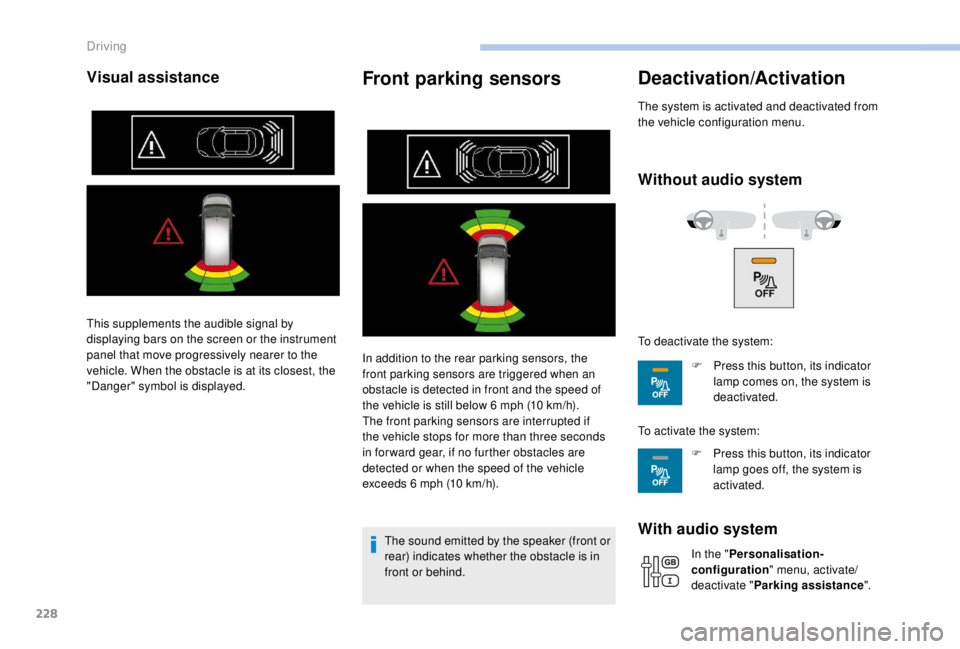
In addition to the rear parking sensors, the
front parking sensors are triggered when an
obstacle is detected in front and the speed of
the vehicle is still below 6 mph (10 km/h).
The front parking sensors are interrupted if
the vehicle stops for more than three seconds
in for ward gear, if no further obstacles are
detected or when the speed of the vehicle
exceeds 6
mph (10 km/h).
The sound emitted by the speaker (front or
rear) indicates whether the obstacle is in
front or behind.
Deactivation/Activation
The system is activated and deactivated from
the vehicle configuration menu.
Without audio system
With audio system
In the " Personalisation-
configuration " menu, activate/
deactivate " Parking assistance ".
This supplements the audible signal by
displaying bars on the screen or the instrument
panel that move progressively nearer to the
vehicle. When the obstacle is at its closest, the
"Danger" symbol is displayed.
To deactivate the system:
F
P
ress this button, its indicator
lamp comes on, the system is
deactivated.
To activate the system: F
P
ress this button, its indicator
lamp goes off, the system is
activated.
Driving
Page 231 of 416
229
The system will be automatically
deactivated where a towbar or towbar-
mounted bicycle carrier is fitted
(vehicle fitted with a towbar installed as
recommended by a PEUGEOT dealer).
Operating fault
When engaging reverse and depending on the
vehicle's equipment, in the event of a fault:This warning lamp comes on and a
message appears, accompanied by
an audible signal.
Contact a PEUGEOT dealer or a qualified
workshop. When reverse gear is engaged, an audible
signal (long beep) indicates that the
sensors may be dirty.
Certain sound sources (motorcycle,
lorry, pneumatic drill, etc.) may trigger
the audible signals of the parking sensor
system.
Reversing camera with
display in the interior
mirror
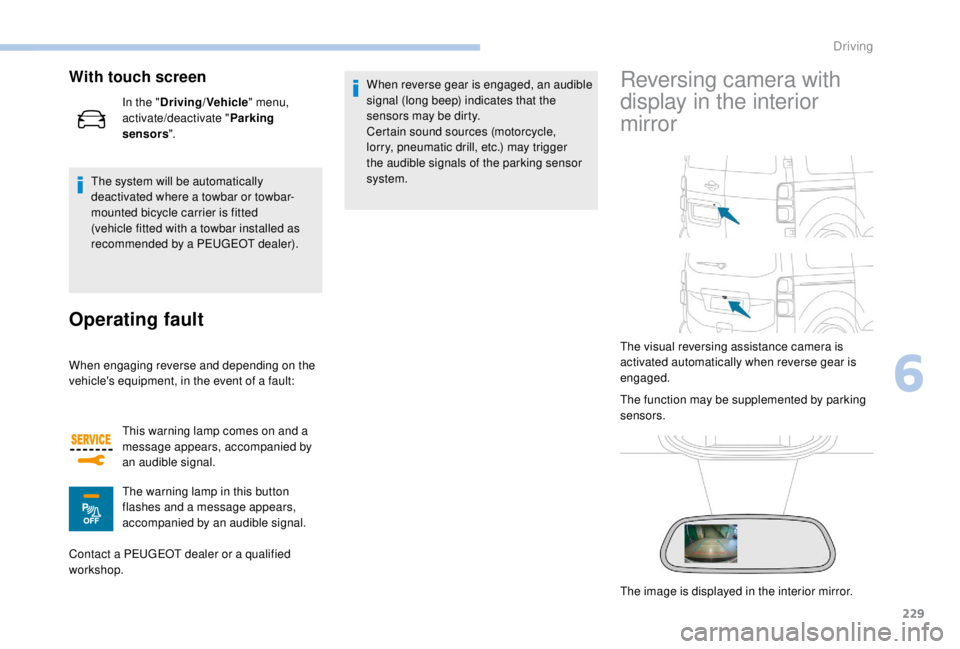
The visual reversing assistance camera is
activated automatically when reverse gear is
engaged.
The function may be supplemented by parking
sensors.
The image is displayed in the interior mirror.
With touch screen
In the "
Driving/Vehicle " menu,
activate/deactivate " Parking
sensors ".
The warning lamp in this button
flashes and a message appears,
accompanied by an audible signal.
6
Driving
Page 232 of 416
230
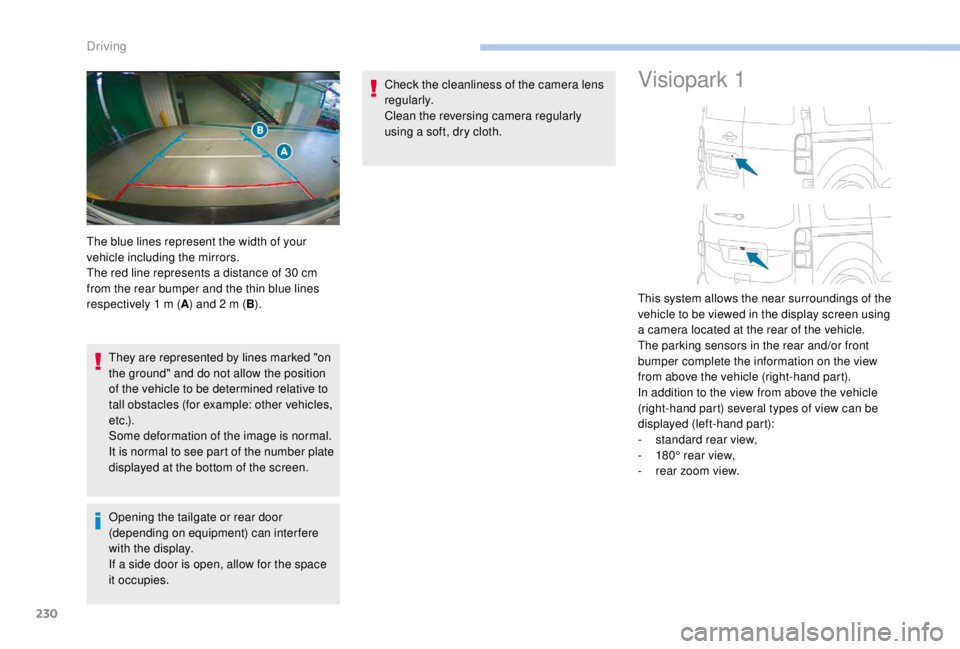
They are represented by lines marked "on
the ground" and do not allow the position
of the vehicle to be determined relative to
tall obstacles (for example: other vehicles,
e t c .) .
Some deformation of the image is normal.
It is normal to see part of the number plate
displayed at the bottom of the screen.
Opening the tailgate or rear door
(depending on equipment) can interfere
with the display.
If a side door is open, allow for the space
it occupies.Check the cleanliness of the camera lens
regularly.
Clean the reversing camera regularly
using a soft, dry cloth.
Visiopark 1
The blue lines represent the width of your
vehicle including the mirrors.
The red line represents a distance of 30
cm
from the rear bumper and the thin blue lines
respectively 1
m (A) and 2
m (B). This system allows the near surroundings of the
vehicle to be viewed in the display screen using
a camera located at the rear of the vehicle.
The parking sensors in the rear and/or front
bumper complete the information on the view
from above the vehicle (right-hand part).
In addition to the view from above the vehicle
(right-hand part) several types of view can be
displayed (left-hand part):
-
s
tandard rear view,
-
1
80° rear view,
-
r
ear zoom view.
Driving
Page 233 of 416
231
Principle of operation
The images provided by the cameras may
be distorted by the environment (external
conditions, driving mode, etc.).
The presence of areas in shadow, bright
sunlight, or poor lighting conditions may
make the image dark and reduce contrast.
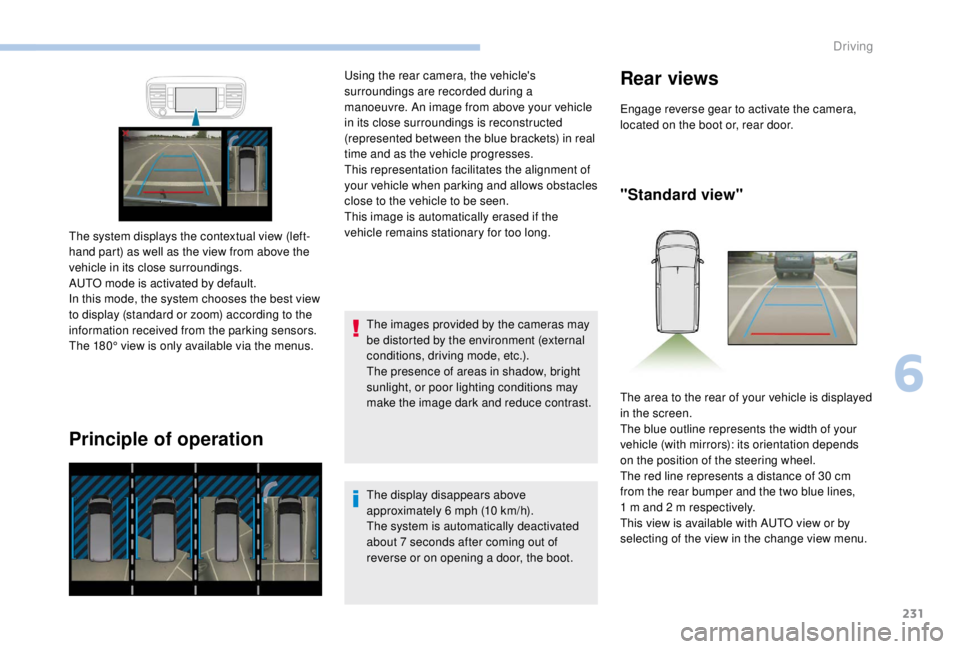
The system displays the contextual view (left-
hand part) as well as the view from above the
vehicle in its close surroundings.
AUTO mode is activated by default.
In this mode, the system chooses the best view
to display (standard or zoom) according to the
information received from the parking sensors.
The 180° view is only available via the menus. Using the rear camera, the vehicle's
surroundings are recorded during a
manoeuvre. An image from above your vehicle
in its close surroundings is reconstructed
(represented between the blue brackets) in real
time and as the vehicle progresses.
This representation facilitates the alignment of
your vehicle when parking and allows obstacles
close to the vehicle to be seen.
This image is automatically erased if the
vehicle remains stationary for too long.
The display disappears above
approximately 6 mph (10 km/h).
The system is automatically deactivated
about 7
seconds after coming out of
reverse or on opening a door, the boot.
Rear views
Engage reverse gear to activate the camera,
located on the boot or, rear door.
"Standard view"
The area to the rear of your vehicle is displayed
in the screen.
The blue outline represents the width of your
vehicle (with mirrors): its orientation depends
on the position of the steering wheel.
The red line represents a distance of 30
cm
from the rear bumper and the two blue lines,
1
m and 2 m respectively.
This view is available with AUTO view or by
selecting of the view in the change view menu.
6
Driving
Page 234 of 416
232
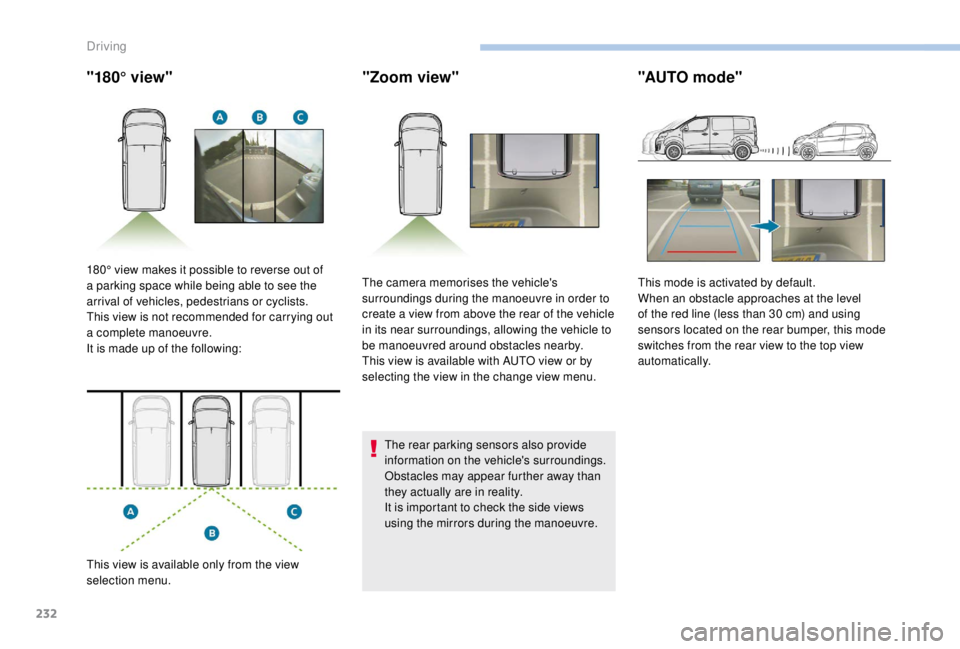
"180° view""Zoom view"
The rear parking sensors also provide
information on the vehicle's surroundings.
Obstacles may appear further away than
they actually are in reality.
It is important to check the side views
using the mirrors during the manoeuvre.
"AUTO mode"
180° view makes it possible to reverse out of
a parking space while being able to see the
arrival of vehicles, pedestrians or cyclists.
This view is not recommended for carrying out
a complete manoeuvre.
It is made up of the following:
This view is available only from the view
selection menu. The camera memorises the vehicle's
surroundings during the manoeuvre in order to
create a view from above the rear of the vehicle
in its near surroundings, allowing the vehicle to
be manoeuvred around obstacles nearby.
This view is available with AUTO view or by
selecting the view in the change view menu.
This mode is activated by default.
When an obstacle approaches at the level
of the red line (less than 30
cm) and using
sensors located on the rear bumper, this mode
switches from the rear view to the top view
automatically.
Driving
Page 236 of 416
234
Under-inflation detection
This system automatically monitors the tyre
pressure while driving.
The system monitors the pressure in all four
tyres, once the vehicle is moving.
It compares the information given by the
wheel speed sensors with reference values,
which must be reinitialised after ever y tyre
pressure adjustment or wheel change.
The system triggers an alert as soon as it
detects a drop in the pressure of one or more
tyres.
The tyre under-inflation detection system
does not replace the need for vigilance on
the part of the driver.
This system still requires you to check the
tyre inflation pressure (including the spare
wheel) every month as well as before a
long journey.
Driving with under-inflated tyres impairs
handling, extends braking distances and
causes early tyre wear, particularly in
adverse conditions (heavy loads, high
speeds, long journeys). Driving with under-inflated tyres
increases fuel consumption.
The tyre pressure specifications for your
vehicle can be found on the tyre pressure
label.
For more information on the
Identification markings , refer to the
corresponding section.
Tyre pressures should be checked when
the tyres are "cold" (vehicle stopped for
1
hour or after a journey of less than
6
miles (10 km) at moderate speeds).
Other wise (when hot), add 0.3
bar to the
pressures shown on the label.
Snow chains
The system does not have to be
reinitialised after fitting or removing snow
chains. Spare wheel
The steel spare wheel does not have an
under-inflation detection sensor.
Under-inflation alert
This warning is indicated by
continuous illumination of the lamp,
an audible signal and, depending on
the equipment installed, a message
displayed on the screen.
F
R
educe speed immediately, avoid excessive
steering movements and sudden braking.
F
S
top the vehicle as soon as it is safe to do
so.
The loss of pressure detected does not
always cause visible bulging of the tyre.
Do not satisfy yourself with just a visual
check.
F
I
n the event of a puncture, use the
temporary puncture repair kit or the spare
wheel (depending on equipment),
or
F
i
f you have a compressor, such as the one
in the temporary puncture repair kit, check
the pressures of the four tyres when cold,
Driving