ad blue PEUGEOT EXPERT 2018 Owner's Manual
[x] Cancel search | Manufacturer: PEUGEOT, Model Year: 2018, Model line: EXPERT, Model: PEUGEOT EXPERT 2018Pages: 416, PDF Size: 14.12 MB
Page 298 of 416
296
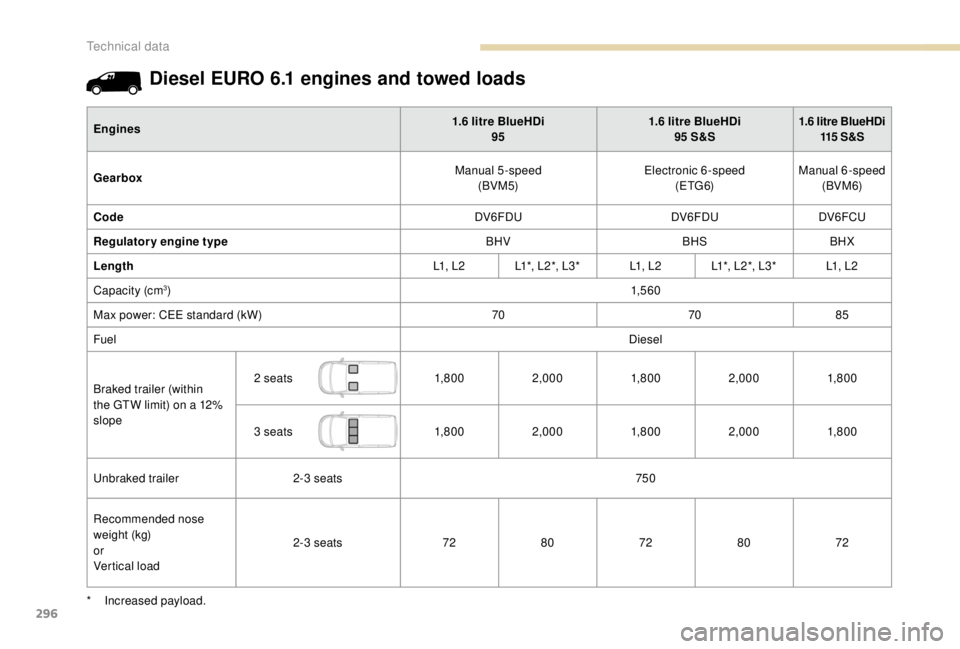
Diesel EURO 6.1 engines and towed loads
Engines1.6 litre BlueHDi
95 1.6
litre BlueHDi
95 S&S1.6
litre BlueHDi
115 S & S
Gearbox Manual 5-speed
(BVM5) Electronic 6-speed
(ETG6) Manual 6-speed
(BVM 6)
Code DV6FDUDV6FDUDV6FCU
Regulatory engine type BHVBHSBHX
Length L1 , L 2L1*, L 2 *, L 3 * L1 , L 2L1*, L 2 *, L 3 * L1 , L 2
Capacity (cm
3) 1,5 6 0
Max power: CEE standard (kW) 707085
Fuel Diesel
Braked trailer (within
the GTW limit) on a 12%
slope 2
seats 1,8 0 02,000 1,8 0 02,000 1,8 0 0
3
seats 1,8 0 02,000 1,8 0 02,000 1,8 0 0
Unbraked trailer 2-3
seats 750
Recommended nose
weight (kg)
or
Vertical load 2-3
seats7280 7280 72
*
I
ncreased payload.
Technical data
Page 299 of 416
297
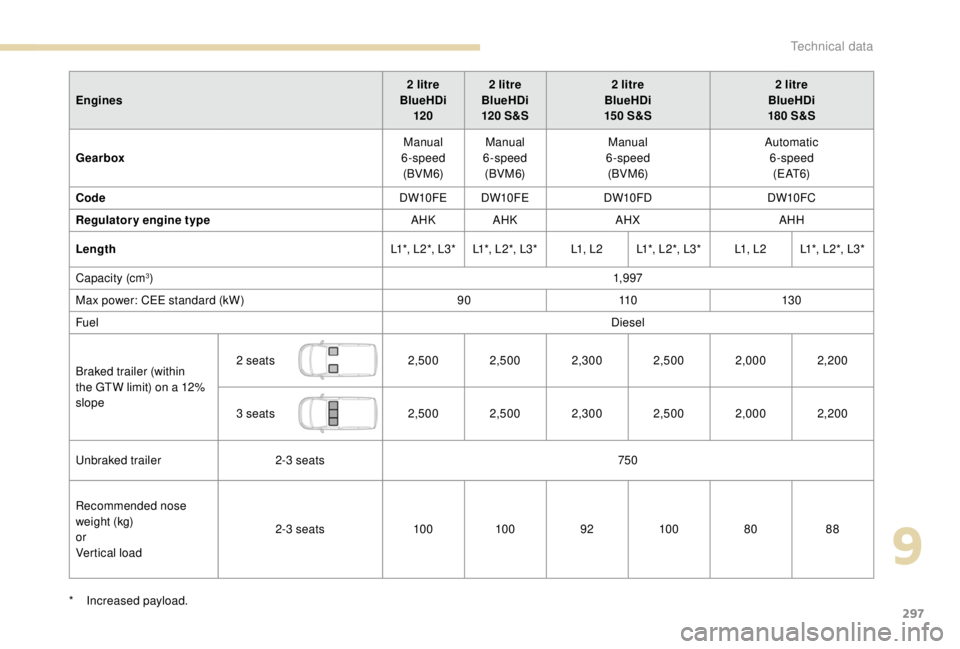
Engines2 litre
BlueHDi 120 2
litre
BlueHDi
120 S&S2
litre
BlueHDi
15 0 S&S2
litre
BlueHDi
180 S&S
Gearbox Manual
6-speed (BVM 6) Manual
6-speed (BVM 6) Manual
6-speed (BVM 6) Automatic
6-speed ( E AT 6)
Code DW10FE DW10FEDW10FDDW10FC
Regulatory engine type AHK AHKAHXAHH
Length L1*, L 2 *, L 3 * L1*, L 2 *, L 3 *L1 , L 2L1*, L 2 *, L 3 * L1 , L 2L1*, L 2 *, L 3 *
Capacity (cm
3) 1,9 97
Max power: CEE standard (kW) 9011 0 13 0
Fuel Diesel
Braked trailer (within
the GTW limit) on a 12%
slope 2
seats 2,500 2,500 2,300 2,500 2,0002,200
3
seats 2,500 2,500 2,300 2,500 2,0002,200
Unbraked trailer 2-3
seats 750
Recommended nose
weight (kg)
or
Vertical load 2-3
seats10 010 0 9210 0 8088
*
I
ncreased payload.
9
Technical data
Page 300 of 416
298
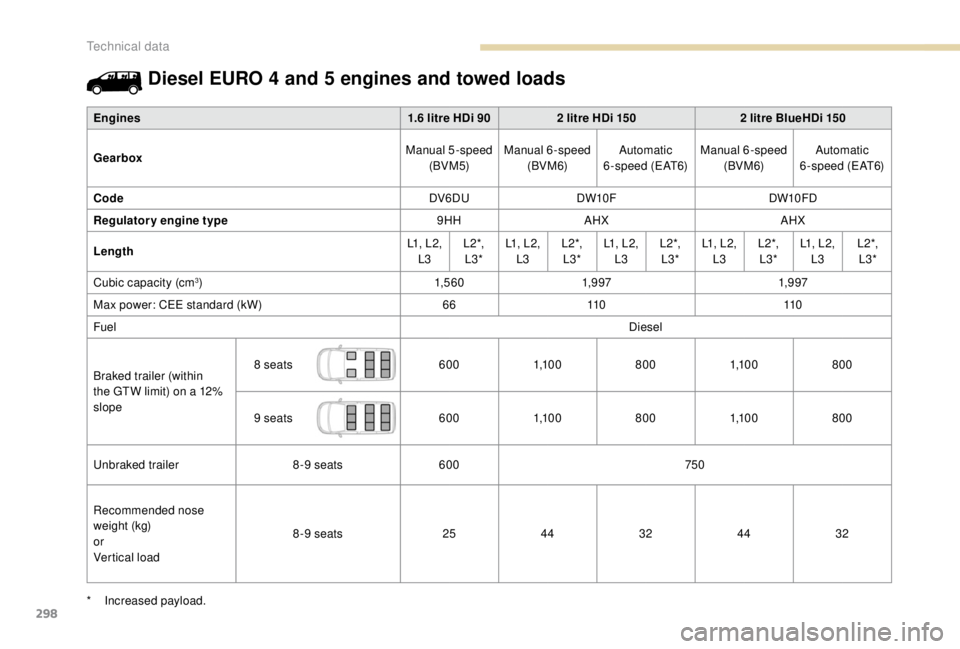
Diesel EURO 4 and 5 engines and towed loads
Engines1.6 litre HDi 902 litre HDi 1502 litre BlueHDi 150
Gearbox Manual 5-speed
(BVM5) Manual 6-speed
(BVM 6) Automatic
6-speed (EAT6) Manual 6-speed
(BVM 6) Automatic
6-speed (EAT6)
Code DV6DUDW10F DW10FD
Regulatory engine type 9HHAHX AHX
Length L1, L2,
L3 L 2 *,
L3* L1, L2,
L3 L 2 *,
L3* L1, L2,
L3 L 2 *,
L3* L1, L2,
L3 L 2 *,
L3* L1, L2,
L3 L 2 *,
L3*
Cubic capacity (cm
3) 1,5 6 01,9 97 1,9 97
Max power: CEE standard (kW) 6611 0 11 0
Fuel Diesel
Braked trailer (within
the GTW limit) on a 12%
slope 8
seats 6001,1 0 0 8001,1 0 0 800
9
seats 6001,1 0 0 8001,1 0 0 800
Unbraked trailer 8-9
seats 600 750
Recommended nose
weight (kg)
or
Vertical load 8-9
seats 2544 3244 32
*
I
ncreased payload.
Technical data
Page 301 of 416
299
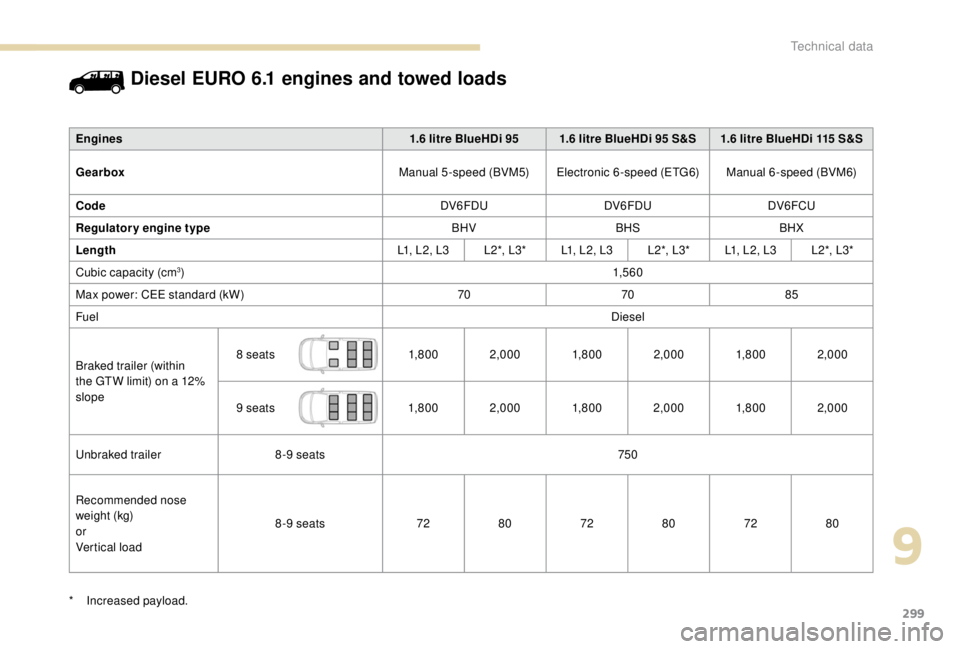
Diesel EURO 6.1 engines and towed loads
Engines1.6 litre BlueHDi 95 1.6 litre BlueHDi 95 S&S 1.6 litre BlueHDi 115 S&S
Gearbox Manual 5-speed (BVM5)Electronic 6-speed (ETG6) Manual 6-speed (BVM6)
Code DV6FDUDV6FDU DV6FCU
Regulatory engine type BHVBHSBHX
Length L1, L2, L3L 2 *, L 3 *L1, L2, L3 L 2 *, L 3 *L1, L2, L3 L 2 *, L 3 *
Cubic capacity (cm
3) 1,5 6 0
Max power: CEE standard (kW) 707085
Fuel Diesel
Braked trailer (within
the GTW limit) on a 12%
slope 8
seats 1,8 0 02,000 1,8 0 02,000 1,8 0 02,000
9
seats 1,8 0 02,000 1,8 0 02,000 1,8 0 02,000
Unbraked trailer 8-9
seats 750
Recommended nose
weight (kg)
or
Vertical load 8-9
seats 7280 7280 7280
*
I
ncreased payload.
9
Technical data
Page 302 of 416
300
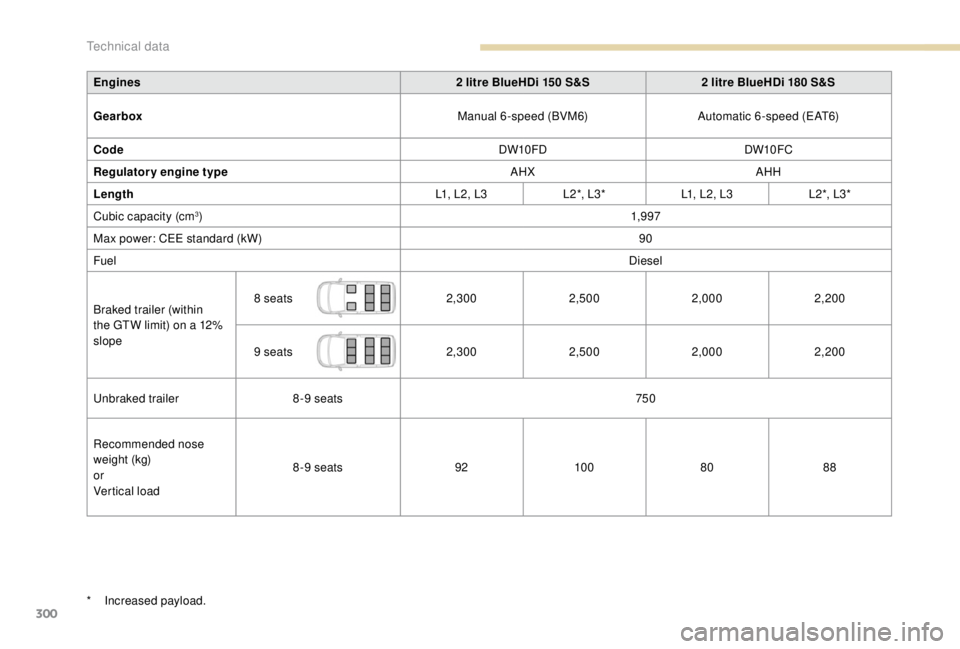
Engines2 litre BlueHDi 150 S&S2 litre BlueHDi 180 S&S
Gearbox Manual 6-speed (BVM6)Automatic 6-speed (EAT6)
Code DW10FDDW10FC
Regulatory engine type AHXAHH
Length L1, L2, L3L 2 *, L 3 *L1, L2, L3 L 2 *, L 3 *
Cubic capacity (cm
3) 1,9 97
Max power: CEE standard (kW) 90
Fuel Diesel
Braked trailer (within
the GTW limit) on a 12%
slope 8
seats 2,3002,5002,0002,200
9
seats 2,3002,5002,0002,200
Unbraked trailer 8-9
seats 750
Recommended nose
weight (kg)
or
Vertical load 8-9
seats 9210 0 8088
*
I
ncreased payload.
Technical data
Page 309 of 416
1
PEUGEOT Connect Nav
GPS satellite navigation –
Applications – Multimedia
audio system – Bluetooth
®
telephone
Contents
First steps
2
S
teering mounted controls
3
M
enus
4
V
oice commands
5
N
avigation
1
1
Connected navigation
1
5
Applications
1
8
Radio
2
3
DAB radio (Digital Audio Broadcasting)
2
5
Media
26
T
elephone
2
8
Configuration
3
3
Frequently asked questions
3
7The different functions and settings
described vary according to the version
and configuration of your vehicle.
As a safety measure and because it
requires sustained attention by the
driver, the pairing of a Bluetooth mobile
telephone with the Bluetooth hands-free
system of your audio system must be
done with the vehicle stationary
and the
ignition on.
The system is protected in such a way that
it will only operate in your vehicle.
The display of the Energy Economy
Mode message signals that a change to
standby is imminent.
The link below gives access to OSS
(Open Source Software) codes for the
system.
https://www.groupe-psa.com/fr/oss/
https://www.groupe-psa.com/en/oss/
PEUGEOT Connect Nav
.
PEUGEOT Connect Nav
Page 310 of 416
2
12:13
18,5 21,5
23 °CFirst steps
With the engine running, a press
mutes the sound.
With the ignition off, a press turns
the system on.
Adjustment of the volume.
Use the buttons either side of or below the
touch screen for access to the menus, then
press the virtual buttons in the touch screen.
Depending on the model, use the "Source" or
"Menu" buttons either side of the touch screen
for access to the menus, then press the virtual
buttons in the touch screen.
You can display the menu at any time by
pressing the screen briefly with three fingers.
All of the touch areas of the screen are white.
Press the cross to go back a level.
Press "OK" to confirm. The touch screen is of the "capacitive"
type.
To clean the screen, use a soft, non-
abrasive cloth (spectacles cloth) with no
additional product.
Do not use sharp objects on the screen.
Do not touch the screen with wet hands.
*
D
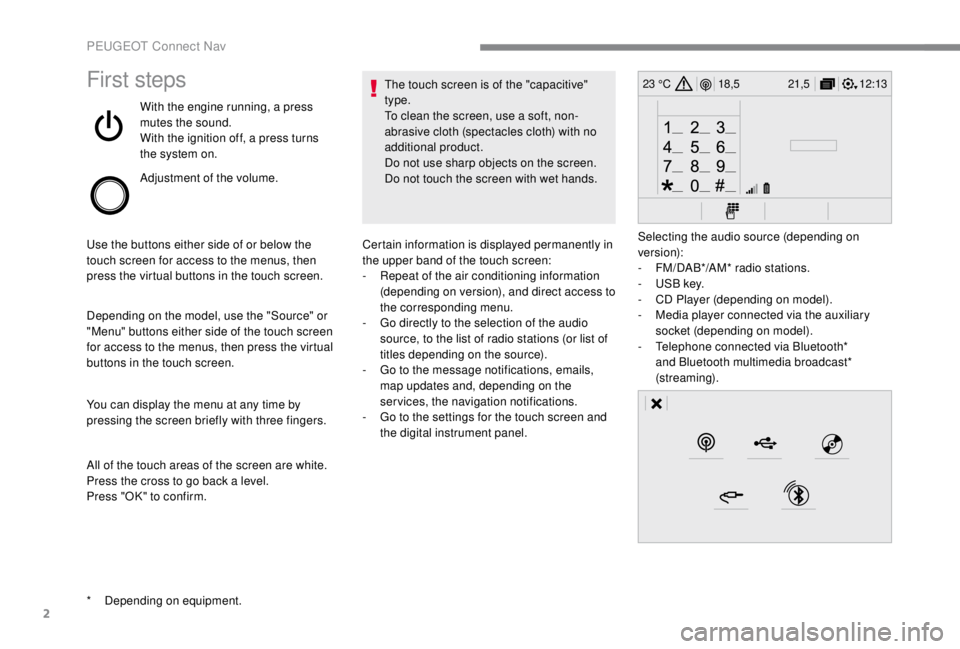
epending on equipment. Certain information is displayed permanently in
the upper band of the touch screen:
-
R
epeat of the air conditioning information
(depending on version), and direct access to
the corresponding menu.
-
G
o directly to the selection of the audio
source, to the list of radio stations (or list of
titles depending on the source).
-
G
o to the message notifications, emails,
map updates and, depending on the
services, the navigation notifications.
-
G
o to the settings for the touch screen and
the digital instrument panel. Selecting the audio source (depending on
version):
-
F
M/DAB*/AM* radio stations.
-
U
SB key.
-
C
D Player (depending on model).
-
M
edia player connected via the auxiliary
socket (depending on model).
-
T
elephone connected via Bluetooth*
and Bluetooth multimedia broadcast*
(streaming).
PEUGEOT Connect Nav
Page 312 of 416
4
FM/87.5 MHz
87.5MHz
12:13
18,5 21,5
23 °C
12:13
18,5 21,5
23 °C
12:13
18,5 21,5
23 °C
21,518,5
12:1323 °C
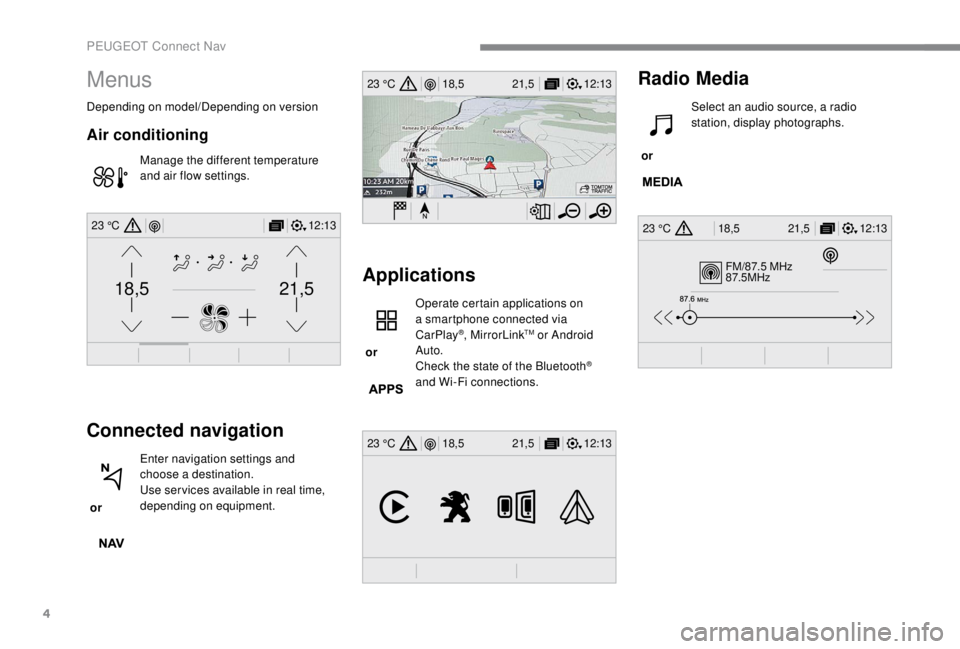
Menus
Depending on model/Depending on version
Air conditioning
Manage the different temperature
and air flow settings.
Connected navigation
or Enter navigation settings and
choose a destination.
Use ser vices available in real time,
depending on equipment.
Applications
or Operate certain applications on
a smartphone connected via
CarPlay
®, MirrorLinkTM or Android
Auto.
Check the state of the Bluetooth
®
and Wi-Fi connections.
Radio Media
or Select an audio source, a radio
station, display photographs.
PEUGEOT Connect Nav
Page 313 of 416
5
12:13
18,5 21,5
23 °C
12:13
18,5 21,5
23 °C
12:13
18,5 21,5
23 °C
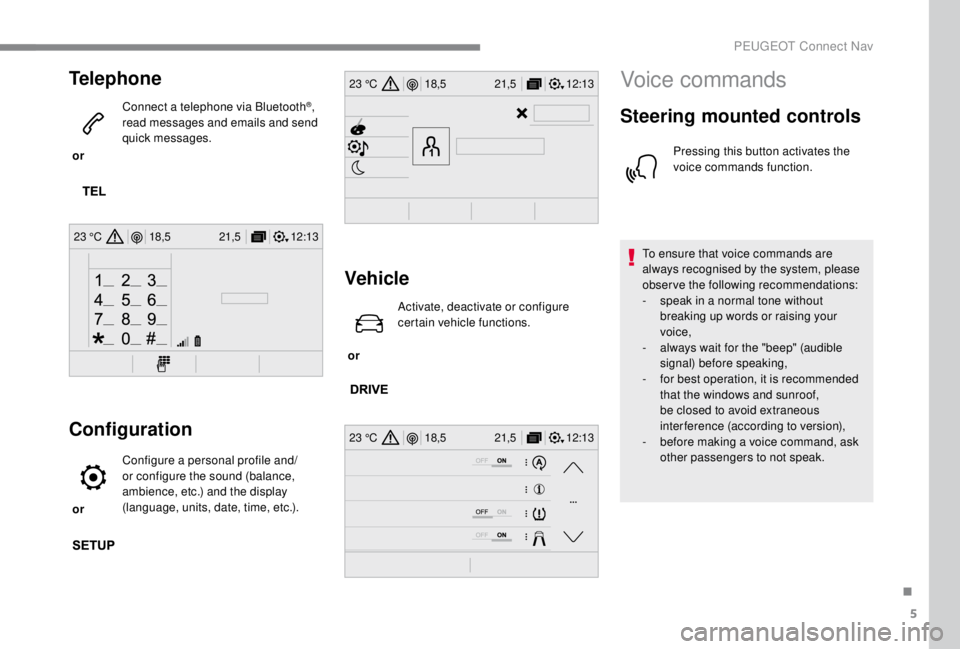
Telephone
or Connect a telephone via Bluetooth
®,
read messages and emails and send
quick messages.
Configuration
or Configure a personal profile and/
or configure the sound (balance,
ambience, etc.) and the display
(language, units, date, time, etc.).
Vehicle
or Activate, deactivate or configure
certain vehicle functions.
Voice commands
Steering mounted controls
Pressing this button activates the
voice commands function.
To ensure that voice commands are
always recognised by the system, please
observe the following recommendations:
-
s
peak in a normal tone without
breaking up words or raising your
voice,
-
a
lways wait for the "beep" (audible
signal) before speaking,
-
f
or best operation, it is recommended
that the windows and sunroof,
be closed to avoid extraneous
interference (according to version),
-
b
efore making a voice command, ask
other passengers to not speak.
.
PEUGEOT Connect Nav
Page 317 of 416
9
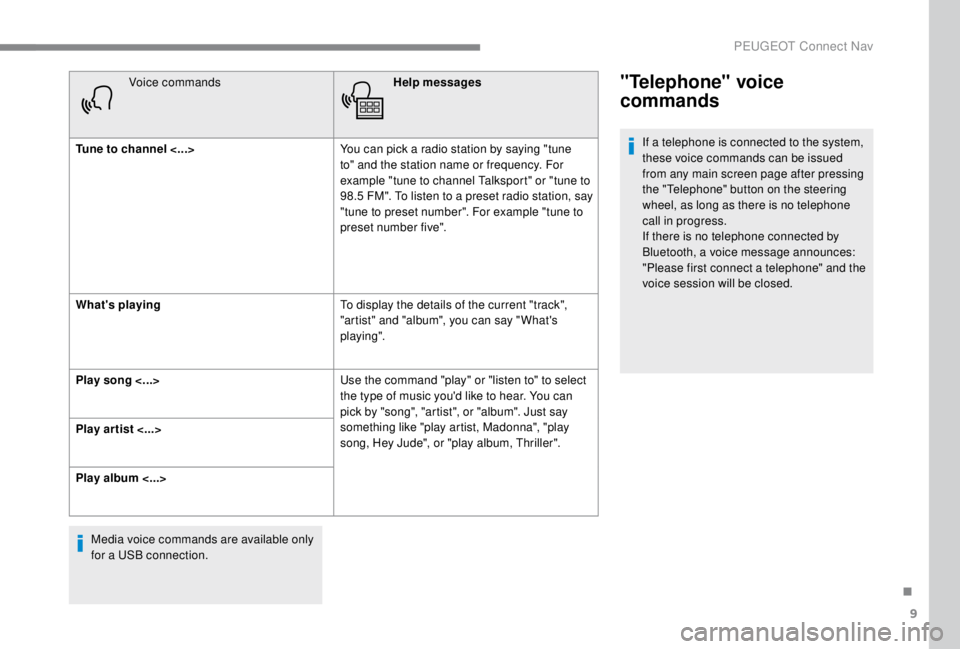
Voice commandsHelp messages
Tune to channel <...> You can pick a radio station by saying "tune
to" and the station name or frequency. For
example "tune to channel Talksport" or "tune to
98.5
FM". To listen to a preset radio station, say
"tune to preset number". For example "tune to
preset number five".
What's playing To display the details of the current "track",
"artist" and "album", you can say " What's
playing".
Play song <...> Use the command "play" or "listen to" to select
the type of music you'd like to hear. You can
pick by "song", "artist", or "album". Just say
something like "play artist, Madonna", "play
song, Hey Jude", or "play album, Thriller".
Play ar tist <...>
Play album <...>
Media voice commands are available only
for a USB connection."Telephone" voice
commands
If a telephone is connected to the system,
these voice commands can be issued
from any main screen page after pressing
the "Telephone" button on the steering
wheel, as long as there is no telephone
call in progress.
If there is no telephone connected by
Bluetooth, a voice message announces:
"Please first connect a telephone" and the
voice session will be closed.
.
PEUGEOT Connect Nav