can Peugeot Expert 2019 Owner's Manual
[x] Cancel search | Manufacturer: PEUGEOT, Model Year: 2019, Model line: Expert, Model: Peugeot Expert 2019Pages: 324, PDF Size: 13.07 MB
Page 259 of 324
7
Playing TA messages
The TA (Traffic Announcement) function
gives priority to TA alert messages.
To operate, this function needs good
reception of a radio station that transmits
this type of message. While traffic
information is being broadcast, the current
media is automatically interrupted so that
the TA message can be heard. Normal
play of the media previously playing is
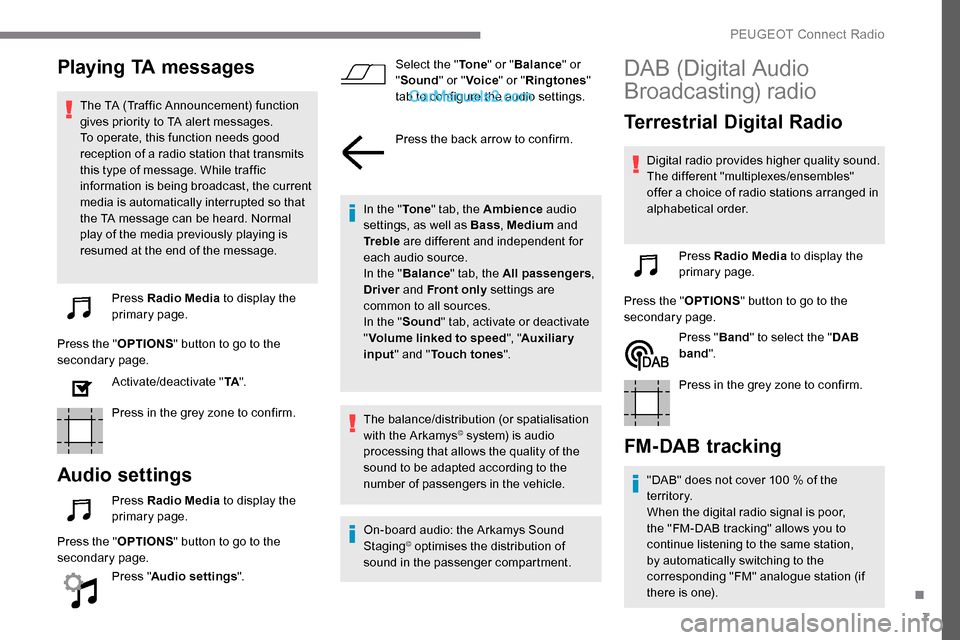
resumed at the end of the message.Press Radio Media to display the
primary page.
Press the " OPTIONS" button to go to the
secondary page.
Activate/deactivate " TA".
Press in the grey zone to confirm.
Audio settings
Press Radio Media to display the
primary page.
Press the " OPTIONS" button to go to the
secondary page.
Press "Audio settings ". Select the "
To n e" or "Balance " or
" Sound " or "Voice " or "Ringtones "
tab to configure the audio settings.
Press the back arrow to confirm.
In the " To n e" tab, the Ambience audio
settings, as well as Bass , Medium and
Tr e b l e are different and independent for
each audio source.
In the " Balance " tab, the All passengers ,
Driver and Front only settings are
common to all sources.
In the " Sound" tab, activate or deactivate
" Volume linked to speed ", "Auxiliary
input " and " Touch tones ".
The balance/distribution (or spatialisation
with the Arkamys
© system) is audio
processing that allows the quality of the
sound to be adapted according to the
number of passengers in the vehicle.
On-board audio: the Arkamys Sound
Staging
© optimises the distribution of
sound in the passenger compartment.
DAB (Digital Audio
Broadcasting) radio
Terrestrial Digital Radio
Digital radio provides higher quality sound.
The different "multiplexes/ensembles"
offer a choice of radio stations arranged in
alphabetical order.
Press Radio Media to display the
primary page.
Press the " OPTIONS" button to go to the
secondary page.
Press "Band" to select the " DAB
band ".
Press in the grey zone to confirm.
FM-DAB tracking
"DAB" does not cover 100 % of the
t e r r i to r y.
When the digital radio signal is poor,
the "FM-DAB tracking" allows you to
continue listening to the same station,
by automatically switching to the
corresponding "FM" analogue station (if
there is one).
.
PEUGEOT Connect Radio
Page 260 of 324
8
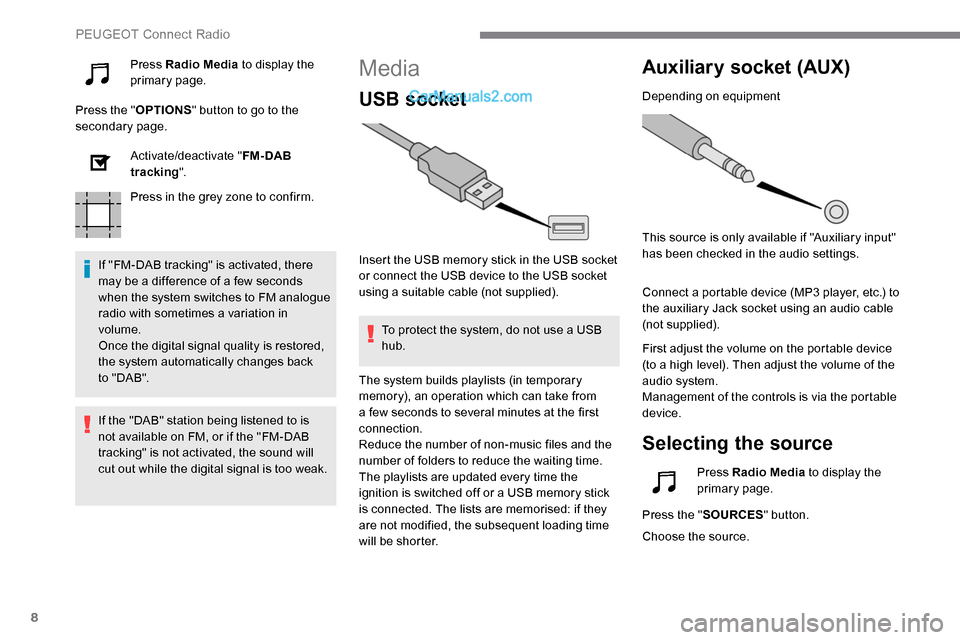
Press Radio Media to display the
primary page.
Press the " OPTIONS" button to go to the
secondary page.
Activate/deactivate " FM- DAB
tracking ".
Press in the grey zone to confirm.
If "FM-DAB tracking" is activated, there
may be a difference of a few seconds
when the system switches to FM analogue
radio with sometimes a variation in
volume.
Once the digital signal quality is restored,
the system automatically changes back
to " DA B ".Media
USB socket
Insert the USB memory stick in the USB socket
or connect the USB device to the USB socket
using a suitable cable (not supplied). To protect the system, do not use a USB
hub.
Auxiliary socket (AUX)
Depending on equipment
This source is only available if "Auxiliary input"
has been checked in the audio settings.
Connect a portable device (MP3 player, etc.) to
the auxiliary Jack socket using an audio cable
(not supplied).
First adjust the volume on the portable device
(to a high level). Then adjust the volume of the
audio system.
Management of the controls is via the portable
device.
Selecting the source
If the "DAB" station being listened to is
not available on FM, or if the "FM-DAB
tracking" is not activated, the sound will
cut out while the digital signal is too weak. The system builds playlists (in temporary
memory), an operation which can take from
a few seconds to several minutes at the first
connection.
Reduce the number of non-music files and the
number of folders to reduce the waiting time.
The playlists are updated every time the
ignition is switched off or a USB memory stick
is connected. The lists are memorised: if they
are not modified, the subsequent loading time
will be shorter.
Press Radio Media
to display the
primary page.
Press the " SOURCES " button.
Choose the source.
PEUGEOT Connect Radio
Page 261 of 324
9
Bluetooth®streaming
Streaming allows you to listen to music from
your smartphone.
The Bluetooth profile must be activated, first
adjust the volume on the portable device (to a
high level).
Then adjust the volume of the system.
If play does not start automatically, it may be
necessary to start the audio playback from the
smartphone.
Control is from the portable device or by using
the system's touch buttons.Once connected in Streaming mode, the
smartphone is considered to be a media
source.
Connecting Apple® players
Connect the Apple® player to the USB socket
using a suitable cable (not supplied).
Play starts automatically.
Control is via the audio system. The classifications available are those of
the portable device connected (artists/
albums/genres/playlists/audio books/
podcasts). It is also possible to use a
classification structured in the form of a
library.
The default classification used is by artist.
To modify the classification used, return
to the first level of the menu then select
the desired classification (playlists for
example) and confirm to go down through
the menu to the desired track.
The version of software in the audio system
may not be compatible with the generation of
the Apple
® p l aye r. To protect the system, do not use a USB
hub.
The audio system will only play audio files
with ".wav", ".wma", ".aac", ".ogg" and ".mp3"
file extensions and with a bit rate of between
32
Kbps and 320 Kbps.
It also supports VBR (Variable Bit Rate) mode.
No other file types (".mp4", etc.) can be read.
Files of the ".wma" type should be to the wma
9 standard.
Sampling frequencies supported are 11, 22, 44
and 48 kHz.
Information and advice
The system supports USB mass storage
devices, BlackBerry® devices or Apple®
players via the USB sockets. The adapter
cable is not supplied.
Device management is via the audio
system controls.
Other devices, not recognised on
connection, must be connected to the
auxiliary socket using a Jack cable (not
supplied) or via Bluetooth streaming,
depending on compatibility.
.
PEUGEOT Connect Radio
Page 269 of 324
17
Radio
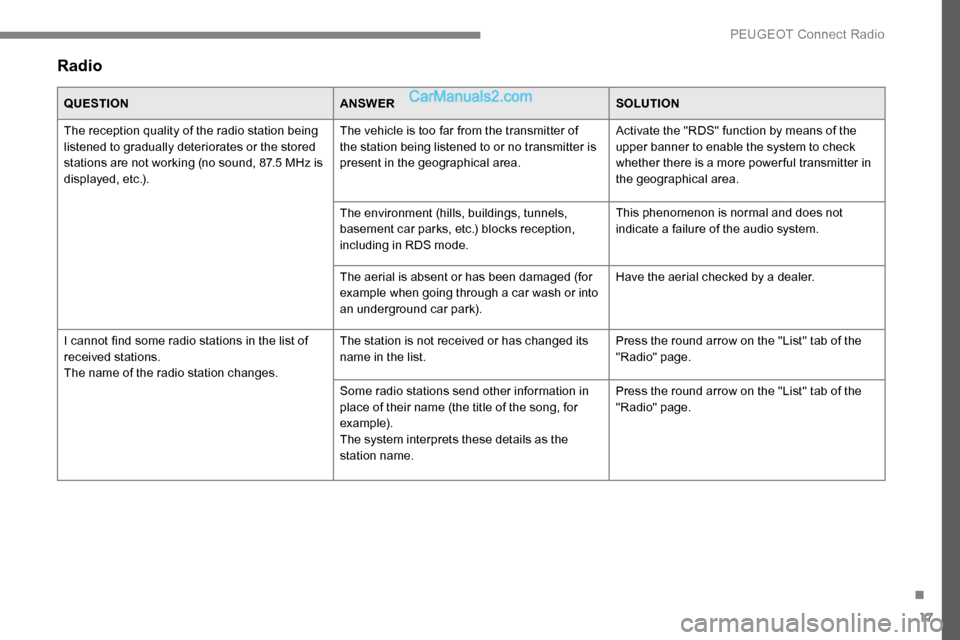
QUESTIONANSWERSOLUTION
The reception quality of the radio station being
listened to gradually deteriorates or the stored
stations are not working (no sound, 87.5 MHz is
displayed, etc.). The vehicle is too far from the transmitter of
the station being listened to or no transmitter is
present in the geographical area.
Activate the "RDS" function by means of the
upper banner to enable the system to check
whether there is a more power ful transmitter in
the geographical area.
The environment (hills, buildings, tunnels,
basement car parks, etc.) blocks reception,
including in RDS mode. This phenomenon is normal and does not
indicate a failure of the audio system.
The aerial is absent or has been damaged (for
example when going through a car wash or into
an underground car park). Have the aerial checked by a dealer.
I cannot find some radio stations in the list of
received stations.
The name of the radio station changes. The station is not received or has changed its
name in the list.
Press the round arrow on the "List" tab of the
"Radio" page.
Some radio stations send other information in
place of their name (the title of the song, for
example).
The system interprets these details as the
station name. Press the round arrow on the "List" tab of the
"Radio" page.
.
PEUGEOT Connect Radio
Page 271 of 324
19
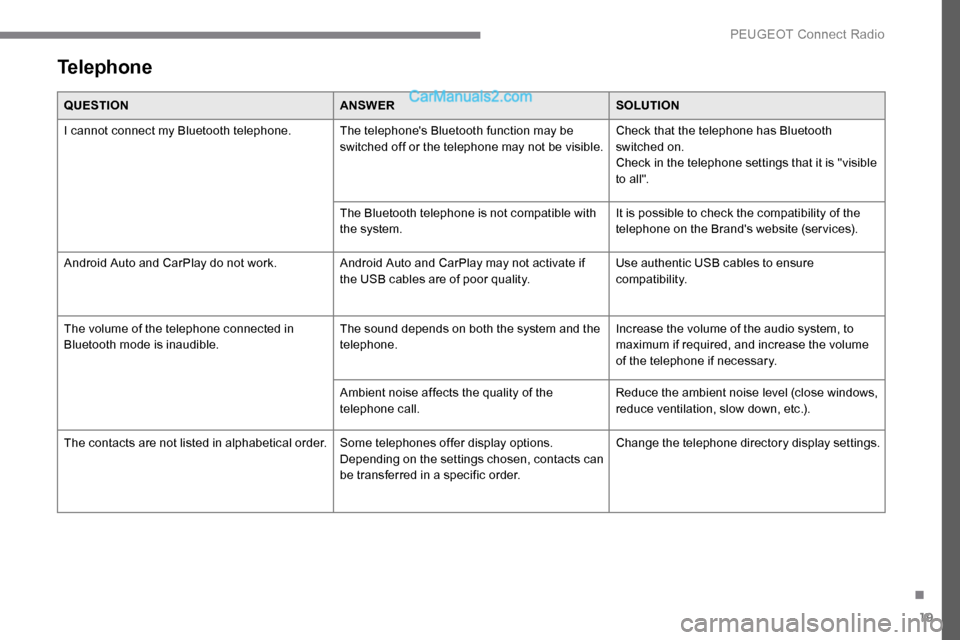
Telephone
QUESTIONANSWERSOLUTION
I cannot connect my Bluetooth telephone. The telephone's Bluetooth function may be switched off or the telephone may not be visible.Check that the telephone has Bluetooth
switched on.
Check in the telephone settings that it is "visible
to all".
The Bluetooth telephone is not compatible with
the system. It is possible to check the compatibility of the
telephone on the Brand's website (services).
Android Auto and CarPlay do not work. Android Auto and CarPlay may not activate if
the USB cables are of poor quality.Use authentic USB cables to ensure
compatibility.
The volume of the telephone connected in
Bluetooth mode is inaudible. The sound depends on both the system and the
telephone.Increase the volume of the audio system, to
maximum if required, and increase the volume
of the telephone if necessary.
Ambient noise affects the quality of the
telephone call. Reduce the ambient noise level (close windows,
reduce ventilation, slow down, etc.).
The contacts are not listed in alphabetical order. Some telephones offer display options.
Depending on the settings chosen, contacts can
be transferred in a specific order.Change the telephone directory display settings.
.
PEUGEOT Connect Radio
Page 272 of 324
20
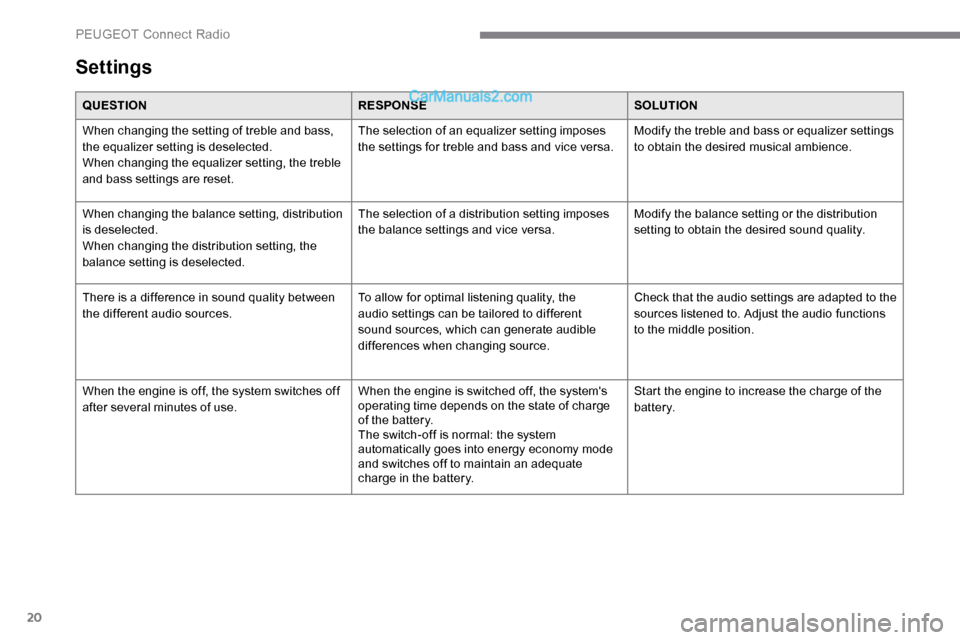
Settings
QUESTIONRESPONSESOLUTION
When changing the setting of treble and bass,
the equalizer setting is deselected.
When changing the equalizer setting, the treble
and bass settings are reset. The selection of an equalizer setting imposes
the settings for treble and bass and vice versa.
Modify the treble and bass or equalizer settings
to obtain the desired musical ambience.
When changing the balance setting, distribution
is deselected.
When changing the distribution setting, the
balance setting is deselected. The selection of a distribution setting imposes
the balance settings and vice versa.
Modify the balance setting or the distribution
setting to obtain the desired sound quality.
There is a difference in sound quality between
the different audio sources. To allow for optimal listening quality, the
audio settings can be tailored to different
sound sources, which can generate audible
differences when changing source.Check that the audio settings are adapted to the
sources listened to. Adjust the audio functions
to the middle position.
When the engine is off, the system switches off
after several minutes of use. When the engine is switched off, the system's
operating time depends on the state of charge
of the battery.
The switch-off is normal: the system
automatically goes into energy economy mode
and switches off to maintain an adequate
charge in the battery.Start the engine to increase the charge of the
battery.
PEUGEOT Connect Radio
Page 276 of 324
4
21,518,5
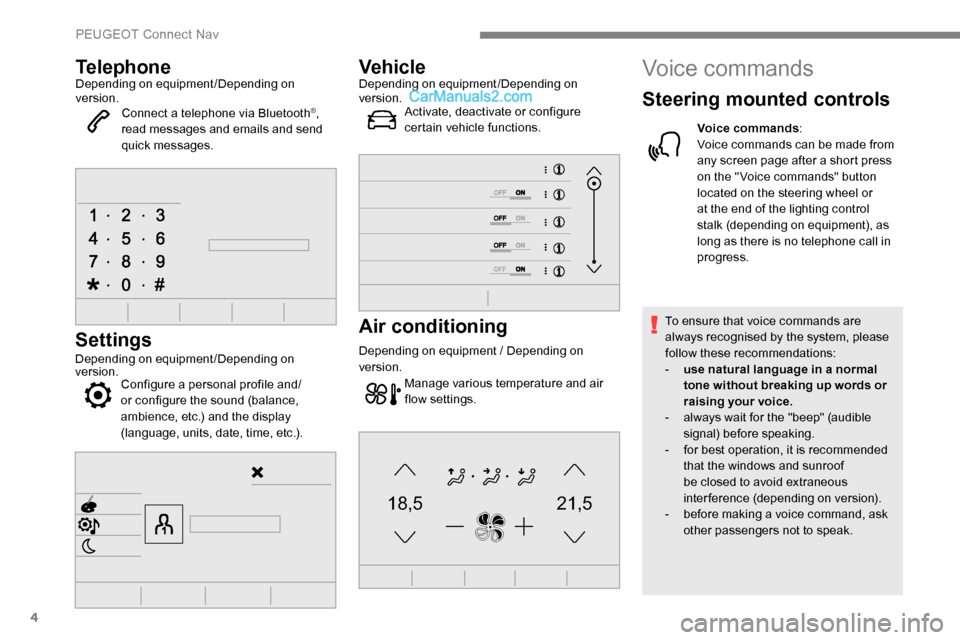
TelephoneDepending on equipment/Depending on
version.Connect a telephone via Bluetooth
®,
read messages and emails and send
quick messages.
Settings
Depending on equipment/Depending on
version. Configure a personal profile and/
or configure the sound (balance,
ambience, etc.) and the display
(language, units, date, time, etc.).
VehicleDepending on equipment/Depending on
version.
Activate, deactivate or configure
certain vehicle functions.
Air conditioning
Depending on equipment / Depending on
version.
Manage various temperature and air
flow settings.
Voice commands
Steering mounted controls
Voice commands :
Voice commands can be made from
any screen page after a short press
on the " Voice commands" button
located on the steering wheel or
at the end of the lighting control
stalk (depending on equipment), as
long as there is no telephone call in
progress.
To ensure that voice commands are
always recognised by the system, please
follow these recommendations:
-
u
se natural language in a normal
tone without breaking up words or
raising your voice.
-
a
lways wait for the "beep" (audible
signal) before speaking.
-
f
or best operation, it is recommended
that the windows and sunroof
be closed to avoid extraneous
interference (depending on version).
-
b
efore making a voice command, ask
other passengers not to speak.
PEUGEOT Connect Nav
Page 277 of 324
5
First steps
Example of a "voice command" for
navigation:
"Navigate to address 11 regent
street, London"
Example of a "voice command" for
the radio and media:
"Play ar tist Madonna"
Example of a "voice command" for
the telephone:
"Call David Miller'' "
The voice commands, with a choice of
17 languages (Arabic, Brazilian, Czech,
Danish, Dutch, English, Farsi, French,
German, Italian, Norwegian, Polish,
Portuguese, Russian, Spanish, Swedish,
Turkish), are made using the language
previously chosen and set in the system.
For some voice commands, there are
alternative synonyms.
Example: Guide to / Navigate to / Go to
/ ...
The voice commands in Arabic for:
"Navigate to address" and "Display POI in
the city", are not available.
Information - Using the
system
Press the Push To Talk button
and tell me what you'd like
after the tone. Remember you
can interrupt me at any time
by pressing this button. If you
press it again while I'm waiting
for you to speak, it'll end the
conversation. If you need to
start over, say "cancel". If you
want to undo something, say
"undo". And to get information
and tips at any time, just say
"help". If you ask to me do
something and there's some
information missing that I need,
I'll give you some examples
or take you through it step by
step. There's more information
available in "novice" mode.
You can set the dialogue mode
to "expert" when you feel
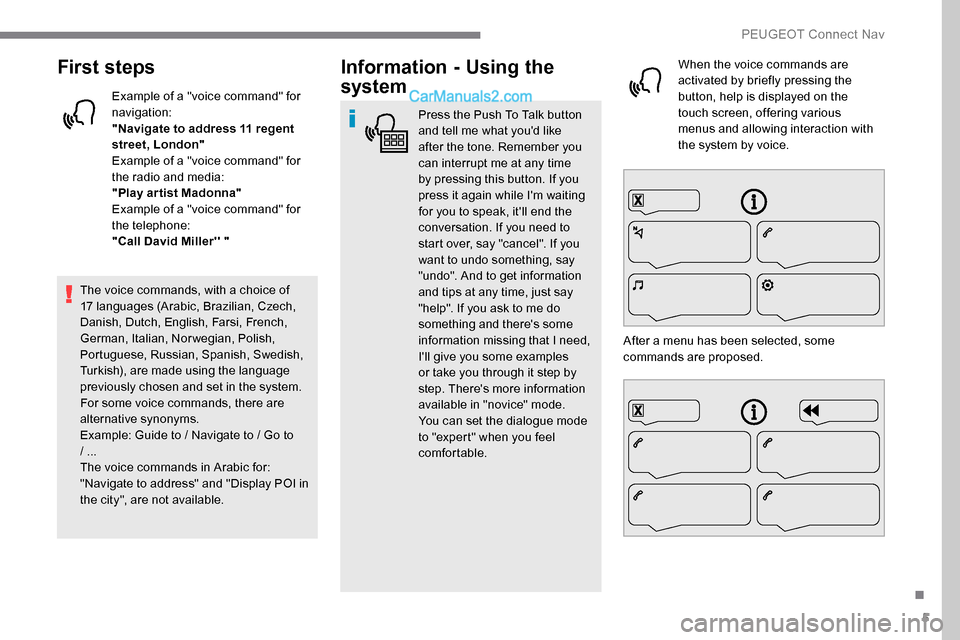
comfortable. When the voice commands are
activated by briefly pressing the
button, help is displayed on the
touch screen, offering various
menus and allowing interaction with
the system by voice.
After a menu has been selected, some
commands are proposed.
.
PEUGEOT Connect Nav
Page 278 of 324
6
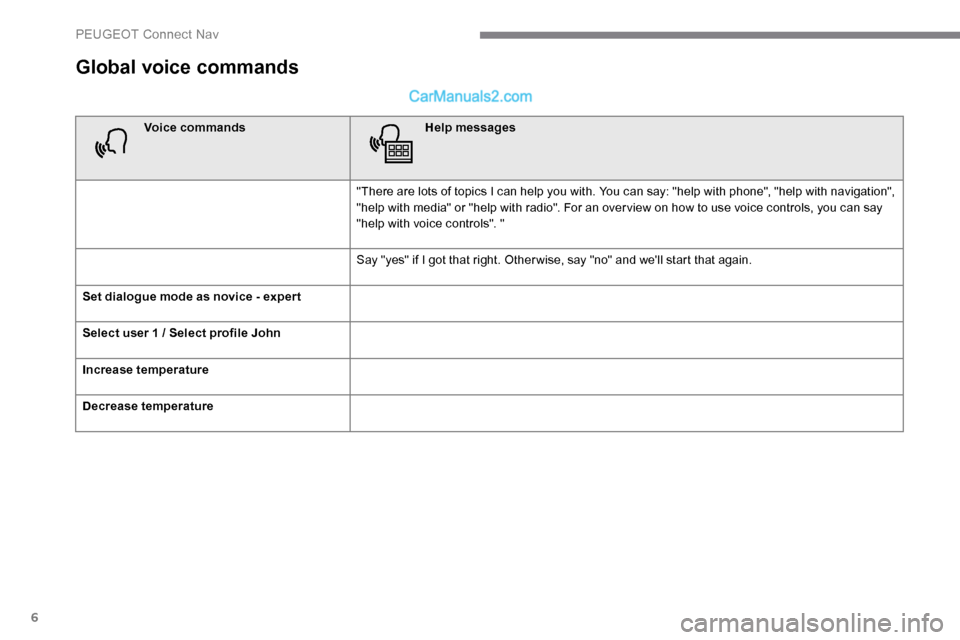
Global voice commands
Voice commandsHelp messages
"There are lots of topics I can help you with. You can say: "help with phone", "help with navigation",
"help with media" or "help with radio". For an over view on how to use voice controls, you can say
"help with voice controls". "
Say "yes" if I got that right. Other wise, say "no" and we'll start that again.
Set dialogue mode as novice - exper t
Select user 1 / Select profile John
Increase temperature
Decrease temperature
PEUGEOT Connect Nav
Page 279 of 324
7
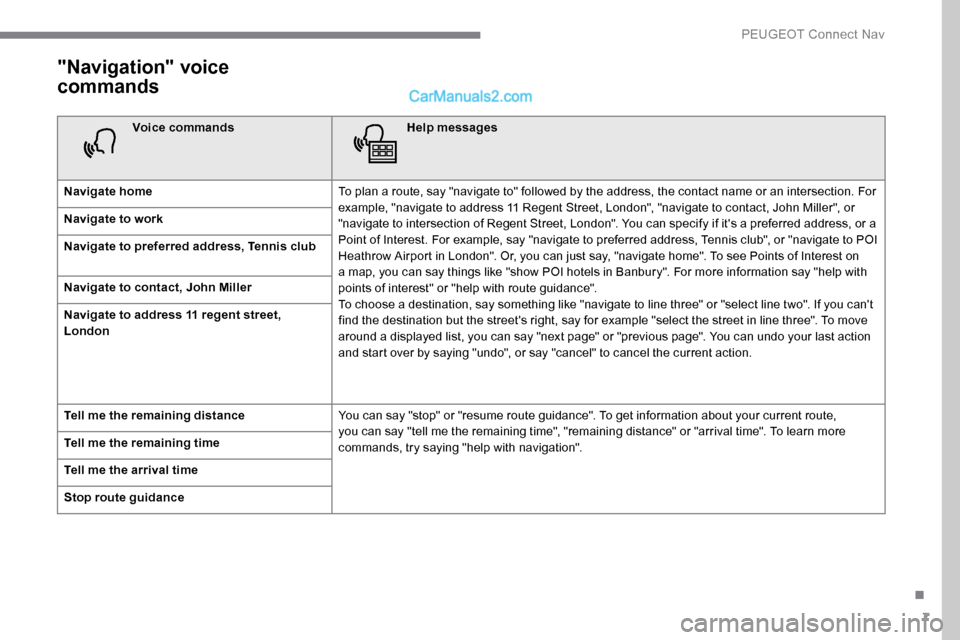
"Navigation" voice
commands
Voice commandsHelp messages
Navigate home To plan a route, say "navigate to" followed by the address, the contact name or an intersection. For
example, "navigate to address 11 Regent Street, London", "navigate to contact, John Miller", or
"navigate to intersection of Regent Street, London". You can specify if it's a preferred address, or a
Point of Interest. For example, say "navigate to preferred address, Tennis club", or "navigate to POI
Heathrow Airport in London". Or, you can just say, "navigate home". To see Points of Interest on
a map, you can say things like "show POI hotels in Banbury". For more information say "help with
points of interest" or "help with route guidance".
To choose a destination, say something like "navigate to line three" or "select line two". If you can't
find the destination but the street's right, say for example "select the street in line three". To move
around a displayed list, you can say "next page" or "previous page". You can undo your last action
and start over by saying "undo", or say "cancel" to cancel the current action.
Navigate to work
Navigate to preferred address, Tennis club
Navigate to contact, John Miller
Navigate to address 11 regent street,
London
Tell me the remaining distance
You can say "stop" or "resume route guidance". To get information about your current route,
you can say "tell me the remaining time", "remaining distance" or "arrival time". To learn more
commands, try saying "help with navigation".
Tell me the remaining time
Tell me the arrival time
Stop route guidance
.
PEUGEOT Connect Nav