Changing km to mph Peugeot Expert 2019 Owner's Manual
[x] Cancel search | Manufacturer: PEUGEOT, Model Year: 2019, Model line: Expert, Model: Peugeot Expert 2019Pages: 324, PDF Size: 13.07 MB
Page 152 of 324
150
Operating fault
When the ignition is on, a message appears
in the instrument panel screen to indicate a
gearbox fault.
In this case, the gearbox switches to back-up
mode and is locked in 3
rd gear. You may feel
a substantial knock when changing from P
to R and from N to R. This will not cause any
damage to the gearbox.
Do not exceed 60 mph (100 km/h), local speed
restrictions permitting.
Have it checked by a PEUGEOT dealer or a
qualified workshop.
There is a risk of damage to the gearbox:
-
i
f you press the accelerator and brake
pedals at the same time (braking or
acceleration must be done only with
the right foot),
-
i
f you force the selector from position P
to another position when the battery is
flat.
To reduce fuel consumption when
stationary for long periods with the
engine running (traffic jam, etc.), position
the selector on N and apply the parking
brake. If your vehicle has an automatic gearbox,
do not try to start the engine by pushing
the vehicle.Electronic gearbox
Electronic gearbox with 6 speeds, with
electronic management of gear changes. It
also offers a manual mode with sequential gear
changes via control paddles situated behind
the steering wheel.
Gear selector
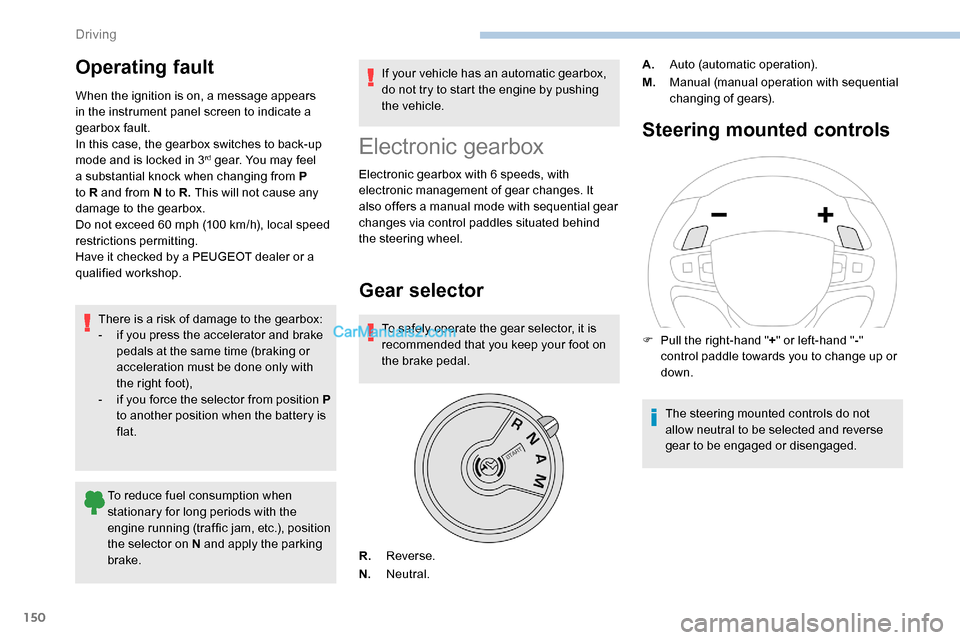
To safely operate the gear selector, it is
recommended that you keep your foot on
the brake pedal.
Steering mounted controls
R.
Reverse.
N. Neutral. A.
Auto (automatic operation).
M. Manual (manual operation with sequential
changing of gears).
F
P
ull the right-hand "
+" or left-hand " -"
control paddle towards you to change up or
down.
The steering mounted controls do not
allow neutral to be selected and reverse
gear to be engaged or disengaged.
Driving
Page 167 of 324
165
Exceeding the programmed speed
setting
The speed setting can be exceeded
temporarily by pressing the accelerator
pedal (the programmed speed flashes).
To return to the speed setting, release
the accelerator pedal (when this speed is
reached again, the display of the speed
stops flashing).
Operating limits
Never use the system in the following
situations:
-
i
n an urban area with the risk of
pedestrians crossing the road,
-
i
n heavy traffic,
-
o
n winding or steep roads,
-
o
n slippery or flooded roads,
-
i
n unfavourable climatic conditions,
-
d
riving on a speed circuit,
-
d
riving on a rolling road,
-
u
se of snow chains, non-slip covers or
studded tyres.Cruise control
Refer to the General recommendations
on the use of driving and manoeuvring
aids and to Cruise control - par ticular
recommendations .
This system automatically keeps the
vehicle’s speed at the cruise value
programmed by the driver (speed
setting), without using the accelerator
pedal.
The cruise control is switched on manually.
It requires a minimum vehicle speed of 25 mph
(40
km/h).
With a manual gearbox, it requires the
engagement of third gear or higher.
With an automatic gearbox, it requires the
engagement of mode D or of second gear or
higher in mode M .
With an automatic or electronic gearbox,
second gear or higher must be engaged.
The cruise control remains active after
changing gear regardless of the gearbox
type on engines fitted with Stop & Start. Switching off the ignition cancels any
speed setting.
Steering mounted control
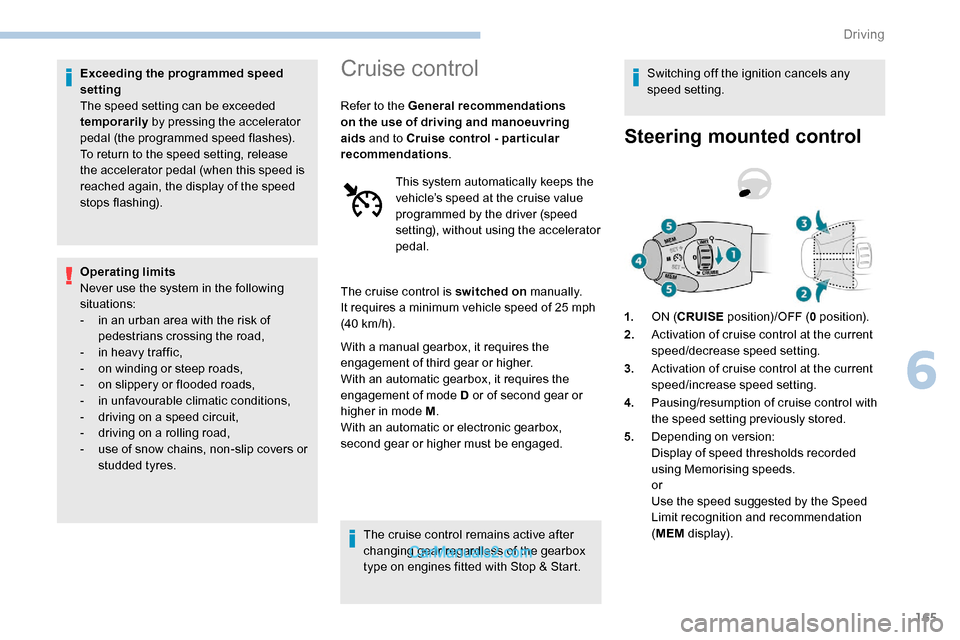
1.
ON (CRUISE position)/OFF ( 0 position).
2. Activation of cruise control at the current
speed/decrease speed setting.
3. Activation of cruise control at the current
speed/increase speed setting.
4. Pausing/resumption of cruise control with
the speed setting previously stored.
5. Depending on version:
Display of speed thresholds recorded
using Memorising speeds.
or
Use the speed suggested by the Speed
Limit recognition and recommendation
(MEM display).
6
Driving
Page 171 of 324
169
F Press 3 to increase or 2 to decrease the
speed setting (steps of 5 mph (km/h) if held
pressed).
Pressing and holding button 2 or 3
results
in a rapid change in the speed of the
vehicle.
Pausing/resuming cruise control
F Press 4 or press the brake pedal . It is also
possible to press the clutch pedal to pause
cruise control.
F
Press 4 to restart cruise control.
Cruise control may have been paused
automatically:
-
w
hen an inter-vehicle distance threshold
is reached,
-
w
hen the distance between your vehicle
and the one in front becomes too short,
-
w
hen the speed of your vehicle becomes
too low or the speed of the vehicle in front
becomes too low,
-
b
y triggering of the ESC system. When the driver attempts to reactivate
cruise control which was paused, the
message "Activation not possible,
conditions unsuitable" is briefly displayed
if reactivation is not possible (safety
conditions not met).
Use the Speed Limit recognition
and recommendation function
or the road sign memorisation to
modify the speed setting
F Press
5 on the instrument panel or touch
screen to accept the speed suggested by
the function, then press again to confirm.
To prevent any sudden acceleration or
deceleration of the vehicle, select a speed
setting fairly close to the current speed of
your vehicle.
Changing the inter-vehicle
distance
F Press 6 to display the distance setting
thresholds ("Distant", "Normal", "Close"),
then press again to select a threshold.
After a few seconds, the option is accepted and
will be memorised when the ignition is switched
of f.
Temporarily exceeding the speed
setting
F Press the accelerator pedal. Distance monitoring and cruise control are
deactivated as long as you continue to
accelerate. The speed flashes in the
instrument panel.
Deactivating the system
F Turn the thumbwheel 1 upwards to position 0 (OFF ).
6
Driving