9
Φωνητικές εντολές
"Ραδιοφώνου / Μέσων"
Φωνητικές εντολέςΜηνύματα βοήθειας
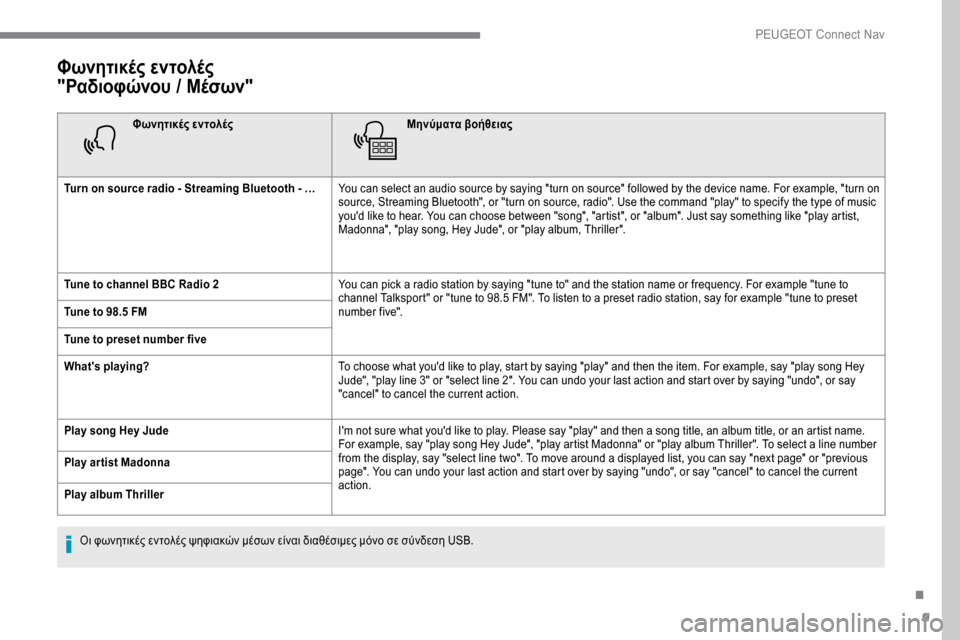
Turn on source radio - Streaming Bluetooth - … You can select an audio source by saying "turn on source" followed by the device name. For example, "turn on
source, Streaming Bluetooth", or "turn on source, radio". Use the command "play" to specify the type of music
you'd like to hear. You can choose between "song", "artist", or "album". Just say something like "play artist,
Madonna", "play song, Hey Jude", or "play album, Thriller".
Tune to channel BBC Radio 2 You can pick a radio station by saying "tune to" and the station name or frequency. For example "tune to
channel Talksport" or "tune to 98.5 FM". To listen to a preset radio station, say for example "tune to preset
number five".
Tune to 98.5 FM
Tune to preset number five
What's playing? To choose what you'd like to play, start by saying "play" and then the item. For example, say "play song Hey
Jude", "play line 3" or "select line 2". You can undo your last action and start over by saying "undo", or say
"cancel" to cancel the current action.
Play song Hey Jude I'm not sure what you'd like to play. Please say "play" and then a song title, an album title, or an artist name.
For example, say "play song Hey Jude", "play artist Madonna" or "play album Thriller". To select a line number
from the display, say "select line two". To move around a displayed list, you can say "next page" or "previous
page". You can undo your last action and start over by saying "undo", or say "cancel" to cancel the current
action.
Play ar tist Madonna
Play album Thriller
Οι φωνητικές εντολές ψηφιακών μέσων είναι διαθέσιμες μόνο σε σύνδεση USB.
.
PEUGEOT Connect Nav