ECO mode PEUGEOT EXPERT DAG 2001 Owner's Manual
[x] Cancel search | Manufacturer: PEUGEOT, Model Year: 2001, Model line: EXPERT DAG, Model: PEUGEOT EXPERT DAG 2001Pages: 149, PDF Size: 5.87 MB
Page 75 of 149
GEAR LEVER61II-6
Starting position
The engine can only be started
when the lever is at position P or N.
A safety device ensures that starting is impossible in the other positions.
Park Do not engage until the vehicle is completely sta-
tionary. To avoid any
movement of the vehicle when par-ked, select position Pand apply the
handbrake firmly. Check that theselector is in the Pposition to ensure
that the driving wheels are locked. When leaving the vehicle, make
absolutely certain that the PARK orP position is selected.
Automatic gearboxes - safety mea-sures:
¥ The gear lever can only be disen- gaged from position Pif the brake
pedal is pressed down.
¥ An audible warning* sounds if the gear lever is not in position P
when a door is opened. Also works with the ignition switched
off. Reverse gear Engage only when statio- nary and with the footbra-
ke firmly applied. To avoid
any transmission snatch or harsh-ness, wait several seconds before
pressing the accelerator. Neutral Do not select this position,
even momentarily, whenthe vehicle is in motion.
Warning If N is selected inadvertently when the vehicle is moving,allow the vehicle to stop beforeengaging other functions.
* According to model or country
Page 78 of 149
GEAR LEVERII-6
64
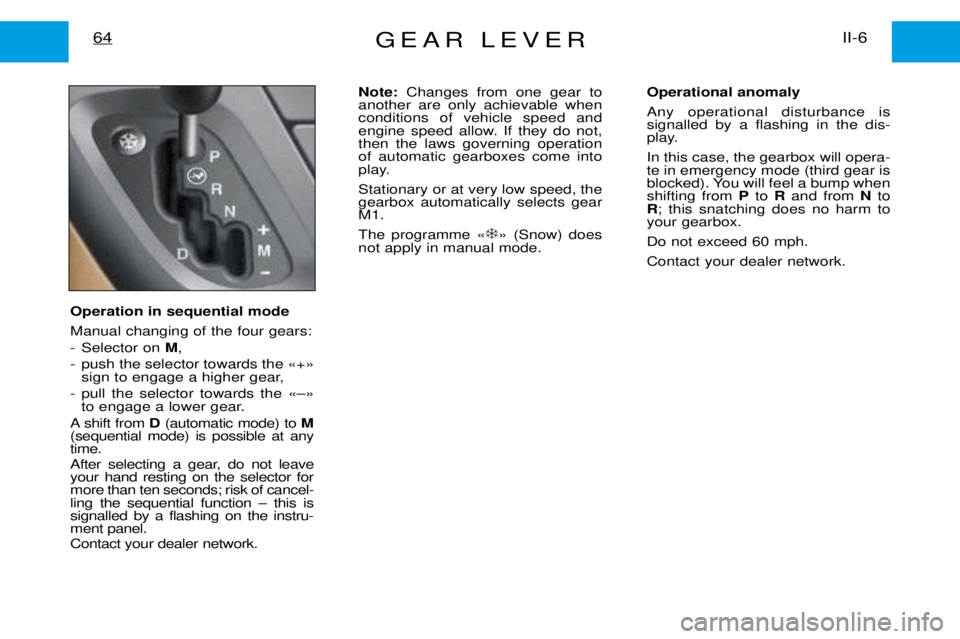
Operation in sequential mode Manual changing of the four gears:
- Selector on M,
- push the selector towards the Ç+È sign to engage a higher gear,
- pull the selector towards the ÇÐÈ to engage a lower gear.
A shift from D(automatic mode) to M
(sequential mode) is possible at any time.
After selecting a gear, do not leave your hand resting on the selector formore than ten seconds; risk of cancel-ling the sequential function Ð this issignalled by a flashing on the instru-ment panel. Contact your dealer network. Note:
Changes from one gear to
another are only achievable when conditions of vehicle speed and
engine speed allow. If they do not,then the laws governing operationof automatic gearboxes come into
play. Stationary or at very low speed, the gearbox automatically selects gearM1. The programme Ç ❄
È (Snow) does
not apply in manual mode. Operational anomalyAny operational disturbance is signalled by a flashing in the dis-
play. In this case, the gearbox will opera- te in emergency mode (third gear is
blocked). You will feel a bump whenshifting from
Pto Rand from Nto
R ; this snatching does no harm to
your gearbox. Do not exceed 60 mph.Contact your dealer network.
Page 82 of 149
VENTILATION - HEATING67III-1
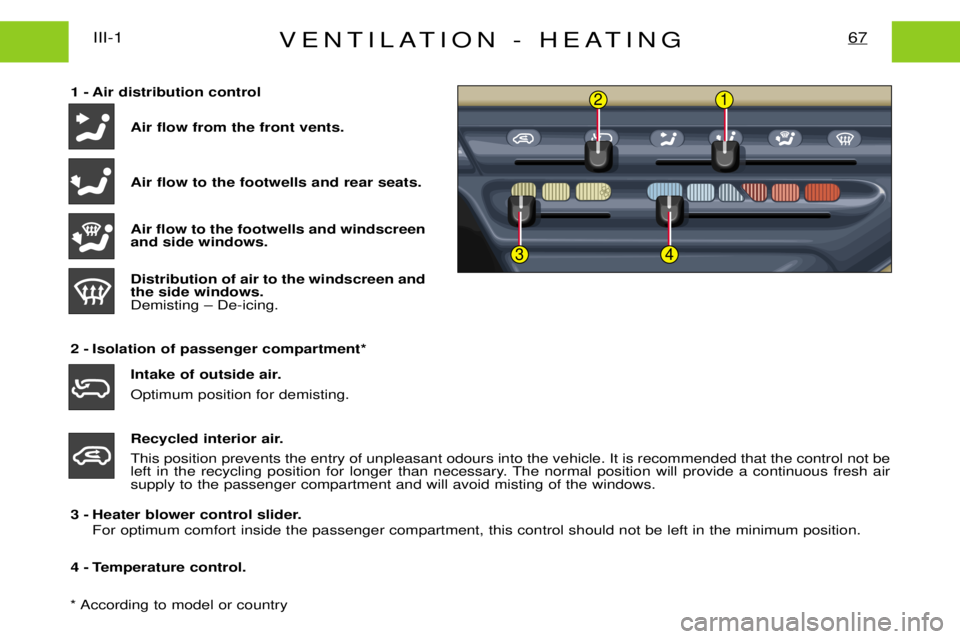
1 - Air distribution controlAir flow from the front vents. Air flow to the footwells and rear seats. Air flow to the footwells and windscreen and side windows. Distribution of air to the windscreen and the side windows.Demisting Ð De-icing.
2 - Isolation of passenger compartment* Intake of outside air. Optimum position for demisting.
Recycled interior air.
This position prevents the entry of unpleasant odours into the vehicle. It is recommended that the control not be left in the recycling position for longer than necessary. The normal position will provide a continuous fresh air
supply to the passenger compartment and will avoid misting of the windows.
3 - Heater blower control slider. For optimum comfort inside the passenger compartment, this control should not be left in the minimum position.
4 - Temperature control.2
34
1
* According to model or country
Page 83 of 149
AIR CONDITIONING*III-2
68
Air conditioning
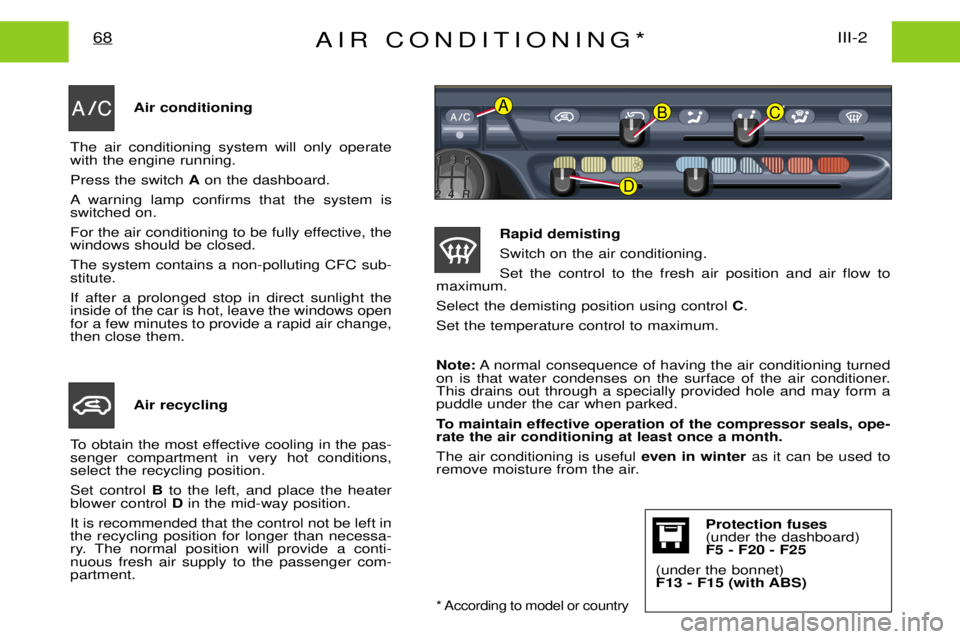
The air conditioning system will only operate with the engine running. Press the switch Aon the dashboard.
A warning lamp confirms that the system is switched on.
For the air conditioning to be fully effective, the windows should be closed. The system contains a non-polluting CFC sub- stitute. If after a prolonged stop in direct sunlight the inside of the car is hot, leave the windows openfor a few minutes to provide a rapid air change,then close them.
Air recycling
To obtain the most effective cooling in the pas-senger compartment in very hot conditions,select the recycling position. Set control Bto the left, and place the heater
blower control Din the mid-way position.
It is recommended that the control not be left in the recycling position for longer than necessa-
ry. The normal position will provide a conti-nuous fresh air supply to the passenger com-partment. Rapid demisting Switch on the air conditioning.Set the control to the fresh air position and air flow to
maximum.Select the demisting position using control C.
Set the temperature control to maximum. Note: A normal consequence of having the air conditioning turned
on is that water condenses on the surface of the air conditioner. This drains out through a specially provided hole and may form apuddle under the car when parked.
To maintain effective operation of the compressor seals, ope- rate the air conditioning at least once a month. The air conditioning is useful even in winteras it can be used to
remove moisture from the air.ABC
D
* According to model or country
Protection fuses (under the dashboard)F5 - F20 - F25
(under the bonnet)
F13 - F15 (with ABS)
Page 87 of 149
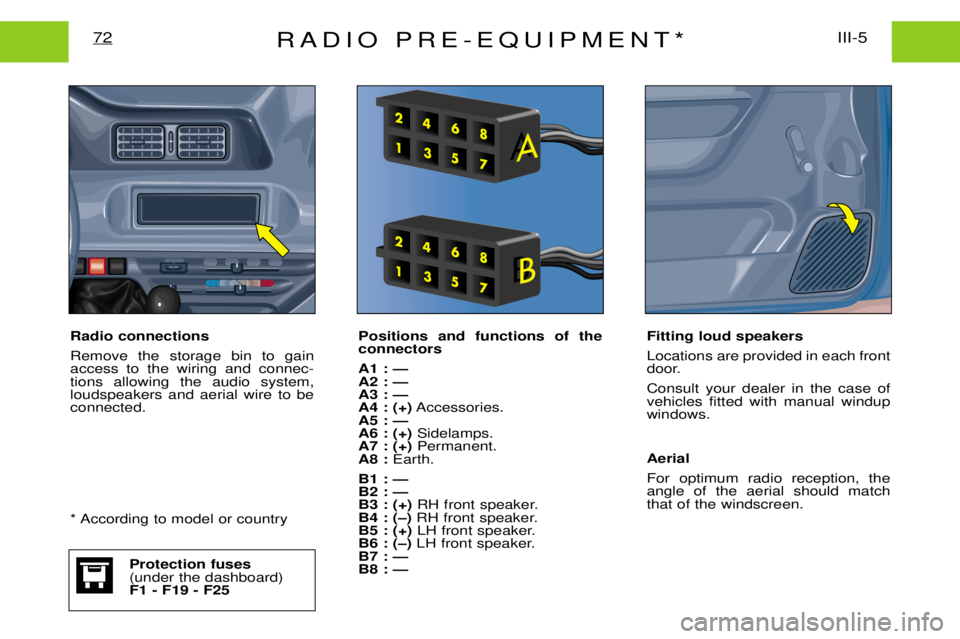
RADIO PRE-EQUIPMENT*III-5
72
Positions and functions of the connectors A1 : Ñ A2 : ÑA3 : ÑA4 : (+) Accessories.
A5 : ÑA6 : (+) Sidelamps.
A7 : (+) Permanent.
A8 : Earth.
B1 : ÑB2 : ÑB3 : (+) RH front speaker.
B4 : (Ð) RH front speaker.
B5 : (+) LH front speaker.
B6 : (Ð) LH front speaker.
B7 : ÑB8 : Ñ Fitting loud speakers Locations are provided in each front
door. Consult your dealer in the case of vehicles fitted with manual windupwindows. Aerial For optimum radio reception, the angle of the aerial should matchthat of the windscreen.
Radio connections Remove the storage bin to gain access to the wiring and connec-tions allowing the audio system,loudspeakers and aerial wire to beconnected.
* According to model or country
Protection fuses (under the dashboard)F1 - F19 - F25
Page 89 of 149

AUDIO-SYSTEM139
ButtonFunction
AT ATraffic information priority on/off.
B RDS RDS on/off.
Pressed for over 2 seconds: regional following mode on/off.
C BND/AST Waveband selection FM1, FM2, FM3, AM.Pressed for over 2 seconds: autostore, automatic storing of stations.
D SRC Source selection; radio, cassette or CD*.
Pressed for over 2 seconds: CD shuffle.
E Pressed fully: cassette fast rewind.
F Pressed fully:cassette fast fowards.
E + F Pressed half-way: reverses the direction of play of the cassette. Pressed fully: ejects the cassette.
G Increase audio setting.
H Decrease audio setting.
I AUDIO Selects the bass, treble, loundness and sound distribution.
J Higher frequency automatic search. Selection of next CD track.
K Lower frequency automatic search.Selection of previous CD track.
L MAN Manual/automatic operation of button Jand K.
M Audio system on/off. Volume adjustment.
N 1 to 6 Selects a stored station.Pressed for over 2 seconds: stores a station.Selects a CD* disk.
jjj
kkk
jjjkkk
k
j
* Depending on equipment
Page 90 of 149

AUDIO-SYSTEM140
GENERAL FUNCTIONS On / off
With the ignition key in the ACCESSORIES or IGNITION position, press the"M"button to switch the set on
or off. ANTI-THEFT SYSTEM
The first time you use the set following disconnection of the set or the battery, you must enter the confiden- tial code which was given to you on handover of your vehicle. Entering the code Switch the set on.The display shows "CODE"then the set changes over to code request mode and "- - - -"is displayed.
Enter your four-digit code number using buttons "1"to "6" .
For example: if your code is 5345 press buttons "5", "3" , "4" and "5"in turn.
When the fourth number has been entered correctly, the radio starts automatically. Error in entering the code
If an error is made when entering one of the first three digits, do not continue the operation and switch off the radio to prevent blocking it. Each incorrect code entry will result in the set being blocked for a period of from 5 seconds to 30 minutes,
after the 7th incorrect entry.
To unblock the set, leave it switched on during the waiting period. When "- - - -"is displayed, you can enter
the code again.
If the set is switched off during the waiting period, this waiting period will restart when the set is switched on again. After 14 incorrect code errors the radio will be permanently blocked.
ADJUSTING THE SOUND Adjusting the volume
Turn the "M"button to increase or decrease the volume of the set.
Page 91 of 149

AUDIO-SYSTEM141
AUDIO SETTINGS Press the ÒAUDIOÓbutton several times in succession to access the bass (BASS), treble (TREB) , loudness
(LOUD) , fader (FAD)and balance (BAL).
Exit from audio mode is automatic after a few seconds, without pressing any button or by pressing the ÒAUDIOÓ button after adjusting the balance.
Note: bass and treble settings are specific to each source. It is possible to set them differently for radio, cas-
sette and CD*. Bass setting When ÒBASSÓ is displayed, press the ÒGÓor ÒHÓ buttons to vary the setting.
- ÒBASS Ð9Ó for a minimum bass setting,
- ÒBASS 0Ó for a normal position,
- ÒBASS +9Ó for a maximum bass setting.
Treble settingWhen ÒTREBÓ is displayed, press the ÒGÓor ÒHÓ buttons to vary the setting.
- ÒTREB Ð9Ó for a minimum treble setting,
- ÒTREB 0Ó for a normal position,
- ÒTREB +9Ó for a maximum treble setting.
Adjusting the loudness
This function automatically emphasises bass and treble tones when the volume is low. Press the ÒGÓor ÒHÓ buttons to switch this function on or off.
Setting the front/rear sound distribution (Fader) When ÒFADÓ is displayed, press the ÒGÓor ÒHÓ buttons to vary the setting.
The ÒGÓ button increases the volume at the front.
The ÒHÓbutton increases the volume at the rear.
Setting the right/left sound distribution (Balance)When ÒBALÓ is displayed, press the ÒGÓor ÒHÓ buttons to vary the setting.
The ÒGÓ button increases the volume on the right-hand side.
The ÒHÓbutton increases the volume on the left-hand side.
* According to specification
Page 94 of 149

AUDIO-SYSTEM144
Traffic information programmes Press the "TA"button to switch the function on or off.
Any traffic information flash will be given priority, whatever source you are listening to (radio, cassette or CD).If you wish to interrupt a message, press the "TA"button; this switches off the function.
Note: the volume of the traffic information announcements is independent of the volume of normal
radio listening. You can adjust it using the volume button. The setting will be stored and will be usedwhen the next messages are broadcast.
While traffic information is being broadcast, the display will alternately show ÒTRAFFICÓand the name of the
station.
When the station selected cannot broadcast traffic information, the display shows ÒNO TAÓ.
Regional following mode (REG)When they are part of a network, certain stations broadcast regional programmes in the various areas they serve. With regional following mode you can keep listening to the same programme.
To do this press the ÒRDSÓbutton for more than two seconds to switch this function on or off.
Page 100 of 149

AUDIO-SYSTEM150
GENERAL FUNCTIONS On / off
With the ignition key in the ACCESSORIES or IGNITION position, press the "M"button to switch the set on
or off.The set can operate for 30 minutes without switching the ignition on. ANTI-THEFT SYSTEM
The first time you use the set following disconnection of the set or the battery, you must enter the confiden- tial code which was given to you on handover of your vehicle. Entering the code Switch the set on.The display shows "CODE"then the set changes over to code request mode and "- - - -"is displayed.
Enter your four-digitcode number using buttons "1"to "6" .
For example: if your code is 5345 press buttons "5", "3" , "4" and "5"in turn.
When the fourth number has been entered correctly, the radio starts automatically. Error in entering the code
If an error is made when entering one of the first three digits, do not continue the operation and switch off the radio to prevent blocking it. Each incorrect code entry will result in the set being blocked for a period of from 5 seconds to 30 minutes,
after the 7th incorrect entry.
To unblock the set, leave it switched on during the waiting period. When "- - - -"is displayed, you can enter
the code again.
If the set is switched off during the waiting period, this waiting period will restart when the set is switched on again. After 14 incorrect code errors the radio will be permanently blocked. ADJUSTING THE SOUND Adjusting the volume
Turn the "M"button M to increase or decrease the volume of the set.