display Peugeot Expert Tepee 2012 User Guide
[x] Cancel search | Manufacturer: PEUGEOT, Model Year: 2012, Model line: Expert Tepee, Model: Peugeot Expert Tepee 2012Pages: 276, PDF Size: 10.01 MB
Page 62 of 276
60
Ventilation
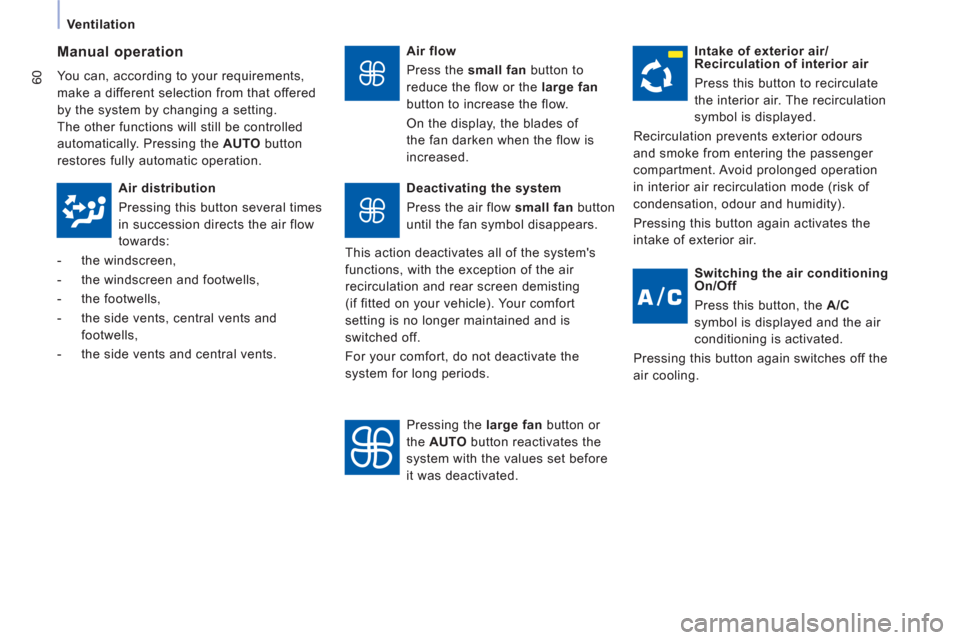
Air flow
Press the small fan
button to
reduce the flow or the large fan
button to increase the flow.
On the display, the blades of
the fan darken when the flow is
increased.
Manual operation
You can, according to your requirements,
make a different selection from that offered
by the system by changing a setting.
The other functions will still be controlled
automatically. Pressing the AUTO
button
restores fully automatic operation.
Intake of exterior air/
Recirculation of interior air
Press this button to recirculate
the interior air. The recirculation
symbol is displayed.
Recirculation prevents exterior odours
and smoke from entering the passenger
compartment. Avoid prolonged operation
in interior air recirculation mode (risk of
condensation, odour and humidity).
Pressing this button again activates the
intake of exterior air.
Air distribution
Pressing this button several times
in succession directs the air flow
towards:
- the windscreen,
- the windscreen and footwells,
- the footwells,
- the side vents, central vents and
footwells,
- the side vents and central vents.
Deactivating the system
Press the air flow small fan
button
until the fan symbol disappears.
This action deactivates all of the system's
functions, with the exception of the air
recirculation and rear screen demisting
(if fitted on your vehicle). Your comfort
setting is no longer maintained and is
switched off.
For your comfort, do not deactivate the
system for long periods.
Pressing the large fan
button or
the AUTO
button reactivates the
system with the values set before
it was deactivated.
Switching the air conditioning
On/Off
Press this button, the A/C
symbol is displayed and the air
conditioning is activated.
Pressing this button again switches off the
air cooling.
Page 96 of 276
94
Parking sensors
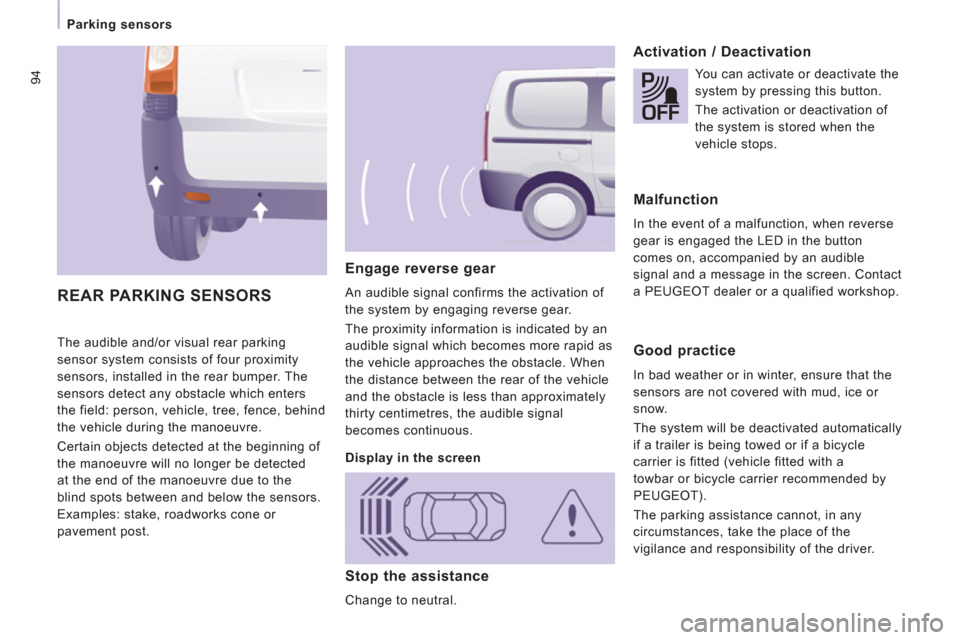
The audible and/or visual rear parking
sensor system consists of four proximity
sensors, installed in the rear bumper. The
sensors detect any obstacle which enters
the field: person, vehicle, tree, fence, behind
the vehicle during the manoeuvre.
Certain objects detected at the beginning of
the manoeuvre will no longer be detected
at the end of the manoeuvre due to the
blind spots between and below the sensors.
Examples: stake, roadworks cone or
pavement post.
Engage reverse gear
An audible signal confirms the activation of
the system by engaging reverse gear.
The proximity information is indicated by an
audible signal which becomes more rapid as
the vehicle approaches the obstacle. When
the distance between the rear of the vehicle
and the obstacle is less than approximately
thirty centimetres, the audible signal
becomes continuous.
Activation / Deactivation
REAR PARKING SENSORS
Display in the screen
You can activate or deactivate the
system by pressing this button.
The activation or deactivation of
the system is stored when the
vehicle stops.
Malfunction
In the event of a malfunction, when reverse
gear is engaged the LED in the button
comes on, accompanied by an audible
signal and a message in the screen. Contact
a PEUGEOT dealer or a qualified workshop.
Good practice
In bad weather or in winter, ensure that the
sensors are not covered with mud, ice or
snow.
The system will be deactivated automatically
if a trailer is being towed or if a bicycle
carrier is fitted (vehicle fitted with a
towbar or bicycle carrier recommended by
PEUGEOT).
The parking assistance cannot, in any
circumstances, take the place of the
vigilance and responsibility of the driver.
Stop the assistance
Change to neutral.
Page 123 of 276
121
Levels
CHECK
S
6
Cooling system
Only use the fluid recommended by the
manufacturer.
Otherwise, you risk seriously damaging
your engine.
When the engine is warm, the temperature
of the coolant is controlled by the engine
fan. As this fan can operate with the ignition
key removed and because the cooling
system is pressurised, wait for at least one
hour after the engine has stopped before
carrying out any work.
Slacken the cap by 1/4 of a turn to release
the pressure to prevent any risk of scalding.
When the pressure has dropped, remove
the cap and top up the level with coolant.
If fluid has to be added frequently, this
indicates a fault which must be checked
by a PEUGEOT dealer or a qualified
workshop as soon as possible. The vehicle must be parked on level ground
with the engine cold. Unscrew the cap
integrated with the gauge and check the
level which must be between the MIN and
MAX marks.
Diesel additive level (Diesel
with particle emission filter)
The minimum level of this additive
is indicated by lighting of the
service warning light, accompanied by an
audible signal and a message in the screen.
When this occurs with the engine running it
is due to the start of saturation of the particle
emission filter (exceptionally prolonged
urban type driving conditions: low speed,
long traffic jams, ...).
In order to regenerate the filter, you are
advised to drive at a speed higher than
40 mph (60 km/h) for at least five minutes
as soon as possible, when traffic conditions
permit (until the message disappears and
the service warning lamp goes off).
During regeneration of the particle emission
filter, relay noise may be heard under the
dashboard.
If the message is still displayed and if the
service warning lamp remains on, contact
a PEUGEOT dealer or a qualified workshop.
Topping up
The level must be between the MIN and
MAX marks on the expansion bottle. If
more than 1 litre of fluid is required to top
up the level, have the system checked by a
PEUGEOT dealer or a qualified workshop.
Screenwash and headlamp wash level
For best quality cleaning and for your safety,
we would advise that you use products of
the PEUGEOT range.
Capacity of the screenwash reservoir:
approximately 4.5 litres.
If your vehicle is fitted with headlamp
washers, the capacity of the reservoir is
7.5 litres.
To ensure optimum cleaning and prevent
freezing, this fluid must not be topped up
or replaced with plain water.
Topping up
This additive must be topped up by a
PEUGEOT dealer or a qualified workshop
without delay.
Page 160 of 276
9.2
If an impact is detected by the airbag control unit, and independentlyof the deployment of any airbags, an emergency call is made automatically.
The messa
ge "Deteriorated emergency call" associated with fl ashing
of the orange indicator lamp indicates a malfunction. Contact a
PEUGEOT dealer.
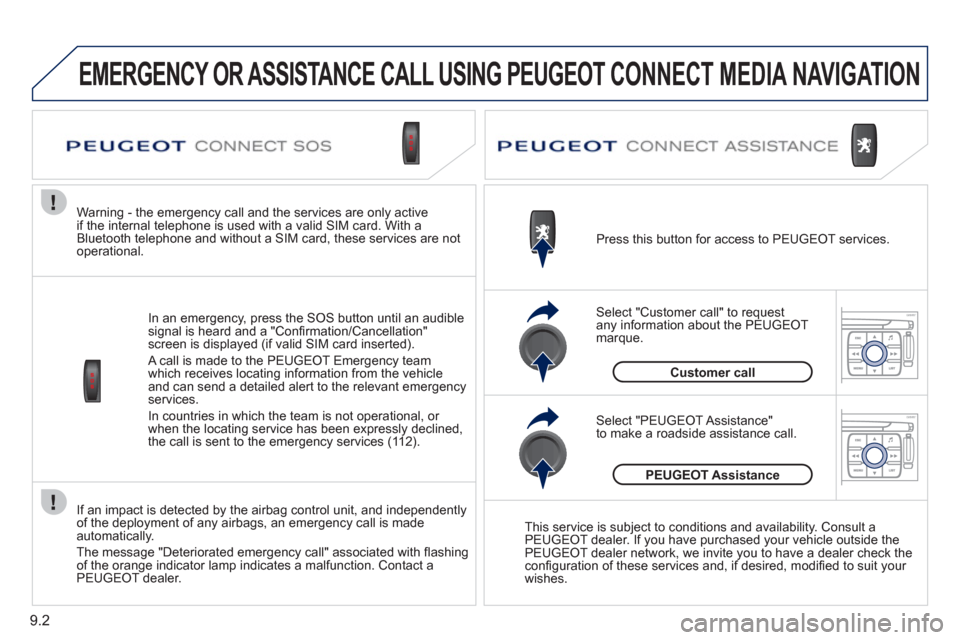
In an emer
gency, press the SOS button until an audible
signal is heard and a "Confi rmation/Cancellation"
screen is displayed (if valid SIM card inserted).
A call is made to the PEU
GEOT Emergency team
which receives locating information from the vehicleand can send a detailed alert to the relevant emergency services.
In countries in which the team is not o
perational, or
when the locating service has been expressly declined,
the call is sent to the emergency services (11 2).
Warning - the emergency call and the services are only active
if the internal telephone is used with a valid SIM card. With a
Bluetooth telephone and without a SIM card, these services are not
operational. Press this button for access to PEUGEOT services.
Customer call
Select "Customer call" to request
any information about the PEUGEOT marque.
Select "PEUGEOT Assistance"
to make a roadside assistance call.
PEUGEOT Assistance
This service is subject to conditions and availability. Consult a
PEUGEOT dealer. If you have purchased your vehicle outside the
PEUGEOT dealer network, we invite you to have a dealer check theconfi guration of these services and, if desired, modifi ed to suit your
wishes.
EMERGENCY OR ASSISTANCE CALL USING PEUGEOT CONNECT MEDIA NAVIGATION
Page 164 of 276
9.6
01FIRST STEPS
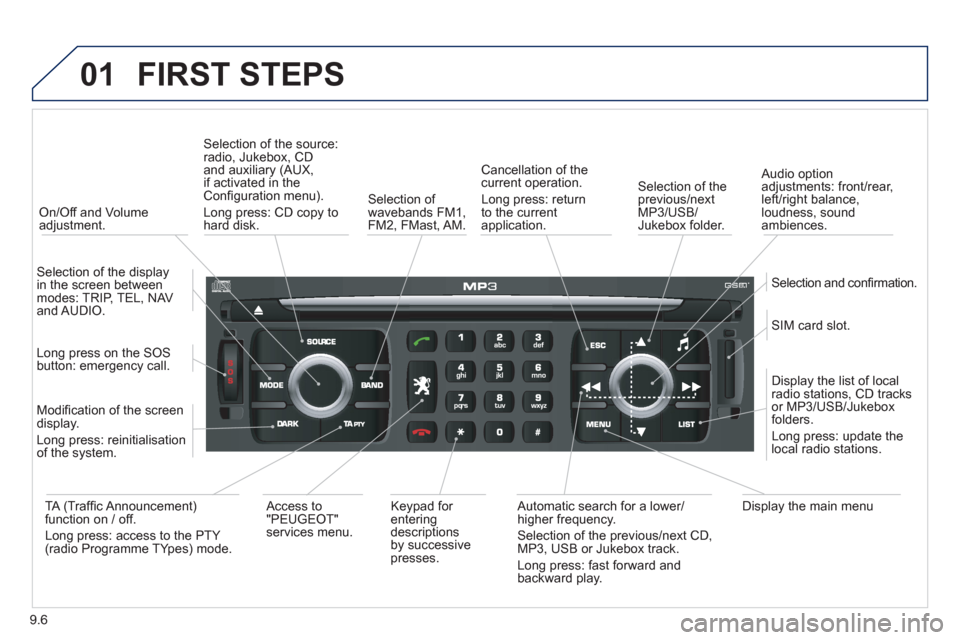
On/Off and Volumeadjustment.
Selection of the source:radio, Jukebox, CD and auxiliary (AUX,
if activated in theConfi guration menu).
Lon
g press: CD copy to
hard disk.
Selection of
wavebands FM1,
FM2, FMast, AM.
Cancellation of the current operation.
Long press: return
t
o the currentapplication.
Selection of the previous/nextMP3/USB/Jukebox folder.
Selection and confi rmation.
Audio option
adjustments: front/rear,
left/right balance,
loudness, sound
ambiences.
SIM card slot.
Displa
y the list of local radio stations, CD tracks
or MP3/USB/Jukeboxfolders.
Lon
g press: update thelocal radio stations.
Display the main menu
Automatic search for a lower/higher frequency.
Selection of the previous/next CD, MP3, USB or Jukebox track.
Lon
g press: fast forward and
backward play. Ke
ypad for enteringdescriptions by successive presses.
Access to
"PEUGEOT" services menu.
TA
(Traffi c Announcement) function on / off.
Long press: access to the PTY (radio Programme TYpes) mode. M
odifi cation of the screen
display.
Long press: reinitialisation
of the system.
Lon
g press on the SOS
button: emergency call.
Selection of the displa
y in the screen betweenmodes: TRIP, TEL, NAV
and AUDIO.
Page 166 of 276
9.8
02
1
2
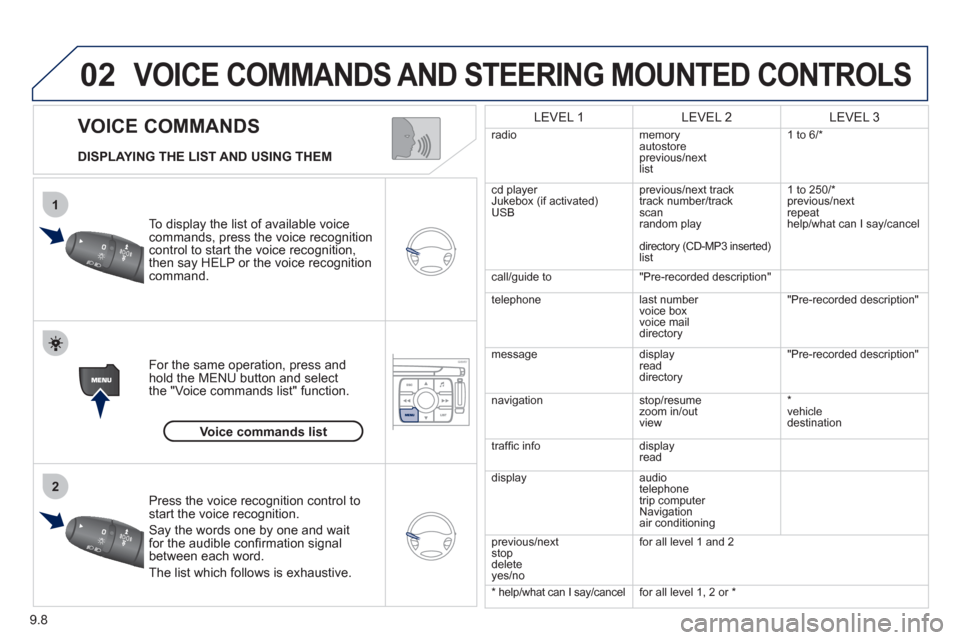
VOICE COMMANDS
VOICE COMMANDS AND STEERING MOUNTED CONTROLS
DISPLAYING THE LIST AND USING THEM
To display the list o
f available voice commands, press the voice recognition control to start the voice recognition,
then say HELP or the voice recognition command.
For the same operation, press and
hold the MENU button and select
the "Voice commands list" function.
Press the voice recognition control tostart the voice recognition.
Say the words one by one and wait for the audible confi rmation signal between each word.
Th
e list which follows is exhaustive.
LEVEL 1LEVEL 2LEVEL 3
radio memoryautostore
previous/next
li
st 1 to
6/*
cd player
Jukebox (if activated) USBprevious/next track
track number/track scan
random play
directory
(CD-MP3 inserted)list 1 to 250/*
previous
/next
repeat
help/what can I sa
y/cancel
call/
guide to"Pre-recorded description"
telephone l
ast number
voice box
voice mail directory
"Pre-recorded description"
messagedisplay
readdirectory
"Pre-recorded description"
nav
igation stop/resume
zoom in/out
vi
ew *
vehicle destination
tr
affi c info display
read
displa
yaudio
telephone
trip computer
Navigation
air conditioning
previous/next
s
top
delete yes/no f
or all level 1 and 2
* help/what can I say/cancelfor all level 1, 2 or *
Voice commands list
Page 167 of 276
9.9
03
°
SCREEN AND MAIN MENU
The system uses the complete and detailed NAVTEQ maps installed directly on the equipment's hard disk.
Updates of the maps of the UK and of the other European countries, supplied by our partner NAVTEQ, are available from the PEUGEOT network.
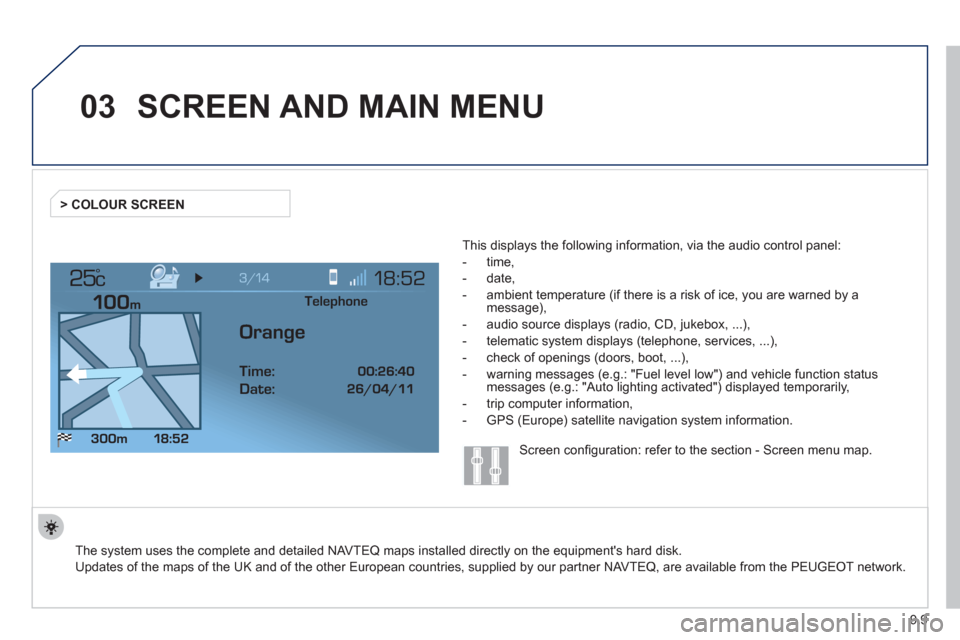
This displa
ys the following information, via the audio control panel:
- time,
- date,
- ambient temperature
(if there is a risk of ice, you are warned by amessage),
- audio source displa
ys (radio, CD, jukebox, ...),
- telematic system displays
(telephone, services, ...),
- check o
f openings (doors, boot, ...),
- warnin
g messages (e.g.: "Fuel level low") and vehicle function statusmessages (e.g.: "Auto lighting activated") displayed temporarily,
- trip computer information,
- GPS
(Europe) satellite navigation system information. > COLOUR
SCREEN
Telephone
Orange
Time:
Date:
Screen confi guration: refer to the section - Screen menu map.
Page 168 of 276
9.10
03SCREEN AND MAIN MENU
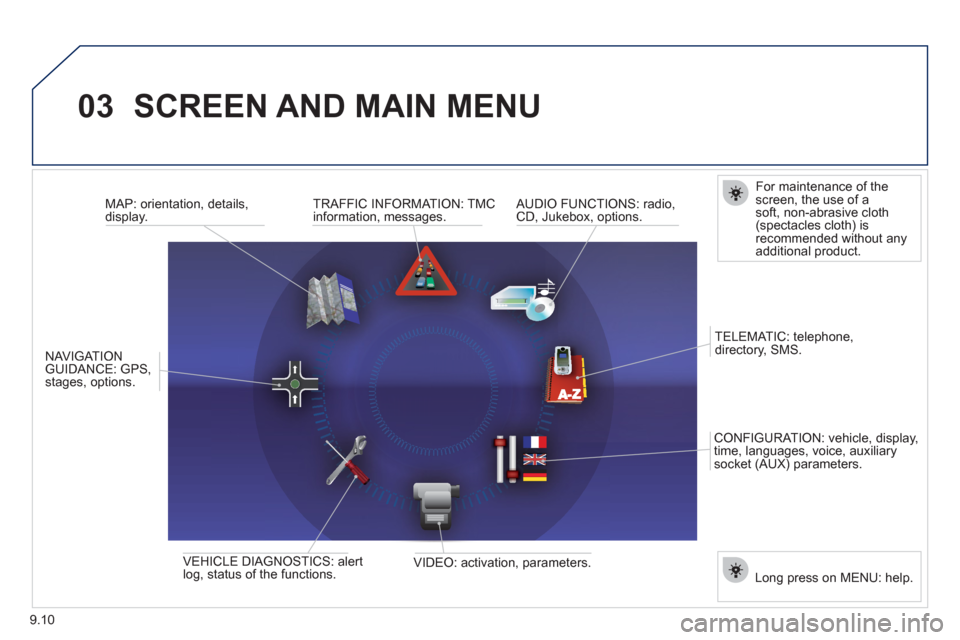
For maintenance of thescreen, the use of asoft, non-abrasive cloth(spectacles cloth) isrecommended without anyadditional product.
TRAFFI
C INFORMATION: TMC
information, messages.
MAP: orientation, details,
display.
NAVI
GAT ION GUIDANCE: GPS,stages, options.
VEHI
CLE DIAGNOSTICS: alert
log, status of the functions.
VIDEO: activation, parameters.
C
ONFIGURATION: vehicle, display,
time, languages, voice, auxiliarysocket (AUX) parameters. TELEMATI
C: telephone,
directory, SMS.
AUDIO FUNCTIONS: radio, CD, Jukebox, options.
Lon
g press on MENU: help.
Page 169 of 276
9.11
03SCREEN AND MAIN MENU
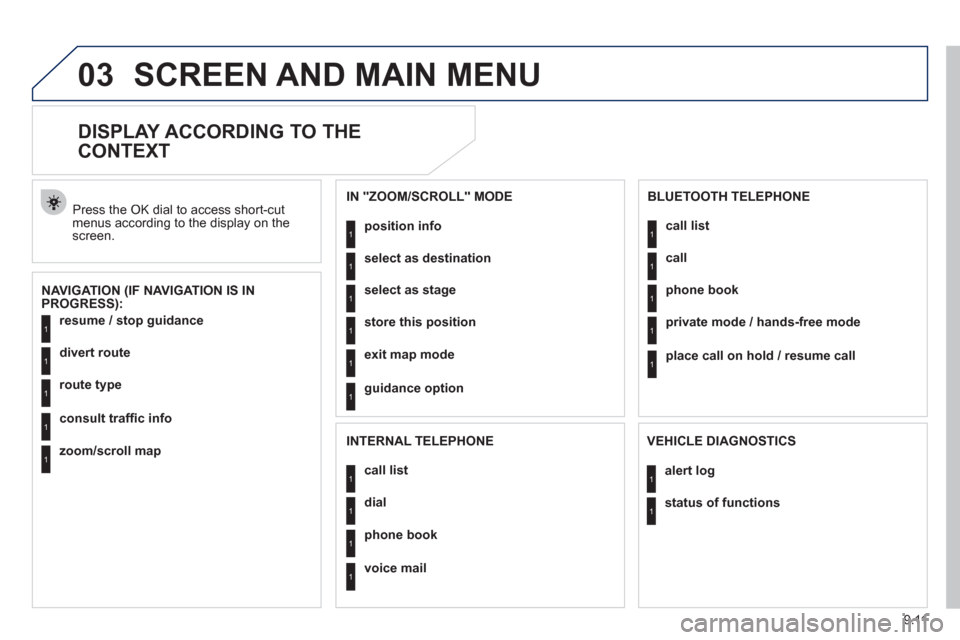
DISPLAY ACCORDING TO THE
CONTEXT
NAVIGATION (IF NAVIGATION IS IN
PROGRESS): Pr
ess the OK dial to access short-cut menus according to the display on thescreen.
resume
/ stop guidance1
1
1
1
divert route
route type
consult traffi c info
1zoom/scroll map
position info1
1
1
1
select as destination
select as sta
ge
store this position
1exit map mode
1guidance option
IN "ZOOM/SCROLL" MODE
call list1
1
1
1
dial
phone book
voice mail
INTERNAL TELEPHONE
call list1
1
1
1
call
phone book
private mode / hands-free mode
1place call on hold / resume call
BLUETOOTH TELEPHONE
alert log1
1status of functions
VEHICLE DIAGNOSTICS
Page 170 of 276
9.12
03 SCREEN AND MAIN MENU
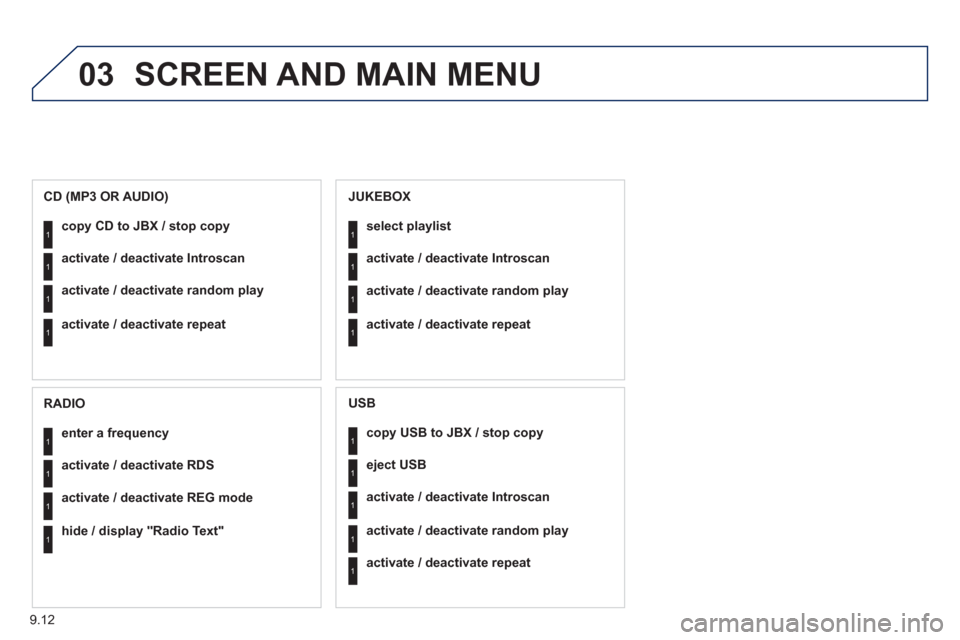
copy USB to JBX / stop copy1
1
1
1
eject USB
activate / deactivate Introscan
activate / deactivate random play
1activate / deactivate repeat
USB
copy CD to JBX / stop copy1
1
1
1
activate / deactivate Introscan
activate / deactivate random play
activate / deactivate repeat
CD (MP3 OR AUDIO)
se
lect playlist1
1
1
1
activate / deactivate Introscan
activate / deactivate random play
activate / deactivate repeat
JUKEBOX
enter a frequency1
1
1
1
activate / deactivate RDS
activate / deactivate REG mode
hide / display "Radio Text"
RADIO