navigation Peugeot Expert Tepee 2013 User Guide
[x] Cancel search | Manufacturer: PEUGEOT, Model Year: 2013, Model line: Expert Tepee, Model: Peugeot Expert Tepee 2013Pages: 260, PDF Size: 9.78 MB
Page 175 of 260
9.13
05
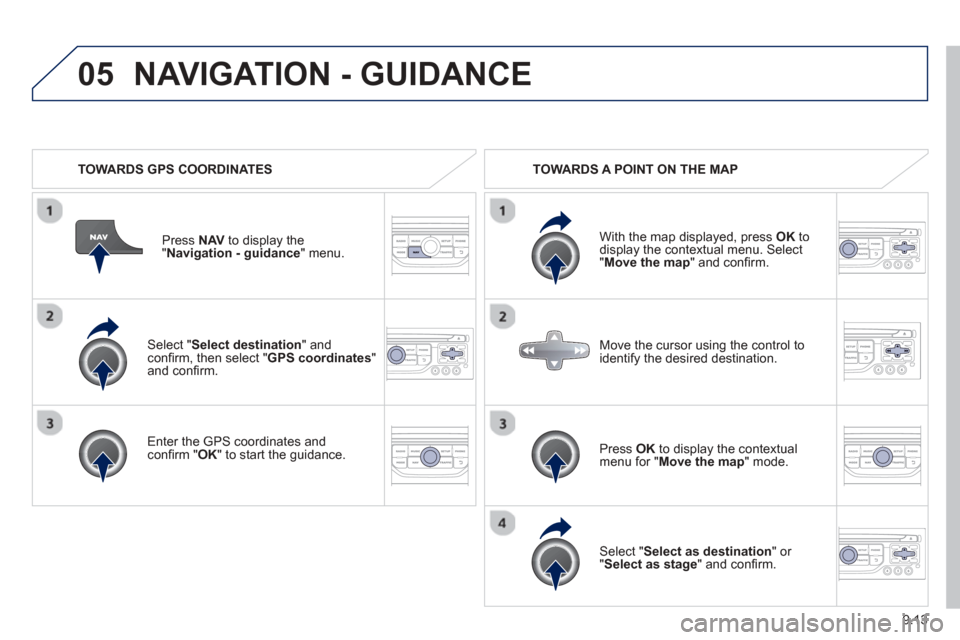
Select "Select destination" andconfi rm, then select " GPS coordinates " and confi rm.
Enter the
GPS coordinates and confi rm " OK " to start the guidance.
Pr
ess
NAV to display the
"Navigation - guidance" menu.
NAVIGATION - GUIDANCE
TOWARDS GPS COORDINATES TOWARDS A POINT ON THE MAP
With the map displa
yed, press OKto
display the contextual menu. Select"Move the map " and confi rm.
Pr
ess OK to display the contextual
menu for " Move the map
" mode.
Select " Select as destination " or "Select as stage" and confi rm.
Move the cursor usin
g the control to
identify the desired destination.
Page 176 of 260
9.14
05
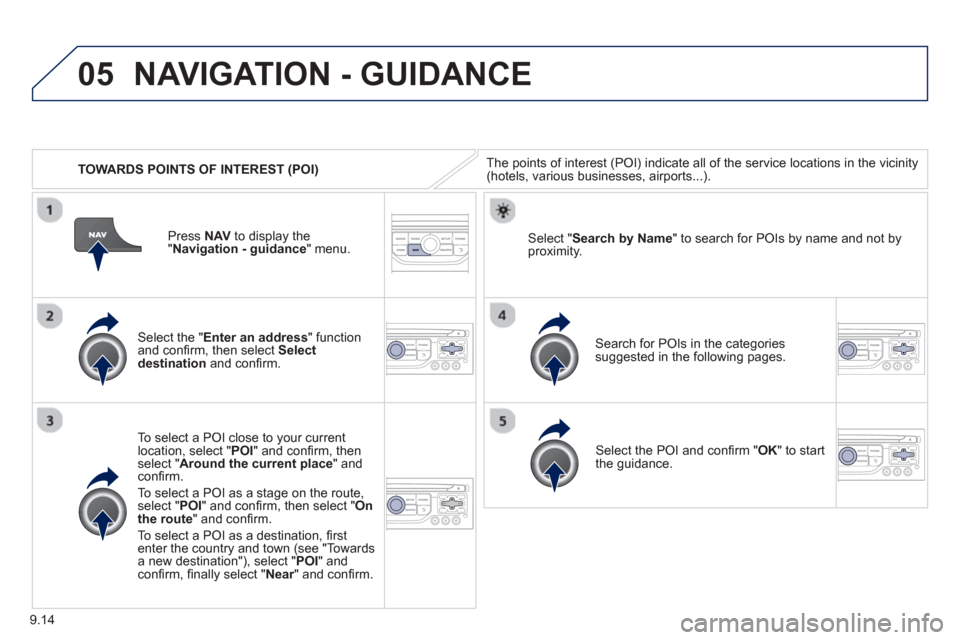
TOWARDS POINTS OF INTEREST (POI)
NAVIGATION - GUIDANCE
The points of interest (POI) indicate all of the service locations in the vicinity(hotels, various businesses, airports...).
Select the " Enter an address " function
and confi rm, then select Select
destinationand confi rm.
To select a P
OI close to your currentlocation, select "POI" and confi rm, thenselect " Around the current place " and confi rm.
To select a P
OI as a stage on the route,select " POI" and confi rm, then select " On
the route" and confi rm.
To select a P
OI as a destination, fi rst enter the country and town (see "Towards
a new destination"), select "POI" andconfi rm, fi nally select "Near" and confi rm.r
Search for POIs in the categories
suggested in the following pages.
Select "
Search by Name " to search for POIs by name and not byproximity.
Select the POI and confi rm " OK" to start
the guidance.
Pr
ess
NAV to display the
"Navigation - guidance" menu.
Page 177 of 260
9.15
05
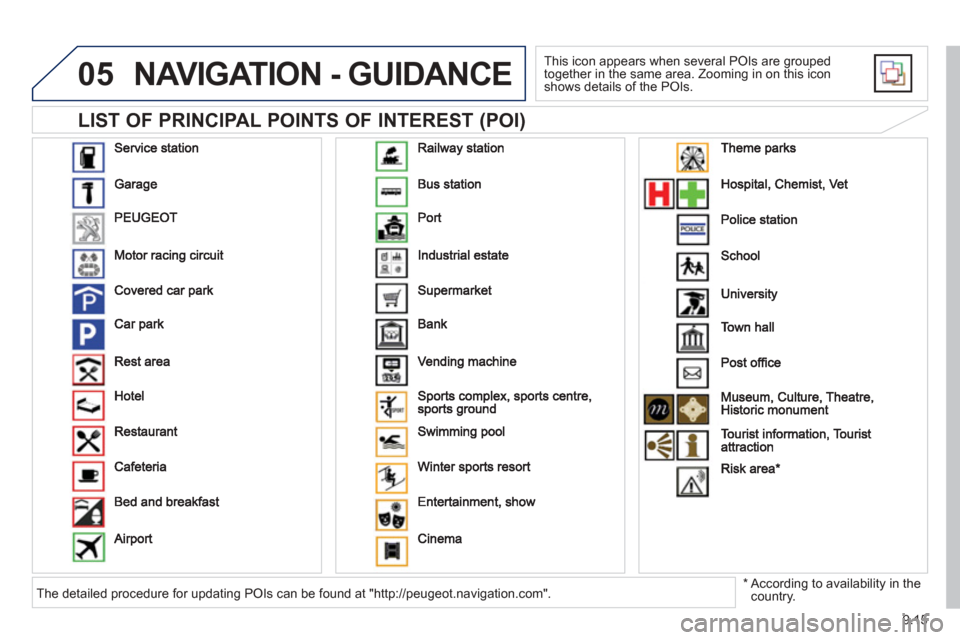
LIST OF PRINCIPAL POINTS OF INTEREST (POI)
NAVIGATION - GUIDANCE
This icon appears when several POIs are grouped
together in the same area. Zooming in on this icon shows details of the POIs.
*
According to availability in the country. The detailed procedure for updating POIs can be found at "http://peugeot.navigation.com".
Page 178 of 260
9.16
05NAVIGATION - GUIDANCE
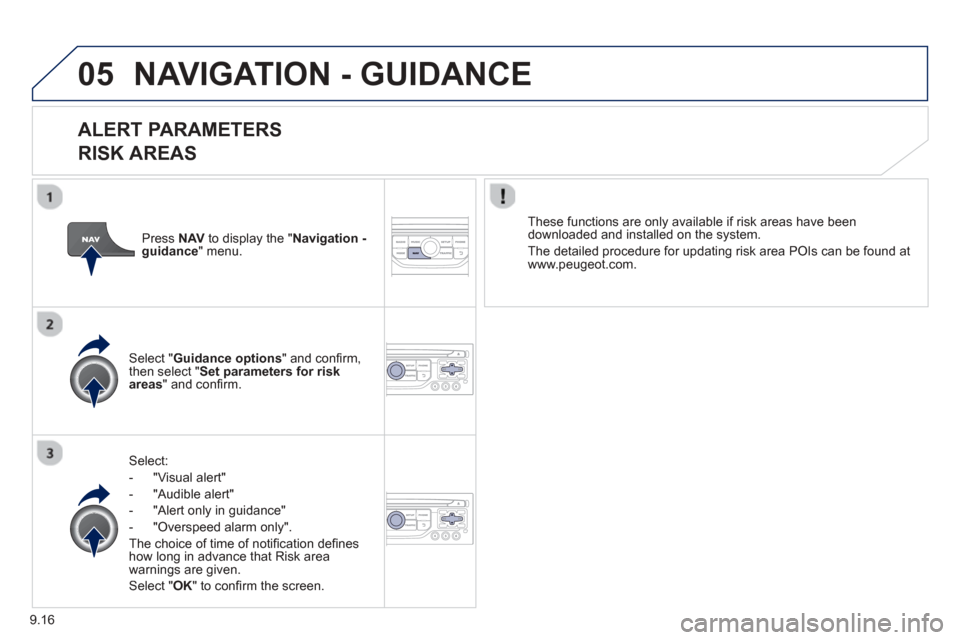
ALERT PARAMETERS
RISK AREAS
Select:
- "Vi
sual alert"
- "A
udible alert"
-
"Alert only in guidance"
- "
Overspeed alarm only".
Th
e choice of time of notifi cation defi nes how long in advance that Risk area
warnings are given.
Select " OK " to confi rm the screen.
Select " Guidance options " and confi rm,
then select "Set parameters for riskareas " and confi rm. These
functions are only available if risk areas have been
downloaded and installed on the system.
The detailed procedure for updatin
g risk area POIs can be found at
www.peugeot.com.
Press NAVto display the " Navigation - guidance" menu.
Page 179 of 260
9.17
05NAVIGATION - GUIDANCE
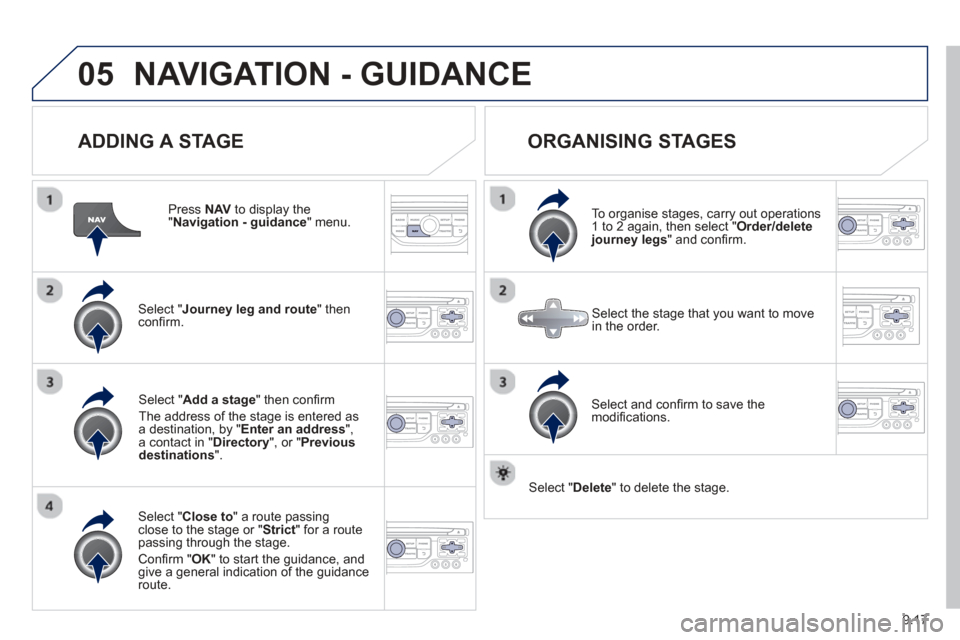
ADDING A STAGE
Press NAV to display the "Navigation - guidance
" menu.
Select " Journey leg and route
" then confi rm.
Select " Close to " a route passing close to the stage or " Strict
" for a routepassing through the stage.
Confi rm " OK " to start the guidance, andgive a general indication of the guidance
route.
Select "Add a stage
" then confi rm
The address o
f the stage is entered as
a destination, by "Enter an address",a contact in " Directory ", or " Previous destinations".
ORGANISING STAGES
To organise stages, carry out operations
1 to 2 again, then select " Order/deletejourney legs" and confi rm.
Select and con fi rm to save the
modifi cations.
Select the stage that you want to move
in the order.
Select "Delete " to delete the stage.
Page 180 of 260
9.18
05NAVIGATION - GUIDANCE
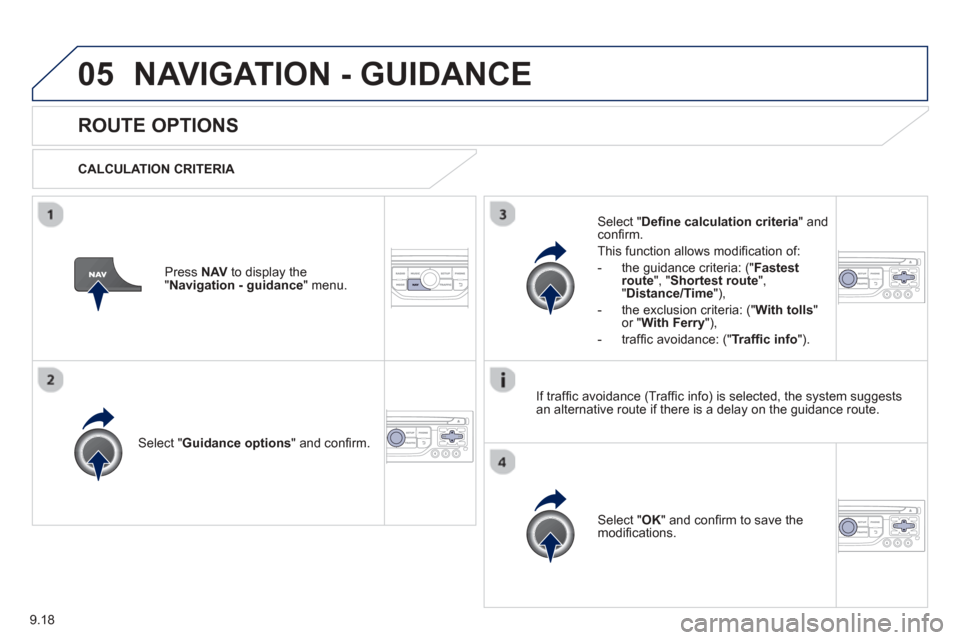
ROUTE OPTIONS
CALCULATION CRITERIA
Select " Guidance options " and confi rm.
Select " OK " and confi rm to save themodifi cations.
Select " Defi
ne calculation criteria" andconfi rm.
Thi
s function allows modifi cation of:
- the
guidance criteria: (" Fastest
route", " Shortest route", "Distance/Time "),
- the exclusion criteria:
(" With tolls "or "With Ferry "),
- traffi c avoidance:
(" Traffi c info ").
Press NAV to display the"Navigation - guidance" menu.
I
f traffi c avoidance (Traffi c info) is selected, the system suggests
an alternative route if there is a delay on the guidance route.
Page 181 of 260
9.19
05NAVIGATION - GUIDANCE
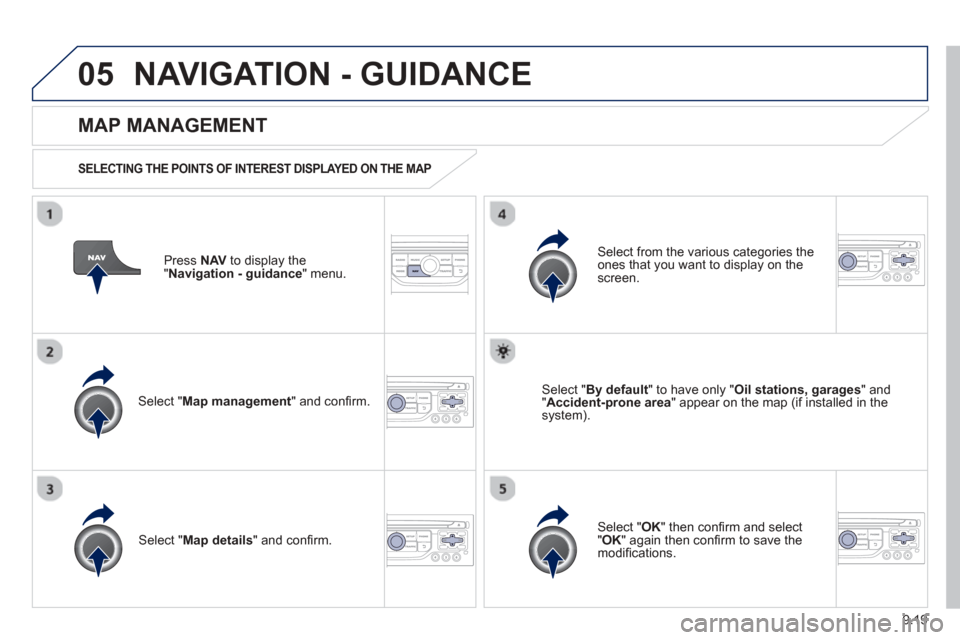
Press NAV to display the
"Navigation - guidance" menu.
MAP MANAGEMENT
SELECTING THE POINTS OF INTEREST DISPLAYED ON THE MAP
Select " Map management " and confi rm.
Select from the various categories the
ones that you want to display on thescreen.
Select "Map details" and confi rm.
Select " By default" to have only "Oil stations, garages" and"Accident-prone area " appear on the map (if installed in the
system).
Select " OK " then confi rm and select "OK" again then confi rm to save the
modifi cations.
Page 182 of 260
9.20
05NAVIGATION - GUIDANCE
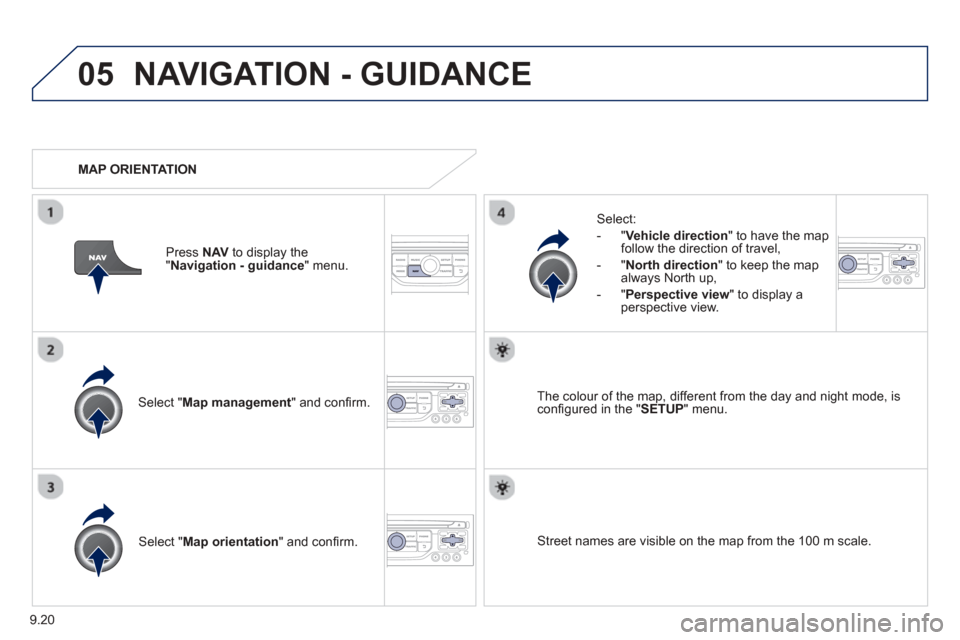
Select " Map management " and confi rm.
Select:
-
"Vehicle direction" to have the map follow the direction of travel,
- " North direction " to keep the map
alwa
ys North up,
-" Perspective view " to displa
y aperspective view.
Select "Map orientation " and confi rm. The colour o
f the map, different from the day and night mode, is confi gured in the " SETUP" menu.
MAP ORIENTATION
Pr
ess NAV to display the
" Navigation - guidance" menu.
Street names are visible on the map from the 100 m scale.
Page 183 of 260
9.21
05NAVIGATION - GUIDANCE
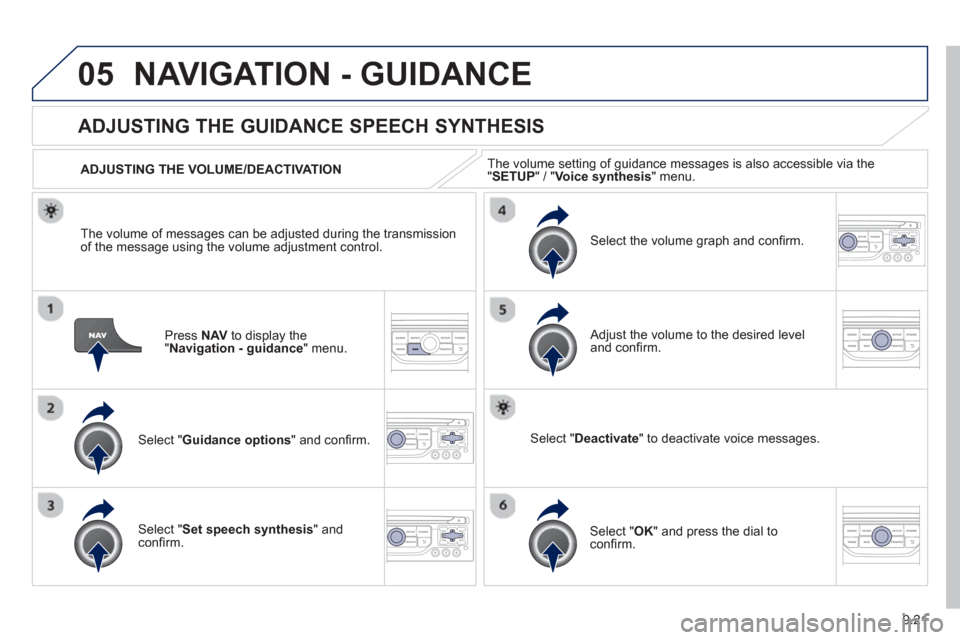
Press NAV to display the"Navigation - guidance" menu.
ADJUSTING THE GUIDANCE SPEECH SYNTHESIS
Select " Guidance options " and confi rm.
ADJUSTING THE VOLUME/DEACTIVATION
Select "
Set speech synthesis" andconfi rm.
Select the volume graph and confi rm.
Select "Deactivate " to deactivate voice messages.
Select " OK " and press the dial to confi rm.
Adjust the volume to the desired level and confi
rm.
The volume o
f messages can be adjusted during the transmissionof the message using the volume adjustment control.
The volume settin
g of guidance messages is also accessible via the "SETUP" / " Voice synthesis
" menu.
Page 184 of 260
9.22
05NAVIGATION - GUIDANCE
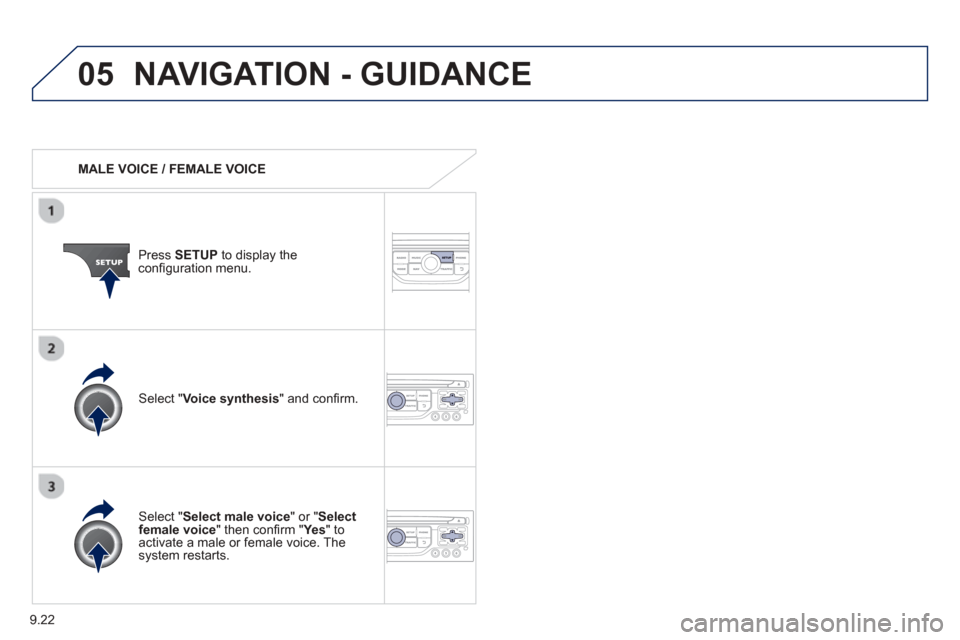
MALE VOICE / FEMALE VOICE
Press SETUP to display theconfi guration menu.
Select "Select male voice " or "Selectfemale voice" then confi rm " Ye s
" to activate a male or female voice. Thesystem restarts.
Select "Voice synthesis " and confi rm.