ESP Peugeot Expert Tepee 2013 Owner's Guide
[x] Cancel search | Manufacturer: PEUGEOT, Model Year: 2013, Model line: Expert Tepee, Model: Peugeot Expert Tepee 2013Pages: 260, PDF Size: 9.78 MB
Page 128 of 260
126
Checks
Manual gearbox
Have the level checked in accordance with
the manufacturer's servicing schedule.
To check the main levels and certain
components, in accordance with the
manufacturer's servicing schedule, refer
to the pages of the servicing and warranty
booklet which correspond to your vehicle's
engine.
Only use products recommended by
PEUGEOT or products of equivalent
quality and specification.
In order to optimise the operation of units as
important as the braking system, PEUGEOT
selects and offers specific products.
In order to avoid damaging the electrical
units, high pressure washing to clean the
engine compartment is strictly prohibited.
After washing the vehicle dampness, or in
winter, ice may form on the brake discs and
pads: braking efficiency may be reduced.
Make some light brake applications to dry
and de-ice the brakes.
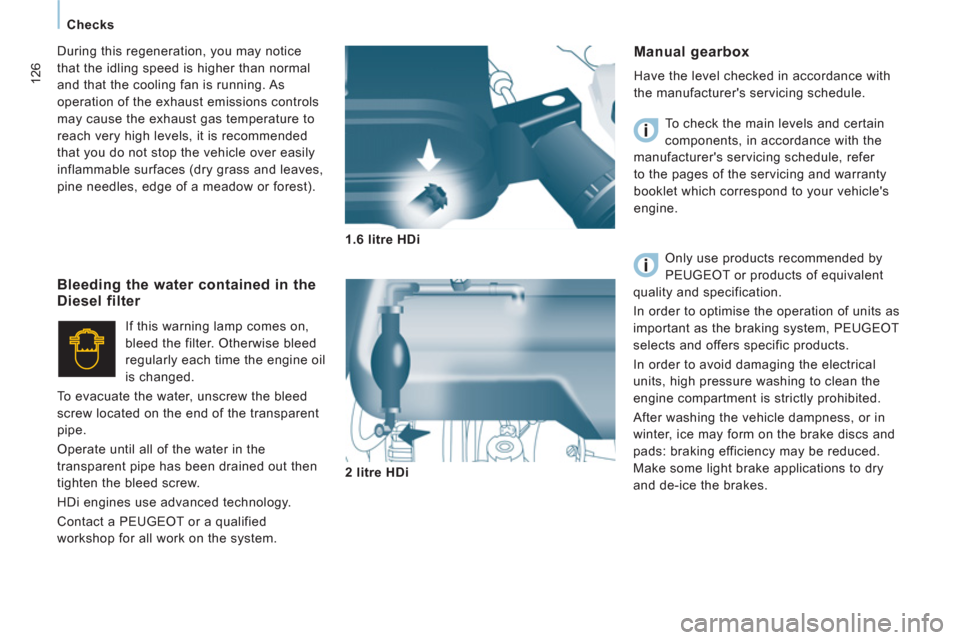
1.6 litre HDi
2 litre HDi
Bleeding the water contained in theDiesel filter
If this warning lamp comes on,
bleed the filter. Otherwise bleed
regularly each time the engine oil
is changed.
To evacuate the water, unscrew the bleed
screw located on the end of the transparent
pipe.
Operate until all of the water in the
transparent pipe has been drained out then
tighten the bleed screw.
HDi engines use advanced technology.
Contact a PEUGEOT or a qualified
workshop for all work on the system. During this regeneration, you may notice
that the idling speed is higher than normal
and that the cooling fan is running. As
operation of the exhaust emissions controls
may cause the exhaust gas temperature to
reach very high levels, it is recommended
that you do not stop the vehicle over easily
inflammable surfaces (dry grass and leaves,
pine needles, edge of a meadow or forest).
Page 148 of 260
146
Changing a fuse
CHANGING A FUSE
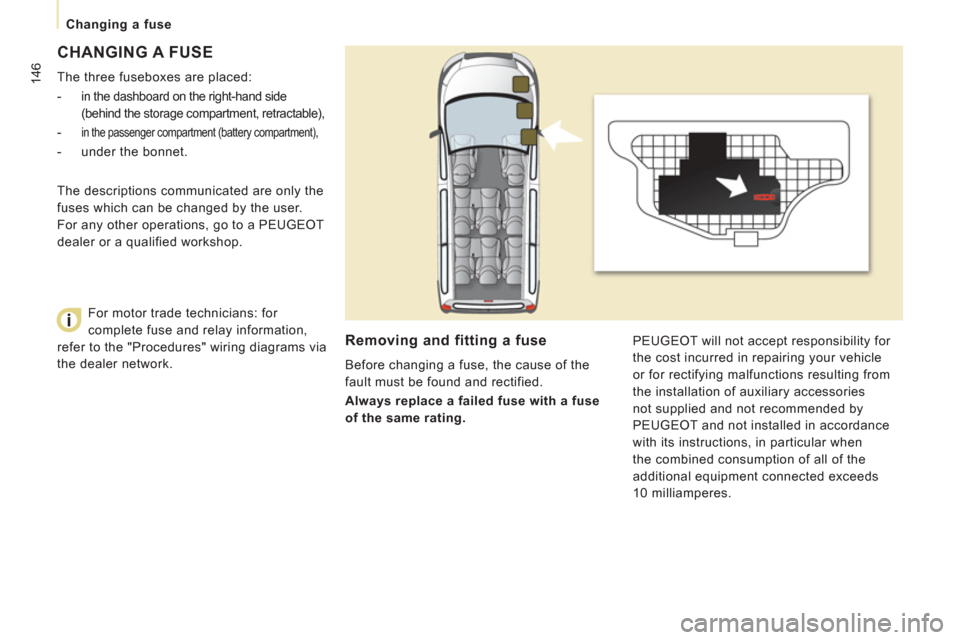
The three fuseboxes are placed:
-
in the dashboard on the right-hand side
(behind the storage compartment, retractable),
- in the passenger compartment (battery compartment),
- under the bonnet.
Removing and fitting a fuse
Before changing a fuse, the cause of the
fault must be found and rectified.
Always replace a failed fuse with a fuse
of the same rating. PEUGEOT will not accept responsibility for
the cost incurred in repairing your vehicle
or for rectifying malfunctions resulting from
the installation of auxiliary accessories
not supplied and not recommended by
PEUGEOT and not installed in accordance
with its instructions, in particular when
the combined consumption of all of the
additional equipment connected exceeds
10 milliamperes. The descriptions communicated are only the
fuses which can be changed by the user.
For any other operations, go to a PEUGEOT
dealer or a qualified workshop.
For motor trade technicians: for
complete fuse and relay information,
refer to the "Procedures" wiring diagrams via
the dealer network.
Page 208 of 260
9.46
09
AUDIO STREAMING
Streaming allows audio fi les on your telephone to be played via the
vehicle's speakers.
Connect the telephone: see "USING THE TELEPHONE".
Select " Audio " or " All" profi le.
I
f play does not start automatically, it may be necessary to start the audio playback from the telephone.
Control is from the peripheral device or b
y using the audio system buttons.
Once connected in streaming mode, the telephone is considered to bea media source.
It is recommended that you activate "
Repeat" on the Bluetooth
peripheral.
MUSIC MEDIA PLAYERS
CONNECTING APPLE®
PLAYERS ®
Connect the Apple ®player to the USB port using a suitable cable (not supplied).
Pla
y starts automatically.
Control is via the audio system.
The classifi cations available are those of the portable device
connected (artists / albums / genres / playlists / audiobooks / podcasts).
The de
fault classifi cation used is by artist. To modify the classifi cationused, return to the fi rst level of the menu then select the desired classifi cation (playlists for example) and confi rm to go down through
the menu to the desired track.
The "
Shuffl e tracks" mode on an iPod® corresponds to the "Random" ®
mode on the audio system.
The "
Shuffl e albums" mode on an iPod® corresponds to the "Random ®
all" on the audio system.
"
Shuffl e tracks" is restored by default on each connection.
The version of software in the audio s
ystem may not be compatible
with the generation of your Apple ®player.
The list of devices compatible with software versions is available from \
PE
UGEOT dealers.
Page 217 of 260
9.55
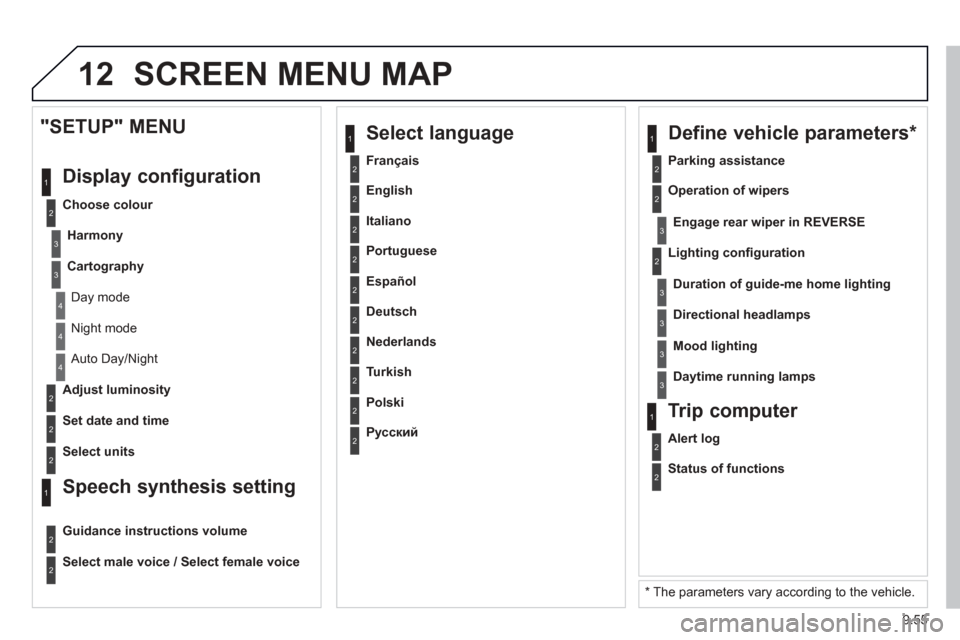
12 SCREEN MENU MAP
2
3
3
1
4
2
2
1
4
4
2
2
Night mode
Auto Day/Night
Ad
just luminosity
Set date and time
"SETUP" MENU
Displa
y configuration
Choose colour
Harmon
y
Cartography
Day mode
Speech synthesis setting
Guidance instructions volume
Select male voice / Select female voice
2 Select units
2
3
3
2 Lighting confi guration
Parkin
g assistance
Engage rear wiper in REVERSE
Duration of guide-me home lighting
1 Define vehicle parameters
*
2 Operation of wipers
3Directional headlamps
3Mood lighting
3Daytime running lamps
*
The parameters vary according to the vehicle.
2Alert log
1Trip computer
2Status of functions
2 Français
1
Select language
2 English
2 Italiano
2 Portuguese
2 Español
2 Deutsch
2 Nederlands
2 Turkish
2 Polski
2
Русский
Page 241 of 260
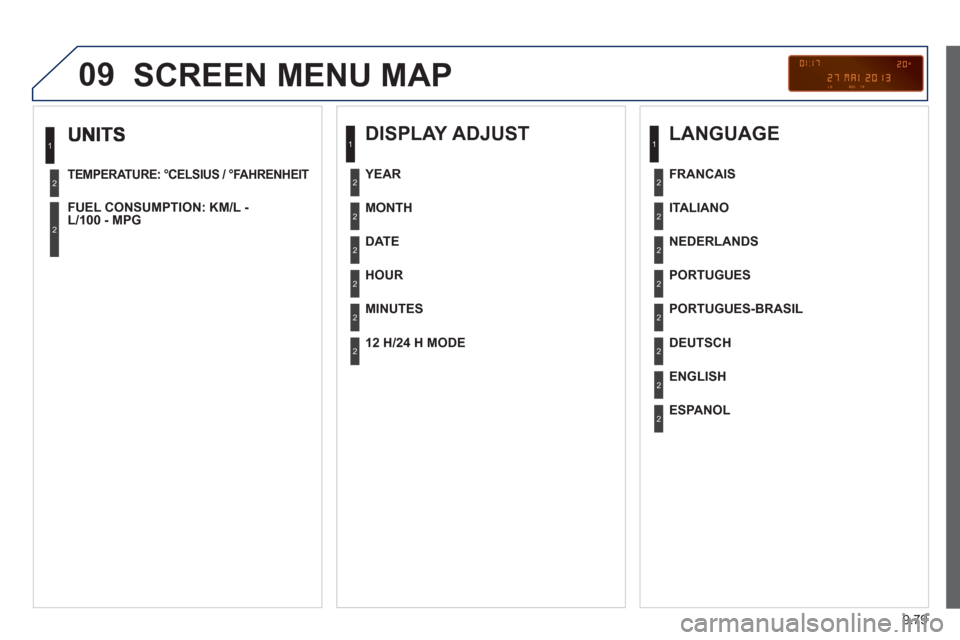
9.79
09
TEMPERATURE: °CELSIUS / °FAHRENHEIT
FUEL CONSUMPTION: KM/L -L/100 - MPG
1
2
2
SCREEN MENU MAP
DISPLAY ADJUST
MONTH
DATE
HOUR
MINUTES
YEAR
12 H/24 H MODE
LANGUAGE
ITALIANO
NEDERLANDS
PORTUGUES
PORTUGUES-BRASIL
FRANCAIS
DEUTSCH
ENGLISH
ESPANOL
1
2
2
2
2
2
2
1
2
2
2
2
2
2
2
2