display Peugeot Expert Tepee 2014 User Guide
[x] Cancel search | Manufacturer: PEUGEOT, Model Year: 2014, Model line: Expert Tepee, Model: Peugeot Expert Tepee 2014Pages: 260, PDF Size: 13.44 MB
Page 63 of 260
61
Ventilation
EASE OF USE and COMFORT
3
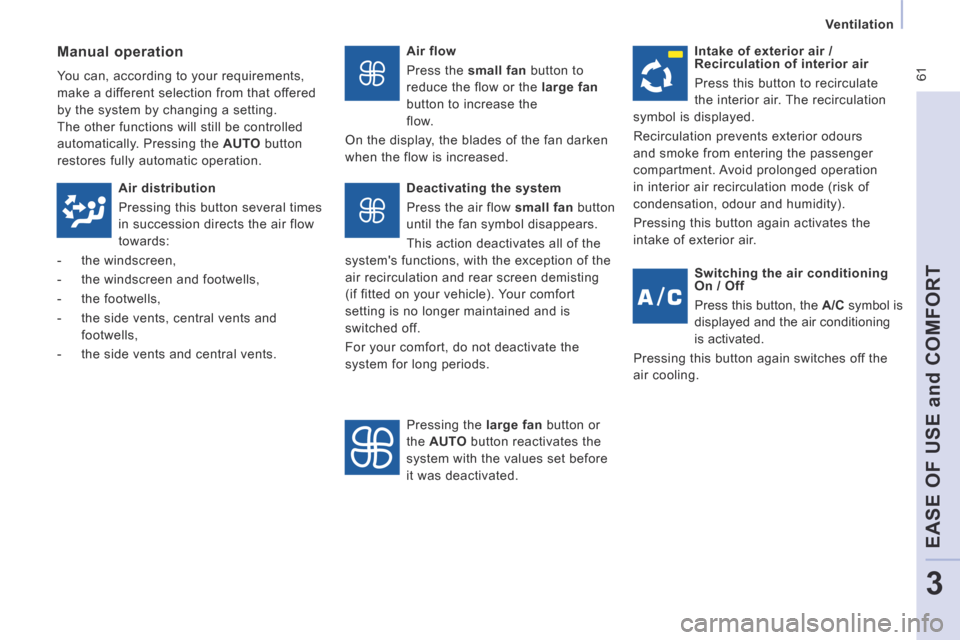
Air flow
Press the small fan button to
reduce the flow or the large fan
button to increase the
flow.
On the display, the blades of the fan darken
when the flow is increased. Manual operation
You can, according to your requirements,
make a different selection from that offered
by the system by changing a setting.
The other functions will still be controlled
automatically. Pressing the AUTO button
restores fully automatic operation. Intake of exterior air /
Recirculation of interior air
Press this button to recirculate
the interior air. The recirculation
symbol is displayed.
Recirculation prevents exterior odours
and smoke from entering the passenger
compartment. Avoid prolonged operation
in interior air recirculation mode (risk of
condensation, odour and humidity).
Pressing this button again activates the
intake of exterior air.
Air distribution
Pressing this button several times
in succession directs the air flow
towards:
- the windscreen,
- the windscreen and footwells,
- the footwells,
- the side vents, central vents and footwells,
- the side vents and central vents. Deactivating the system
Press the air flow
small fan button
until the fan symbol disappears.
This action deactivates all of the
system's functions, with the exception of the
air recirculation and rear screen demisting
(if fitted on your vehicle). Your comfort
setting is no longer maintained and is
switched off.
For your comfort, do not deactivate the
system for long periods.
Pressing the large fan button or
the AUTO button reactivates the
system with the values set before
it was deactivated. Switching the air conditioning
On / Off
Press this button, the
A/C symbol is
displayed and the air conditioning
is activated.
Pressing this button again switches off the
air cooling.
Page 97 of 260
95
Parking sensors
SAFETY
4
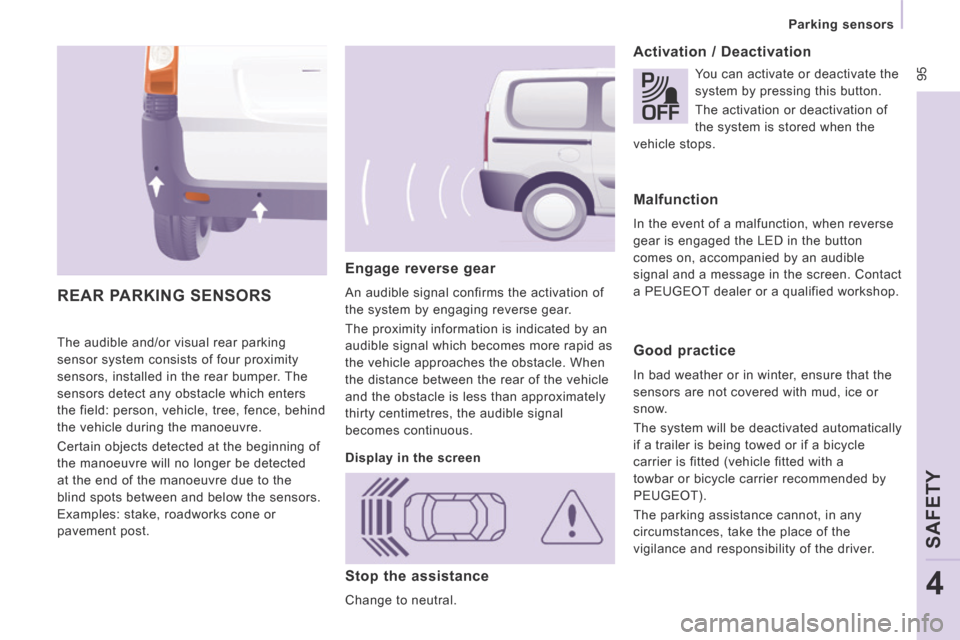
The audible and/or visual rear parking
sensor system consists of four proximity
sensors, installed in the rear bumper. The
sensors detect any obstacle which enters
the field: person, vehicle, tree, fence, behind
the vehicle during the manoeuvre.
Certain objects detected at the beginning of
the manoeuvre will no longer be detected
at the end of the manoeuvre due to the
blind spots between and below the sensors.
Examples: stake, roadworks cone or
pavement post.
Engage reverse gear
An audible signal confirms the activation of
the system by engaging reverse gear.
The proximity information is indicated by an
audible signal which becomes more rapid as
the vehicle approaches the obstacle. When
the distance between the rear of the vehicle
and the obstacle is less than approximately
thirty centimetres, the audible signal
becomes continuous.
Activation / Deactivation
REAR PARKING SENSORS
Display in the screen You can activate or deactivate the
system by pressing this button.
The activation or deactivation of
the system is stored when the
vehicle stops.
Malfunction
In the event of a malfunction, when reverse
gear is engaged the LED in the button
comes on, accompanied by an audible
signal and a message in the screen. Contact
a PEUGEOT dealer or a qualified workshop.
Good practice
In bad weather or in winter, ensure that the
sensors are not covered with mud, ice or
snow.
The system will be deactivated automatically
if a trailer is being towed or if a bicycle
carrier is fitted (vehicle fitted with a
towbar or bicycle carrier recommended by
PEUGEOT).
The parking assistance cannot, in any
circumstances, take the place of the
vigilance and responsibility of the driver.
Stop the assistance
Change to neutral.
Page 128 of 260
126
Levels
Cooling system
Only use the fluid recommended by the
manufacturer.
Otherwise, you risk seriously damaging your
engine.
When the engine is warm, the temperature
of the coolant is controlled by the engine
fan. As this fan can operate with the ignition
key removed and because the cooling
system is pressurised, wait for at least one
hour after the engine has stopped before
carrying out any work.
Slacken the cap by 1/4 of a turn to release
the pressure to prevent any risk of scalding.
When the pressure has dropped, remove the
cap and top up the level with coolant.
If fluid has to be added frequently, this
indicates a fault which must be checked by a
PEUGEOT dealer or a qualified workshop as
soon as possible.
Power steering fluid level
The vehicle must be parked on level ground
with the engine cold. Unscrew the cap
integrated with the gauge and check the
level which must be between the MIN and
MAX marks.
Diesel additive level (Diesel with particle emission filter)
The minimum level of this additive
is indicated by lighting of the
service warning light, accompanied by an
audible signal and a message in the screen.
When this occurs with the engine running it
is due to the start of saturation of the particle
emission filter (exceptionally prolonged
urban type driving conditions: low speed,
long traffic jams, ...).
In order to regenerate the filter, you are
advised to drive at a speed higher than
40 mph (60 km/h) for at least five minutes
as soon as possible, when traffic conditions
permit (until the message disappears and
the service warning lamp goes off).
During regeneration of the particle emission
filter, relay noise may be heard under the
dashboard.
If the message is still displayed and if the
service warning lamp remains on, contact a
PEUGEOT dealer or a qualified workshop.
Topping up
The level must be between the MIN and
MAX marks on the expansion bottle. If
more than 1 litre of fluid is required to top
up the level, have the system checked by a
PEUGEOT dealer or a qualified workshop.
Screenwash and headlamp wash level
For best quality cleaning and for your safety,
we would advise that you use products of
the PEUGEOT range.
Capacity of the screenwash reservoir:
approximately 4.5 litres.
If your vehicle is fitted with headlamp
washers, the capacity of the reservoir
is 7.5 litres.
To ensure optimum cleaning and prevent
freezing, this fluid must not be topped up or
replaced with plain water.
Topping up
This additive must be topped up by a
PEUGEOT dealer or a qualified workshop
without delay.
Page 168 of 260
9.4
01 FIRST STEPS
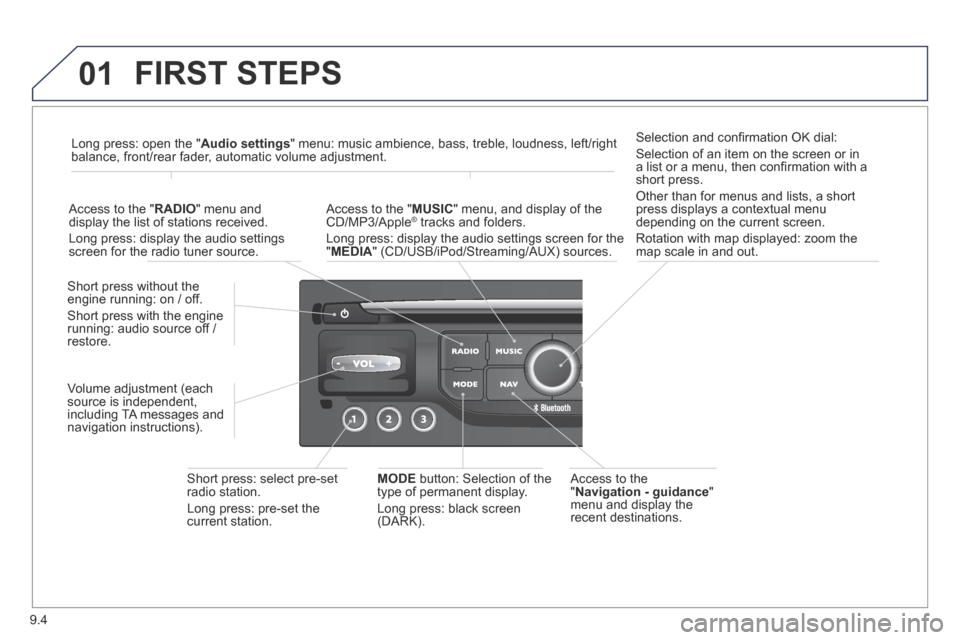
Access to the " Navigation - guidance " menu and display the recent destinations.
Short press without the engine running: on / off.
Short press with the engine running: audio source off / restore.
Short press: select pre-set radio station.
Long press: pre-set the current station.
MODE button: Selection of the type of permanent display.
Long press: black screen (DARK).
Access to the " MUSIC " menu, and display of the CD/MP3/Apple ® tracks and folders. ® tracks and folders. ®
Long press: display the audio settings screen for the " MEDIA " (CD/USB/iPod/Streaming/AUX) sources.
Long press: open the " Audio settings " menu: music ambience, bass, treble, loudness, left/right balance, front/rear fader, automatic volume adjustment.
Access to the " RADIO " menu and display the list of stations received.
Long press: display the audio settings screen for the radio tuner source.
Selection and confi rmation OK dial:
Selection of an item on the screen or in a list or a menu, then confi rmation with a short press.
Other than for menus and lists, a short press displays a contextual menu depending on the current screen.
Rotation with map displayed: zoom the map scale in and out.
Volume adjustment (each source is independent, including TA messages and navigation instructions).
Page 169 of 260
9.5
01
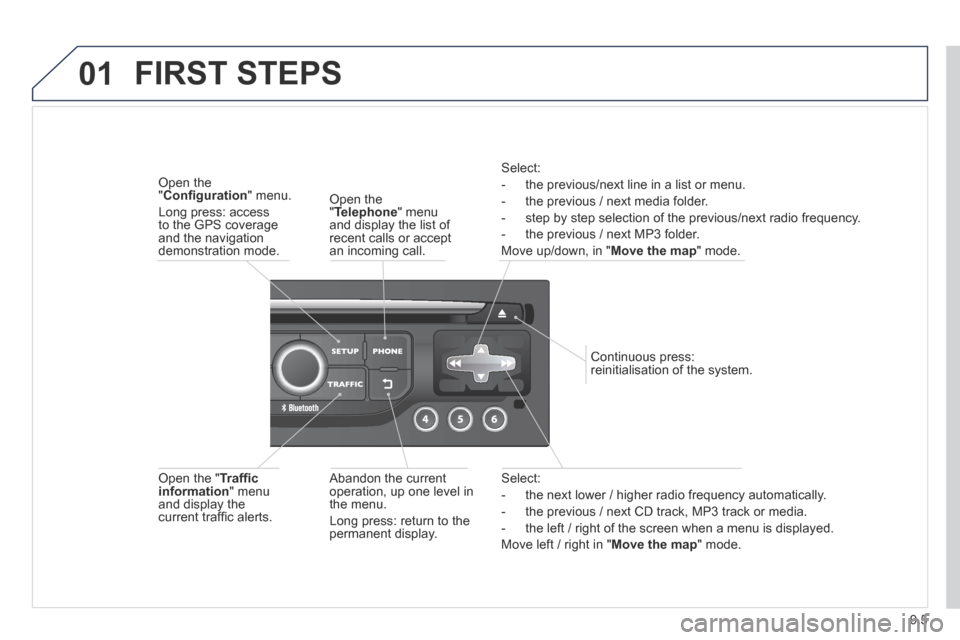
Select:
- the next lower / higher radio frequency automatically.
- the previous / next CD track, MP3 track or media.
- the left / right of the screen when a menu is displayed.
Move left / right in " Move the map " mode.
Abandon the current operation, up one level in the menu.
Long press: return to the permanent display.
Continuous press: reinitialisation of the system.
Open the " Telephone " menu and display the list of recent calls or accept an incoming call.
Open the " Confi guration " menu.
Long press: access to the GPS coverage and the navigation demonstration mode.
Open the " Traffi c information " menu and display the current traffi c alerts.
Select:
- the previous/next line in a list or menu.
- the previous / next media folder.
- step by step selection of the previous/next radio frequency.
- the previous / next MP3 folder.
Move up/down, in " Move the map " mode.
FIRST STEPS
Page 170 of 260
9.6
02
For a detailed global view of the menus available, refer to the "Screen menu map" section. For cleaning the screen, the use of a soft, non-abrasive cloth (spectacles cloth) is recommended, with no additional product.
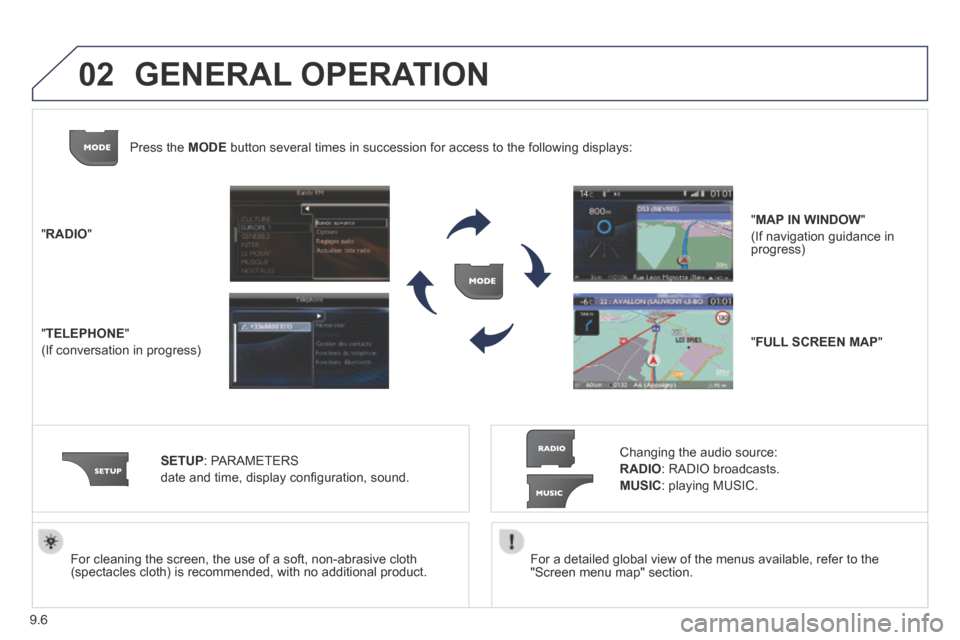
" RADIO "
" TELEPHONE "
(If conversation in progress)
SETUP : PARAMETERS
date and time, display confi guration, sound.
Changing the audio source:
RADIO : RADIO broadcasts.
MUSIC : playing MUSIC.
Press the MODE button several times in succession for access to the following displays\
:
GENERAL OPERATION
" FULL SCREEN MAP "
" MAP IN WINDOW "
(If navigation guidance in progress)
Page 171 of 260
9.7
02
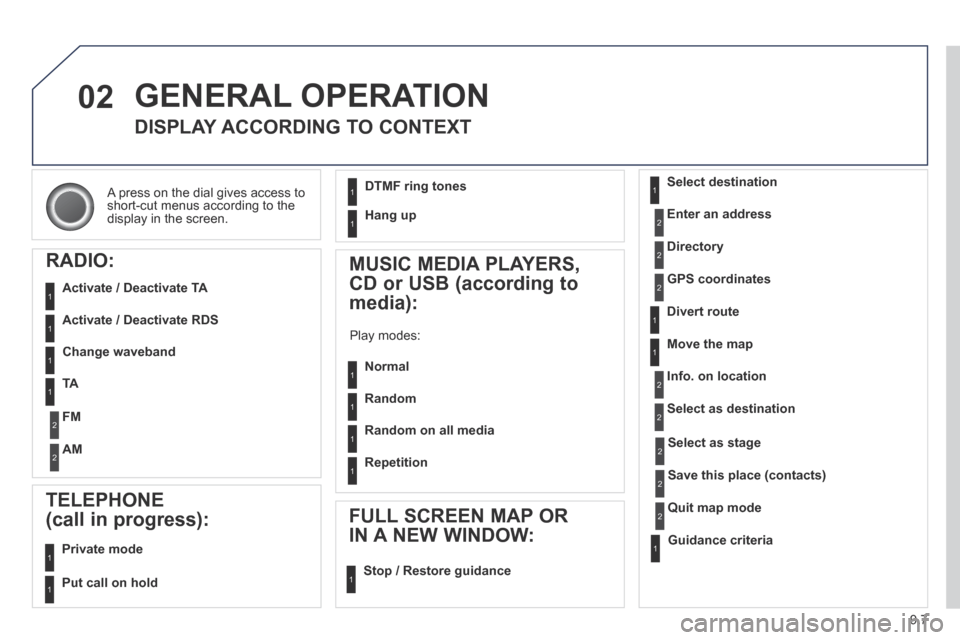
A press on the dial gives access to short-cut menus according to the display in the screen.
GENERAL OPERATION
DISPLAY ACCORDING TO CONTEXT
RADIO:
Activate / Deactivate TA
Activate / Deactivate RDS
MUSIC MEDIA PLAYERS,
CD or USB (according to
media):
Play modes:
Normal
Random
Random on all media
Repetition
TELEPHONE
(call in progress):
Private mode
FULL SCREEN MAP OR
IN A NEW WINDOW:
Stop / Restore guidance
Select destination
Enter an address
Directory
GPS coordinates
Divert route
Move the map
Info. on location
Select as destination
Select as stage
Save this place (contacts)
Quit map mode
Guidance criteria
Put call on hold
DTMF ring tones
Hang up
1
1
1
1
1
1
1
1
2
2
2
2
2
1
2
2
2
1
1
1
1
1
1
Change waveband
FM
AM
2
2
1
TA 1
Page 175 of 260
9.11
05
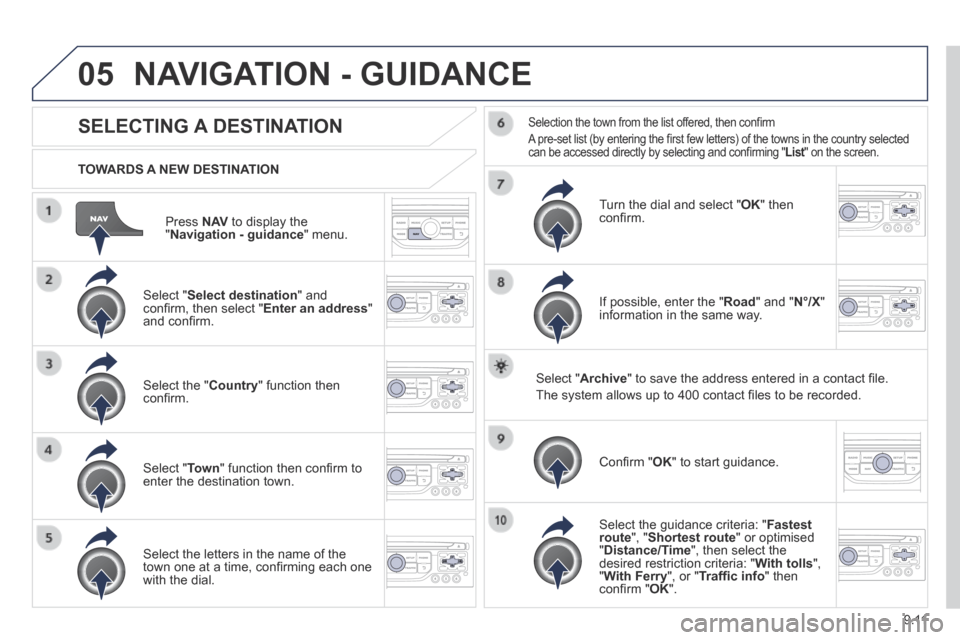
Press N AV to display the " Navigation - guidance " menu.
TOWARDS A NEW DESTINATION
NAVIGATION - GUIDANCE
SELECTING A DESTINATION
Select " Select destination " and confi rm, then select " Enter an address " and confi rm.
Select the " Country " function then confi rm.
Select " Town " function then confi rm to enter the destination town.
Select the letters in the name of the town one at a time, confi rming each one with the dial.
Selection the town from the list offered, then confi rm
A pre-set list (by entering the fi rst few letters) of the towns in the country selected can be accessed directly by selecting and confi rming " List " on the screen. List " on the screen. List
Turn the dial and select " OK " then confi rm.
If possible, enter the " Road " and " N°/X " information in the same way.
Select " Archive " to save the address entered in a contact fi le.
The system allows up to 400 contact fi les to be recorded.
Confi rm " OK " to start guidance.
Select the guidance criteria: " Fastest route ", " Shortest route " or optimised " Distance/Time ", then select the desired restriction criteria: " With tolls ", " With Ferry ", or " Traffi c info " then confi rm " OK ".
Page 176 of 260
9.12
05
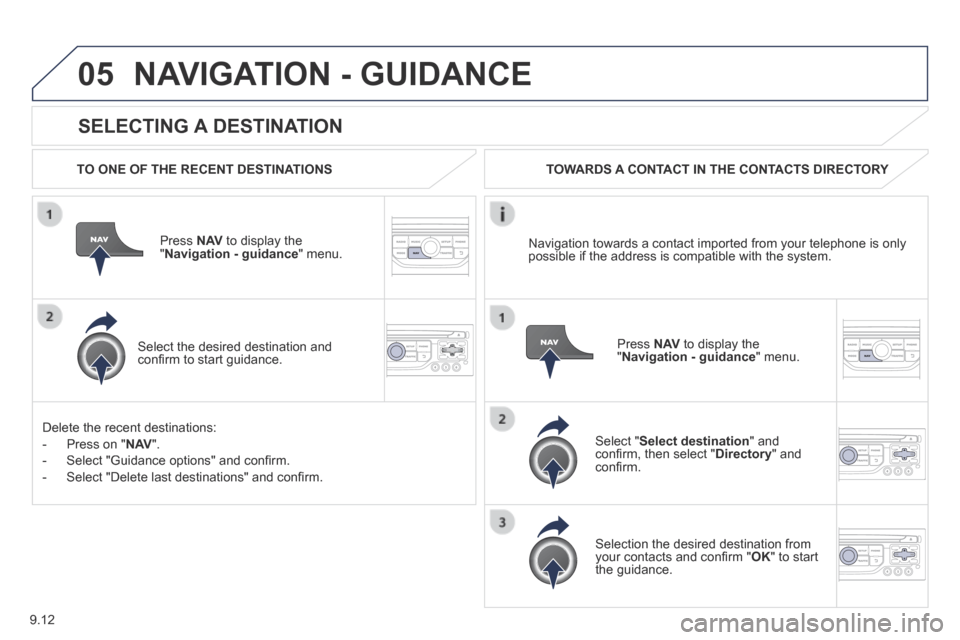
SELECTING A DESTINATION
NAVIGATION - GUIDANCE
TO ONE OF THE RECENT DESTINATIONS
Press N AV to display the " Navigation - guidance " menu.
Select the desired destination and confi rm to start guidance.
TOWARDS A CONTACT IN THE CONTACTS DIRECTORY
Select " Select destination " and confi rm, then select " Directory " and confi rm.
Selection the desired destination from your contacts and confi rm " OK " to start the guidance.
Press N AV to display the " Navigation - guidance " menu.
Navigation towards a contact imported from your telephone is only possible if the address is compatible with the system.
Delete the recent destinations:
- Press on " N AV ".
- Select "Guidance options" and confi rm.
- Select "Delete last destinations" and confi rm.
Page 177 of 260
9.13
05
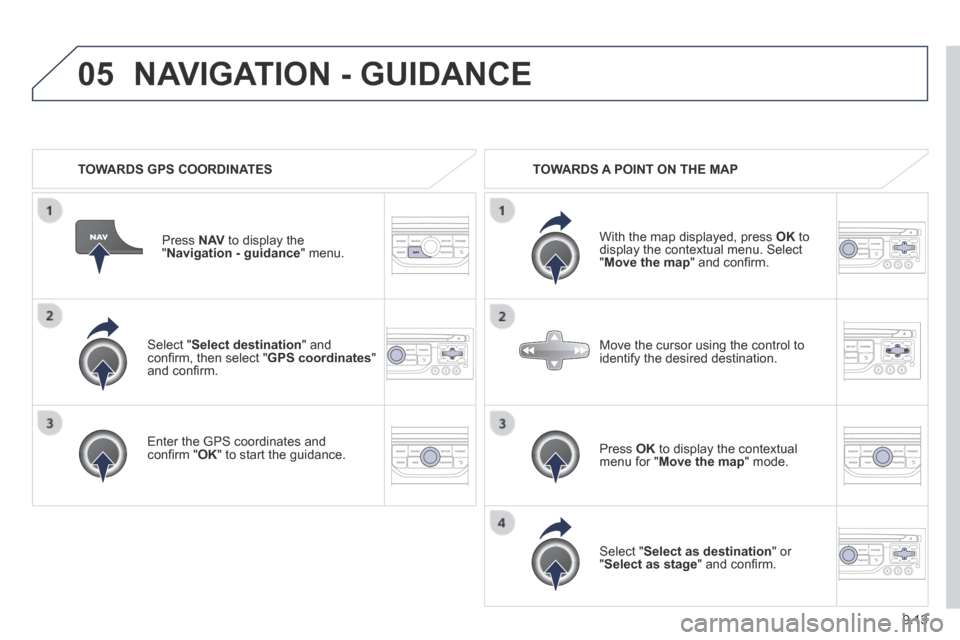
Select " Select destination " and confi rm, then select " GPS coordinates " and confi rm.
Enter the GPS coordinates and confi rm " OK " to start the guidance.
Press N AV to display the " Navigation - guidance " menu.
NAVIGATION - GUIDANCE
TOWARDS GPS COORDINATES TOWARDS A POINT ON THE MAP
With the map displayed, press OK to display the contextual menu. Select " Move the map " and confi rm.
Press OK to display the contextual menu for " Move the map " mode.
Select " Select as destination " or " Select as stage " and confi rm.
Move the cursor using the control to identify the desired destination.