navigation Peugeot Expert Tepee 2014 Owner's Guide
[x] Cancel search | Manufacturer: PEUGEOT, Model Year: 2014, Model line: Expert Tepee, Model: Peugeot Expert Tepee 2014Pages: 260, PDF Size: 13.44 MB
Page 188 of 260
9.24
06 TRAFFIC INFORMATION
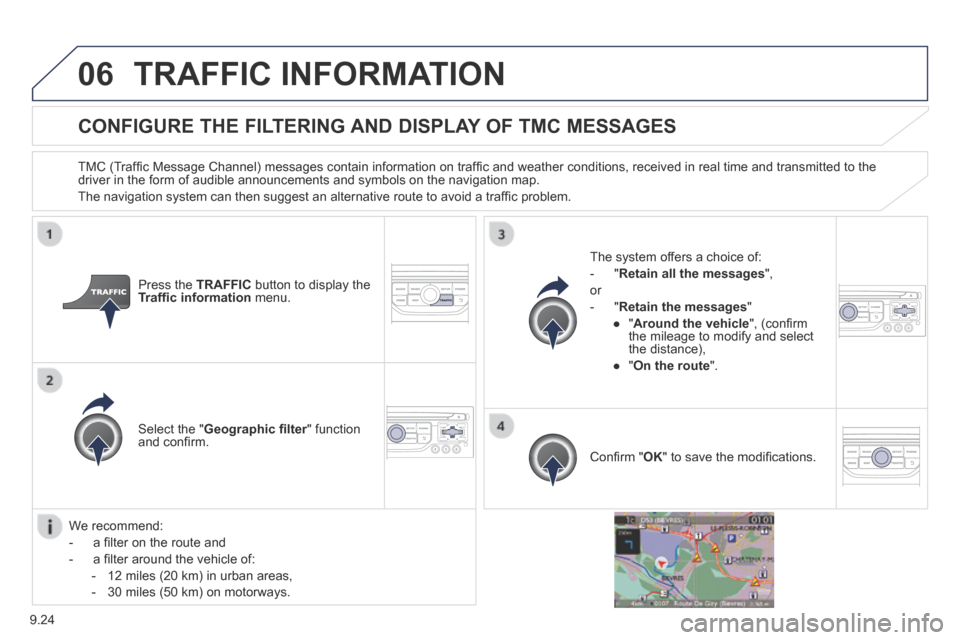
CONFIGURE THE FILTERING AND DISPLAY OF TMC MESSAGES
TMC (Traffi c Message Channel) messages contain information on traffi c and weather conditions, received in real time and transmitted to the driver in the form of audible announcements and symbols on the navigatio\
n map.
The navigation system can then suggest an alternative route to avoid a traffi c problem.
Press the TRAFFIC button to display the Traffi c information menu.
Select the " Geographic fi lter " function Geographic fi lter " function Geographic fi lterand confi rm.
The system offers a choice of:
- " Retain all the messages ",
or
- " Retain the messages "
● " Around the vehicle ", (confi rm the mileage to modify and select the distance),
● " On the route ".
Confi rm " OK " to save the modifi cations.
We recommend:
- a fi lter on the route and
- a fi lter around the vehicle of:
- 12 miles (20 km) in urban areas,
- 30 miles (50 km) on motorways.
Page 215 of 260
9.51
11 TRIP COMPUTER
TRIP COMPUTER
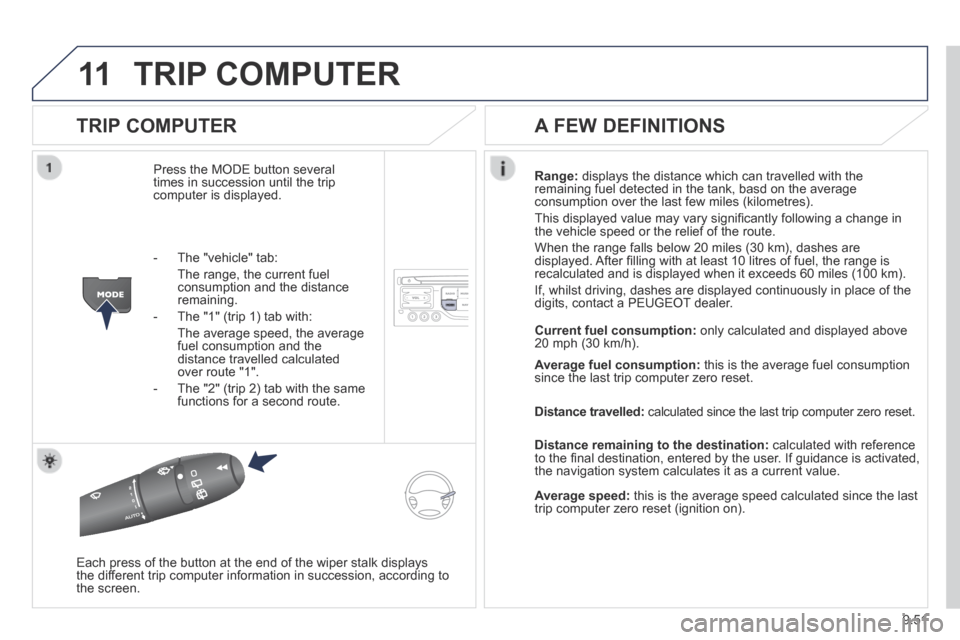
Press the MODE button several times in succession until the trip computer is displayed.
Range: displays the distance which can travelled with the remaining fuel detected in the tank, basd on the average consumption over the last few miles (kilometres).
This displayed value may vary signifi cantly following a change in the vehicle speed or the relief of the route.
When the range falls below 20 miles (30 km), dashes are displayed. After fi lling with at least 10 litres of fuel, the range is recalculated and is displayed when it exceeds 60 miles (100 km).
If, whilst driving, dashes are displayed continuously in place of the digits, contact a PEUGEOT dealer.
Each press of the button at the end of the wiper stalk displays the different trip computer information in succession, according to the screen.
A FEW DEFINITIONS
- The "vehicle" tab:
The range, the current fuel consumption and the distance remaining.
- The "1" (trip 1) tab with:
The average speed, the average fuel consumption and the distance travelled calculated over route "1".
- The "2" (trip 2) tab with the same functions for a second route.
Current fuel consumption: only calculated and displayed above 20 mph (30 km/h).
Average fuel consumption: this is the average fuel consumption since the last trip computer zero reset.
Distance travelled: calculated since the last trip computer zero reset.
Distance remaining to the destination: calculated with reference to the fi nal destination, entered by the user. If guidance is activated, the navigation system calculates it as a current value.
Average speed: this is the average speed calculated since the last trip computer zero reset (ignition on).
Page 216 of 260
9.52
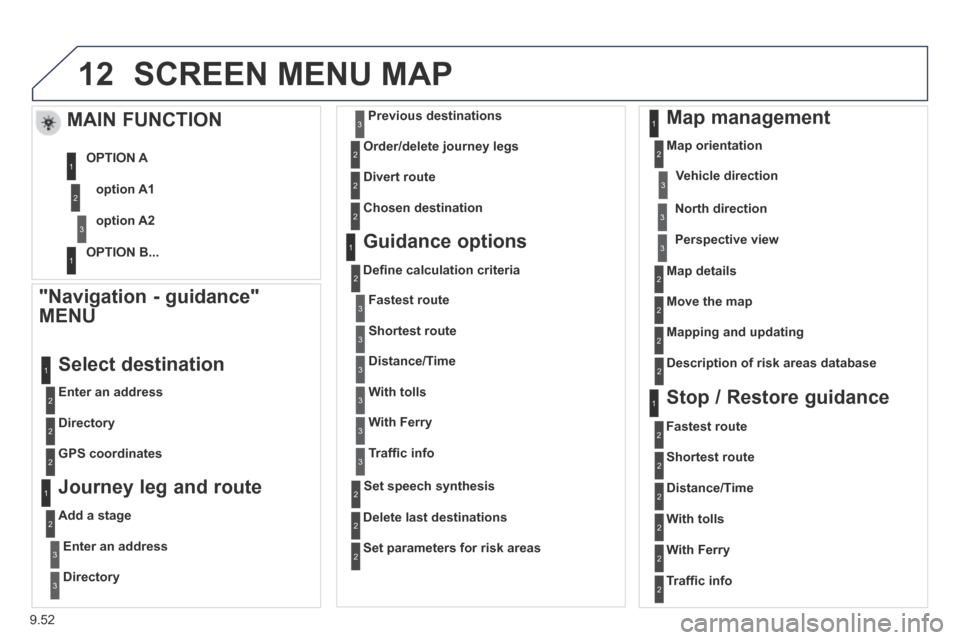
12 SCREEN MENU MAP
"Navigation - guidance"
MENU
Enter an address
Select destination
Directory
GPS coordinates
Journey leg and route
Add a stage
Enter an address
Directory
Previous destinations
Order/delete journey legs
Divert route
Chosen destination
Guidance options
Defi ne calculation criteria
Delete last destinations
Map management
Map orientation
MAIN FUNCTION
option A1
option A2
OPTION A
OPTION B...
Map details
Move the map
Mapping and updating
Description of risk areas database
Stop / Restore guidance
1
2
3
1
3
3
2
2
2
2
1
3
1
1
2
2
2
2
2
2
2
2
2
2
1
1
Set parameters for risk areas 2
Fastest route2
Shortest route
Distance/Time
With tolls
2
2
2
With Ferry2
Traffi c info2
Set speech synthesis
Fastest route
Shortest route
3
3
2
Distance/Time
With tolls
3
3
With Ferry
Traffi c info
3
3
3
3
3
North direction
Vehicle direction
Perspective view
Page 220 of 260

9.56
The following table groups together the answers to the most frequently a\
sked questions concerning your audio system.
FREQUENTLY ASKED QUESTIONS
QUESTIONANSWERSOLUTION
The route calculation is not successful. The guidance criteria may confl ict with the current location (exclusion of toll roads on a toll motorway). Check the guidance criteria on the Navigation Menu, "Guidance options"\ "Defi ne calculation criteria".
The POIs do not appear. The POIs have not been selected. Select the POIs in the list of POIs.
The POIs have not been downloaded. Download the POIs from the website:
"http://peugeot.navigation.com".
The risk areas audible warning does not work. The audible warning is not active. Activate audible warnings in the Guidance options menu, "Navigation - guidance", "Set parameters for risk areas".
The system does not suggest a detour around an incident on the route.
The guidance criteria do not take account of TMC messages. Select the "Traffi c info" function in the list of guidance criteria.
I receive a Risk area alert which is not on my route. Other than guidance, the system announces all Risk areas positioned in a\
cone located in front of the vehicle. It may provide an alert for a Risk\
area located on nearby or parallel roads.
Zoom in on the map to view the exact position of the Risk area. Select "On the route" to no longer receive alerts other than guidance or to reduce the time for the announcement.
Page 234 of 260
9.70
05 USB PLAYER
The system puts together playlists (temporary memory) created over a period which depends on the capacity of the USB device.
The other sources are available during this time.
The playlists are updated each time the ignition is switched off or each time a USB memory stick is connected.
When connecting for the fi rst time, the classifi cation suggested is by folder. When you reconnect, the classifi cation selected previously is retained.
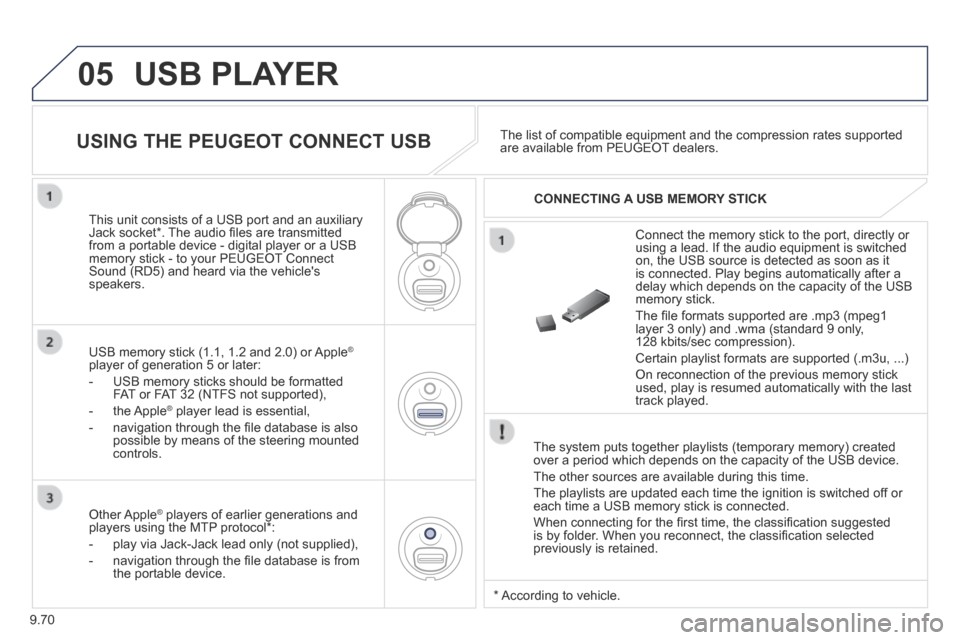
Connect the memory stick to the port, directly or using a lead. If the audio equipment is switched on, the USB source is detected as soon as it is connected. Play begins automatically after a delay which depends on the capacity of the USB memory stick.
The fi le formats supported are .mp3 (mpeg1 layer 3 only) and .wma (standard 9 only, 128 kbits/sec compression).
Certain playlist formats are supported (.m3u, ...)
On reconnection of the previous memory stick used, play is resumed automatically with the last track played.
This unit consists of a USB port and an auxiliary Jack socket * . The audio fi les are transmitted from a portable device - digital player or a USB memory stick - to your PEUGEOT Connect Sound (RD5) and heard via the vehicle's speakers.
USB memory stick (1.1, 1.2 and 2.0) or Apple ®
player of generation 5 or later:
- USB memory sticks should be formatted FAT or FAT 32 (NTFS not supported),
- the Apple ® player lead is essential, ® player lead is essential, ®
- navigation through the fi le database is also possible by means of the steering mounted controls.
The list of compatible equipment and the compression rates supported are available from PEUGEOT dealers. USING THE PEUGEOT CONNECT USB
CONNECTING A USB MEMORY STICK
Other Apple ® players of earlier generations and ® players of earlier generations and ®
players using the MTP protocol * :
- play via Jack-Jack lead only (not supplied),
- navigation through the fi le database is from the portable device.
* According to vehicle.
Page 235 of 260
9.71
05
USING THE PEUGEOT CONNECT USB
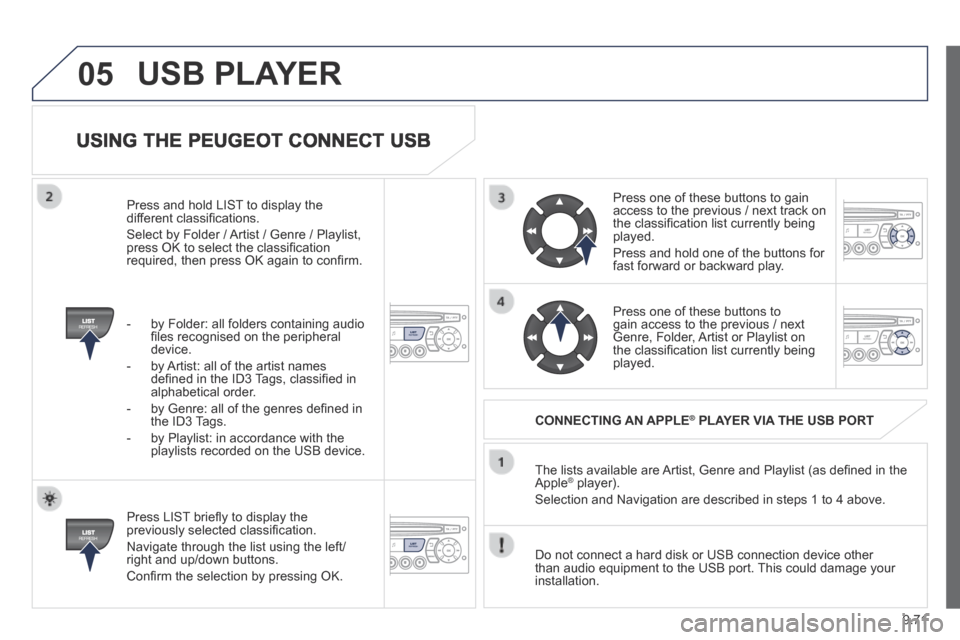
Press LIST briefl y to display the previously selected classifi cation.
Navigate through the list using the left/right and up/down buttons.
Confi rm the selection by pressing OK.
The lists available are Artist, Genre and Playlist (as defi ned in the Apple ® player). ® player). ®
Selection and Navigation are described in steps 1 to 4 above.
Do not connect a hard disk or USB connection device other than audio equipment to the USB port. This could damage your installation.
CONNECTING AN APPLE ® CONNECTING AN APPLE ® CONNECTING AN APPLE PLAYER VIA THE USB PORT ® PLAYER VIA THE USB PORT ®
Press one of these buttons to gain access to the previous / next track on the classifi cation list currently being played.
Press and hold one of the buttons for fast forward or backward play.
Press one of these buttons to gain access to the previous / next Genre, Folder, Artist or Playlist on the classifi cation list currently being played.
Press and hold LIST to display the different classifi cations.
Select by Folder / Artist / Genre / Playlist, press OK to select the classifi cation required, then press OK again to confi rm.
- by Folder: all folders containing audio fi les recognised on the peripheral device.
- by Artist: all of the artist names defi ned in the ID3 Tags, classifi ed in alphabetical order.
- by Genre: all of the genres defi ned in the ID3 Tags.
- by Playlist: in accordance with the playlists recorded on the USB device.
USB PLAYER
Page 241 of 260
9.77
08
13
TRIP COMPUTER
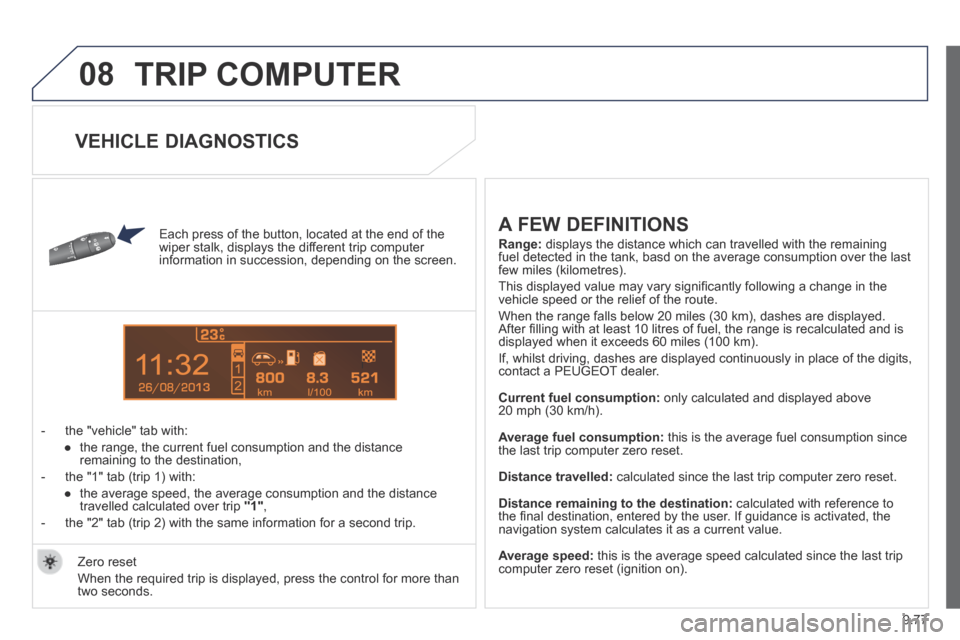
Each press of the button, located at the end of the wiper stalk, displays the different trip computer information in succession, depending on the screen.
- the "vehicle" tab with:
● the range, the current fuel consumption and the distance remaining to the destination,
- the "1" tab (trip 1) with:
● the average speed, the average consumption and the distance travelled calculated over trip "1" ,
- the "2" tab (trip 2) with the same information for a second trip.
A FEW DEFINITIONS
Range: displays the distance which can travelled with the remaining fuel detected in the tank, basd on the average consumption over the last\
few miles (kilometres).
This displayed value may vary signifi cantly following a change in the vehicle speed or the relief of the route.
When the range falls below 20 miles (30 km), dashes are displayed. After fi lling with at least 10 litres of fuel, the range is recalculated and is displayed when it exceeds 60 miles (100 km).
If, whilst driving, dashes are displayed continuously in place of the di\
gits, contact a PEUGEOT dealer.
Current fuel consumption: only calculated and displayed above 20 mph (30 km/h).
Average fuel consumption: this is the average fuel consumption since the last trip computer zero reset.
Distance travelled: calculated since the last trip computer zero reset.
Distance remaining to the destination: calculated with reference to the fi nal destination, entered by the user. If guidance is activated, the navigation system calculates it as a current value.
Average speed: this is the average speed calculated since the last trip computer zero reset (ignition on). Zero reset
When the required trip is displayed, press the control for more than two seconds.
VEHICLE DIAGNOSTICS
Page 250 of 260
164
Instruments and controls
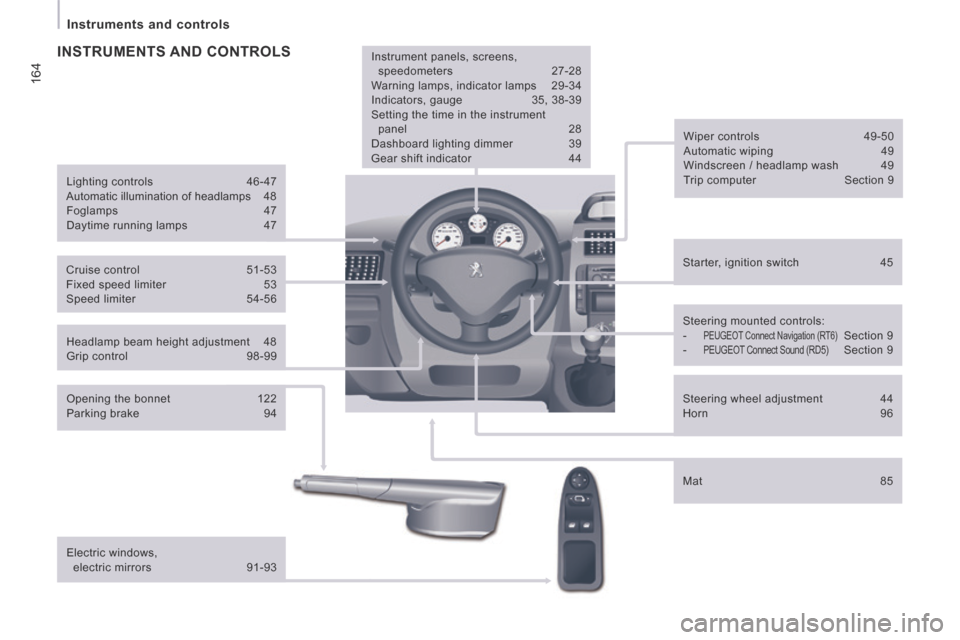
Headlamp beam height adjustment 48
Grip control 98-99 Starter, ignition switch
45
Wiper controls
49-50
Automatic wiping 49
Windscreen / headlamp wash 49
Trip computer Section 9
Cruise control 51-53
Fixed speed limiter 53
Speed limiter 54-56
Steering mounted controls:
- PEUGEOT Connect Navigation (RT6) Section 9
- PEUGEOT Connect Sound (RD5) Section 9
Lighting controls
46-47
Automatic illumination of headlamps 48
Foglamps 47
Daytime running lamps 47
INSTRUMENTS AND CONTROLS
Opening the bonnet 122
Parking brake 94
Electric windows, electric mirrors 91-93 Instrument panels, screens,
speedometers 27-28
Warning lamps, indicator lamps 29-34
Indicators, gauge 35, 38-39
Setting the time in the instrument panel 28
Dashboard lighting dimmer 39
Gear shift indicator 44
Mat 85
Steering wheel adjustment
44
Horn 96
Page 251 of 260
165
Instruments and controls
VISUAL SEARCH
10
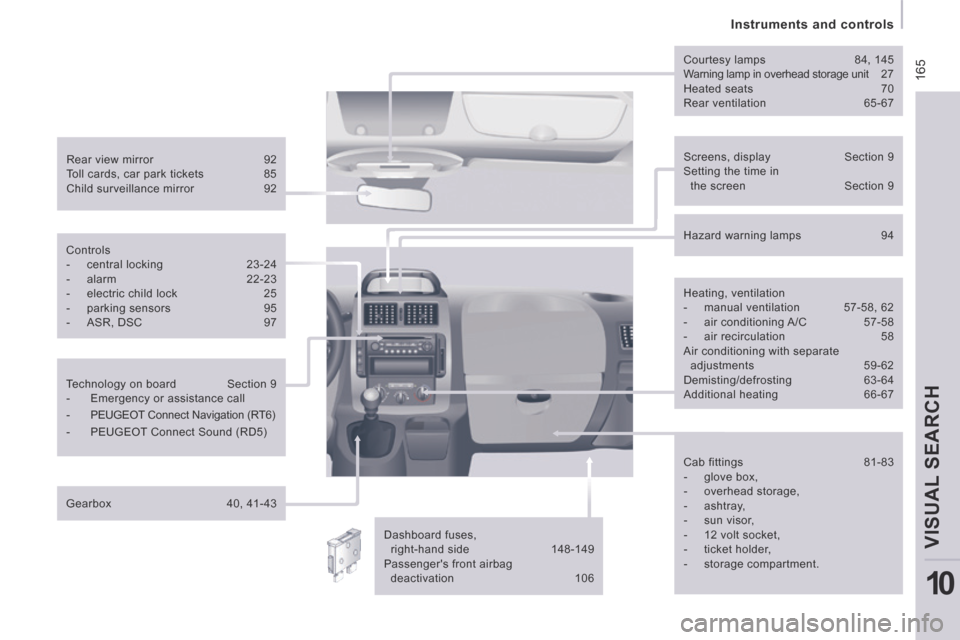
Screens, display Section 9
Setting the time in the screen Section 9
Rear view mirror
92
Toll cards, car park tickets 85
Child surveillance mirror 92 Courtesy lamps
84, 145
Warning lamp in overhead storage unit 27
Heated seats 70
Rear ventilation 65-67
Dashboard fuses, right-hand side 148-149
Passenger's front airbag deactivation 106
Controls
- central locking
23-24
- alarm 22-23
- electric child lock 25
- parking sensors 95
- ASR, DSC 97
Technology on board Section 9
- Emergency or assistance call
- PEUGEOT Connect Navigation (RT6)
- PEUGEOT Connect Sound (RD5)
Gearbox 40, 41-43 Hazard warning lamps
94
Heating, ventilation
- manual ventilation 57-58, 62
- air conditioning A/C 57-58
- air recirculation 58
Air conditioning with separate
adjustments 59-62 Demisting/defrosting 63-64
Additional heating 66-67
Cab fittings 81-83
- glove box,
- overhead storage,
- ashtray,
- sun visor,
- 12 volt socket,
- ticket holder,
- storage compartment.