display Peugeot Partner 2009 Owner's Guide
[x] Cancel search | Manufacturer: PEUGEOT, Model Year: 2009, Model line: Partner, Model: Peugeot Partner 2009Pages: 177, PDF Size: 6.15 MB
Page 133 of 177
9.4
11
22
33
44
22
44
33
11
03 AUDIO
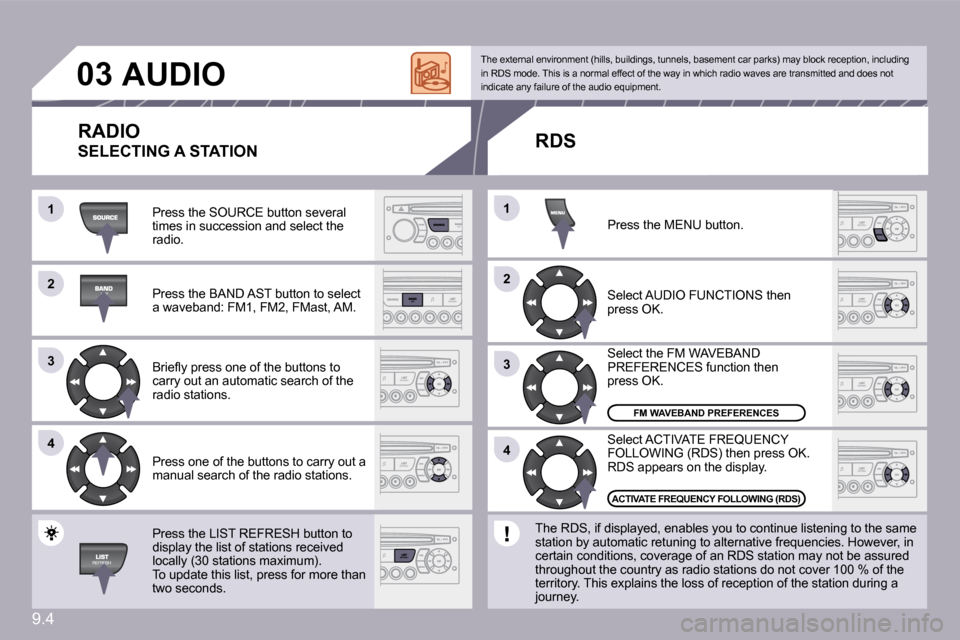
Press the SOURCE button several times in succession and select the radio.
Press the BAND AST button to select a waveband: FM1, FM2, FMast, AM.
Briefl y press one of the buttons to carry out an automatic search of the radio stations.
Press one of the buttons to carry out a manual search of the radio stations.
Press the LIST REFRESH button to display the list of stations received locally (30 stations maximum). To update this list, press for more than two seconds.
Select ACTIVATE FREQUENCY FOLLOWING (RDS) then press OK. RDS appears on the display.
Select the FM WAVEBAND PREFERENCES function then press OK.
Select AUDIO FUNCTIONS then press OK.
Press the MENU button.
FM WAVEBAND PREFERENCES
ACTIVATE FREQUENCY FOLLOWING (RDS)
The external environment (hills, buildings, tunnels, basement car parks) may block reception, includi ng in RDS mode. This is a normal effect of the way in which radio waves are transmitted and does not indicate any failure of the audio equipment.
RDS
The RDS, if displayed, enables you to continue lis tening to the same station by automatic retuning to alternative frequencies. However, in certain conditions, coverage of an RDS station may not be assured throughout the country as radio stations do not cover 100 % of the territory. This explains the loss of reception of the station during a journey.
RADIO
SELECTING A STATION
Page 134 of 177
9.5
11
22
11
22
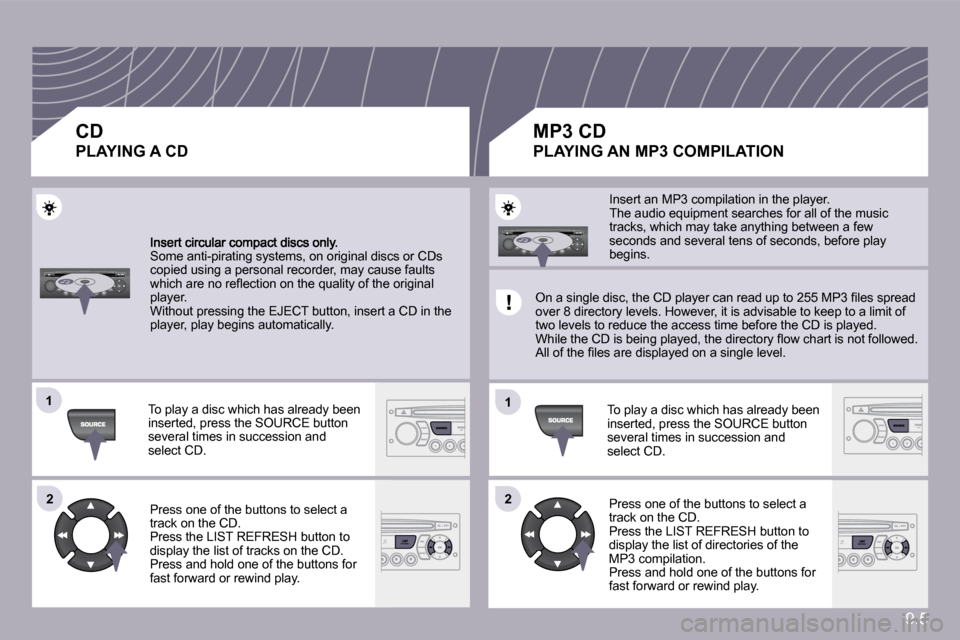
Some anti-pirating systems, on original discs or CDs copied using a personal recorder, may cause faults which are no refl ection on the quality of the original player. Without pressing the EJECT button, insert a CD in the player, play begins automatically.
To play a disc which has already been inserted, press the SOURCE button several times in succession and select CD.
Press one of the buttons to select a track on the CD. Press the LIST REFRESH button to display the list of tracks on the CD. Press and hold one of the buttons for fast forward or rewind play.
Insert an MP3 compilation in the player. The audio equipment searches for all of the music tracks, which may take anything between a few seconds and several tens of seconds, before play begins.
On a single disc, the CD player can read up to 255 MP3 fi les spread over 8 directory levels. However, it is advisable to keep to a limit of two levels to reduce the access time before the CD is played. While the CD is being played, the directory fl ow chart is not followed. All of the fi les are displayed on a single level.
To play a disc which has already been inserted, press the SOURCE button several times in succession and select CD.
Press one of the buttons to select a track on the CD. Press the LIST REFRESH button to display the list of directories of the MP3 compilation. Press and hold one of the buttons for fast forward or rewind play.
CD
PLAYING A CD
MP3 CD
PLAYING AN MP3 COMPILATION
Page 137 of 177
9.8
33
04
44
11
55
22
USB PLAYER - PLUG
USING THE USB SOCKET - PLUG
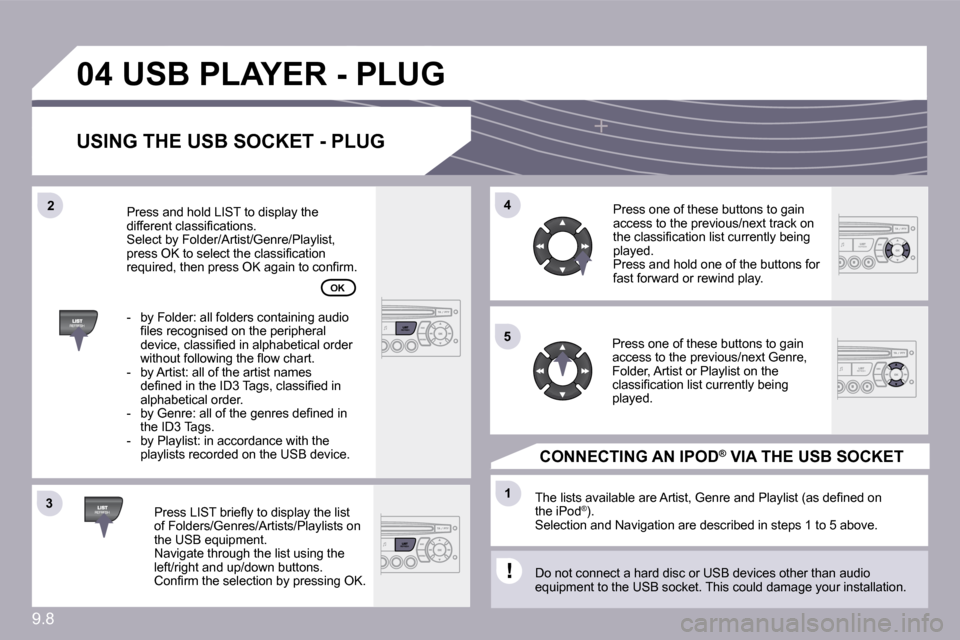
Press LIST briefl y to display the list of Folders/Genres/Artists/Playlists on the USB equipment. Navigate through the list using the left/right and up/down buttons. Confi rm the selection by pressing OK.
The lists available are Artist, Genre and Playlist (as defi ned on the iPod ® ). Selection and Navigation are described in steps 1 to 5 above.
Do not connect a hard disc or USB devices other than audio equipment to the USB socket. This could damage your installation.
CONNECTING AN IPOD ® CONNECTING AN IPOD CONNECTING AN IPOD VIA THE USB SOCKET ®
Press one of these buttons to gain access to the previous/next track on the classifi cation list currently being played. Press and hold one of the buttons for fast forward or rewind play.
Press one of these buttons to gain access to the previous/next Genre, Folder, Artist or Playlist on the classifi cation list currently being played.
Press and hold LIST to display the different classifi cations. Select by Folder/Artist/Genre/Playlist, press OK to select the classifi cation required, then press OK again to confi rm.
- by Folder: all folders containing audio fi les recognised on the peripheral device, classifi ed in alphabetical order without following the fl ow chart. - by Artist: all of the artist names defi ned in the ID3 Tags, classifi ed in alphabetical order. - by Genre: all of the genres defi ned in the ID3 Tags. - by Playlist: in accordance with the playlists recorded on the USB device.
OK
Page 140 of 177
9.11
11
22
11
11
22
33
22
YES
RECEIVING A CALL
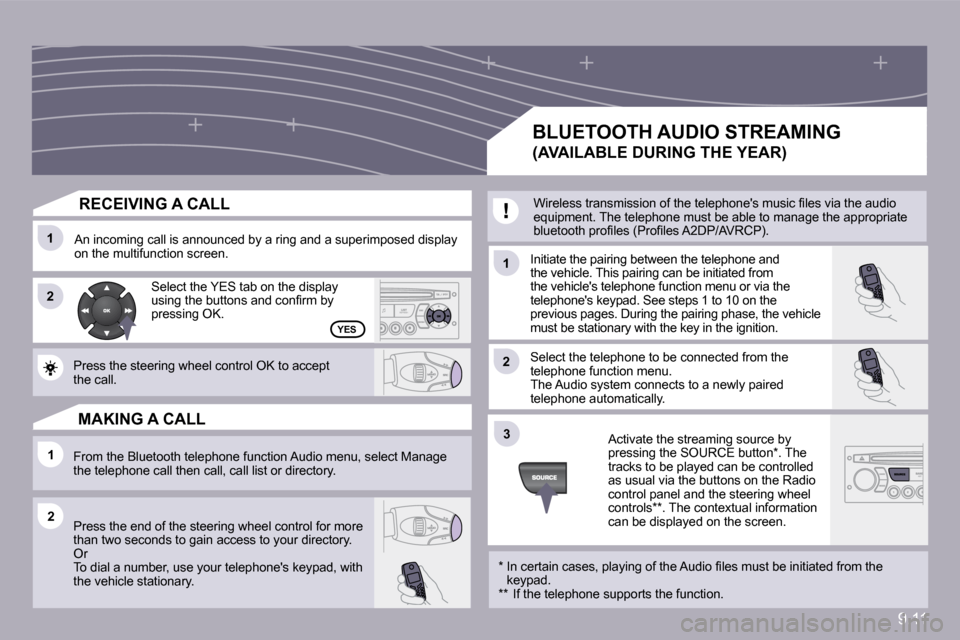
An incoming call is announced by a ring and a superimposed display on the multifunction screen. Initiate the pairing between the telephone and the vehicle. This pairing can be initiated from the vehicle's telephone function menu or via the telephone's keypad. See steps 1 to 10 on the previous pages. During the pairing phase, the vehicle must be stationary with the key in the ignition.
Select the telephone to be connected from the telephone function menu. The Audio system connects to a newly paired telephone automatically.
Select the YES tab on the display using the buttons and confi rm by pressing OK.
Press the steering wheel control OK to accept the call.
From the Bluetooth telephone function Audio menu, select Manage the telephone call then call, call list or directory.
Press the end of the steering wheel control for mo re than two seconds to gain access to your directory. Or To dial a number, use your telephone's keypad, wit h the vehicle stationary.
MAKING A CALL
BLUETOOTH AUDIO STREAMING
(AVAILABLE DURING THE YEAR)
Wireless transmission of the telephone's music fi les via the audio equipment. The telephone must be able to manage the appropriate bluetooth profi les (Profi les A2DP/AVRCP).
* In certain cases, playing of the Audio fi les must be initiated from the keypad. ** If the telephone supports the function.
Activate the streaming source by pressing the SOURCE button * . The tracks to be played can be controlled as usual via the buttons on the Radio control panel and the steering wheel controls ** . The contextual information can be displayed on the screen.
Page 147 of 177
9.17
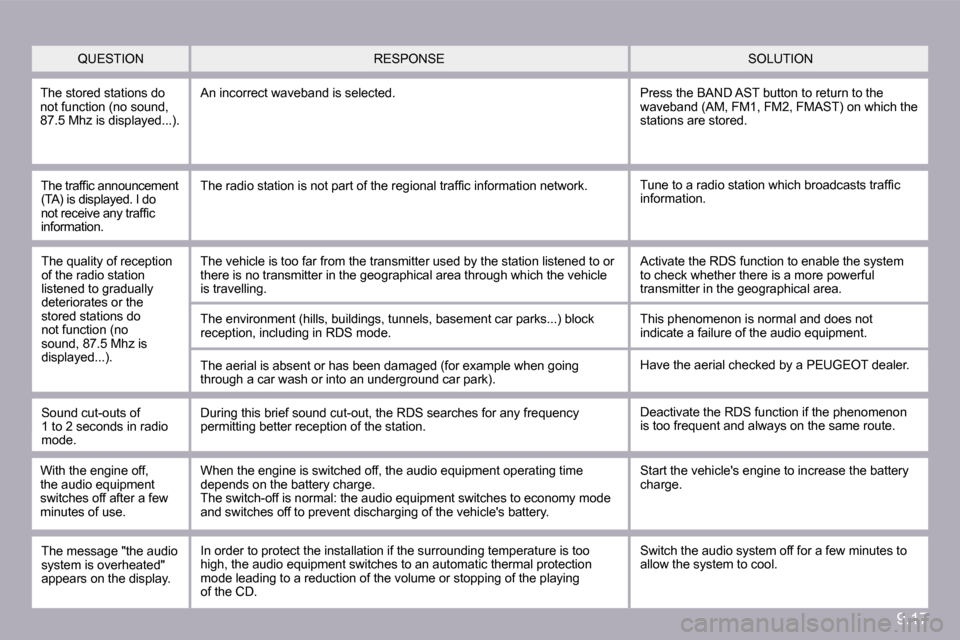
QUESTION SOLUTION RESPONSE
The stored stations do not function (no sound, 87.5 Mhz is displayed...).
An incorrect waveband is selected. Press the BAND AST button to return to the waveband (AM, FM1, FM2, FMAST) on which the stations are stored.
The traffi c announcement (TA) is displayed. I do not receive any traffi c information.
Tune to a radio station which broadcasts traffi c information. The radio station is not part of the regional traffi c information network.
The quality of reception of the radio station listened to gradually deteriorates or the stored stations do not function (no sound, 87.5 Mhz is displayed...).
The vehicle is too far from the transmitter used b y the station listened to or there is no transmitter in the geographical area th rough which the vehicle is travelling.
The environment (hills, buildings, tunnels, baseme nt car parks...) block reception, including in RDS mode.
The aerial is absent or has been damaged (for exam ple when going through a car wash or into an underground car park).
Activate the RDS function to enable the system to check whether there is a more powerful transmitter in the geographical area.
This phenomenon is normal and does not indicate a failure of the audio equipment.
Have the aerial checked by a PEUGEOT dealer.
Sound cut-outs of 1 to 2 seconds in radio mode.
During this brief sound cut-out, the RDS searches for any frequency permitting better reception of the station. Deactivate the RDS function if the phenomenon is too frequent and always on the same route.
With the engine off, the audio equipment switches off after a few minutes of use.
When the engine is switched off, the audio equipme nt operating time depends on the battery charge. The switch-off is normal: the audio equipment switches to economy mode and switches off to prevent discharging of the vehicle's battery.
Start the vehicle's engine to increase the battery charge.
The message "the audio system is overheated" appears on the display.
Switch the audio system off for a few minutes to allow the system to cool. In order to protect the installation if the surrounding temperature is too high, the audio equipment switches to an automatic thermal protection mode leading to a reduction of the volume or stopping of the playing of the CD.
Page 151 of 177
9. 21
02 GENERAL OPERATION
For a detailed global view of the menus available, refer to section 10.
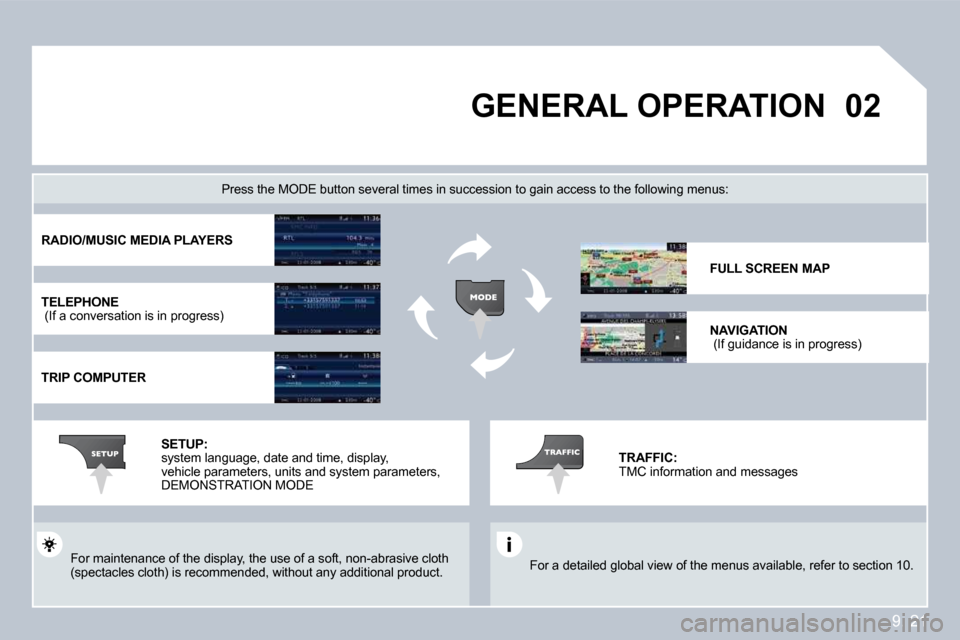
Press the MODE button several times in succession to gain access to the following menus:
For maintenance of the display, the use of a soft, non-abrasive cloth (spectacles cloth) is recommended, without any addi tional product.
RADIO/MUSIC MEDIA PLAYERS
TELEPHONE (If a conversation is in progress)
TRIP COMPUTER
FULL SCREEN MAP
NAVIGATION (If guidance is in progress)
SETUP: system language, date and time, display, vehicle parameters, units and system parameters, DEMONSTRATION MODE
TRAFFIC: TMC information and messages
Page 152 of 177
9.22
02
1
2
3
3
2
1
1
1
3
2
1
1
1
1
1
1
1
1
1
1
1
1
2
2
2
2
1
1
2
1
2
2
2
2
2
2
2
1
1
1
1
1
1
GENERAL OPERATION
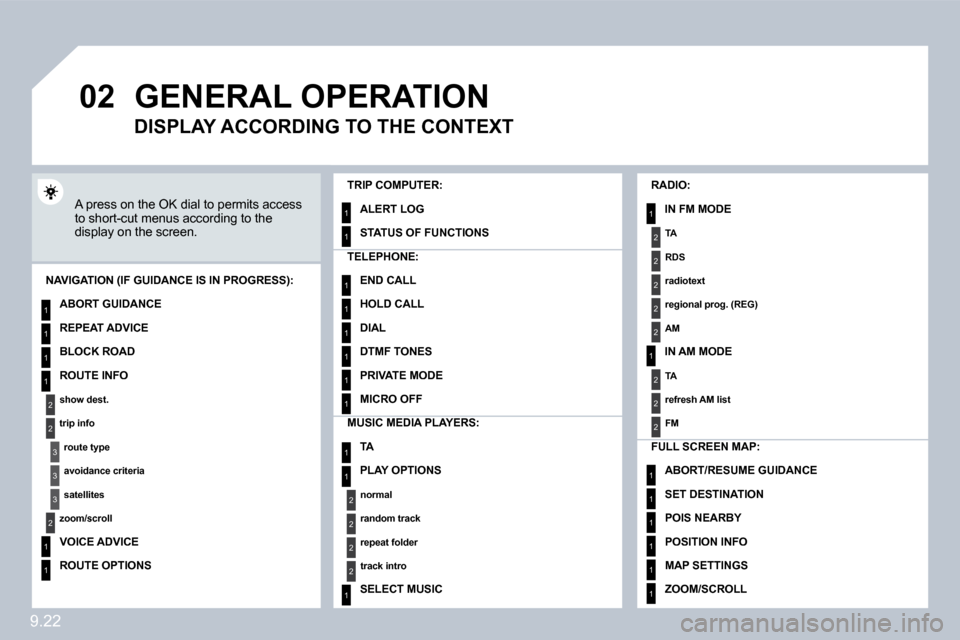
A press on the OK dial to permits access to short-cut menus according to the display on the screen.
TRIP COMPUTER:
ALERT LOG
STATUS OF FUNCTIONS
MUSIC MEDIA PLAYERS:
TA
PLAY OPTIONS
normal
random track
repeat folder
track intro
SELECT MUSIC
NAVIGATION (IF GUIDANCE IS IN PROGRESS):
ABORT GUIDANCE
REPEAT ADVICE
BLOCK ROAD
ROUTE INFO
show dest.
trip info
route type
avoidance criteria
satellites
zoom/scroll
VOICE ADVICE
ROUTE OPTIONS
RADIO:
IN FM MODE
TA
RDS
radiotext
regional prog. (REG)
AM
IN AM MODE
TA
refresh AM list
FM
FULL SCREEN MAP:
ABORT/RESUME GUIDANCE
SET DESTINATION
POIS NEARBY
POSITION INFO
MAP SETTINGS
ZOOM/SCROLL
TELEPHONE:
END CALL
HOLD CALL
DIAL
DTMF TONES
PRIVATE MODE
MICRO OFF
DISPLAY ACCORDING TO THE CONTEXT
Page 159 of 177
9. 29
03
6
4
5
1
2
3
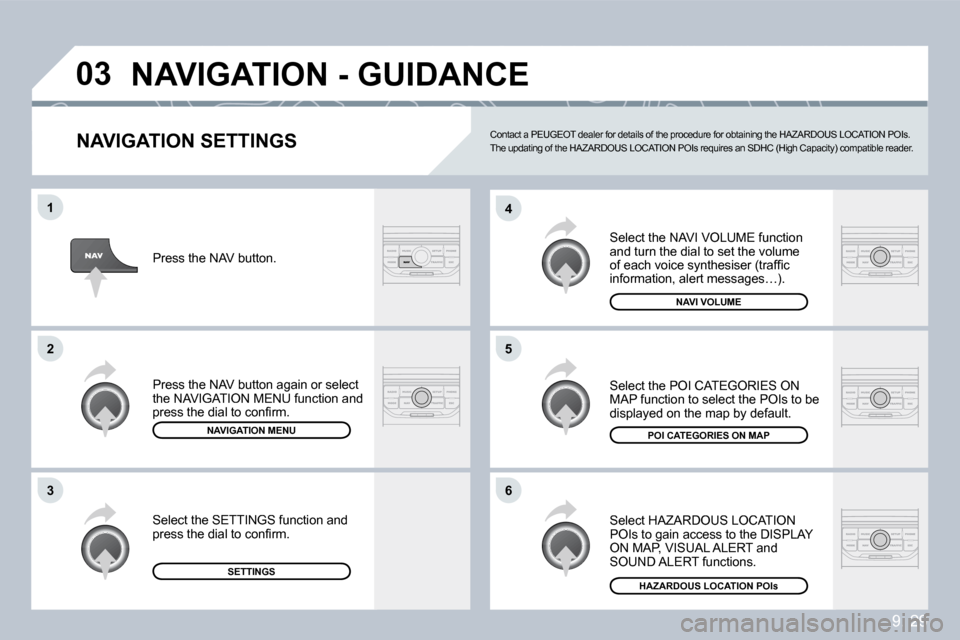
NAVIGATION SETTINGS
Select the NAVI VOLUME function and turn the dial to set the volume of each voice synthesiser (traffi c information, alert messages…).
Select HAZARDOUS LOCATION POIs to gain access to the DISPLAY ON MAP, VISUAL ALERT and SOUND ALERT functions.
Select the POI CATEGORIES ON MAP function to select the POIs to be displayed on the map by default.
NAVI VOLUME
Press the NAV button.
NAVIGATION MENU
Press the NAV button again or select the NAVIGATION MENU function and press the dial to confi rm.
SETTINGS
Select the SETTINGS function and press the dial to confi rm.
HAZARDOUS LOCATION POIsPOI CATEGORIES ON MAP
NAVIGATION - GUIDANCE
Contact a PEUGEOT dealer for details of the proced
ure for obtaining the HAZARDOUS LOCATION POIs. The updating of the HAZARDOUS LOCATION POIs requir es an SDHC (High Capacity) compatible reader.
Page 161 of 177
9. 31
11
2
3
05
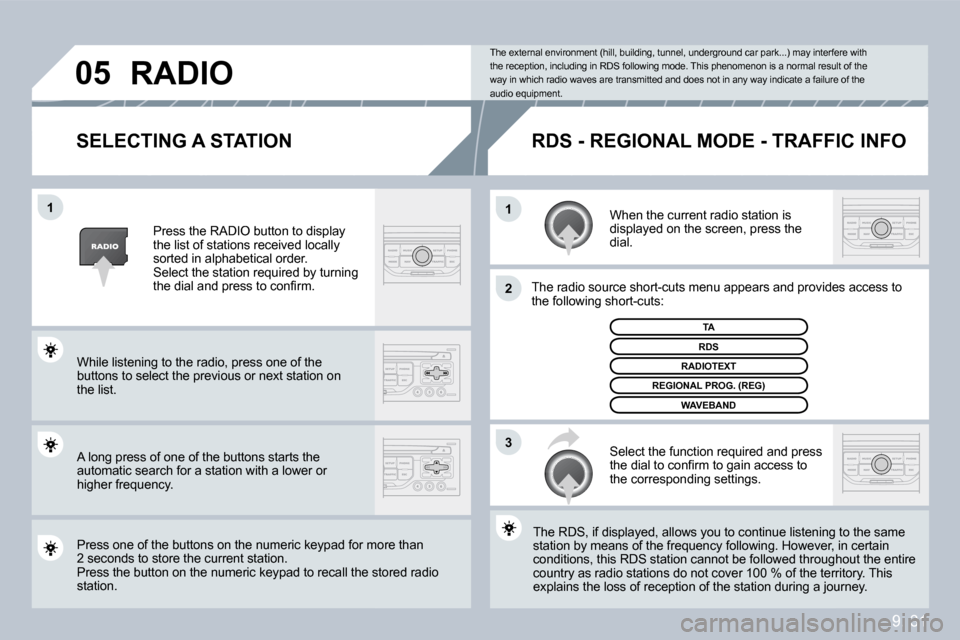
SELECTING A STATION
When the current radio station is displayed on the screen, press the dial.
The radio source short-cuts menu appears and providesovides access to the following short-cuts:
Select the function required and press the dial to confi rm to gain access to the corresponding settings.
TA
The RDS, if displayed, allows you to continue listening to the same The RDS, if displayed, allows you to continue listening to the same station by means of the frequency following. Howeve r, in certain station by means of the frequency following. However, in certain conditions, this RDS station cannot be followed throughout the entire conditions, this RDS station cannot be followed throughout the entire country as radio stations do not cover 100 % of the terrie territory. This explains the loss of reception of the station during a journey. explains the loss of reception of the station during a journey.
The external environment (hill, building, tunnel, underground car park...) may interfere with the reception, including in RDS following mode. Thi s phenomenon is a normal result of the way in which radio waves are transmitted and does n ot in any way indicate a failure of the audio equipment.
RDS - REGIONAL MODE - TRAFFIC INFO
Press the RADIO button to display the list of stations received locally sorted in alphabetical order. Select the station required by turning the dial and press to confi rm.
While listening to the radio, press one of the buttons to select the previous or next station on the list.
Press one of the buttons on the numeric keypad for moor more than 2 seconds to store the current station. Press the button on the numeric keypad to recall the stothe stored radio station.
RDS
RADIOTEXT
REGIONAL PROG. (REG)
WAVEBAND
RADIO
A long press of one of the buttons starts the automatic search for a station with a lower or higher frequency.
Page 165 of 177
9. 35
07
1
3
5
4
2
1
2
The services available depend on the network, the SIM card and the compatibility of the Bluetooth equipment used. Refer to your telephone's manual an d your operator to check which services you have access to. A list of mobile telephones which offer the best range of services is available from dealers.
BLUETOOTH TELEPHONE
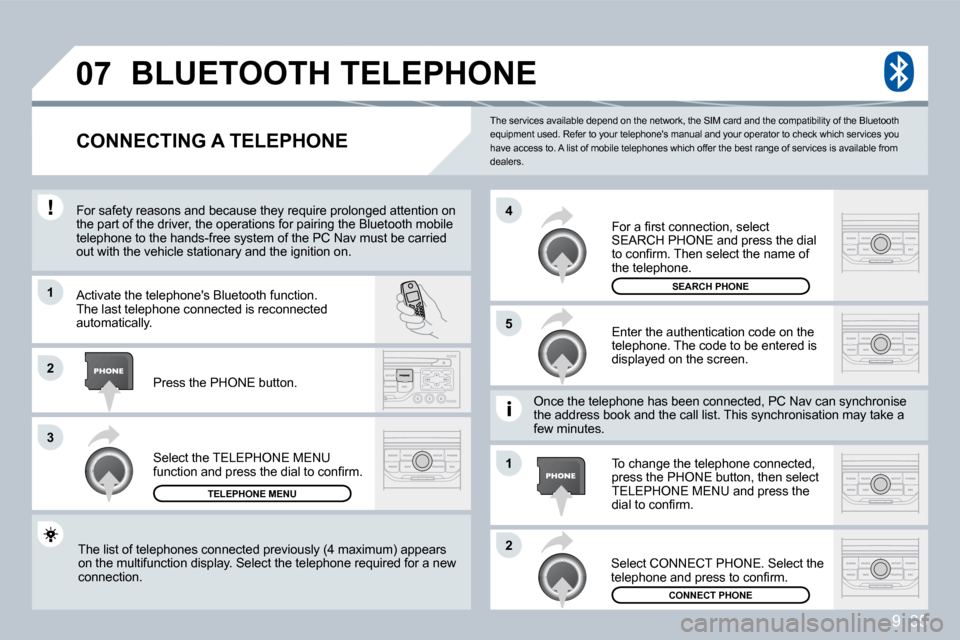
CONNECTING A TELEPHONE
For safety reasons and because they require prolon ged attention on For safety reasons and because they require prolonged attention on the part of the driver, the operations for pairing the Bluetooth mobile the part of the driver, the operations for pairing the Bluetooth mobile telephone to the hands-free system of the PC Nav mu sv must be carried out with the vehicle stationary and the ignition on.
Activate the telephone's Bluetooth function. The last telephone connected is reconnected automatically.
Select the TELEPHONE MENU function and press the dial to confi rm.
TELEPHONE MENU
Enter the authentication code on the telephone. The code to be entered is displayed on the screen.
To change the telephone connected, press the PHONE button, then select TELEPHONE MENU and press the dial to confi rm.
Once the telephone has been connected, PC Nav can s can synchronise the address book and the call list. This synchronisation ation may take a few minutes.
Select CONNECT PHONE. Select the telephone and press to confi rm.
The list of telephones connected previously (4 max imum) appears The list of telephones connected previously (4 maximum) appears on the multifunction display. Select the telephone requir required for a new connection.
Press the PHONE button.
For a fi rst connection, select SEARCH PHONE and press the dial to confi rm. Then select the name of the telephone.
SEARCH PHONE
CONNECT PHONE