navigation Peugeot Partner 2012 User Guide
[x] Cancel search | Manufacturer: PEUGEOT, Model Year: 2012, Model line: Partner, Model: Peugeot Partner 2012Pages: 208, PDF Size: 6.5 MB
Page 153 of 208
04
7
6
5
4
3
2
1
9.13
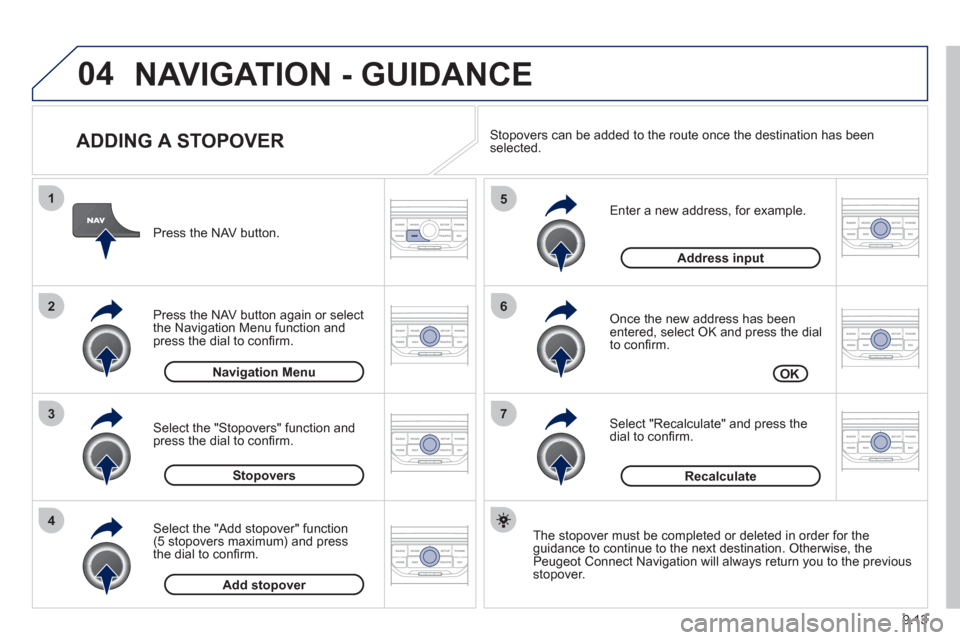
ADDING A STOPOVER
Enter a new address, for example.
Once the new address has been entered, select OK and press the dial
to confi rm.
Select "Recalculate" and press thedial to confi rm. Pr
ess the NAV button.
Press the NAV button again or select
the Navi
gation Menu function and
press the dial to confi rm.
Select the "Add stopover" function(5 stopovers maximum) and press
the dial to confi rm.
Select the "Stopovers" function and
press the dial to confi rm.
OK Address in
put
Add stopover Sto
povers Navi
gation Menu
Recalculate
The stopover must be completed or deleted in order for theguidance to continue to the next destination. Otherwise, the Peugeot Connect Navigation will always return you to the previous stopover.
Stopovers can be added to the route once the destination has been selected.
NAVIGATION - GUIDANCE
Page 154 of 208
04
8
6
7
4
3
5
2
1
9.14
NAVIGATION - GUIDANCE
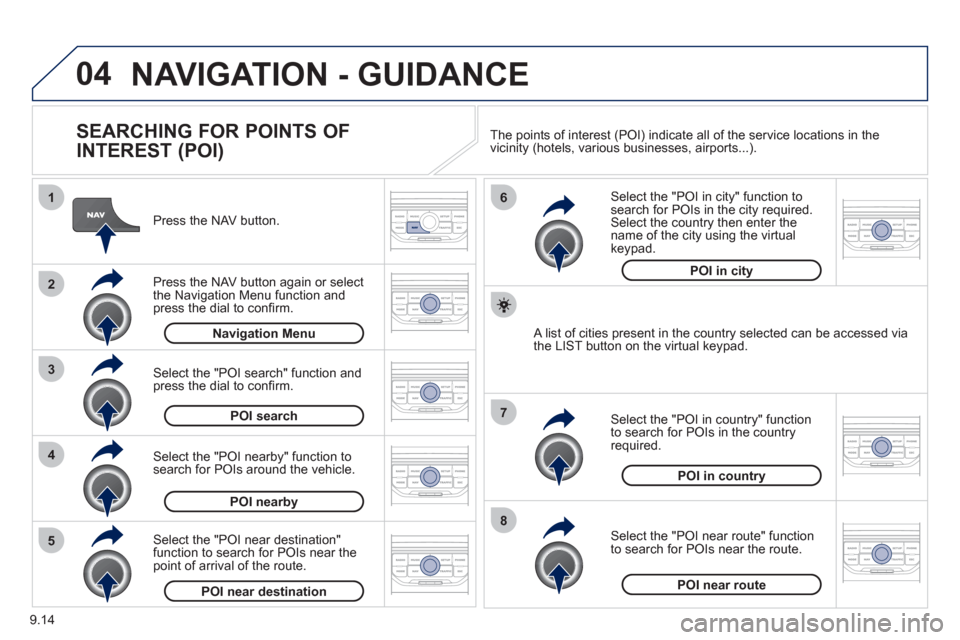
SEARCHING FOR POINTS OF
INTEREST (POI)
Press the NAV button.
Press the NAV button again or select
the Navigation Menu function and press the dial to confi rm.
Select the "POI nearby" function to search for POIs around the vehicle.
Select the "POI search" function and press the dial to confi rm. Navigation Menu
POI search
POI nearby
Select the "POI in city" function tosearch for POIs in the city required.Select the country then enter the name of the city using the virtual
keypad.
Select the "POI near route" function
to search for POIs near the route.
Select the "P
OI in country" function
to search for POIs in the country
required.
Select the "POI near destination"function to search for POIs near thepoint of arrival of the route.
POI near destinationPOI near route
POI in country
POI in city
A list of cities present in the country selected can be accessed via
the LIST button on the virtual keypad. The points o
f interest (POI) indicate all of the service locations in the
vicinity (hotels, various businesses, airports...).
Page 155 of 208
04
9.15
NAVIGATION - GUIDANCE
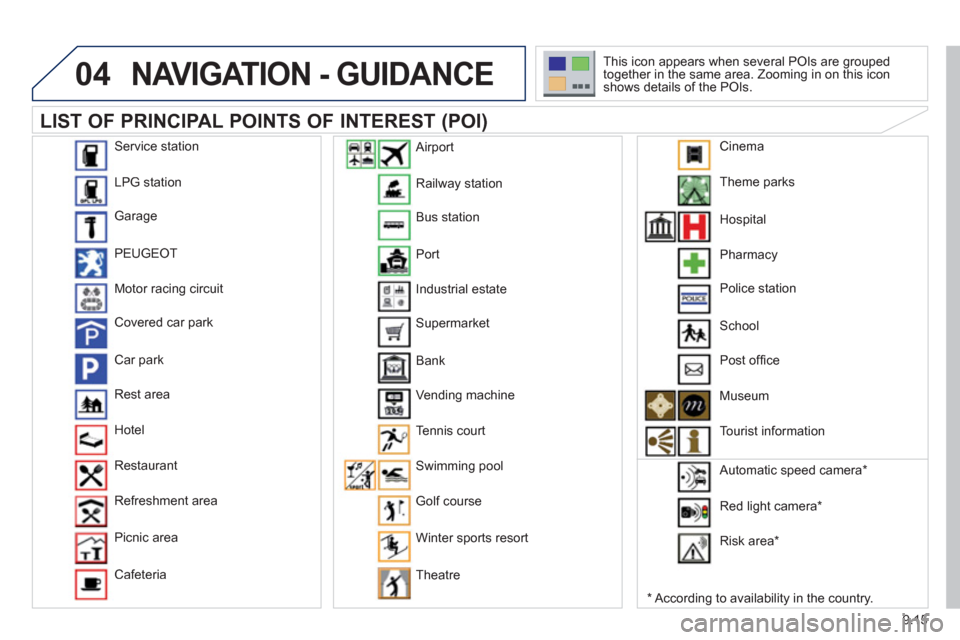
LIST OF PRINCIPAL POINTS OF INTEREST (POI)
*
According to availability in the country. This icon appears when several P
OIs are grouped
together in the same area. Zooming in on this icon
shows details of the POIs.
Service station
LP
G station
Garage
PEU
GEOT
Motor racin
g circuit
Covered car park
Car park
Rest area
H
otel
Restaurant
R
efreshment area
Pi
cnic area
Cafeteria
Railwa
y station
B
us station
Port
Industrial estate
Supermarket
B
ank
Vending machine
T
ennis court
Swimmin
g pool
Golf course
Winter sports resort
Th
eatre
Airport
Theme
parks
Hospital
Pharmac
y
Police station
School
P
ost offi ce
Museum
T
ourist information
Automatic speed camera
*
Red li
ght camera *
Ri
sk area *
Cinema
Page 156 of 208
04
5
6
3 2 1
4
9.16
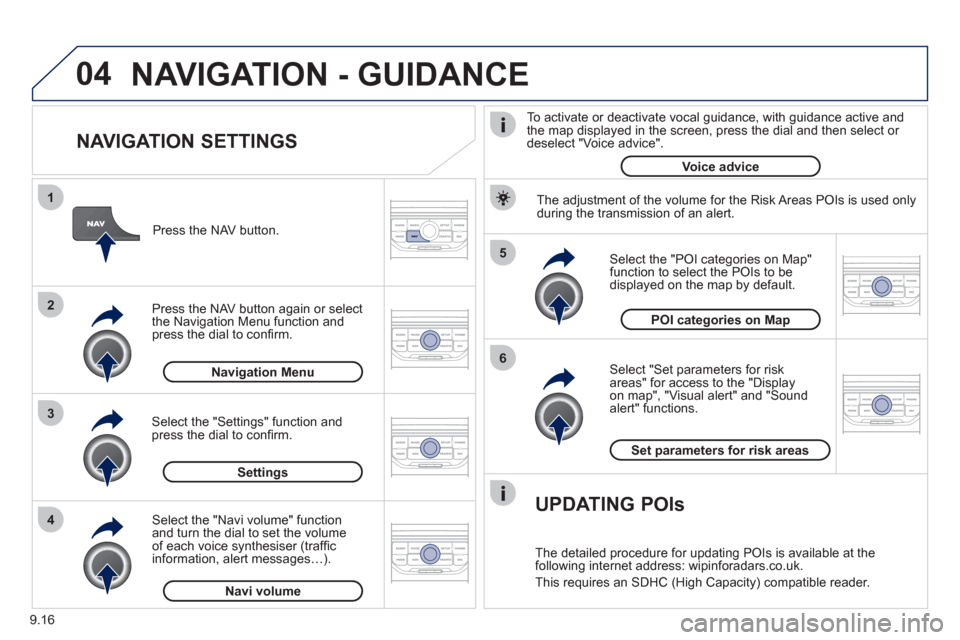
NAVIGATION SETTINGS
Select "Set parameters for risk
areas" for access to the "Display
on map", "Visual alert" and "Soundalert" functions.
Select the "POI categories on Map"function to select the POIs to be
displayed on the map by default. Pr
ess the NAV button.
Press the NAV button a
gain or select
the Navigation Menu function and
press the dial to confi rm.
Select the "Settings" function andpress the dial to confi rm.
POI categories on Map
Settin
gsSet parameters for risk area
s
Navigation Menu
NAVIGATION - GUIDANCE
Select the "Navi volume" function and turn the dial to set the volume
of each voice synthesiser (traffi c
information, alert messagesÖ).
Navi volum
e
The adjustment of the volume for the Risk Areas POIs is used only
during the transmission of an alert.
UPDATING POIs
The detailed procedure for updating POIs is available at the
following internet address: wipinforadars.co.uk.
This requires an SDHC
(High Capacity) compatible reader.
To activate or deactivate vocal
guidance, with guidance active and
the map displayed in the screen, press the dial and then select or deselect "Voice advice".
Voice advice
Page 157 of 208
05
2 1
3
4
5
9.17
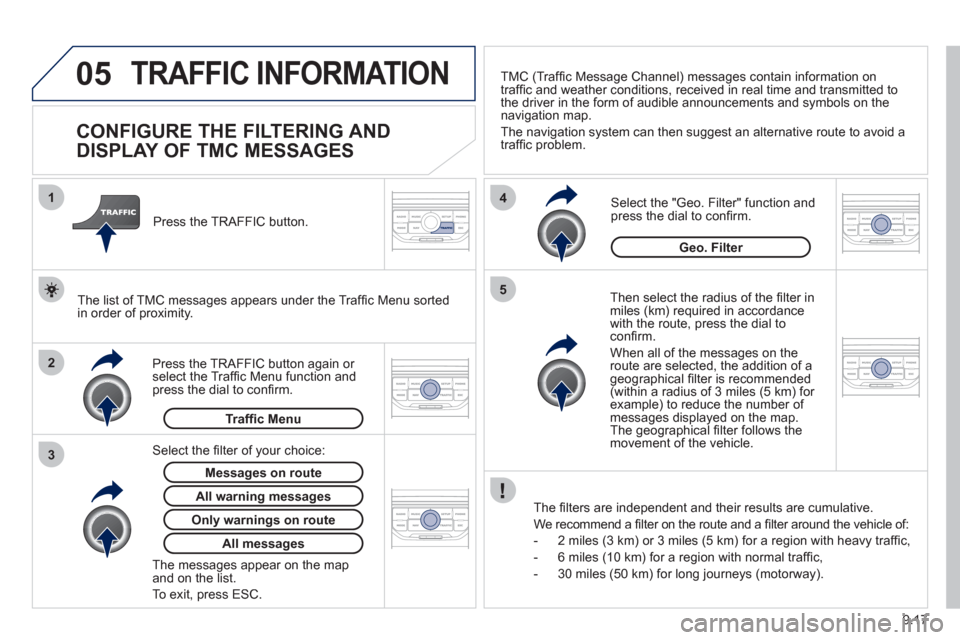
TRAFFIC INFORMATION
CONFIGURE THE FILTERING AND
DISPLAY OF TMC MESSAGES
Then select the radius of the fi lter in miles (km) required in accordance
with the route, press the dial to confi rm.
When all of the messa
ges on the route are selected, the addition of ageographical fi lter is recommended(within a radius of 3 miles (5 km) for example) to reduce the number of messages displayed on the map.The geographical fi lter follows the movement of the vehicle.
The
fi lters are independent and their results are cumulative.
W
e recommend a fi lter on the route and a fi lter around the vehicle of:
- 2 miles
(3 km) or 3 miles (5 km) for a region with heavy traffi c,
- 6 miles
(10 km) for a region with normal traffi c,
- 30 miles
(50 km) for long journeys (motorway).
Press the TRAFFI
C button again or select the Traffi c Menu function andpress the dial to confi rm. Press the TRAFFI
C button.
TM
C (Traffi c Message Channel) messages contain information on
traffi c and weather conditions, received in real time and transmitted to
the driver in the form of audible announcements and symbols on thenavigation map.
The navi
gation system can then suggest an alternative route to avoid a
traffi c problem.
Select the "Geo. Filter" function and press the dial to confi rm.
Messages on route
The list of TMC messages appears under the Traffi c Menu sorted
in order of proximity.
All warnin
g messages
Traffi c Menu
Select the fi lter of
your choice:
Onl
y warnings on route
All messages
The messages appear on the map and on the list.
To exit, press E
SC.
Geo. Filter
Page 160 of 208
07
9.20
MUSIC MEDIA PLAYERS
CD, MP3 / WMA CD
INFORMATION AND ADVICE
In order to be able to play a recorded CDR or CDRW, when recording it is preferable to select the ISO 9660 level 1, 2 or Jolietstandard.
I
f the disc is recorded in another format it may not be playedcorrectly.
It is recommended that the same recordin
g standard is alwaysused for an individual disc, with as low a speed as possible(4x maximum) for optimum sound quality.
In the particular case o
f a multi-session CD, the Joliet standard is recommended.
The Peu
geot Connect Navigation will only play audio fi les with the extension ".mp3" with a speed of between 8 Kbps and 320 Kbps
and the extension ".wma" with a speed of between 5 Kbps and384 Kbps.
It also supports the VBR
(Variable Bit Rate) mode.
No other t
ype of fi le (.mp4, .m3u...) can be played. The MP3
format, an abbreviation of MPEG 1, 2 & 2.5 Audio Layer 3 and the WMA format, an abbreviation of Windows Media Audio and
the property of Microsoft, are audio compression standards which permit the recording of several tens of music fi les on a single disc.
It is advisable to restrict fi le names to 20 characters
, without
using special characters (e.g.: " ? ; ù) to avoid any play or display
problems.
Page 163 of 208
08
1
2
3
4
9.23
BLUETOOTH® TELEPHONE®
*
The services available depend on the network, the SIM card and thecompatibility of the Bluetooth telephone used. Check the telephone
manual and with your network provider for details of the servicesavailable to you.
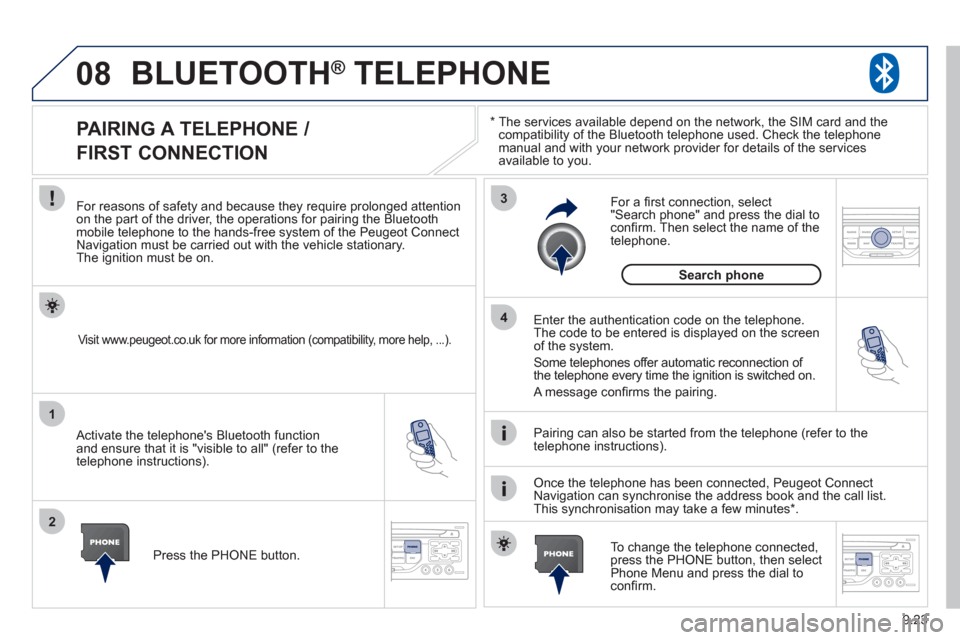
PAIRING A TELEPHONE /
FIRST CONNECTION
For reasons of safety and because they require prolonged attentionon the part of the driver, the operations for pairing the Bluetooth mobile telephone to the hands-free system of the Peugeot ConnectNavigation must be carried out with the vehicle stationary.The ignition must be on.
Activate the telephone's Bluetooth
function
and ensure that it is "visible to all" (refer to the
telephone instructions). Enter the authentication code on the tele
phone.
The code to be entered is displayed on the screen
of the system.
Some telephones offer automatic reconnection o
f
the telephone every time the ignition is switched on.
A messa
ge confi rms the pairing.
To change the telephone connected, press the PHONE button, then select Phone Menu and press the dial toconfi rm.
Once the telephone has been connected, Peugeot Connect
Navigation can synchronise the address book and the call list.
This synchronisation may take a few minutes * . Pairin
g can also be started from the telephone (refer to the
telephone instructions).
Visit www.peugeot.co.uk for more information (compatibility, more help, ...).
Press the PHONE button.
For a
fi rst connection, select"Search phone" and press the dial to confi rm. Then select the name of thetelephone.
Search
phone
Page 164 of 208
08
1
2
2
1
9.24
*
The services available depend on the network, the SIM card and the compatibility of the Bluetooth telephone used. Check the telephone manual and with your network provider for details of the services
available to you.
BLUETOOTH ®TELEPHONE ®
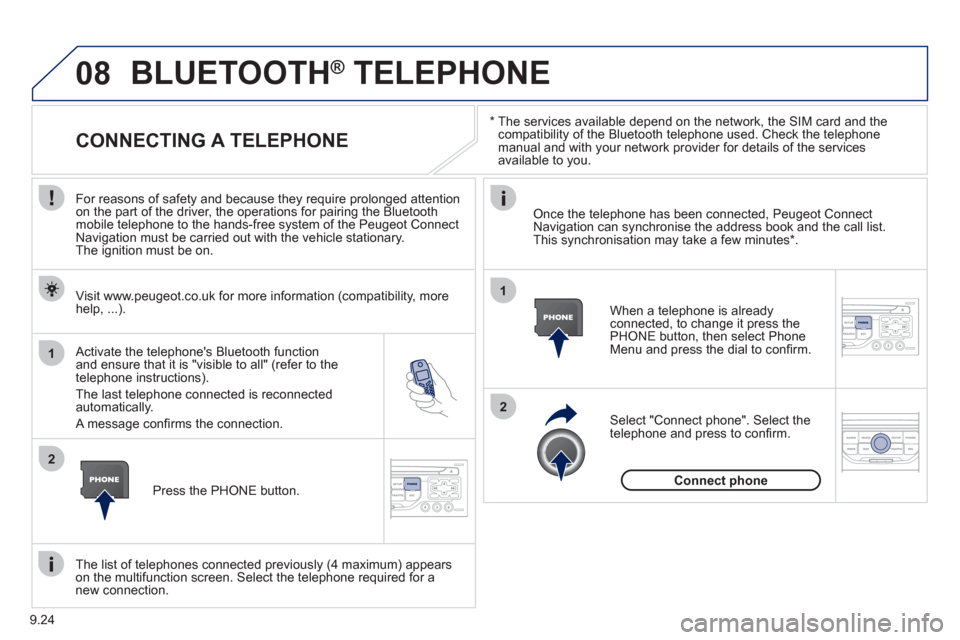
CONNECTING A TELEPHONE
For reasons of safety and because they require prolonged attention
on the part of the driver, the operations for pairing the Bluetooth
mobile telephone to the hands-free system of the Peugeot Connect
Navigation must be carried out with the vehicle stationary.
The ignition must be on.
Activate the tele
phone's Bluetooth function and ensure that it is "visible to all" (refer to the
telephone instructions).
The last telephone connected is reconnected automatically.
A messa
ge confi rms the connection. When a telephone is alread
yconnected, to change it press the
PHONE button, then select PhoneMenu and press the dial to confi rm.
Once the telephone has been connected, Peugeot Connect Navigation can synchronise the address book and the call list.This synchronisation may take a few minutes *
.
The list o
f telephones connected previously (4 maximum) appearson the multifunction screen. Select the telephone required for a
new connection. Visit www.peu
geot.co.uk for more information (compatibility, more
help, ...).
Pr
ess the PHONE button.Select "Connect
phone". Select the
telephone and press to confi rm.
Connect
phone
Page 165 of 208
08
1
3 2
2 1
9.25
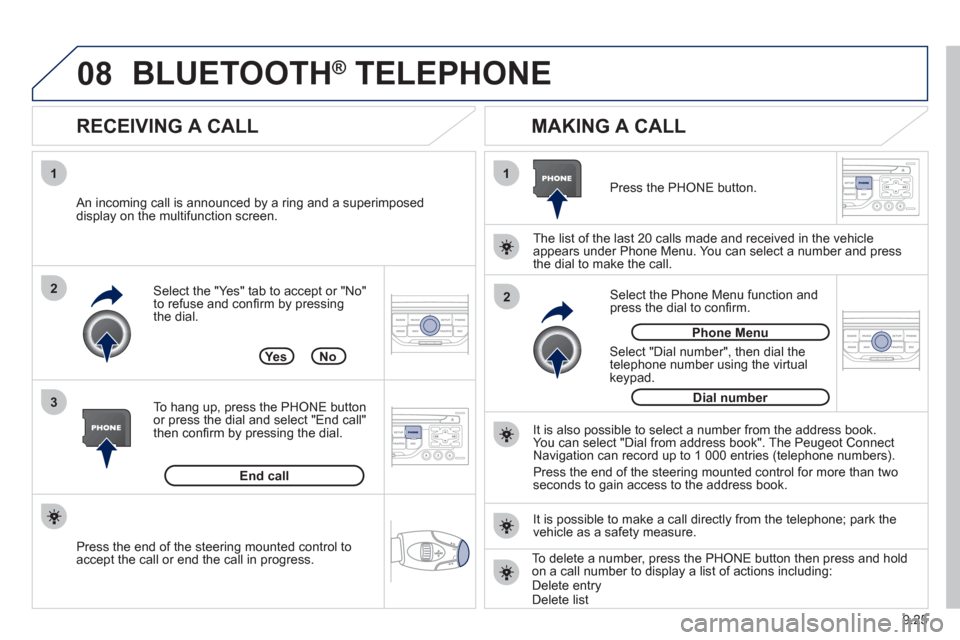
Select the "Yes" tab to accept or "No"
to refuse and confi rm by pressing
the dial.
RECEIVING A CALL
MAKING A CALL
An incoming call is announced by a ring and a superimposed
display on the multifunction screen.
Yes
To han
g up, press the PHONE button
or press the dial and select "End call"then confi rm by pressing the dial.
End callPress the PH
ONE button.
Select "Dial number"
, then dial the
telephone number using the virtualkeypad.
Select the Phone Menu function and
press the dial to confi rm.
The list of the last 2
0 calls made and received in the vehicle
appears under Phone Menu. You can select a number and press
the dial to make the call.
No
It is also possible to select a number from the address book. You can select "Dial from address book". The Peugeot Connect
Navigation can record up to 1 000 entries (telephone numbers).
Press the end o
f the steering mounted control for more than twoseconds to gain access to the address book.
Phone Menu
Dial number
It is possible to make a call directl
y from the telephone; park the
vehicle as a safety measure.
BLUETOOTH ® TELEPHONE ®
Press the end of the steering mounted control to
accept the call or end the call in progress.To delete a number, press the PHONE button then press and hold
on a call number to display a list of actions including:Delete entryDelete list
Page 167 of 208
10
1
9.27
TRIP COMPUTER
TRIP COMPUTER
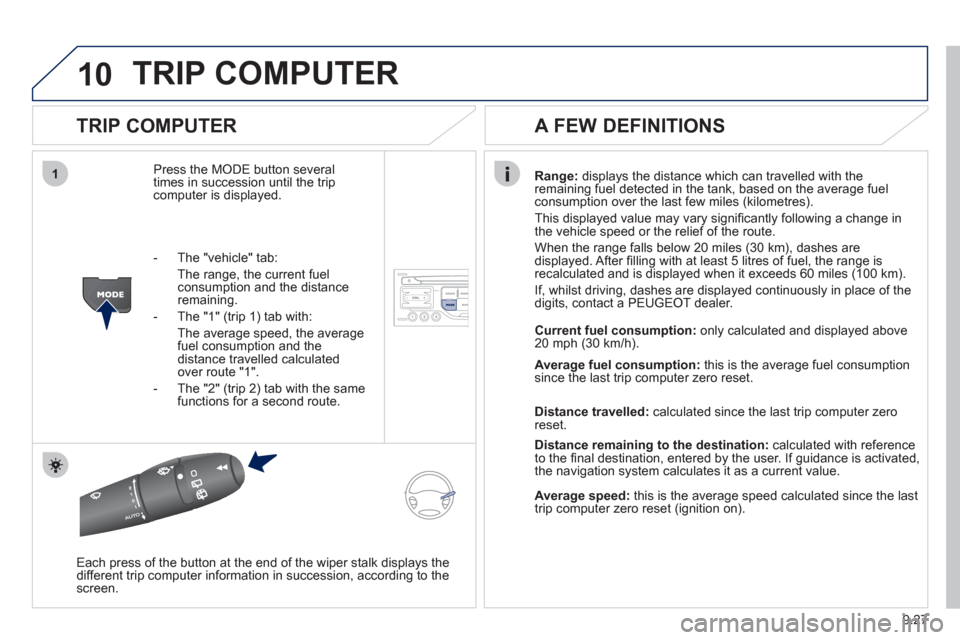
Press the MODE button several
times in succession until the tripcomputer is displayed.Ran
ge: displays the distance which can travelled with the
remaining fuel detected in the tank, based on the average fuel consumption over the last few miles (kilometres).
This displa
yed value may vary signifi cantly following a change in
the vehicle speed or the relief of the route.
When the ran
ge falls below 20 miles (30 km), dashes are
displayed. After fi lling with at least 5 litres of fuel, the range is
recalculated and is displayed when it exceeds 60 miles (100 km).
I
f, whilst driving, dashes are displayed continuously in place of the
digits, contact a PEUGEOT dealer.
Each press o
f the button at the end of the wiper stalk displays the
different trip computer information in succession, according to the screen.
A FEW DEFINITIONS
- The "vehicle" tab:
The ran
ge, the current fuelconsumption and the distance remaining.
- The "1"
(trip 1) tab with:
The average speed, the average fuel consumption and the distance travelled calculatedover route "1".
- The "2"
(trip 2) tab with the same functions for a second route. Current fuel consum
ption:only calculated and displayed above
20 mph (30 km/h).
Avera
ge fuel consumption:this is the average fuel consumption since the last trip computer zero reset.
Distance travelled:calculated since the last trip computer zero
reset.
Distance remaining to the destination:calculated with referenceto the fi nal destination, entered by the user. If guidance is activated,
the navigation system calculates it as a current value.
Average speed:this is the average speed calculated since the last
trip computer zero reset (ignition on).