set time Peugeot Partner 2012 Owner's Guide
[x] Cancel search | Manufacturer: PEUGEOT, Model Year: 2012, Model line: Partner, Model: Peugeot Partner 2012Pages: 208, PDF Size: 6.5 MB
Page 174 of 208
9.34
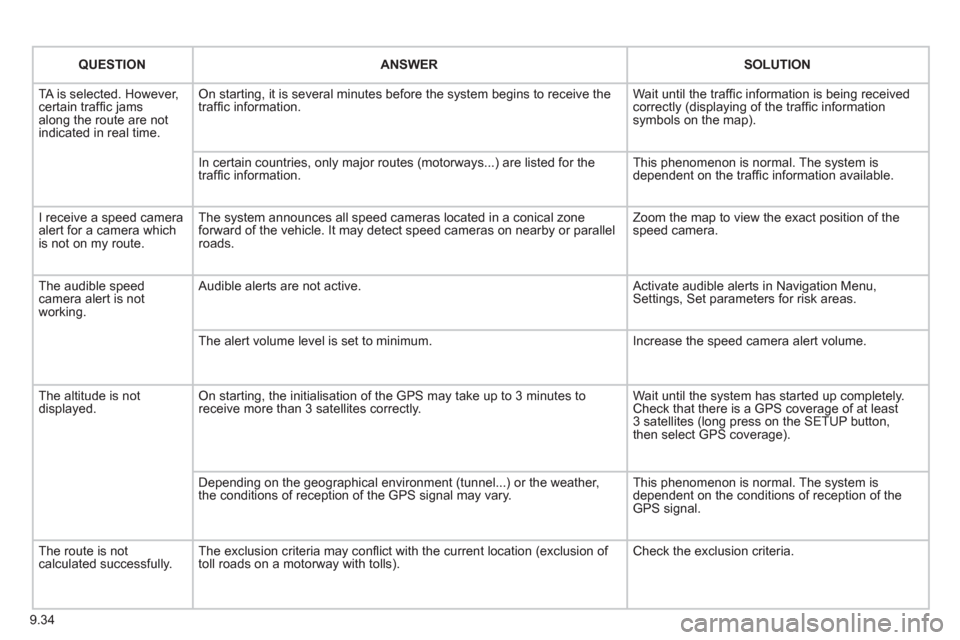
QUESTIONANSWER SOLUTION
TA is selected. However, certain traffi c jams
along the route are not
indicated in real time.
On starting, it is several minutes before the system begins to receive the
traffi c information. Wait until the traffi c information is being received correctly (displaying of the traffi c information symbols on the map).
In certain countries, onl
y major routes (motorways...) are listed for the
traffi c information. This phenomenon is normal. The system is
dependent on the traffi c information available.
I receive a speed camera
alert for a camera which
is not on my route.The system announces all speed cameras located in a conical zoneforward of the vehicle. It may detect speed cameras on nearby or parallel roads. Zoom the map to view the exact position o
f thespeed camera.
The audible speed
camera alert is not
working. A
udible alerts are not active. Activate audible alerts in Navigation Menu, Settings, Set parameters for risk areas.
Th
e alert volume level is set to minimum. Increase the speed camera alert volume.
Th
e altitude is not displayed. On starting, the initialisation of the GPS may take up to 3 minutes toreceive more than 3 satellites correctly. Wait until the system has started up completely.
Check that there is a GPS coverage of at least
3 satellites (long press on the SETUP button,
then select GPS coverage).
Dependin
g on the geographical environment (tunnel...) or the weather,
the conditions of reception of the GPS signal may vary. This phenomenon is normal. The system is
dependent on the conditions of reception of the
GPS signal.
The route is notcalculated successfully.The exclusion criteria may confl ict with the current location (exclusion of
toll roads on a motorway with tolls). Check the exclusion criteria.
Page 175 of 208
9.35
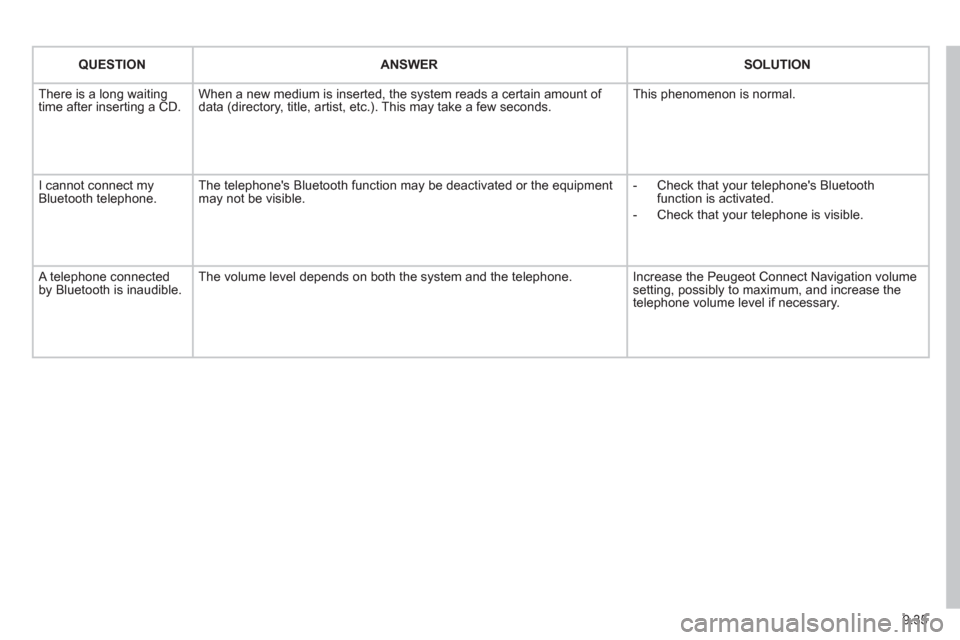
QUESTIONANSWER SOLUTION
There is a long waiting
time after inserting a CD. When a new medium is inserted, the system reads a certain amount of
data (directory, title, artist, etc.). This may take a few seconds. This phenomenon is normal.
I cannot connect myBluetooth telephone.The telephone's Bluetooth function may be deactivated or the equipment
may not be visible.
- Check that your telephone's Bluetoothfunction is activated.
-
Check that your telephone is visible.
A telephone connected by Bluetooth is inaudible.The volume level depends on both the system and the telephone. Increase the Peugeot Connect Navigation volume setting, possibly to maximum, and increase the
telephone volume level if necessary.
Page 190 of 208
07
1
2
3
4
5
6
7
8
MENU
OK
OK
OK
OK
9.50
CONFIGURATION
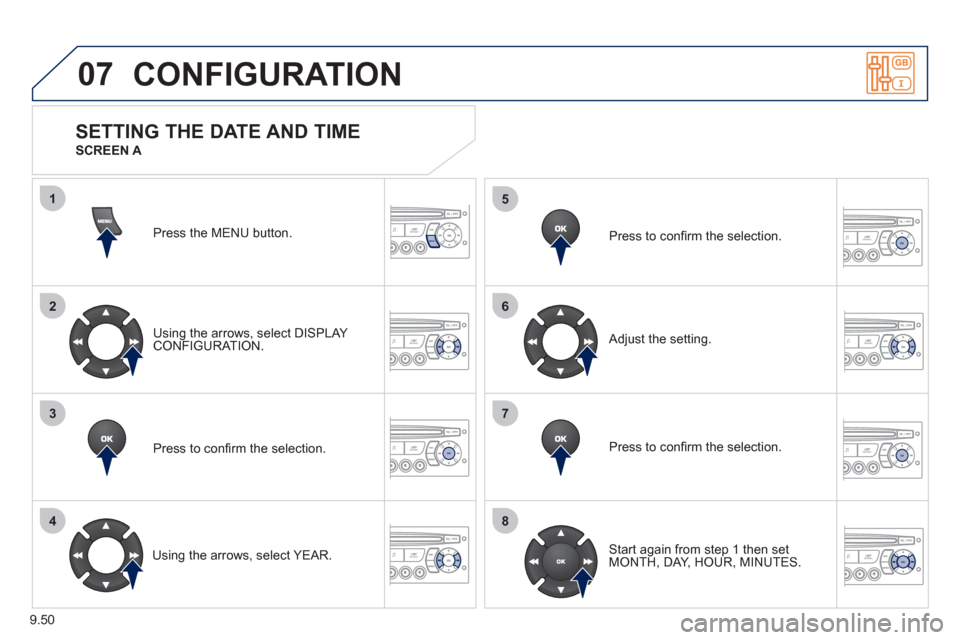
Press the MENU button.
Usin
g the arrows, select DISPLAY CONFIGURATION.
Pr
ess to confi rm the selection.
Using the arrows, select YEAR. Pr
ess to confi rm the selection.
Pr
ess to confi rm the selection.
Ad
just the setting.
Start again from step 1 then set MONTH, DAY, HOUR, MINUTES.
SETTING THE DATE AND TIME
SCREEN A
Page 191 of 208
07
1
2
3
4
5
6
7
8
MENU
OK
OK
OK
OK
9.51
CONFIGURATION
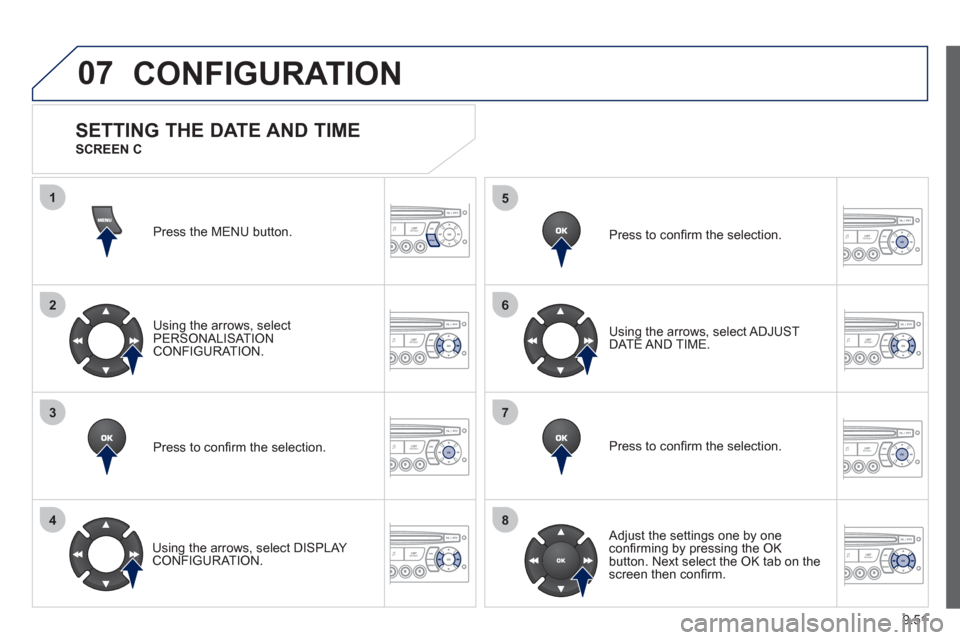
Press the MENU button.
Usin
g the arrows, select
PERSONALISAT ION CONFIGURATION.
Pr
ess to confi rm the selection.
Using the arrows, select DI
SPLAY CONFIGURATION. Pr
ess to confi rm the selection.
Pr
ess to confi rm the selection. Usin
g the arrows, select ADJUST DATE AND TIME.
Adjust the settings one by one confi rming by pressing the OK
button. Next select the OK tab on thescreen then confi rm.
SETTING THE DATE AND TIME
SCREEN C
Page 202 of 208
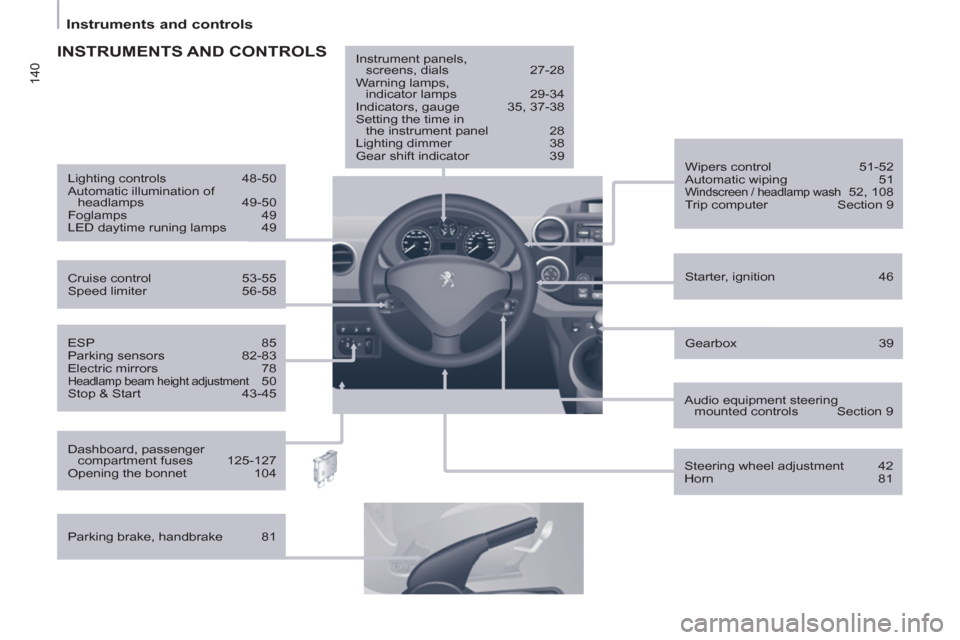
140
Instruments and controls
ESP 85
Parking sensors 82-83
Electric mirrors 78
Headlamp beam height adjustment 50
Stop & Start 43-45
Starter, ignition 46
Wipers control 51-52
Automatic wiping 51
Windscreen / headlamp wash 52, 108
Trip computer Section 9
Cruise control 53-55
Speed limiter 56-58
Lighting controls 48-50
Automatic illumination of
headlamps 49-50
Foglamps 49
LED daytime runing lamps 49
INSTRUMENTS AND CONTROLS
Dashboard, passenger
compartment fuses 125-127
Opening the bonnet 104
Parking brake, handbrake 81
Instrument panels,
screens, dials 27-28
Warning lamps,
indicator lamps 29-34
Indicators, gauge 35, 37-38
Setting the time in
the instrument panel 28
Lighting dimmer 38
Gear shift indicator 39
Audio equipment steering
mounted controls Section 9
Steering wheel adjustment 42
Horn 81
Gearbox 39
Page 203 of 208
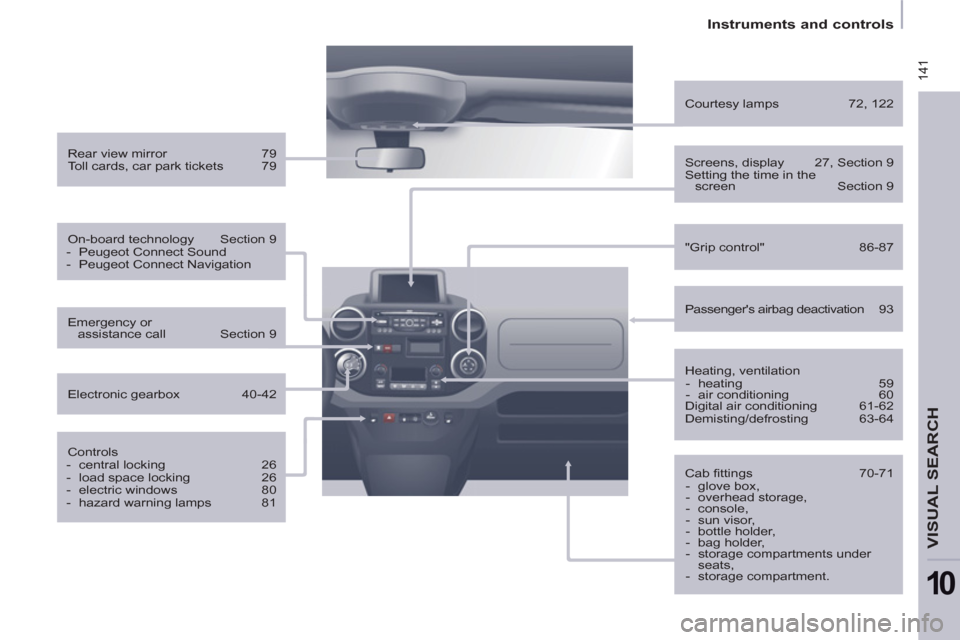
141
Instruments and controls
VISUAL SEARCH
10
Rear view mirror 79
Toll cards, car park tickets 79
On-board technology Section 9
- Peugeot Connect Sound
- Peugeot Connect Navigation
Controls
- central locking 26
- load space locking 26
- electric windows 80
- hazard warning lamps 81
Emergency or
assistance call Section 9
Electronic gearbox 40-42
Heating, ventilation
- heating 59
- air conditioning 60
Digital air conditioning 61-62
Demisting/defrosting 63-64
"Grip control" 86-87
Courtesy lamps 72, 122
Cab fi ttings 70-71
- glove box,
- overhead storage,
- console,
- sun visor,
- bottle holder,
- bag holder,
- storage compartments under
seats,
- storage compartment.
Screens, display 27, Section 9
Setting the time in the
screen Section 9
Passenger's airbag deactivation 93