tow Peugeot Partner 2012 Owner's Guide
[x] Cancel search | Manufacturer: PEUGEOT, Model Year: 2012, Model line: Partner, Model: Peugeot Partner 2012Pages: 208, PDF Size: 6.5 MB
Page 149 of 208
04
1
2
3
5
6
4
9.9
NAVIGATION - GUIDANCE
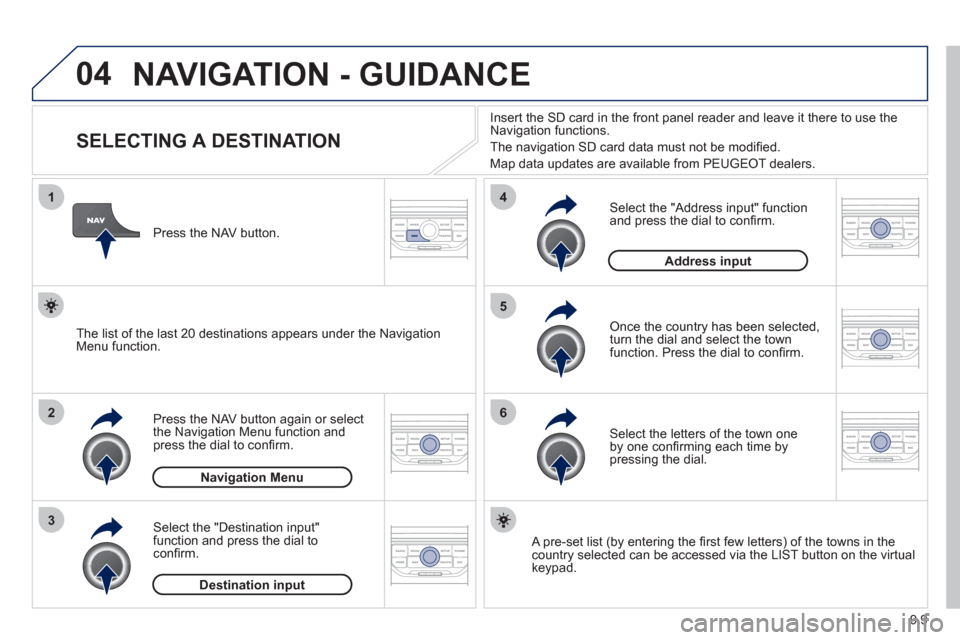
SELECTING A DESTINATION
Press the NAV button again or select
the Navigation Menu function and
press the dial to confi rm.
Select the "Destination in
put"
function and press the dial to
confi rm. Pr
ess the NAV button.
Select the letters of the town one
by one confi rming each time by pressing the dial.
Once the country has been selected,
turn the dial and select the townfunction. Press the dial to confi rm. Insert the
SD card in the front panel reader and leave it there to use the
Navigation functions.
The navi
gation SD card data must not be modifi ed.
Map data updates are available
from PEUGEOT dealers.
A pre-set list (by entering the fi rst few letters) of the towns in thecountry selected can be accessed via the LIST button on the virtual
keypad.
Select the "Address input" function
and press the dial to confi rm.
The list o
f the last 20 destinations appears under the NavigationMenu function.
Navigation Menu
Destination input
Address input
Page 151 of 208
04
1
2
3
5
4
9.11
NAVIGATION - GUIDANCE
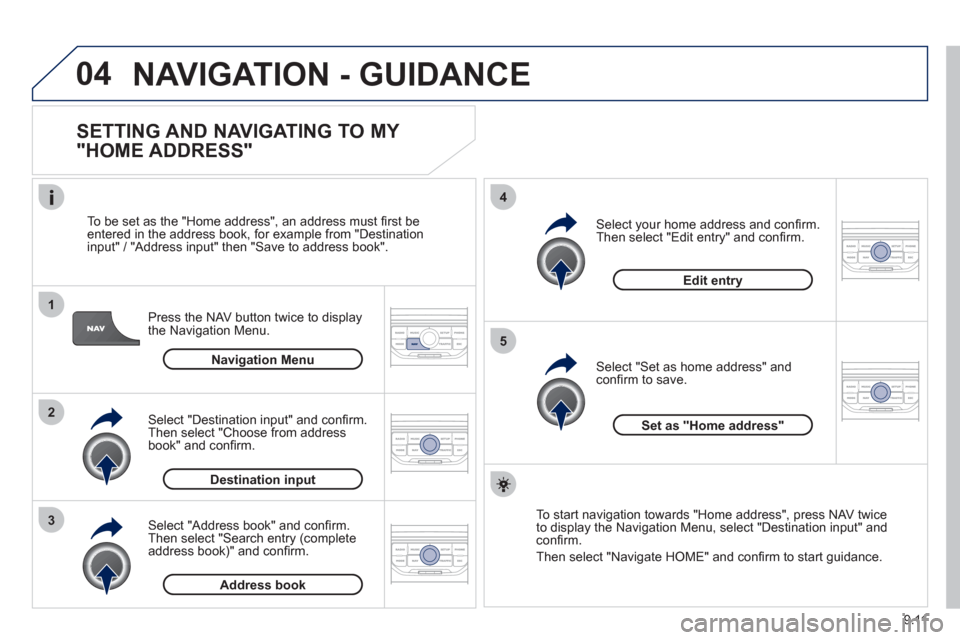
SETTING AND NAVIGATING TO MY
"HOME ADDRESS"
Press the NAV button twice to display
the Navigation Menu.
To be set as the "Home address"
, an address must fi rst be entered in the address book, for example from "Destination
input" / "Address input" then "Save to address book".
Select "Address book" and confi rm.
Then select "Search entry (complete address book)" and confi rm. Select "Destination in
put" and confi rm.
Then select "Choose from addressbook" and confi rm.
Select "Set as home address" andconfi rm to save.
Select
your home address and confi rm.
Then select "Edit entry" and confi rm.
To start navi
gation towards "Home address", press NAV twice
to display the Navigation Menu, select "Destination input" and confi rm.
Then select "Navi
gate HOME" and confi rm to start guidance.
Navigation Menu
Destination input
Address book
Edit entry
Set as "Home address"
Page 201 of 208
139
Exterior
VISUAL SEARCH
10
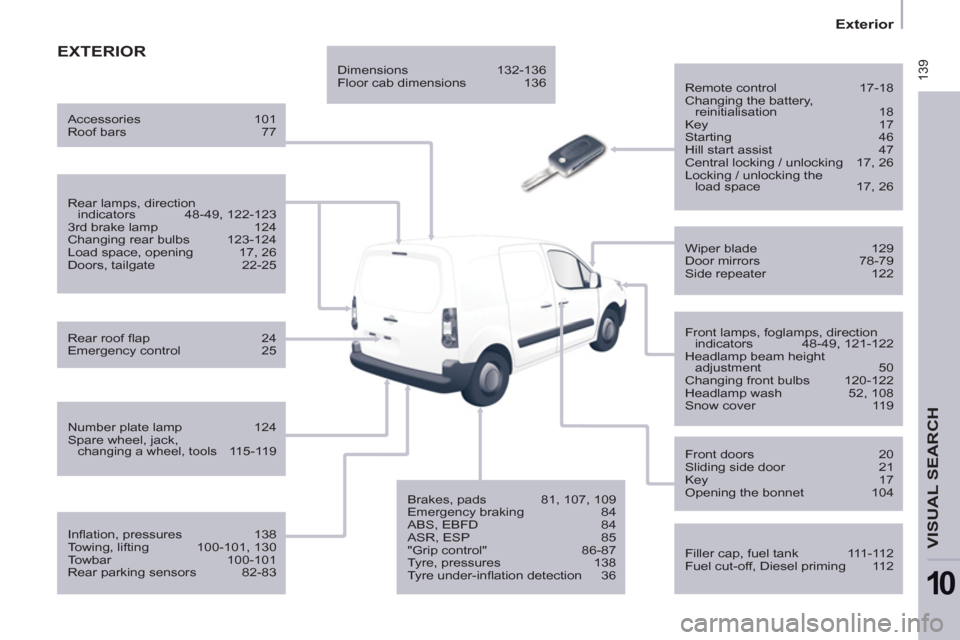
EXTERIOR
Remote control 17-18
Changing the battery,
reinitialisation 18
Key 17
Starting 46
Hill start assist 47
Central locking / unlocking 17, 26
Locking / unlocking the
load space 17, 26
Filler cap, fuel tank 111-112
Fuel cut-off, Diesel priming 112
Wiper blade 129
Door mirrors 78-79
Side repeater 122
Front lamps, foglamps, direction
indicators 48-49, 121-122
Headlamp beam height
adjustment 50
Changing front bulbs 120-122
Headlamp wash 52, 108
Snow cover 119
Front doors 20
Sliding side door 21
Key 17
Opening the bonnet 104
Infl ation, pressures 138
Towing, lifting 100-101, 130
Towbar 100-101
Rear parking sensors 82-83
Number plate lamp 124
Spare wheel, jack,
changing a wheel, tools 115-119
Rear lamps, direction
indicators 48-49, 122-123
3rd brake lamp 124
Changing rear bulbs 123-124
Load space, opening 17, 26
Doors, tailgate 22-25
Accessories 101
Roof bars 77
Rear roof fl ap 24
Emergency control 25
Dimensions 132-136
Floor cab dimensions 136
Brakes, pads 81, 107, 109
Emergency braking 84
ABS, EBFD 84
ASR, ESP 85
"Grip control" 86-87
Tyre, pressures 138
Tyre under-infl ation detection 36
Page 204 of 208
142
Interior
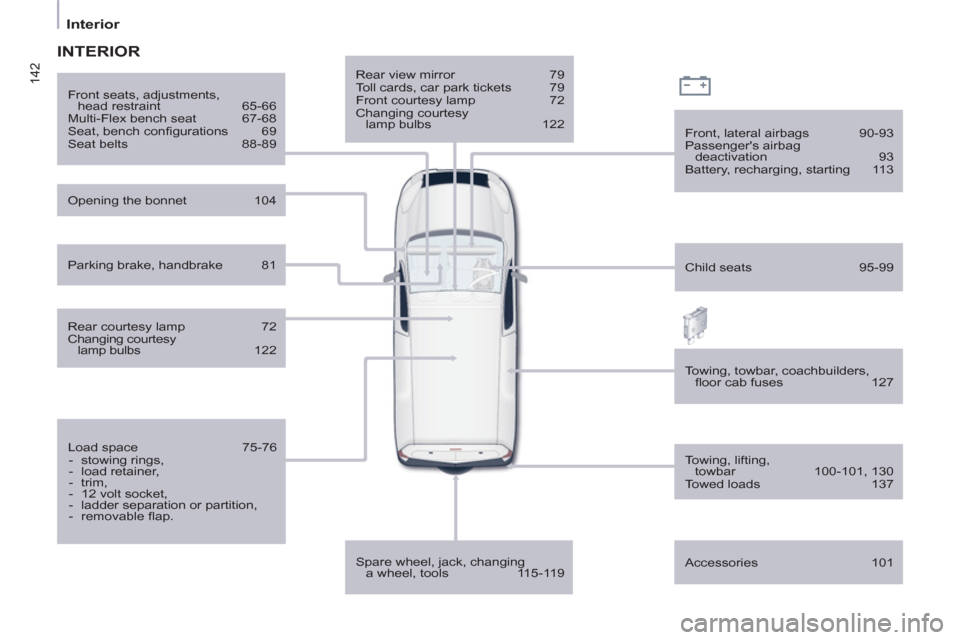
Rear view mirror 79
Toll cards, car park tickets 79
Front courtesy lamp 72
Changing courtesy
lamp bulbs 122
Spare wheel, jack, changing
a wheel, tools 115-119
Front, lateral airbags 90-93
Passenger's airbag
deactivation 93
Battery, recharging, starting 113
Opening the bonnet 104
Towing, towbar, coachbuilders,
fl oor cab fuses 127
Front seats, adjustments,
head restraint 65-66
Multi-Flex bench seat 67-68
Seat, bench confi gurations 69
Seat belts 88-89
Accessories 101
INTERIOR
Rear courtesy lamp 72
Changing courtesy
lamp bulbs 122
Load space 75-76
- stowing rings,
- load retainer,
- trim,
- 12 volt socket,
- ladder separation or partition,
- removable fl ap.
Child seats 95-99
Parking brake, handbrake 81
Towing, lifting,
towbar 100-101, 130
Towed loads 137