DEF Peugeot Partner 2012 Owner's Manual
[x] Cancel search | Manufacturer: PEUGEOT, Model Year: 2012, Model line: Partner, Model: Peugeot Partner 2012Pages: 208, PDF Size: 6.5 MB
Page 16 of 208
33
4
4
3
14
Interior
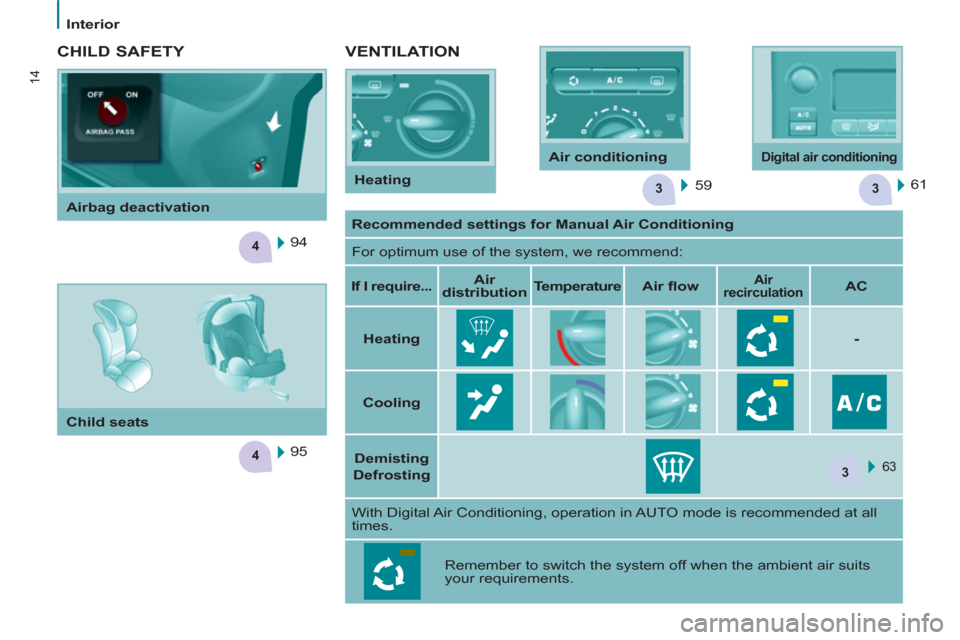
VENTILATION
59 61
CHILD SAFETY
95
94
Recommended settings for Manual Air Conditioning
For optimum use of the system, we recommend:
If I require...
Air
distribution
Temperature
Air fl ow
Air
recirculation
AC
Heating
-
Cooling
Demisting
Defrosting
63
With Digital Air Conditioning, operation in AUTO mode is recommended at all
times.
Remember to switch the system off when the ambient air suits
your requirements.
Airbag deactivation
Child seats
Heating Air conditioning
Digital air conditioning
Page 17 of 208
15
1
FAMILIARISATION
ECO-DRIVING
Eco-driving is a range of everyday practices that allow the motorist to optimise their fuel consumption and CO2
emissions.
Optimise the use of your
gearbox
With a manual gearbox, move off
gently, change up without waiting and
drive by changing up quite soon. If
your vehicle has the system, the gear
shift indicator invites you to change
up; it is displayed in the instrument
panel, follow its instructions.
With an automatic or electronic
gearbox, stay in Drive "D"
or
Auto "A"
, according to the type
of gearbox, without pressing
the accelerator pedal heavily or
suddenly.
Control the use of your
electrical equipment
Before moving off, if the passenger
compartment is too warm, ventilate it
by opening the windows and air vents
before using the air conditioning.
Above 30 mph (50 km/h), close the
windows and leave the air vents open.
Remember to make use of equipment
that can help keep the temperature
in the passenger compartment down
(sunroof and window blinds...).
Switch off the headlamps and front
foglamps when the level of light does
not require their use.
Avoid running the engine before
moving off, particularly in winter; your
vehicle will warm up much faster
while driving.
Drive smoothly
Maintain a safe distance between
vehicles, use engine braking rather
than the brake pedal, and press the
accelerator progressively. These
practices contribute towards a
reduction in fuel consumption and CO
2
emissions and also helps reduce the
background traffi c noise.
If your vehicle has cruise control,
make use of the system at speeds
above 25 mph (40 km/h) when the
traffi c is fl owing well.
As a passenger, if you avoid
connecting your multimedia devices
(fi lm, music, video game...), you
will contribute towards limiting the
consumption of electrical energy, and
so of fuel.
Disconnect your portable devices
before leaving the vehicle.
Switch off the air conditioning, unless
it has automatic digital regulation, as
soon as the desired temperature is
attained.
Switch off the demisting and
defrosting controls, if not automatic.
Switch off the heated seat as soon as
possible.
Page 38 of 208
Instruments and controls
36
Puncture
The STOP warning lamp comes on.
Stop as soon as it is safe to do so,
avoiding any sudden movement of the
steering wheel and the brakes.
Make a temporary repair to the tyre
using the puncture repair kit or by
fi tting the spare wheel.
Change the damaged wheel, and have
the tyre pressures checked as soon as
possible.
Sensor(s) fault or not detected
The Service warning lamp comes on.
When changing a wheel or in the
event of a sensor fault, the tyre
pressure is no longer monitored.
Contact a PEUGEOT dealer or a
qualifi ed workshop to replace the faulty
sensor(s).
All repairs and changing of tyres on a
wheel fi tted with this system must be
carried out by a PEUGEOT dealer or a
qualifi ed workshop.
If when changing a tyre, you fi t a
wheel not detected by your vehicle
(for example: fi tting snow tyres), you
must have the system reinitialised
by a PEUGEOT dealer or a qualifi ed
workshop.
The tyre under-infl ation detection
system is a driving aid which does
not take the place of vigilance or the
responsibility of the driver.
TYRE UNDER-INFLATION
DETECTION
- CO (carbon monoxide),
- HC (unburnt hydrocarbons),
- NOx (nitrous oxides) or particles,
detected by oxygen sensors placed
upstream and downstream of the
catalytic converters.
The driver is warned of any malfunction
of this emission control system by the
illumination of this specifi c warning
lamp in the instrument panel.
There is a risk of damage to the
catalytic converter. Have it checked
by a PEUGEOT dealer or a qualifi ed
workshop.
EMISSIONS CONTROLS
Deflated tyre
The Service warning lamp comes on.
Following a warning, the under-infl ation
of the tyre will not necessarily be
visible.
Check the tyre pressure as soon as
possible.
Refer to the "Changing a wheel"
section of chapter 7.
If the damaged wheel is replaced by
one without a sensor (for example,
the spare wheel), the message
is maintained to indicate that the
pressure of the wheel cannot be
monitored, so providing a reminder that
the damaged wheel with sensor must
be repaired. Sensors continuously monitor the tyre
pressures and trigger a warning in the
event of under-infl ation, a puncture or
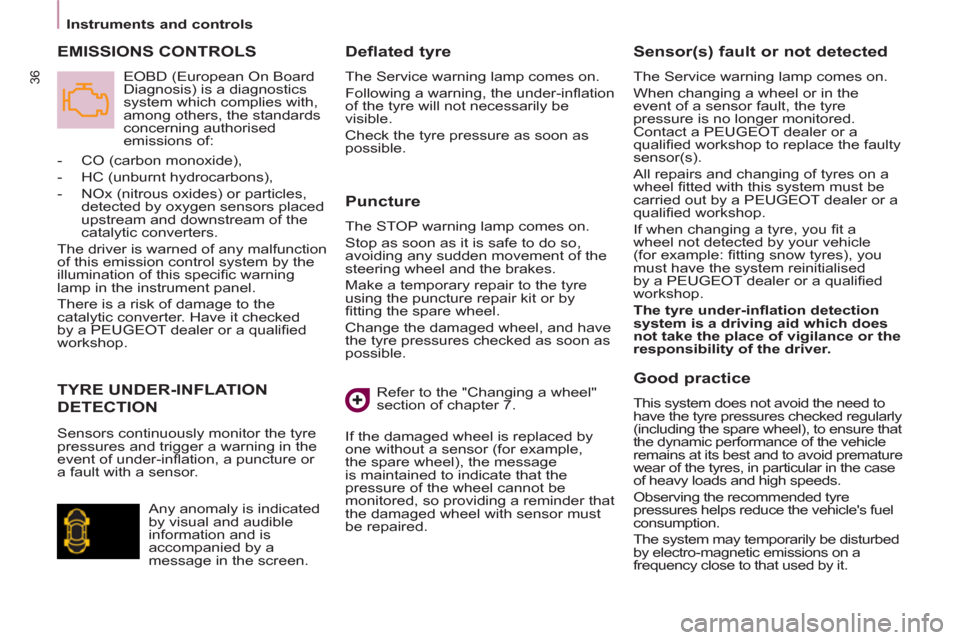
a fault with a sensor.
EOBD (European On Board
Diagnosis) is a diagnostics
system which complies with,
among others, the standards
concerning authorised
emissions of:
Any anomaly is indicated
by visual and audible
information and is
accompanied by a
message in the screen.
Good practice
This system does not avoid the need to
have the tyre pressures checked regularly
(including the spare wheel), to ensure that
the dynamic performance of the vehicle
remains at its best and to avoid premature
wear of the tyres, in particular in the case
of heavy loads and high speeds.
Observing the recommended tyre
pressures helps reduce the vehicle's fuel
consumption.
The system may temporarily be disturbed
by electro-magnetic emissions on a
frequency close to that used by it.
Page 52 of 208
50
Steering mounted controls
If the sunshine sensor
does not function correctly
,
the lighting comes on
accompanied by the service
warning lamp, an audible
signal and a message in the screen.
Contact a PEUGEOT dealer or a
qualifi ed workshop.
Guide-me-home lighting
Keeping the dipped beam headlamps
on temporarily with the ignition off,
makes the driver's exit easier when the
light is poor.
HEADLAMP BEAM
Depending on the load in your vehicle,
the beam setting must be adjusted.
0 -
No load.
1 -
Partial load.
2 -
Average load.
3 -
Maximum authorised load.
Manual operation
- With the ignition off, "fl ash" the
headlamps within one minute after
switching off the ignition.
The guide-me-home lighting switches
off automatically after a set time.
Automatic operation
Refer to the "Screen menu map"
section of chapter 9.
Activate the function via the
vehicle confi guration menu.
Initial setting is position 0.
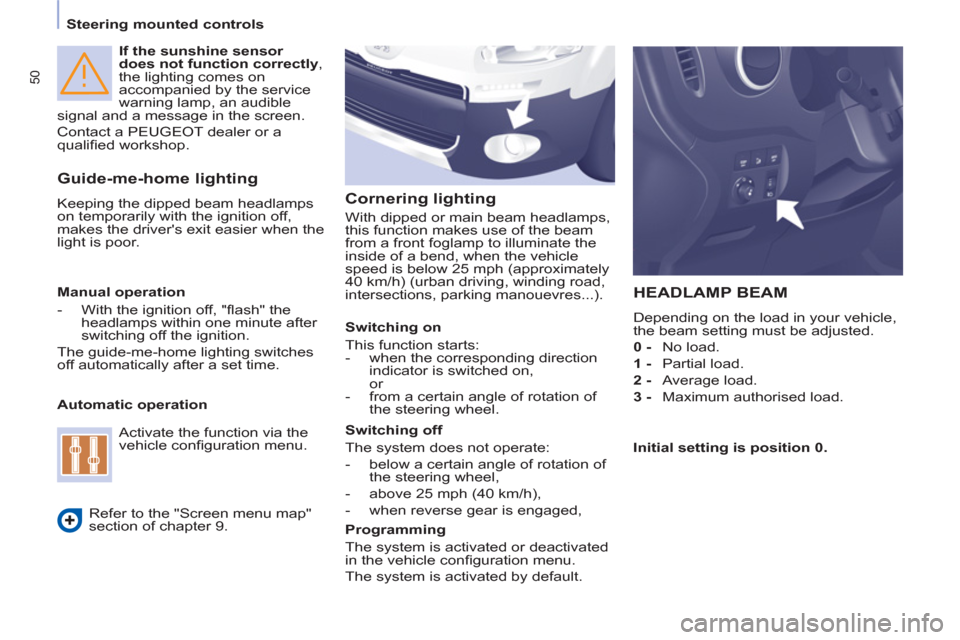
Cornering lighting
With dipped or main beam headlamps,
this function makes use of the beam
from a front foglamp to illuminate the
inside of a bend, when the vehicle
speed is below 25 mph (approximately
40 km/h) (urban driving, winding road,
intersections, parking manouevres...).
Switching on
This function starts:
- when the corresponding direction
indicator is switched on,
or
- from a certain angle of rotation of
the steering wheel.
Switching off
The system does not operate:
- below a certain angle of rotation of
the steering wheel,
- above 25 mph (40 km/h),
- when reverse gear is engaged,
Programming
The system is activated or deactivated
in the vehicle confi guration menu.
The system is activated by default.
Page 65 of 208
Ventilation
63
EASE OF USE and COMFOR
T
33
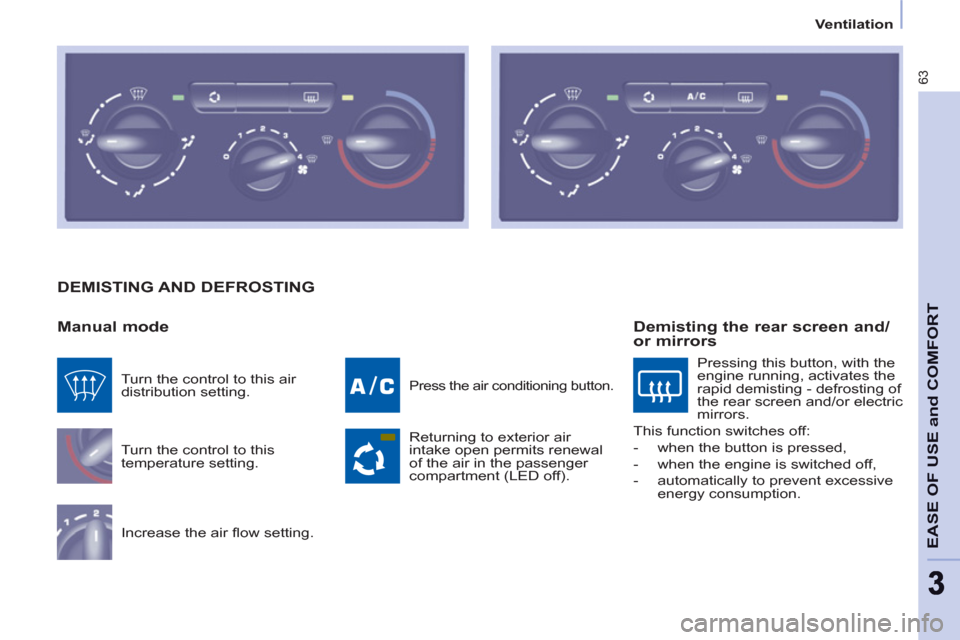
DEMISTING AND DEFROSTING
Manual mode
Turn the control to this
temperature setting.
Increase the air fl ow setting.
Press the air conditioning button.
Returning to exterior air
intake open permits renewal
of the air in the passenger
compartment (LED off). Turn the control to this air
distribution setting.
Demisting the rear screen and/
or mirrors
Pressing this button, with the
engine running, activates the
rapid demisting - defrosting of
the rear screen and/or electric
mirrors.
This function switches off:
- when the button is pressed,
- when the engine is switched off,
- automatically to prevent excessive
energy consumption.
Page 66 of 208
Ventilation
64
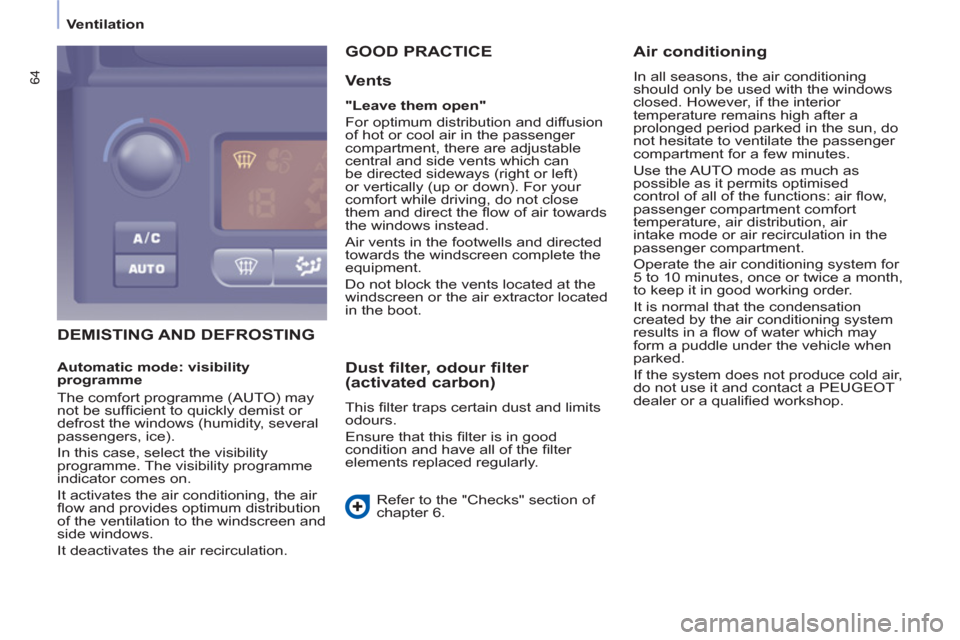
DEMISTING AND DEFROSTING GOOD PRACTICE
Vents
"Leave them open"
For optimum distribution and diffusion
of hot or cool air in the passenger
compartment, there are adjustable
central and side vents which can
be directed sideways (right or left)
or vertically (up or down). For your
comfort while driving, do not close
them and direct the fl ow of air towards
the windows instead.
Air vents in the footwells and directed
towards the windscreen complete the
equipment.
Do not block the vents located at the
windscreen or the air extractor located
in the boot.
Dust filter, odour filter
(activated carbon)
This fi lter traps certain dust and limits
odours.
Ensure that this fi lter is in good
condition and have all of the fi lter
elements replaced regularly.
Refer to the "Checks" section of
chapter 6.
Air conditioning
In all seasons, the air conditioning
should only be used with the windows
closed. However, if the interior
temperature remains high after a
prolonged period parked in the sun, do
not hesitate to ventilate the passenger
compartment for a few minutes.
Use the AUTO mode as much as
possible as it permits optimised
control of all of the functions: air fl ow,
passenger compartment comfort
temperature, air distribution, air
intake mode or air recirculation in the
passenger compartment.
Operate the air conditioning system for
5 to 10 minutes, once or twice a month,
to keep it in good working order.
It is normal that the condensation
created by the air conditioning system
results in a fl ow of water which may
form a puddle under the vehicle when
parked.
If the system does not produce cold air,
do not use it and contact a PEUGEOT
dealer or a qualifi ed workshop.
Automatic mode: visibility
programme
The comfort programme (AUTO) may
not be suffi cient to quickly demist or
defrost the windows (humidity, several
passengers, ice).
In this case, select the visibility
programme. The visibility programme
indicator comes on.
It activates the air conditioning, the air
fl ow and provides optimum distribution
of the ventilation to the windscreen and
side windows.
It deactivates the air recirculation.
Page 156 of 208
04
5
6
3 2 1
4
9.16
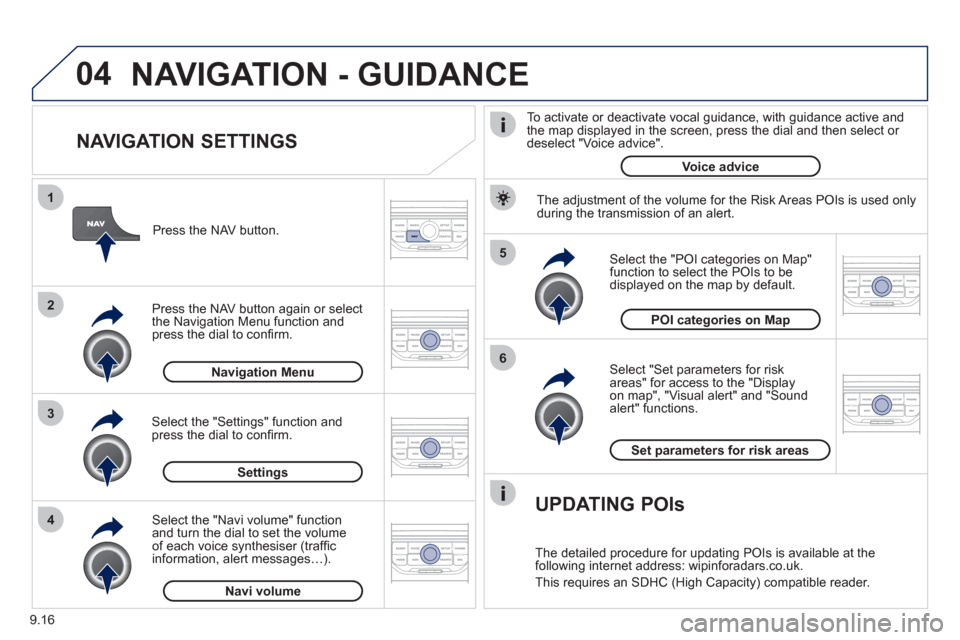
NAVIGATION SETTINGS
Select "Set parameters for risk
areas" for access to the "Display
on map", "Visual alert" and "Soundalert" functions.
Select the "POI categories on Map"function to select the POIs to be
displayed on the map by default. Pr
ess the NAV button.
Press the NAV button a
gain or select
the Navigation Menu function and
press the dial to confi rm.
Select the "Settings" function andpress the dial to confi rm.
POI categories on Map
Settin
gsSet parameters for risk area
s
Navigation Menu
NAVIGATION - GUIDANCE
Select the "Navi volume" function and turn the dial to set the volume
of each voice synthesiser (traffi c
information, alert messagesÖ).
Navi volum
e
The adjustment of the volume for the Risk Areas POIs is used only
during the transmission of an alert.
UPDATING POIs
The detailed procedure for updating POIs is available at the
following internet address: wipinforadars.co.uk.
This requires an SDHC
(High Capacity) compatible reader.
To activate or deactivate vocal
guidance, with guidance active and
the map displayed in the screen, press the dial and then select or deselect "Voice advice".
Voice advice
Page 167 of 208
10
1
9.27
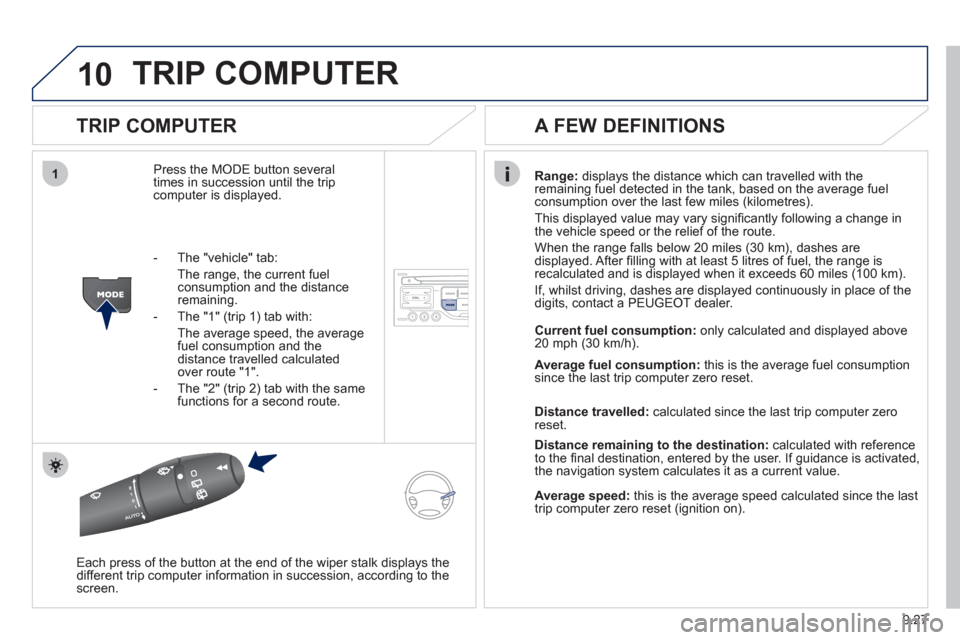
TRIP COMPUTER
TRIP COMPUTER
Press the MODE button several
times in succession until the tripcomputer is displayed.Ran
ge: displays the distance which can travelled with the
remaining fuel detected in the tank, based on the average fuel consumption over the last few miles (kilometres).
This displa
yed value may vary signifi cantly following a change in
the vehicle speed or the relief of the route.
When the ran
ge falls below 20 miles (30 km), dashes are
displayed. After fi lling with at least 5 litres of fuel, the range is
recalculated and is displayed when it exceeds 60 miles (100 km).
I
f, whilst driving, dashes are displayed continuously in place of the
digits, contact a PEUGEOT dealer.
Each press o
f the button at the end of the wiper stalk displays the
different trip computer information in succession, according to the screen.
A FEW DEFINITIONS
- The "vehicle" tab:
The ran
ge, the current fuelconsumption and the distance remaining.
- The "1"
(trip 1) tab with:
The average speed, the average fuel consumption and the distance travelled calculatedover route "1".
- The "2"
(trip 2) tab with the same functions for a second route. Current fuel consum
ption:only calculated and displayed above
20 mph (30 km/h).
Avera
ge fuel consumption:this is the average fuel consumption since the last trip computer zero reset.
Distance travelled:calculated since the last trip computer zero
reset.
Distance remaining to the destination:calculated with referenceto the fi nal destination, entered by the user. If guidance is activated,
the navigation system calculates it as a current value.
Average speed:this is the average speed calculated since the last
trip computer zero reset (ignition on).
Page 192 of 208
1
08
9.52
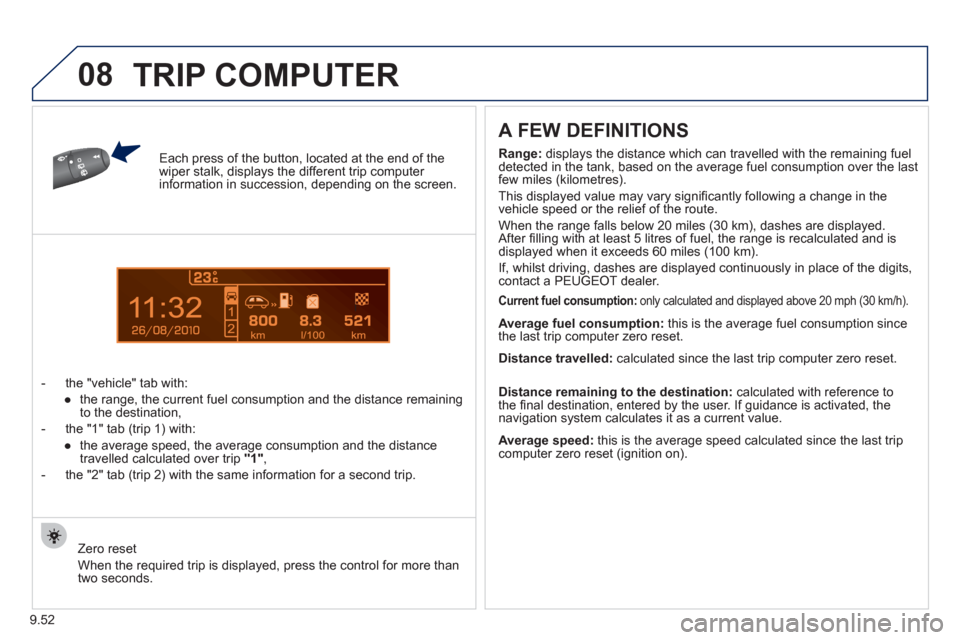
Each press of the button, located at the end of the wiper stalk, displays the different trip computer information in succession, depending on the screen.
- t
he "vehicle" tab with:
●
the range, the current
fuel consumption and the distance remaining
to the destination,
- the "1" tab
(trip 1) with:
●
the avera
ge speed, the average consumption and the distance
travelled calculated over trip "1",
- the "2" tab
(trip 2) with the same information for a second trip.
A FEW DEFINITIONS
Zero reset
When the required trip is displa
yed, press the control for more than
two seconds.
Range: displays the distance which can travelled with the remaining fuel
detected in the tank, based on the average fuel consumption over the last few miles (kilometres).
This displa
yed value may vary signifi cantly following a change in the
vehicle speed or the relief of the route.
When the ran
ge falls below 20 miles (30 km), dashes are displayed.
After fi lling with at least 5 litres of fuel, the range is recalculated and is
displayed when it exceeds 60 miles (100 km).
I
f, whilst driving, dashes are displayed continuously in place of the digits,contact a PEUGEOT dealer.
Current fuel consumption:only calculated and displayed above 20 mph (30 km/h).
Average fuel consumption: this is the average fuel consumption since
the last trip computer zero reset.
Average speed: this is the average speed calculated since the last trip computer zero reset (ignition on).
Distance travelled:
calculated since the last trip computer zero reset.
Distance remaining to the destination:calculated with reference to
the fi nal destination, entered by the user. If guidance is activated, the
navigation system calculates it as a current value.
TRIP COMPUTER
Page 197 of 208
09
9.57
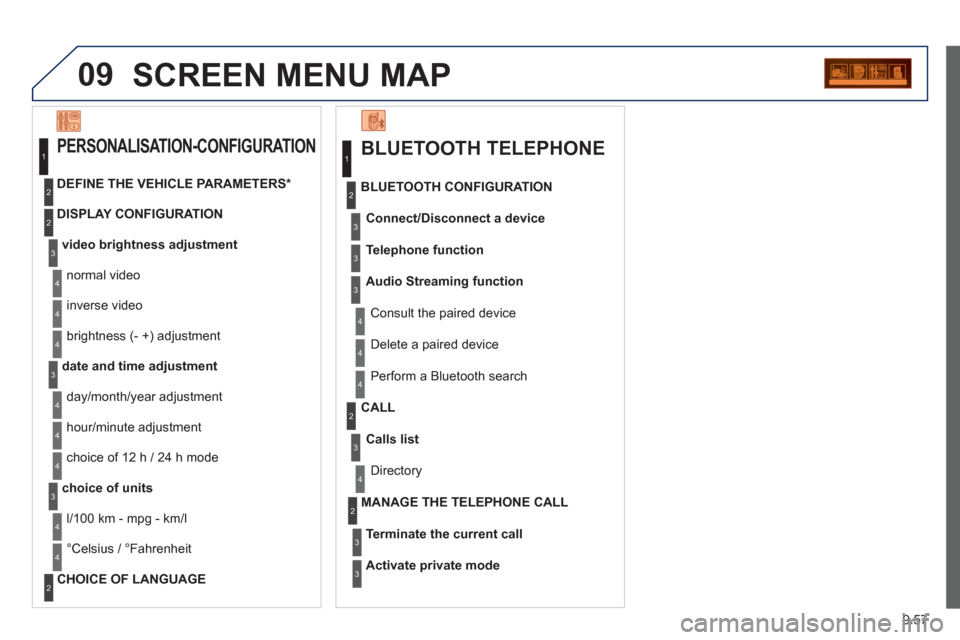
SCREEN MENU MAP
BLUETOOTH TELEPHONE
Connect/Disconnect a device
Consult the paired device
BLUETOOTH CONFIGURATION
Telephone function
Audio Streamin
g function
Delete a
paired device
P
erform a Bluetooth search
Calls lis
t
CALL
Directory
Terminate the current call
MANAGE THE TELEPHONE CALL
Activate private mode
1
2
3
3
3
4
4
4
2
3
4
2
3
3
video brightness adjustment
DISPLAY CONFIGURATION
DEFINE THE VEHICLE PARAMETERS *
PERSONALISATION-CONFIGURATION
normal video
inverse video
bri
ghtness (- +) adjustment
date and time adjustment
day/month/year adjustment
hour
/minute adjustment
choice of 12 h / 24 h mode
choice of units
l/100 km - mpg - km/l
°
Celsius / °Fahrenheit
CHOICE OF LANGUAGE
1
2
4
3
2
4
4
3
4
4
2
3
4
4
4