Indicator Peugeot Partner 2019 Owner's Guide
[x] Cancel search | Manufacturer: PEUGEOT, Model Year: 2019, Model line: Partner, Model: Peugeot Partner 2019Pages: 312, PDF Size: 9.56 MB
Page 27 of 312
25
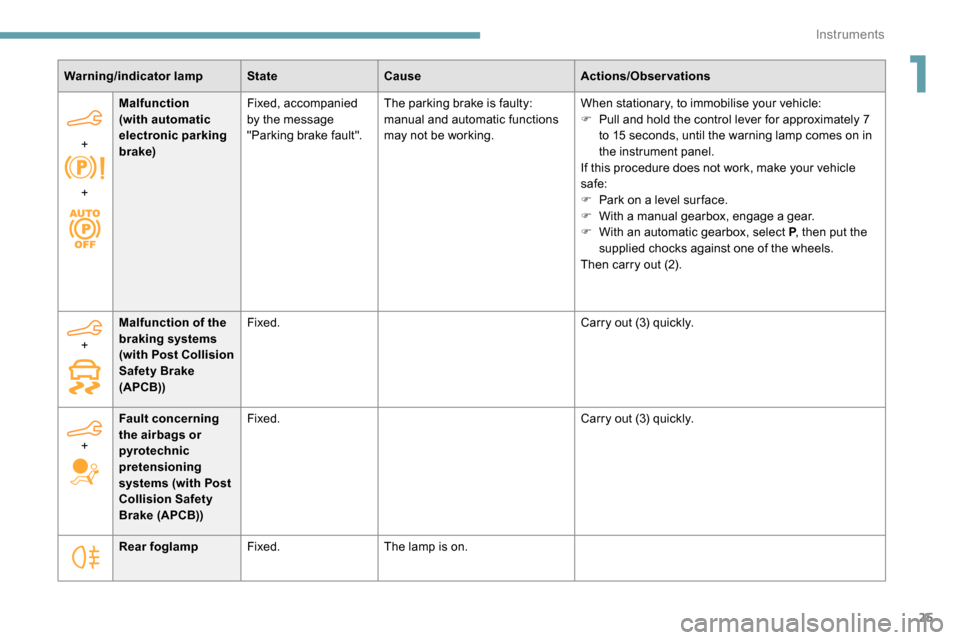
Warning/indicator lampStateCause Actions/Observations
+
+ Malfunction
(with automatic
electronic parking
brake)
Fixed, accompanied
by the message
"Parking brake fault".
The parking brake is faulty:
manual and automatic functions
may not be working. When stationary, to immobilise your vehicle:
F
P
ull and hold the control lever for approximately 7
to 15
seconds, until the warning lamp comes on in
the instrument panel.
If this procedure does not work, make your vehicle
safe:
F
P
ark on a level sur face.
F
W
ith a manual gearbox, engage a gear.
F
W
ith an automatic gearbox, select P, then put the
supplied chocks against one of the wheels.
Then carry out (2).
Rear foglamp Fixed. The lamp is on.
+
Malfunction of the
braking systems
(with Post Collision
Safety Brake
(APCB)) Fixed.
Carry out (3) quickly.
+ Fault concerning
the airbags or
pyrotechnic
pretensioning
systems (with Post
Collision Safety
Brake (APCB)) Fixed.
Carry out (3) quickly.
1
Instruments
Page 28 of 312
26
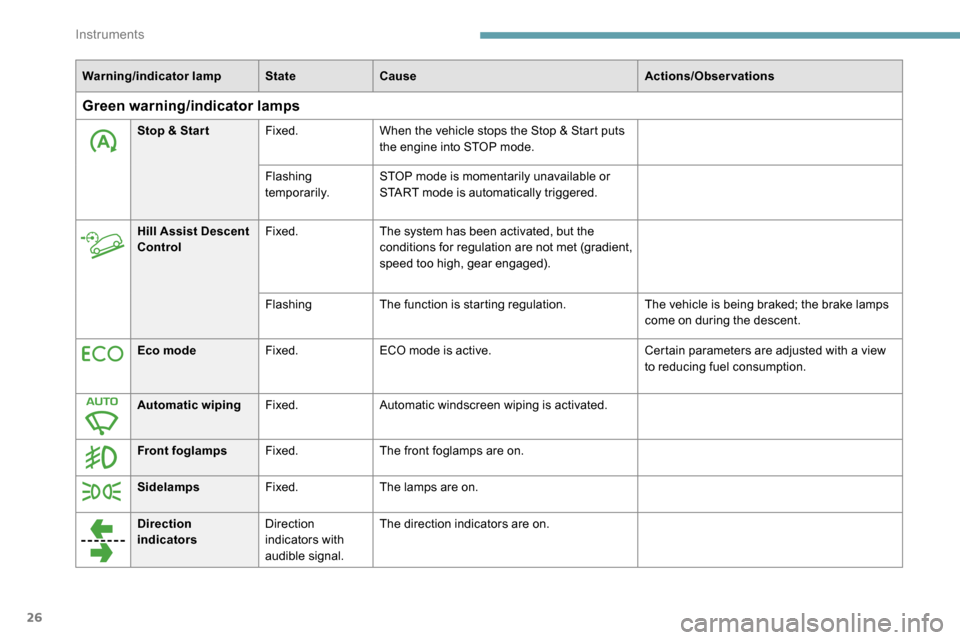
Warning/indicator lampStateCause Actions/Observations
Green warning/indicator lamps
Stop & Star tFixed.When the vehicle stops the Stop & Start puts
the engine into STOP mode.
Flashing
temporarily. STOP mode is momentarily unavailable or
START mode is automatically triggered.
Hill Assist Descent
Control Fixed.
The system has been activated, but the
conditions for regulation are not met (gradient,
speed too high, gear engaged).
Flashing The function is starting regulation. The vehicle is being braked; the brake lamps
come on during the descent.
Eco mode Fixed.ECO mode is active. Certain parameters are adjusted with a view
to reducing fuel consumption.
Automatic wiping Fixed.Automatic windscreen wiping is activated.
Front foglamps Fixed.The front foglamps are on.
Sidelamps Fixed.The lamps are on.
Direction
indicators Direction
indicators with
audible signal.The direction indicators are on.
Instruments
Page 29 of 312
27
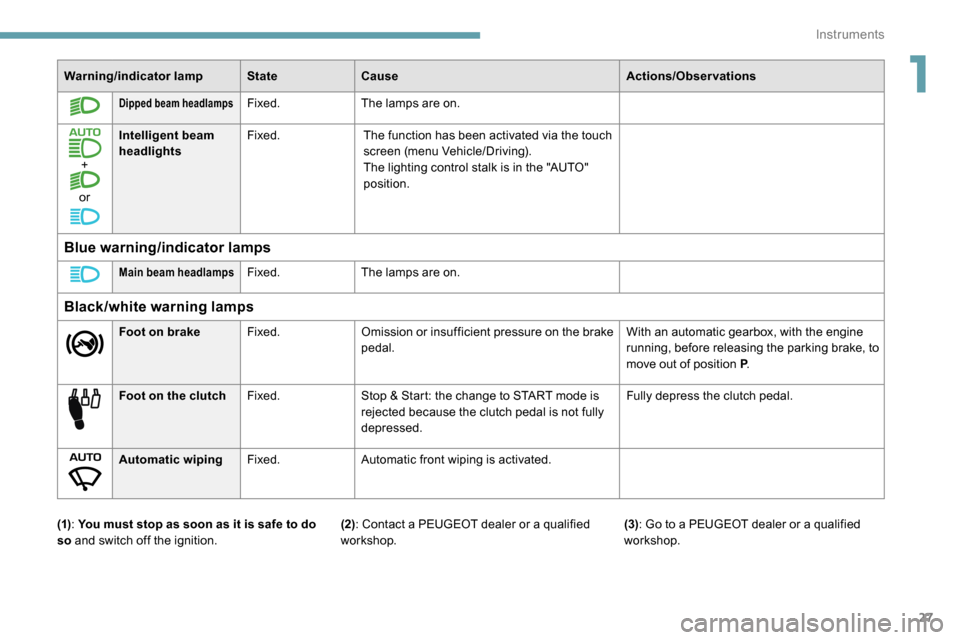
Warning/indicator lampStateCause Actions/Observations
Dipped beam headlampsFixed.The lamps are on.
+
or Intelligent beam
headlights
Fixed.
The function has been activated via the touch
screen (menu Vehicle/Driving).
The lighting control stalk is in the "AUTO"
position.
Blue warning/indicator lamps
Main beam headlampsFixed.The lamps are on.
Black/white warning lamps
Foot on brake Fixed.Omission or insufficient pressure on the brake
pedal. With an automatic gearbox, with the engine
running, before releasing the parking brake, to
move out of position P
.
Foot on the clutch Fixed.Stop & Start: the change to START mode is
rejected because the clutch pedal is not fully
depressed. Fully depress the clutch pedal.
Automatic wiping Fixed.Automatic front wiping is activated.
(1) : You must stop as soon as it is safe to do
so and switch off the ignition. (3)
: Go to a PEUGEOT dealer or a qualified
workshop.
(2): Contact a PEUGEOT dealer or a qualified
workshop.
1
Instruments
Page 30 of 312
28
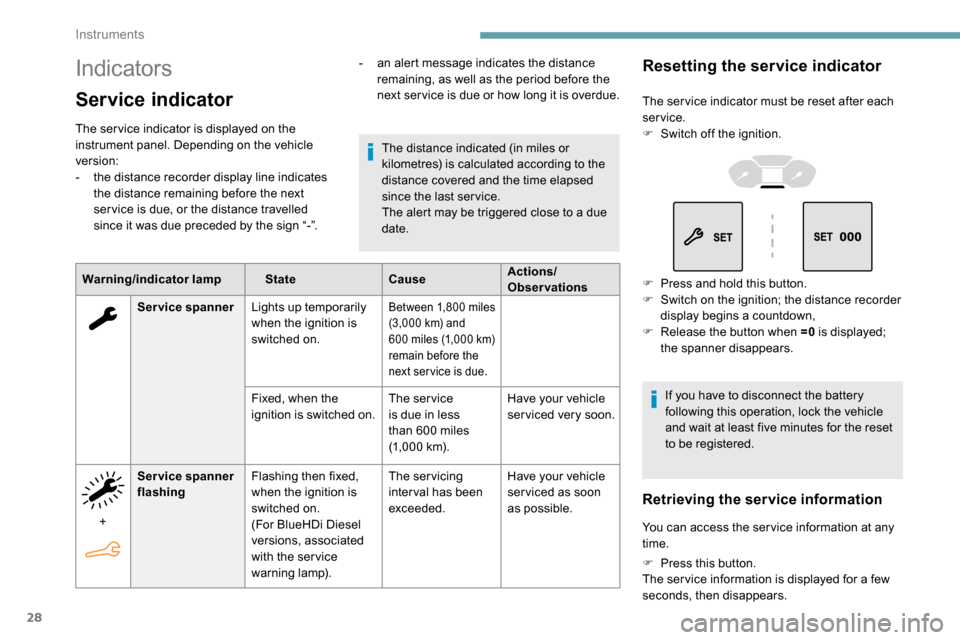
Indicators
Service indicator
The ser vice indicator is displayed on the
instrument panel. Depending on the vehicle
version:
-
t
he distance recorder display line indicates
the distance remaining before the next
ser vice is due, or the distance travelled
since it was due preceded by the sign “-”.
Warning/indicator lamp StateCauseActions/
Observations
The distance indicated (in miles or
kilometres) is calculated according to the
distance covered and the time elapsed
since the last ser vice.
The alert may be triggered close to a due
date.
Service spanner Lights up temporarily
when the ignition is
switched on.
Between 1,800 miles
( 3,000 km) and
600
miles (1,000 km)
remain before the
next ser vice is due.
Fixed, when the
ignition is switched on. The service
is due in less
than 600
miles
(1,000
km).Have your vehicle
serviced very soon.
+ Service spanner
flashing
Flashing then fixed,
when the ignition is
switched on.
(For BlueHDi Diesel
versions, associated
with the ser vice
warning lamp). The servicing
inter val has been
exceeded.
Have your vehicle
ser viced as soon
as possible.
-
a
n alert message indicates the distance
remaining, as well as the period before the
next ser vice is due or how long it is overdue.
Resetting the service indicator
The ser vice indicator must be reset after each
service.
F
S
witch off the ignition.
F
P
ress and hold this button.
F
S
witch on the ignition; the distance recorder
display begins a countdown,
F
R
elease the button when =0 is displayed;
the spanner disappears.
If you have to disconnect the battery
following this operation, lock the vehicle
and wait at least five minutes for the reset
to be registered.
Retrieving the service information
You can access the ser vice information at any
time.
F
P
ress this button.
The ser vice information is displayed for a few
seconds, then disappears.
Instruments
Page 32 of 312
30
You must stop as soon as it is safe to do so.
Wait a few minutes before switching off the
engine.
Contact a PEUGEOT dealer or a qualified
workshop.
Checking
After driving for a few minutes, the temperature
and pressure in the cooling system increase.
To top up the level:
F
w
ait at least one hour for the engine to cool,
F
u
nscrew the cap by two turns to allow the
pressure to drop,
F
w
hen the pressure has dropped, remove the
cap,
F
t
op up the level to the "MA X" mark.
For more information on Checking levels ,
refer to the corresponding section.
Be aware of the risk of scalding when
topping up the coolant. Do not fill above
the maximum level (indicated on the
reservoir).
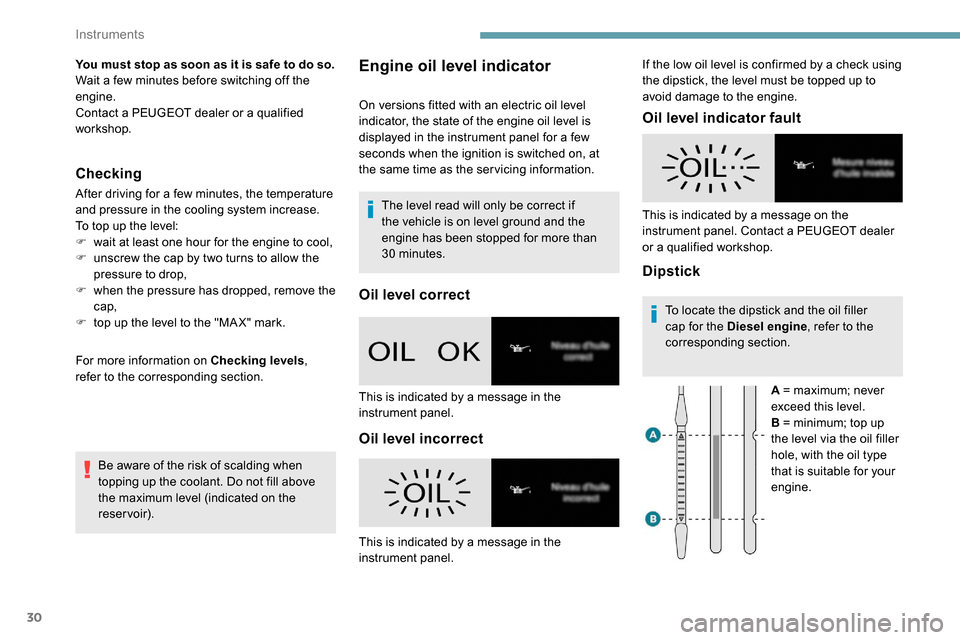
Engine oil level indicator
On versions fitted with an electric oil level
indicator, the state of the engine oil level is
displayed in the instrument panel for a few
seconds when the ignition is switched on, at
the same time as the ser vicing information.The level read will only be correct if
the vehicle is on level ground and the
engine has been stopped for more than
30
minutes.
Oil level correct
Oil level incorrect Oil level indicator fault
DipstickTo locate the dipstick and the oil filler
cap for the Diesel engine
, refer to the
corresponding section.
A = maximum; never
exceed this level.
B = minimum; top up
the level via the oil filler
hole, with the oil type
that is suitable for your
engine.
This is indicated by a message in the
instrument panel.
This is indicated by a message in the
instrument panel. This is indicated by a message on the
instrument panel. Contact a PEUGEOT dealer
or a qualified workshop. If the low oil level is confirmed by a check using
the dipstick, the level must be topped up to
avoid damage to the engine.
Instruments
Page 33 of 312
31
These range indicators are present only on
BlueHDi Diesel versions.
Once the AdBlue
® tank is on reser ve or after
detection of a fault with the SCR emissions
control system, when the ignition is switched
on, an indicator displays an estimate of the
distance that can be covered, the range, before
engine starting is prevented.
In the event of the risk of non-
starting related to a lack of
AdBlue
®
The engine starting prevention system
required by regulations is activated
automatically once the AdBlue
® tank is
e m pt y.
AdBlue® range indicators
Range greater than 1,500 miles (2,400 km)
W hen the ignition is switched on, no
information on range is displayed automatically. Pressing this button temporarily displays the
driving range.
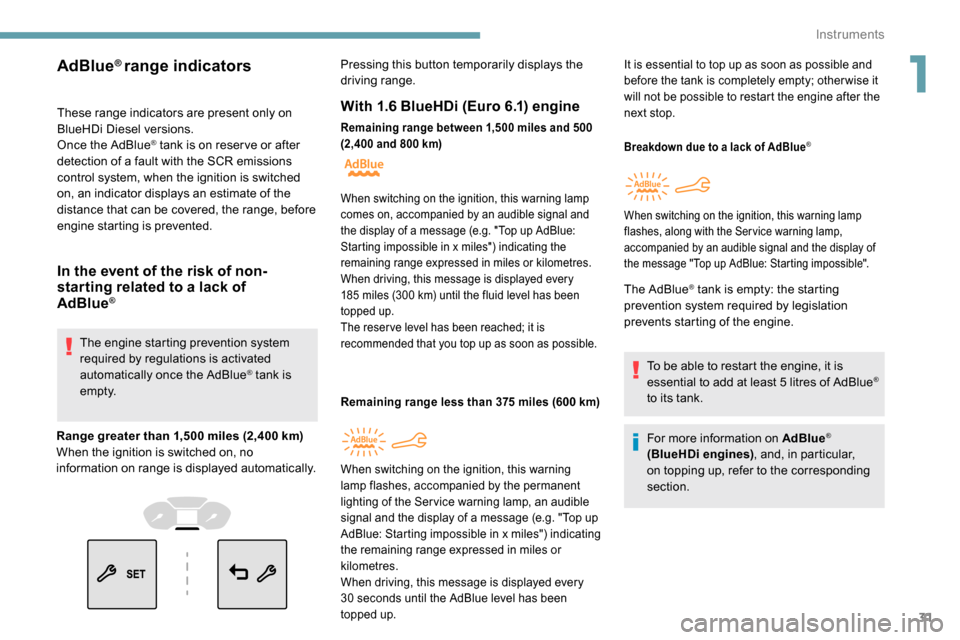
With 1.6 BlueHDi (Euro 6.1) engine
Remaining range between 1,500 miles and 500
( 2,400 and 800 km)
Remaining range less than 375 miles (600 km)
Breakdown due to a lack of AdBlue®
The AdBlue® tank is empty: the starting
prevention system required by legislation
prevents starting of the engine.
To be able to restart the engine, it is
essential to add at least 5
litres of AdBlue
®
to its tank.
For more information on AdBlue
®
(BlueHDi engines) , and, in particular,
on topping up, refer to the corresponding
section.
When switching on the ignition, this warning lamp
c omes on, accompanied by an audible signal and
the display of a message (e.g. "Top up AdBlue:
Starting impossible in x miles") indicating the
remaining range expressed in miles or kilometres.
When driving, this message is displayed every
185
miles (300 km) until the fluid level has been
topped up.
The reser ve level has been reached; it is
recommended that you top up as soon as possible.
When switching on the ignition, this warning
lam p flashes, accompanied by the permanent
lighting of the Ser vice warning lamp, an audible
signal and the display of a message (e.g. "Top up
AdBlue: Starting impossible in x miles") indicating
the remaining range expressed in miles or
kilometres.
When driving, this message is displayed every
30
seconds until the AdBlue level has been
topped up. It is essential to top up as soon as possible and
before the tank is completely empty; other wise it
will not be possible to restart the engine after the
next stop.
When switching on the ignition, this warning lamp
flashes, along with the Service warning lamp,
accompanied by an audible signal and the display of
the message "Top up AdBlue: Starting impossible".
1
Instruments
Page 41 of 312
39
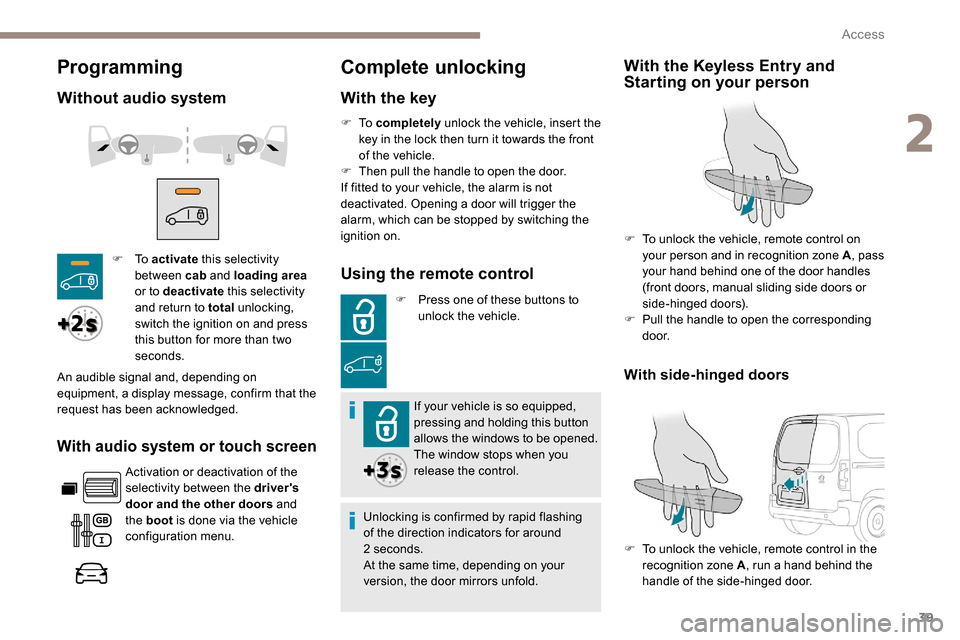
Programming
Without audio system
With audio system or touch screen
Activation or deactivation of the
selectivity between the driver's
door and the other doors and
the boot is done via the vehicle
configuration menu.
Complete unlocking
With the key
F To activate this selectivity
between cab and loading area
or to deactivate this selectivity
and return to total unlocking,
switch the ignition on and press
this button for more than two
seconds.
An audible signal and, depending on
equipment, a display message, confirm that the
request has been acknowledged. F
To
completely unlock the vehicle, insert the
key in the lock then turn it towards the front
of the vehicle.
F
T
hen pull the handle to open the door.
If fitted to your vehicle, the alarm is not
deactivated. Opening a door will trigger the
alarm, which can be stopped by switching the
ignition on.Using the remote control
F Press one of these buttons to unlock the vehicle.
If your vehicle is so equipped,
pressing and holding this button
allows the windows to be opened.
The window stops when you
release the control.
Unlocking is confirmed by rapid flashing
of the direction indicators for around
2
seconds.
At the same time, depending on your
version, the door mirrors unfold.
With the Keyless Entry and
Starting on your person
F To unlock the vehicle, remote control on your person and in recognition zone A , pass
your hand behind one of the door handles
(front doors, manual sliding side doors or
side-hinged doors).
F
P
ull the handle to open the corresponding
d o o r.
F
T
o unlock the vehicle, remote control in the
recognition zone A , run a hand behind the
handle of the side-hinged door.
With side-hinged doors
2
Access
Page 42 of 312
40
Selective unlocking
Using the remote control
F To unlock just the cab doors,
press this button once.
F
T
o unlock the doors of the
loading area (side and rear),
press this button a second time.
or F
P
ress this button on the remote
control to unlock only the
loading area .
If your vehicle is so equipped,
pressing and holding this
button allows the windows to be
opened. The window stops when
you release the control.
Unlocking is confirmed by rapid flashing
of the direction indicators for around
2
seconds.
At the same time, depending on your
version, the door mirrors unfold.
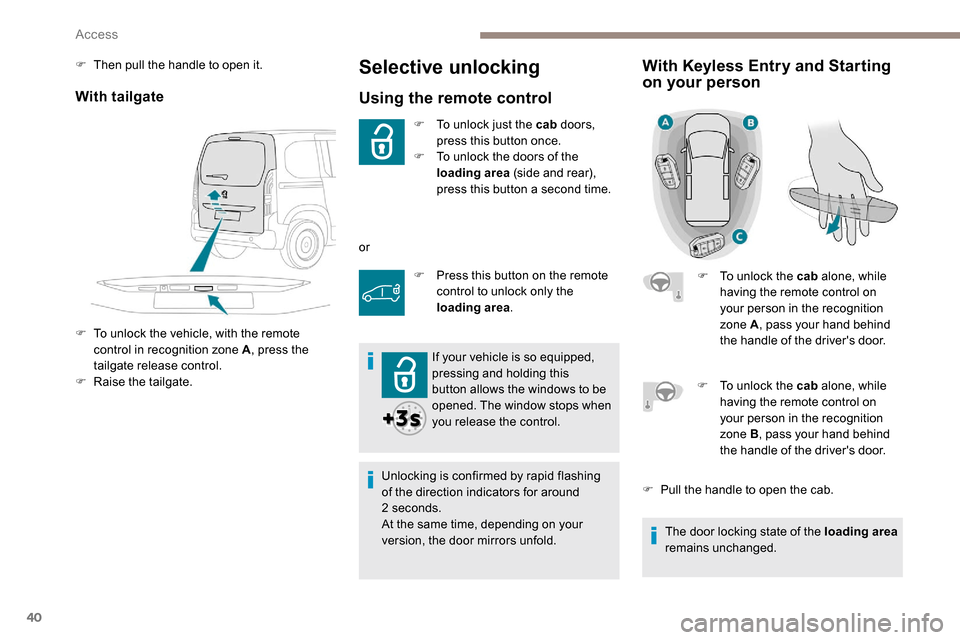
With Keyless Entry and Starting
on your person
F To unlock the cab alone, while
having the remote control on
your person in the recognition
zone A , pass your hand behind
the handle of the driver's door.
With tailgate
F To unlock the vehicle, with the remote control in recognition zone A , press the
tailgate release control.
F
Ra
ise the tailgate.
F
T
hen pull the handle to open it.
F
T
o unlock the cab alone, while
having the remote control on
your person in the recognition
zone B , pass your hand behind
the handle of the driver's door.
F
P
ull the handle to open the cab.
The door locking state of the loading area
remains unchanged.
Access
Page 43 of 312
41
Depending on version, the door mirrors
unfold only when the cab is unlocked, and
the alarm is deactivated.
Unlocking
With the key
F To completely unlock the vehicle, insert the
key in the lock then turn it towards the front
of the vehicle.
F
T
hen pull the handle to open the door.
Using the remote control
F Press this button to unlock the vehicle.
If fitted to your vehicle, pressing
and holding this button opens
the windows. The window stops
when you release the control.
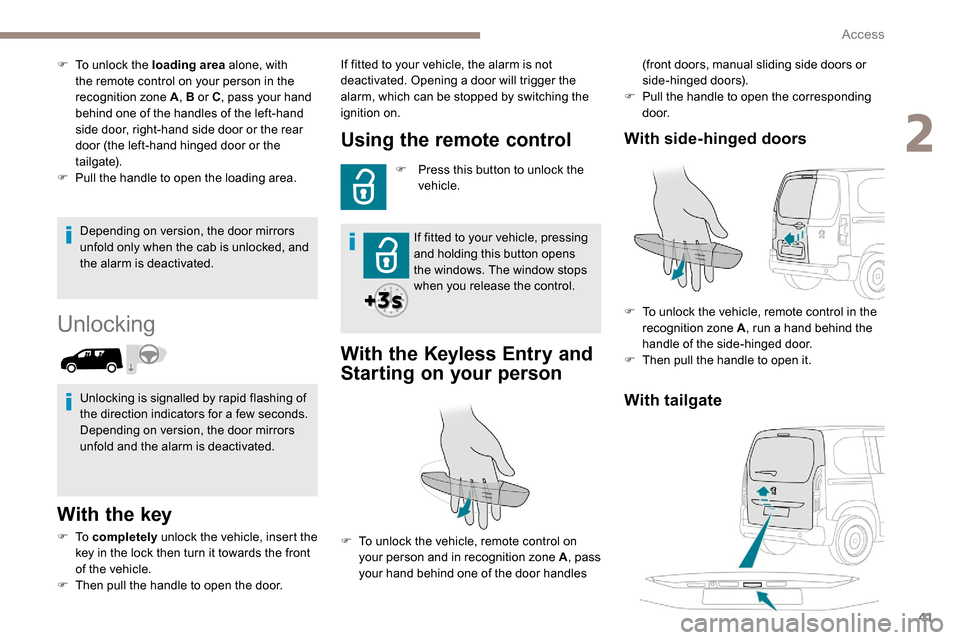
With the K eyless Entry and
Starting on your person
(front doors, manual sliding side doors or
side-hinged doors).
F
P
ull the handle to open the corresponding
d o o r.
With tailgate
With side-hinged doors
F To unlock the vehicle, remote control in the
recognition zone A , run a hand behind the
handle of the side-hinged door.
F
T
hen pull the handle to open it.
F
T
o unlock the loading area
alone, with
the remote control on your person in the
recognition zone A , B or C, pass your hand
behind one of the handles of the left-hand
side door, right-hand side door or the rear
door (the left-hand hinged door or the
tailgate).
F
P
ull the handle to open the loading area.
Unlocking is signalled by rapid flashing of
the direction indicators for a few seconds.
Depending on version, the door mirrors
unfold and the alarm is deactivated. If fitted to your vehicle, the alarm is not
deactivated. Opening a door will trigger the
alarm, which can be stopped by switching the
ignition on.
F
T
o unlock the vehicle, remote control on
your person and in recognition zone A , pass
your hand behind one of the door handles
2
Access
Page 44 of 312
42
Locking
With the key
F To lock the vehicle, insert the key in the lock then turn it towards the rear of the vehicle.
Using the remote control
F To lock the vehicle, press this button. If fitted to your vehicle, pressing
and holding this button closes the
windows. The window stops when
you release the control.
Ensure that no person or object prevents
the correct closing of the windows.
Be particularly aware of children when
operating the windows.
If your vehicle is not fitted with an alarm,
the locking/deadlocking is signalled by the
fixed illumination of the direction indicators
for about two seconds.
Depending on your version, the door
mirrors fold at the same time.
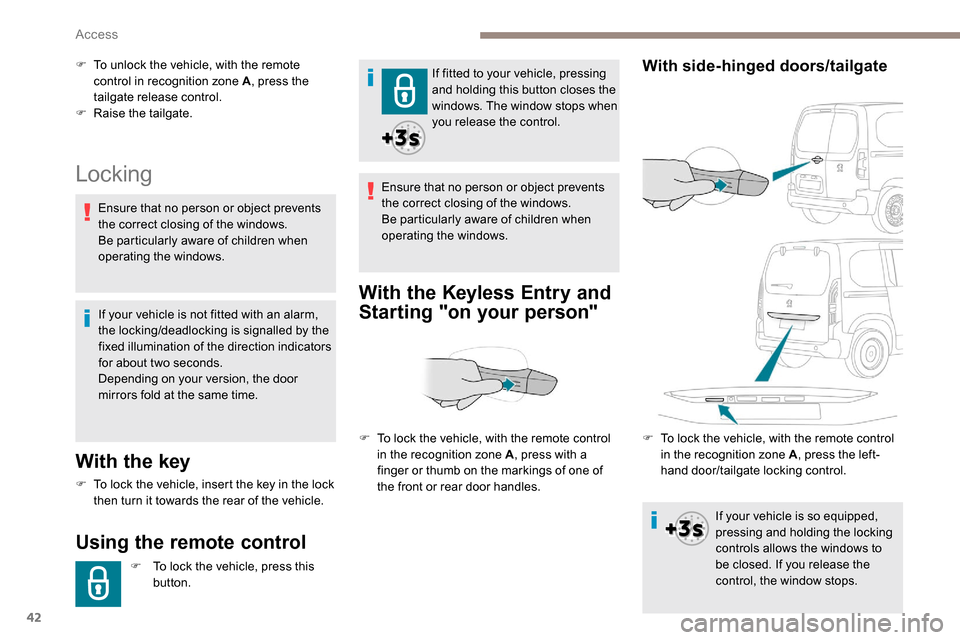
With the K eyless Entry and
Starting "on your person"
F To unlock the vehicle, with the remote
control in recognition zone A , press the
tailgate release control.
F
Ra
ise the tailgate.
F
T
o lock the vehicle, with the remote control
in the recognition zone A , press with a
finger or thumb on the markings of one of
the front or rear door handles.With side-hinged doors/tailgate
Ensure that no person or object prevents
the correct closing of the windows.
Be particularly aware of children when
operating the windows.
F
T
o lock the vehicle, with the remote control
in the recognition zone A , press the left-
hand door/tailgate locking control.
If your vehicle is so equipped,
pressing and holding the locking
controls allows the windows to
be closed. If you release the
control, the window stops.
Access