phone Peugeot Partner Tepee 2015 Owner's Guide
[x] Cancel search | Manufacturer: PEUGEOT, Model Year: 2015, Model line: Partner Tepee, Model: Peugeot Partner Tepee 2015Pages: 276, PDF Size: 12.76 MB
Page 244 of 276
10.54
Partner_2_VP_en_Chap10b_RT6-2-8_ed02-2014
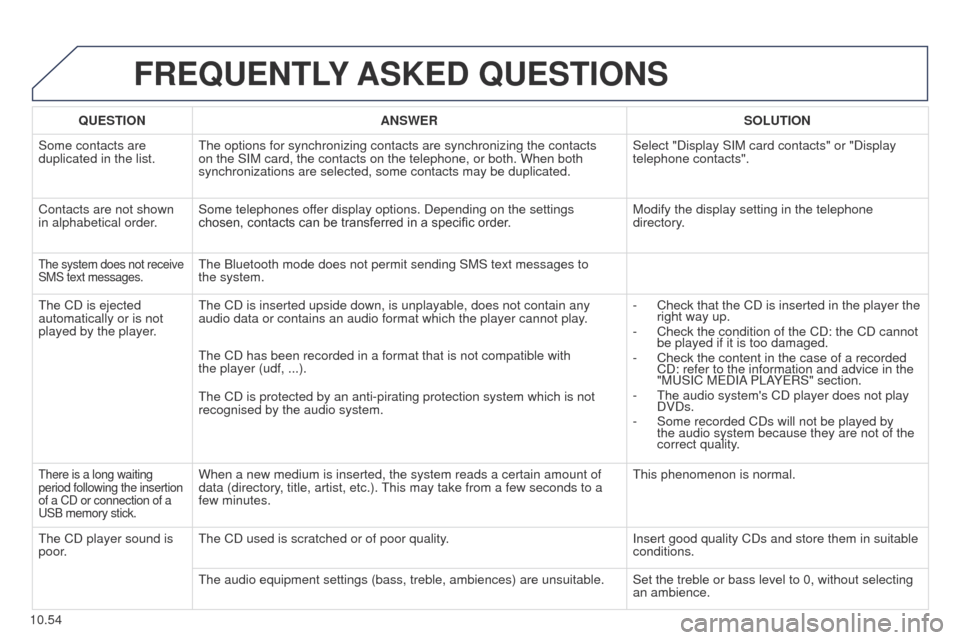
FREQUENTLY ASKED QUESTIONS
QUESTION ANSWER SOLUTION
Some contacts are
duplicated in the list.
t
he options for synchronizing contacts are synchronizing the contacts
on the SIM card, the contacts on the telephone, or both. When both
synchronizations are selected, some contacts may be duplicated. Select "Display SIM card contacts" or "Display
telephone contacts".
Contacts are not shown
in alphabetical order. Some telephones offer display options. Depending on the settings
chosen, contacts can be transferred in a specific order. Modify the display setting in the telephone
directory.
the system does not receive
SMS text messages.the Bluetooth mode does not permit sending SMS text messages to
the system.
t
he CD is ejected
automatically or is not
played by the player.
t
he CD is inserted upside down, is unplayable, does not contain any
audio data or contains an audio format which the player cannot play. -
Check that the CD is inserted in the player the
right way up.
-
Check the condition of the CD: the CD cannot
be played if it is too damaged.
-
Check the content in the case of a recorded
CD: refer to the information and advice in the
"M
u SIC M e DIA PLAY e RS" section.
-
t he audio system's CD player does not play
DVDs.
-
Some recorded CDs will not be played by
the audio system because they are not of the
correct quality
.
t
he CD has been recorded in a format that is not compatible with
the
player (udf, ...).
t
he CD is protected by an anti-pirating protection system which is not
recognised by the audio system.
there is a long waiting
period following the insertion
of a CD or connection of a
u
SB memory stick.When a new medium is inserted, the system reads a certain amount of
data (directory, title, artist, etc.). t his may take from a few seconds to a
few minutes.t his phenomenon is normal.
t
he CD player sound is
poor.
t
he CD used is scratched or of poor quality. Insert good quality CDs and store them in suitable
conditions.
t
he audio equipment settings (bass, treble, ambiences) are unsuitable. Set the treble or bass level to 0, without selecting an ambience.
Page 247 of 276
10.57
Partner_2_VP_en_Chap10b_RT6-2-8_ed02-2014
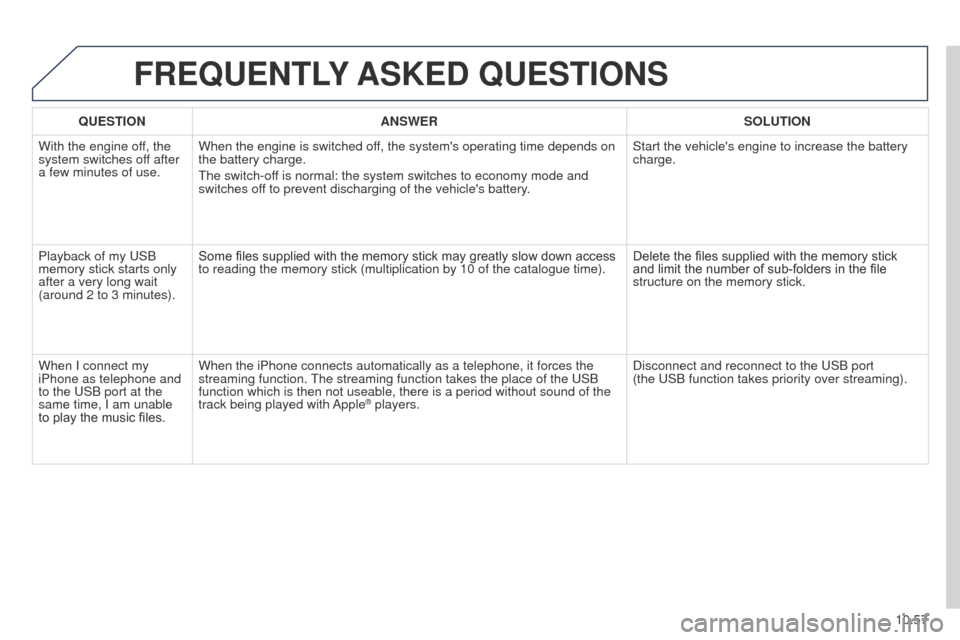
FREQUENTLY ASKED QUESTIONS
QUESTION ANSWER SOLUTION
With the engine off, the
system switches off after
a few minutes of use. When the engine is switched off, the system's operating time depends on
the battery charge.
t
he switch-off is normal: the system switches to economy mode and
switches off to prevent discharging of the vehicle's battery. Start the vehicle's engine to increase the battery
charge.
Playback of my
u SB
memory stick starts only
after a very long wait
(around 2 to 3 minutes). Some files supplied with the memory stick may greatly slow down access
to reading the memory stick (multiplication by 10 of the catalogue time\
).
Delete the files supplied with the memory stick
and limit the number of sub-folders in the file
structure on the memory stick.
When I connect my
iPhone as telephone and
to the
u SB port at the
same time, I am unable
to play the music files. When the iPhone connects automatically as a telephone, it forces the
streaming function.
t
he streaming function takes the place of the u SB
function which is then not useable, there is a period without sound of t\
he
track being played with Apple
® players. Disconnect and reconnect to the u SB port
(the u SB function takes priority over streaming).
Page 250 of 276
01
10.60
Partner_2_VP_en_Chap10c_RD45_ed02_2014
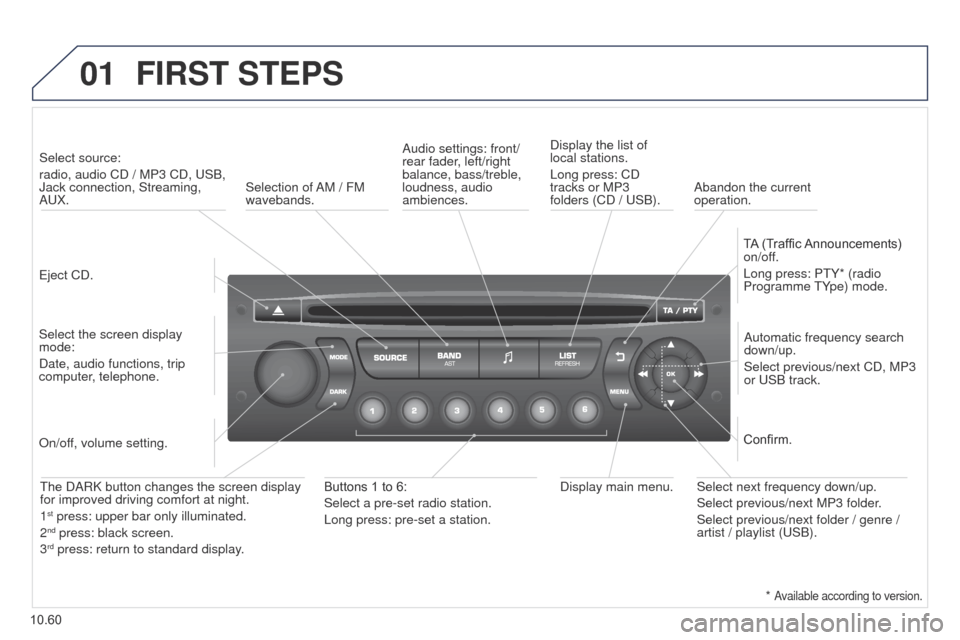
FIRST STEPS
eject CD.
Select source:
radio, audio CD / MP3 CD,
u SB,
Jack connection, Streaming,
A u X.
Select the screen display
mode:
Date, audio functions, trip
computer, telephone. Automatic frequency search
down/up.
Select previous/next CD, MP3
or
u SB track.
Audio settings: front/
rear fader, left/right
balance, bass/treble,
loudness, audio
ambiences.
Display the list of
local stations.
Long press: CD
tracks or MP3
folders (CD / u SB).
TA (Traffic Announcements)
on/off.
Long press: P t Y* (radio
Programme t Ype) mode.
Display main menu.
t
he DARK button changes the screen display
for improved driving comfort at night.
1
st press: upper bar only illuminated.
2nd press: black screen.
3rd press: return to standard display.
On/off, volume setting.
Buttons 1 to 6:
Select a pre-set radio station.
Long press: pre-set a station. Select next frequency down/up.
Select previous/next MP3 folder.
Select previous/next folder / genre /
artist / playlist (
u SB).
Confirm.
Selection of AM / FM
wavebands.
Abandon the current
operation.
*
Available according to version.
Page 251 of 276
02
10.61
Partner_2_VP_en_Chap10c_RD45_ed02_2014
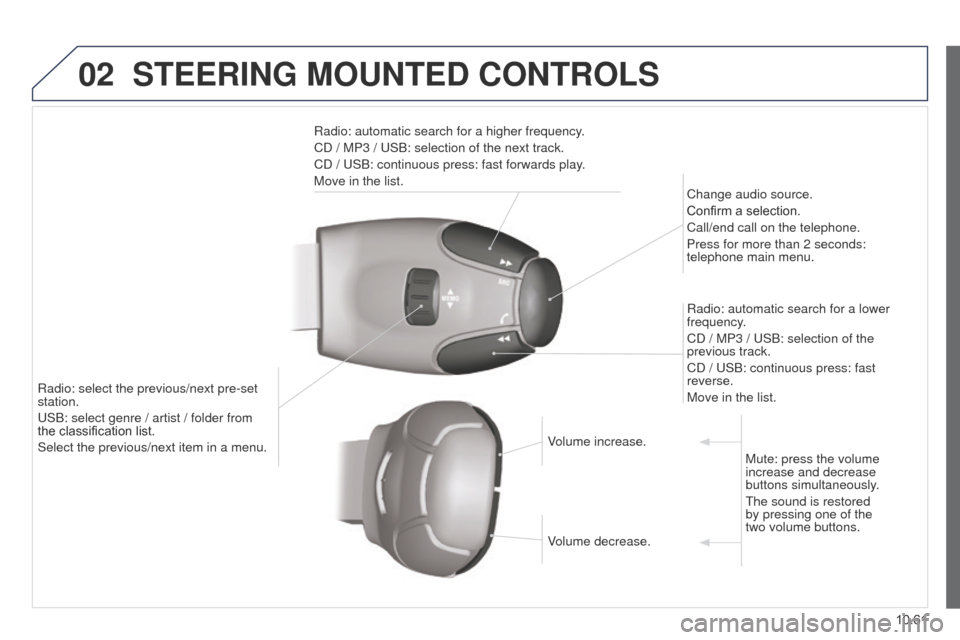
STEERING MOUNTED CONTROLS
Radio: automatic search for a higher frequency.
CD / MP3 / u SB: selection of the next track.
CD /
u SB: continuous press: fast forwards play.
Move in the list. Change audio source.
Confirm a selection.
Call/end call on the telephone.
Press for more than 2 seconds:
telephone main menu.
Radio: automatic search for a lower
frequency.
CD / MP3 /
u SB: selection of the
previous track.
CD /
u SB: continuous press: fast
reverse.
Move in the list.
Radio: select the previous/next pre-set
station.
u
SB: select genre / artist / folder from
the
classification list.
Select the previous/next item in a menu. Volume increase.
Volume decrease.Mute: press the volume
increase and decrease
buttons simultaneously.
t
he sound is restored
by pressing one of the
two volume buttons.
Page 252 of 276
03
10.62
Partner_2_VP_en_Chap10c_RD45_ed02_2014
MAIN MENU
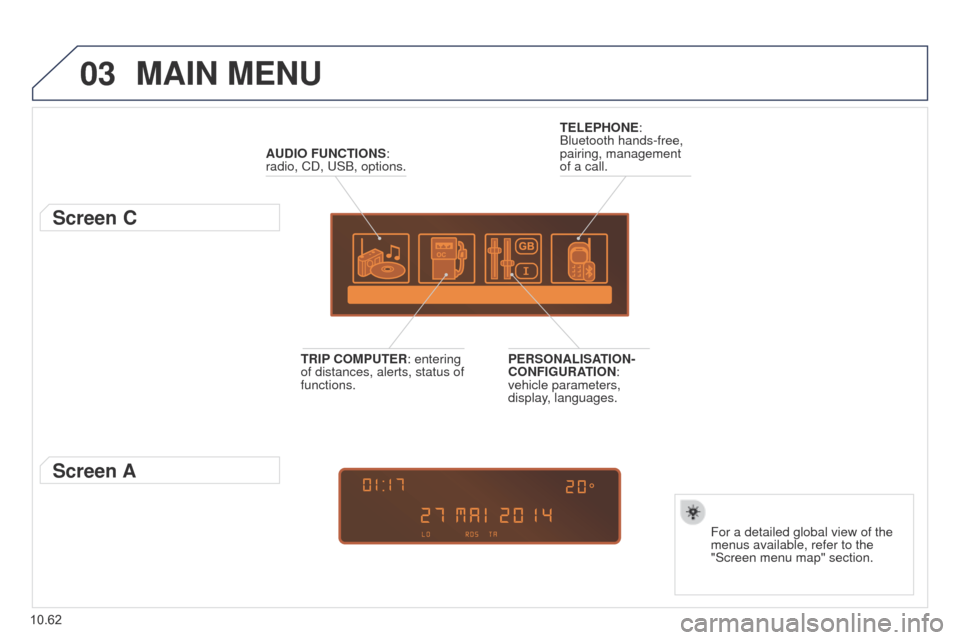
AUDIO FUNCTIONS:
radio, CD, u SB, options.
Screen C
For a detailed global view of the
menus available, refer to the
"Screen menu map" section.
TELEPHONE:
Bluetooth hands-free,
pairing, management
of a call.
PERSONALISATION-
CONFIGURATION:
vehicle parameters,
display, languages.
TRIP COMPUTER: entering
of distances, alerts, status of
functions.
Screen A
Page 259 of 276
06
10.69
Partner_2_VP_en_Chap10c_RD45_ed02_2014
BLUETOOTH
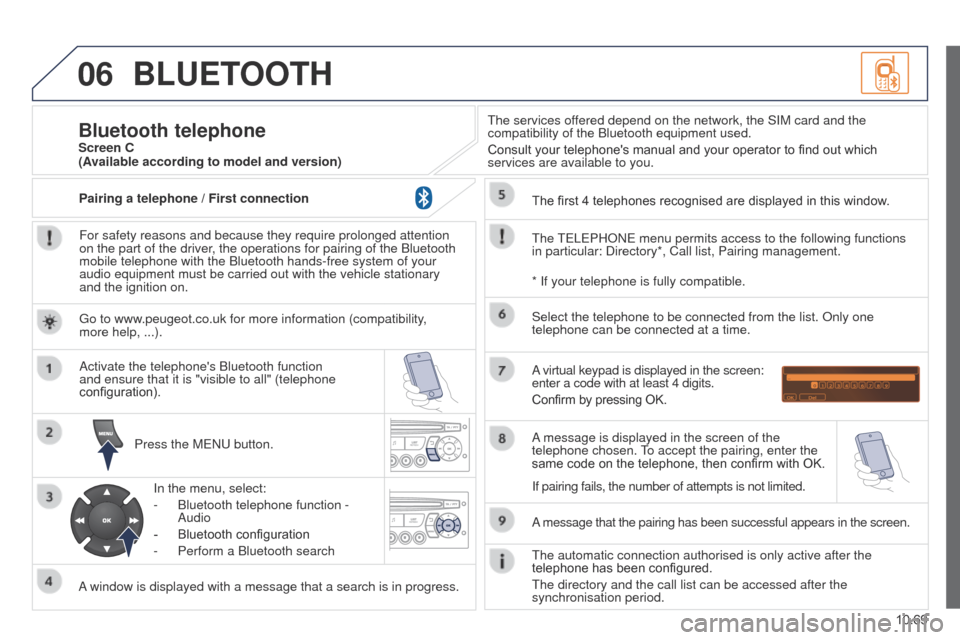
For safety reasons and because they require prolonged attention
on the part of the driver, the operations for pairing of the Bluetooth
mobile telephone with the Bluetooth hands-free system of your
audio equipment must be carried out with the vehicle stationary
and the ignition on.Press the M
e N u button.
A window is displayed with a message that a search is in progress. Activate the telephone's Bluetooth function
and ensure that it is "visible to all" (telephone
configuration).
In the menu, select:
-
Bluetooth telephone function -
Audio
-
Bluetooth configuration
-
Perform a Bluetooth search
t
he services offered depend on the network, the SIM card and the
compatibility of the Bluetooth equipment used.
Consult your telephone's manual and your operator to find out which
services are available to you.
Bluetooth telephoneScreen C
t
he
te
L e PHON e menu permits access to the following functions
in particular: Directory*, Call list, Pairing management. The first 4 telephones recognised are displayed in this window.
A virtual keypad is displayed in the screen:
enter a code with at least 4 digits.
Confirm by pressing OK.
A message that the pairing has been successful appears in the screen. Select the telephone to be connected from the list. Only one
telephone can be connected at a time.
A message is displayed in the screen of the
telephone chosen.
to accept the pairing, enter the
same code on the telephone, then confirm with OK.
t
he automatic connection authorised is only active after the
telephone has been configured.
t
he directory and the call list can be accessed after the
synchronisation period.
(Available according to model and version)
* If your telephone is fully compatible.
If pairing fails, the number of attempts is not limited.
g
o to www.peugeot.co.uk for more information (compatibility,
more help, ...).
Pairing a telephone / First connection
Page 260 of 276
06
10.70
Partner_2_VP_en_Chap10c_RD45_ed02_2014
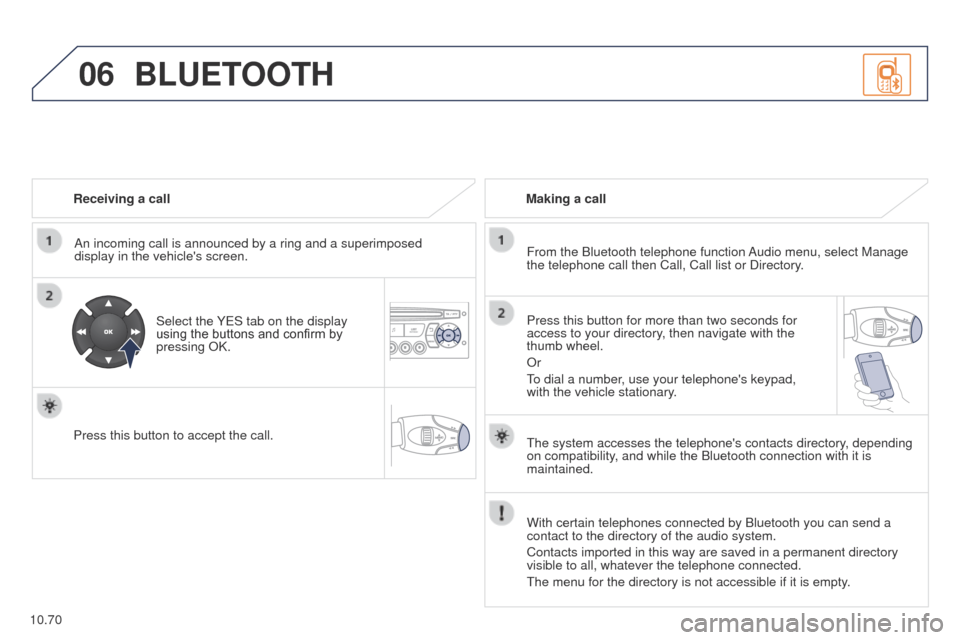
Receiving a callAn incoming call is announced by a ring and a superimposed
display in the vehicle's screen.
Select the Y
e S tab on the display
using the buttons and confirm by
pressing OK.
Press this button to accept the call. Making a call
From the Bluetooth telephone function Audio menu, select Manage
the telephone call then Call, Call list or Directory.
Press this button for more than two seconds for
access to your directory, then navigate with the
thumb wheel.
Or
to dial a number
, use your telephone's keypad,
with the vehicle stationary.
BLUETOOTH
the system accesses the telephone's contacts directory, depending
on compatibility , and while the Bluetooth connection with it is
maintained.
With certain telephones connected by Bluetooth you can send a
contact to the directory of the audio system.
Contacts imported in this way are saved in a permanent directory
visible to all, whatever the telephone connected.
t
he menu for the directory is not accessible if it is empty.
Page 261 of 276
06
10.71
Partner_2_VP_en_Chap10c_RD45_ed02_2014
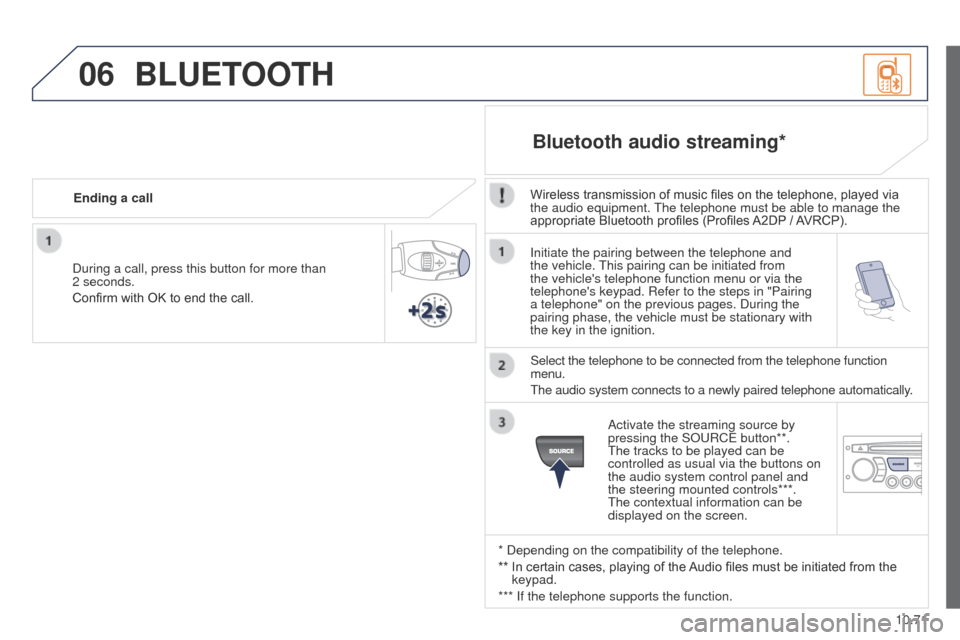
Initiate the pairing between the telephone and
the vehicle. this pairing can be initiated from
the vehicle's telephone function menu or via the
telephone's keypad. Refer to the steps in "Pairing
a telephone" on the previous pages. During the
pairing phase, the vehicle must be stationary with
the key in the ignition.
Select the telephone to be connected from the telephone function
menu.
t
he audio system connects to a newly paired telephone automatically.
Bluetooth audio streaming*
Wireless transmission of music files on the telephone, played via
the audio equipment. t he telephone must be able to manage the
appropriate Bluetooth profiles (Profiles A2DP / AVRCP).
* Depending on the compatibility of the telephone.
**
In certain cases, playing of the
Audio files must be initiated from the
keypad.
*** If the telephone supports the function. Activate the streaming source by
pressing the SO
u RC e button**.
t
he tracks to be played can be
controlled as usual via the buttons on
the audio system control panel and
the steering mounted controls***.
t
he contextual information can be
displayed on the screen.
During a call, press this button for more than
2 seconds.
Confirm with OK to end the call.
Ending a call
BLUETOOTH
Page 268 of 276
09
10.78
Partner_2_VP_en_Chap10c_RD45_ed02_2014
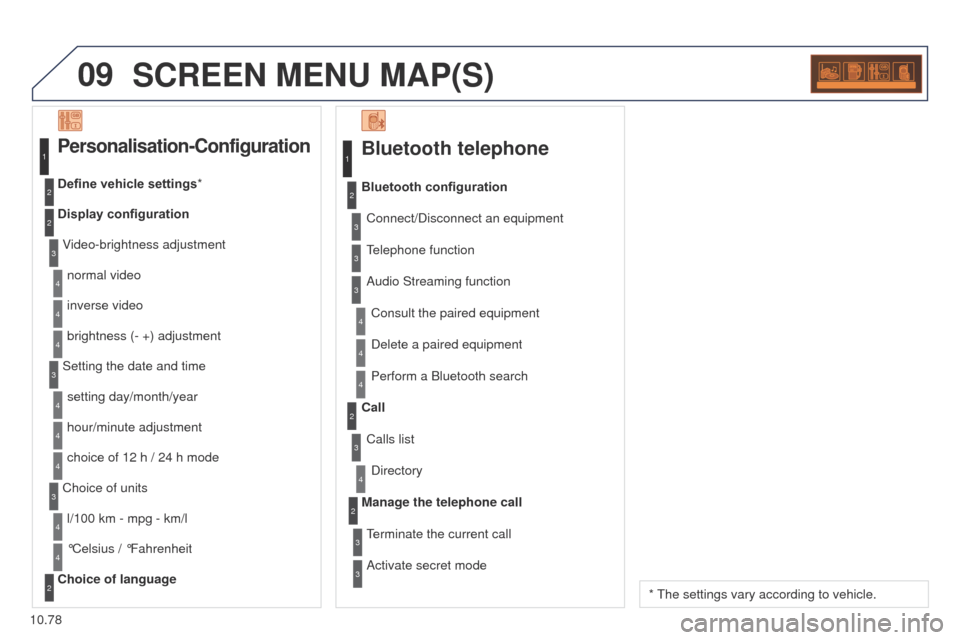
SCREEN MENU MAP(S)
Bluetooth telephone
Connect/Disconnect an equipmentConsult the paired equipment
Bluetooth configuration
telephone function
Audio Streaming function
Delete a paired equipment
Perform a Bluetooth search
Calls list
Call
Directory
terminate the current call
Manage the telephone call
Activate secret mode
1
2
3
3
3
4
4
4
2
3
4
2
3
3
Video-brightness adjustment
Display configuration Define vehicle settings*
Personalisation-Configuration
normal video
inverse video
brightness (- +) adjustment
Setting the date and time setting day/month/year
hour/minute adjustment
choice of 12 h / 24 h mode
Choice of units l/100 km - mpg - km/l
°Celsius / °Fahrenheit
Choice of language
1
2
4
3
2
4
4
3
4
4
2
3
4
4
4
* t he settings vary according to vehicle.
Page 270 of 276
10.80
Partner_2_VP_en_Chap10c_RD45_ed02_2014
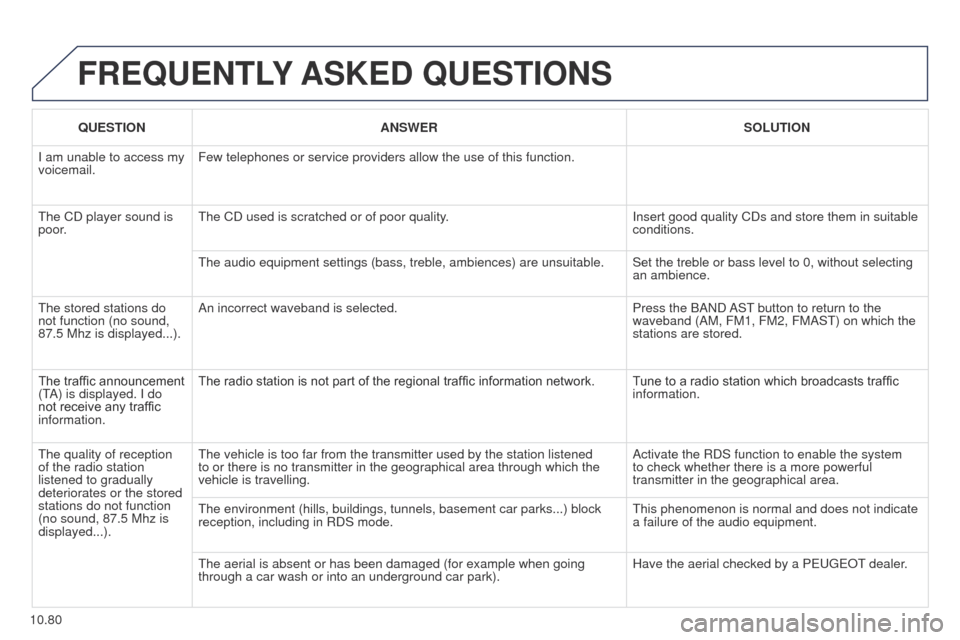
FREQUENTLY ASKED QUESTIONS
QUESTION ANSWER SOLUTION
I am unable to access my
voicemail. Few telephones or service providers allow the use of this function.
t
he CD player sound is
poor.
t
he CD used is scratched or of poor quality. Insert good quality CDs and store them in suitable
conditions.
t
he audio equipment settings (bass, treble, ambiences) are unsuitable. Set the treble or bass level to 0, without selecting an ambience.
t
he stored stations do
not function (no sound,
87.5 Mhz is displayed...). An incorrect waveband is selected.
Press the BAND AS
t
button to return to the
waveband (AM, FM1, FM2, FMAS
t ) on which the
stations are stored.
The traffic announcement
(
t
A) is displayed. I do
not receive any traffic
information. The radio station is not part of the regional traffic information network.
T
une to a radio station which broadcasts traffic
information.
t
he quality of reception
of the radio station
listened to gradually
deteriorates or the stored
stations do not function
(no sound, 87.5
Mhz is
displayed...).
t
he vehicle is too far from the transmitter used by the station listened \
to or there is no transmitter in the geographical area through which the\
vehicle is travelling. Activate the RDS function to enable the system
to check whether there is a more powerful
transmitter in the geographical area.
t
he environment (hills, buildings, tunnels, basement car parks...) bloc\
k
reception, including in RDS mode.
t
his phenomenon is normal and does not indicate
a failure of the audio equipment.
t
he aerial is absent or has been damaged (for example when going
through a car wash or into an underground car park). Have the aerial checked by a P
euge O t
dealer
.