service Peugeot Partner Tepee 2015 Owner's Guide
[x] Cancel search | Manufacturer: PEUGEOT, Model Year: 2015, Model line: Partner Tepee, Model: Peugeot Partner Tepee 2015Pages: 276, PDF Size: 12.76 MB
Page 192 of 276
10.2
Partner_2_VP_en_Chap10a_BtA_ed02-2014
EMERGENCY OR ASSIST ANCE CALL
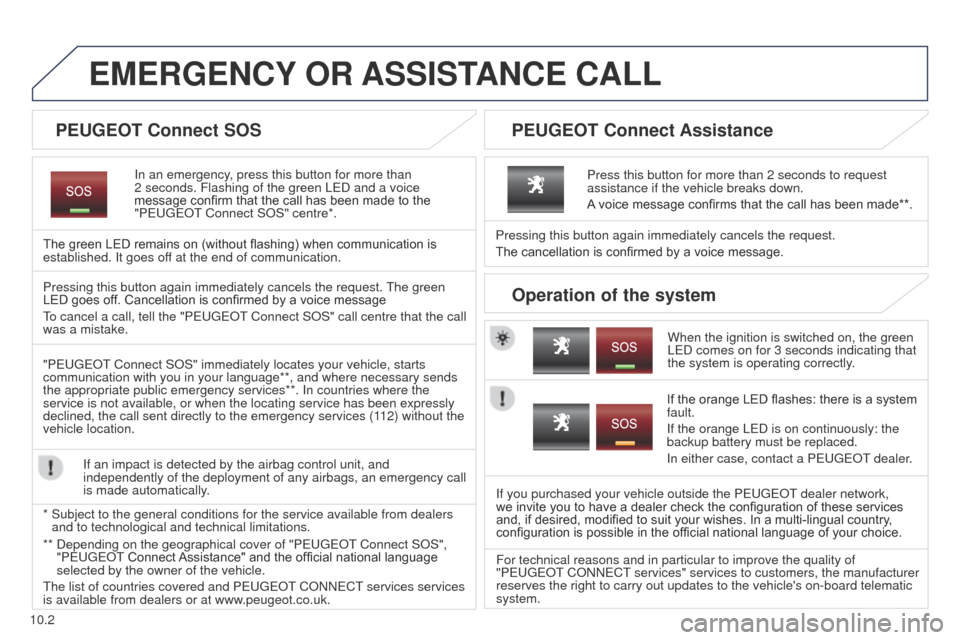
In an emergency, press this button for more than
2
seconds. Flashing of the green L e D and a voice
message confirm that the call has been made to the
"Peuge
O t Connect SOS" centre*.
The green LED remains on (without flashing) when communication is
established. It goes off at the end of communication.
When the ignition is switched on, the green
L
e D comes on for 3 seconds indicating that
the system is operating correctly.
Pressing this button again immediately cancels the request.
The cancellation is confirmed by a voice message.
Press this button for more than 2 seconds to request
assistance if the vehicle breaks down.
A voice message confirms that the call has been made**.
Pressing this button again immediately cancels the request.
t
he green
LED goes off. Cancellation is confirmed by a voice message
to cancel a call, tell the "Peuge
O t Connect SOS" call centre that the call
was a mistake.
"Peuge
O
t Connect SOS" immediately locates your vehicle, starts
communication with you in your language**, and where necessary sends
the appropriate public emergency services**. In countries where the
service is not available, or when the locating service has been expressl\
y
declined, the call sent directly to the emergency services (112) without the
vehicle location.
If an impact is detected by the airbag control unit, and
independently of the deployment of any airbags, an emergency call
is made automatically.
*
Subject to the general conditions for the service available from dealers\
and to technological and technical limitations. If the orange LED flashes: there is a system
fault.
If the orange L
e D is on continuously: the
backup battery must be replaced.
In either case, contact a P
euge O t
dealer
.
If you purchased your vehicle outside the P
euge O t
dealer network,
we invite you to have a dealer check the configuration of these services
and, if desired, modified to suit your wishes. In a multi-lingual country ,
configuration is possible in the official national language of your choice.
For technical reasons and in particular to improve the quality of
"P
euge O t
CONN
e C t
services" services to customers, the manufacturer
reserves the right to carry out updates to the vehicle's on-board telema\
tic
system.
PEUGEOT Connect SOS P EUGEOT Connect Assistance
Operation of the system
** Depending on the geographical cover of "Peuge O t Connect SOS",
"Peuge O t Connect Assistance" and the official national language
selected by the owner of the vehicle.
t
he list of countries covered and P euge O t
CONN
e C t
services services
is available from dealers or at www
.peugeot.co.uk.
Page 198 of 276
03
10.8
Partner_2_VP_en_Chap10b_RT6-2-8_ed02-2014
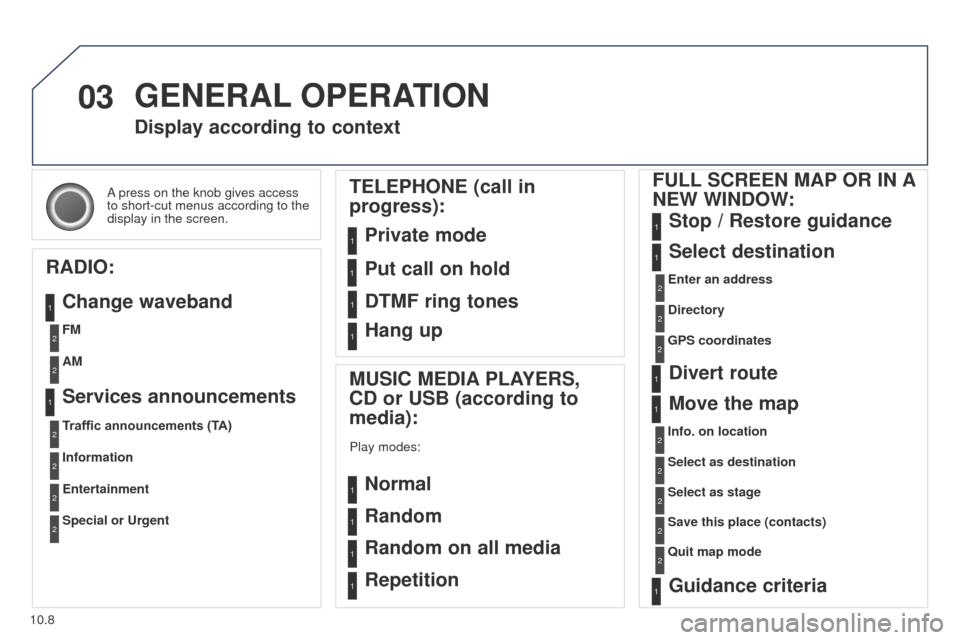
A press on the knob gives access
to short-cut menus according to the
display in the screen.
Display according to context
RADIO: Change waveband
MUSIC MEDIA PLAYERS,
CD or USB (according to
media):
Play modes:
Normal
Random
Random on all media
Repetition
TELEPHONE (call in
progress):
Private mode FULL SCREEN MAP OR IN A
NEW WINDOW:
Stop / Restore guidance
Select destination
Enter an address
Directory
GPS coordinates
Divert route
Move the map
Info. on location
Select as destination Select as stage
Save this place (contacts)
Quit map mode
Guidance criteria
Put call on hold
DTMF ring tones
Hang up
1
1
1
1
1
1
1
2
2
2
2
2
1
2
2
2
1
1
1
1
1
1FM
Traffic announcements (TA) AM
Information
Entertainment
Special or Urgent2
2
2
2
2
2
Services announcements1
GENERAL OPERATION
Page 203 of 276
the points of interest (POI) indicate all of the service locations in t\
he vicinity
(hotels, various businesses, ai")
04
10.13
Partner_2_VP_en_Chap10b_RT6-2-8_ed02-2014
Towards points of interest (POI)the points of interest (POI) indicate all of the service locations in t\
he vicinity
(hotels, various businesses, airports...).
Select the "Enter an address" function
and confirm, then select Select
destination and confirm.
to select a POI close to your current
location, select " POI
" and confirm, then
select "Around the current place" and
confirm.
to select a POI as a stage on the route,
select "
POI" and confirm, then select "On
the route" and confirm.
To select a POI as a destination, first
enter the country and town (see "
t
owards
a new destination"), select " POI
" and
confirm, finally select " Near" and confirm. Search for POIs in the categories
suggested in the following pages.
Select "Search by Name
" to search for POIs by name and not by
proximity.
Select the POI and confirm "OK" to start
the guidance.
Press N AV
to display the
"Navigation - guidance " menu.
NAVIGATION - GUIDANCE
Page 204 of 276
04
10.14
Partner_2_VP_en_Chap10b_RT6-2-8_ed02-2014
NAVIGATION - GUIDANCE
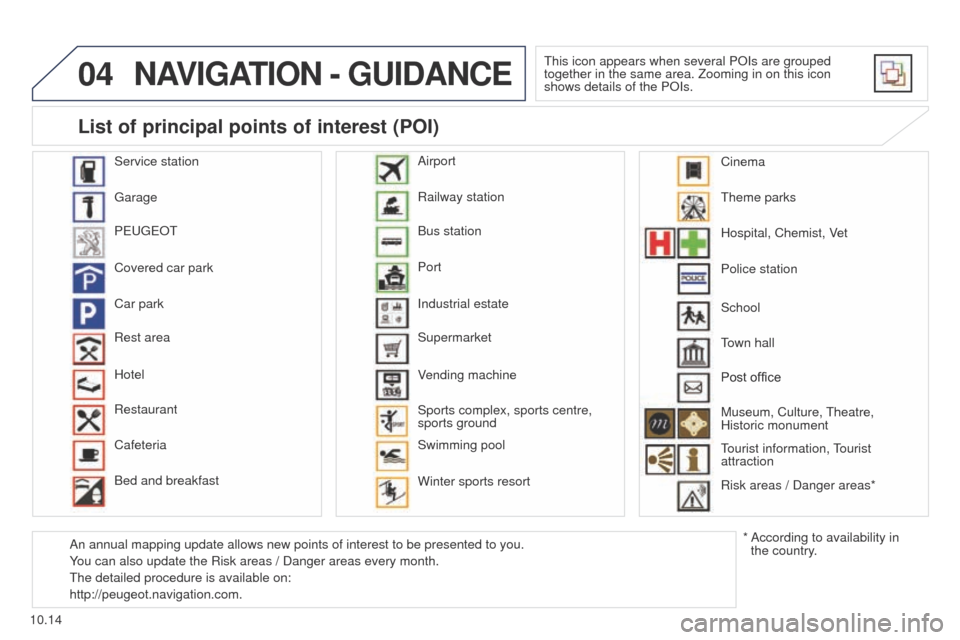
this icon appears when several POIs are grouped
together in the same area. Zooming in on this icon
shows details of the POIs.
Service station
g
arage
P
euge
O
t
Covered car park
Car park
Rest area
Hotel
Restaurant
Cafeteria
Bed and breakfast Railway station
Bus station
Port
Industrial estate
Supermarket
V
ending machine
Sports complex, sports centre,
sports ground
Swimming pool
Winter sports resort Airport
t
heme parks
Hospital, Chemist, Vet
Police station
town hall
Post office
Museum,
Culture, t heatre,
Historic monument
tourist
information, t
ourist
attraction
Risk areas / Danger areas*
List of principal points of interest (POI)
* According to availability in
the country.
School
An annual mapping update allows new points of interest to be presented t\
o you.
You can also update the Risk areas / Danger areas every month.
t
he detailed procedure is available on:
http://peugeot.navigation.com. Cinema
Page 214 of 276

05
10.24
Partner_2_VP_en_Chap10b_RT6-2-8_ed02-2014
Principal TMC symbols
Red and yellow triangle: traffic information, for example:
Black and blue triangle: general information, for example:
Weather reports
Modified signage
Risk of explosion Traffic reports
Narrow carriageway
Road closed
Wind
Slippery surface
Demonstration Fog
Accident
Danger
Parking
Delay
No entry Snow / ice
Roadworks
Traffic jam
Receiving TA messages
The TA (Traffic Announcement) function gives priority to TA alert
messages. to operate, this function needs good reception of a
radio station transmitting this type of message. When a traffic report
is transmitted, the current audio source (Radio, CD,
u SB, ...) is
interrupted automatically to play the
tA
message. Normal playback
of the audio source resumes at the end of the transmission of the
message.
Press RADIO to display the menu.
Select "Service announcements" then
confirm.
Activate or deactivate "TA " then confirm.
t
he volume setting for
tA
messages can be adjusted only during the
transmission of this type of alert.
Activate or deactivate the function at any time by pressing
the button.
During a message, press the button to interrupt it.
TRAFFIC INFORMATION
Page 216 of 276
06
10.26
Partner_2_VP_en_Chap10b_RT6-2-8_ed02-2014
USING THE TELEPHONE
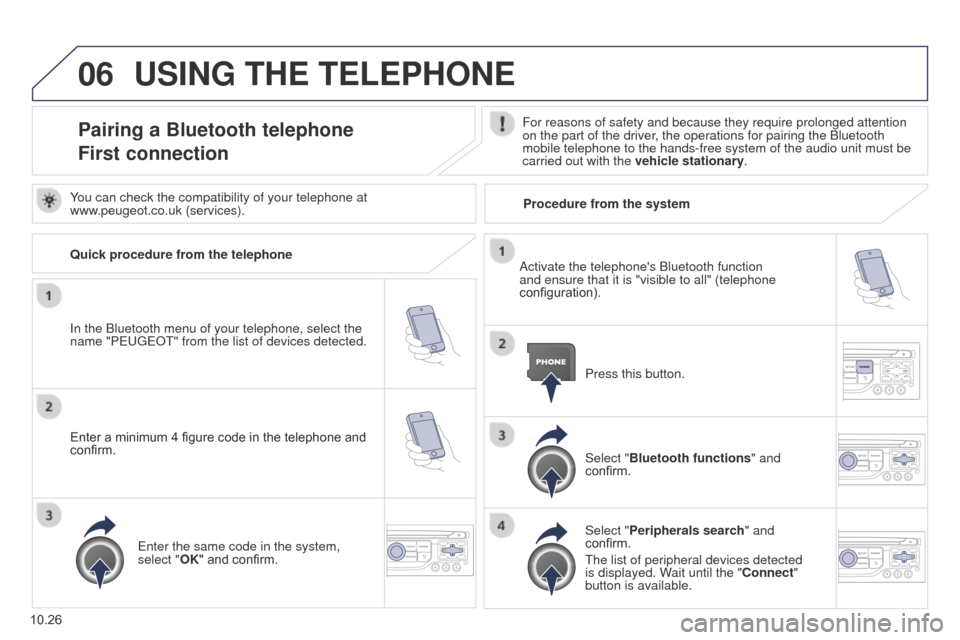
Pairing a Bluetooth telephone
First connectionFor reasons of safety and because they require prolonged attention
on the part of the driver, the operations for pairing the Bluetooth
mobile telephone to the hands-free system of the audio unit must be
carried out with the vehicle stationary.
In the Bluetooth menu of your telephone, select the
name "Peuge
O
t" from the list of devices detected. Press this button.
Select "Bluetooth functions" and
confirm.
Select "Peripherals search " and
confirm.
t
he list of peripheral devices detected
is displayed. Wait until the "Connect"
button is available.
You can check the compatibility of your telephone at
www.peugeot.co.uk (services).
Activate the telephone's Bluetooth function
and ensure that it is "visible to all" (telephone
configuration).
Quick procedure from the telephone
Enter a minimum 4 figure code in the telephone and
confirm.
e
nter the same code in the system,
select "OK" and confirm. Procedure from the system
Page 217 of 276
06
10.27
Partner_2_VP_en_Chap10b_RT6-2-8_ed02-2014
USING THE TELEPHONE
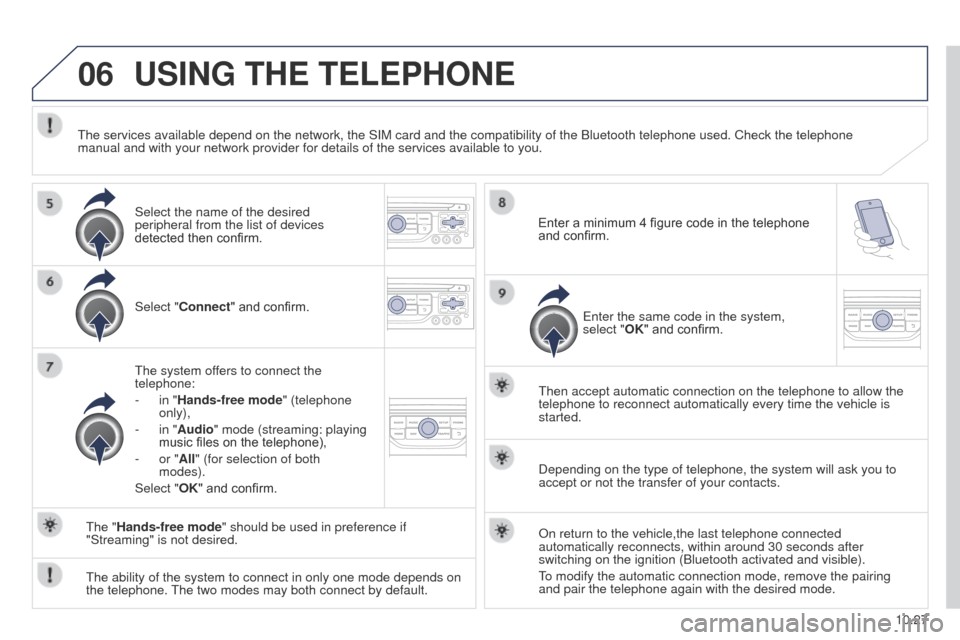
Select "Connect" and confirm.
t
he system offers to connect the
telephone:
-
in "
Hands-free mode" (telephone
only),
-
in "
Audio" mode (streaming: playing
music files on the telephone),
-
or "
All" (for selection of both
modes).
Select "OK" and confirm.
t
hen accept automatic connection on the telephone to allow the
telephone to reconnect automatically every time the vehicle is
started.
t
he ability of the system to connect in only one mode depends on
the telephone.
t
he two modes may both connect by default.
t
he "Hands-free mode" should be used in preference if
"Streaming" is not desired.
t
he services available depend on the network, the SIM card and the compat\
ibility of the Bluetooth telephone used. Check the telephone
manual and with your network provider for details of the services availa\
ble to you.
Depending on the type of telephone, the system will ask you to
accept or not the transfer of your contacts.
On return to the vehicle,the last telephone connected
automatically reconnects, within around 30 seconds after
switching on the ignition (Bluetooth activated and visible).
to modify the automatic connection mode, remove the pairing
and pair the telephone again with the desired mode.
Enter a minimum 4 figure code in the telephone
and confirm.
e
nter the same code in the system,
select "OK" and confirm.
Select the name of the desired
peripheral from the list of devices
detected then confirm.
Page 223 of 276
06
10.33
Partner_2_VP_en_Chap10b_RT6-2-8_ed02-2014
Options during a call*
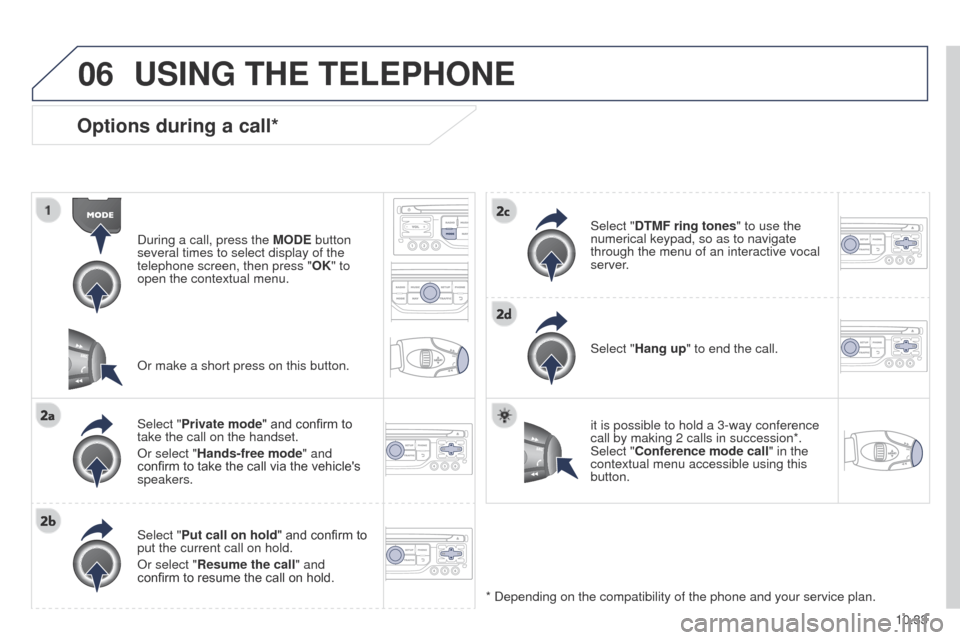
During a call, press the MODE button
several times to select display of the
telephone screen, then press " OK" to
open the contextual menu.
Select "Private mode" and confirm to
take the call on the handset.
Or select "Hands-free mode" and
confirm to take the call via the vehicle's
speakers.
Select "Put call on hold " and confirm to
put the current call on hold.
Or select "Resume the call" and
confirm to resume the call on hold. Select "DTMF ring tones
" to use the
numerical keypad, so as to navigate
through the menu of an interactive vocal
server.
Select "Hang up" to end the call.
* Depending on the compatibility of the phone and your service plan. it is possible to hold a 3-way conference
call by making 2 calls in succession*.
Select "Conference mode call" in the
contextual menu accessible using this
button.
Or make a short press on this button.
USING THE TELEPHONE
Page 243 of 276
10.53
Partner_2_VP_en_Chap10b_RT6-2-8_ed02-2014
FREQUENTLY ASKED QUESTIONS
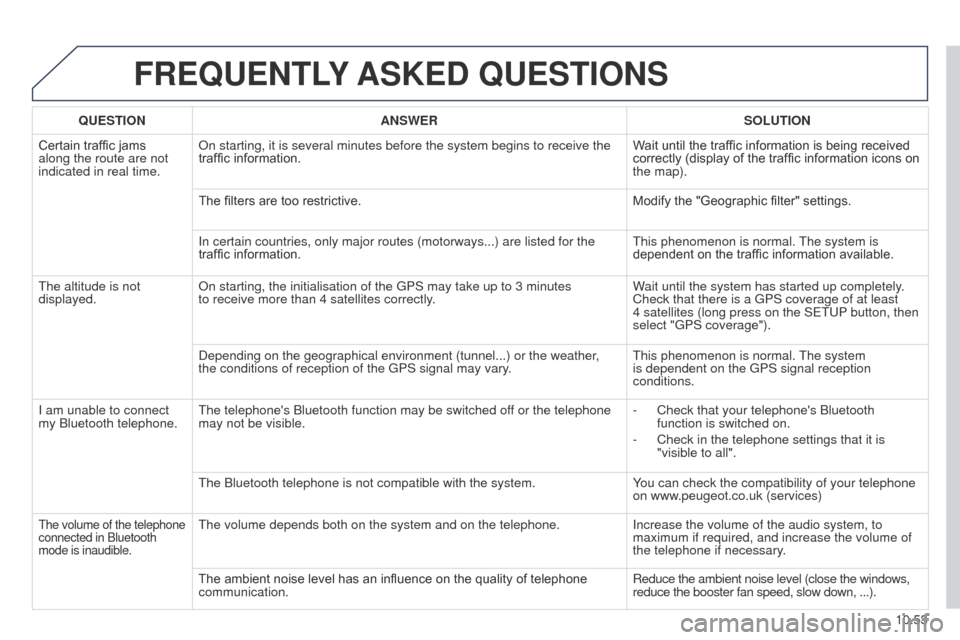
QUESTION ANSWER SOLUTION
Certain traffic jams
along the route are not
indicated in real time. On starting, it is several minutes before the system begins to receive t\
he
traffic information.
Wait until the traffic information is being received
correctly (display of the traffic information icons on
the map).
The filters are too restrictive. Modify the "Geographic filter" settings.
In certain countries, only major routes (motorways...) are listed for \
the
traffic information.
t
his phenomenon is normal.
t
he system is
dependent on the traffic information available.
t
he altitude is not
displayed. On starting, the initialisation of the
g PS may take up to 3 minutes
to
receive more than 4 satellites correctly. Wait until the system has started up completely.
Check that there is a
g PS coverage of at least
4
satellites (long press on the S etu P button, then
select "
g PS coverage").
Depending on the geographical environment (tunnel...) or the weather,
the conditions of reception of the
g PS signal may vary.
t
his phenomenon is normal.
t
he system
is dependent on the
g PS signal reception
conditions.
I am unable to connect
my Bluetooth telephone.
t
he telephone's Bluetooth function may be switched off or the telephone
may not be visible. -
Check that your telephone's Bluetooth
function is switched on.
-
Check in the telephone settings that it is
"visible to all".
t
he Bluetooth telephone is not compatible with the system. You can check the compatibility of your telephone
on www.peugeot.co.uk (services)
the volume of the telephone
connected in Bluetooth
mode is inaudible.the volume depends both on the system and on the telephone. Increase the volume of the audio system, to
maximum if required, and increase the volume of
the telephone if necessary
.
The ambient noise level has an influence on the quality of telephone
communication. Reduce the ambient noise level (close the windows,
reduce the booster fan speed, slow down, ...).
Page 259 of 276
06
10.69
Partner_2_VP_en_Chap10c_RD45_ed02_2014
BLUETOOTH
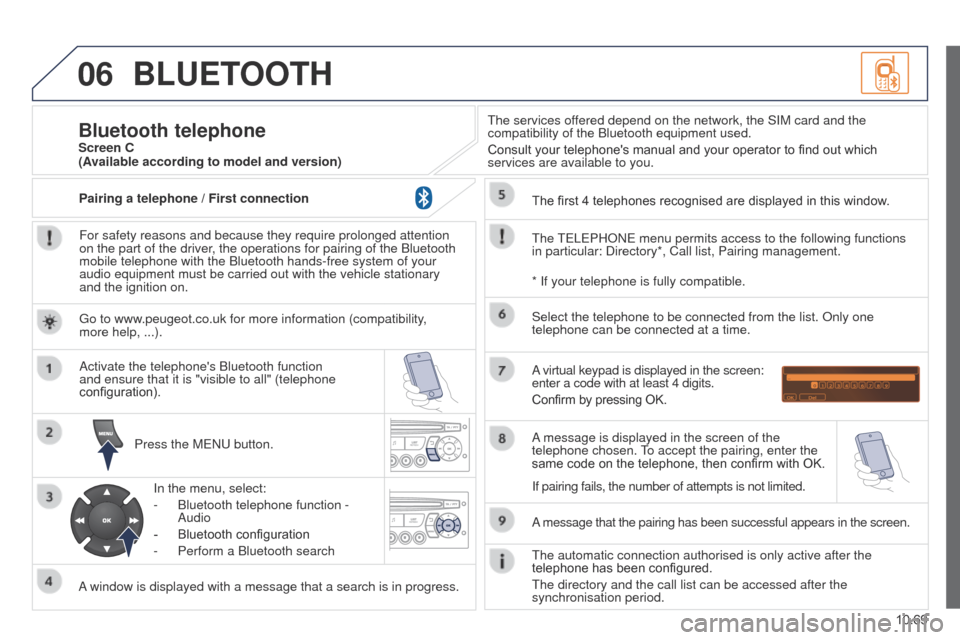
For safety reasons and because they require prolonged attention
on the part of the driver, the operations for pairing of the Bluetooth
mobile telephone with the Bluetooth hands-free system of your
audio equipment must be carried out with the vehicle stationary
and the ignition on.Press the M
e N u button.
A window is displayed with a message that a search is in progress. Activate the telephone's Bluetooth function
and ensure that it is "visible to all" (telephone
configuration).
In the menu, select:
-
Bluetooth telephone function -
Audio
-
Bluetooth configuration
-
Perform a Bluetooth search
t
he services offered depend on the network, the SIM card and the
compatibility of the Bluetooth equipment used.
Consult your telephone's manual and your operator to find out which
services are available to you.
Bluetooth telephoneScreen C
t
he
te
L e PHON e menu permits access to the following functions
in particular: Directory*, Call list, Pairing management. The first 4 telephones recognised are displayed in this window.
A virtual keypad is displayed in the screen:
enter a code with at least 4 digits.
Confirm by pressing OK.
A message that the pairing has been successful appears in the screen. Select the telephone to be connected from the list. Only one
telephone can be connected at a time.
A message is displayed in the screen of the
telephone chosen.
to accept the pairing, enter the
same code on the telephone, then confirm with OK.
t
he automatic connection authorised is only active after the
telephone has been configured.
t
he directory and the call list can be accessed after the
synchronisation period.
(Available according to model and version)
* If your telephone is fully compatible.
If pairing fails, the number of attempts is not limited.
g
o to www.peugeot.co.uk for more information (compatibility,
more help, ...).
Pairing a telephone / First connection