trip computer Peugeot Partner Tepee 2015 Owner's Manual
[x] Cancel search | Manufacturer: PEUGEOT, Model Year: 2015, Model line: Partner Tepee, Model: Peugeot Partner Tepee 2015Pages: 276, PDF Size: 12.76 MB
Page 10 of 276
8
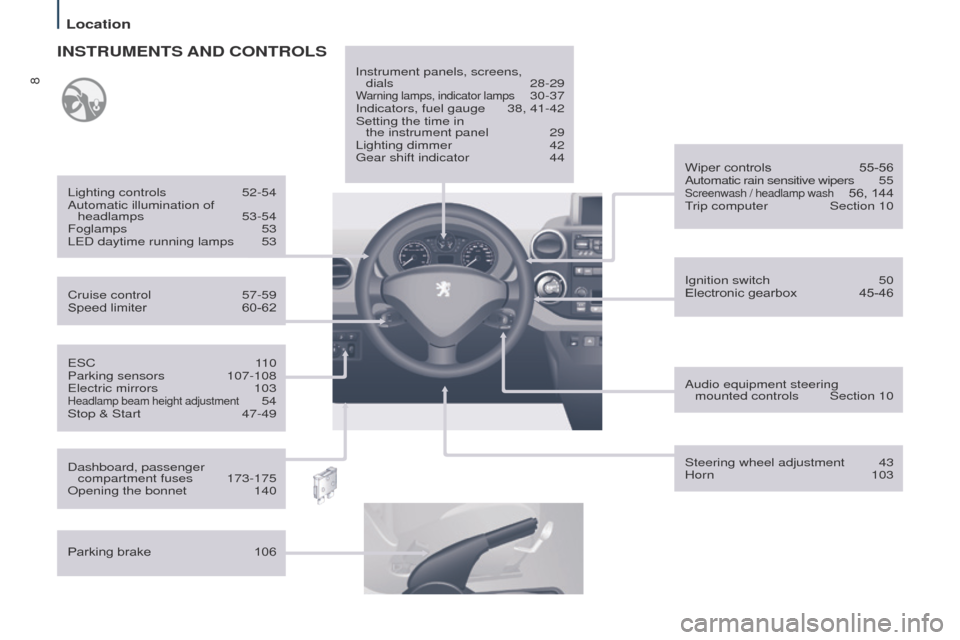
Partner_2_VP_en_Chap01_vue-ensemble_ed02-2014
eSC 110
Parking sensors 107-108e
lectric mirrors
103Headlamp beam height adjustment 54
Stop & Start
47-49
Cruise control
57-59
Speed limiter
60-62
Lighting controls
52-54
Automatic illumination of headlamps
53-54
Foglamps
53
L
e
D daytime running lamps
53
INSTRUMENTS AND CONTROLS
Dashboard, passenger
compartment fuses 173-175
Opening the bonnet
140
Parking brake
106 Instrument panels, screens,
dials 28-29
Warning lamps, indicator lamps 30-37
Indicators, fuel gauge
38, 41-42
Setting the time in
the instrument panel
29
Lighting dimmer
42g
ear shift indicator
44
Ignition switch
50
Electronic gearbox
45-46
Wiper controls
55-56
Automatic rain sensitive wipers
5
5
Screenwash / headlamp wash 56, 144trip computer
Section 10
Audio equipment steering mounted controls
Section 10
Steering wheel adjustment
43
Horn
103
Location
Page 12 of 276
10
Partner_2_VP_en_Chap01_vue-ensemble_ed02-2014
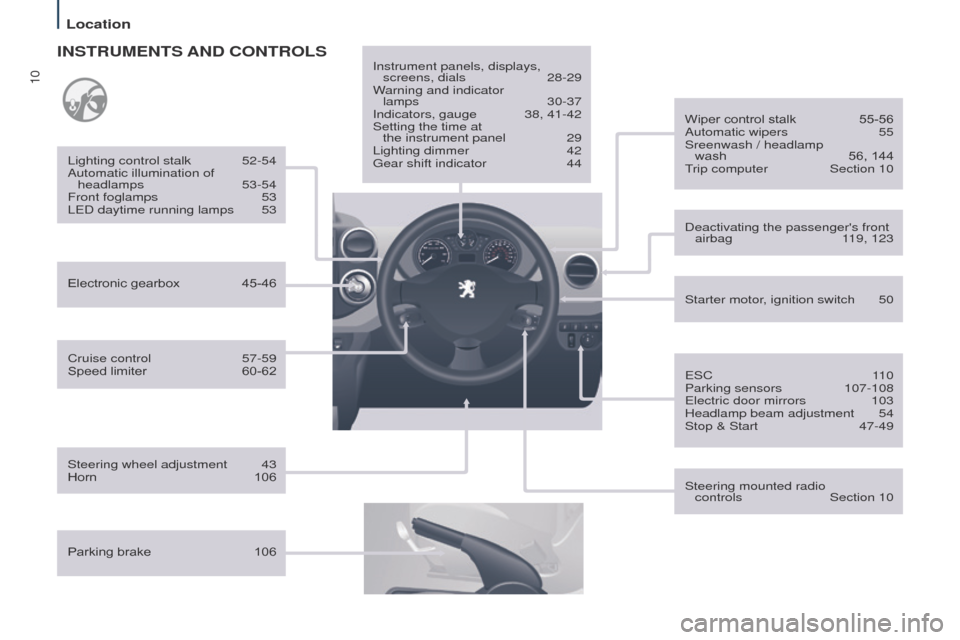
Cruise control 57-59
Speed limiter 60-62
Lighting control stalk
52-54
Automatic illumination of headlamps
53-54
Front foglamps
53
L
e D daytime running lamps
53
INSTRUMENTS AND CONTROLS
Parking brake 106Instrument panels, displays,
screens, dials
28-29
W
arning and indicator
lamps
30-37
Indicators, gauge
38, 41-42
Setting the time at
the instrument panel
29
Lighting dimmer
42g
ear shift indicator
44
Steering wheel adjustment
43
Horn
106 Starter motor
, ignition switch
50
Wiper control stalk
55-56
Automatic wipers
55
Sreenwash / headlamp
wash
56, 144trip computer
Section 10
Steering mounted radio
controls
Section 10
Deactivating the passenger's front
airbag
1
19, 123
e
SC
1
10
Parking sensors
107-108e
lectric door mirrors
103
Headlamp beam adjustment
54
Stop & Start
47-49
Electronic gearbox
45-46
Location
Page 15 of 276
13
Partner_2_VP_en_Chap01_vue-ensemble_ed02-2014
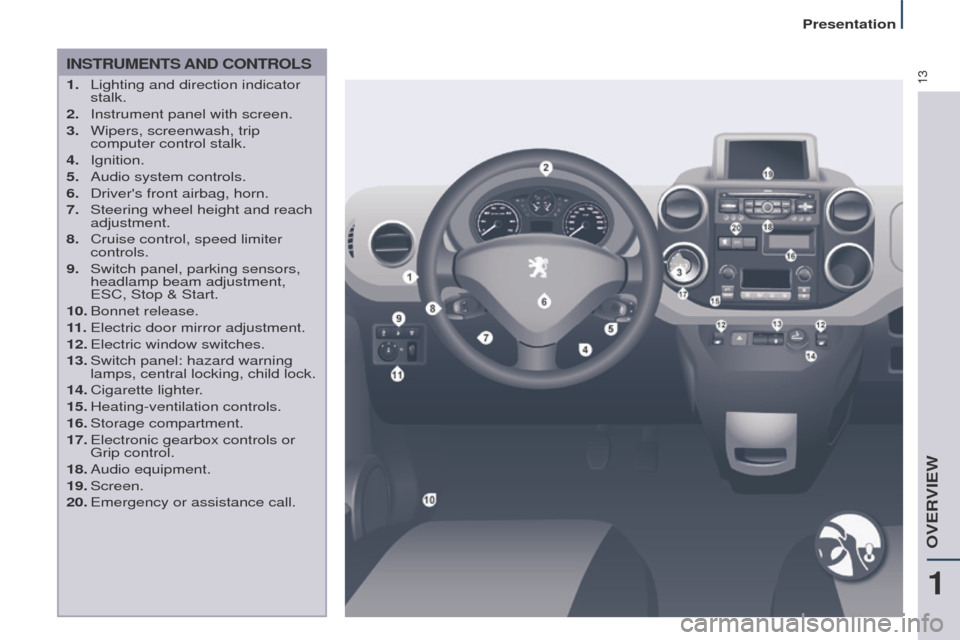
INSTRUMENTS AND CONTROLS
1. Lighting and direction indicator
stalk.
2.
Instrument panel with screen.
3.
Wipers, screenwash, trip
computer control stalk.
4.
Ignition.
5.
Audio system controls.
6.
Driver's front airbag, horn.
7.
Steering wheel height and reach
adjustment.
8.
Cruise control, speed limiter
controls.
9.
Switch panel, parking sensors,
headlamp beam adjustment,
e
SC, Stop & Start.
10.
Bonnet
release.
11 .
e lectric door mirror adjustment.
12.
e lectric window switches.
13.
Switch panel: hazard warning
lamps, central locking, child lock.
14.
Cigarette
lighter.
15.
Heating-ventilation
controls.
16.
Storage
compartment.
17.
e lectronic gearbox controls or
g
rip control.
18.
Audio
equipment.
19.
Screen.
20.
e mergency or assistance call.
1
OVeRVIeW
Presentation
Page 16 of 276
14
Partner_2_VP_en_Chap01_vue-ensemble_ed02-2014
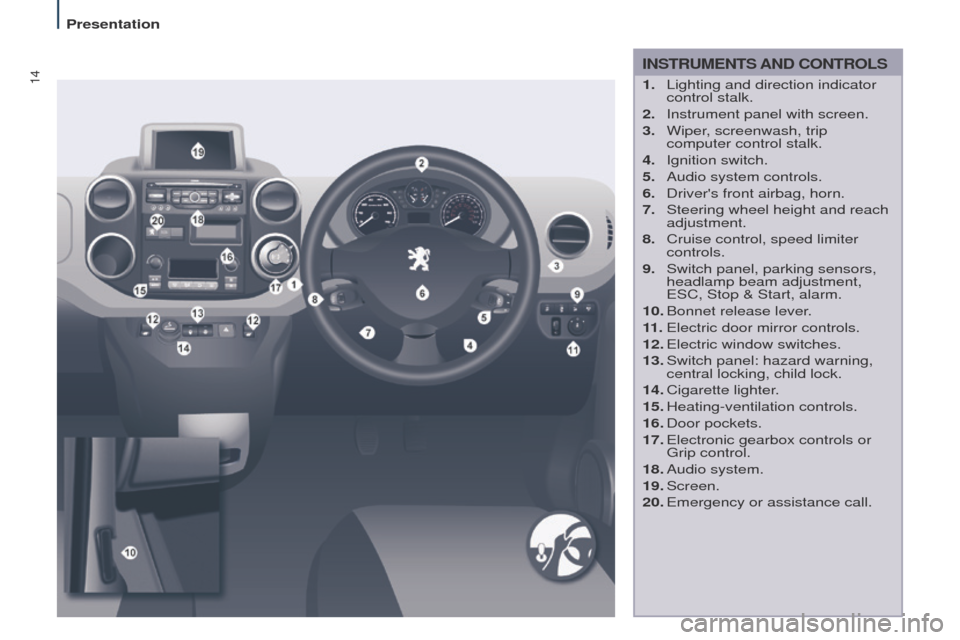
INSTRUMENTS AND CONTROLS
1. Lighting and direction indicator
control stalk.
2.
Instrument panel with screen.
3.
Wiper
, screenwash, trip
computer control stalk.
4.
Ignition switch.
5.
Audio system controls.
6.
Driver's front airbag, horn.
7.
Steering wheel height and reach
adjustment.
8.
Cruise control, speed limiter
controls.
9.
Switch panel, parking sensors,
headlamp beam adjustment,
e
SC, Stop & Start, alarm.
10.
Bonnet release lever
.
11 .
e lectric door mirror controls.
12.
e lectric window switches.
13.
Switch panel: hazard warning,
central locking, child lock.
14.
Cigarette
lighter.
15.
Heating-ventilation
controls.
16.
Door
pockets.
17.
e lectronic gearbox controls or
g
rip control.
18.
Audio
system.
19.
Screen.
20.
e mergency or assistance call.
Presentation
Page 33 of 276
31
Partner_2_VP_en_Chap03_Pret-a-partir_ed02-2014
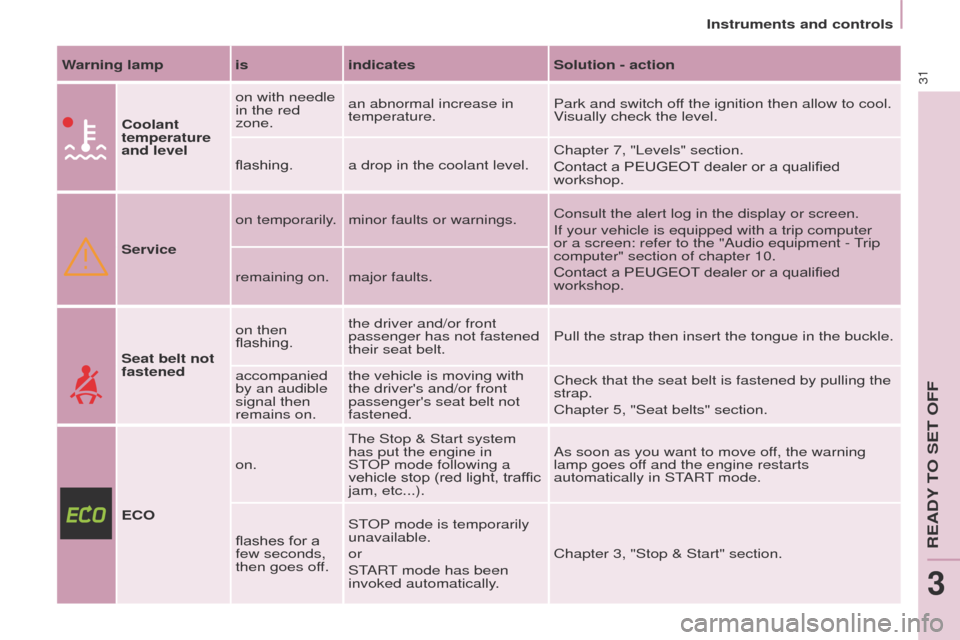
Warning lamp isindicatesSolution - action
Coolant
temperature
and level on with needle
in the red
zone.
an abnormal increase in
temperature.
Park and switch off the ignition then allow to cool.
Visually check the level.
flashing. a drop in the coolant level. Chapter 7, "Levels" section.
Contact a PEUGEOT
dealer or a qualified
workshop.
Service on temporarily. minor faults or warnings.
Consult the alert log in the display or screen.
If your vehicle is equipped with a trip computer
or a screen: refer to the "Audio equipment -
trip
computer" section of chapter 10.
Contact a PEUGEOT
dealer or a qualified
workshop.
remaining on. major faults.
Seat belt not
fastened on then
flashing.
the driver and/or front
passenger has not fastened
their seat belt.
Pull the strap then insert the tongue in the buckle.
accompanied
by an audible
signal then
remains on. the vehicle is moving with
the driver's and/or front
passenger's seat belt not
fastened.
Check that the seat belt is fastened by pulling the
strap.
Chapter 5, "Seat belts" section.
ECO on.
t
he Stop & Start system
has put the engine in
S
t
OP
mode following a
vehicle stop (red light, traffic
jam,
etc...).As soon as you want to move off, the warning
lamp goes off and the engine restarts
automatically in S
t
ARt mode.
flashes for a
few seconds,
then goes of
f.S
t
OP
mode is temporarily
unavailable.
or
S
t
ARt mode has been
invoked automatically
.Chapter 3, "Stop & Start" section.
Instruments and controls
ReADY tO Set OFF
3
Page 237 of 276
11
10.47
Partner_2_VP_en_Chap10b_RT6-2-8_ed02-2014
TRIP COMPUTER
Trip computer
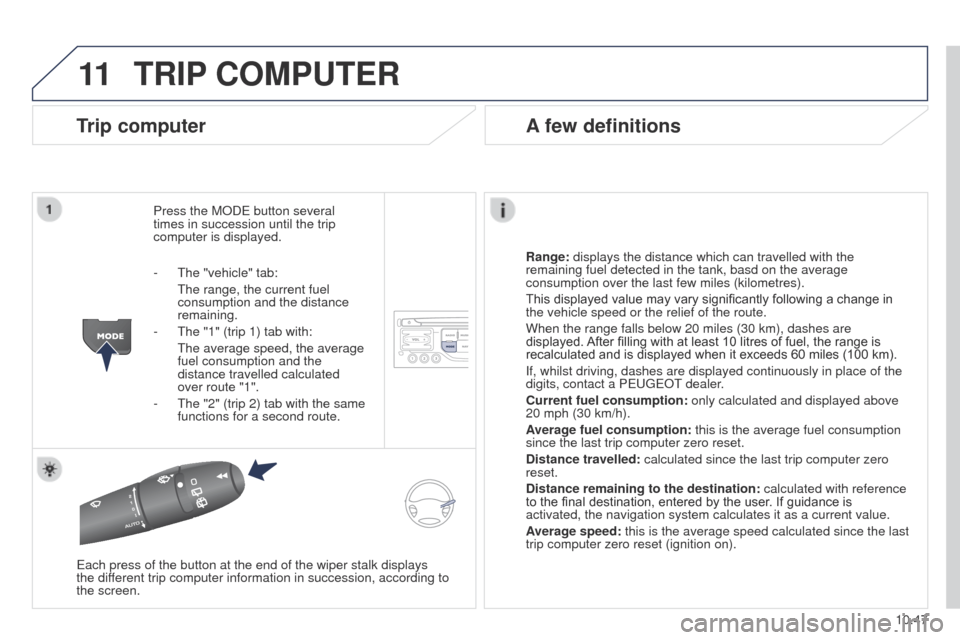
Press the MODe button several
times in succession until the trip
computer is displayed.
Range:
displays the distance which can travelled with the
remaining fuel detected in the tank, basd on the average
consumption over the last few miles (kilometres).
This displayed value may vary significantly following a change in
the vehicle speed or the relief of the route.
When the range falls below 20 miles (30 km), dashes are
displayed. After filling with at least 10 litres of fuel, the range is
recalculated and is displayed when it exceeds 60 miles (100 km).
If, whilst driving, dashes are displayed continuously in place of the
digits, contact a P
euge O t
dealer
.
Current fuel consumption:
only calculated and displayed above
20 mph (30 km/h).
Average fuel consumption: this is the average fuel consumption
since the last trip computer zero reset.
Distance travelled: calculated since the last trip computer zero
reset.
Distance remaining to the destination:
calculated with reference
to the final destination, entered by the user. If guidance is
activated, the navigation system calculates it as a current value.
Average speed: this is the average speed calculated since the last
trip computer zero reset (ignition on).
e
ach press of the button at the end of the wiper stalk displays
the
different trip computer information in succession, according to
the screen.
A few definitions
- the "vehicle" tab:
t he range, the current fuel
consumption and the distance
remaining.
-
t he "1" (trip 1) tab with:
t he average speed, the average
fuel consumption and the
distance travelled calculated
over route "1".
-
t he "2" (trip 2) tab with the same
functions for a second route.
Page 241 of 276
12
10.51
Partner_2_VP_en_Chap10b_RT6-2-8_ed02-2014
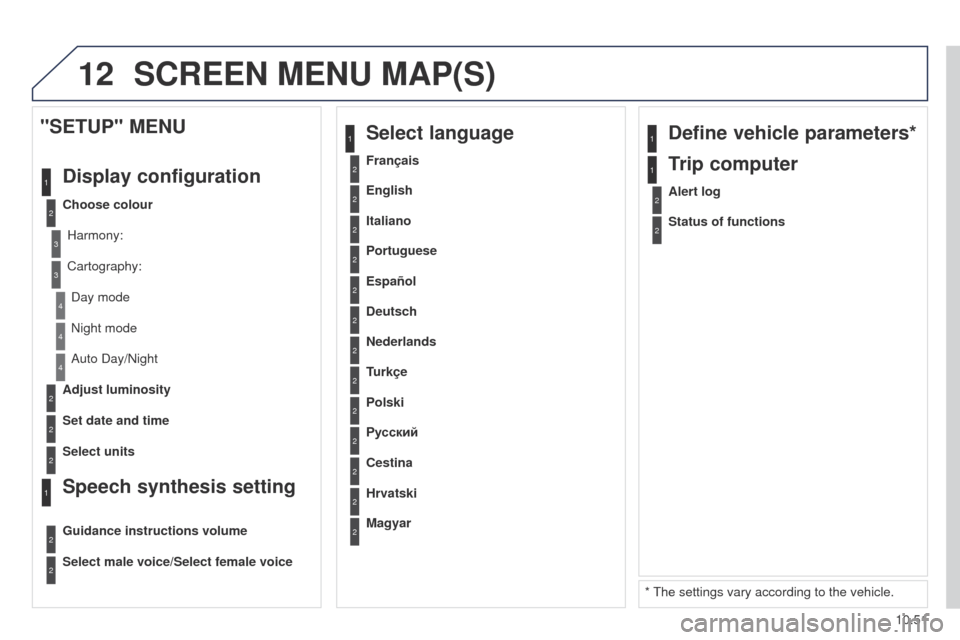
2
3
3
1
4
2
2
1
4
4
2
2
Night mode
Auto Day/Night
Adjust luminosity
Set date and time
"SETUP" MENU
Display configuration
Choose colourHarmony:
Cartography:Day mode
Speech synthesis setting
Guidance instructions volume
Select male voice/Select female voice
2Select units
1Define vehicle parameters*
* t he settings vary according to the vehicle.
2Alert log
1Trip computer
2Status of functions
2Français
1Select language
2English
2Italiano
2Portuguese
2Español
2Deutsch
2Nederlands
2
2
Turkçe
Cestina
2
2
Polski
Hrvatski
2
2
Русский
Magyar
SCREEN MENU MAP(S)
Page 250 of 276
01
10.60
Partner_2_VP_en_Chap10c_RD45_ed02_2014
FIRST STEPS
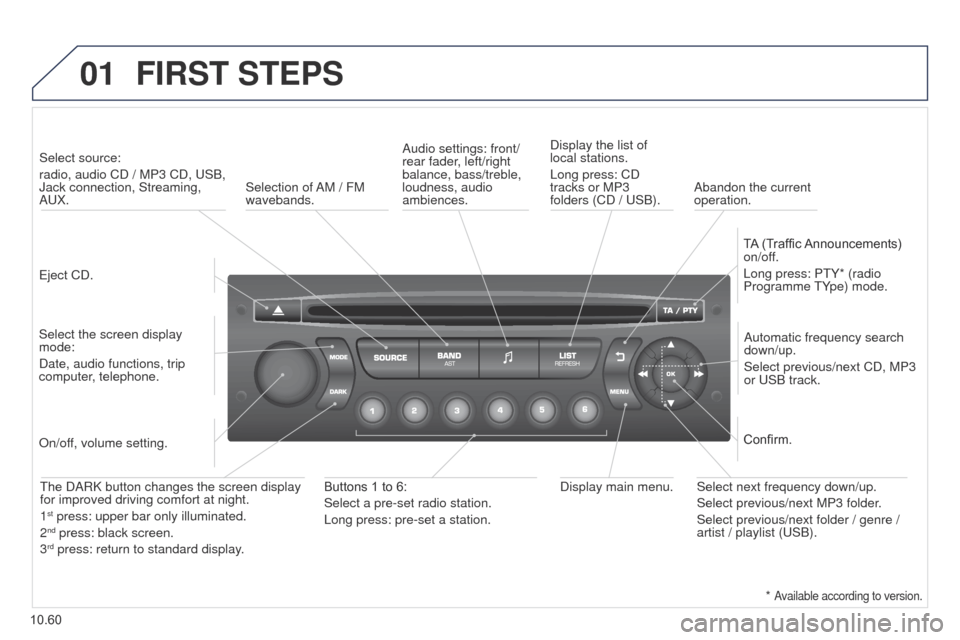
eject CD.
Select source:
radio, audio CD / MP3 CD,
u SB,
Jack connection, Streaming,
A u X.
Select the screen display
mode:
Date, audio functions, trip
computer, telephone. Automatic frequency search
down/up.
Select previous/next CD, MP3
or
u SB track.
Audio settings: front/
rear fader, left/right
balance, bass/treble,
loudness, audio
ambiences.
Display the list of
local stations.
Long press: CD
tracks or MP3
folders (CD / u SB).
TA (Traffic Announcements)
on/off.
Long press: P t Y* (radio
Programme t Ype) mode.
Display main menu.
t
he DARK button changes the screen display
for improved driving comfort at night.
1
st press: upper bar only illuminated.
2nd press: black screen.
3rd press: return to standard display.
On/off, volume setting.
Buttons 1 to 6:
Select a pre-set radio station.
Long press: pre-set a station. Select next frequency down/up.
Select previous/next MP3 folder.
Select previous/next folder / genre /
artist / playlist (
u SB).
Confirm.
Selection of AM / FM
wavebands.
Abandon the current
operation.
*
Available according to version.
Page 252 of 276
03
10.62
Partner_2_VP_en_Chap10c_RD45_ed02_2014
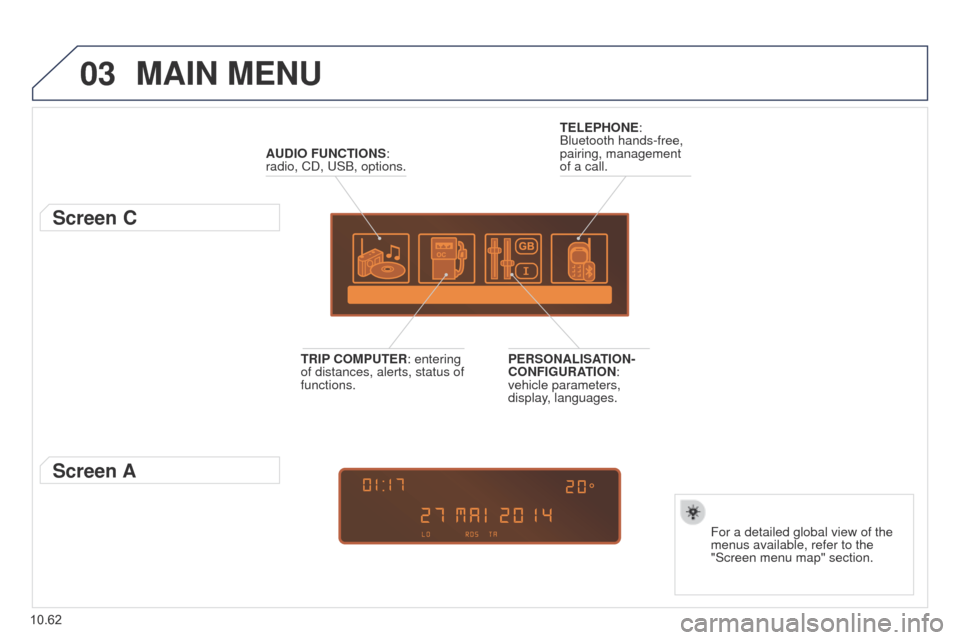
MAIN MENU
AUDIO FUNCTIONS:
radio, CD, u SB, options.
Screen C
For a detailed global view of the
menus available, refer to the
"Screen menu map" section.
TELEPHONE:
Bluetooth hands-free,
pairing, management
of a call.
PERSONALISATION-
CONFIGURATION:
vehicle parameters,
display, languages.
TRIP COMPUTER: entering
of distances, alerts, status of
functions.
Screen A
Page 263 of 276
08
14
10.73
Partner_2_VP_en_Chap10c_RD45_ed02_2014
TRIP COMPUTER
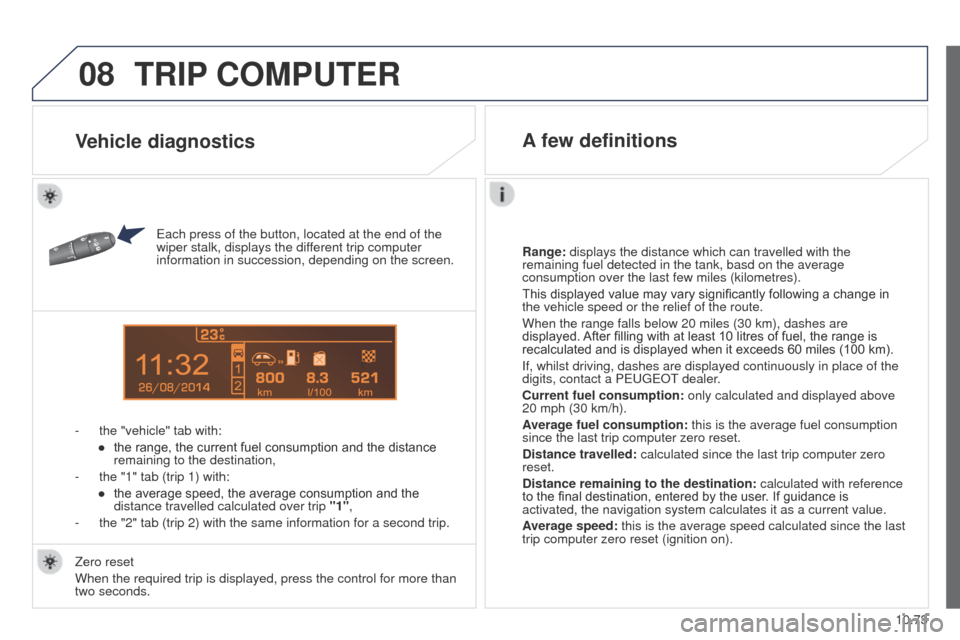
each press of the button, located at the end of the
wiper stalk, displays the dif ferent trip computer
information in succession, depending on the screen.
-
the "vehicle" tab with:
●
the range, the current fuel consumption and the distance
remaining to the destination,
-
the "1" tab (trip 1) with:
●
the average speed, the average consumption and the
distance travelled calculated over trip "1"
,
-
the "2" tab (trip 2) with the same information for a second trip. Range:
displays the distance which can travelled with the
remaining fuel detected in the tank, basd on the average
consumption over the last few miles (kilometres).
This displayed value may vary significantly following a change in
the vehicle speed or the relief of the route.
When the range falls below 20 miles (30 km), dashes are
displayed. After filling with at least 10 litres of fuel, the range is
recalculated and is displayed when it exceeds 60 miles (100 km).
If, whilst driving, dashes are displayed continuously in place of the
digits, contact a P
euge O t
dealer
.
Current fuel consumption:
only calculated and displayed above
20 mph (30 km/h).
Average fuel consumption: this is the average fuel consumption
since the last trip computer zero reset.
Distance travelled: calculated since the last trip computer zero
reset.
Distance remaining to the destination:
calculated with reference
to the final destination, entered by the user. If guidance is
activated, the navigation system calculates it as a current value.
Average speed: this is the average speed calculated since the last
trip computer zero reset (ignition on).
Zero reset
When the required trip is displayed, press the control for more than
two seconds.
Vehicle diagnostics A few definitions