touch Peugeot Partner Tepee 2016 User Guide
[x] Cancel search | Manufacturer: PEUGEOT, Model Year: 2016, Model line: Partner Tepee, Model: Peugeot Partner Tepee 2016Pages: 296, PDF Size: 10.76 MB
Page 137 of 296
135
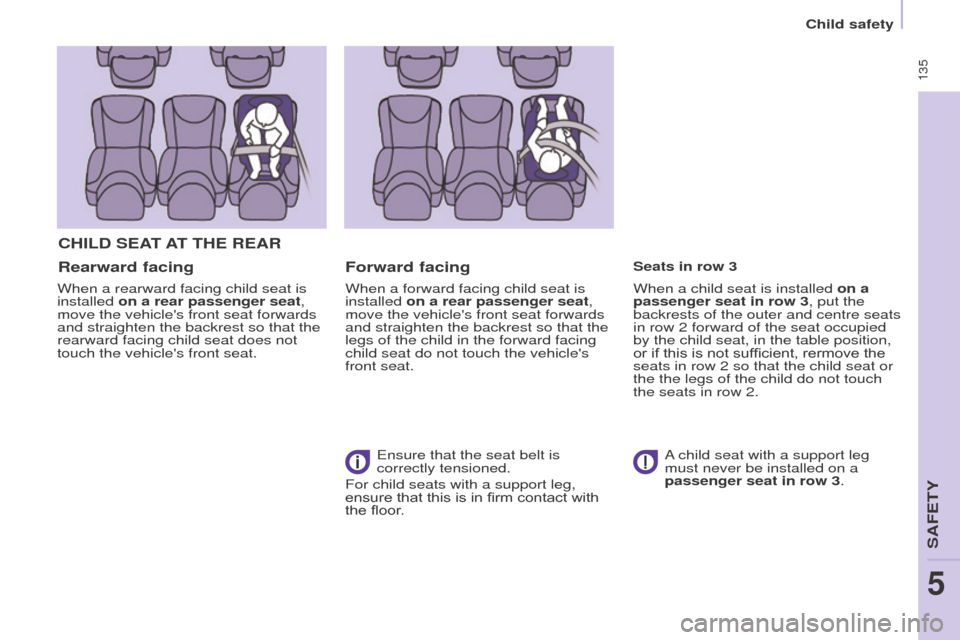
CHILD SeAt At tH e R e AR
Rearward facing
When a rearward facing child seat is
installed on a rear passenger seat,
move the vehicle's front seat forwards
and straighten the backrest so that the
rearward facing child seat does not
touch the vehicle's front seat.
Forward facing
When a forward facing child seat is
installed on a rear passenger seat,
move the vehicle's front seat forwards
and straighten the backrest so that the
legs of the child in the forward facing
child seat do not touch the vehicle's
front seat.
e
nsure that the seat belt is
correctly tensioned.
For child seats with a support leg,
ensure that this is in firm contact with
the floor. When a child seat is installed on a
passenger seat in row 3, put the
backrests of the outer and centre seats
in row 2 forward of the seat occupied
by the child seat, in the table position,
or if this is not sufficient, rermove the
seats in row 2 so that the child seat or
the the legs of the child do not touch
the seats in row 2. Seats in row 3
A child seat with a support leg
must never be installed on a
passenger seat in row 3.
5
SAFeTY
Child safety
Page 144 of 296
142
(a) universal child seat: child seat
that can be installed in any vehicle
using the seat belt.
(b)
g roup 0: from birth to 10 kg.
Cots and baby carriers cannot be
installed on the front passenger
seat or in row 3. When installed in
row 2, they may prevent the use of
one or more seat in this row.
(c)
Refer to the legislation in force in
your country before installin
g your
child on this seat.
(d)
When a rearward facing child seat
is installed on a
front passenger
seat, the passenger's front airbag
must be deactivated.
o therwise,
the child would risk being
seriously injured or killed if the
airbag is deployed.
When a forward facing child seat
is installed on a
front passenger
seat, the passenger's front airbag
must remain active. Remove and stow the heads
restraint, before installing a child
seat with backrest on a passenger
seat.
Refit the head restraint once the child
seat has been removed.
(e)
When a child seat is installed at
the rear
, forward facing or rearward
facing, move the vehicle's seats
in the row in front forwards and
straighten their backrests to leave
enough space for the child seat or
the child's legs.
(f)
Put the backrests of the outer and
centre seats in row 2, located in
front of seat occupied by a child
seat, in the table position, or if this
is not sufficient, remove the seats in
row 2, so that the child seat or the
child's legs do not touch the seats in
row 2.
(g)
If the seats in row 3 are occupied,
do not leave a child seat installed
on the foldable row 2 seat, to allow
easy access to row 3.
Child safety
Page 148 of 296
146
ADVICe oN CHILD SeAtS
At the rear, always leave sufficient
space between the front seat and:
-
a rearward facing child seat,
-
the feet of a child seated in a
forward facing child seat.
For this, move the front seat forward
and, if necessary
, straighten its
backrest as well. The incorrect installation of a child seat
in a vehicle compromises the child's
protection in the event of an accident.
Check that there is no seat belt or seat
belt buckle under the child seat, as this
could destabilise the seat.
Remember to fasten the seat belts or
the child seat harnesses keeping the
slack relative to the child's body to a
minimum, even for short journeys.
For the installation of a child seat using
the seat belt, ensure that the seat belt
is well tensioned on the child seat
and that it is holding the child seat
firmly against the vehicle's seat. If the
passenger seat is adjustable, move it
forward if necessary. For the optimum installation of a
forward facing child seat, ensure that
the back of the child seat is as close as
possible to the backrest of the vehicle's
seat, or in contact if possible.
The head restraint must be removed
before installing a child seat with a
backrest on the passenger seat.
e
nsure that the head restraint is
stowed or attached securely so that it
is not thrown around the vehicle in the
event of sharp braking.
Refit the head restraint as soon as the
child seat is removed.Children at the front
The legislation on carrying a child on
the front passenger seat is specific to
each country. Refer to the legislation in
force in your country.
Deactivate the passenger's airbag
when a rearward facing child seat is
installed on the front seat.
o
therwise, the child would risk being
seriously injured or killed if the airbag
were deployed.
Installing a booster seat
The chest part of the seat belt must
be positioned on the child's shoulder
without touching the neck.
e
nsure that the lap part of the seat belt
passes correctly over the child's thighs.
P
eugeo T recommends the use of a
booster seat which has a back, fitted
with a seat belt guide at shoulder level.
As a safety precaution, never leave:
-
one or more children alone and
unsupervised in a vehicle,
-
a child or an animal in a vehicle
which is exposed to the sun, with
the windows closed,
-
the keys within reach of children
inside the vehicle.
T
o prevent accidental opening of the
doors, use the "Child Lock".
Take care not to open the rear windows
by more than one third.
To protect young children from the rays
of the sun, fit side blinds to the rear
windows.
For an installation in row 3, put the
backrests of the outer and centre
seats in row 2 in the table position, or
remove these seats in row 2, so that
the child seat or the child's legs do not
touch the seats in row 2.
Child safety
Page 167 of 296
165
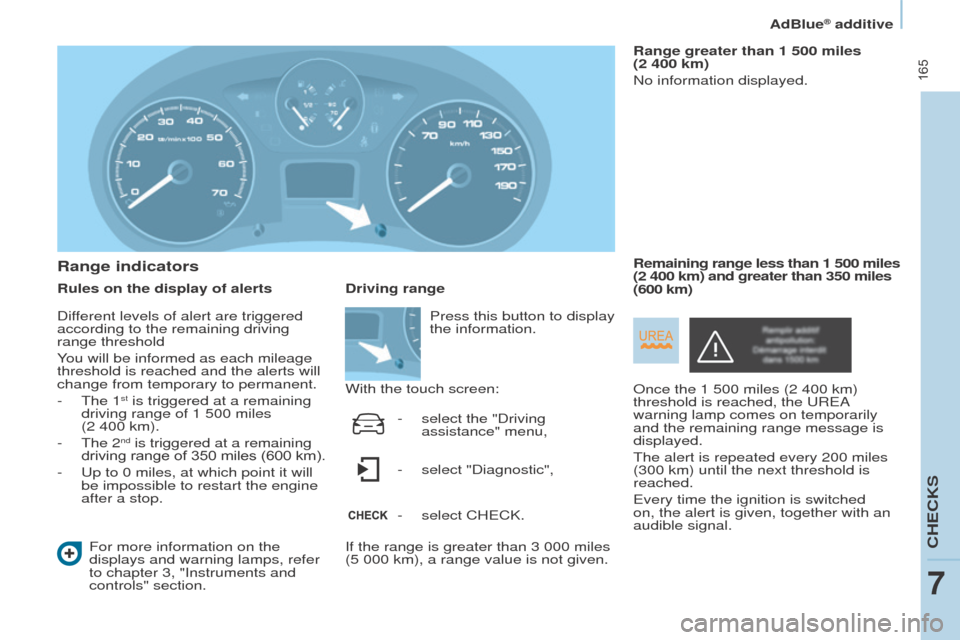
Range indicators
Rules on the display of alertsFor more information on the
displays and warning lamps, refer
to chapter 3, "Instruments and
controls" section. Range greater than 1 500 miles
(2 400 km)
No information displayed.
o
nce the 1 500 miles (2 400 km)
threshold is reached, the
u R e A
warning lamp comes on temporarily
and the remaining range message is
displayed.
The alert is repeated every 200 miles
(300 km) until the next threshold is
reached.
e
very time the ignition is switched
on, the alert is given, together with an
audible signal. Remaining range less than 1 500
miles
(2 400 km) and greater than 350 miles
(600 km)
Driving range
With the touch screen:
If the range is greater than 3 000 miles
(5 000 km), a range value is not given. Press this button to display
the information.
-
select the "Driving
assistance" menu,
-
select "Diagnostic",
-
select CH
e CK.
Different levels of alert are triggered
according to the remaining driving
range threshold
You will be informed as each mileage
threshold is reached and the alerts will
change from temporary to permanent.
-
The 1st is triggered at a remaining
driving range of 1 500 miles
(2 400 km).
-
The 2nd is triggered at a remaining
driving range of 350 miles (600 km).
-
u
p to 0 miles, at which point it will
be impossible to restart the engine
after a stop.
CHeCKS
7
AdBlue® additive
Page 183 of 296
181
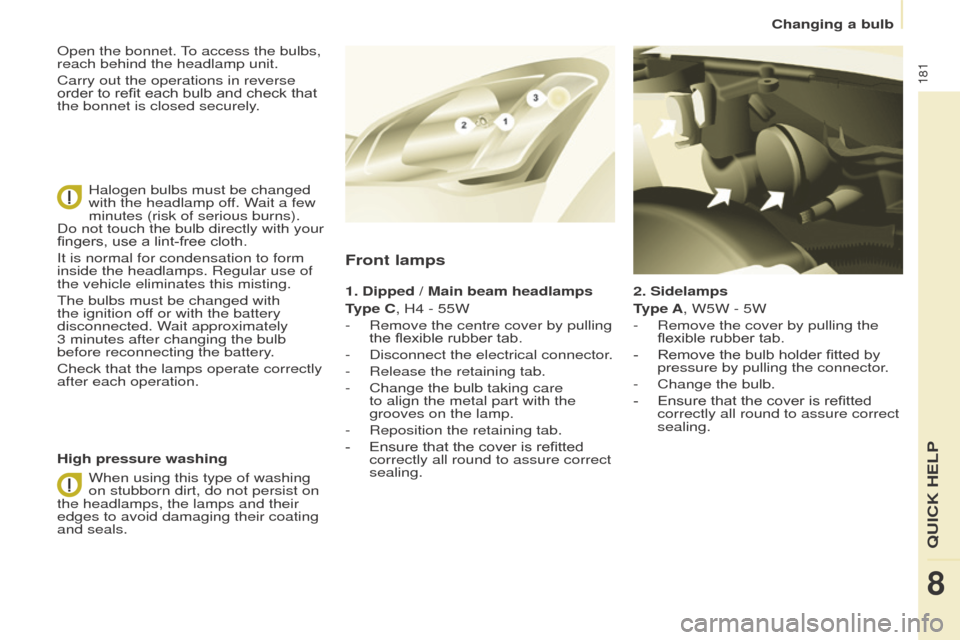
2. Sidelamps
type A
, W5W - 5W
-
Remove the cover by pullin
g the
flexible rubber tab.
-
Remove the bulb holder fitted by
pressure by pullin
g the connector.
-
Change the bulb.
-
Ensure that the cover is refitted
correctly all round to assure correct
sealing.
Front lamps
1. Dipped / Main beam headlamps
type C
, H4 - 55W
-
Remove the centre cover by pullin
g
the flexible rubber tab.
-
Disconnect the electrical connector
.
-
Release the retaining tab.
-
Change the bulb taking care
to align the metal part with the
grooves on the lamp.
-
Reposition the retaining tab.
-
Ensure that the cover is refitted
correctly all round to assure correct
sealing.
High pressure washing
o
pen the bonnet. To access the bulbs,
reach behind the headlamp unit.
Carry out the operations in reverse
order to refit each bulb and check that
the bonnet is closed securely.
Halogen bulbs must be changed
with the headlamp off. Wait a few
minutes (risk of serious burns).
Do not touch the bulb directly with your
fingers, use a lint-free cloth.
It is normal for condensation to form
inside the headlamps. Regular use of
the vehicle eliminates this misting.
The bulbs must be changed with
the ignition off or with the battery
disconnected. Wait approximately
3
minutes after changing the bulb
before reconnecting the battery.
Check that the lamps operate correctly
after each operation.
When using this type of washing
on stubborn dirt, do not persist on
the headlamps, the lamps and their
edges to avoid damaging their coating
and seals.
8
QuICK HeLP
Changing a bulb
Page 203 of 296
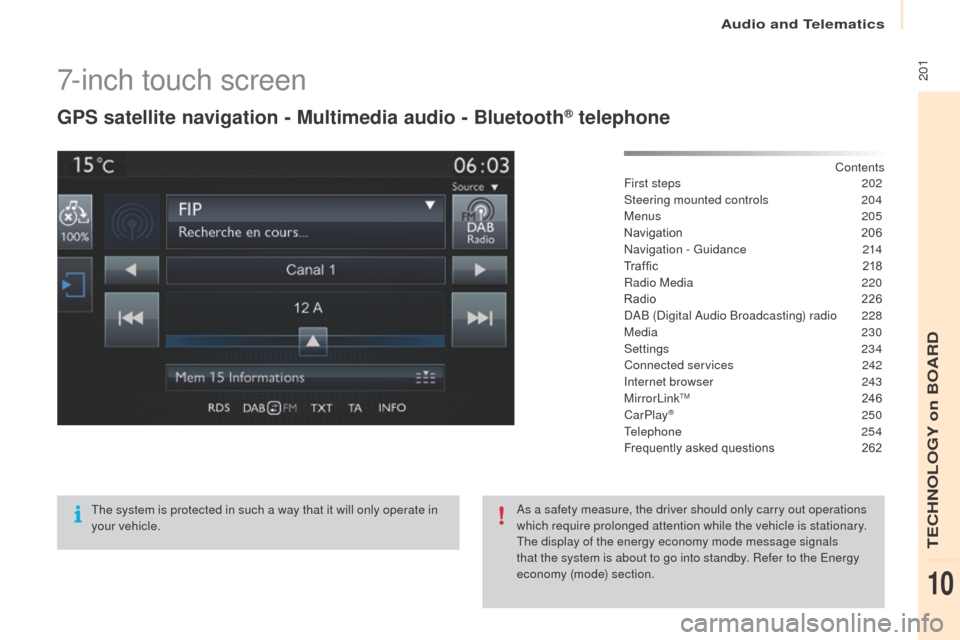
2017-inch touch screen
gPS satellite navigation - Multimedia audio - Bluetooth® telephone
Contents
First steps
2 02
Steering mounted controls
20
4
Menus
205
Navigation
2
06
Navigation -
g
u
idance
2
14
Tr a f fi c
2
18
Radio Media
2
20
Radio
2
26
DAB (Digital Audio Broadcasting) radio
2
28
Media
230
Settings
234
Connected services
2
42
Internet browser
2
43
MirrorLink
TM 24 6
CarPlay® 250
T
elephone
254
Frequently asked questions
2
62
The system is protected in such a way that it will only operate in
your vehicle. As a safety measure, the driver should only carry out operations
which require prolonged attention while the vehicle is stationary.
The display of the energy economy mode message signals
that the system is about to go into standby. Refer to the
e
n
ergy
economy (mode) section.
Audio and Telematics
TeCHNoLogY on BoARD
10
Page 204 of 296
202First steps
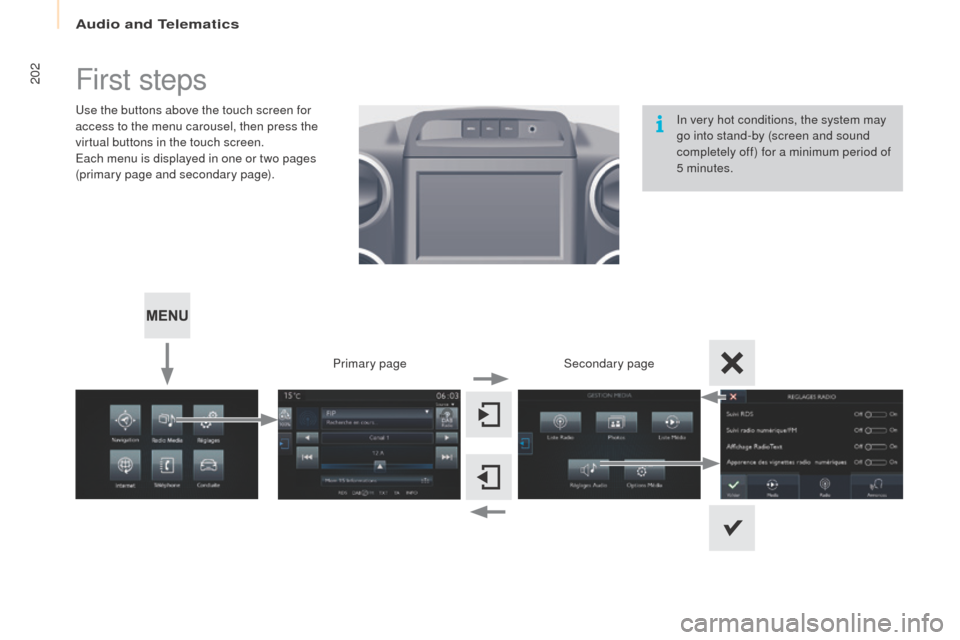
use the buttons above the touch screen for
access to the menu carousel, then press the
virtual buttons in the touch screen.
ea
ch menu is displayed in one or two pages
(primary page and secondary page).
Secondary page
Primary page In very hot conditions, the system may
go into stand-by (screen and sound
completely off) for a minimum period of
5 minutes.
Audio and Telematics
Page 205 of 296
203
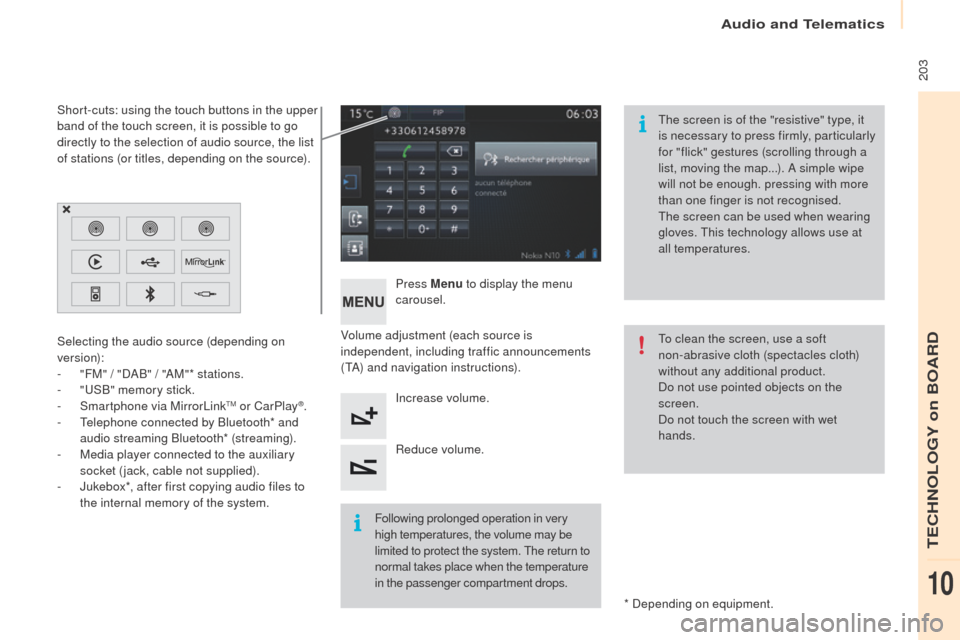
Volume adjustment (each source is
independent, including traffic announcements
(TA) and navigation instructions).Press Menu
to display the menu
carousel.
Increase volume.
Reduce volume.
Selecting the audio source (depending on
version):
-
"
FM" / "DAB" / "AM"* stations.
-
"uS
B" memory stick.
-
S
martphone via MirrorLink
TM or CarPlay®.
-
T
elephone connected by Bluetooth* and
audio streaming Bluetooth* (streaming).
-
M
edia player connected to the auxiliary
socket (jack, cable not supplied).
-
J
ukebox*, after first copying audio files to
the internal memory of the system.
* Depending on equipment.
Short-cuts: using the touch buttons in the upper
band of the touch screen, it is possible to go
directly to the selection of audio source, the list
of stations (or titles, depending on the source).
The screen is of the "resistive" type, it
is necessary to press firmly, particularly
for "flick" gestures (scrolling through a
list, moving the map...). A simple wipe
will not be enough. pressing with more
than one finger is not recognised.
The screen can be used when wearing
gloves. This technology allows use at
all temperatures.
Following prolonged operation in very
high temperatures, the volume may be
limited to protect the system. The return to
normal takes place when the temperature
in the passenger compartment drops. To clean the screen, use a soft
non-abrasive cloth (spectacles cloth)
without any additional product.
Do not use pointed objects on the
screen.
Do not touch the screen with wet
hands.
Audio and Telematics
TeCHNoLogY on BoARD
10
Page 242 of 296
240
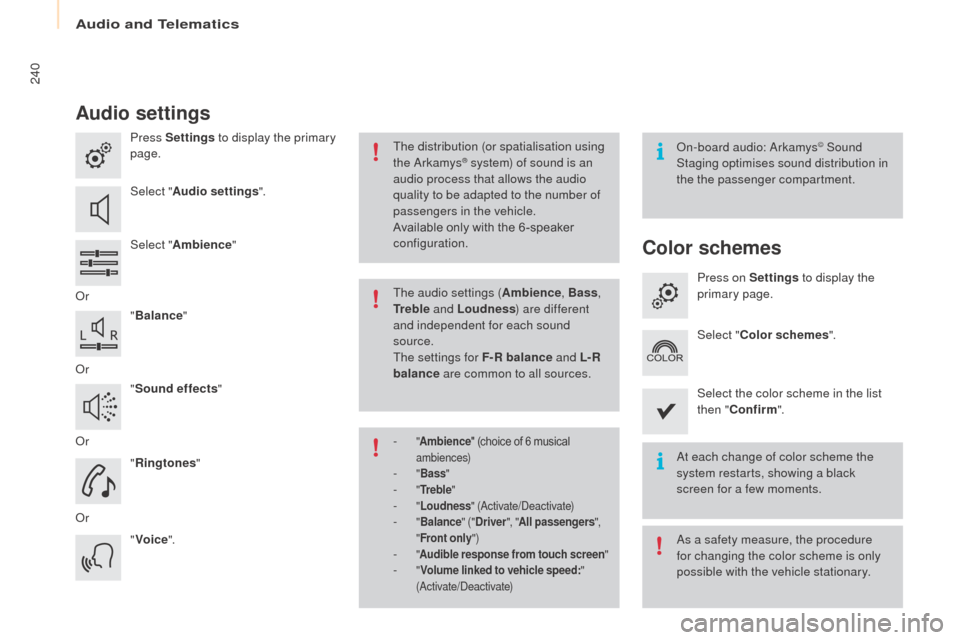
Audio settings
Press Settings to display the primary
page.
Select " Audio settings ".
Select " Ambience "
o
r "Balance "
o
r "Sound effects "
o
r "Ringtones "
o
r "Voice ".on
-board audio: Arkamys© Sound
Staging optimises sound distribution in
the the passenger compartment.
At each change of color scheme the
system restarts, showing a black
screen for a few moments.
The distribution (or spatialisation using
the Arkamys® system) of sound is an
audio process that allows the audio
quality to be adapted to the number of
passengers in the vehicle.
Available only with the 6 -speaker
configuration.
As a safety measure, the procedure
for changing the color scheme is only
possible with the vehicle stationary.
The audio settings (
Ambience, Bass,
tr
e b l e and Loudness ) are different
and independent for each sound
source.
The settings for F-R balance and L- R
balance are common to all sources.
-
" Ambience " (choice of 6 musical
ambiences)
- " Bass "- "tre b l e "- "Loudness " (Activate/Deactivate)- "Balance " ("Driver ", "All passengers ",
" Front only ")
- "Audible response from touch screen "- "Volume linked to vehicle speed: "
(Activate/Deactivate)
Color schemes
Press on Settings to display the
primary page.
Select " Color schemes ".
Select the color scheme in the list
then " Confirm ".
Audio and Telematics
Page 249 of 296
247
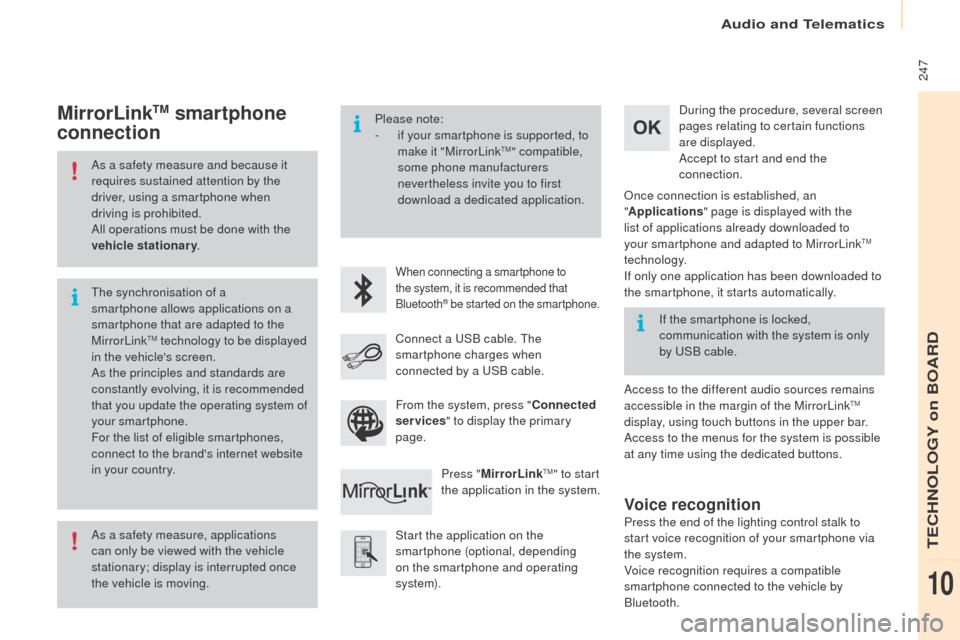
As a safety measure and because it
requires sustained attention by the
driver, using a smartphone when
driving is prohibited.
All operations must be done with the
vehicle stationary.
As a safety measure, applications
can only be viewed with the vehicle
stationary; display is interrupted once
the vehicle is moving. The synchronisation of a
smartphone allows applications on a
smartphone that are adapted to the
MirrorLink
TM technology to be displayed
i
n the vehicle's screen.
As the principles and standards are
constantly evolving, it is recommended
that you update the operating system of
your smartphone.
For the list of eligible smartphones,
connect to the brand's internet website
in your country. Please note:
-
i
f your smartphone is supported, to
make it "MirrorLink
TM" compatible,
some phone manufacturers
nevertheless invite you to first
download a dedicated application.
When connecting a smartphone to
the system, it is recommended that
Bluetooth
® be started on the smartphone.
Start the application on the
smartphone (optional, depending
on the smartphone and operating
syste m). During the procedure, several screen
pages relating to certain functions
are displayed.
Accept to start and end the
connection.
Connect a u
S
B cable. The
smartphone charges when
connected by a u
S
B cable.
Press " MirrorLink
TM" to start
the application in the system.
on
ce connection is established, an
" Applications " page is displayed with the
list of applications already downloaded to
your smartphone and adapted to MirrorLink
TM
technology.
If only one application has been downloaded to
the smartphone, it starts automatically.
MirrorLinktM smartphone
connection
Access to the different audio sources remains
accessible in the margin of the MirrorLinkTM
display, using touch buttons in the upper bar.
Access to the menus for the system is possible
at any time using the dedicated buttons. If the smartphone is locked,
communication with the system is only
by
u
S
B cable.
From the system, press " Connected
services " to display the primary
page.
Voice recognition
Press the end of the lighting control stalk to
start voice recognition of your smartphone via
the system.
Voice recognition requires a compatible
smartphone connected to the vehicle by
Bluetooth.
Audio and Telematics
TeCHNoLogY on BoARD
10