warning Peugeot Partner Tepee 2016 Workshop Manual
[x] Cancel search | Manufacturer: PEUGEOT, Model Year: 2016, Model line: Partner Tepee, Model: Peugeot Partner Tepee 2016Pages: 296, PDF Size: 10.76 MB
Page 169 of 296
167
Fault confirmed
In addition to the previous signals,
the UREA warning lamp flashes and
the remaining range allowed will be
displayed in miles (kilometres).
The alert will be repeated every
30 seconds with an update of the
driving range in steps of 30 miles
(50 km).
g
o to a P eugeo T dealer or a
qualified workshop as soon as
possible.
You risk not being able to start the
engine.
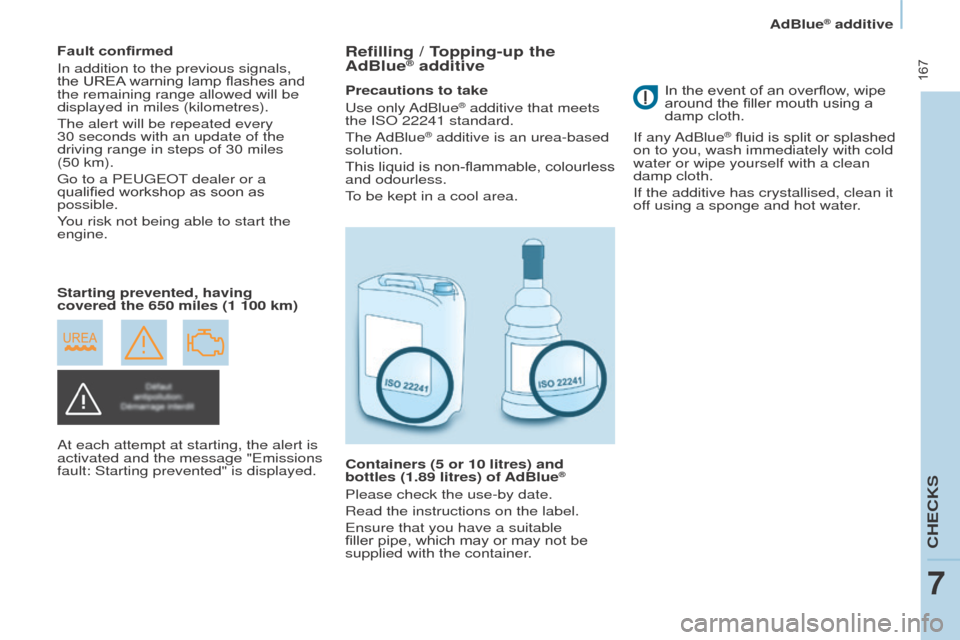
Starting prevented, having
covered the 650 miles (1 100 km)
At each attempt at starting, the alert is
activated and the message "
e missions
fault: Starting prevented" is displayed.Refilling / topping-up the
AdBlue® additive
Precautions to take
u
se only AdBlue® additive that meets
the IS
o
22241 standard.
The AdBlue
® additive is an urea-based
solution.
This liquid is non-flammable, colourless
and odourless.
To be kept in a cool area.
Containers (5 or 10 litres) and
bottles (1.89 litres) of AdBlue
®
Please check the use-by date.
Read the instructions on the label.
e
nsure that you have a suitable
filler pipe, which may or may not be
supplied with the container. In the event of an overflow, wipe
around the filler mouth using a
damp cloth.
If any AdBlue
® fluid is split or splashed
on to you, wash immediately with cold
water or wipe yourself with a clean
damp cloth.
If the additive has crystallised, clean it
off using a sponge and hot water.
CHeCKS
7
AdBlue® additive
Page 170 of 296
168
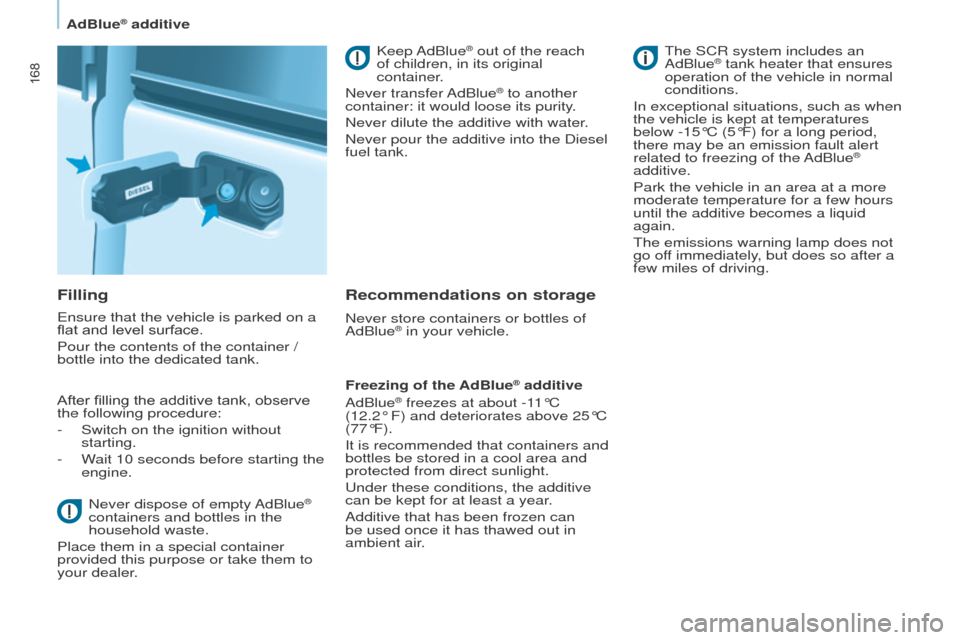
Filling
ensure that the vehicle is parked on a
flat and level surface.
Pour the contents of the container /
bottle into the dedicated tank.
After fillin
g the additive tank, observe
the following procedure:
-
Switch on the ignition without
starting.
-
W
ait 10 seconds before starting the
engine.
Never dispose of empty AdBlue
®
containers and bottles in the
household waste.
Place them in a special container
provided this purpose or take them to
your dealer. Keep AdBlue
® out of the reach
of children, in its original
container.
Never transfer AdBlue
® to another
container: it would loose its purity.
Never dilute the additive with water.
Never pour the additive into the Diesel
fuel tank.
Recommendations on storage
Never store containers or bottles of
AdBlue® in your vehicle.
Freezing of the AdBlue
® additive
AdBlue® freezes at about -11°C
(12.2°
F) and deteriorates above 25°C
(77°F).
It is recommended that containers and
bottles be stored in a cool area and
protected from direct sunlight.
u
nder these conditions, the additive
can be kept for at least a year.
Additive that has been frozen can
be used once it has thawed out in
ambient air. The SCR system includes an
AdBlue
® tank heater that ensures
operation of the vehicle in normal
conditions.
In exceptional situations, such as when
the vehicle is kept at temperatures
below -15°C (5°F) for a long period,
there may be an emission fault alert
related to freezing of the AdBlue
®
additive.
Park the vehicle in an area at a more
moderate temperature for a few hours
until the additive becomes a liquid
again.
The emissions warning lamp does not
go off immediately, but does so after a
few miles of driving.
AdBlue® additive
Page 172 of 296
170
eCoNoMY M o D e
After the engine has stopped, with
the key in the ignition position, certain
functions (windscreen wiper, electric
windows, courtesy lamps, audio
equipment, etc.) can only be used for a
cumulative duration of thirty minutes, to
prevent discharging of the battery.
o
nce the thirty minutes have elapsed,
the active functions are put on standby
and the battery warning lamp flashes
accompanied by a message in the
screen.
To resume the use of these functions
immediately, start the engine and let it
run for a few minutes.
The time available will then be double
the time for which the engine was left
running. However, this time will always
be between five and thirty minutes.
A flat battery will prevent the
engine from starting.
Battery
Page 173 of 296
171
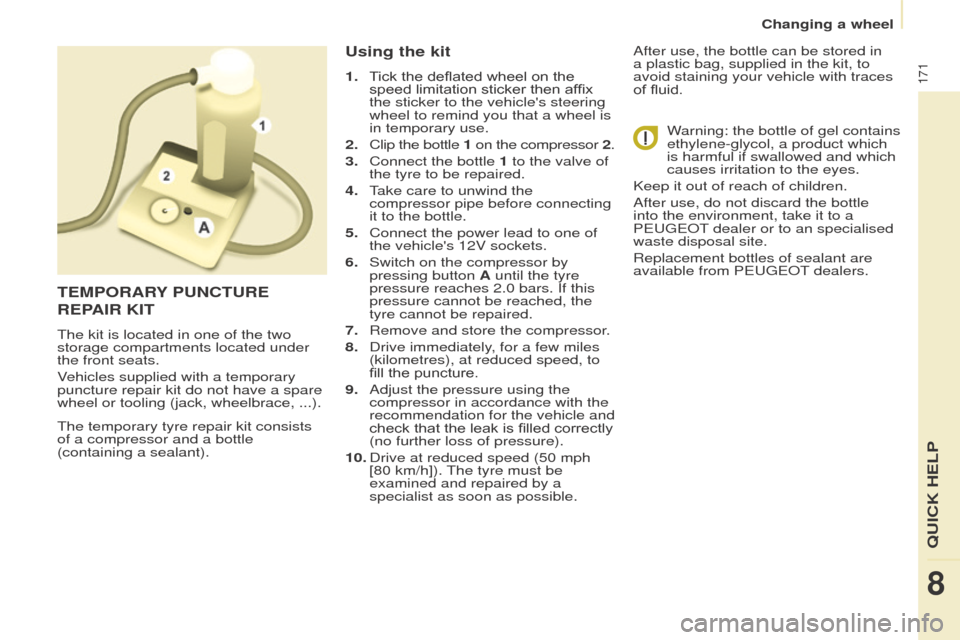
The temporary tyre repair kit consists
of a compressor and a bottle
(containing a sealant).
using the kit
1. Tick the deflated wheel on the speed limitation sticker then affix
the sticker to the vehicle's steering
wheel to remind you that a wheel is
in temporary use.
2.
Clip the bottle
1 on the compressor
2.
3.
Connect the bottle
1 to the valve of
the tyre to be repaired.
4.
T
ake care to unwind the
compressor pipe before connecting
it to the bottle.
5.
Connect the power lead to one of
the vehicle's 12V sockets.
6.
Switch on the compressor by
pressing button
A until the tyre
pressure reaches 2.0 bars. If this
pressure cannot be reached, the
tyre cannot be repaired.
7.
Remove and store the compressor
.
8.
Drive immediately
, for a few miles
(kilometres), at reduced speed, to
fill the puncture.
9.
Adjust the pressure using the
compressor in accordance with the
recommendation for the vehicle and
check that the leak is filled correctly
(no further loss of pressure).
10.
Drive at reduced speed (50
mph
[80 km/h]). The tyre must be
examined and repaired by a
specialist as soon as possible. After use, the bottle can be stored in
a plastic bag, supplied in the kit, to
avoid staining your vehicle with traces
of fluid.
Warning: the bottle of gel contains
ethylene-glycol, a product which
is harmful if swallowed and which
causes irritation to the eyes.
Keep it out of reach of children.
After use, do not discard the bottle
into the environment, take it to a
P
eugeo T dealer or to an specialised
waste disposal site.
Replacement bottles of sealant are
available from P
eugeo T dealers.
teMPoRARY P u NC tu R e
R
e PAIR KI t
The kit is located in one of the two
storage compartments located under
the front seats.
Vehicles supplied with a temporary
puncture repair kit do not have a spare
wheel or tooling (jack, wheelbrace, ...).
8
QuICK HeLP
Changing a wheel
Page 220 of 296
218
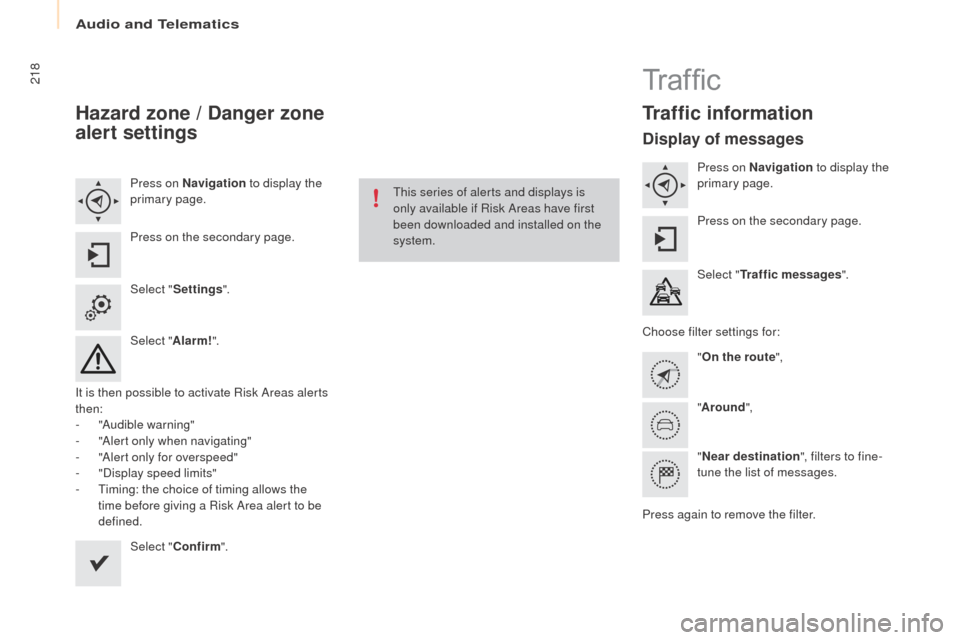
Hazard zone / Danger zone
alert settings
Press on Navigation to display the
primary page.
Press on the secondary page.
Select " Settings ".
Select " Alarm!".
It is then possible to activate Risk Areas alerts
then:
-
"
Audible warning"
-
"
Alert only when navigating"
-
"
Alert only for overspeed"
-
"
Display speed limits"
-
T
iming: the choice of timing allows the
time before giving a Risk Area alert to be
defined.
Select " Confirm ". This series of alerts and displays is
only available if Risk Areas have first
been downloaded and installed on the
system.
Tr a f fi c
traffic information
Display of messages
Press on Navigation
to display the
primary page.
Press on the secondary page.
Select "
tra
ffic messages ".
Choose filter settings for: "
on t
he route",
" Around ",
" Near destination ", filters to fine-
tune the list of messages.
Press again to remove the filter.
Audio and Telematics
Page 264 of 296
262
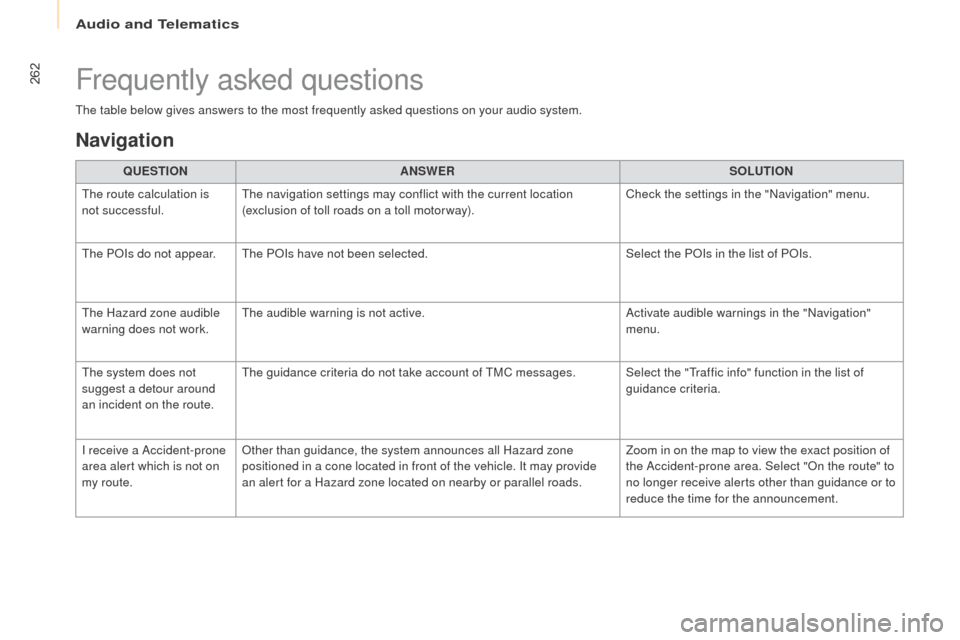
The table below gives answers to the most frequently asked questions on your audio system.Q
ueStIoN A
NSW
eRS
o
LutIoN
T
he route calculation is
not successful. The navigation settings may conflict with the current location
(exclusion of toll roads on a toll motor way). Check the settings in the "Navigation" menu.
The P
oI
s do not appear. The P
o
Is
have not been selected. Select the P
oI
s in the list of P
oI
s.
The Hazard zone audible
warning does not work. The audible warning is not active.
Activate audible warnings in the "Navigation"
menu.
The system does not
suggest a detour around
an incident on the route. The guidance criteria do not take account of TMC messages. Select the "Traffic info" function in the list of
guidance criteria.
I receive a Accident-prone
area alert which is not on
my route.
ot
her than guidance, the system announces all Hazard zone
positioned in a cone located in front of the vehicle. It may provide
an alert for a Hazard zone located on nearby or parallel roads. Zoom in on the map to view the exact position of
the Accident-prone area. Select "
on t
he route" to
no longer receive alerts other than guidance or to
reduce the time for the announcement.
Frequently asked questions
Navigation
Audio and Telematics
Page 284 of 296
282
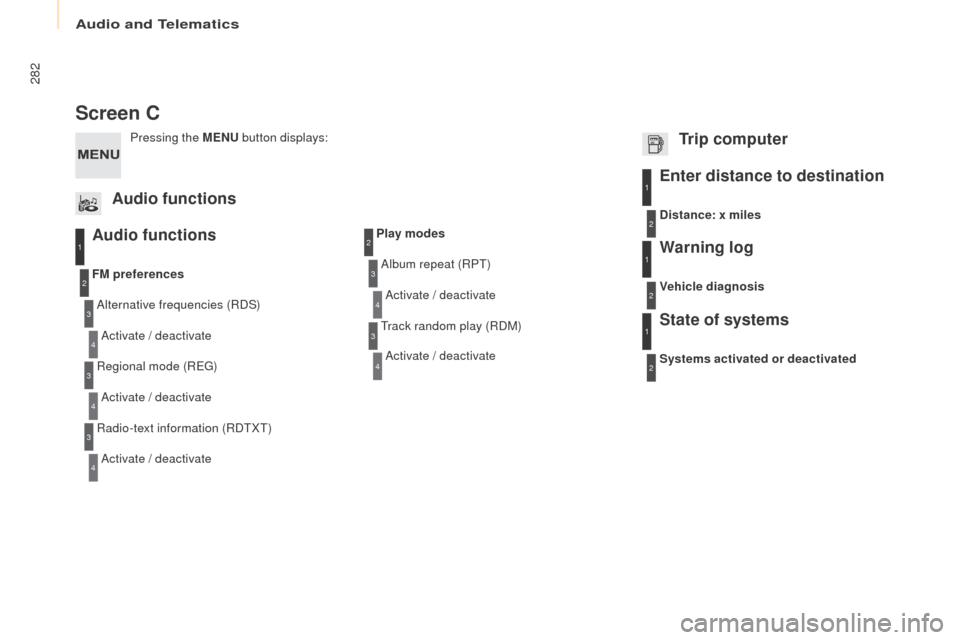
Screen C
Audio functions
Alternative frequencies (RDS)Activate / deactivate
FM
preferences
Regional mode (R
e
g
)
A
ctivate / deactivate
Radio-text information (RDTXT) Activate / deactivate
1
2
3
4
3
4
3
4
Play modes
Album repeat (RPT)Activate / deactivate
Track random play (RDM) Activate / deactivate2
3
4
3
4
enter distance to destination1
1
1
2
2
2
Pressing the MeN u bu tton displays:
Audio functions
tr
ip computerDistance: x miles
Vehicle diagnosis
Warning log
Systems activated or deactivated
State of systems
Audio and Telematics
Page 293 of 296
46
Instruments and controls
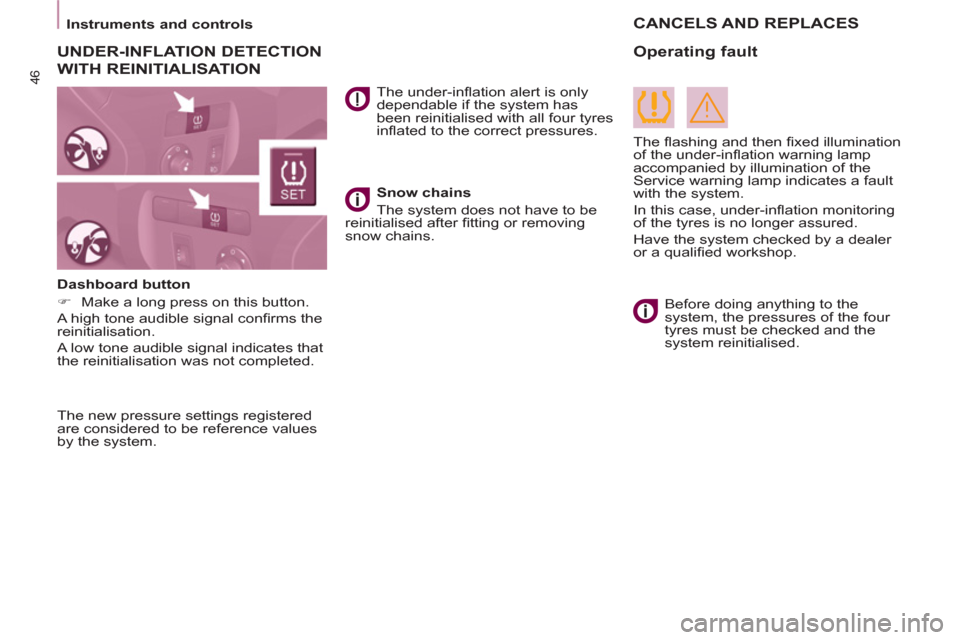
The new pressure settings registered
are considered to be reference values
by the system.
The under-infl ation alert is only
dependable if the system has
been reinitialised with all four tyres
infl ated to the correct pressures.
Before doing anything to the
system, the pressures of the four
tyres must be checked and the
system reinitialised.
Snow chains
The system does not have to be
reinitialised after fi tting or removing
snow chains.
Dashboard button
)
Make a long press on this button.
A high tone audible signal confi rms the
reinitialisation.
A low tone audible signal indicates that
the reinitialisation was not completed.
Operating fault
The fl ashing and then fi xed illumination
of the under-infl ation warning lamp
accompanied by illumination of the
Service warning lamp indicates a fault
with the system.
In this case, under-infl ation monitoring
of the tyres is no longer assured.
Have the system checked by a dealer
or a qualifi ed workshop.
CANCELS AND REPLACES
UNDER-INFLATION DETECTION
WITH REINITIALISATION