audio PEUGEOT RCZ 2012 User Guide
[x] Cancel search | Manufacturer: PEUGEOT, Model Year: 2012, Model line: RCZ, Model: PEUGEOT RCZ 2012Pages: 336, PDF Size: 14.1 MB
Page 88 of 336
86
USB PLAYER
This connection box, consisting of a USB port, is located in the front
armrest.
It permits the connection of portable equipment, such as an iPod
®
digital audio player of generation 5 or later or a USB memory stick.
It reads the audio fi le formats (mp3, ogg, wma, wav...) which are
transmitted to your audio equipment and played via the vehicle's
speakers.
You can manage these fi les using the steering mounted controls or the
audio equipment control panel and display them in the multifunction
screen.
When it is in use, the portable equipment charges automatically.
For more information on the use of this equipment, refer to the
corresponding audio section.
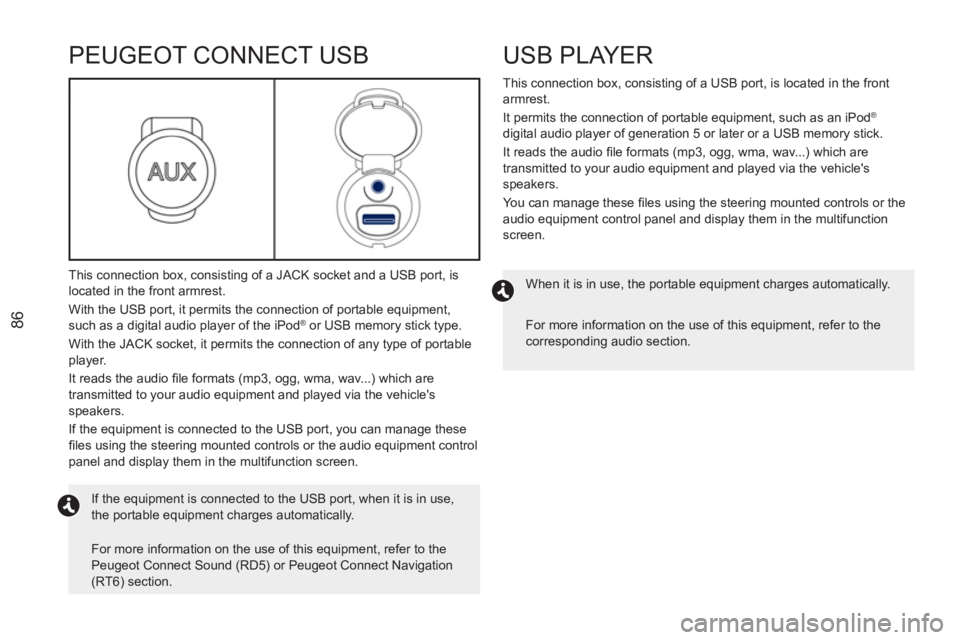
PEUGEOT CONNECT USB
This connection box, consisting of a JACK socket and a USB port, is
located in the front armrest.
With the USB port, it permits the connection of portable equipment,
such as a digital audio player of the iPod
® or USB memory stick type.
With the JACK socket, it permits the connection of any type of portable
player.
It reads the audio fi le formats (mp3, ogg, wma, wav...) which are
transmitted to your audio equipment and played via the vehicle's
speakers.
If the equipment is connected to the USB port, you can manage these
fi les using the steering mounted controls or the audio equipment control
panel and display them in the multifunction screen.
If the equipment is connected to the USB port, when it is in use,
the portable equipment charges automatically.
For more information on the use of this equipment, refer to the
Peugeot Connect Sound (RD5) or Peugeot Connect Navigation
(RT6) section.
Page 105 of 336
5/
SAFETY
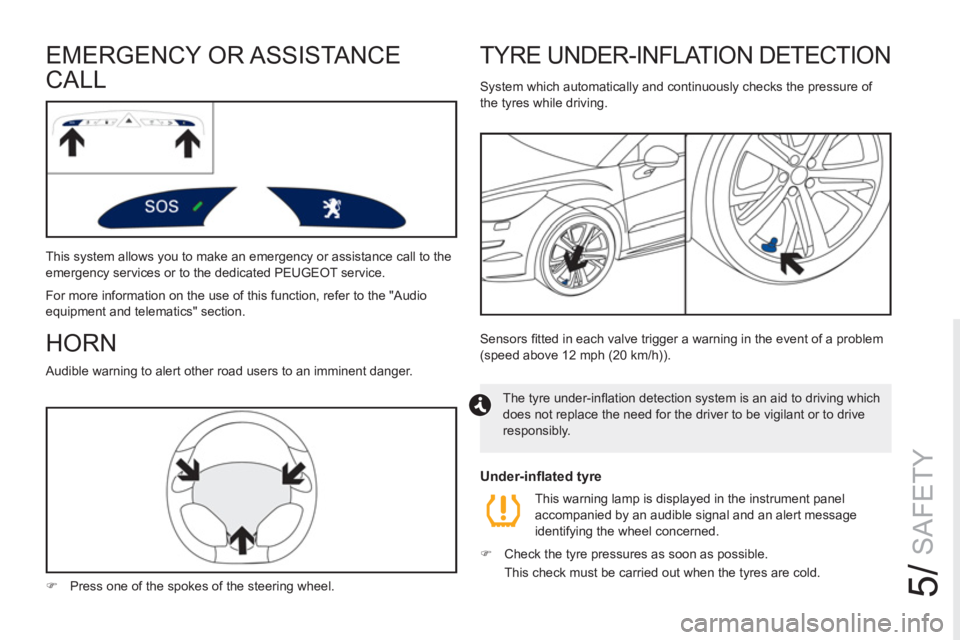
TYRE UNDER-INFLATION DETECTION
System which automatically and continuously checks the pressure of
the tyres while driving.
The tyre under-infl ation detection system is an aid to driving which
does not replace the need for the driver to be vigilant or to drive
responsibly. Sensors fi tted in each valve trigger a warning in the event of a problem
(speed above 12 mph (20 km/h)).
Under-inflated tyre
This warning lamp is displayed in the instrument panel
accompanied by an audible signal and an alert message
identifying the wheel concerned.
)
Check the tyre pressures as soon as possible.
This check must be carried out when the tyres are cold.
HORN
Audible warning to alert other road users to an imminent danger.
)
Press one of the spokes of the steering wheel.
EMERGENCY OR ASSISTA NCE
CALL
This system allows you to make an emergency or assistance call to the
emergency services or to the dedicated PEUGEOT service.
For more information on the use of this function, refer to the "Audio
equipment and telematics" section.
Page 172 of 336
170
ENERGY ECONOMY MODE
System which manages the duration of use of certain functions to
conserve a suffi cient level of charge in the battery.
After the engine has stopped, you can still use functions such as
the audio and telematic system, windscreen wipers, dipped beam
headlamps, courtesy lamp, etc. for a maximum combined duration of
thirty minutes.
This period may be greatly reduced if the battery is not fully charged.
SWITCHING TO ECONOMY MODE
Once this time has elapsed, a message appears in the screen indicating
that the vehicle has switched to economy mode and the active functions
are put on standby.
If the telephone is being used at this time:
- it will be maintained for 5 minutes with the Bluetooth system
of your Peugeot Connect Sound (RD5),
- it will still be possible to fi nish the call with the Peugeot Connect
Navigation (RT6) or Peugeot Connect Media (NG4 3D).
EXITING ECONOMY MODE
These functions are reactivated automatically next time the vehicle is
driven.
To restore operation of these functions immediately, start the engine
and let it run for at least 5 minutes.
Let the engine run for the period specifi ed to ensure that the battery
charge is suffi cient.
Do not repeatedly and continuously restart the engine in order to charge
the battery.
A fl at battery prevents the engine from starting (refer to the
"Battery" section).
LOAD REDUCTION MODE
System which manages the use of certain functions according to the
level of charge remaining in the battery.
When the vehicle is being driven, the load reduction function temporarily
deactivates certain functions, such as the air conditioning, the heated
rear screen...
The deactivated functions are reactivated automatically as soon as
conditions permit.
Page 184 of 336
182
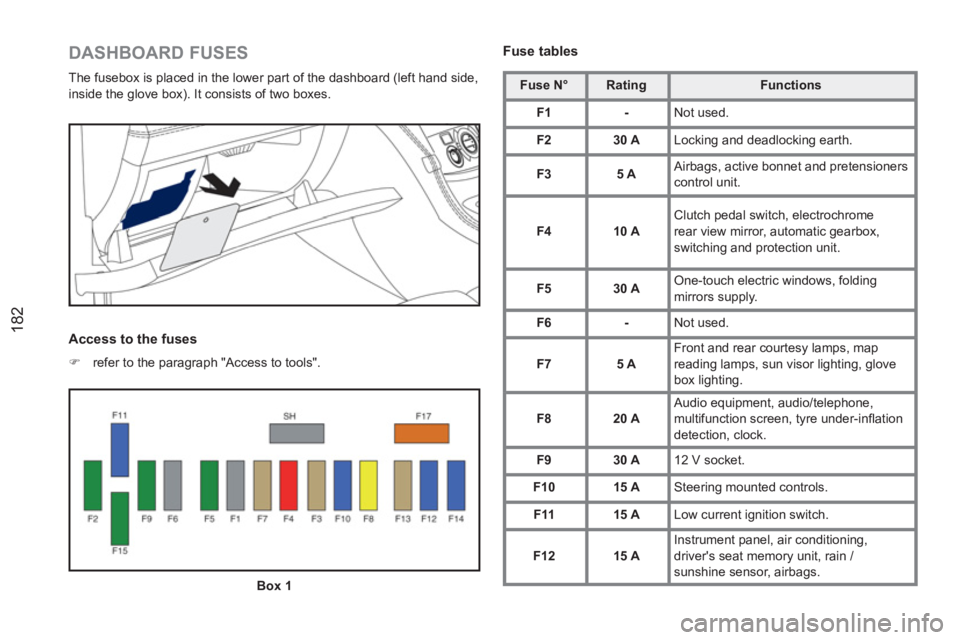
DASHBOARD FUSES
The fusebox is placed in the lower part of the dashboard (left hand side,
inside the glove box). It consists of two boxes.
Access to the fuses
)
refer to the paragraph "Access to tools".
Fuse tables
Fuse N°
Rating
Functions
F1
-
Not used.
F2
30 A
Locking and deadlocking earth.
F3
5 A
Airbags, active bonnet and pretensioners
control unit.
F4
10 A
Clutch pedal switch, electrochrome
rear view mirror, automatic gearbox,
switching and protection unit.
F5
30 A
One-touch electric windows, folding
mirrors supply.
F6
-
Not used.
F7
5 A
Front and rear courtesy lamps, map
reading lamps, sun visor lighting, glove
box lighting.
F8
20 A
Audio equipment, audio/telephone,
multifunction screen, tyre under-infl ation
detection, clock.
F9
30 A
12 V socket.
F10
15 A
Steering mounted controls.
F11
15 A
Low current ignition switch.
F12
15 A
Instrument panel, air conditioning,
driver's seat memory unit, rain /
sunshine sensor, airbags.
Box 1
Page 207 of 336
205
The system is protected in such a way that it will onlyoperate in your vehicle.
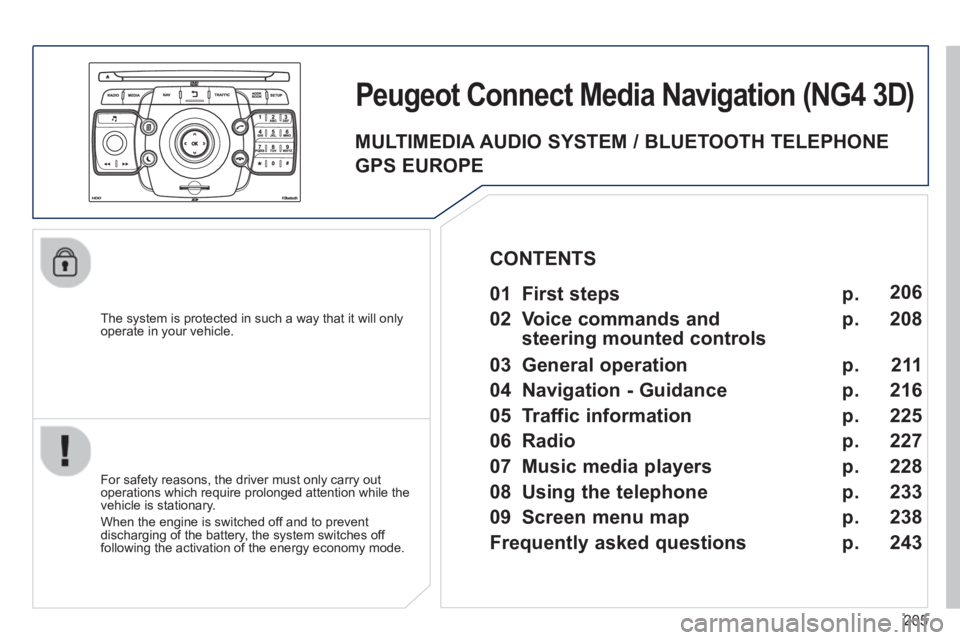
Peugeot Connect Media Navigation (NG4 3D)
For safety reasons, the driver must only carry out
operations which require prolonged attention while the
vehicle is stationary.
When the en
gine is switched off and to prevent
discharging of the battery, the system switches off
following the activation of the energy economy mode.
01 First steps
02 Voice commands and
steerin
g mounted controls
03 General operation
04 Navi
gation - Guidance
05 Traffic information
06 Radio
07 Music media pla
yers
08 Usin
g the telephone
09 Screen menu map
Frequentl
y asked questions
p.
p.
p.
p.
p.
p.
p.
p.
p.
p. 2
06
208
211
216
225
227
228
233
238
243
CONTENTS
MULTIMEDIA AUDIO SYSTEM / BLUETOOTH TELEPHONE
GPS EUROPE
Page 208 of 336
206
01FIRST STEPS
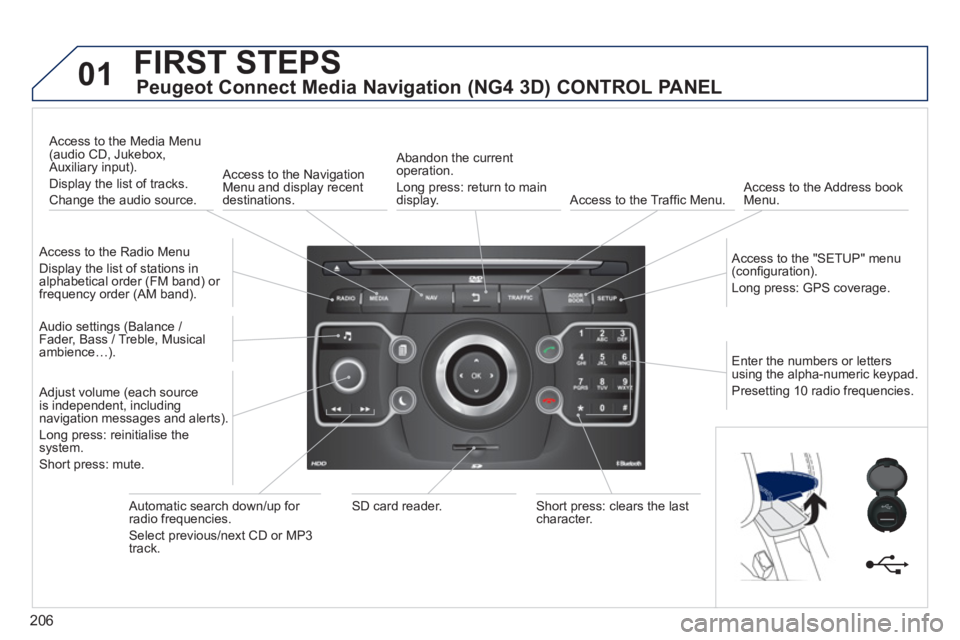
Peugeot Connect Media Navigation (NG4 3D) CONTROL PANEL
Access to the Radio Menu
Display the list of stations in
alphabetical order (FM band) or frequency order (AM band).
Access to the Media Menu(audio CD, Jukebox,
Auxiliary input).
Display the list o
f tracks.
Change the audio source.
Access to the NavigationMenu and display recentdestinations.
Abandon the current
operation.
Long press: return to main
displa
y. Access to the Traffi c Menu.
Access to the Address book Menu.
A
ccess to the "SETUP" menu (confi guration).
Lon
g press: GPS coverage.
Audio settings (Balance /
Fader, Bass / Treble, Musical
ambience…
).
Adjust volume (each source
is independent, including
navigation messages and alerts).
Lon
g press: reinitialise thesystem.
Short press: mute.
Automatic search down/up for radio frequencies.
Select
previous/next CD or MP3
track.
SD card reader.Short press: clears the last character.
Enter the numbers or lettersusing the alpha-numeric keypad.
Presettin
g 10 radio frequencies.
Page 211 of 336
209
02
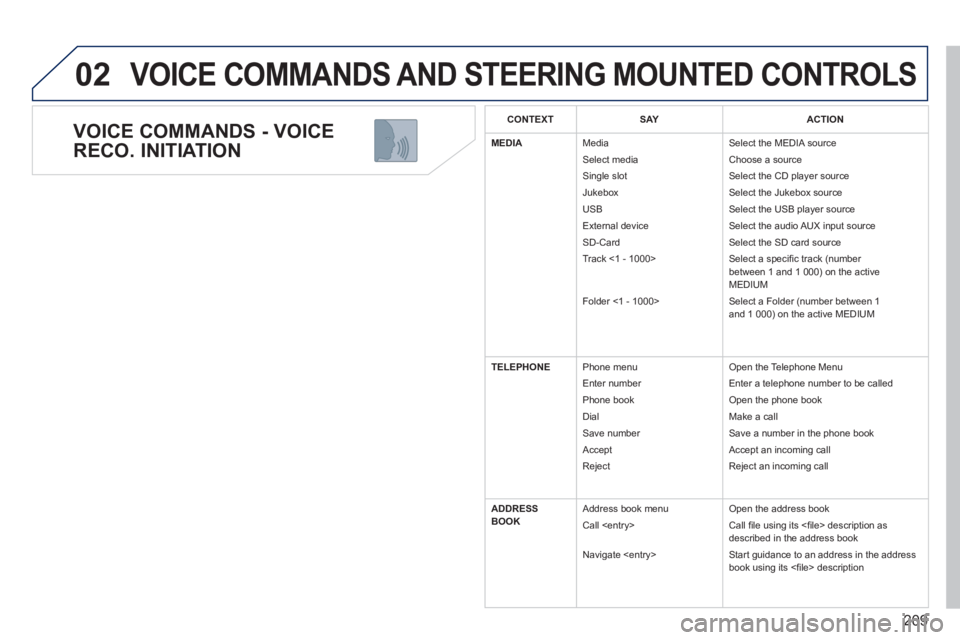
VOICE COMMANDS - VOICE
RECO. INITIATION
VOICE COMMANDS AND STEERING MOUNTED CONTROLS
CONTEXTSAYACTION
MEDIA
Media
Select media
Sin
gle slot
Jukebox
USB
External device
SD-Card
Track <1 - 1000>
Folder <
1 - 1000>
Select the MEDIA source
Choose a source
Select the CD pla
yer source
Select the Jukebox source
Select the USB player source
Select the audio AUX input source
Select the SD card source
Select a specifi c track (number
between 1 and 1 000) on the activeMEDIUM
Select a Folder (number between 1
and 1 000) on the active MEDIUM
TELEPHONE Phone menu
Enter number
Ph
one book
Di
al
Save number
Accept
Reject O
pen the Telephone Menu
Entera telephone number to be calledr
Open the phone book
M
ake a call
Save a number in the phone book
Accept an incoming call
Reject an incoming call
ADDRESS
BOOK Address book menu
Call
N
avigate
Open the address book
Call fi le using its <fi le> description as described in the address book
Start guidance to an address in the addressbook using its <fi le> description
Page 212 of 336
210
02 VOICE COMMANDS AND STEERING MOUNTED CONTROLS
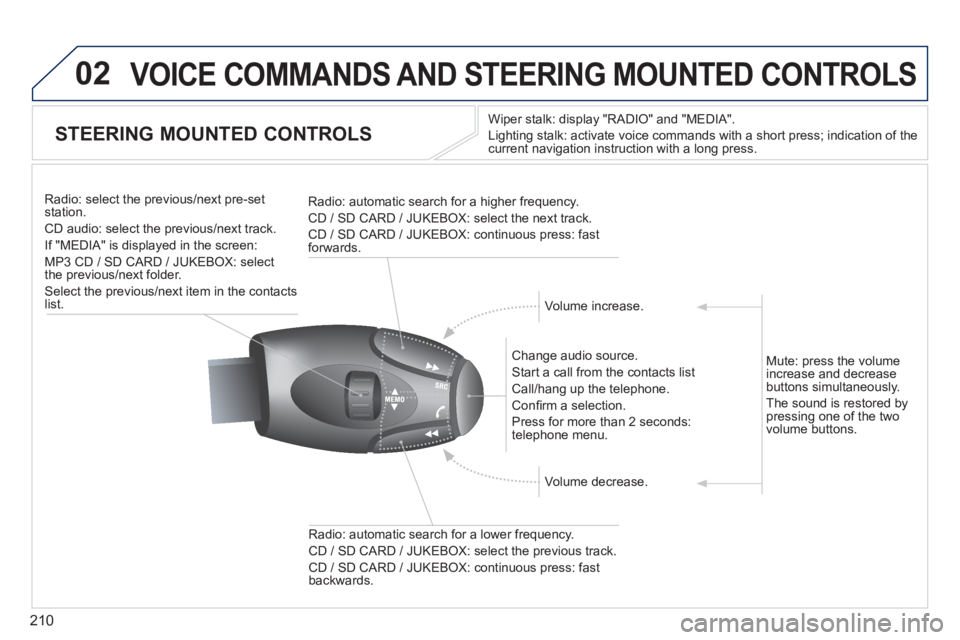
STEERING MOUNTED CONTROLS
Wiper stalk: display "RADIO" and "MEDIA".
Li
ghting stalk: activate voice commands with a short press; indication of the current navigation instruction with a long press
.
Change audio source.
Start a call from the contacts list
Call/han
g up the telephone.
Confi rm a selection.
Pr
ess for more than 2 seconds:
telephone menu.
Radio: automatic search for a lower frequenc
y.
CD / SD CARD / JUKEBOX: select the previous track.
CD / SD CARD / JUKEBOX: continuous press: fast backwards. Radio: select the previous
/next pre-setstation.
CD audio: select the previous/next track .
If "MEDIA" is displa
yed in the screen:
MP
3 CD / SD CARD / JUKEBOX: select
the previous/next folder.
Select the previous/next item in the contacts list.
Radio: automatic search
for a higher frequency.
CD / SD CARD / JUKEBOX: select the next track.
CD / SD CARD / JUKEBOX: continuous press: fast
forwards.
Volume increase.
Volume decrease. Mute: press the volume
increase and decreasebuttons simultaneously.
The sound is restored b
y pressing one of the two
volume buttons.
Page 213 of 336
211
03
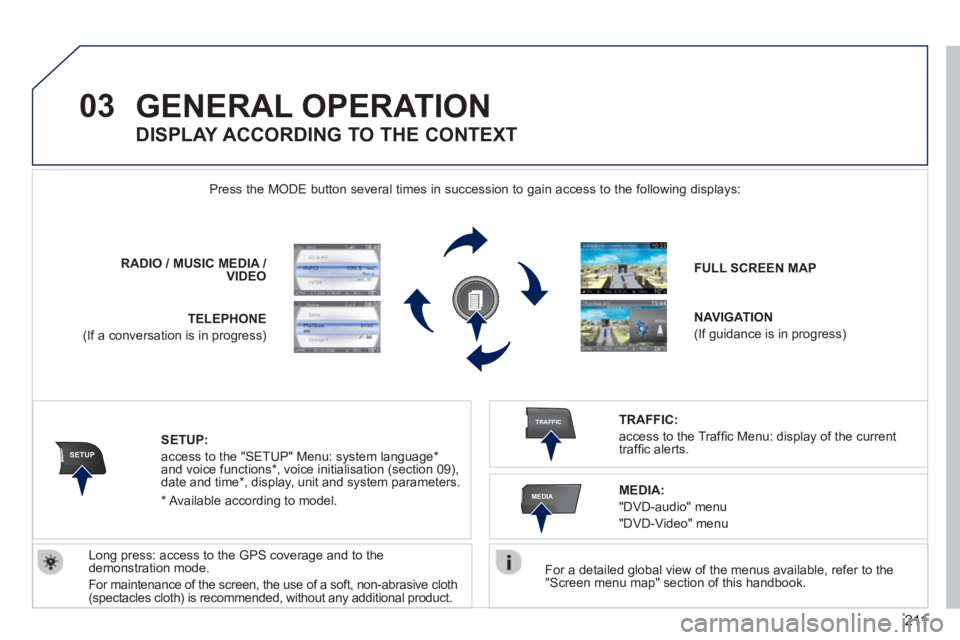
SETUP
TRAFFIC
MEDIA
GENERAL OPERATION
For a detailed global view of the menus available, refer to the "Screen menu map" section of this handbook.
Press the M
ODE button several times in succession to gain access to the following displays:
Lon
g press: access to the GPS coverage and to the demonstration mode.
For maintenance o
f the screen, the use of a soft, non-abrasive cloth (spectacles cloth) is recommended, without any additional product. RADIO
//MUSICMEDIA / VIDEO
TELEPHONE
(If a conversation is in progress)
FULL SCREEN MAP
NAVIGATION
(If guidance is in progress)
SETUP:
access to the "SETUP" Menu: system language *
and voice functions * , voice initialisation (section 09),
date and time * , display, unit and system parameters.
TRAFFIC:
access to the Traffi c Menu: display of the current
traffi c alerts.
DISPLAY ACCORDING TO THE CONTEXT
MEDIA:
"DVD-audio" menu
"DVD-Video" menu
*
Available accordin
g to model.
Page 215 of 336
213
03GENERAL OPERATION
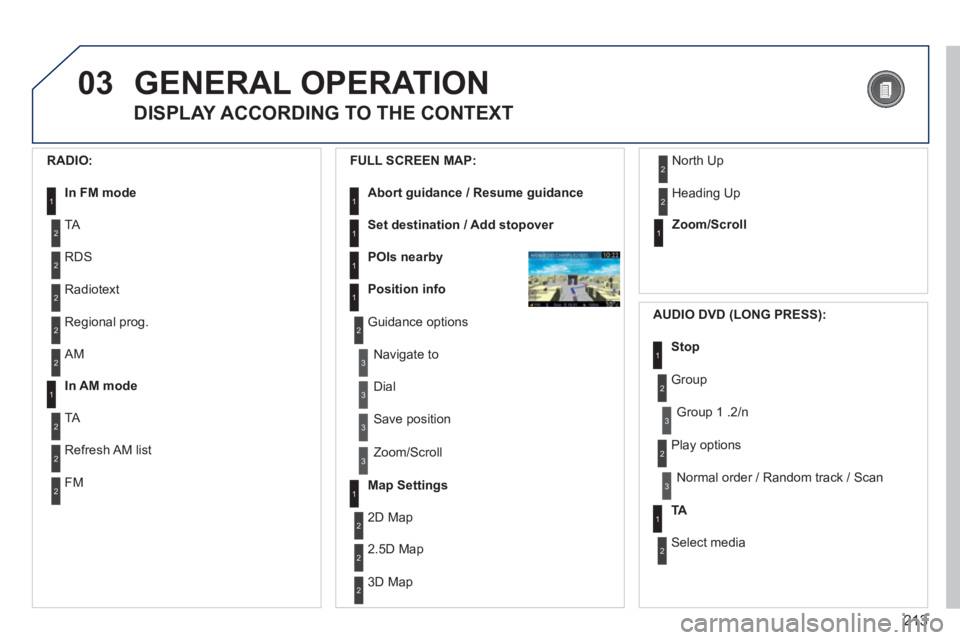
DISPLAY ACCORDING TO THE CONTEXT
RADIO:
In FM mode1
2
2
TA
RDS
2Radiotext
2Regional prog.
FULL
SCREEN MAP:
Abort guidance / Resume guidance1
1
1
1
Set destination / Add stopover
POIs nearby
Position info
2Guidance options
3
3
Navigate to
Dial
3 Save position
3
Zoom/Scroll
Map Settings1
1Zoom/Scroll
2
2
2D Map
2.5D Map
23D Map
2 North Up
2
Heading Up
AUDIO DVD (LONG PRESS):
1Stop
2 Group
3Group 1 .2/n
TA1
2 Select media
2
Play options
3Normal order / Random track / Scan
2AM
In AM mode1
2
2
TA
Refresh AM list
2FM