key PEUGEOT RCZ 2012 Owner's Guide
[x] Cancel search | Manufacturer: PEUGEOT, Model Year: 2012, Model line: RCZ, Model: PEUGEOT RCZ 2012Pages: 336, PDF Size: 14.1 MB
Page 278 of 336
276
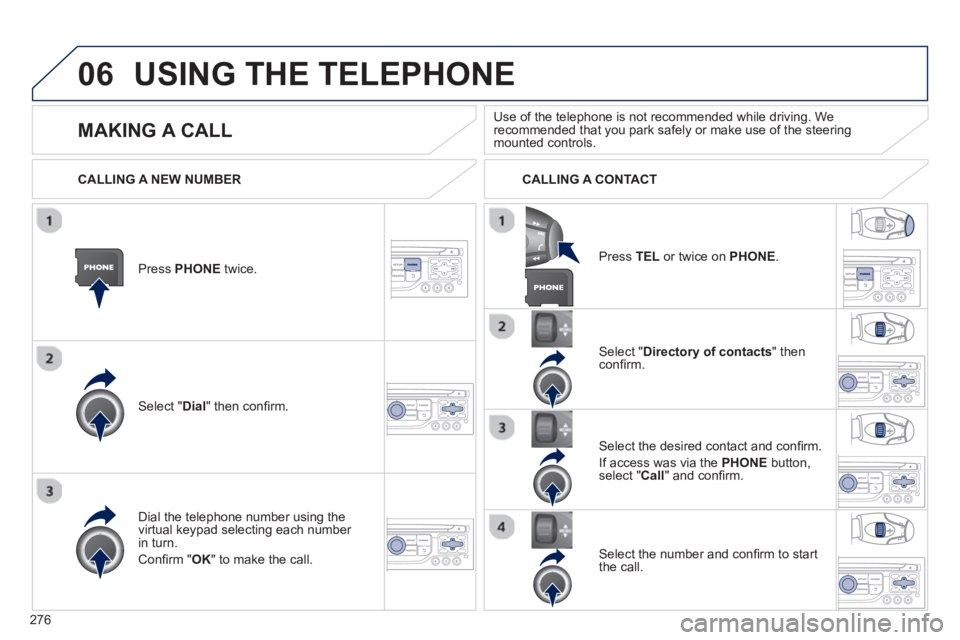
06USING THE TELEPHONE
Press PHONEtwice.
Select " Dial" then confi rm.
Select " Directory of contacts" thenconfi rm.
Dial the telephone number usin
g the
virtual keypad selecting each number in turn.
Confi rm " OK " to make the call.
Pr
ess TELor twice on PHONE.
CALLING A NEW NUMBER CALLING A CONTACT
Select the desired contact and confi rm.
I
f access was via the PHONEbutton,select "Call" and confi rm.
Select the number and confi rm to start
the call.
MAKING A CALL Use of the telephone is not recommended while driving. Werecommended that you park safely or make use of the steering mounted controls.
Page 281 of 336
279
06 USING THE TELEPHONE
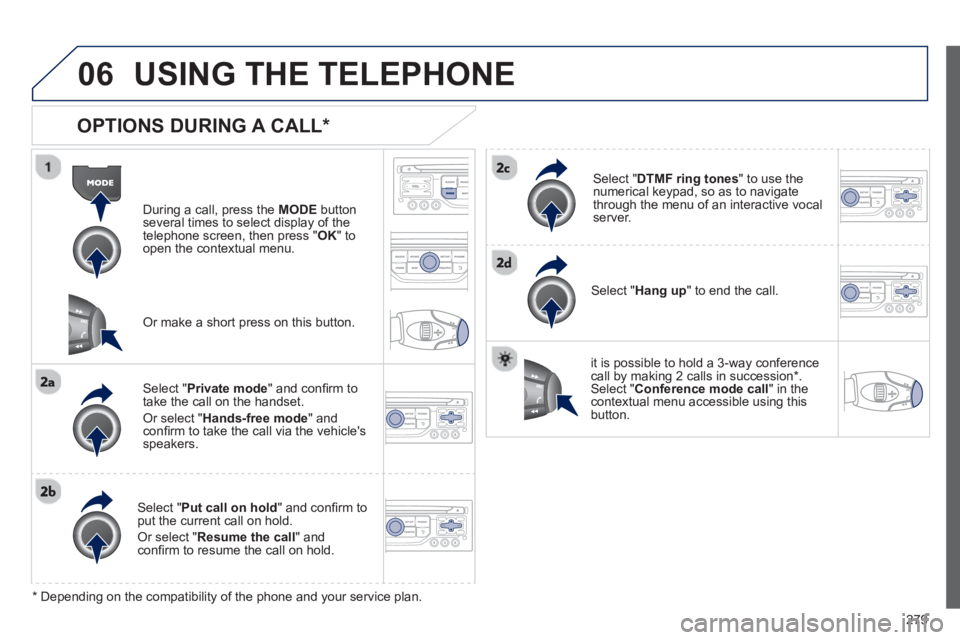
OPTIONS DURING A CALL *
During a call, press the MODE
button
several times to select display of the
telephone screen, then press " OK " to
open the contextual menu.
Select " Private mode
" and confi rm totake the call on the handset.
Or select " Hands-free mode" andconfi rm to take the call via the vehicle's
speakers.
Select " Put call on hold" and confi rm to put the current call on hold.
Or select " Resume the call" andconfi rm to resume the call on hold.
Select " DTMF ring tones
" to use thenumerical keypad, so as to navigate
through the menu of an interactive vocal server.
Select " Hang up " to end the call.
*
Depending on the compatibility of the phone and your service plan.
it is possible to hold a 3-wa
y conferencecall by making 2 calls in succession*. Select "Conferencemode call" in the contextual menu accessible using thisbutton.
Or make a short press on this button.
Page 285 of 336
283
07
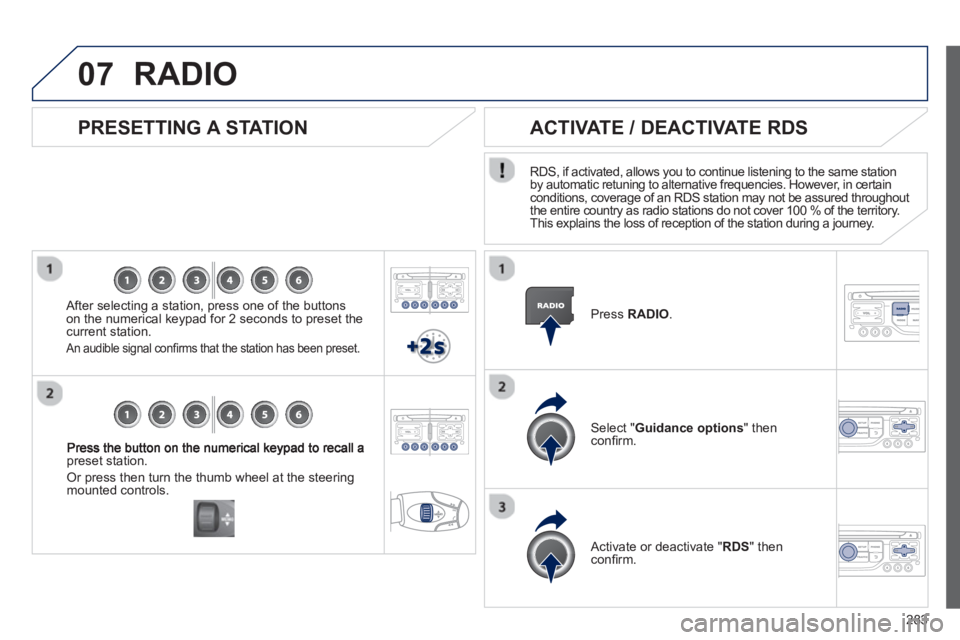
preset station.
Or press then turn the thumb wheel at the steeringmounted controls.
PRESETTING A STATION
After selecting a station, press one of the buttonson the numerical keypad for 2 seconds to preset the current station.
An audible signal confi rms that the station has been preset.
Press RADIO.
ACTIVATE / DEACTIVATE RDS
RDS, if activated, allows you to continue listening to the same station
by automatic retuning to alternative frequencies. However, in certain conditions, coverage of an RDS station may not be assured throughout
the entire country as radio stations do not cover 100 % of the territory.
This explains the loss of reception of the station during a journey.
Select " Guidance options
" then confi rm.
Activate or deactivate "RDS " then confi rm.
RADIO
Page 287 of 336
285
08
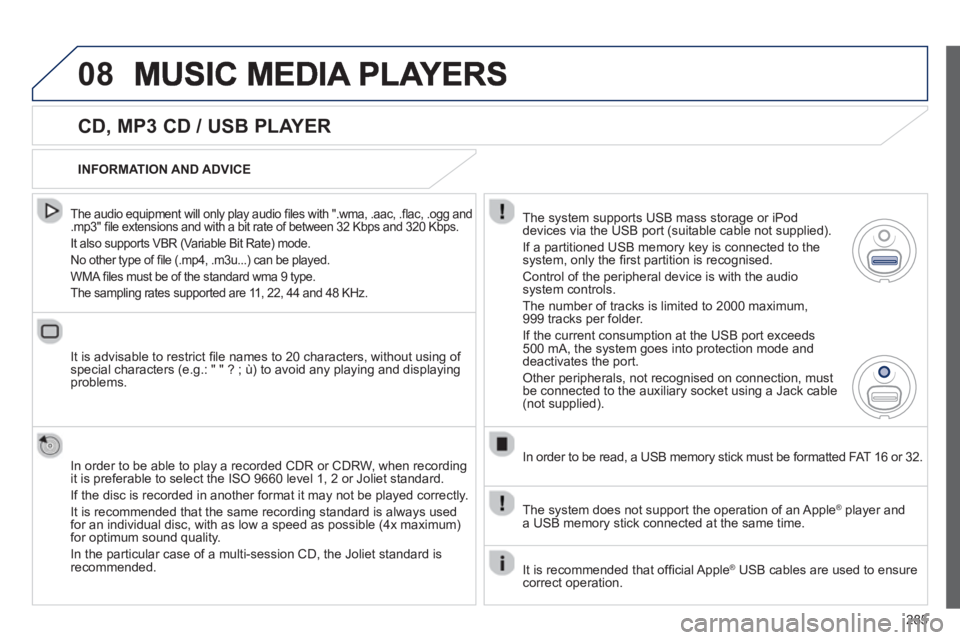
CD, MP3 CD / USB PLAYER
The audio equipment will only play audio fi les with ".wma, .aac, .fl ac, .ogg and.mp3" fi le extensions and with a bit rate of between 32 Kbps and 320 Kbps.
It also supports VBR
(Variable Bit Rate) mode.
No other t
ype of fi le (.mp4, .m3u...) can be played.
WMA
fi les must be of the standard wma 9 type.
The samplin
g rates supported are 11, 22, 44 and 48 KHz.
It is advisable to restrict fi le names to 20 characters, without using of special characters (e.g.: " " ? ; ù) to avoid any playing and displayingproblems.
In order to be able to pla
y a recorded CDR or CDRW, when recording
it is preferable to select the ISO 9660 level 1, 2 or Joliet standard.
If the disc is recorded in another format it ma
y not be played correctly.
It is recommended that the same recordin
g standard is always used
for an individual disc, with as low a speed as possible (4x maximum)for optimum sound quality.
In the particular case o
f a multi-session CD, the Joliet standard isrecommended.
INFORMATION AND ADVICE
The s
ystem supports USB mass storage or iPod
devices via the USB port (suitable cable not supplied).
I
f a partitioned USB memory key is connected to the system, only the fi rst partition is recognised.
Control of the peripheral device is with the audiosystem controls.
The number of tracks is limited to 2000 maximum,
999 tracks per folder.
I
f the current consumption at the USB port exceeds 500 mA, the system goes into protection mode and
deactivates the port.
Other peripherals, not recognised on connection, must
be connected to the auxiliary socket using a Jack cable (not supplied).
In order to be read, a USB memor
y stick must be formatted FAT 16 or 32.
The s
ystem does not support the operation of an Apple Æplayer and
a USB memory stick connected at the same time.
It is recommended that o
ffi cial Apple Æ USB cables are used to ensure Æ
correct operation.
Page 316 of 336
314
06
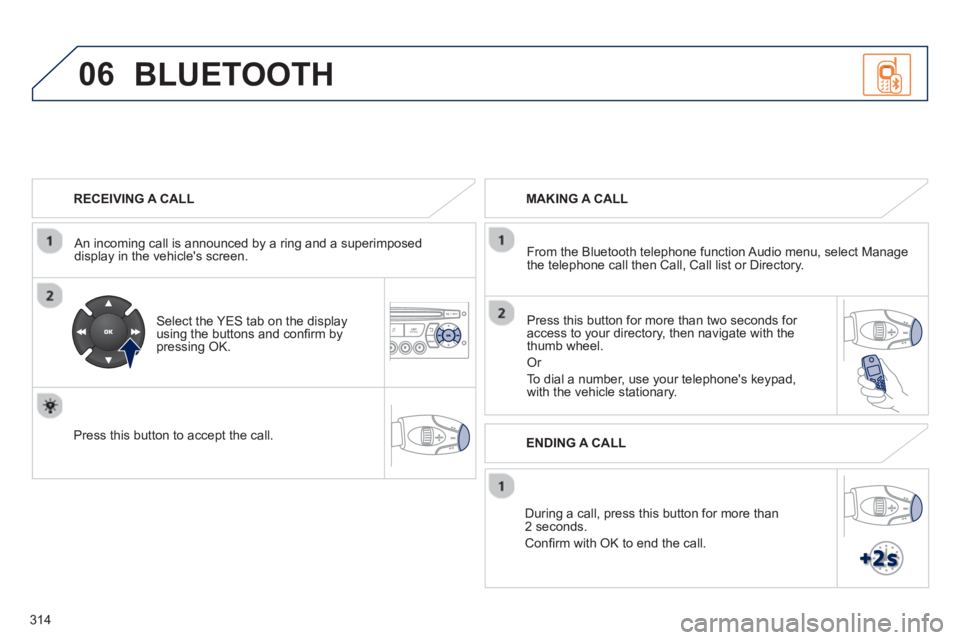
RECEIVING A CALL
An incomin
g call is announced by a ring and a superimposed
display in the vehicle's screen.
Select the YES tab on the display
using the buttons and confi rm bypressing OK.
Press this button to acce
pt the call.
MAKING A CALL
From the Bluetooth telephone
function Audio menu, select Manage
the telephone call then Call, Call list or Directory.
Pr
ess this button for more than two seconds for
access to your directory, then navigate with the
thumb wheel.
Or
To dial a number, use your telephone's keypad,with the vehicle stationary.
Durin
g a call, press this button for more than2 seconds.
Confi rm with OK to end the call.
BLUETOOTH
ENDING A CALL
Page 317 of 336
315
06
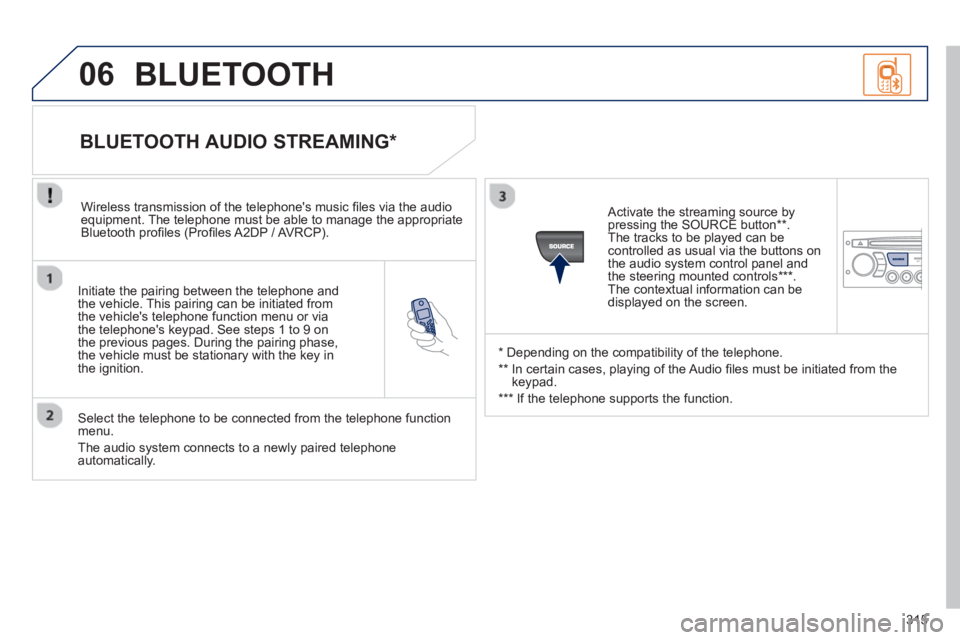
Initiate the pairing between the telephone and
the vehicle. This pairing can be initiated from
the vehicle's telephone function menu or via
the telephone's ke
ypad. See steps 1 to 9 on
the previous pages. During the pairing phase,
the vehicle must be stationary with the key in
the i
gnition.
Select the telephone to be connected from the telephone functionmenu.
The audio s
ystem connects to a newly paired telephone automatically.
BLUETOOTH AUDIO STREAMING *
Wireless transmission of the telephone's music fi les via the audioequipment. The telephone must be able to manage the appropriate
Bluetooth profi les (Profi les A2DP / AVRCP).
*
Depending on the compatibility of the telephone.
**
In certain cases, playing of the Audio fi les must be initiated from the
keypad.
***
If the tele
phone supports the function.
Activate the streaming source by
pressin
g the SOURCE button ** .
The tracks to be played can becontrolled as usual via the buttons on
the audio system control panel and
the steering mounted controls *** .
The contextual information can bedisplayed on the screen.
BLUETOOTH
Page 325 of 336
ALPHABETICAL INDEX
ALPHABETICAL INDEX
Navigation................................ 216, 255
Number plate lamps ........................ 176N/
Menu, main ...................................... 306
Mirror, rear view ................................. 72
Mirrors, door ................................ 70, 71
Mountings for ISOFIX seats ............ 124
MP3 CD ........................... 229, 285, 309
Music media players ........ 228, 284, 309M/Indicators, direction ......................... 102
Infl ating accessories
(using the kit) ................................ 162
Infl ating tyres ............................. 20, 200
Inputs for audio
system ............ 86, 232, 289, 310, 312
Instrument panel lighting ................... 38
Instrument panels .................. 22, 24, 37
Instrument panel screen .................... 22
Intelligent Traction Control ............... 106
Interior fi nish .................................... 191
Interior fi ttings .................................... 82
Interior lamp....................................... 79
Interior mood lighting ......................... 80
ISOFIX ............................................. 124
ISOFIX child seats .................... 125-126
ISOFIX mountings ........................... 124I/Labels, identifi cation ........................ 200
Lamps, front............................. 173, 191
Lamps, rear ............................. 176, 191
Lamps, warning and indicator....... 26-32
LED daytime running lamps .............. 93
Level, brake fl uid ............................. 152
Level, headlamp wash ............... 99, 153
Level, power steering fl uid ............... 152
Levels and checks .................... 149-155
Lighting, guide-me home ............. 94, 95
Lighting, interior ........................... 79, 80
Lighting bulbs (replacement) ........... 173
Lighting control stalk .......................... 90
Lighting dimmer ................................. 38
Lighting on reminder .......................... 92
Loading .............................................. 20
Load reduction mode ....................... 170
Locating your vehicle ......................... 54
Locking from the inside...................... 62
Locking the boot ................................ 64
Low fuel level ............................. 28, 146L/
JACK socket .............. 86, 289, 310, 312
Jukebox (copy) ................................ 230
Jukebox (playing) ............................ 231J/
Main beam ......................... 90, 174, 175
Maintenance ...................................... 20
Maintenance (advice) ...................... 191
Map reading lamps ............................ 79
Markings, identifi cation .................... 200
Mat..................................................... 87M/
Oil fi lter ............................................ 154
Oil level ...................................... 33, 152
Opening the bonnet ......................... 148
Opening the boot ......................... 52, 64
Opening the doors ................. 52, 61, 63
Opening the fuel fi ller fl ap ................ 146
Opening the retractable screen ......... 50
Operation indicator lamps............. 26-32O/
Keeping
children safe ........... 113, 115, 119-126
Key in ignition warning..................... 127
Key with remote control ........ 52-55, 127K/Paint colour code ............................. 200
Paintwork, matt ................................ 192
Parking brake .......................... 128, 155
Parking sensors, front...................... 143P/
Page 328 of 336
326
EXTERIOR
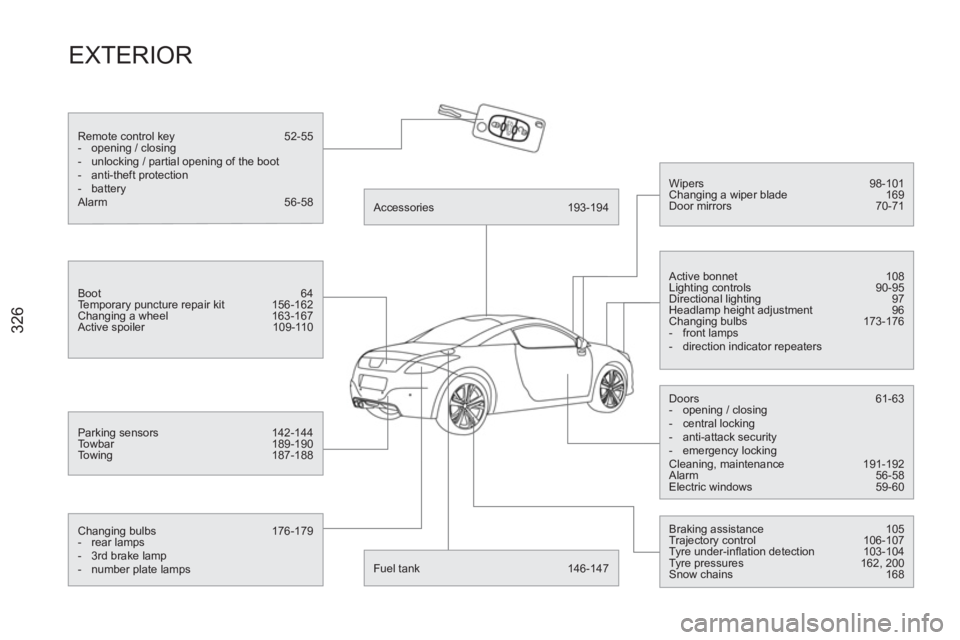
Remote control key 52-55
- opening / closing
- unlocking / partial opening of the boot
- anti-theft protection
- battery
Alarm 56-58
Boot 64
Temporary puncture repair kit 156-162
Changing a wheel 163-167
Active spoiler 109-110
Parking sensors 142-144
Towbar 189-190
Towing 187-188
Changing bulbs 176-179
- rear lamps
- 3rd brake lamp
- number plate lamps
Accessories 193-194
Fuel tank 146-147
Wipers 98-101
Changing a wiper blade 169
Door mirrors 70-71
Active bonnet 108
Lighting controls 90-95
Directional lighting 97
Headlamp height adjustment 96
Changing bulbs 173-176
- front lamps
- direction indicator repeaters
Doors 61-63
- opening / closing
- central locking
- anti-attack security
- emergency locking
Cleaning, maintenance 191-192
Alarm 56-58
Electric windows 59-60
Braking assistance 105
Trajectory control 106-107
Tyre under-infl ation detection 103-104
Tyre pressures 162, 200
Snow chains 168