navigation PEUGEOT RCZ 2012 Workshop Manual
[x] Cancel search | Manufacturer: PEUGEOT, Model Year: 2012, Model line: RCZ, Model: PEUGEOT RCZ 2012Pages: 336, PDF Size: 14.1 MB
Page 266 of 336
264
04NAVIGATION - GUIDANCE
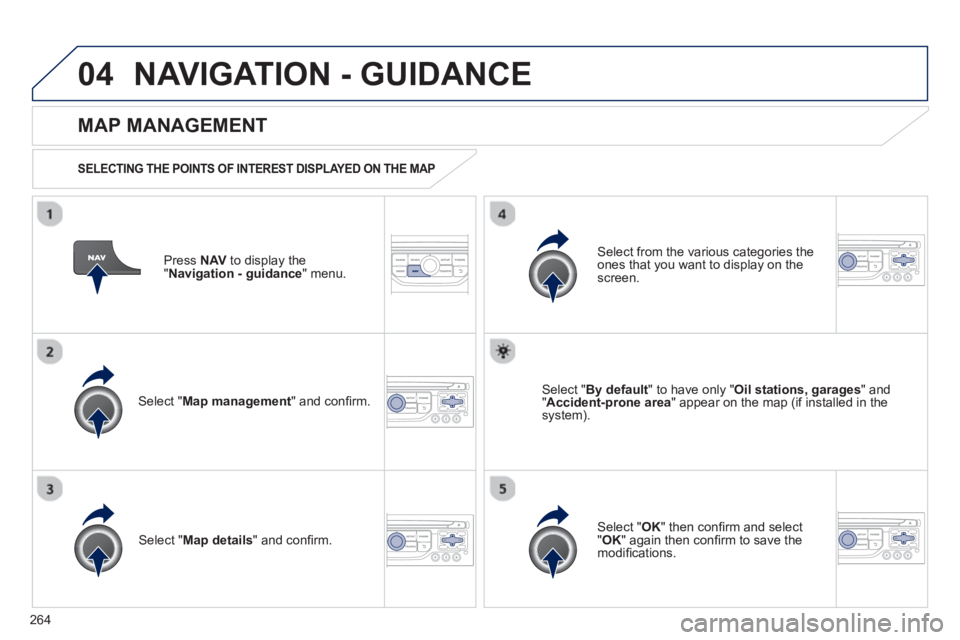
Press NAV
to display the
"Navigation - guidance" menu.
MAP MANAGEMENT
SELECTING THE POINTS OF INTEREST DISPLAYED ON THE MAP
Select " Map management
" and confi rm.
Select from the various categories the
ones that you want to display on thescreen.
Select "Map details" and confi rm.
Select " By default" to have only "Oil stations, garages" and"Accident-prone area
" appear on the map (if installed in the
system).
Select " OK
" then confi rm and select "OK" again then confi rm to save the
modifi cations.
Page 267 of 336
265
04
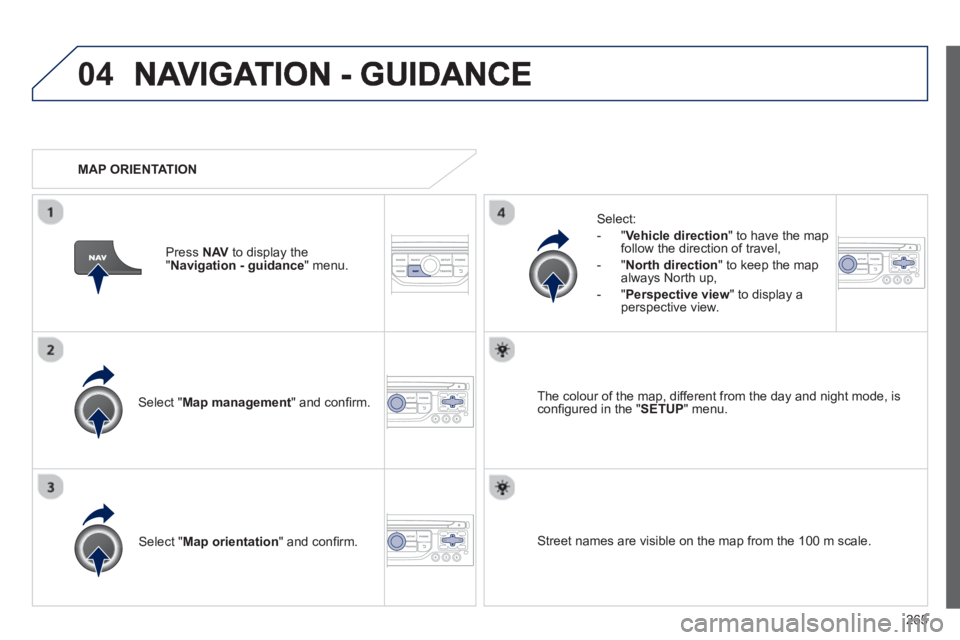
Select " Map management " and confi rm.
Select:
-
"Vehicle direction" to have the map follow the direction of travel,
- "North direction" to keep the map
alwa
ys North up,
- "Perspective view
" to displa
y aperspective view.
Select "Map orientation
" and confi rm. The colour o
f the map, different from the day and night mode, is confi gured in the " SETUP" menu.
MAP ORIENTATION
Pr
ess NAV
to display the
" Navigation - guidance" menu.
Street names are visible on the map from the 100 m scale.
Page 268 of 336
266
04NAVIGATION - GUIDANCE
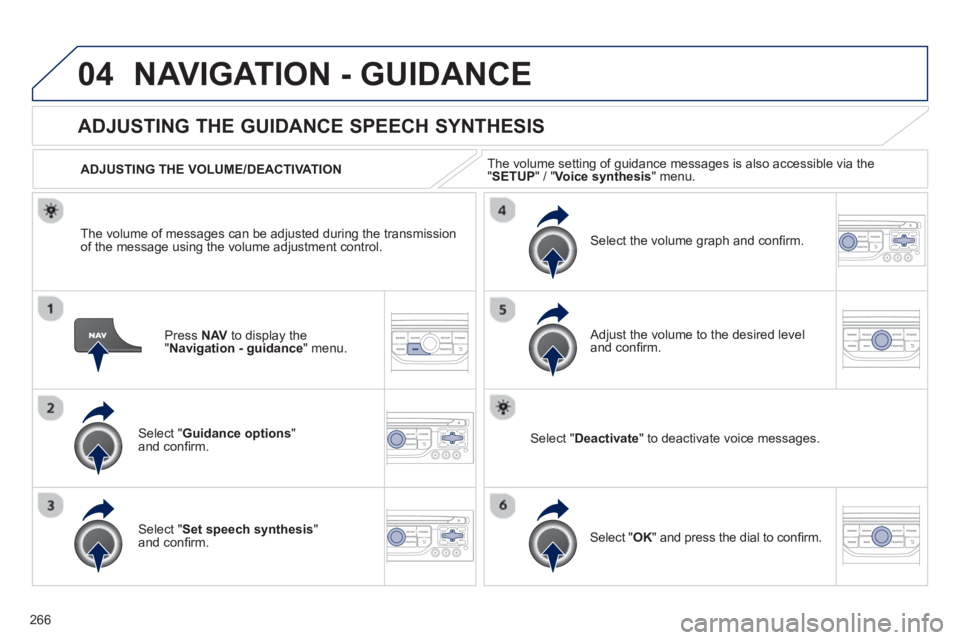
Press NAV to display the"Navigation - guidance" menu.
ADJUSTING THE GUIDANCE SPEECH SYNTHESIS
Select " Guidance options
" and confi rm.
ADJUSTING THE VOLUME/DEACTIVATION
Select " Set speech synthesis"and confi rm.
Select the volume graph and confi rm.
Select "Deactivate " to deactivate voice messages.
Select " OK
" and press the dial to confi rm.K
Adjust the volume to the desired level and confi rm.
The volume o
f messages can be adjusted during the transmissionof the message using the volume adjustment control.The volume settin
g of guidance messages is also accessible via the "SETUP" / " Voice synthesis " menu.
Page 271 of 336
269
05TRAFFIC INFORMATION
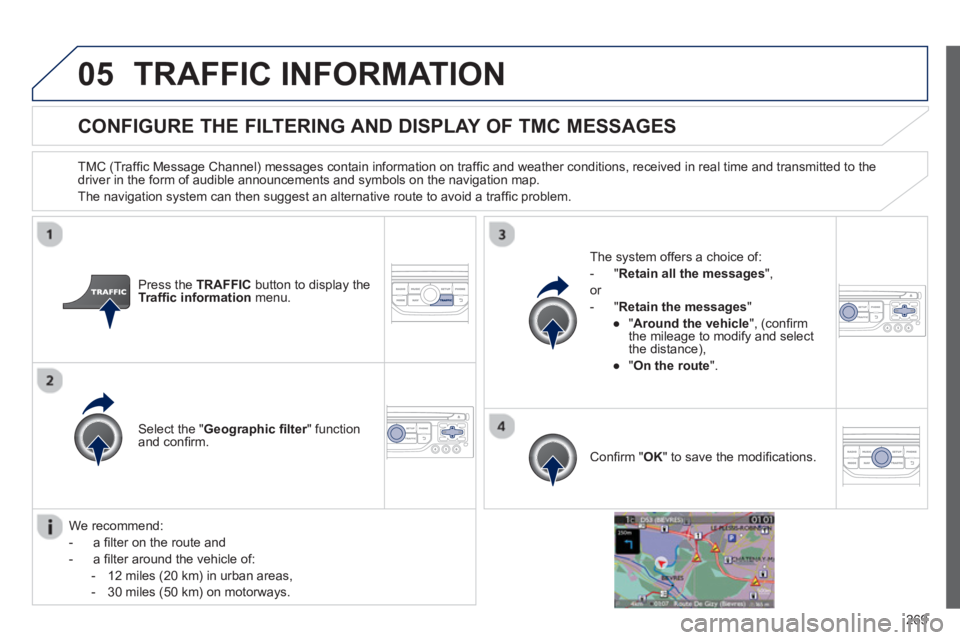
CONFIGURE THE FILTERING AND DISPLAY OF TMC MESSAGES
TMC (Traffi c Message Channel) messages contain information on traffi c and weather conditions, received in real time and transmitted to the
driver in the form of audible announcements and symbols on the navigation map.
The navi
gation system can then suggest an alternative route to avoid a traffi c problem.
Pr
ess the TRAFFICbutton to display the Traffi c informationmenu.
Select the "Geographic fi lter" function rand confi rm. The s
ystem offers a choice of:
- " Retain all the messa
ges",
or
-"Retain the messa
ges"
●
"Around the vehicle ", (confi rm
the mileage to modify and select
the distance),
●
" On the rout
e".
Confi rm " OK
" to save the modifi cations.
We recommend:
-
a fi lter on the route and
-
a fi lter around the vehicle of:
- 12 miles
(20 km) in urban areas,
- 30 miles
(50 km) on motorways.
Page 294 of 336
292
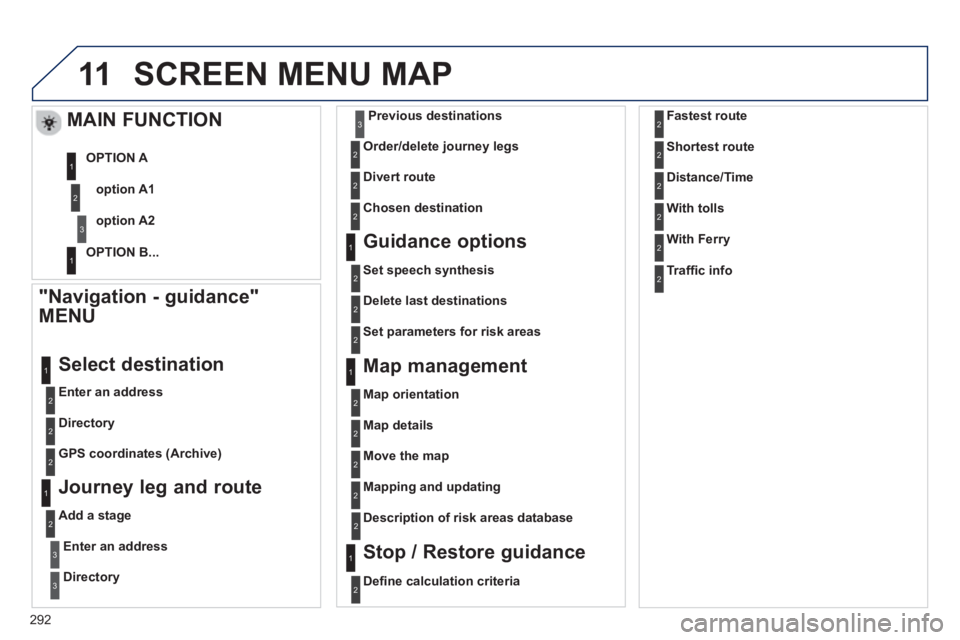
11SCREEN MENU MAP
"Navigation - guidance"
MENU
Enter an address
Select destination
Directory
GPS coordinates
(Archive)
Journey leg and route
Add a stage
Enter an address
Directory
Previous destinations
Order/delete
journey legs
Divert route
Chosen destination
Guidance options
Set speech synthesis
Delete last destinations
Map management
Map orientation
MAIN FUNCTION
option A1
option A2 OPTION A
OPTION B...
Map details
Move the map
Mapping and updating
Descri
ption of risk areas database
Stop / Restore guidance
1
2
3
1
3
3
2
2
2
2
1
3
1
1
2
2
2
2
2
2
2
2
2
2
1
1
Set parameters for risk areas
2
Defi ne calculation criteria 2
Fastest route
Shortest route
Distance/Time
2
2
2
With tolls2
With Ferry2
Traffi c info2
Page 298 of 336
296
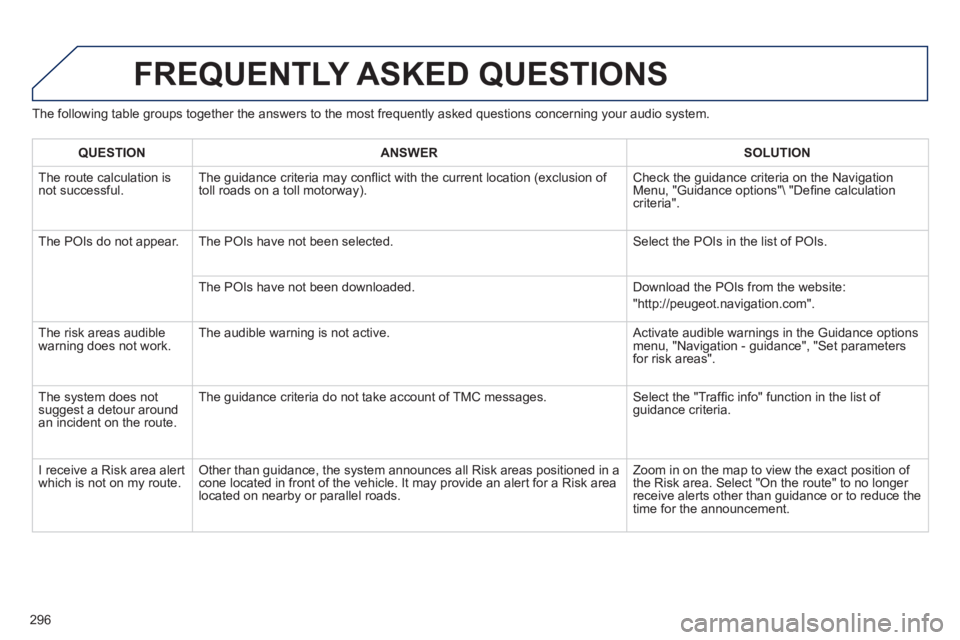
The following table groups together the answers to the most frequently asked questions concerning your audio system.
FREQUENTLY ASKED QUESTIONS
QUESTIONANSWER SOLUTION
The route calculation is not successful. The guidance criteria may confl ict with the current location (exclusion of
toll roads on a toll motorway). Check the guidance criteria on the Navigation Menu, "Guidance options"\ "Defi ne calculation criteria".
The P
OIs do not appear. The POIs have not been selected. Select the POIs in the list of POIs.
The P
OIs have not been downloaded. Download the POIs from the website:
"http://peugeot.navigation.com".
Th
e risk areas audiblewarning does not work. The audible warning is not active. Activate audible warnings in the Guidance options menu, "Navigation - guidance", "Set parameters for risk areas".
The s
ystem does notsuggest a detour around an incident on the route. The
guidance criteria do not take account of TMC messages. Select the "Traffi c info" function in the list of guidance criteria.
I r
eceive a Risk area alert
which is not on my route. Other than guidance, the system announces all Risk areas positioned in a cone located in front of the vehicle. It may provide an alert for a Risk area located on nearby or parallel roads. Zoom in on the map to view the exact position o
f
the Risk area. Select "On the route" to no longer receive alerts other than guidance or to reduce the
time for the announcement.
Page 313 of 336
311
05
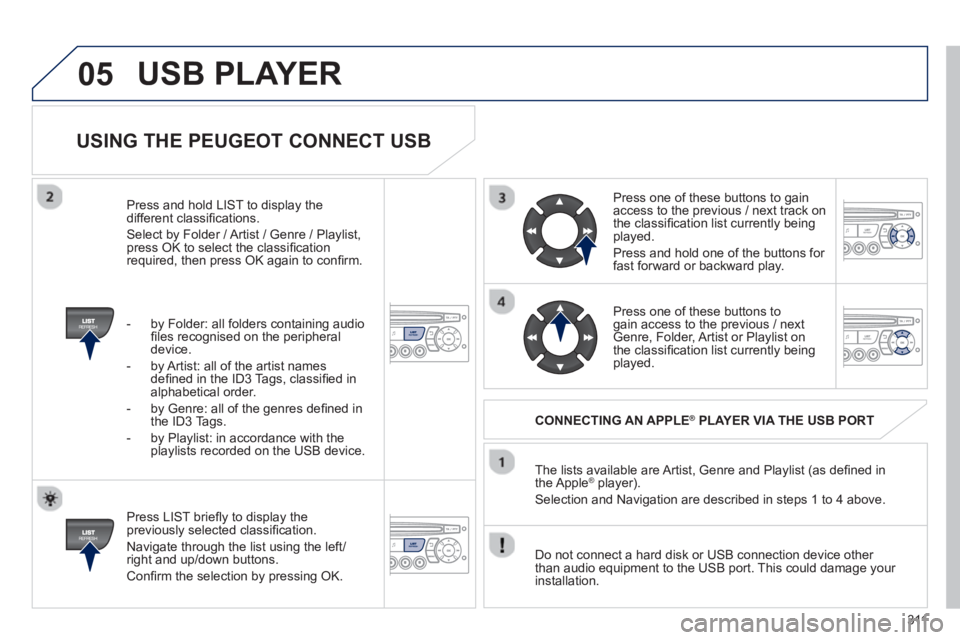
USING THE PEUGEOT CONNECT USB
Press LIST briefl y to display thepreviously selected classifi cation.
Navi
gate through the list using the left/right and up/down buttons.
Confi rm the selection by pressing OK. The lists available are Artist, Genre and Pla
ylist (as defi ned in
the Apple® player).®
Selection and Navigation are described in steps 1 to 4 above.
Do not connect a hard disk or
USB connection device other
than audio equipment to the USB port. This could damage your
installation.
CONNECTING AN APPLE®PLAYER VIA THE USB PORT®
Press one of these buttons to gain
access to the previous / next track on
the classifi cation list currently beingplayed.
Pr
ess and hold one of the buttons for fast forward or backward play.
Pr
ess one of these buttons to gain access to the previous / next
Genre, Folder, Artist or Playlist on
the classifi cation list currently beingplayed.
Press and hold LI
ST to display the different classifi cations.
Select b
y Folder / Artist / Genre / Playlist,press OK to select the classifi cation required, then press OK again to confi rm.
- b
y Folder: all folders containing audio fi les recognised on the peripheraldevice.
- by Artist: all o
f the artist names
defi ned in the ID3 Tags, classifi ed in alphabetical order.
- b
y Genre: all of the genres defi ned in
the ID3 Tags.
- b
y Playlist: in accordance with the
playlists recorded on the USB device.
USB PLAYER
Page 325 of 336
ALPHABETICAL INDEX
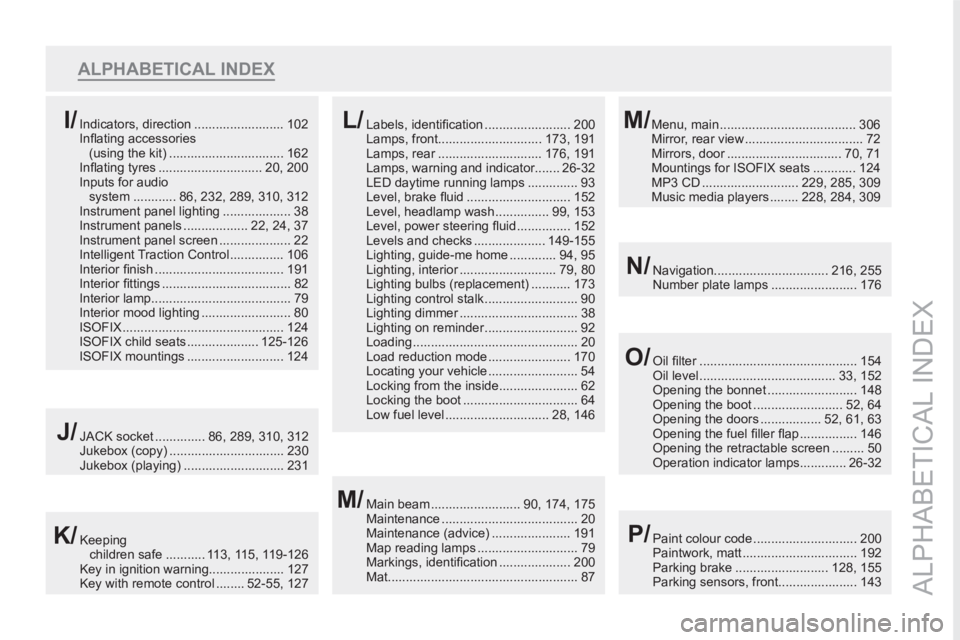
ALPHABETICAL INDEX
Navigation................................ 216, 255
Number plate lamps ........................ 176N/
Menu, main ...................................... 306
Mirror, rear view ................................. 72
Mirrors, door ................................ 70, 71
Mountings for ISOFIX seats ............ 124
MP3 CD ........................... 229, 285, 309
Music media players ........ 228, 284, 309M/Indicators, direction ......................... 102
Infl ating accessories
(using the kit) ................................ 162
Infl ating tyres ............................. 20, 200
Inputs for audio
system ............ 86, 232, 289, 310, 312
Instrument panel lighting ................... 38
Instrument panels .................. 22, 24, 37
Instrument panel screen .................... 22
Intelligent Traction Control ............... 106
Interior fi nish .................................... 191
Interior fi ttings .................................... 82
Interior lamp....................................... 79
Interior mood lighting ......................... 80
ISOFIX ............................................. 124
ISOFIX child seats .................... 125-126
ISOFIX mountings ........................... 124I/Labels, identifi cation ........................ 200
Lamps, front............................. 173, 191
Lamps, rear ............................. 176, 191
Lamps, warning and indicator....... 26-32
LED daytime running lamps .............. 93
Level, brake fl uid ............................. 152
Level, headlamp wash ............... 99, 153
Level, power steering fl uid ............... 152
Levels and checks .................... 149-155
Lighting, guide-me home ............. 94, 95
Lighting, interior ........................... 79, 80
Lighting bulbs (replacement) ........... 173
Lighting control stalk .......................... 90
Lighting dimmer ................................. 38
Lighting on reminder .......................... 92
Loading .............................................. 20
Load reduction mode ....................... 170
Locating your vehicle ......................... 54
Locking from the inside...................... 62
Locking the boot ................................ 64
Low fuel level ............................. 28, 146L/
JACK socket .............. 86, 289, 310, 312
Jukebox (copy) ................................ 230
Jukebox (playing) ............................ 231J/
Main beam ......................... 90, 174, 175
Maintenance ...................................... 20
Maintenance (advice) ...................... 191
Map reading lamps ............................ 79
Markings, identifi cation .................... 200
Mat..................................................... 87M/
Oil fi lter ............................................ 154
Oil level ...................................... 33, 152
Opening the bonnet ......................... 148
Opening the boot ......................... 52, 64
Opening the doors ................. 52, 61, 63
Opening the fuel fi ller fl ap ................ 146
Opening the retractable screen ......... 50
Operation indicator lamps............. 26-32O/
Keeping
children safe ........... 113, 115, 119-126
Key in ignition warning..................... 127
Key with remote control ........ 52-55, 127K/Paint colour code ............................. 200
Paintwork, matt ................................ 192
Parking brake .......................... 128, 155
Parking sensors, front...................... 143P/
Page 326 of 336
324
ALPHABETICAL INDEX
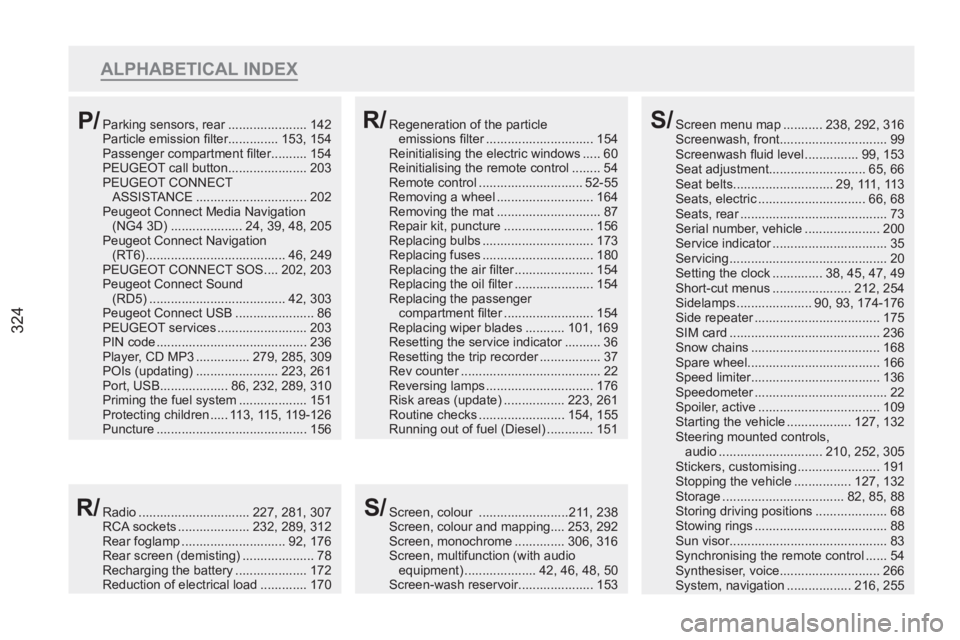
Screen menu map ........... 238, 292, 316
Screenwash, front.............................. 99
Screenwash fl uid level ............... 99, 153
Seat adjustment........................... 65, 66
Seat belts............................ 29, 111, 113
Seats, electric .............................. 66, 68
Seats, rear ......................................... 73
Serial number, vehicle ..................... 200
Service indicator ................................ 35
Servicing ............................................ 20
Setting the clock .............. 38, 45, 47, 49
Short-cut menus ...................... 212, 254
Sidelamps ..................... 90, 93, 174-176
Side repeater ................................... 175
SIM card .......................................... 236
Snow chains .................................... 168
Spare wheel..................................... 166
Speed limiter.................................... 136
Speedometer ..................................... 22
Spoiler, active .................................. 109
Starting the vehicle .................. 127, 132
Steering mounted controls,
audio ............................. 210, 252, 305
Stickers, customising ....................... 191
Stopping the vehicle ................ 127, 132
Storage .................................. 82, 85, 88
Storing driving positions .................... 68
Stowing rings ..................................... 88
Sun visor............................................ 83
Synchronising the remote control ...... 54
Synthesiser, voice............................ 266
System, navigation .................. 216, 255S/
Radio ............................... 227, 281, 307
RCA sockets .................... 232, 289, 312
Rear foglamp ............................. 92, 176
Rear screen (demisting) .................... 78
Recharging the battery .................... 172
Reduction of electrical load ............. 170R/
Regeneration of the particle
emissions fi lter .............................. 154
Reinitialising the electric windows ..... 60
Reinitialising the remote control ........ 54
Remote control ............................. 52-55
Removing a wheel ........................... 164
Removing the mat ............................. 87
Repair kit, puncture ......................... 156
Replacing bulbs ............................... 173
Replacing fuses ............................... 180
Replacing the air fi lter ...................... 154
Replacing the oil fi lter ...................... 154
Replacing the passenger
compartment fi lter ......................... 154
Replacing wiper blades ........... 101, 169
Resetting the service indicator .......... 36
Resetting the trip recorder ................. 37
Rev counter ....................................... 22
Reversing lamps .............................. 176
Risk areas (update) ................. 223, 261
Routine checks ........................ 154, 155
Running out of fuel (Diesel) ............. 151R/Parking sensors, rear ...................... 142
Particle emission fi lter.............. 153, 154
Passenger compartment fi lter.......... 154
PEUGEOT call button ...................... 203
PEUGEOT CONNECT
ASSISTANCE ............................... 202
Peugeot Connect Media Navigation
(NG4 3D) .................... 24, 39, 48, 205
Peugeot Connect Navigation
(RT6) ....................................... 46, 249
PEUGEOT CONNECT SOS .... 202, 203
Peugeot Connect Sound
(RD5) ...................................... 42, 303
Peugeot Connect USB ...................... 86
PEUGEOT services ......................... 203
PIN code .......................................... 236
Player, CD MP3 ............... 279, 285, 309
POIs (updating) ....................... 223, 261
Port, USB................... 86, 232, 289, 310
Priming the fuel system ................... 151
Protecting children ..... 113, 115, 119-126
Puncture .......................................... 156P/
Screen, colour .........................211, 238
Screen, colour and mapping.... 253, 292
Screen, monochrome .............. 306, 316
Screen, multifunction (with audio
equipment) .................... 42, 46, 48, 50
Screen-wash reservoir..................... 153S/
Page 330 of 336
328
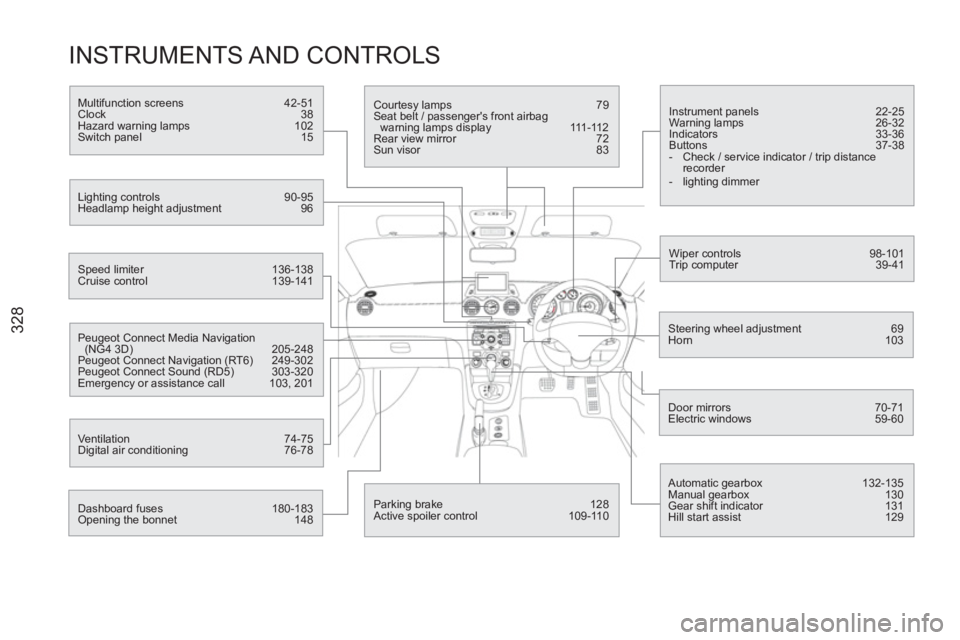
INSTRUMENTS AND CONTROLS
Instrument panels 22-25
Warning lamps 26-32
Indicators 33-36
Buttons 37-38
- Check / service indicator / trip distance
recorder
- lighting dimmer
Wiper controls 98-101
Trip computer 39-41
Speed limiter 136-138
Cruise control 139-141
Steering wheel adjustment 69
Horn 103
Door mirrors 70-71
Electric windows 59-60
Dashboard fuses 180-183
Opening the bonnet 148
Courtesy lamps 79
Seat belt / passenger's front airbag
warning lamps display 111-112
Rear view mirror 72
Sun visor 83
Multifunction screens 42-51
Clock 38
Hazard warning lamps 102
Switch panel 15
Lighting controls 90-95
Headlamp height adjustment 96
Peugeot Connect Media Navigation
(NG4 3D) 205-248
Peugeot Connect Navigation (RT6) 249-302
Peugeot Connect Sound (RD5) 303-320
Emergency or assistance call 103, 201
Ventilation 74-75
Digital air conditioning 76-78
Automatic gearbox 132-135
Manual gearbox 130
Gear shift indicator 131
Hill start assist 129
Parking brake 128
Active spoiler control 109-110