fog light PONTIAC BONNEVILLE 1993 Owners Manual
[x] Cancel search | Manufacturer: PONTIAC, Model Year: 1993, Model line: BONNEVILLE, Model: PONTIAC BONNEVILLE 1993Pages: 322, PDF Size: 16.31 MB
Page 7 of 322
How to Use this Manual
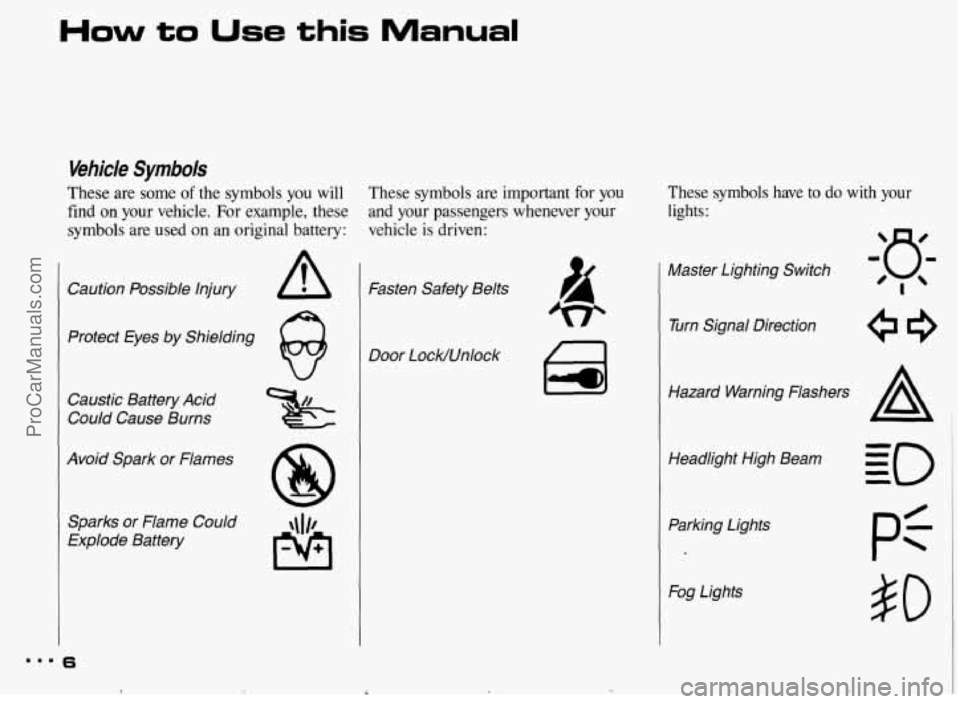
Vehicle Symbols
These are some of the symbols you will
find on your vehicle. For example, these
symbols are used on an original battery:
Caution Possible injury A
Protect Eyes by Shielding
@
Caustic Battery Acid
Could Cause Burns
Avoid Spark or Flames
Sparks or Flame Could
Explode Battery
m.. 6
These symbols are important for you
and your passengers whenever your
vehicle is driven:
Fasten Safety Belts
Door LocWUnlock
These symbols have to do with your
lights:
Master Lighting Switch
Turn Signal Direction
Hazard Warning Flashers
Headlight High Beam Parking Lights
Fog Lights
pf
$0
ProCarManuals.com
Page 8 of 322
r
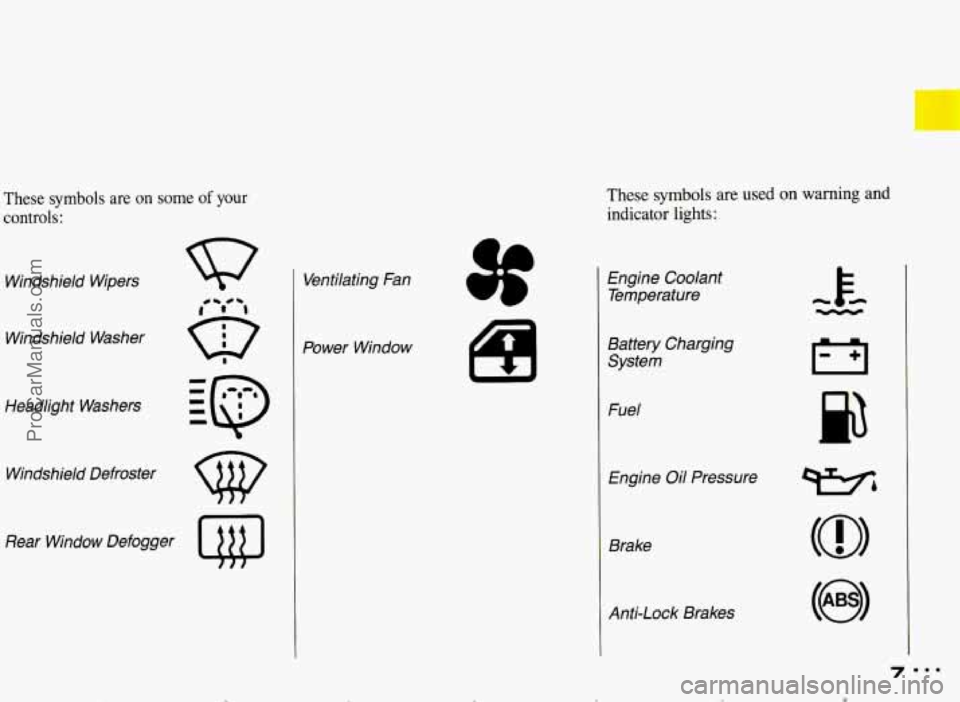
These symbols are on some of your
controls:
Windshield Wipers
Windshield Washer
Headlight Washers
Windshield Defroster
Rear Window Defogger
Q@
Ventilating Fan
Power Window
These symbols are used on warning and
indicator lights:
L
I
a
Engine Coolant Temperature
Battery Charging System
Fuel
Engine
Oil Pressure
Brake
Anti-Lock Brakes
ProCarManuals.com
Page 83 of 322
...
Features & Controls
Operation of lights '
Although your vehicle's lighting system (headlamps, parking lamps, fog lamps,
side marker lamps and tail lamps) meets
all applicable federal lighting
requirements, certain states and
provinces may apply their own lighting
regulations that may require special
attention before you operate these
lamps. For example, some jurisdictions
may require that you operate your lower
beam lamps with fog lamps at all times,
62
or that headlamps be turned on
whenever you must use your windshield wipers. In addition, most jurisdictions
prohibit driving solely with parking
lamps, especially at dawn or dusk. It is
recommended that you check with your
own state or provincial highway
authority for applicable lighting
regulations.
lights On Reminder
If you open the door while leaving the
lights on, you will hear a warning tone.
ProCarManuals.com
Page 86 of 322
Second, to light your way when you
leave your vehicle, the Twilight Sentinel
will keep your headlights on for
as long
as three minutes. Rotate the Twilight
Sentinel switch to
MAX for a three-
minute delay, Rotate it the other way
to
reduce the delay.
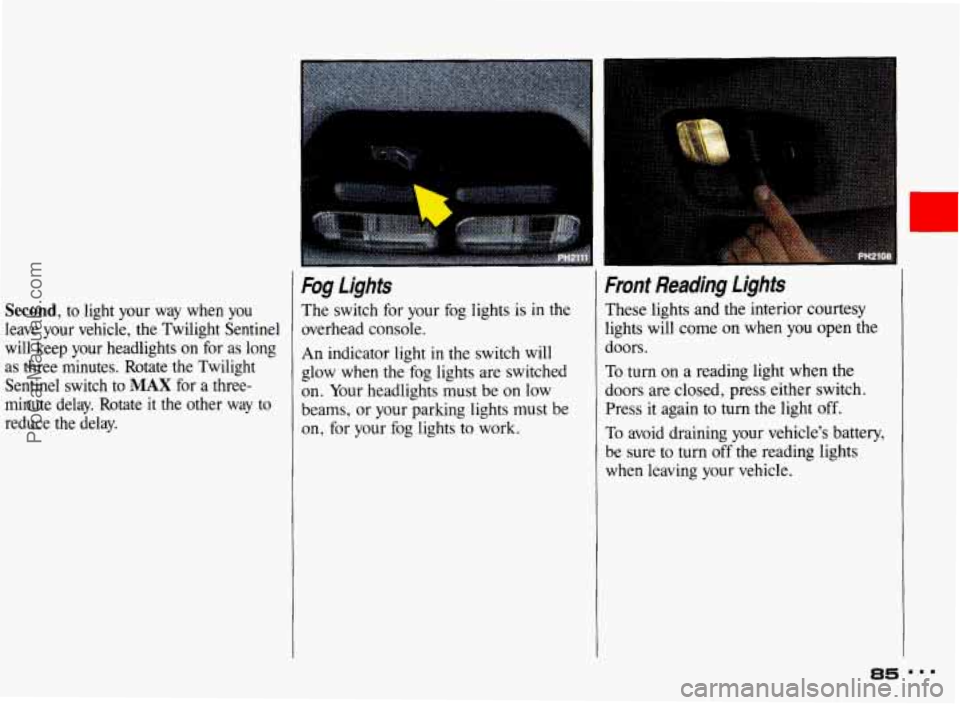
Fog Lights
The switch for your fog lights is in the
overhead console.
An indicator light
in the switch will
glow when the fog lights are switched
on. Your headlights must be on low
beams, or your parking lights must be
on, for your fog lights to work.
Front Reading Ljghts
These lights and the interior courtesy
lights will come
on when you open the
doors.
To turn on
a reading light when the
doors are closed, press either switch.
Press it again to turn
the light off.
To avoid draining your vehicle's battery,
be sure to turn off the reading lights
when leaving your vehicle.
ProCarManuals.com
Page 89 of 322
Features & Controls
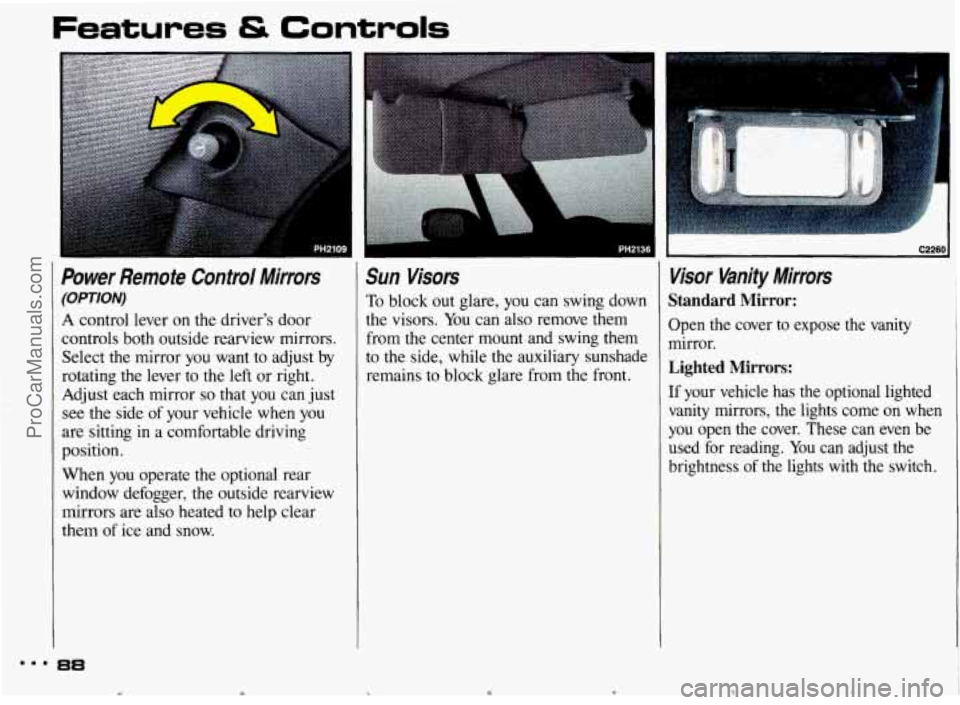
Power Remote Control Mirrors
(OPTION)
A control lever on the driver's door
controls both outside rearview mirrors.
Select the mirror you want to adjust
by
rotating the lever to the left or right.
Adjust each mirror
so that you can just
see the side of your vehicle
when you
are sitting
in a comfortable driving
position.
When you operate the optional rear
window defogger, the outside rearview
mirrors are also heated to help clear
them of ice and snow.
Sun Visors
To block out glare, you can swing down
the visors. You can also remove them
from the center mount and swing them
to the side, while the auxiliary sunshade
remains to block glare from the front.
laaria1 C2260
Visor Vanity Mirrors
Standard Mirror:
Open the cover to expose the vanity
mirror.
Lighted Mirrors:
If your vehicle has the optional lighted
vanity mirrors, the lights come
on when
you open the cover. These can even be
used for reading.
You can adjust the
brightness of the lights
with the switch.
m.. 88
e t ProCarManuals.com
Page 96 of 322
r
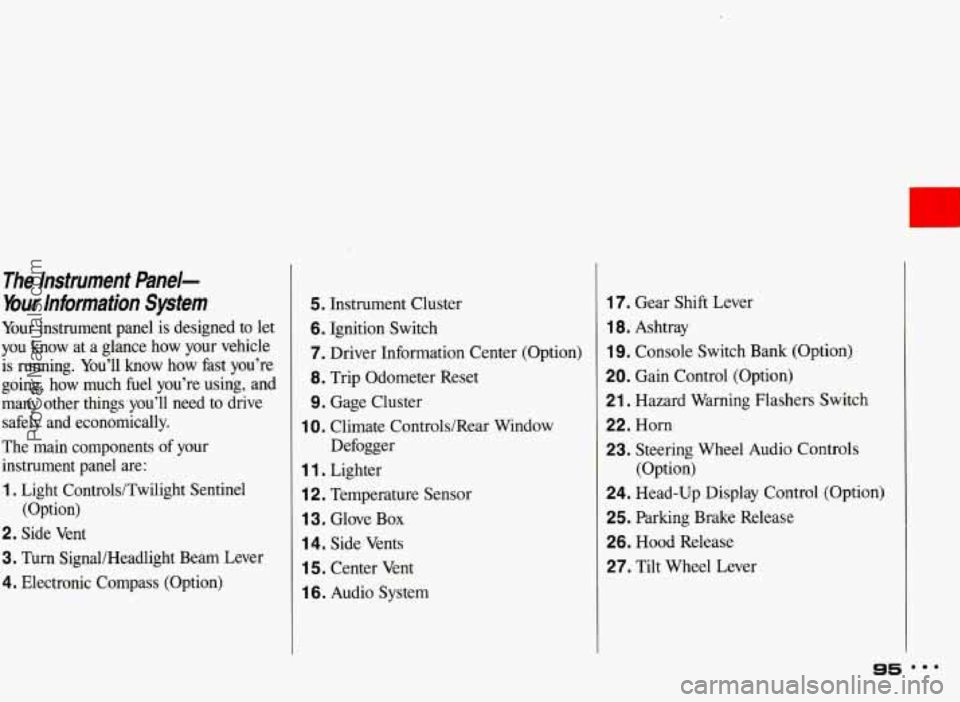
The Instrument &ne/-
bur Information System
Your instrument panel is designed to let
you know at a glance how your vehicle
is running. You’ll know how fast you’re
going, how much fuel you’re using, and
many other things you’ll need to drive
safely and economically.
The main components of your
instrument panel are:
1. Light Controls/Twilight Sentinel
2. Side Vent
3. Turn SignaUHeadlight Beam Lever
4. Electronic Compass (Option) (Option)
5. Instrument Cluster
6. Ignition Switch
7. Driver Information Center
(Option)
8. Trip Odometer Reset
9. Gage Cluster
Defogger
1 0. Climate Controls/Rear Window
1 1 . Lighter
i 2. Temperature Sensor
1 3. Glove Box
14. Side Vents
1 5. Center Vent
1 6. Audio System
17. Gear Shift Lever
1 8. Ashtray
19. Console Switch Bank (Option)
20. Gain Control (Option)
21. Hazard Warning Flashers Switch
22. Horn
23. Steering Wheel Audio Controls
24. Head-Up Display Control (Option)
25. Parking Brake Release
26. Hood Release
27. Tilt Wheel Lever (Option)
95 mmm
ProCarManuals.com
Page 121 of 322
Comfort Controls & Audio Systems ~ ~~
I
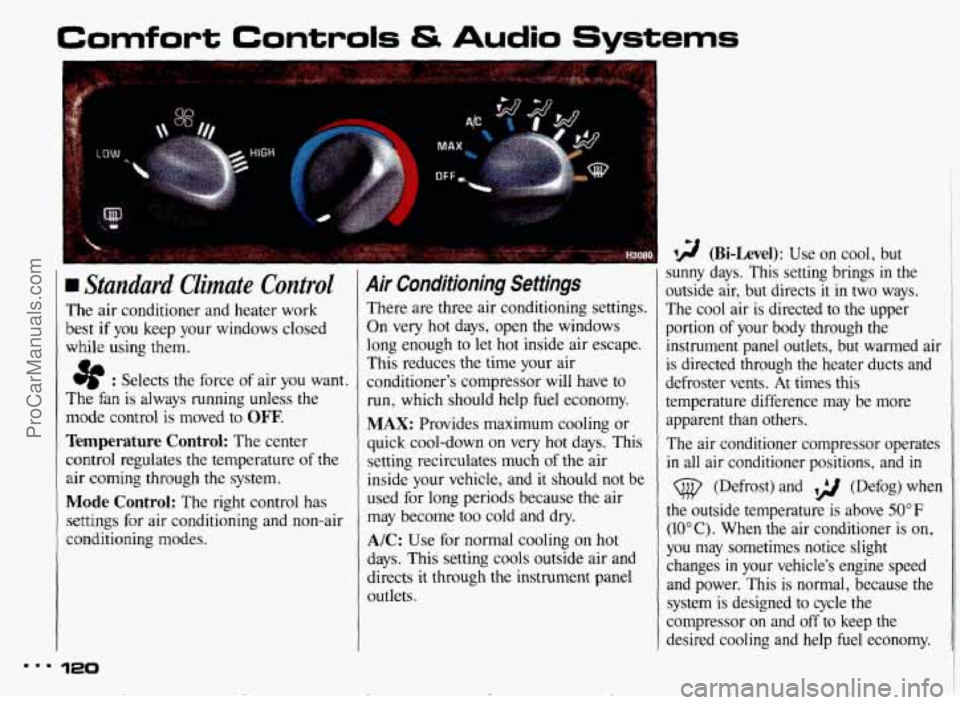
Standard Climate Control
The air conditioner and heater work
best
if you keep your windows closed
while using them.
e : Selects the force of air you want.
The fan is always running unless the
mode control
is moved to OFF.
Temperature Control: The center
control regulates the temperature
of the
air coming through the system.
Mode Control: The right control has
settings for air conditioning and non-air
conditioning modes.
120
Air Conditioning Settings
There are three air conditioning settings.
On very hot days, open the windows
long enough to let hot inside air escape.
This reduces the time your air
conditioner's compressor
will have to
run, which should help fuel economy.
MAX: Provides maximum cooling or
quick cool-down on very hot days. This
setting recirculates much
of the air
inside your vehicle, and it should not be
used for long periods because
the air
may become too cold and dry.
A/C: Use for normal cooling on hot
days. This setting cools outside air and
directs it through the instrument panel
outlets.
I 9 (Bi-Level): Use on cool, but
sunny days. This setting brings
in the
outside air, but directs
it in two ways.
The cool air
is directed to the upper
portion
of your body through the
instrument panel outlets, but warmed air
1
is directed through the heater ducts and ~
defroster vents. At times this
temperature difference may be more
apparent than others.
The air conditioner compressor operates
in all air conditioner positions, and in
(@ (Defrost) and ,> (Defog) when
the outside temperature is above 50°F
(IOOC). When the air conditioner is on,
you may sometimes notice slight
changes
in your vehicle's engine speed
and power. This is normal, because the system
is designed to cycle the
compressor on and off to keep the
desired cooling and help fuel economy.
I
c ProCarManuals.com
Page 123 of 322
Comfort Controls & Audio Systems
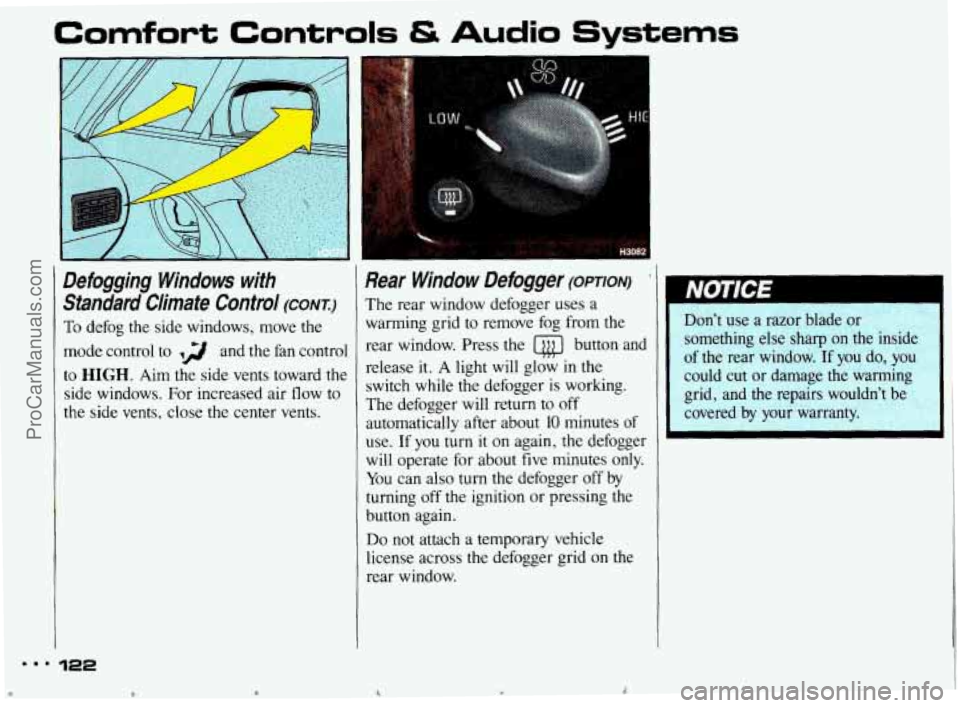
Defogging Windows with Standard Climate Control
(CONT:)
To defog the side windows, move the
mode control to ,g and the fan control
to
HIGH. Aim the side vents toward the
side windows. For increased air flow to
the
side vents, close the center vents.
.ma 122
rl t
Rear Window Defogger (OPTION)
The rear window defogger uses a
warming grid to remove fog from the
rear window. Press the
@ button and
release
it. A light will glow in the
switch while the defogger
is working.
The defogger will return to off
automatically after about
10 minutes of
use. If you turn
it on again, the defogger
will operate for about five minutes only. You can
also turn the defogger off by
turning off the ignition or pressing the
button again.
Do not attach a temporary vehicle
license across the defogger grid on the rear window.
A
~ Don't use a razor blade or
something else sharp
on the inside
of the rear window. If you do, you
could cut or damage the warming
grid, and the repairs wouldn't be
covered by your warranty.
ProCarManuals.com
Page 170 of 322
Some Other Rainy Weather Tips
Turn on your headlights-not just your
parking lights-to help make you more
visible to others.
Look for hard-to-see vehicles coming
from behind. You may want to use
your headlights even in daytime if it’s
raining hard.
Besides slowing down, allow some
extra following distance. And be
especially careful when you pass
another vehicle. Allow yourself more
clear room ahead, and be prepared to
have your view restricted by road
spray.
If the road spray is so heavy you
are actually blinded, drop back. Don’t
pass until conditions improve. Going
more slowly is better than having an
accident.
Use your defogger if it helps.
Have good tires with proper tread
depth. (See the
Index under Tires.)
Hydroplaning
Hydroplaning is dangerous. So much
water can build up under your tires that
they can actually ride on the water. This
can happen if the road is wet enough
and you’re going fast enough. When
your vehicle is hydroplaning, it has little
or no contact with the road.
You might not be aware
of hydroplaning.
You could drive along for some time
without realizing your tires aren’t in
constant contact with the road. You
could find out the hard way:
when you
have to slow, turn, move out to pass-or
if you get hit by a gust
of wind. You could
suddenly find yourself out of control. Hydroplaning doesn’t happen
often. But
it can if your tires haven’t much tread
or
if the pressure in one or more is low. It
can happen if a lot
of water is standing
on the road.
If you can see reflections
from trees, telephone poles, or other
vehicles, and raindrops “dimple” the
water’s surface, there could be
hydroplaning.
Hydroplaning usually happens at higher
speeds. There just isn’t a hard and fast
rule about hydroplaning. The best
advice is to slow down when it
is
raining, and be careful.
ProCarManuals.com
Page 171 of 322
Your Driving and the Road
Driving in Fog, Mist and Haze
Fog can occur with high humidity or
heavy frost. It can be
so mild that you
can see through it for several hundred
feet (meters). Or it might be
so thick
that you can see only a
few feet (meters)
ahead. It may come suddenly to an
otherwise clear road. And
it can be a
major hazard.
When you drive into a fog patch, your
visibility will be reduced quickly. The
biggest dangers are striking the vehicle
ahead or being struck by the one
behind. Try to “read” the fog density
down the road. If the vehicle ahead
starts to become less clear or, at night, if
the taillights are harder to see, the fog is
probably thickening. Slow down to give
traffic behind you a chance to slow
down.
170 mm.
Everybody then has a better chance to
avoid hitting the vehicle ahead.
A patch of dense fog may extend only
for a few feet (meters) or for miles
(kilometers); you can’t really tell while
you’re
in it. You can only treat the
situation
with extreme care.
One common fog condition-sometimes
called mist or ground fog-can happen
in weather that seems perfect, especially
at night or in the early morning
in valley
and low, marshy areas. You can be
suddenly enveloped
in thick, wet haze
that may even coat your windshield. You
can often spot these fog patches or mist
layers with your headlights. But sometimes they can be waiting for you
as you come over a
hill or dip into a
shallow valley.
Start your windshield
wipers and washer to help clear
accumulated road dirt. Slow down
carefully.
Tips on Driving in Fog
If you get caught in fog, turn your
headlights on low beam, even
in
daytime. You’ll see-and be seen-
better. Use your fog lights.
Don’t use your
high beams. The light
will bounce off the water droplets that
make
up fog and reflect back at you.
Use your defogger. In
high humidity,
even a light buildup of moisture on the
inside of the glass will cut down on your
already limited visibility. Run your
windshield wipers and washer
occasionally. Moisture can build up on
the outside glass, and what seems to be
fog may actually be moisture on the
outside of your windshield.
Treat dense fog as an emergency. Try to find a place to pull off the road.
Of
course you want to respect another’s
property, but you might need to put
ProCarManuals.com