key battery PONTIAC BONNEVILLE 2003 Owners Manual
[x] Cancel search | Manufacturer: PONTIAC, Model Year: 2003, Model line: BONNEVILLE, Model: PONTIAC BONNEVILLE 2003Pages: 418, PDF Size: 20.24 MB
Page 62 of 418
Servicing Your Air Bag-Equipped
Vehicle
Air bags affect how your vehicle should be serviced.
There are parts
of the air bag systems in several places
around your vehicle. Your dealer and the service
manual have information about servicing your vehicle
and the air bag systems. To purchase a service manual,
see
Service Publications Ordering lnformation on
page
7-9.
For up to 10 seconds after the ignition key is
turned
off and the battery is disconnected, an
air bag can still inflate during improper service. You can be injured if you are close to
an air bag when it inflates. Avoid yellow
connectors. They are probably part of the air
bag system. Be sure to follow proper service
procedures, and make sure
the person
performing work for you is qualified to do
so.
The air bag systems do not need regular maintenance.
1-55
Page 70 of 418
Remote Keyless Entry System
If equipped, the keyless entry system operates on a
radio frequency subject to Federal Communications
Commission (FCC) Rules and with Industry Canada.
This device complies with Part 15 of the FCC Rules.
Operation is subject to the following two conditions:
1. This device may not cause interference, and
2. This device must accept any interference received,
including interference that may cause undesired
operation of the device.
This device complies with RSS-210 of Industry Canada.
Operation is subject to the following two conditions:
1. This device may not cause interference, and
2. This device must accept any interference received,
including interference that may cause undesired
operation of the device. Changes
or modifications to this system by other than
an authorized service facility could void authorization to
use this equipment.
At times you may notice a decrease in range. This is
normal for any remote keyless entry system.
If the
transmitter does not work or
if you have to stand closer
to your vehicle for the transmitter to work, try this:
e
e
Check the distance. You may be too far from your
vehicle. You may need to stand closer during
rainy or snowy weather.
Check the location. Other vehicles or objects may
be blocking the signal. Take a few steps to the
left or right, hold the transmitter higher, and
try again.
Check to determine if battery replacement is
necessary. See
“Battery Replacement” under
Remote Keyless Entry System Operation on
page
2-6.
If you are still having trouble, see your dealer or a
q~Ia!ified technician for service.
2-5
Page 74 of 418
Battery Replacement
Under normal use, the battery in your remote keyless
entry transmitter should last about four years.
You can tell the battery is weak
if the transmitter won't
work at the normal range in any location.
If you have
to get close to your vehicle before the transmitter works,
it's probably time to change the battery.
Notice: When replacing the battery, use care not to
touch any of the circuitry. Static from your body
transferred to these surfaces may damage the
transmitter.
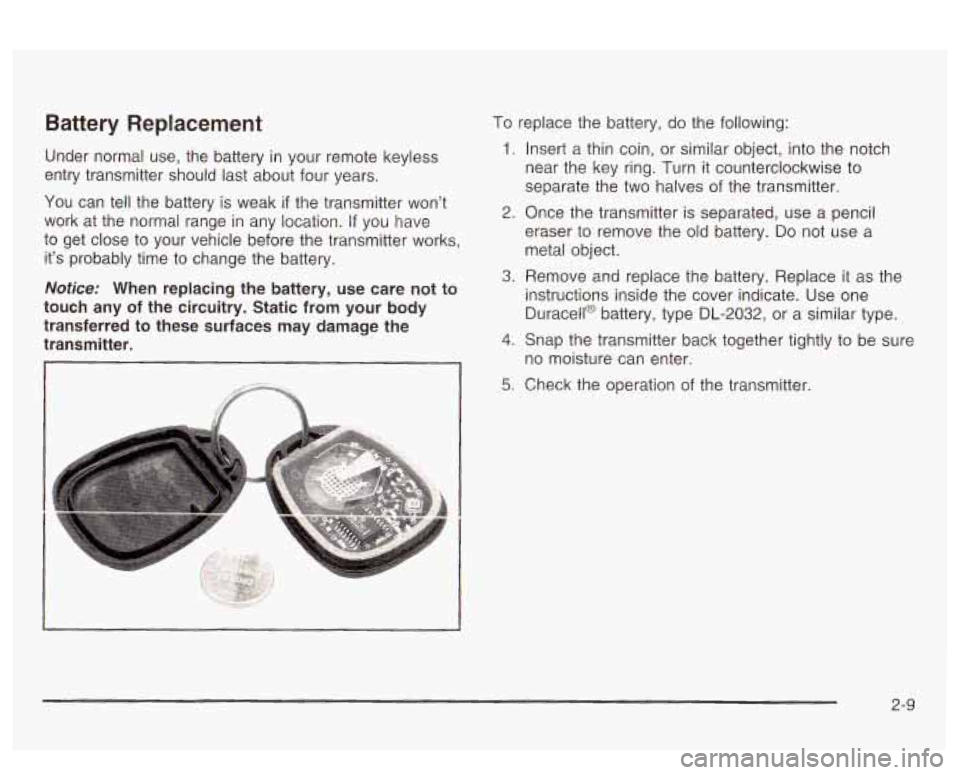
To replace the battery, do the following:
1. Insert a thin coin, or similar object, into the notch
near the key ring. Turn
it counterclockwise to
separate the two halves of the transmitter.
2. Once the transmitter is separated, use a pencil
eraser to remove the old battery.
Do not use a
metal object.
A. Remove and replace the battery. Replace it as the
instructions inside the cover indicate. Use one
Duracell@ battery, type DL-2032, or a similar type.
4. Snap the transmitter back together tightly to be sure
no moisture can enter.
5; Check the operation of the transmitter.
2-9
Page 86 of 418
Theft-Deterrent Systems
Vehicle theft is big business, especially in some cities.
Although your vehicle has a number of theft-deterrent
features, we know that nothing we put on it can make it
impossible to steal.
Universal Theft-Deterrent
If your vehicle has this feature, it has a theft-deterrent
alarm system. With this system, the SECURITY light will
flash
as you open the door if your ignition is in OFF.
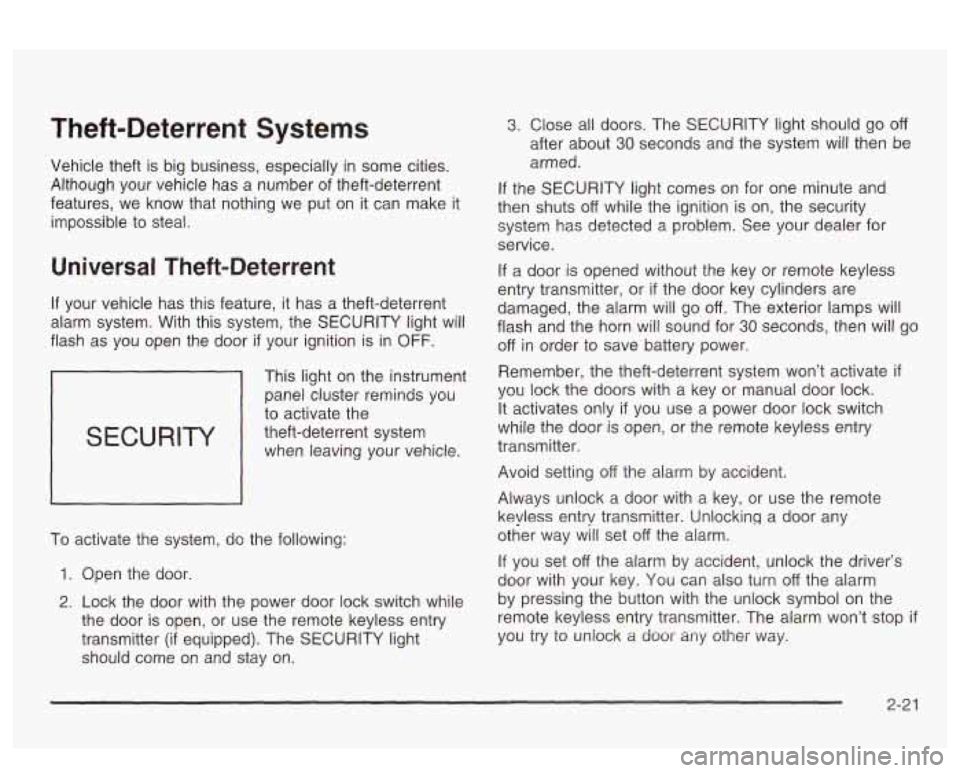
SECURITY
This light on the instrument
panei cluster reminds
you
to activate the
theft-deterrent system when leaving your vehicle.
To activate the system, do the following:
1. Open the door.
2. Lock the door with the power door lock switch while
the door is open, or use the remote keyless entry
transmitter
(if equipped). The SECURITY light
should come on and stay on.
3. Close all doors. The SECURITY light should go off
after about 30 seconds and the system will then be
armed.
If the SECURITY light comes on for one minute and
then shuts
off while the ignition is on, the security
system has detected a problem. See your dealer for
service.
If a door is opened without the key or remote keyless
entry transmitter, or
if the door key cylinders are
damaged, the alarm will go
off. The exterior lamps will
flash and the horn will sound for
30 seconds, then will go
off in order to save battery power.
Remember, the theft-deterrent system won’t activate
if
YQL! !ock the doors with a key or manual door lock.
It activates only
if you use a power door lock switch
while the door is open, or the remote keyless entry
transmitter.
Avoid setting
off the alarm by accident.
Always unlock a door with a key, or use the remote
keyless entry transmitter. Unlocking a door any
other way will set
off the alarm.
If you set off the alarm by accident, unlock the driver’s
door with your key. You can also turn
off the alarm
by pressing the button with the unlock symbol on the
remote keyless entry transmitter. The alarm won’t stop
if
you try to uniock a door any other Way.
2-2 1
Page 91 of 418
OFF: This is the only position from which you can
remove the key. This position locks your ignition and
transaxle. It’s a theft-deterrent feature.
ACC (Accessory): In this position you can operate
your electrical accessories such as power windows,
sunroof (option), audio system and windshield wipers.
ON: This is the position the switch returns to after
you start your engine and release the switch. Even when
the engine is not running, you can use ON
to operate
your electrical accessories and to display some
instrument panel cluster warning lights. This is the
position for driving your vehicle.
START: This position starts the engine. When the
engine starts, release the key. The ignition switch will
return to
ON for normal driving.
Even
if the engine is not running, ACC and ON are
positions that allow you to operate your electrical
accessories.
Key Reminder Warning
If you leave your key in OFF you will hear a warning
tone when you open the driver’s door.
Retained Accessory Power (RAP)
After you turn the ignition off and remove the key, you
will still have power to such accessories as the
radio, sunroof (option) and power windows for up to
10 minutes. Power is turned off if you open a door.
Always leave your key in
OFF. If you leave your key in
any position other than
OFF, your battery will
discharge prematurely.
Starting Your Engine
Move your shift lever to PARK (P) or NEUTRAL (N).
Your engine won’t start in any other position - that’s a
safety feature. To restart when you’re already moving,
use NEUTRAL
(N) only.
Notice: Don’t try to shift to PARK (P) if your
vehicle
is moving. If you do, you could damage the
transaxle. Shift
to PARK (P) only when your
vehicle
is stopped.
1. With your foot off the accelerator pedal, turn your
ignition key to START. When the engine starts, let
go of the key. The idle speed will go down as
your engine gets warm.
2-26
Page 92 of 418
Notice: Holding your key in START for longer than
15 seconds at a time will cause your battery to
be drained much sooner. And the excessive heat
can damage your starter motor. Wait about
15
seconds between each try to help avoid draining
your battery
or damaging your starter.
2. If it doesn’t start within 10 seconds, hold your key in
START for about
10 seconds at a time until your
engine starts. Wait about 15 seconds between
each try.
stops), it could be flooded with too much gasoline.
Try pushing your accelerator pedal all the way to the
floor and holding it there as you hold the key
in
START for about three seconds. If the vehicle starts
briefly but then stops again, do the same thing.
This time keep the pedal down for five or six
seconds to clear the extra gasoline from the engine.
After waiting about 15 seconds, repeat the normal
starting procedure.
3. If your engine still won’t start (or starts but then
Notice: Your engine is designed to work with the
electronics
in your vehicle. If you add electrical
parts or accessories, you could change the way the
engine operates. Before adding electrical equipment,
check with your dealer. If you don’t, your engine might not perform properly.
Engine Coolant Heater
If your vehicle has this feature, in very cold weather,
0°F (-18°C) or colder, the engine coolant heater
can help. You’ll get easier starting and better fuel
economy during engine warm-up. Usually, the coolant
heater should be plugged in a minimum of four
hours prior to starting your vehicle. At temperatures
above
32°F (OOC), use of the coolant heater is not
required.
2-27
Page 131 of 418
If the Twilight Sentinel@ lighting is active, it can be
disabled by turning on the manual parking lamps. This
lighting will be disabled until the key is turned from
ON or until the manual parking lamps are turned off.
Also, it’s possible that your headlamps may go out if you
drive from a dark area into a bright area like a lighted
parking lot.
If this happens, turn on your headlamps with
the exterior lamp control.
Exterior Lighting Battery Saver
If the exterior lamp control has been left on, the exterior
lamps will turn
off approximately 10 minutes after the
ignition is turned to
OFF and a door has been opened.
This protects against draining the battery in case
you have accidentally left the headlamps or parking
lamps on.
If you need to leave the lamps on for more
than
10 minutes, use the exterior lamp control to turn the
lamps back on after turning the ignition to
OFF and
opening a door. To delay the lamps from turning
off, see
“Twilight Sentinel@,” listed previously.
Interior Lamps
Instrument Panel Brightness
When it is dark outside, you can brighten or dim your
instrument panel cluster lights using the DIM knob,
located to the left of the steering wheel on the instrument
panel.
Turn the knob clockwise to brighten the instrument
panel cluster lights and displays. Turn the knob
clockwise all the way to turn on the interior courtesy
lamps. Turn the knob counterclockwise to dim the
instrument panel cluster lights and displays and to turn
off the courtesy lamps.
Courtesy Lamps
If it is dark enough outside, when any door is opened,
several lamps will come on. They make
it easier for you
to enter and leave the vehicle. Turn the dimmer knob
all the way clockwise to turn the interior courtesy
lamps on.
3-1 6
Page 132 of 418
Entry Lighting
If it is dark enough outside and you press the button
with the unlock symbol on the remote keyless entry
transmitter
(if equipped), the interior courtesy lamps will
come on and stay on for approximately
25 seconds,
The lamps will turn
off immediately by pressing
the button with the lock symbol on the remote keyless
entry transmitter, by turning the ignition key to
ON or by
activating the power door locks.
If a door is left ajar, your interior lamps will turn
off after
10 minutes to save your battery.
Delayed Entry Lighting
When you open the door to enter your vehicle, the
interior lamps will come on
if it is dark enough outside.
When you close the door with the ignition
off, the
interior lamps will stay on for
25 seconds or until the
ignition is turned on. Locking the doors with the power
door lock switch, or with the lock button on the
remote keyless entry transmitter (if equipped), will
override the delayed entry lighting and the lamps will
turn
off immediately.
Theater Dimming
This feature allows for a three to five-second fade out oi
the courtesy lamps instead of immediate turn off after
you remove the key from the ignition.
Delayed Exit Lighting
This feature will turn on the interior lamps for 25 seconds
after you remove the key from the ignition while the
doors are closed and it is night. This
will give you time
to find the door handle or lock switches as you exit
the vehicle.
This lighting will only be deactivated
if the key is
reinserted into the ignition switch or the power door
locks are activated.
Parade Dimming
To activate the instrument panel backlighting during the
day, turn the exterior lamp switch to the parking
lamp or headlamp position. Dimming
oi the instrument
panel display is not possible during daylight hours.
The instrument panel display can only be adjusted when
the parking lamps or headlamps are on and it is dark
outside.
Perimeter Lighting
When the button with the unlock symbol on the remote
keyless entry transmitter
(if equipped) is pressed,
the DRL headlamps, parking lamps and back-up lamps
will turn on
if it is dark enough outside.
3-1 7
Page 136 of 418
Head-Up Display (HUD)
If the HUD image is too bright, or too high in
your field
of view, it may take you more time to
see things you need to see when it's dark
outside. Be sure to keep the HUD image dim
and placed low in your field of view.
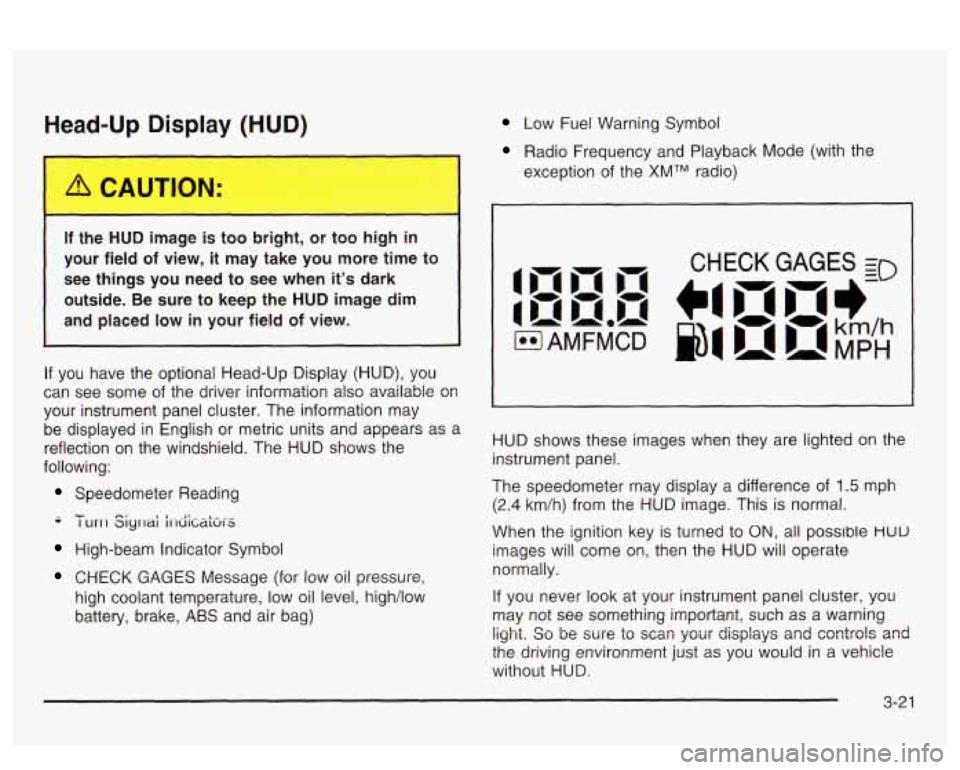
If you have the optional Head-Up Display (HUD), you
can see
some of the driver information also available 08
your instrument panel cluster. The information may
be displayed in English
or metric units and appears as a
reflection on the windshield. The HUD shows the
following:
Speedometer Reading
-- - I urrl Siyrlai i1-diCaki-S
High-beam Indicator Symbol
CHECK GAGES Message (for low oil pressure,
high coolant temperature, low oil level, high/low
battery, brake,
ABS and air bag)
Low Fuel Warning Symbol
Radio Frequency and Playback Mode (with the
exception of the
XMTM radio)
HUD shows these images when they are lighted on the
instrument panel.
The speedometer may display a difference of
1.5 mph
(2.4 km/h) from the HUD image. This is normal.
When the ignition key is turned to
ON, all possible HUU
images will come on, then the HUD will operate
normally.
If you never look at your instrument panel cluster, you
may not see something important, such as a warning
light. So be wre to scm your displays and csntrols and
the driving environment just as you would in a vehicle
without HUD.
Page 138 of 418
If you can’t see the HUD image when the ignition is on,
check to see
if:
0 The HUD unit is covered,
0 the HUD INTENSITY knob is adjusted correctly,
0 the HUD image is adjusted to the proper height, or
a fuse in the fuse panel may have blown. See
Fuses and Circuit Breakers on page 5-92.
If the HUD image is not clear, it could be too bright.
Move the HUD INTENSITY knob counterclockwise. You
may need to clean the windshield and HUD lens.
Your windshield is part of the HUD system. If you ever
have to have a new windshield, be sure to get one
designed for HUD.
If you don’t, the HUD image may look
blurred and out of focus.
Accessory Power Outlets
If your vehicle has a front console, the accessory power
outlet
(1 2-volt ) is located at the rear of the front
console.
If your vehicle has a floor console, the outlet is
located at the rear of the floor console. To
use the outlet, remove the protective cap which
covers it. When not using it, always cover the outlet with
the protective cap.
The accessory power outlet will only operate when the
ignition key
is in ON and for 10 minutes after turning
the ignition OFF. If you would like the accessory power
outlet to operate regardless of ignition position, and
for extended periods of time, see “Engine Compartment
Fuse
Block” under Fuses and Circuit Breakers on
page 5-92 or see your dealer for more information.
Nofice: When using an accessory power outlet,
maximum electrical load must not exceed
15 amps.
Always turn
off any electrical equipment when
not in use. Leaving electrical equipment on for
extended periods will drain your battery.
Certain electrical accessories may not be compatible
with the accessory power outlet and could result
in blown vehicle or adapter fuses.
If you experience a
problem, see your dealer for additional information
on accessory power outlets.
3-23