language PONTIAC BONNEVILLE 2004 Owners Manual
[x] Cancel search | Manufacturer: PONTIAC, Model Year: 2004, Model line: BONNEVILLE, Model: PONTIAC BONNEVILLE 2004Pages: 446, PDF Size: 2.81 MB
Page 2 of 446
GENERAL MOTORS, GM, the GM Emblem, PONTIAC,
the PONTIAC Emblem and the name BONNEVILLE
are registered trademarks of General Motors
Corporation.
This manual includes the latest information at the time it
was printed. We reserve the right to make changes
after that time without further notice. For vehicles rst
sold in Canada, substitute the name “General Motors of
Canada Limited” for Pontiac Division whenever it
appears in this manual.
Please keep this manual in your vehicle, so it will be
there if you ever need it when you’re on the road. If you
sell the vehicle, please leave this manual in it so the
new owner can use it.
Litho in U.S.A.
Part No. 25755769 A First Edition©
Copyright General Motors Corporation 09/12/03
All Rights Reserved
Canadian Owners
You can obtain a French language copy of this manual
from your dealer or from:
Helm, Incorporated
P.O. Box 07130
Detroit, MI 48207
How to Use This Manual
Many people read their owner’s manual from beginning
to end when they rst receive their new vehicle. If
you do this, it will help you learn about the features and
controls for your vehicle. In this manual, you will nd
that pictures and words work together to explain things.
Index
A good place to look for what you need is the Index in
back of the manual. It is an alphabetical list of what
is in the manual, and the page number where you will
nd it.
ii
Page 182 of 446
EXP
(Export ID) Warning Message
33 STARTING DISABLED — THEFT*
34 SERVICE THEFT SYSTEM
35 CHECK GAGES OIL PRESSURE*
36 OIL LEVEL LOW
37 BRAKE FLUID LOW*
40 ALARM OCCURRED
44 CHECK GAGES TEMPERATURE*
54 SERVICE STABILITY SYSTEM
55 STABILITY SYSTEM ACTIVE
61 CHECK GAS CAP
81 ENGINE OIL CHANGE SOONEXP
(Export ID) Warning Message
83 SERVICE AIR BAG
102 CHECK CHARGE SYSTEM
140 DRIVER DOOR AJAR
141 FRONT PASSENGER DOOR AJAR
142 LEFT REAR DOOR AJAR
143 RIGHT REAR DOOR AJAR
144 CHECK TIRE PRESSURE
147 PARK BRAKE SET*
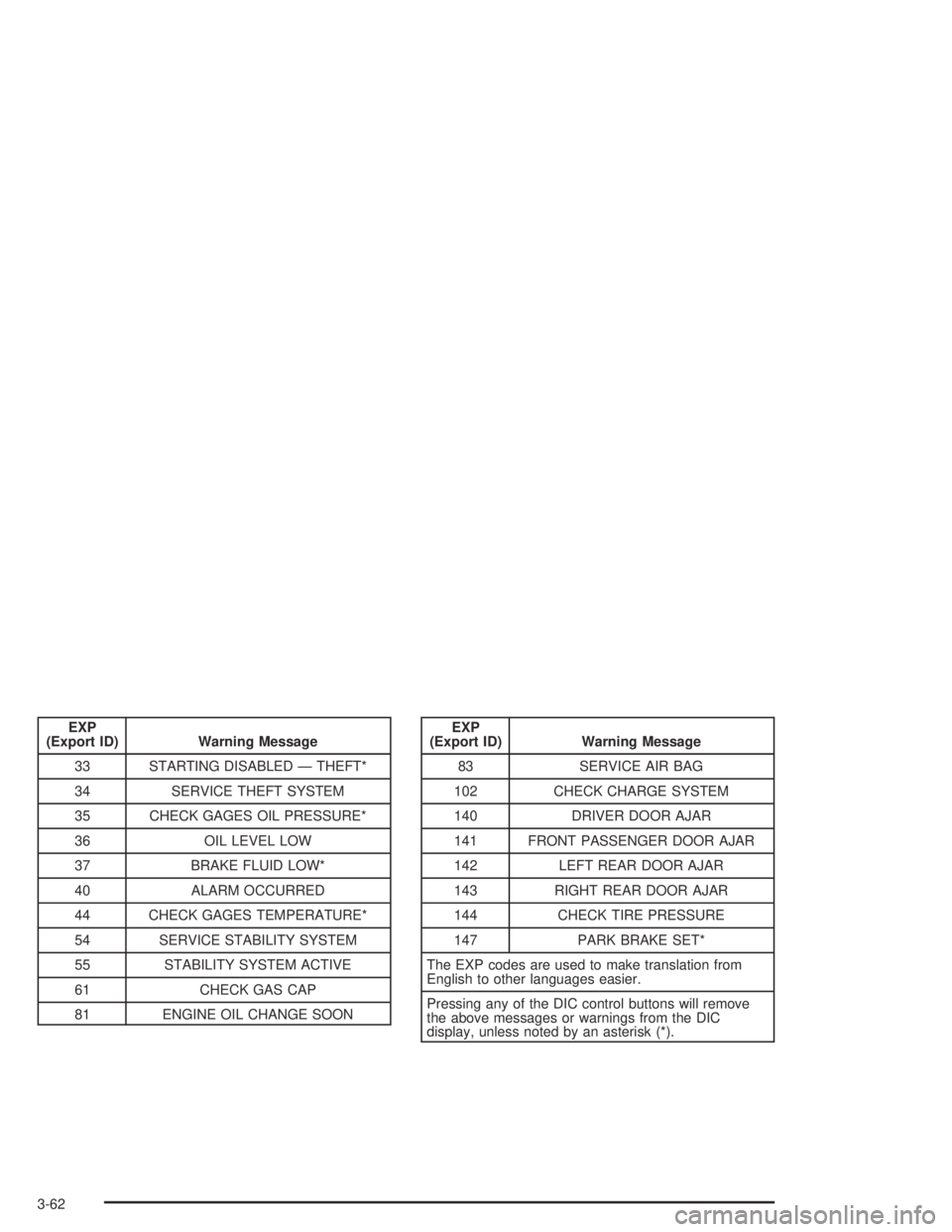
The EXP codes are used to make translation from
English to other languages easier.
Pressing any of the DIC control buttons will remove
the above messages or warnings from the DIC
display, unless noted by an asterisk (*).
3-62
Page 202 of 446
XM™ Radio Messages
Radio Display
MessageCondition Action Required
XL (Explicit Language
Channels)XL on the radio display,
after the channel name,
indicates content with
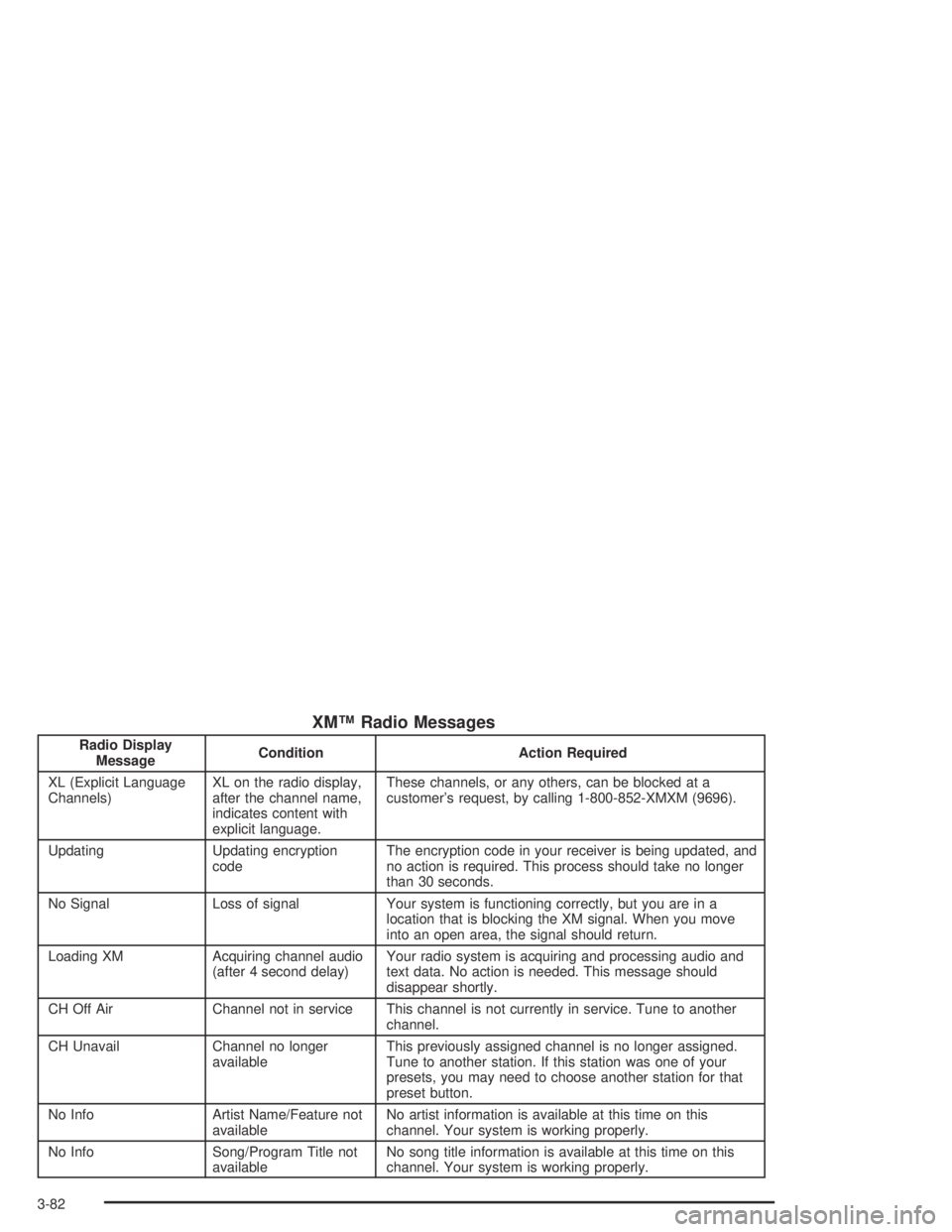
explicit language.These channels, or any others, can be blocked at a
customer’s request, by calling 1-800-852-XMXM (9696).
Updating Updating encryption
codeThe encryption code in your receiver is being updated, and
no action is required. This process should take no longer
than 30 seconds.
No Signal Loss of signal Your system is functioning correctly, but you are in a
location that is blocking the XM signal. When you move
into an open area, the signal should return.
Loading XM Acquiring channel audio
(after 4 second delay)Your radio system is acquiring and processing audio and
text data. No action is needed. This message should
disappear shortly.
CH Off Air Channel not in service This channel is not currently in service. Tune to another
channel.
CH Unavail Channel no longer
availableThis previously assigned channel is no longer assigned.
Tune to another station. If this station was one of your
presets, you may need to choose another station for that
preset button.
No Info Artist Name/Feature not
availableNo artist information is available at this time on this
channel. Your system is working properly.
No Info Song/Program Title not
availableNo song title information is available at this time on this
channel. Your system is working properly.
3-82
Page 214 of 446

XM™ Radio Messages
Radio Display
MessageCondition Action Required
XL (Explicit Language
Channels)XL on the radio display,
after the channel name,
indicates content with
explicit language.These channels, or any others, can be blocked at a
customer’s request, by calling 1-800-852-XMXM (9696).
Updating Updating encryption
codeThe encryption code in your receiver is being updated, and
no action is required. This process should take no longer
than 30 seconds.
No Signal Loss of signal Your system is functioning correctly, but you are in a
location that is blocking the XM signal. When you move
into an open area, the signal should return.
Loading XM Acquiring channel audio
(after 4 second delay)Your radio system is acquiring and processing audio and
text data. No action is needed. This message should
disappear shortly.
CH Off Air Channel not in service This channel is not currently in service. Tune to another
channel.
CH Unavail Channel no longer
availableThis previously assigned channel is no longer assigned.
Tune to another station. If this station was one of your
presets, you may need to choose another station for that
preset button.
No Info Artist Name/Feature not
availableNo artist information is available at this time on this
channel. Your system is working properly.
No Info Song/Program Title not
availableNo song title information is available at this time on this
channel. Your system is working properly.
3-94