keyless PONTIAC BONNEVILLE 2005 Owners Manual
[x] Cancel search | Manufacturer: PONTIAC, Model Year: 2005, Model line: BONNEVILLE, Model: PONTIAC BONNEVILLE 2005Pages: 438, PDF Size: 2.71 MB
Page 65 of 438
Keys...............................................................2-2
Remote Keyless Entry System.........................2-4
Remote Keyless Entry System Operation...........2-5
Doors and Locks.............................................2-9
Door Locks....................................................2-9
Central Door Unlocking System......................2-10
Power Door Locks........................................2-10
Delayed Locking...........................................2-11
Programmable Automatic Door Locks..............2-12
Rear Door Security Locks..............................2-14
Lockout Protection........................................2-14
Trunk..........................................................2-15
Windows........................................................2-17
Power Windows............................................2-18
Sun Visors...................................................2-19
Theft-Deterrent Systems..................................2-19
Universal Theft-Deterrent...............................2-19
Content Theft-Deterrent.................................2-21
PASS-Key
®III ..............................................2-21
PASS-Key®III Operation...............................2-22
Starting and Operating Your Vehicle................2-23
New Vehicle Break-In....................................2-23
Ignition Positions..........................................2-24
Retained Accessory Power (RAP)...................2-24
Starting Your Engine.....................................2-25
Engine Coolant Heater..................................2-26
Automatic Transaxle Operation.......................2-27Parking Brake..............................................2-30
Shifting Into Park (P).....................................2-31
Shifting Out of Park (P).................................2-33
Parking Over Things That Burn.......................2-34
Engine Exhaust............................................2-34
Running Your Engine While You Are Parked.......2-35
Mirrors...........................................................2-36
Manual Rearview Mirror.................................2-36
Automatic Dimming Rearview Mirror................2-36
Outside Power Mirrors...................................2-37
Outside Curb View Assist Mirror.....................2-38
Outside Convex Mirror...................................2-38
Outside Heated Mirrors..................................2-38
OnStar
®System.............................................2-39
HomeLink®Transmitter...................................2-40
Programming the HomeLink®Transmitter.........2-41
Storage Areas................................................2-44
Glove Box...................................................2-44
Front Storage Area.......................................2-45
Center Console Storage Area.........................2-45
Rear Seat Pass Through...............................2-45
Convenience Net..........................................2-45
Sunroof.........................................................2-45
Vehicle Personalization...................................2-46
Memory Seat and Mirrors..............................2-46
Section 2 Features and Controls
2-1
Page 68 of 438
Remote Keyless Entry System
If equipped, the keyless entry system operates on a
radio frequency subject to Federal Communications
Commission (FCC) Rules and with Industry Canada.
This device complies with Part 15 of the FCC Rules.
Operation is subject to the following two conditions:
1. This device may not cause interference.
2. This device must accept any interference received,
including interference that may cause undesired
operation of the device.
This device complies with RSS-210 of Industry Canada.
Operation is subject to the following two conditions:
1. This device may not cause interference.
2. This device must accept any interference received,
including interference that may cause undesired
operation of the device.
Changes or modications to this system by other than
an authorized service facility could void authorization to
use this equipment.At times you may notice a decrease in range. This is
normal for any remote keyless entry system. If the
transmitter does not work or if you have to stand closer
to your vehicle for the transmitter to work, try this:
Check the distance. You may be too far from your
vehicle. You may need to stand closer during
rainy or snowy weather.
Check the location. Other vehicles or objects may
be blocking the signal. Take a few steps to the
left or right, hold the transmitter higher, and
try again.
Check to determine if battery replacement is
necessary. See “Battery Replacement” under
Remote Keyless Entry System Operation on
page 2-5.
If you are still having trouble, see your dealer or a
qualied technician for service.
2-4
Page 69 of 438
Remote Keyless Entry System
Operation
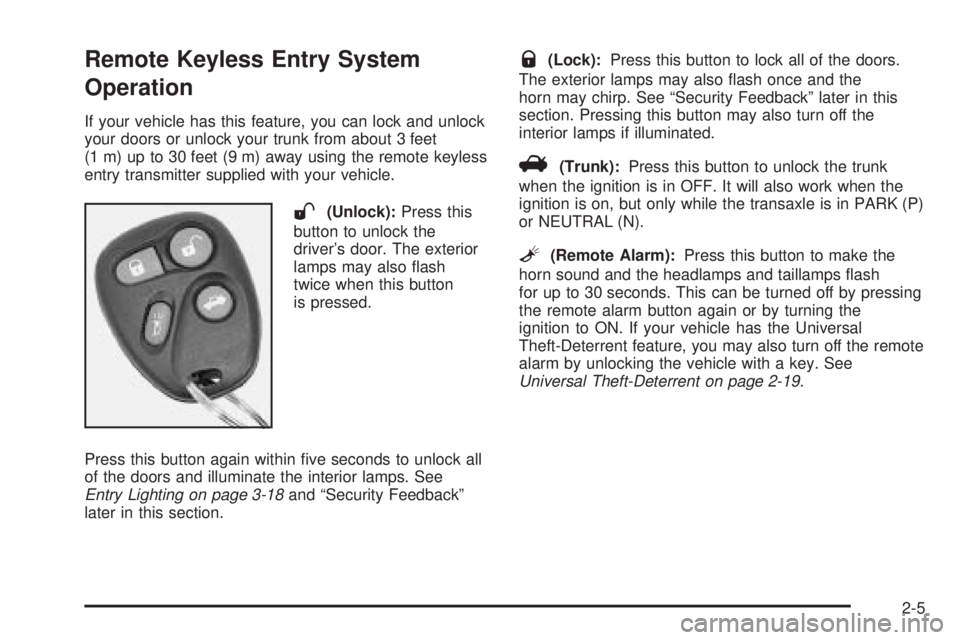
If your vehicle has this feature, you can lock and unlock
your doors or unlock your trunk from about 3 feet
(1 m) up to 30 feet (9 m) away using the remote keyless
entry transmitter supplied with your vehicle.
W(Unlock):Press this
button to unlock the
driver’s door. The exterior
lamps may also ash
twice when this button
is pressed.
Press this button again within ve seconds to unlock all
of the doors and illuminate the interior lamps. See
Entry Lighting on page 3-18and “Security Feedback”
later in this section.
Q(Lock):Press this button to lock all of the doors.
The exterior lamps may also ash once and the
horn may chirp. See “Security Feedback” later in this
section. Pressing this button may also turn off the
interior lamps if illuminated.
V(Trunk):Press this button to unlock the trunk
when the ignition is in OFF. It will also work when the
ignition is on, but only while the transaxle is in PARK (P)
or NEUTRAL (N).
L(Remote Alarm):Press this button to make the
horn sound and the headlamps and taillamps ash
for up to 30 seconds. This can be turned off by pressing
the remote alarm button again or by turning the
ignition to ON. If your vehicle has the Universal
Theft-Deterrent feature, you may also turn off the remote
alarm by unlocking the vehicle with a key. See
Universal Theft-Deterrent on page 2-19.
2-5
Page 70 of 438
Personalization Features
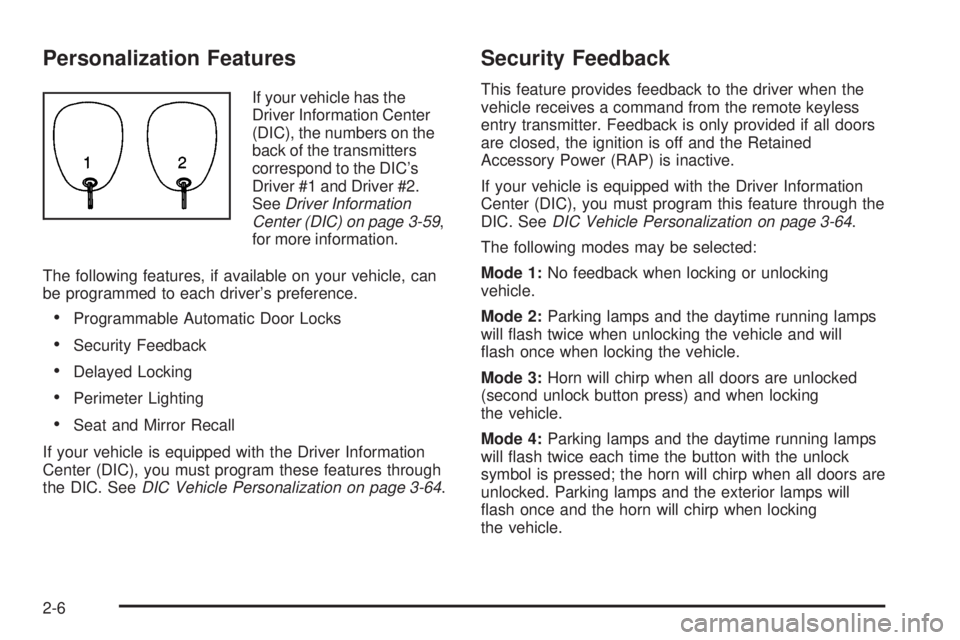
If your vehicle has the
Driver Information Center
(DIC), the numbers on the
back of the transmitters
correspond to the DIC’s
Driver #1 and Driver #2.
SeeDriver Information
Center (DIC) on page 3-59,
for more information.
The following features, if available on your vehicle, can
be programmed to each driver’s preference.
Programmable Automatic Door Locks
Security Feedback
Delayed Locking
Perimeter Lighting
Seat and Mirror Recall
If your vehicle is equipped with the Driver Information
Center (DIC), you must program these features through
the DIC. SeeDIC Vehicle Personalization on page 3-64.
Security Feedback
This feature provides feedback to the driver when the
vehicle receives a command from the remote keyless
entry transmitter. Feedback is only provided if all doors
are closed, the ignition is off and the Retained
Accessory Power (RAP) is inactive.
If your vehicle is equipped with the Driver Information
Center (DIC), you must program this feature through the
DIC. SeeDIC Vehicle Personalization on page 3-64.
The following modes may be selected:
Mode 1:No feedback when locking or unlocking
vehicle.
Mode 2:Parking lamps and the daytime running lamps
will ash twice when unlocking the vehicle and will
ash once when locking the vehicle.
Mode 3:Horn will chirp when all doors are unlocked
(second unlock button press) and when locking
the vehicle.
Mode 4:Parking lamps and the daytime running lamps
will ash twice each time the button with the unlock
symbol is pressed; the horn will chirp when all doors are
unlocked. Parking lamps and the exterior lamps will
ash once and the horn will chirp when locking
the vehicle.
2-6
Page 71 of 438
Each remote keyless entry transmitter can be
programmed to a different mode according to the user’s
preference. To change to another mode, do the
following:
1. Keep all doors closed, the vehicle in PARK (P) and
the ignition on throughout this procedure.
2. Press and hold the driver’s power door lock switch
in LOCK through Step 4.
3. Press the button with the trunk symbol on the
transmitter. The transmitter will remain in its
current mode and the horn will chirp as feedback.
4. Press the button with the trunk symbol again. Each
time the transmitter’s trunk button is pressed, the
mode will advance by one, going from Mode 2 to 3
to 4, etc. and the horn will chirp as feedback.
5. Release the power door lock switch. The security
feedback will remain in the most recent mode
selected.
To verify the mode selected, remove the key from the
ignition and close all of the doors after you have
exited the vehicle. Press the lock button on the
transmitter to be veried and conrm the appropriate
feedback. Repeat with the unlock button.Matching Transmitter(s) to Your
Vehicle
Each remote keyless entry transmitter is coded to
prevent another transmitter from unlocking your vehicle.
If a transmitter is lost or stolen, a replacement can
be purchased through your dealer. Remember to bring
any remaining transmitters with you when you go to
your dealer. When the dealer matches the replacement
transmitter to your vehicle, any remaining transmitters
must also be matched. Once your dealer has coded the
new transmitter, the lost transmitter will not unlock
your vehicle. Each vehicle can have a maximum of four
transmitters matched to it.
See your dealer to match additional transmitters to your
vehicle.
2-7
Page 72 of 438
Battery Replacement
Under normal use, the battery in your remote keyless
entry transmitter should last about four years.
You can tell the battery is weak if the transmitter will not
work at the normal range in any location. If you have
to get close to your vehicle before the transmitter works,
it is probably time to change the battery.
Notice:When replacing the battery, use care not to
touch any of the circuitry. Static from your body
transferred to these surfaces may damage the
transmitter.
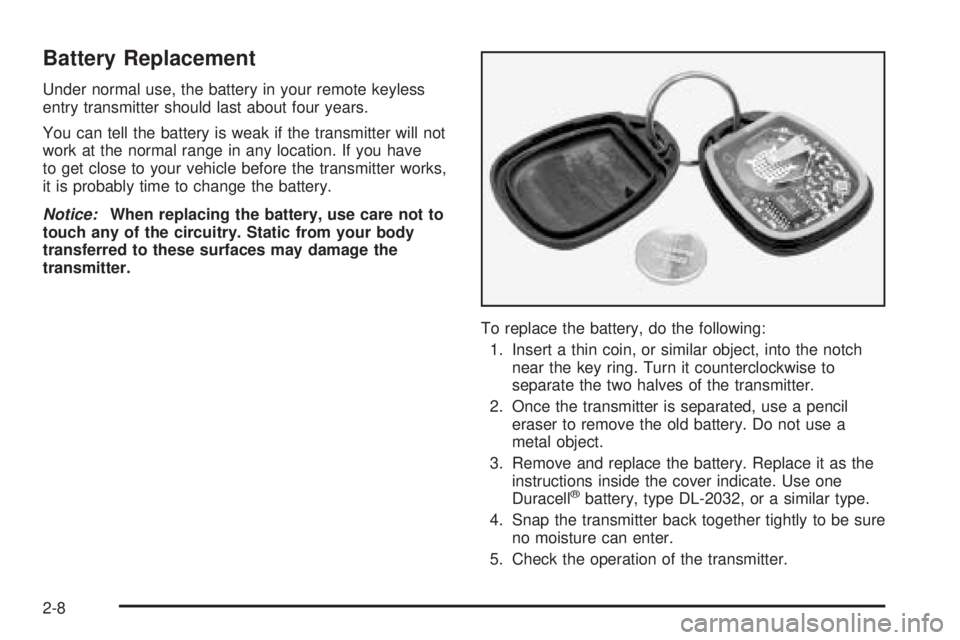
To replace the battery, do the following:
1. Insert a thin coin, or similar object, into the notch
near the key ring. Turn it counterclockwise to
separate the two halves of the transmitter.
2. Once the transmitter is separated, use a pencil
eraser to remove the old battery. Do not use a
metal object.
3. Remove and replace the battery. Replace it as the
instructions inside the cover indicate. Use one
Duracell
®battery, type DL-2032, or a similar type.
4. Snap the transmitter back together tightly to be sure
no moisture can enter.
5. Check the operation of the transmitter.
2-8
Page 73 of 438
Doors and Locks
Door Locks
{CAUTION:
Unlocked doors can be dangerous.
Passengers — especially children — can
easily open the doors and fall out of a
moving vehicle. When a door is locked, the
handle will not open it. You increase the
chance of being thrown out of the vehicle
in a crash if the doors are not locked. So,
wear safety belts properly and lock the
doors whenever you drive.
CAUTION: (Continued)
CAUTION: (Continued)
Young children who get into unlocked
vehicles may be unable to get out. A child
can be overcome by extreme heat and can
suffer permanent injuries or even death
from heat stroke. Always lock your vehicle
whenever you leave it.
Outsiders can easily enter through an
unlocked door when you slow down or
stop your vehicle. Locking your doors can
help prevent this from happening.
There are several ways to lock and unlock your vehicle.
If your vehicle has a theft-deterrent system and it is
activated, unlock the doors only with the key or remote
keyless entry system. This will avoid setting off the
alarm. SeeUniversal Theft-Deterrent on page 2-19for
more information.
To unlock the door from the outside, use your door key
or remote keyless entry transmitter (if equipped).
Turning the door key toward the rear of the vehicle will
unlock the door. Turning the door key toward the
front of the vehicle will lock it.
2-9
Page 75 of 438
Delayed Locking
This feature lets the driver delay the actual locking of the
vehicle. When the driver’s power door lock switch or the
remote keyless entry transmitter lock button is pressed,
with the key removed from the ignition and the driver’s
door open, a chime will sound three times to signal that
the delayed locking system is active. When all doors have
been closed, the doors will lock automatically after
ve seconds. If any door is opened before this, the
ve-second timer will reset itself once all the doors have
been closed again.
Pressing a power door lock switch or the remote
keyless entry transmitter lock button again will override
this feature.
Personalization Programming
The delayed locking feature can be turned on or off.
If your vehicle is equipped with the Driver Information
Center (DIC), you must program this feature through the
DIC. SeeDIC Vehicle Personalization on page 3-64.If your vehicle is not equipped with remote keyless
entry, the delayed locking feature can be turned on or
off by using the following procedure:
1. Keep all doors closed, the vehicle in PARK (P) and
the ignition on throughout this procedure.
2. Press and hold the driver’s power door lock switch
in LOCK through Step 4.
3. Cycle the parking lamp switch from off to on
six times. On the sixth cycle, the doors will unlock to
conrm that the feature has been turned on. Your
doors will remain locked if delayed locking is
off. If the doors unlock, delayed locking is on.
4. To change modes, cycle the parking lamp switch
once more. A locking action will conrm the
new mode.
5. Release the power door lock switch.
To turn the feature off, repeat the previous procedure.
2-11
Page 76 of 438
If your vehicle is equipped with remote keyless entry,
your vehicle can be programmed to each driver’s
preference for each of the transmitters. Use the following
procedure to turn the feature off using the corresponding
transmitter:
1. Keep all doors closed, the vehicle in PARK (P) and
the ignition on throughout this procedure.
2. Press and hold the power door lock switch in LOCK
throughout this procedure. All the doors will lock.
3. Press the button with the unlock symbol on the
transmitter. The lock delay is still on and all the
doors will unlock.
4. Press the button with the unlock symbol on the
transmitter again. Lock delay is now off and all
the doors will lock.
5. Release the power door lock switch.
To turn this feature on, repeat the previous procedure.
This procedure changes the mode for only the
transmitter used to change this setting. The procedure
will need to be repeated for the second transmitter.Programmable Automatic Door
Locks
Close the doors and turn on the ignition. Every time you
move the shift lever out of PARK (P), all of the doors will
lock. And, every time you stop and move the shift lever
into PARK (P), the doors will unlock. If someone needs to
get out while you are not in PARK (P), have that person
use the manual door lock or the power door lock switch.
When the door is closed again, it will not lock
automatically. Use the manual door lock or the power
door lock switch to lock the door again.
Personalization Programming
You can program the automatic door lock feature to
change to the following modes:
Mode 0:No automatic door lock or unlock.
Mode 1:All doors automatically lock when shifted out
of PARK (P). No automatic door unlock.
Mode 2:All doors automatically lock when shifted out
of PARK (P). Only the driver’s door automatically
unlocks when shifted into PARK (P).
Mode 3:All doors automatically lock when shifted out
of PARK (P). All doors automatically unlock when shifted
into PARK (P).
2-12
Page 77 of 438
Mode 4:All doors automatically lock when shifted out
of PARK (P). Only the driver’s door automatically
unlocks when the key is turned to OFF (DIC equipped
vehicles only).
Mode 5:All doors automatically lock when shifted out
of PARK (P). All doors automatically unlock when
the key is turned to OFF (DIC equipped vehicles only).
If your vehicle is equipped with the Driver Information
Center (DIC), you must program this feature through the
DIC. SeeDIC Vehicle Personalization on page 3-64.
If your vehicle is not equipped with remote keyless entry,
use the following procedure to change modes:
1. Keep all doors closed, the vehicle in PARK (P) and
the ignition on throughout this procedure.
2. Press and hold the driver’s power door lock switch
in LOCK through Step 3.
3. Cycle the shift lever, starting in PARK (P), out of
PARK (P) and then back into PARK (P), to
advance by one mode for each cycle.
After the rst cycle, you will hear a door locking
action, which identies the current mode.
4. Release the power door lock switch. The automatic
door locks will remain in the most recent mode
selected.If your vehicle is equipped with remote keyless entry,
use the following procedure to change modes:
1. Keep all doors closed, the vehicle in PARK (P) and
the ignition on throughout this procedure.
2. Press and hold the driver’s power door lock switch
in LOCK through Step 4.
3. Press the button with the lock symbol on the
remote keyless entry transmitter. The automatic
door locks will remain in the current mode.
4. Press the button with the lock symbol on the
transmitter again. Each time the transmitter’s
lock button is pressed, the mode will advance by
one, going from 3 to 0 to 1, etc.
The door locks will cycle according to the mode
entered. Mode 0 has no feedback.
5. Release the power door lock switch. The automatic
door locks will remain in the most recent mode
selected.
This procedure changes the mode for only the
transmitter used to change this setting. The procedure
will need to be repeated for the second transmitter.
2-13