lock PONTIAC G3 2009 Manual PDF
[x] Cancel search | Manufacturer: PONTIAC, Model Year: 2009, Model line: G3, Model: PONTIAC G3 2009Pages: 348, PDF Size: 2.16 MB
Page 277 of 348
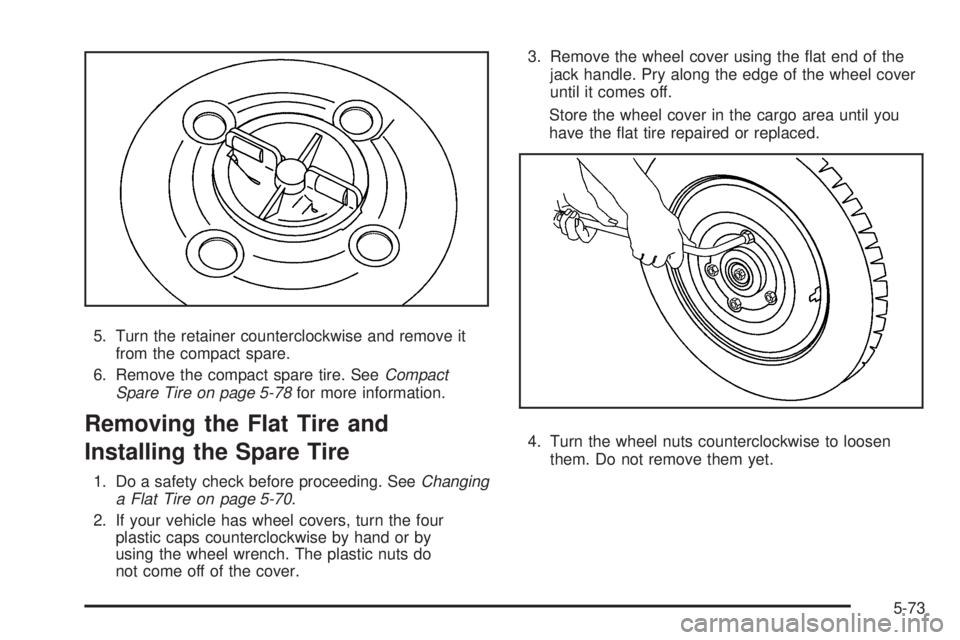
5. Turn the retainer counterclockwise and remove it
from the compact spare.
6. Remove the compact spare tire. SeeCompact
Spare Tire on page 5-78for more information.
Removing the Flat Tire and
Installing the Spare Tire
1. Do a safety check before proceeding. SeeChanging
a Flat Tire on page 5-70.
2. If your vehicle has wheel covers, turn the four
plastic caps counterclockwise by hand or by
using the wheel wrench. The plastic nuts do
not come off of the cover.3. Remove the wheel cover using the at end of the
jack handle. Pry along the edge of the wheel cover
until it comes off.
Store the wheel cover in the cargo area until you
have the at tire repaired or replaced.
4. Turn the wheel nuts counterclockwise to loosen
them. Do not remove them yet.
5-73
Page 279 of 348
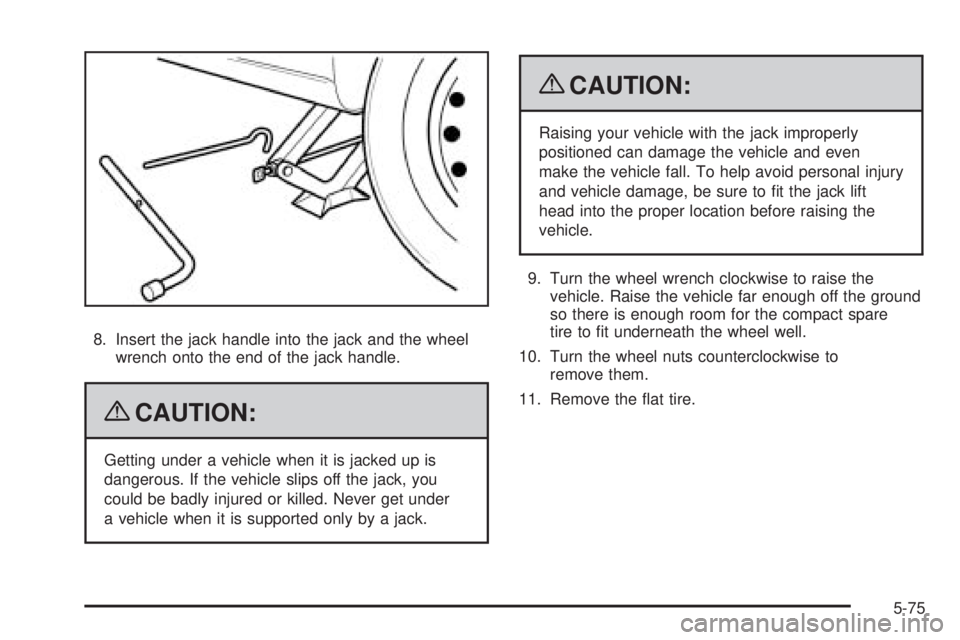
8. Insert the jack handle into the jack and the wheel
wrench onto the end of the jack handle.
{CAUTION:
Getting under a vehicle when it is jacked up is
dangerous. If the vehicle slips off the jack, you
could be badly injured or killed. Never get under
a vehicle when it is supported only by a jack.
{CAUTION:
Raising your vehicle with the jack improperly
positioned can damage the vehicle and even
make the vehicle fall. To help avoid personal injury
and vehicle damage, be sure to t the jack lift
head into the proper location before raising the
vehicle.
9. Turn the wheel wrench clockwise to raise the
vehicle. Raise the vehicle far enough off the ground
so there is enough room for the compact spare
tire to t underneath the wheel well.
10. Turn the wheel nuts counterclockwise to
remove them.
11. Remove the at tire.
5-75
Page 281 of 348

{CAUTION:
Never use oil or grease on bolts or nuts because
the nuts might come loose. The vehicle’s wheel
could fall off, causing a crash.
14. Install the wheel nuts with the rounded end of the
nuts toward the wheel. Tighten each nut by hand
clockwise until the wheel is held against the hub.
15. Lower the vehicle by turning the wheel wrench
counterclockwise. Lower the jack completely.
{CAUTION:
Wheel nuts that are improperly or incorrectly
tightened can cause the wheels to become loose or
come off. The wheel nuts should be tightened with
a torque wrench to the proper torque specication
after replacing. Follow the torque specication
supplied by the aftermarket manufacturer when
using accessory locking wheel nuts. SeeCapacities
and Specifications on page 5-93for original
equipment wheel nut torque specications.Notice:Improperly tightened wheel nuts can
lead to brake pulsation and rotor damage. To avoid
expensive brake repairs, evenly tighten the wheel
nuts in the proper sequence and to the proper torque
specication. SeeCapacities and Specifications on
page 5-93for the wheel nut torque specication.
16. Tighten the wheel nuts
rmly in a crisscross
sequence, as shown.
Notice:Wheel covers will not t on your vehicle’s
compact spare. If you try to put a wheel cover
on the compact spare, the cover or the spare could
be damaged.
5-77
Page 291 of 348

Engine Identication
The eighth character in the VIN is the engine code.
This code helps identify the vehicle’s engine,
specications, and replacement parts. See “Engine
Specications” underCapacities and Specifications
on page 5-93for the vehicle’s engine code.
Service Parts Identication Label
This label is on the inside of the glove box. It is
very helpful if parts need to be ordered. The label
has the following information:
Vehicle Identication Number (VIN)
Model designation
Paint information
Production options and special equipment
Do not remove this label from the vehicle.
Electrical System
Add-On Electrical Equipment
Notice:Do not add anything electrical to the
vehicle unless you check with your dealer/retailer
rst. Some electrical equipment can damage
the vehicle and the damage would not be covered
by the vehicle’s warranty. Some add-on electrical
equipment can keep other components from
working as they should.
Add-on equipment can drain the vehicle battery, even if
the vehicle is not operating.
The vehicle has an airbag system. Before attempting to
add anything electrical to the vehicle, seeServicing
Your Airbag-Equipped Vehicle on page 1-70.
Headlamp Wiring
The headlamp wiring is protected by fuses in the fuse
block. An electrical overload will cause the lamps to turn
off. If this happens, have the headlamp wiring checked
right away.
5-87
Page 292 of 348
Windshield Wiper Fuses
The windshield wiper motor is protected by a circuit
breaker and a fuse. If the motor overheats due to heavy
snow, etc., the wiper will stop until the motor cools. If the
overload is caused by some electrical problem, have it
xed.
Power Windows and Other Power
Options
Circuit breakers in the fuse block protect the power
windows and other power accessories. When the current
load is too heavy, the circuit breaker opens and closes,
protecting the circuit until the problem is xed or
goes away.
Fuses and Circuit Breakers
The wiring circuits in the vehicle are protected from
short circuits by a combination of fuses, circuit breakers
and fusible thermal links. This greatly reduces the
chance of res caused by electrical problems.
Look at the silver-colored band inside the fuse. If the
band is broken or melted, replace the fuse. Be sure you
replace a bad fuse with a new one of the identical
size and rating.
Fuses of the same amperage can be temporarily
borrowed from another fuse location, if a fuse goes out.
Replace the fuse as soon as you can.
5-88
Page 293 of 348
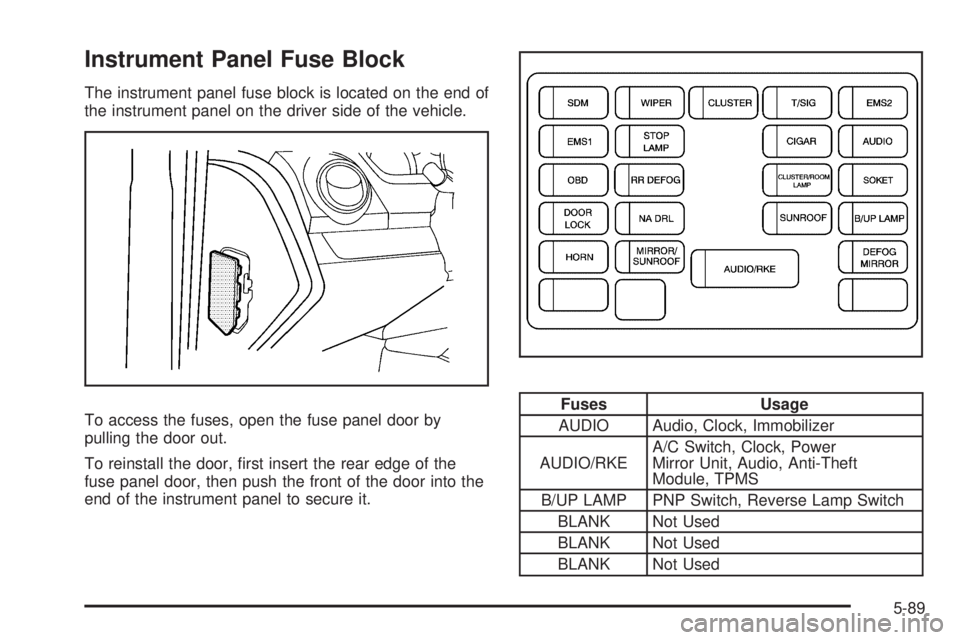
Instrument Panel Fuse Block
The instrument panel fuse block is located on the end of
the instrument panel on the driver side of the vehicle.
To access the fuses, open the fuse panel door by
pulling the door out.
To reinstall the door, rst insert the rear edge of the
fuse panel door, then push the front of the door into the
end of the instrument panel to secure it.
Fuses Usage
AUDIO Audio, Clock, Immobilizer
AUDIO/RKEA/C Switch, Clock, Power
Mirror Unit, Audio, Anti-Theft
Module, TPMS
B/UP LAMP PNP Switch, Reverse Lamp Switch
BLANK Not Used
BLANK Not Used
BLANK Not Used
5-89
Page 294 of 348

Fuses Usage
BLANK Not Used
CIGAR Cigar Lighter
CLUSTERBrake Switch, TPMS, Anti-Theft
Module
DEFOG
MIRRORPower Mirror Unit, A/C Switch
RR DEFOG Rear Defog
DOOR LOCK Door Lock
NA DRL NA DRL Circuit
MIRROR/
SUNROOFMirror Control Switch, Room Lamp,
A/C Switch
EMS 1Engine Room Fuse Block, TCM,
VSS, Fuel Pump
EMS 2 Stoplamp Switch
HORN Horn
OBD DLC, Immobilizer
CLUSTER/
ROOM LAMPTrunk Room Lamp, Trunk Open
Switch, IPC, Room Lamp
SDM Sensing and Diagnostic ModuleFuses Usage
SOKET Power Jack
STOP LAMP Brake Switch
SUNROOF Sunroof Module (Option)
T/SIG Hazard Switch
WIPER Wiper Switch, Wiper Motor
Engine Compartment Fuse Block
The engine compartment fuse block is located on the
driver side of the vehicle, near the battery. SeeEngine
Compartment Overview on page 5-12for more
information on location.
Notice:Spilling liquid on any electrical components
on the vehicle may damage it. Always keep the
covers on any electrical component.
To access the fuses, press in the side aps to release
the cover. To reinstall the cover, push the cover until it is
secure.
5-90
Page 295 of 348

Fuses Usage
FAN HI Cooling Fan HI Relay
ABS-1 EBCM
ABS-2 EBCM
SJB BATT Instrument Panel Fuse BlockFuses Usage
ACC/IG1 IGN1 Relay
IG2/ST IGN2 Relay, Starter Relay
ACC/RAP Instrument Panel Fuse Block
P/WINDOW-2 Power Window Switch
5-91
Page 296 of 348

Fuses Usage
P/W
WINDOW-1Power Window Switch
FAN LOW Cooling Fan LOW Relay
A/CON A/C Compressor Relay
PKLP LHTail Lamp (LH), Side Marker (LH),
Turn Signal & Parking Lamp (LH),
License Lamp
PKLP RHTail Lamp (RH), Side Marker (RH),
Turn Signal & Parking Lamp (RH),
License Lamp, I/P Fuse Block
ECU ECM, TCM
FRT FOG Front Fog Lamp Relay
F/PUMP Fuel Pump Relay
HAZARD Hazard Switch, Hood Contact Switch
HDLP HI LH Head Lamp (LH), IPC
HDLP HI RH Head Lamp (RH)
IPC IPC
HDLP LO LH Head Lamp (LH), I/P Fuse Block
HDLP LO RH Head Lamp (RH)
EMS-1 ECM, Injector
DLIS Ignition Switch
EMS-2EVAP Canister Purge Solenoid,
Thermostat Heater, HO2S,
MAF Sensor
SPARE Not UsedRelays Usage
F/PUMP
RELAYFuel Pump
STARTER
RELAYStarter
PARK LAMP
RELAYPark Lamp
FRONT FOG
RELAYFog Lamp
HDLP HIGH
RELAYHead Lamp High
HDLP LOW
RELAYHead Lamp Low
FAN HIGH
RELAYCooling Fan High
FAN LOW
RELAYCooling Fan Low
A/CON RELAY Air Conditioner
ENGINE MAIN
RELAYMain Power
ACC/RAP
RELAYI/P Fuse Block
IGN-2 RELAY Ignition
Misc. Usage
FUSE PULLER Fuse Puller
5-92
Page 306 of 348

(c)Visually inspect hoses and have them replaced if they
are cracked, swollen, or deteriorated. Inspect all pipes,
fittings and clamps; replace with genuine parts as
needed. To help ensure proper operation, a pressure test
of the cooling system and pressure cap and cleaning the
outside of the radiator and air conditioning condenser is
recommended at least once a year.
(d)Inspect wiper blades for wear, cracking, or
contamination. Clean the windshield and wiper blades, if
contaminated. Replace wiper blades that are worn or
damaged. See Windshield Wiper Blade Replacement on
page 5-49 and Windshield and Wiper Blades on
page 5-84 for more information.
(e)Make sure the safety belt reminder light and safety
belt assemblies are working properly. Look for any
other loose or damaged safety belt system parts. If you
see anything that might keep a safety belt system
from doing its job, have it repaired. Have any torn or
frayed safety belts replaced. Also see Checking
the Restraint Systems on page 1-72.
(f)Lubricate all key lock cylinders, door hinges and
latches, hood hinges and latches, and trunk lid hinges
and latches. More frequent lubrication may be required
when exposed to a corrosive environment. Applying
silicone grease on weatherstrips with a clean cloth will
make them last longer, seal better, and not stick or
squeak.(g)Visually inspect belt for fraying, excessive cracks, or
obvious damage. Replace belt if necessary.
(h)Change automatic transmission fluid and filter if the
vehicle is mainly driven under one or more of these
conditions:
In heavy city traffic where the outside temperature
regularly reaches 90°F (32°C) or higher.
In hilly or mountainous terrain.
When doing frequent trailer towing.
Uses such as found in taxi, police, or delivery
service.
If the vehicle is not used under any of these conditions,
the fluid and filter do not require changing.
(i)Drain, flush, and refill cooling system. This service
can be complex; you should have your dealer/retailer
perform this service. See Engine Coolant on page 5-23
for what to use. Inspect hoses. Clean radiator,
condenser, pressure cap, and filler neck. Pressure test
the cooling system and pressure cap.
(j)A fluid loss in any vehicle system could indicate a
problem. Have the system inspected and repaired and
the fluid level checked. Add fluid if needed.
(k)If driving regularly under dusty conditions, inspect
the filter at each engine oil change.
(l)If driving regularly under dusty conditions, the filter
may require replacement more often.
6-8