audio PONTIAC G5 2007 Owner's Manual
[x] Cancel search | Manufacturer: PONTIAC, Model Year: 2007, Model line: G5, Model: PONTIAC G5 2007Pages: 428, PDF Size: 2.46 MB
Page 211 of 428

To change from playback by artist to playback by
album, press the pushbutton located below the Sort
By label. From the sort screen, push one of the
buttons below the album button. Press the
pushbutton below the back label to return to the
main music navigator screen. The album name
displays on the second line between the arrows and
songs from the current album and begins to play.
Once all songs from that album are played, the
player moves to the next album in alphabetical
order on the CD-R and begins playing MP3 les
from that album.
To exit music navigator mode, press the pushbutton
below the Back label to return to normal MP3
playback.BAND:Press this button to listen to the radio
while a CD is playing. The CD remains inside the
radio for future listening.
CD/AUX (CD/Auxiliary):Press this button to play
a CD while listening to the radio. The CD icon and a
message showing disc and/or track number
displays while a CD is in the player. Press this
button again and the system automatically
searches for an auxiliary input device such as a
portable audio player. If a portable audio player is
not connected, “No Aux Input Device” displays.
211
Page 212 of 428

XM Radio Messages
Radio Display Message Condition Action Required
XL (Explicit Language
Channels)XL on the radio display,
after the channel name,
indicates content with
explicit language.These channels, or any others, can be blocked at a
customer’s request, by calling 1-800-852-XMXM (9696).
XM Updating Updating encryption code The encryption code in the receiver is being updated, and
no action is required. This process should take no longer
than 30 seconds.
No XM Signal Loss of signal The system is functioning correctly, but the vehicle is in a
location that is blocking the XM™ signal. When you move
into an open area, the signal should return.
Loading XM Acquiring channel audio
(after four second delay)The audio system is acquiring and processing audio and
text data. No action is needed. This message should
disappear shortly.
Channel Off Air Channel not in service This channel is not currently in service. Tune to another
channel.
Channel Unavail Channel no longer
availableThis previously assigned channel is no longer assigned.
Tune to another station. If this station was one of the
presets, choose another station for that preset button.
No Artist Info Artist Name/Feature
not availableNo artist information is available at this time on this channel.
The system is working properly.
No Title Info Song/Program
Title not availableNo song title information is available at this time on this
channel. The system is working properly.
212
Page 214 of 428
Theft-Deterrent Feature
THEFTLOCK®is designed to discourage
theft of your vehicle’s radio. The feature works
automatically by learning a portion of the Vehicle
Identication Number (VIN). If the radio is moved to
a different vehicle, it will not operate and LOCK or
LOCKED will appear on the display.
With THEFTLOCK
®activated, the radio will not
operate if stolen.
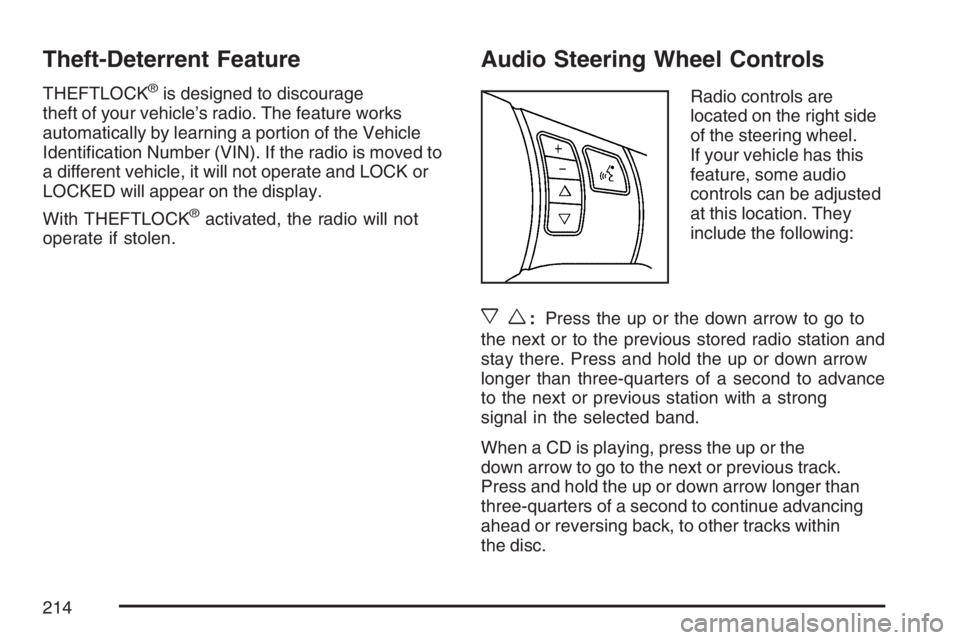
Audio Steering Wheel Controls
Radio controls are
located on the right side
of the steering wheel.
If your vehicle has this
feature, some audio
controls can be adjusted
at this location. They
include the following:
xw:Press the up or the down arrow to go to
the next or to the previous stored radio station and
stay there. Press and hold the up or down arrow
longer than three-quarters of a second to advance
to the next or previous station with a strong
signal in the selected band.
When a CD is playing, press the up or the
down arrow to go to the next or previous track.
Press and hold the up or down arrow longer than
three-quarters of a second to continue advancing
ahead or reversing back, to other tracks within
the disc.
214
Page 365 of 428

Fuses Usage
8 Ignition Switch, PASS-Key
®III+
9 Stoplamp
10Heating, Ventilation, Air
Conditioning, PASS-Key
®III+
11 Empty
12 Spare
13 Airbag
14 Spare
15 Windshield Wiper
16 Climate Control System, Ignition
17 Empty
18 Empty
19Electric Power Steering,
Steering Wheel Control
20 Sunroof
21 Spare
22 Empty
23 Audio System
24Sensing and Diagnostic
Module (Airbag)
Fuses Usage
25Engine Control Module,
Transaxle Control Module
26 Door Locks
27 Interior Lights
28 Steering Wheel Control Illumination
29 Power Windows
Relays Usage
30 Climate Control System
31 Empty
32 Retained Accessory Power (RAP)
Engine Compartment Fuse Block
The engine compartment fuse block is located on
the driver’s side of the vehicle. Lift off the cover
to check the fuses. SeeEngine Compartment
Overview on page 278for more information
on location.
365
Page 368 of 428

Fuses Usage
S BAND/
ONSTARAudio, OnStar
®
ABS3 Anti-lock Brake System 3
LTR Cigarette Lighter
MIR Mirrors
HTD SEATS Heated Seats
CNSTR VENT Canister Vent
Relays Usage
REAR DEFOG Rear Defogger
COOL FAN2 Engine Cooling Fan 2
WPR HI/LO Windshield Wiper High/Low Speed
CRNK Starter
Relays Usage
COOL FAN1 Engine Cooling Fan 1
FUEL PUMP Fuel Pump
WPR ON/OFF Windshield Wiper On/Off
COOL FANS Engine Cooling Fans
PWR/TRN Powertrain
AIR PUMP AIR Pump
A/C CLTCH Air Conditioning Clutch
AIR SOL/
AFTERCOOLAIR Solenoid (L61, LE5),
Aftercooler (L4)
RUN/CRNK Run, Crank
Misc. Usage
PLR Fuse Puller
368
Page 414 of 428

Audio System(s).......................................... 185
Audio Steering Wheel Controls................. 214
Care of Your CD Player........................... 216
Care of Your CDs.................................... 216
Fixed Mast Antenna................................. 216
Radio with CD................................189, 194
Setting the Time..............................186, 187
Theft-Deterrent Feature............................ 214
Understanding Radio Reception............... 215
XM™ Satellite Radio Antenna System...... 216
Automatic Door Lock..................................... 96
Automatic Transaxle
Fluid........................................................ 286
Operation................................................. 113
B
Battery........................................................ 303
Electric Power Management..................... 149
Run-Down Protection............................... 150
Before Leaving on a Long Trip.................... 240Brake
Anti-Lock Brake System (ABS)................. 223
Emergencies............................................ 225
Parking.................................................... 118
System Warning Light.............................. 165
Brakes........................................................ 298
Braking....................................................... 222
Braking in Emergencies............................... 225
Break-In, New Vehicle................................. 106
Bulb Replacement....................................... 312
Back-Up Lamps....................................... 317
Center High-Mounted
Stoplamp (CHMSL)............................... 315
Halogen Bulbs......................................... 312
Headlamp Aiming..................................... 309
Headlamps, Front Turn Signal,
Sidemarker, and Parking Lamps........... 313
License Plate Lamps................................ 318
Replacement Bulbs.................................. 318
Taillamps and Turn Signal Lamps............. 316
Taillamps, Turn Signal, Stoplamps and
Back-up Lamps..................................... 316
Buying New Tires........................................ 330
414
Page 425 of 428

Servicing Your Airbag-Equipped Vehicle......... 78
Setting the Time.................................186, 187
Sheet Metal Damage................................... 359
Shifting Into Park (P)................................... 119
Shifting Out of Park (P)............................... 121
Shoulder Belt Height Adjuster........................ 30
Signals, Turn and Lane-Change.................. 140
Spare Tire
Compact.................................................. 352
Installing.................................................. 344
Removing................................................ 339
Storing..................................................... 349
Specications, Capacities............................ 369
Speedometer............................................... 159
Starting Your Engine................................... 110
Steering...................................................... 227
Steering Wheel Controls, Audio................... 214
Steering Wheel, Tilt Wheel.......................... 139
Storage Areas
Center Console Storage Area................... 131
Convenience Net..................................... 131
Cupholder(s)............................................ 131
Driver’s Storage Compartment................. 131
Glove Box................................................ 131
Stuck in Sand, Mud, Ice, or Snow............... 248
Sun Visors.................................................. 102
Snroof......................................................... 132T
Tachometer................................................. 159
Taillamps
Turn Signal Lamps................................... 316
Turn Signal, Stoplamps and
Back-up Lamps..................................... 316
Theft-Deterrent, Radio................................. 214
Theft-Deterrent Systems .............................. 102
Content Theft-Deterrent............................ 102
PASS-Key
®III+........................................ 104
PASS-Key®III+ Operation........................ 104
Tilt Wheel.................................................... 139
Tires........................................................... 320
Aluminum or Chrome-Plated Wheels,
Cleaning............................................... 358
Buying New Tires..................................... 330
Chains..................................................... 336
Changing a Flat Tire................................ 338
Cleaning.................................................. 359
Compact Spare Tire................................. 352
Different Size........................................... 332
If a Tire Goes Flat................................... 337
Ination - Tire Pressure............................ 327
Inspection and Rotation............................ 328
Installing the Spare Tire........................... 344
425