turn signal PONTIAC G5 2008 User Guide
[x] Cancel search | Manufacturer: PONTIAC, Model Year: 2008, Model line: G5, Model: PONTIAC G5 2008Pages: 388, PDF Size: 2.22 MB
Page 177 of 388
The radio only seeks and scans stations with a strong
signal that are in the selected band.
4(Information) (Radio with CD (Base)):Press to
switch the display between the radio station frequency
and the time. While the ignition is off, press this button to
display the time.
4(Information) (XM™ Satellite Radio Service, MP3,
and RDS Features):Press to display additional
text information related to the current FM-RDS or XM™
station, or MP3 song. A choice of additional information
such as: Channel, Song, Artist, and CAT (category)
can display. Continue pressing to highlight the desired
label, or press the pushbutton positioned under any
one of the labels and the information about that
label displays.
While information is not available, No Info displays.
Setting Preset Stations
(Radio with CD (Base Only))
Up to 18 stations (six FM1, six FM2, and six AM), can
be programmed on the six numbered pushbuttons,
by performing the following steps:
1. Turn the radio on.
2. Press BAND to select FM1, FM2, or AM.
3. Tune in the desired station.4. Press and hold one of the six numbered
pushbuttons for three seconds until a beep sounds.
When that pushbutton is pressed and released,
the station that was set, returns.
5. Repeat Steps 2 through 4 for each pushbutton.
Storing a Radio Station as a Favorite
Drivers are encouraged to set up their radio station
favorites while the vehicle is parked. Tune to your
favorite stations using the presets, favorites button, and
steering wheel controls if the vehicle has this feature.
SeeDefensive Driving on page 4-2.
FAV (Favorites):A maximum of 36 stations can be
programmed as favorites using the six pushbuttons
positioned below the radio station frequency labels and
by using the radio favorites page button (FAV button).
Press the FAV button to go through up to six pages
of favorites, each having six favorite stations available
per page. Each page of favorites can contain any
combination of AM, FM, or XM™ (if equipped)
stations. To store a station as a favorite, perform the
following steps:
1. Tune to the desired radio station.
2. Press the FAV button to display the page where
you want the station stored.
3-61
Page 190 of 388
BAND:Press this button to listen to the radio while a
CD is playing. The CD remains inside the radio for future
listening.
CD/AUX (CD/Auxiliary):Press this button to play a CD
while listening to the radio. The CD icon and a
message showing disc and/or track number displays
while a CD is in the player. Press this button again and
the system automatically searches for an auxiliary
input device such as a portable audio player. If a
portable audio player is not connected, “No Aux Input
Device” displays.
XM Radio Messages
XL (Explicit Language Channels):These channels, or
any others, can be blocked at a customer’s request,
by calling 1-800-852-XMXM (9696).
XM Updating:The encryption code in the receiver is
being updated, and no action is required. This process
should take no longer than 30 seconds.
No XM Signal:The system is functioning correctly, but
the vehicle is in a location that is blocking the XM™
signal. When you move into an open area, the signal
should return.Loading XM:The audio system is acquiring and
processing audio and text data. No action is needed.
This message should disappear shortly.
Channel Off Air:This channel is not currently in
service. Tune to another channel.
Channel Unavail:This previously assigned channel is
no longer assigned. Tune to another station. If this
station was one of the presets, choose another station
for that preset button.
No Artist Info:No artist information is available at this
time on this channel. The system is working properly.
No Title Info:No song title information is available
at this time on this channel. The system is working
properly.
No CAT Info:No category information is available at
this time on this channel. The system is working
properly.
No Information:No text or informational messages are
available at this time on this channel. The system is
working properly.
CAT Not Found:There are no channels available for
the selected category. The system is working properly.
3-74
Page 192 of 388
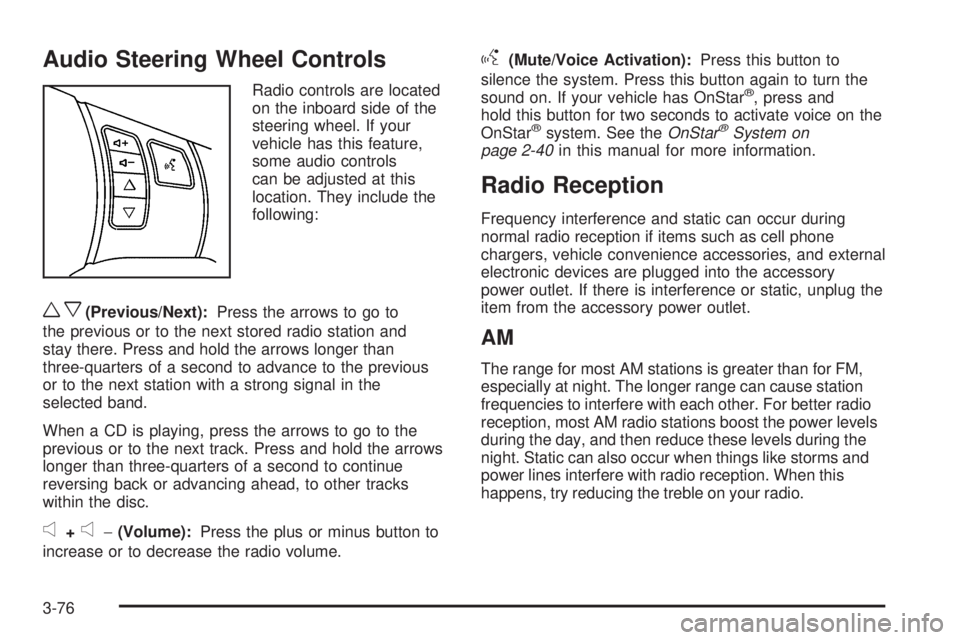
Audio Steering Wheel Controls
Radio controls are located
on the inboard side of the
steering wheel. If your
vehicle has this feature,
some audio controls
can be adjusted at this
location. They include the
following:
wx(Previous/Next):Press the arrows to go to
the previous or to the next stored radio station and
stay there. Press and hold the arrows longer than
three-quarters of a second to advance to the previous
or to the next station with a strong signal in the
selected band.
When a CD is playing, press the arrows to go to the
previous or to the next track. Press and hold the arrows
longer than three-quarters of a second to continue
reversing back or advancing ahead, to other tracks
within the disc.
e+e−(Volume):Press the plus or minus button to
increase or to decrease the radio volume.
g(Mute/Voice Activation):Press this button to
silence the system. Press this button again to turn the
sound on. If your vehicle has OnStar
®, press and
hold this button for two seconds to activate voice on the
OnStar
®system. See theOnStar®System on
page 2-40in this manual for more information.
Radio Reception
Frequency interference and static can occur during
normal radio reception if items such as cell phone
chargers, vehicle convenience accessories, and external
electronic devices are plugged into the accessory
power outlet. If there is interference or static, unplug the
item from the accessory power outlet.
AM
The range for most AM stations is greater than for FM,
especially at night. The longer range can cause station
frequencies to interfere with each other. For better radio
reception, most AM radio stations boost the power levels
during the day, and then reduce these levels during the
night. Static can also occur when things like storms and
power lines interfere with radio reception. When this
happens, try reducing the treble on your radio.
3-76
Page 193 of 388
FM Stereo
FM stereo gives the best sound, but FM signals only
reach about 10 to 40 miles (16 to 65 km). Tall buildings
or hills can interfere with FM signals, causing the
sound to fade in and out.
XM™ Satellite Radio Service
XM™ Satellite Radio Service gives digital radio
reception from coast-to-coast in the 48 contiguous
United States, and in Canada. Just as with FM,
tall buildings or hills can interfere with satellite radio
signals, causing the sound to fade in and out.
In addition, traveling or standing under heavy foliage,
bridges, garages, or through tunnels could cause loss
of the XM signal for a period of time. The radio may
display NO XM SIGNAL to indicate interference.
Fixed Mast Antenna
The xed mast antenna can withstand most car washes
without being damaged. If the mast should ever
become slightly bent, straighten it out by hand. If the
mast is badly bent, replace it.
Check occasionally to make sure the mast is still
tightened to its base. If tightening is required, tighten by
hand, then with a wrench one quarter turn.
XM™ Satellite Radio Antenna
System
Your vehicle may have the XM™ Satellite Radio
antenna that is located on the trunk of your vehicle.
Keep this antenna clear of snow and ice build up
for clear radio reception.
3-77
Page 201 of 388
If your vehicle is in cruise control while TCS begins to
limit wheel spin, the cruise control will automatically
disengage. When road conditions allow you to safely
use it again, the cruise control can be re-engaged. See
Turn Signal/Multifunction Lever on page 3-7.
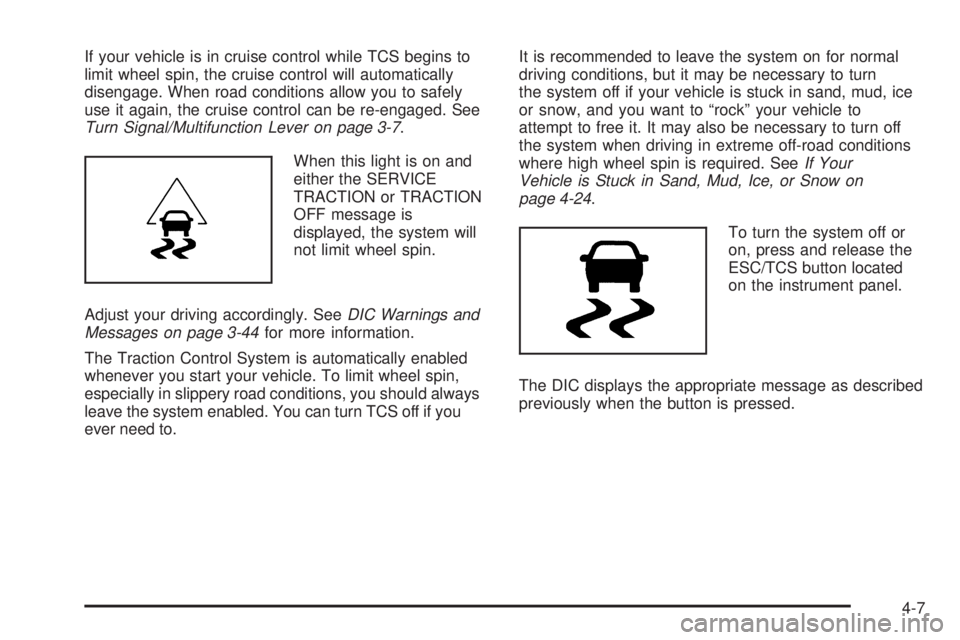
When this light is on and
either the SERVICE
TRACTION or TRACTION
OFF message is
displayed, the system will
not limit wheel spin.
Adjust your driving accordingly. SeeDIC Warnings and
Messages on page 3-44for more information.
The Traction Control System is automatically enabled
whenever you start your vehicle. To limit wheel spin,
especially in slippery road conditions, you should always
leave the system enabled. You can turn TCS off if you
ever need to.It is recommended to leave the system on for normal
driving conditions, but it may be necessary to turn
the system off if your vehicle is stuck in sand, mud, ice
or snow, and you want to “rock” your vehicle to
attempt to free it. It may also be necessary to turn off
the system when driving in extreme off-road conditions
where high wheel spin is required. SeeIf Your
Vehicle is Stuck in Sand, Mud, Ice, or Snow on
page 4-24.
To turn the system off or
on, press and release the
ESC/TCS button located
on the instrument panel.
The DIC displays the appropriate message as described
previously when the button is pressed.
4-7
Page 231 of 388
Making Turns
Notice:Making very sharp turns while trailering
could cause the trailer to come in contact with
the vehicle. Your vehicle could be damaged.
Avoid making very sharp turns while trailering.
When you are turning with a trailer, make wider turns
than normal. Do this so your trailer will not strike soft
shoulders, curbs, road signs, trees or other objects.
Avoid jerky or sudden maneuvers. Signal well in advance.
Turn Signals When Towing a Trailer
When you tow a trailer, your vehicle may need a
different turn signal asher and/or extra wiring. Check
with your dealer/retailer. The arrows on your instrument
panel will ash whenever you signal a turn or lane
change. Properly hooked up, the trailer lamps will also
ash, telling other drivers you are about to turn, change
lanes or stop.
When towing a trailer, the arrows on your instrument
panel will ash for turns even if the bulbs on the trailer
are burned out. Thus, you may think drivers behind
you are seeing your signal when they are not. It is
important to check occasionally to be sure the trailer
bulbs are still working.
Driving on Grades
Notice:Do not tow on steep continuous grades
exceeding 6 miles (9.6 km). Extended, higher than
normal engine and transmission temperatures may
result and damage your vehicle. Frequent stops are
very important to allow the engine and transmission
to cool.
Reduce speed and shift to a lower gearbeforeyou start
down a long or steep downgrade. If you do not shift
down, you might have to use your brakes so much that
they would get hot and no longer work well.
Pay attention to the engine coolant gage. If the indicator
is in the red area, turn off the air conditioning to reduce
engine load. SeeEngine Overheating on page 5-22.
When towing under severe conditions such as hot
ambient temperatures or steep grades, your vehicle may
experience more transmission shifting. A COOLING
MODE ON message may also appear in the DIC.
This alerts the driver that the shifting mode is in progress
and is aiding engine cooling. SeeDIC Warnings and
Messages on page 3-44DIC Warnings and Messages
for more information.
4-37
Page 235 of 388
Service............................................................5-3
Accessories and Modications..........................5-3
California Proposition 65 Warning.....................5-3
California Perchlorate Materials Requirements.....5-4
Doing Your Own Service Work.........................5-4
Adding Equipment to the Outside of
Your Vehicle..............................................5-5
Fuel................................................................5-5
Gasoline Octane............................................5-5
Gasoline Specications....................................5-6
California Fuel...............................................5-6
Additives.......................................................5-6
Fuels in Foreign Countries...............................5-7
Filling the Tank..............................................5-8
Filling a Portable Fuel Container.....................5-10
Checking Things Under the Hood....................5-10
Hood Release..............................................5-11
Engine Compartment Overview.......................5-12
Engine Oil...................................................5-13
Engine Oil Life System..................................5-16
Engine Air Cleaner/Filter................................5-17
Automatic Transmission Fluid.........................5-18
Manual Transmission Fluid.............................5-19
Hydraulic Clutch...........................................5-19
Engine Coolant.............................................5-19
Coolant Surge Tank Pressure Cap..................5-22Engine Overheating.......................................5-22
Cooling System............................................5-24
Windshield Washer Fluid................................5-29
Brakes........................................................5-30
Battery........................................................5-33
Jump Starting...............................................5-34
Headlamp Aiming...........................................5-39
Bulb Replacement..........................................5-42
Halogen Bulbs..............................................5-42
Headlamps, Front Turn Signal, Sidemarker,
and Parking Lamps....................................5-42
Center High-Mounted Stoplamp (CHMSL).........5-44
Taillamps and Turn Signal Lamps (Coupe).......5-44
Taillamps, Turn Signal, Stoplamps and
Back-up Lamps (Sedan).............................5-45
Back-Up Lamps (Coupe)................................5-46
License Plate Lamp......................................5-46
Replacement Bulbs.......................................5-47
Windshield Wiper Blade Replacement..............5-47
Tires..............................................................5-48
Tire Sidewall Labeling...................................5-49
Tire Terminology and Denitions.....................5-52
Ination - Tire Pressure.................................5-55
Tire Pressure Monitor System.........................5-56
Tire Pressure Monitor Operation.....................5-58
Section 5 Service and Appearance Care
5-1
Page 276 of 388
Bulb Replacement
For the proper type of replacement bulbs, see
Replacement Bulbs on page 5-47.
For any bulb changing procedure not listed in this
section, contact your dealer/retailer.
Halogen Bulbs
{CAUTION:
Halogen bulbs have pressurized gas inside and
can burst if you drop or scratch the bulb. You or
others could be injured. Be sure to read and
follow the instructions on the bulb package.
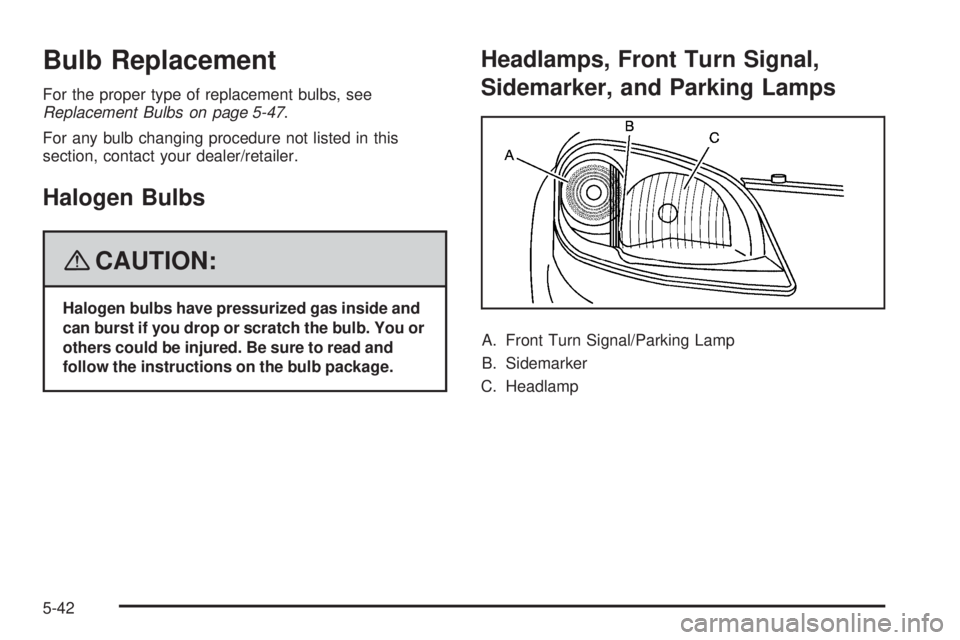
Headlamps, Front Turn Signal,
Sidemarker, and Parking Lamps
A. Front Turn Signal/Parking Lamp
B. Sidemarker
C. Headlamp
5-42
Page 277 of 388
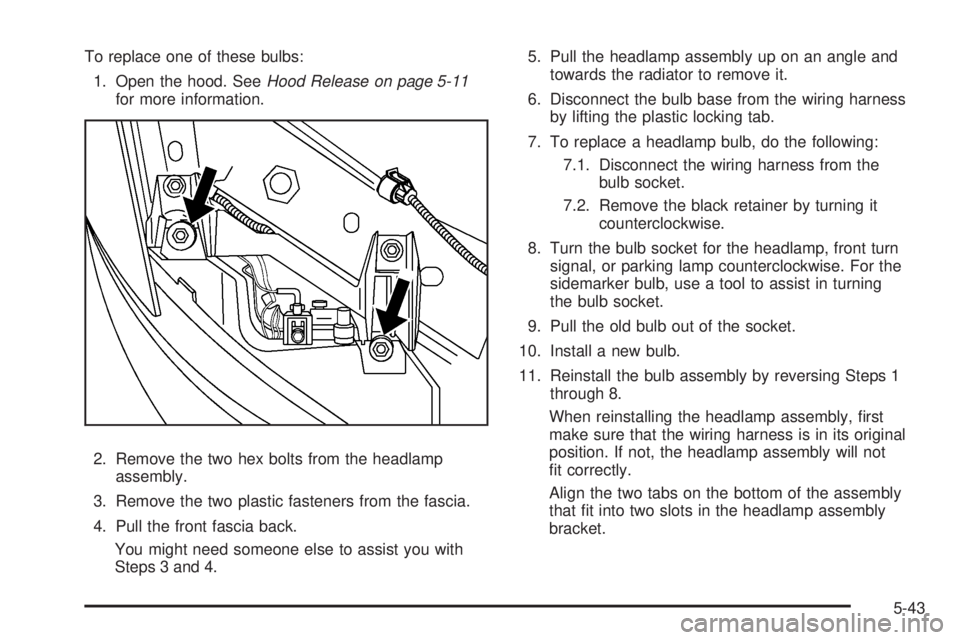
To replace one of these bulbs:
1. Open the hood. SeeHood Release on page 5-11
for more information.
2. Remove the two hex bolts from the headlamp
assembly.
3. Remove the two plastic fasteners from the fascia.
4. Pull the front fascia back.
You might need someone else to assist you with
Steps 3 and 4.5. Pull the headlamp assembly up on an angle and
towards the radiator to remove it.
6. Disconnect the bulb base from the wiring harness
by lifting the plastic locking tab.
7. To replace a headlamp bulb, do the following:
7.1. Disconnect the wiring harness from the
bulb socket.
7.2. Remove the black retainer by turning it
counterclockwise.
8. Turn the bulb socket for the headlamp, front turn
signal, or parking lamp counterclockwise. For the
sidemarker bulb, use a tool to assist in turning
the bulb socket.
9. Pull the old bulb out of the socket.
10. Install a new bulb.
11. Reinstall the bulb assembly by reversing Steps 1
through 8.
When reinstalling the headlamp assembly, rst
make sure that the wiring harness is in its original
position. If not, the headlamp assembly will not
t correctly.
Align the two tabs on the bottom of the assembly
that t into two slots in the headlamp assembly
bracket.
5-43
Page 278 of 388
Center High-Mounted Stoplamp
(CHMSL)
To replace a CHMSL bulb:
1. Open the trunk. SeeTrunk on page 2-12for more
information.
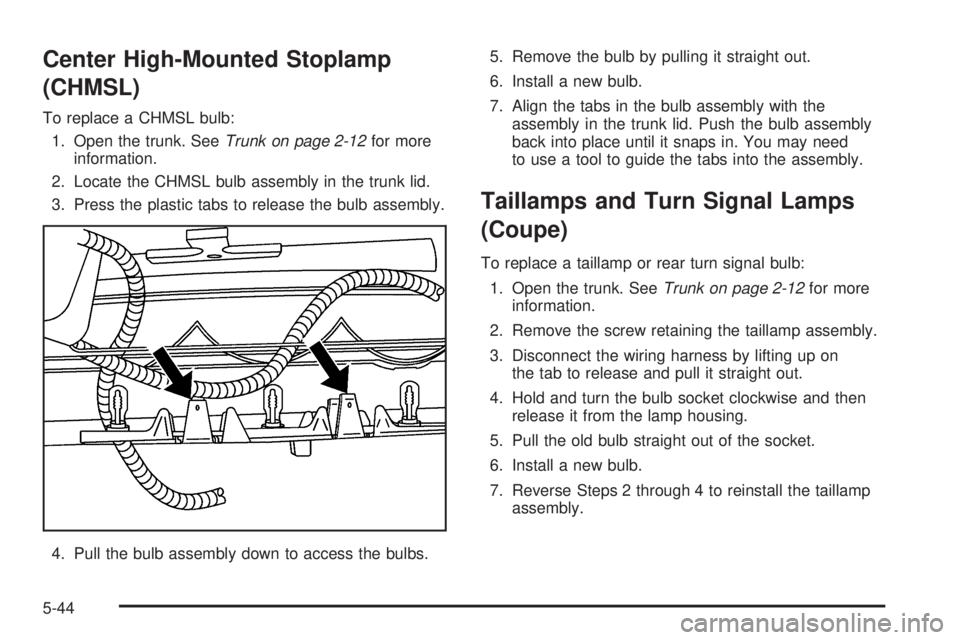
2. Locate the CHMSL bulb assembly in the trunk lid.
3. Press the plastic tabs to release the bulb assembly.
4. Pull the bulb assembly down to access the bulbs.5. Remove the bulb by pulling it straight out.
6. Install a new bulb.
7. Align the tabs in the bulb assembly with the
assembly in the trunk lid. Push the bulb assembly
back into place until it snaps in. You may need
to use a tool to guide the tabs into the assembly.
Taillamps and Turn Signal Lamps
(Coupe)
To replace a taillamp or rear turn signal bulb:
1. Open the trunk. SeeTrunk on page 2-12for more
information.
2. Remove the screw retaining the taillamp assembly.
3. Disconnect the wiring harness by lifting up on
the tab to release and pull it straight out.
4. Hold and turn the bulb socket clockwise and then
release it from the lamp housing.
5. Pull the old bulb straight out of the socket.
6. Install a new bulb.
7. Reverse Steps 2 through 4 to reinstall the taillamp
assembly.
5-44