roof PONTIAC G5 2009 User Guide
[x] Cancel search | Manufacturer: PONTIAC, Model Year: 2009, Model line: G5, Model: PONTIAC G5 2009Pages: 402, PDF Size: 2.22 MB
Page 95 of 402

3. Locate the plunger.
4. Press and hold the plunger while turning the ignition
key to LOCK/OFF. Remove the key.
Have the vehicle serviced at your dealer/retailer as soon
as possible.
Retained Accessory Power (RAP)
These vehicle accessories may be used for up to
10 minutes after the engine is turned off.
Audio System
Power Windows, if equipped
Sunroof, if equipped
The power windows and sunroof will continue to
work for up to 10 minutes or until any door is opened.
The radio will work when the key is in ON/RUN or
ACC/ACCESSORY. Once the key is turned from
ON/RUN to OFF/LOCK, the radio will continue to work
for 10 minutes or until the driver’s door is opened.
2-23
Page 114 of 402
Sunroof
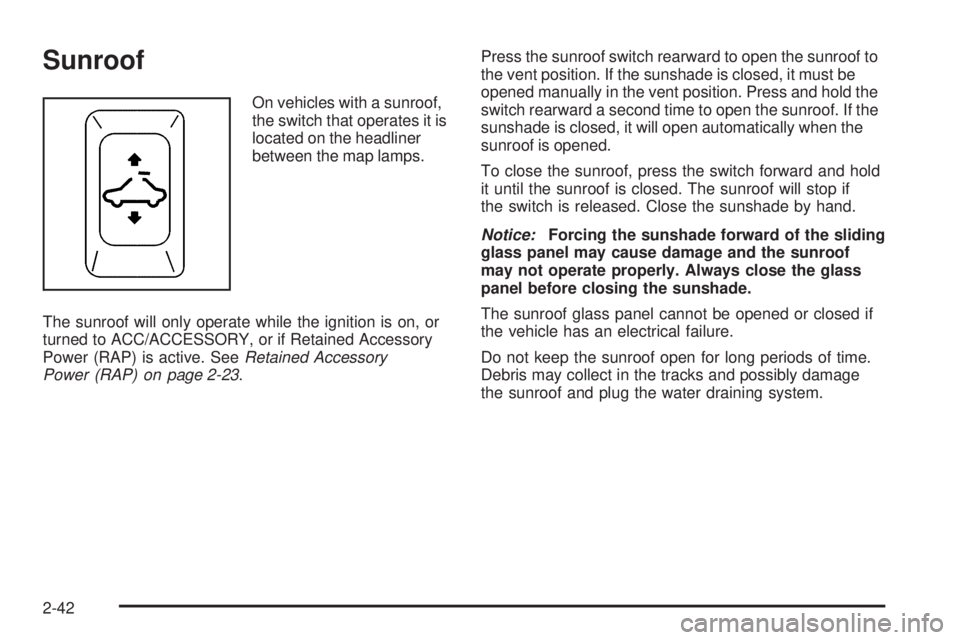
On vehicles with a sunroof,
the switch that operates it is
located on the headliner
between the map lamps.
The sunroof will only operate while the ignition is on, or
turned to ACC/ACCESSORY, or if Retained Accessory
Power (RAP) is active. SeeRetained Accessory
Power (RAP) on page 2-23.Press the sunroof switch rearward to open the sunroof to
the vent position. If the sunshade is closed, it must be
opened manually in the vent position. Press and hold the
switch rearward a second time to open the sunroof. If the
sunshade is closed, it will open automatically when the
sunroof is opened.
To close the sunroof, press the switch forward and hold
it until the sunroof is closed. The sunroof will stop if
the switch is released. Close the sunshade by hand.
Notice:Forcing the sunshade forward of the sliding
glass panel may cause damage and the sunroof
may not operate properly. Always close the glass
panel before closing the sunshade.
The sunroof glass panel cannot be opened or closed if
the vehicle has an electrical failure.
Do not keep the sunroof open for long periods of time.
Debris may collect in the tracks and possibly damage
the sunroof and plug the water draining system.
2-42
Page 201 of 402
XM™ Satellite Radio Service
XM Satellite Radio Service gives digital radio reception
from coast-to-coast in the 48 contiguous United States,
and in Canada. Just as with FM, tall buildings or hills can
interfere with satellite radio signals, causing the sound to
fade in and out. In addition, traveling or standing under
heavy foliage, bridges, garages, or tunnels may cause
loss of the XM signal for a period of time.
Cellular Phone Usage
Cellular phone usage may cause interference with the
vehicle’s radio. This interference may occur when making
or receiving phone calls, charging the phone’s battery,
or simply having the phone on. This interference causes
an increased level of static while listening to the radio.
If static is received while listening to the radio, unplug
the cellular phone and turn it off.
Fixed Mast Antenna
The xed mast antenna can withstand most car washes
without being damaged as long as it is securely attached
to the base. If the mast becomes slightly bent, straighten
it out by hand. If the mast is badly bent, replace it.
Occasionally check to make sure the antenna is
tightened to its base. If tightening is required, tighten
by hand until fully seated plus one quarter turn.
XM™ Satellite Radio Antenna
System
The XM Satellite Radio antenna is located on the roof
or the rear of the vehicle. Keep the antenna clear
of obstructions for clear radio reception.
3-87
Page 345 of 402

Fuses Usage
4 Empty
5 Empty
6 Amplier
7 Cluster
8 Ignition Switch, PASS-Key
®III+
9 Stoplamp
10Heating, Ventilation, Air
Conditioning, PASS-Key
®III+
11 Empty
12 Spare
13 Airbag
14 Spare
15 Windshield Wiper
16 Climate Control System, Ignition
17 Window Retained Accessory Power
18 Empty
19Electric Power Steering, Steering
Wheel Control
20 Sunroof
21 Spare
22 Empty
23 Audio System
Fuses Usage
24 XM Radio™, OnStar™
25Engine Control Module,
Transmission Control Module
26 Door Locks
27 Interior Lights
28 Steering Wheel Control Illumination
29 Power Windows
Relays Usage
30 Climate Control System
31 Empty
32 Retained Accessory Power (RAP)
Engine Compartment Fuse Block
The engine compartment fuse block is located on the
driver side of the vehicle. Lift off the cover to check
the fuses. SeeEngine Compartment Overview on
page 5-12for more information on location.
Notice:Spilling liquid on any electrical components
on the vehicle may damage it. Always keep the
covers on any electrical component.
5-105
Page 399 of 402

Recommended Fluids and Lubricants.................6-12
Recreational Vehicle Towing.............................4-28
Reimbursement Program, GM Mobility................. 7-7
Remote Keyless Entry (RKE) System.................. 2-3
Remote Keyless Entry (RKE) System,
Operation..................................................... 2-3
Remote Vehicle Start........................................ 2-6
Removing the Flat Tire and Installing
the Spare Tire.............................................5-86
Removing the Spare Tire and Tools...................5-82
Replacement Bulbs.........................................5-47
Replacement Parts, Maintenance......................6-14
Reporting Safety Defects to General Motors.......7-16
Reporting Safety Defects to the Canadian
Government................................................7-16
Reporting Safety Defects to the U.S.
Government................................................7-15
Restraint System Check
Checking the Restraint Systems....................1-66
Replacing Restraint System Parts After
a Crash..................................................1-67
Retained Accessory Power (RAP)......................2-23
Ride Control Systems....................................... 4-6
Electronic Stability (ESC)................................ 4-6
Roadside Assistance Program............................ 7-7
Rocking Your Vehicle to Get it Out....................4-22
Roof
Sunroof......................................................2-42
Running the Vehicle While Parked.....................2-35S
Safety Belt Reminders.....................................3-25
Safety Belts
Care of ......................................................5-97
Extender....................................................1-28
How to Wear Safety Belts Properly................1-15
Lap-Shoulder Belt........................................1-23
Safety Belts Are for Everyone.......................1-10
Use During Pregnancy.................................1-28
Safety Defects
Reporting to Canadian Government................7-16
Reporting to General Motors.........................7-16
Reporting to the U.S. Government.................7-15
Safety Warnings and Symbols.............................. iii
Scheduled Maintenance..................................... 6-4
Additional Required Services........................... 6-6
Scheduling Appointments.................................7-10
Sealant Kit, Tire..............................................5-72
Seats
Driver Seat Height Adjuster............................. 1-3
Easy Entry Seat............................................ 1-8
Heated Seats............................................... 1-4
Manual Lumbar............................................. 1-3
Reclining Seatbacks...................................... 1-4
Split Folding Rear Seat.................................. 1-9
Securing a Child Restraint
Rear Seat Position......................................1-45
Right Front Seat Position..............................1-48
11
Page 400 of 402

Security Light.................................................3-37
Service........................................................... 5-3
Accessories and Modications......................... 5-3
Adding Equipment to the Outside of the
Vehicle..................................................... 5-5
Doing Your Own Work................................... 5-4
Engine Soon Lamp......................................3-33
Publications Ordering Information...................7-16
Scheduling Appointments..............................7-10
Service Parts Identication Label.....................5-102
Servicing Your Airbag-Equipped Vehicle..............1-64
Setting the Clock............................................3-53
Sheet Metal Damage.....................................5-101
Shifting
Out of Park................................................2-33
Shifting Into Park............................................2-31
Signals, Turn and Lane-Change.......................... 3-7
Spare Tire
Compact....................................................5-93
Installing....................................................5-86
Removing...................................................5-82
Storing.......................................................5-90
Specications and Capacities..........................5-108
Speedometer..................................................3-24
Split Folding Rear Seat..................................... 1-9
Start Vehicle, Remote....................................... 2-6
Starting the Engine.........................................2-24Steering........................................................4-12
Steering Wheel Controls, Audio.........................3-85
Steering Wheel, Tilt Wheel................................. 3-6
Storage Areas
Center Console...........................................2-41
Convenience Net.........................................2-41
Cupholders.................................................2-41
Driver Storage Compartment.........................2-41
Glove Box..................................................2-41
Storing the Tire Sealant and Compressor Kit......5-80
Stuck in Sand, Mud, Ice, or Snow.....................4-21
Sun Visors.....................................................2-16
Sunroof.........................................................2-42
T
Tachometer....................................................3-24
Taillamps
Turn Signal Lamps......................................5-44
Turn Signal, Stoplamps and Back-up Lamps....5-44
Text Telephone (TTY) Users............................... 7-6
Theft-Deterrent Feature....................................3-85
Theft-Deterrent Systems...................................2-16
Content Theft-Deterrent................................2-16
PASS-Key
®III+ Electronic Immobilizer............2-18
PASS-Key®III+ Electronic Immobilizer
Operation................................................2-19
12